笔者:@神奇二进制
参数化 - parameters
hello-world-parameters.yaml文件解析
apiVersion: argoproj.io/v1alpha1
kind: Workflow
metadata:
  generateName: hello-world-parameters-
spec:

  entrypoint: whalesay    # 调用 whalesay 模板
  arguments:              # 传递给函数的参数
    parameters:           # 声明参数
    - name: message       # Key
      value: hello world  # value

  templates:
  - name: whalesay  # whalesay 模板
    inputs:
      parameters:
      - name: message
    container:
      image: docker/whalesay
      command: [cowsay]
      args: ["{{inputs.parameters.message}}"]
提交此工作流时,可以指定实际参数值:
[root@k8s-master01 argo]# argo submit -n argo arguments-parameters.yaml -p message="goodbye world"
[root@k8s-master01 argo]# argo logs -n argo hello-world-parameters-xxx

自定义 Parameter 数据生产端和消费端
output 作为生产端信息输出给 input 作为信息消费端,以parameter参数的方式。
apiVersion: argoproj.io/v1alpha1
kind: Workflow
metadata:
  generateName: output-parameter-
spec:
  entrypoint: output-parameter
  templates:
  - name: output-parameter
    steps:
    # 产生参数
    - - name: generate-parameter
        template: nginx
    # 消费参数
    - - name: consume-parameter
        template: print-message
        arguments:
          parameters:
          - name: message
            value: "{{steps.generate-parameter.outputs.parameters.nginx-index}}"
  # 生产模板 nginx
  - name: nginx
    container:
      image: nginx:latest
      # 输出 logs,不影响实际的消费信息
      command: [sh, -c]
      args: ["sleep 1; cat /usr/share/nginx/html/index.html"]
    # 输出生产信息
    outputs:
      parameters:
      - name: nginx-index
      # 检查 path 文件是否存在,如果不存在,则输出 "Foobar"
        valueFrom:
          default: "Foobar"
          # 输出文件内容,作为 print-message 的输入内容
          path: /usr/share/nginx/html/index.html
  # 消费模板 print-message
  - name: print-message
    inputs:
      parameters:
      - name: message
    container:
      image: alpine:latest
      # 输出 outputs 过来的信息
      command: [echo]
      args: ["{{inputs.parameters.message}}"]
生产端日志

消费端日志

steps 类型工作流
hello-hello-hello.yaml文件解析
apiVersion: argoproj.io/v1alpha1
kind: Workflow
metadata:
  generateName: steps-          # Workflow 的名称前缀
spec:
  entrypoint: hello-hello-hello # 表示第一个执行的模板名称,让工作流知道从哪个模板开始执行,类似于 main 函数

  # 该templates中有两个模板,分别是:hello-hello-hello和whalesay
  templates:
  - name: hello-hello-hello     # 第一个模板 hello-hello-hello
    steps:                      # template 的类型是 steps
    # 一个 template 有多种类型,分别为:container、script、dag、steps、resource、suspend
    - - name: hello1            # 在 steps 类型中,[--] 表示顺序执行,[-] 表示并行执行
        template: whalesay      # 引用 whalesay 模板
        arguments:              # 传递给函数的参数
          parameters:           # 声明参数
          - name: message       # Key
            value: "hello1"     # value
    - - name: hello2a           # [--] 顺序执行
        template: whalesay
        arguments:
          parameters:
          - name: message
            value: "hello2a"
      - name: hello2b           # [-] 表示跟上一步并行运行
        template: whalesay
        arguments:
          parameters:
          - name: message
            value: "hello2b"

  - name: whalesay   # 第二个模板 whalesay
    inputs:          # input、output 实现数据交互
      parameters:
      - name: message
    container:
      image: docker/whalesay  # 镜像名称
      command: [cowsay]       # 执行命令
      args: ["{{inputs.parameters.message}}"]  # 参数引用
上面的工作流规范打印了三种不同的“hello”。hello-hello-hello模板由三个步骤组成。名为hello1的第一步将按顺序运行,而名为hello2a和hello2b的后面两个步骤将并行运行。使用argo CLI命令,我们可以图形化地显示这个工作流规范的执行历史,它显示了名为hello2a和hello2b的步骤彼此并行运行。

DAG工作流
作为指定步骤序列的另一种方法,您可以通过指定每个任务的依赖关系来将工作流定义为有向无环图(DAG)。对于复杂的工作流,这可以更容易维护,并且在运行任务时允许最大程度的并行性。
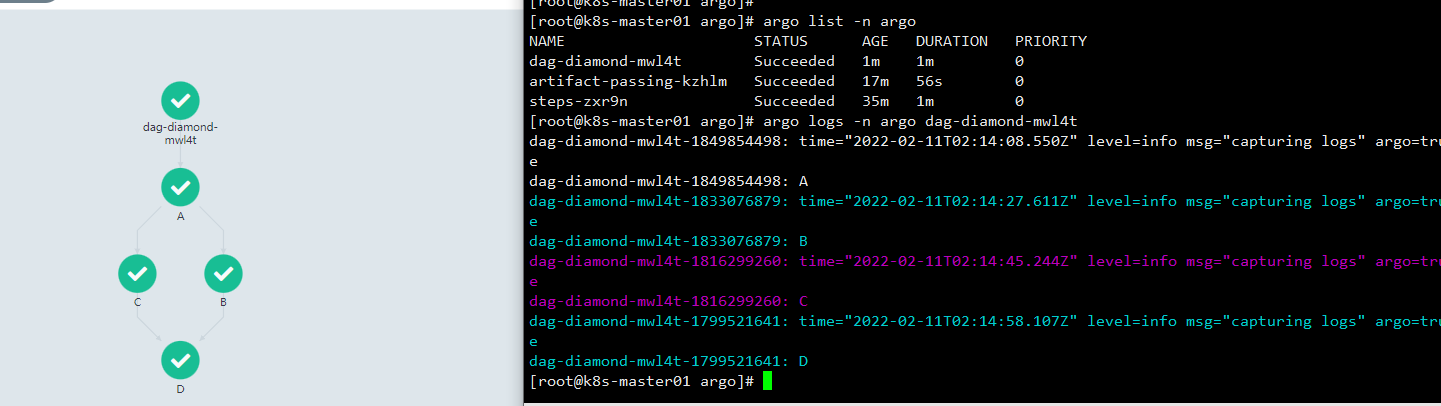
在下面的工作流中,步骤A首先运行,因为它没有依赖项。一旦A完成,步骤B和步骤C将并行运行。最后,一旦B和C完成,步骤D就可以运行了。
dag-diamond.yaml文件解析
apiVersion: argoproj.io/v1alpha1
kind: Workflow
metadata:
  generateName: dag-diamond-
spec:
  entrypoint: diamond
  # 分别有 echo 和 diamond 两个模板
  templates:
  - name: echo
    inputs:
      parameters:     # 声明参数
      - name: message
    container:
      image: alpine:3.7
      command: [echo, "{{inputs.parameters.message}}"]
  # 入口点模板
  - name: diamond
    # DAG声明
    dag:
      tasks:
      - name: A
        template: echo
        arguments:
          parameters: [{name: message, value: A}]
      - name: B
        # 任务B依赖于任务A
        dependencies: [A]
        template: echo
        arguments:
          parameters: [{name: message, value: B}]
      - name: C
        dependencies: [A]
        template: echo
        arguments:
          parameters: [{name: message, value: C}]
      - name: D
        # 任务D同时依赖于任务B、C
        dependencies: [B, C]
        template: echo
        arguments:
          parameters: [{name: message, value: D}]
Artifacts 工作流
通过 input/output 以及 artifacts 实现 Job 之间数据传递。
在工作流中,某些步骤产生或者消费构件,是很常见的需求。通常,前一环节的输出构件,用作下一环节的输入构件。
下面的例子包含两个Step,前一个步骤产生构件供后一个消费。
artifact-passing.yaml文件解析
apiVersion: argoproj.io/v1alpha1
kind: Workflow
metadata:
  generateName: artifact-passing-
spec:
  entrypoint: artifact-example
  templates:
  - name: artifact-example
    steps:
    # 产生构件
    - - name: generate-artifact
        template: whalesay
    # 消费构件
    - - name: consume-artifact
        template: print-message
        arguments:
          artifacts:
          # 绑定构件名message到generate-artifact,输出制品库 hello-art 内容
          - name: message
            from: "{{steps.generate-artifact.outputs.artifacts.hello-art}}"

  # 此模板产生构件
  - name: whalesay
    container:
      image: docker/whalesay:latest
      command: [sh, -c]
      args: ["cowsay hello world | tee /tmp/hello_world.txt"]
    # 输出构件声明
    outputs:
      artifacts:
      - name: hello-art            # 生成制品共享 hello-art
        path: /tmp/hello_world.txt # 把这个文件打包后上传到制品库中

  # 此模板消费构件
  - name: print-message
    # 输入构件声明
    inputs:
      artifacts:
      - name: message
        path: /tmp/message
    container:
      image: alpine:latest
      command: [sh, -c]
      args: ["cat /tmp/message"]
生产信息

消费信息

Scripts & Results
很多情况下,我们仅仅希望 Template 来执行一个脚本:
apiVersion: argoproj.io/v1alpha1
kind: Workflow
metadata:
  generateName: scripts-bash-
spec:
  entrypoint: bash-script-example
  templates:
  - name: bash-script-example
    steps:
    - - name: generate
        # 调用其中一个模板,分别有 gen-random-int-bash、python、javascript
        template: gen-random-int-python
    - - name: print
        template: print-message
        arguments:
          parameters:
          - name: message
            # 引用 result 此特殊的输出参数
            value: "{{steps.generate.outputs.result}}"

  - name: gen-random-int-bash
    # 在 script 关键字的 source 标签中,可以编写脚本
    # script 还导致执行脚本时的标准输出,保存为名为 result 的特殊输出参数
    script:
      image: debian:9.4
      command: [bash]
      # Shell 脚本随机生成一个数值
      source: |
        cat /dev/urandom | od -N2 -An -i | awk -v f=1 -v r=100 '{printf "%i\n", f + r * $1 / 65536}'

  - name: gen-random-int-python
    script:
      image: python:alpine3.6
      command: [python]
      # Python 脚本随机生成数值
      source: |
        import random
        i = random.randint(1, 100)
        print(i)

  - name: gen-random-int-javascript
    script:
      image: node:9.1-alpine
      command: [node]
      # JS 脚本随机生成数值
      source: |
        var rand = Math.floor(Math.random() * 100);
        console.log(rand);

  # 输出随机数模板 print-message
  - name: print-message
    inputs:
      parameters:
      - name: message
    container:
      image: alpine:latest
      command: [sh, -c]
      args: ["echo result was: {{inputs.parameters.message}}"]
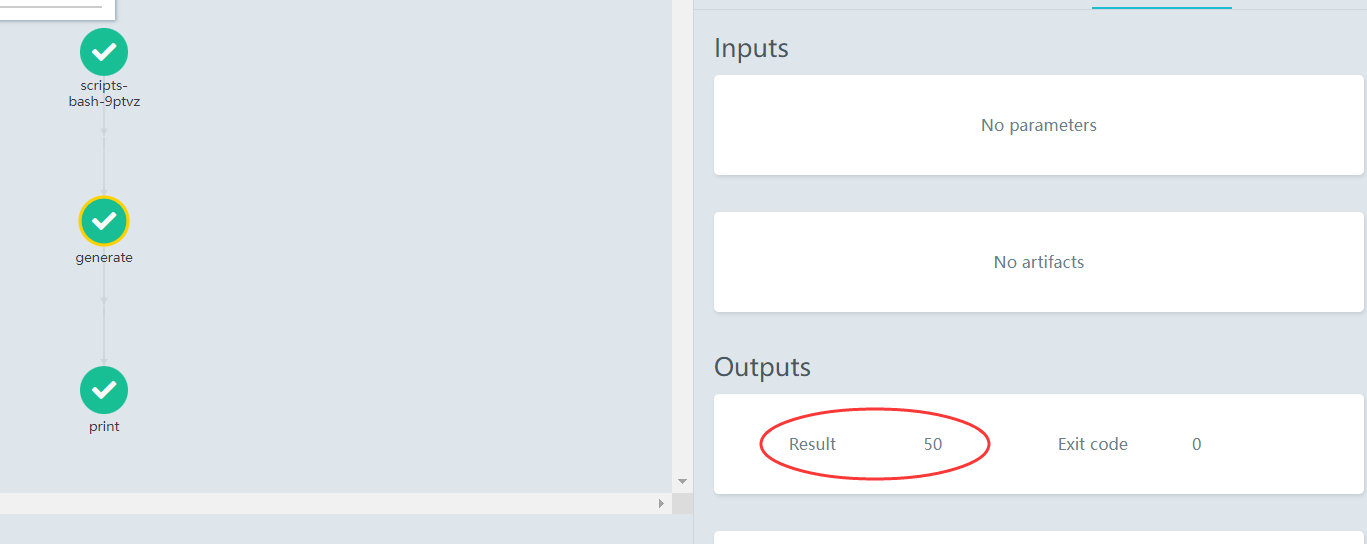
generate 模板调用 gen-random-int-python 任务随机生成个50数值,print 模板利用result特殊参数调用输出,如图所示。

退出处理器工作流
Exit handler是一种必然会在工作流结尾执行的模板,不论工作流执行成功与否。它的运用场景包括:
- 工作流运行后清理
- 发送工作流状态的通知(例如,电子邮件/Slack)
- 将成功/失败状态传递为 Webhook 结果(例如GitHub Build Result)
- 重新提交工作流 或 提交另外一个工作流
apiVersion: argoproj.io/v1alpha1
kind: Workflow
metadata:
  generateName: exit-handlers-
spec:
  entrypoint: intentional-fail
  # 在工作流的末尾调用退出处理程序模板
  onExit: exit-handler
  templates:
  # 工作流主模板
  - name: intentional-fail
    container:
      image: alpine:latest
      command: [sh, -c]
      # exit 1 表示工作流异常退出,exit 0 表示工作流成功退出
      args: ["echo intentional failure; exit 1"]

  # 退出处理器模板
  # 主模板完成后,工作流状态可以通过全局变量{{workflow.status}}获取,其值是Succeeded, Failed, Error之一
  - name: exit-handler
    steps:
    # 无论工作流是否成功,都会调用 send-email 模板
    - - name: notify
        template: send-email
      # 如果工作流等于 Succeeded,才会调用 celebrate 模板
      - name: celebrate
        template: celebrate
        when: "{{workflow.status}} == Succeeded"
      # 如果工作流不等于 Succeeded,则会调用 cry 模板
      - name: cry
        template: cry
        when: "{{workflow.status}} != Succeeded"
  # send-email 模板信息
  - name: send-email
    container:
      image: alpine:latest
      command: [sh, -c]
      # 输出工作流名称和工作流状态
      args: ["echo send e-mail: {{workflow.name}} {{workflow.status}}"]
  # celebrate 模板信息
  - name: celebrate
    container:
      image: alpine:latest
      command: [sh, -c]
      args: ["echo hooray!"]
  # cry 模板信息
  - name: cry
    container:
      image: alpine:latest
      command: [sh, -c]
      args: ["echo boohoo!"]
接下来分别演示工作流成功和不成功所执行的任务,只需要更改exit 0/1状态码即可。
演示工作流不成功:


演示工作流成功:


简单的将官方案例进行实践和配置详细解析,欢迎有研究Argo的大佬们一起交流交流,多多指教!