JAVA
元注解#
在java.lang.annotation包下,除了@Native之外都为元注解
元注解:是一种基础注解(根注解),可以注解其他的注解上。
作用:用来解释说明其他的注解。
@Documented#
- 源码:
@Documented
@Retention(RetentionPolicy.RUNTIME)
@Target(ElementType.ANNOTATION_TYPE)
public @interface Documented {
}
- 说明:
Document:文档。被标注的注解用在类A上后类A的注解信息可以被例如javadoc此类的工具文档化,相关的注解信息会出现在Doc中
@Inherited#
-
源码:
@Documented @Retention(RetentionPolicy.RUNTIME) @Target(ElementType.ANNOTATION_TYPE) public @interface Inherited { } -
说明:
Inherited:动词,被继承。被@Inherited注解标注的注解去注解了一个类后,凡是该类的子类均继承注解被标注的注解
-
示例:
/**
被@Inherited注解标注的注解MySelf去注解了类Human后,类Human的子类Man继承注解MySelf
**/
@Inherited
@Target(ElementType.TYPE)
@Retention(RetentionPolicy.RUNTIME)
public @Interface MySelf{
}

@MySelf
public class Human{}

public class Man extends Human{}
@Retention#
-
源码:
@Documented @Retention(RetentionPolicy.RUNTIME) @Target(ElementType.ANNOTATION_TYPE) public @interface Retention { RetentionPolicy value(); } -
说明:
Retention:保留期,存活期。解释说明了被标注的注解的存活时间。
RetentionPolicy
SOURCE---------------------注解只保留在源文件,当Java文件编译成class文件的时候,注解被丢弃
CLASS------------------------默认值,注解被写入字节码文件,但jvm加载class文件时候被丢弃
RUNTIME-------------------表明注解会被写入字节码文件,jvm运行时能够获取到,通过反射可以解析到
一般如果需要在运行时去动态获取注解信息,那只能用 RUNTIME 注解
如果要在编译时进行一些预处理操作,比如生成一些辅助代码(如 ButterKnife),就用 CLASS注解
如果只是做一些检查性的操作,比如 @Override 和 @SuppressWarnings,则可选用 SOURCE 注解
@Target#
-
源码:
@Documented @Retention(RetentionPolicy.RUNTIME) @Target(ElementType.ANNOTATION_TYPE) public @interface Target { ElementType[] value(); } -
说明:
target:目标,对象。描述被修饰的注解的使用范围,可以用在什么地方
ElementType
TYPE----------接口、类、枚举、注解
FIELD--------------字段、枚举的常量
METHOD----------------方法
PARAMETER------------------方法参数
CONSTRUCTOR-------------------构造函数
LOCAL_VARIABLE----------------------局部变量
ANNOTATION_TYPE------------------------注解
PACKAGE-------------------------------------------包
TYPE_PARAMETER-----------------------------------类型参数
TYPE_USE------------------------------------------------------任意类型(不包括class)
@Repeatable#
-
源码:
@Documented @Retention(RetentionPolicy.RUNTIME) @Target(ElementType.ANNOTATION_TYPE) public @interface Repeatable { Class<? extends Annotation> value(); } -
说明:
repeatabled:可重复。允许注解的重复使用,如:@ComponentScan
-
示例:
spring中示例:Scheduled
@Target(ElementType.METHOD)
@Retention(RetentionPolicy.RUNTIME)
@Documented
public @interface Human {
    Man[] value();
}

@Target(ElementType.METHOD)
@Retention(RetentionPolicy.RUNTIME)
@Documented
@Repeatable(Human.class)
public @interface Man {
    String name;
}

@Man("will")
@Man("Jacky")
public void test(){
}
@Native#
- 源码:
@Documented
@Target(ElementType.FIELD)
@Retention(RetentionPolicy.SOURCE)
public @interface Native {
}
-
说明:
指示定义常量值的字段可以从本机代码引用。
内置注解#
@Deprecated#
-
源码
@Documented @Retention(RetentionPolicy.RUNTIME) @Target({ElementType.CONSTRUCTOR, ElementType.FIELD, ElementType.LOCAL_VARIABLE, ElementType.METHOD, ElementType.PACKAGE, ElementType.PARAMETER, ElementType.TYPE}) public @interface Deprecated { } -
说明:
Deprecated:强烈反对。标记一个方法、变量、包等已经过时,再使用被标记的方法等会报编译警告
-
示例:
public class Man(){
@Deprecated
public void getName(){}}
Man man = new Man();
man.getName();
@Override#
-
源码:
@Target(ElementType.METHOD) @Retention(RetentionPolicy.SOURCE) public @interface Override { } -
说明:
override:推翻重写。仅用在方法上,对该类所继承的父类方法进行重写
@SafeVarargs#
-
源码:
@Documented @Retention(RetentionPolicy.RUNTIME) @Target({ElementType.CONSTRUCTOR, ElementType.METHOD}) public @interface SafeVarargs {} -
说明:
safe varargs:安全的可变参数。声明了可变参数的构造函数或方法,会让java编译器报unchecked警告,如果程序员断定该方法的主体不会对可变参数执行潜在的不安全的操作,可以使用@SafeVarargs来去除警告。说白了就是防止安全警告带来的编译错误。
可以用于构造函数和static、final声明的方法
-
示例:
public class Man(){

    @SafeVarargs
    public Man(Object... val){}

   	@SafeVarargs
    public static<T> void getName(T... tVal){}

    @SafeVarargs
    public final void getAge(String... val){}

    /**--------------Wrong------------
    @SafeVarargs is not allowed on methods with fixed arity
    @SafeVarargs不允许在具有固定值的方法上使用
    **/
    @SafeVarargs
    public void getAge(String. tVal){}
}
@SuppressWarnings#
-
源码:
@Target({TYPE, FIELD, METHOD, PARAMETER, CONSTRUCTOR, LOCAL_VARIABLE}) @Retention(RetentionPolicy.SOURCE) public @interface SuppressWarnings { String[] value(); } -
说明:
suppress warning:抑制警告。对被注解的作用域内部的警告保持静默,抑制警告的发生。value参数是抑制的警告类型, 详见https://blog.csdn.net/lftaoyuan/article/details/104813851
@FunctionalInterface#
-
源码:
@Documented @Retention(RetentionPolicy.RUNTIME) @Target(ElementType.TYPE) public @interface FunctionalInterface {} -
说明:
functional interface:函数式接口,功能接口。Java8新特性
特点:
- 有且仅有一个抽象方法
- 允许静态方法
- 允许默认方法
- 允许java.lang.Object中public类型的方法,这些方法对于函数式接口来说,不被当成是抽象方法,因为所有的函数式接口的实现都是默认继承了Object类,Object类含有该方法的实现。
- 该注解非必须,只要符合函数式接口的条件,可以不加注解,加上注解知识辅助编译器进行检查
-
示例:
@FunctionalInterface
interface Man{
    // 抽象方法
    void setName(String name);
    // 静态方法
    public static void getName(){

    }
    // 默认方法
    public default void setAge(){

    }
    // java.lang.Object的public方法
    public boolean equals(Object val);

}
Spring(Boot)
声明bean#
声明一个类为Spring的bean,可以被自动装配,区别在于定位一个类的作用,由于企业级应用的开发注重分层,所以使用注解分别定义类的层次也可以更好地助力于开发,比使用xml进行配置更加简单。
-
@Controller
-
@Service
-
@Repository
-
@Component
@Controller#
-
源码:
@Target({ElementType.TYPE}) @Retention(RetentionPolicy.RUNTIME) @Documented @Component public @interface Controller { @AliasFor( annotation = Component.class ) String value() default ""; } -
说明:
controller:控制者,控制器。对应MVC中的控制层
作用:接收用户请求并调用不同的Service进行数据处理封装,再将数据返回给前端,配合视图解析器可以返回一个指定的页面,而使用RestController则无法返回指定页面,但是可以返回json
但是,@Controller仅说明这个类是一个控制器类,接收用户请求需要@RequestMapping来映射一个Url让用户能够通过该路径访问到
-
示例:
@Controller
public class MyUser(){
    @RequestMapping(value = "getName",method=RequestMethod.GET)
    public String getName(){
    }
}
/**
调用getName方法:
http:/localhost:8080/getName
**/
@Service#
-
源码:
@Target({ElementType.TYPE}) @Retention(RetentionPolicy.RUNTIME) @Documented @Component public @interface Service { @AliasFor( annotation = Component.class ) String value() default ""; } -
说明:
service:服务。主要负责业务模块的应用逻辑处理,调用Dao层接口从数据库进行数据的获取等操作
-
示例:
/**
Service内的参数名字可以省略,默认为首字母小写,示例为myUser
**/
@Service("firstUser")
public class MyUser(){

}
@Repository#
-
源码:
@Target({ElementType.TYPE}) @Retention(RetentionPolicy.RUNTIME) @Documented @Component public @interface Repository { @AliasFor( annotation = Component.class ) String value() default ""; } -
说明:
repository:仓库。用于持久层接口,定义在dao层。
类似于@Mapper,但是使用@Repository并不常使用,单独使用会报错,需要增加其他配置,一般在启动类添加@MapperScan("com.*.dao"),或者直接使用@Mapper注解
@Component#
-
源码:
@Target({ElementType.TYPE}) @Retention(RetentionPolicy.RUNTIME) @Documented @Indexed public @interface Component { String value() default ""; } -
说明:
component:组件。当一个类不属于以上几类又需要注入到bean时,使用@Component,是一个比较通用的定义bean的注解
注入bean#
就是具体对象的创建,上一步的定义仅仅是定义,要具体的使用,一般可以用new,但是现在可以交给spring来创建,让他去找到合适的对象给你。
- @Autowired
- @Inject(java)
- @Resource(java)
@Autowired#
-
源码:
@Target({ElementType.CONSTRUCTOR, ElementType.METHOD, ElementType.PARAMETER, ElementType.FIELD, ElementType.ANNOTATION_TYPE}) @Retention(RetentionPolicy.RUNTIME) @Documented public @interface Autowired { boolean required() default true; } -
说明:
Autowired:自动装配。可以对类成员构造函数、方法、参数、变量、注解等进行标注,完成自动装配的工作,省略getter、setter。
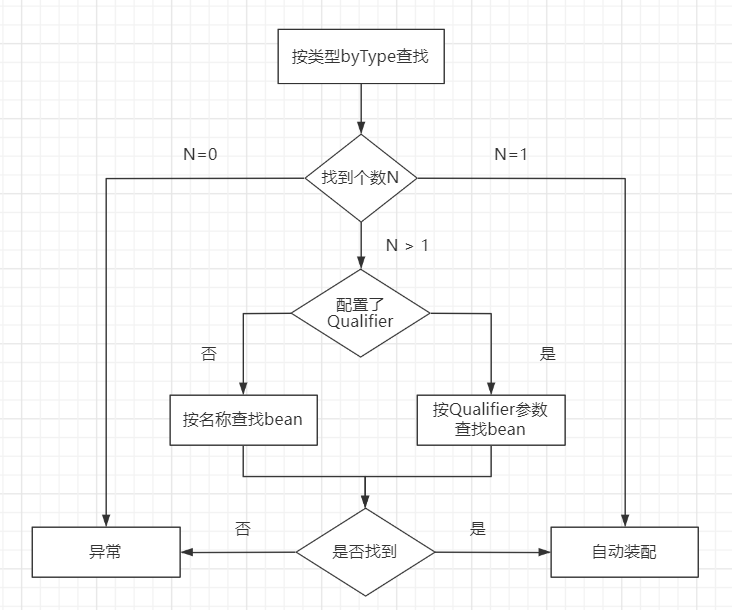
默认装配方式:byType
在使用@Autowired时,在容器中查询对应类型的bean
如果查询结果只有一个,就将该bean装配给@Autowired指定的数据
如果查询的结果不止一个,可以配合@Qulifier("")根据名称来查找,装配方式:byName,或者在其中一个对象类添加@Primary注解,使用@Autowired时优先装配该类
装配过程:
-
示例:
/**1、作用在构造函数 说明:@autowired写在变量上的注入要等到类完全加载完,时间上晚于构造函数,而且变量的加载也按照相应的顺序 所以存在变量的加载要早于@autowired变量的加载的情况,这时@Autowired变量为null时进行了引用会报错 --------ERROR------------------ @Service public class User{ @Autowired private final Man man; private String name; public User() { name = man.name();//man为null,报错空指针 } } -------------------------------- **/ @Service public class User{ private final String name; @Autowired public User(Man man) { this.name= man.getName(); } } /**2、作用在普通方法上使用同1 会在注入的时候调用一次该方法,如果方法中有实参,会对方法里面的参数进行装配,并调用一次该方法 可以用来做一些初始化操作 **/ @Service public class User{ private String name; @Autowired public void getUserName(Man man) { this.name= man.getName(); } } /**3、作用在参数上(非静态方法的入参上) 用于初始化参数 示例效果同示例2 **/ @Service public class User{ private String name; public void getUserName(@Autowired Man man) { this.name= man.getName(); } } /** 4、作用在变量上 **/ @Autowired User user; /**5、作用在注解上 即自定义一个注解,然后在注解上添加@Autowired注解 实现注入功能的自定义注解名以及其他功能 **/注意事项:需要在类上加@Controller、@Service、@Component、@Repository等注解才能起作用
@Inject#
-
源码:
package javax.inject; @Target({ElementType.METHOD, ElementType.CONSTRUCTOR, ElementType.FIELD}) @Retention(RetentionPolicy.RUNTIME) @Documented public @interface Inject { } -
说明:
Inject:注射。用法与Autowired差不多,仅能在方法、构造方法和变量等,而且没有required。
默认装配方式:byType
配合@Named("bean名称")完成根据name装配
-
示例:
/**作用于变量**/
@Inject
Man man;

/**作用于方法**/
@Inject
public void setName(Man man){
}
@Inject
@Named("自定义bean名称")
public void setName(Man man){
}
@Resource#
-
源码:
package javax.annotation; @Target({ElementType.TYPE, ElementType.FIELD, ElementType.METHOD}) @Retention(RetentionPolicy.RUNTIME) public @interface Resource { ... } -
说明:
resource:资源。
默认装配方式:byName。根据定义可以知道还能通过byType进行注入
-
示例:
@Resource(name = "man")
private Man man;
配置类#
- @Configuration
- @Bean
- @EnableAutoConfiguration
- @ComponentScan
- @SpringBootApplication
@Configuration#
-
源码:
@Target({ElementType.TYPE}) @Retention(RetentionPolicy.RUNTIME) @Documented @Component public @interface Configuration { @AliasFor( annotation = Component.class ) String value() default ""; boolean proxyBeanMethods() default true; } -
说明:
configuration:配置。
用于定义一个配置类,初始化各项配置,比如:redis的Jackson2方式序列化,通常与@Bean结合使用,内部含有N>=0个被@Bean注解的方法。
注意事项:
1、该类不能为final类型
2、内部类只能为static静态内部类
-
示例
@Configuration
public class HuMan{

    @Bean
    public Man getMan(){
        Man man = new Man();
        man.setSex(1);
        return man;
    }

    @Bean
    public Son getSon(){
        // 若打印此时返回的值和getMan()方法中返回的值,应是两个相同的对象
        return getMan();
    }
}
@Bean#
-
源码:
@Target({ElementType.METHOD, ElementType.ANNOTATION_TYPE}) @Retention(RetentionPolicy.RUNTIME) @Documented public @interface Bean { ... } -
说明:
bean:豆子。JavaBean:对象,实例。
注解在方法上时,返回一个bean交给容器,id为方法名,或者设置name参数
-
示例:
@Configuration
public class HuMan{

    //默认名字是getMan
    @Bean(name = "myMan")
    public Man getMan(){
        Man man = new Man();
        man.setSex(1);
        return man;
    }
}
@EnableAutoConfiguration#
-
源码:
@Target({ElementType.TYPE}) @Retention(RetentionPolicy.RUNTIME) @Documented @Inherited @AutoConfigurationPackage @Import({AutoConfigurationImportSelector.class}) public @interface EnableAutoConfiguration { ... } -
说明:
EnableAutoConfiguration:允许自动配置。
将autoconfigure.jar/META-INF/spring.factories中EnableAutoConfiguration的值全部加载到容器,通常都是添加了@Configuration的类。目前集成在@SprinBootApplication注解中
@ComponentScan#
-
源码:
@Retention(RetentionPolicy.RUNTIME) @Target({ElementType.TYPE}) @Documented @Repeatable(ComponentScans.class) public @interface ComponentScan { ... } -
说明:
componentScan:组件扫描。
设置可以被spring加载到容器的类(定义了bean的类),扫描添加了@Configuration的类。
相当于定义了bean之后,想去使用,前提是容器里边有,所以需要spring扫描这些定义的bean装配到容器。也是集成在@SpringBootApplication
@SpringBootApplication#
-
源码:
@Target({ElementType.TYPE}) @Retention(RetentionPolicy.RUNTIME) @Documented @Inherited @SpringBootConfiguration @EnableAutoConfiguration @ComponentScan( excludeFilters = {@Filter( type = FilterType.CUSTOM, classes = {TypeExcludeFilter.class} ), @Filter( type = FilterType.CUSTOM, classes = {AutoConfigurationExcludeFilter.class} )} ) public @interface SpringBootApplication { ... } -
说明:
springboot应用,用于快捷配置一个启动类,默认开启自动装配,扫描并加载bean
web#
以下web的注解都在org.springframework.web.*下,仅记录部分常用的
- @CrossOrigin
- @ResponseBody
- @RestController
- @RequestMapping
- @PathVariable
- @RequestParam
- @RequestBody
@CrossOrigin#
-
源码:
@Target({ElementType.TYPE, ElementType.METHOD}) @Retention(RetentionPolicy.RUNTIME) @Documented public @interface CrossOrigin { ... } -
说明:
CrossOrigin:跨域。
浏览器的同源策略(有相同的协议,主机,端口号)限制,网站的访问会拒绝跨域请求,比如:前后端分离项目的跨域问题,如果想要进行跨域的访问,可以在类、方法上添加@CrossOrigin注解来允许跨域访问
-
示例:
/**
	1、写在方法上
**/
/**没有参数,允许类中所有的方法接收跨域请求**/
@CrossOrigin
@Controller
public class Man{

}
/**origin参数,允许me跨域请求该类中的方法**/
@CrossOrigin(origin="http://me.com")
@Controller
public class Man{

}
/**
	2、写在方法上,允许该跨域请求该方法
**/
@Controller
public class Man{
    @CrossOrigin
    @RequestMapping(...)
    public String getName(){...}
}
@ResponseBody#
-
源码:
@Target({ElementType.TYPE, ElementType.METHOD}) @Retention(RetentionPolicy.RUNTIME) @Documented public @interface ResponseBody { } -
说明:
response body:响应体,对应请求体。
用于将返回的参数格式化为json类型,按照SpringMVC的运行流程,一个请求应该返回的是一个视图,通过视图解析器后展现在web页面,而添加@ResponseBody后可以将结果写入到该net请求的response body中去,而不走试图解析器
@RestController#
-
源码:
@Target({ElementType.TYPE}) @Retention(RetentionPolicy.RUNTIME) @Documented @Controller @ResponseBody public @interface RestController { @AliasFor( annotation = Controller.class ) String value() default ""; } -
说明:
@Restcontroller 集成了@Controller和@ResponseBody,可以以json的形式返回数据给前端,如果返回字符串的话当然还是String类型,不会被json化。目前很多项目都是前后端分离的,所以对外的接口一般都用@RestController
@RequestMapping#
-
源码:
@Target({ElementType.TYPE, ElementType.METHOD}) @Retention(RetentionPolicy.RUNTIME) @Documented @Mapping public @interface RequestMapping { ... } -
说明:
request mapping:请求映射。
用于映射一个请求的路径供外部请求的进入,可以作用于方法、类上,
-
示例:
/**
	请求路径为http://host:port/human-request/getName
	如果类上不加该注解的话,
	请求路径为http://host:port/getName
	一般都会在类上添加该注解,因为项目方法多了之后,请求路径容易重复
**/
@RequestMapping("human-request")
@RestController
public class Human{
    @RequestMapping("getName",method=Requestmethod.GET)
	public String getName(){
        return "";
    }
}
/**
	可以与@Pathvariable注解一块使用,可以在请求路径上添加参数
	传入id为2,请求路径为
	http://host:port/getName/2
**/
@RestController
public class Human{
    @RequestMapping("getName/{id}",method=Requestmethod.GET)
	public String getName(@Pathvariable int id){
        return "";
    }
}
/**
@RequestMapping("getName",method=Requestmethod.GET)==@GetMapping("getName")

@RequestMapping("getName",method=Requestmethod.POST)==@PostMapping("getName")

同PutMapping,DeleteMapping,PatchMapping
**/
@PathVariable#
-
源码:
@Target({ElementType.PARAMETER}) @Retention(RetentionPolicy.RUNTIME) @Documented public @interface PathVariable { @AliasFor("name") String value() default ""; @AliasFor("value") String name() default ""; boolean required() default true; } -
说明:
path variable:路径变量。
用于接收请求路径中占位符的值,默认是必须传入,可以传入多个
-
示例:
/**
	若传入id为2
	请求路径为http://host:port/getName/2且路径中的2必穿
**/
@RequestMapping("getName/{id}",method=RequestMethod.GET)
public String getName(@PathVariable int id){
    return "";
}
/**
	设置required=false时
	若传入id为2
	请求路径为http://host:port/getName/2,路径中的2可以不传
**/
@RequestMapping("getName/{id}",method=RequestMethod.GET)
public String getName(@PathVariable(required=false) int id){
    return "";
}
@RequestParam#
-
源码:
@Target({ElementType.PARAMETER}) @Retention(RetentionPolicy.RUNTIME) @Documented public @interface RequestParam { ... } -
说明:
request param:请求参数。
用于将参数赋给控制器方法中的形参上,默认参数必传,可以传递多个,仅作用于参数,可以使用required=false
-
示例:
/**
	请求路径:http://host:port/getName?id=2
**/
@RequestMapping("getName", method=RequestMathod.GET)
public String getName(@Requestparam Long id){
	return "";
}
@RequestBody#
-
源码:
@Target({ElementType.PARAMETER}) @Retention(RetentionPolicy.RUNTIME) @Documented public @interface RequestBody { boolean required() default true; } -
说明:
request body:请求体
用于接收传递的json数据,前端传递json数据一般都用POST提交到请求体中用于后端接收,仅能有一个。
-
示例:
/**
	请求路径:http://host:port/getName
	前端使用axios的话将json数据传入data中
**/
@RequestMapping("getName", method=RequestMathod.POST)
public String getName(@RequestBody Man man){
	return "";
}
AOP#
AOP(Aspect Orient Programming) 面向切面编程,底层的实现就是采用动态代理模式实现的,采用了JDK的动态代理和CGLIB的动态代理。
-
@Aspect
-
@Before
-
@AfterReturning
-
@Around
-
@AfterThrowing
-
@After
-
@PointCut
@Aspect#
-
源码:
@Retention(RetentionPolicy.RUNTIME) @Target({ElementType.TYPE}) public @interface Aspect { String value() default ""; } -
说明:
Aspect:方面,切面。
标识一个类为切面类,用于给目标类增加一些功能
特点:一般都是非业务方法,独立使用的AspectJ的相关注解,一般配合@Component使用,先将类加到spring容器,再使用@Aspect定义为切面类
@Before#
-
源码:
@Retention(RetentionPolicy.RUNTIME) @Target({ElementType.METHOD}) public @interface Before { String value(); String argNames() default ""; } -
说明:
属性: value,是切入点表达式,表示切面的功能执行的位置。 位置: 在方法的上面 功能:前置通知,在目标方法之前执行 特点: 1.在目标方法之前先执行的 2.不会改变目标方法的执行结果 3.不会影响目标方法的执行。 -
示例:
@Before(value="execution(public void com.will.HumanImpl.getName(id))")
public void getNameBefore(){
	// 需要执行的功能代码
}

/*
 * 指定通知方法中的参数:JoinPoint
 * JoinPoint:业务方法,要加入切面功能的业务方法
 * 作用是:可以在通知方法中获取方法执行时的信息,例如方法名称,方法的实参。
 * 如果你的切面  功能中需要用到方法的信息,就加入JoinPoint.
 * 这个JoinPoint参数的值是由框架赋予,必须是第一个位置的参数
*/

@Before(value="execution(public void com.will.HumanImpl.getName(id))")
public void myBefore(JoinPoint jp){
	//获取方法的完整定义
	system.out.println("方法的签名(定义)="+jp.getsignature());
	system.out.println("方法的名称="+jp.getsignature().getName());//获取方法的实参
	object args []= jp.getArgs();
	for (object arg:args){
		system.out.println("参数="+arg);
	}
}
@AfterReturning#
-
源码:
@Retention(RetentionPolicy.RUNTIME) @Target({ElementType.METHOD}) public @interface AfterReturning { String value() default ""; String pointcut() default ""; String returning() default ""; String argNames() default ""; } -
说明:
后置通知定义方法,方法是实现切面功能的。
方法的定义要求:
1.公共方法 public
2.方法没有返回值
3.方法名称自定义
4.方法有参数的,推荐是object,参数名自定义
**@AfterReturning:后置通知** 属性: 1.value切入点表达式 2.returning自定义的变量,表示目标方法的返回值的。自定义变量名必须和通知方法的形参名一样。 位置:在方法定义的上面 特点: 1. 在目标方法之后执行的。 2. 能够获取到目标方法的返回值,可以根据这个返回值做不同的处理功能 3. 可以修改这个返回值 -
示例:
@AfterReturning(value="execution(* *..SomeServiceImpl.doOther(..))",returning="res")
// 此处returning的res名称=Object的res名称就行
public void myAfterReturing(object res){
	// object res:是目标方法执行后的返回值,根据返回值做你的切面的功能处理
    // 思考:如果是对类对象res的更改会不会影响在程序执行后得到的输出结果?
	system.out.println("后置通知:在目标方法之后执行的,获取的返回值是:"+res);
    if(res.equals("abcd"))
    {
		//做―些功能
	}
    e1se
    {
		//做其它功能
	}
}
@Around#
-
源码:
@Retention(RetentionPolicy.RUNTIME) @Target({ElementType.METHOD}) public @interface Around { String value(); String argNames() default ""; } -
说明:
环绕通知 方法的定义格式: 1.public 2.必须有一个返回值,推荐使用object 3.方法名称自定义 4.方法有参数,固定的参数ProceedingjoinPoint 等同于jdk动态代理的,InvocationHandler接口 参数:ProceedingJoinPoint 等同于Method 作用:执行目标方法 返回值:就是目标方法的执行结果,可以被修改 -
示例:
@Around(value = "execution(* *..SomeService1mpl.doFirst(..))")
public object myAround(ProceedingJoinPoint pjp) throws Throwable {
	// 获取第一个参数值
    Object[] args = pjp.getArgs();
    String name = "";
    if(args != null && args.length > 1){
        Object arg = args[0];
        name = (String)arg;
    }
    //实现环绕通知
	object result = null;
	system.out.println("环绕通知:在目标方法之前,输出时间:"+ new Date());
    //1.目标方法调用
    if("xxx".equals(name)){
         // 控制是否执行目标方法
        result = pjp.proceed(); //method.invoke(); object result = doFirst();
    }
    system.out.println("环绕通知:在目标方法之后,提交事务");
	//2.在目标方法的前或者后加入功能
	//返回目标方法的执行结果
	return result;
}
@AfterThrowing#
-
源码:
@Retention(RetentionPolicy.RUNTIME) @Target({ElementType.METHOD}) public @interface AfterThrowing { String value() default ""; String pointcut() default ""; String throwing() default ""; String argNames() default ""; } -
说明:
方法的定义格式:
1、public
2、没有返回值
3、方法,名称自定义
4、方法有一个Exception,如果还有就是JoinPoint
@AfterThrowing:异常通知 属性: 1、value 2、throwing自定义变量,表示目标方法抛出的异常对象,变量名和方法的参数名一样 特点: 1、在目标方法抛出异常时执行 2、可以做异常的监控程序,如果有异常,可以发邮件,短信通知等 执行时: 没有异常就走正常逻辑,有异常就走定义的@AfterThrowing注解的方法try{ SomeServiceImpl.doSecond(..); } catch(Exception ex){ myAfterThrowing(ex); } -
示例:
@AfterThrowing(value = "execution(* *..SomeServiceImpl.doSecond(..))",throwing = "ex")
public void myAfterThrowing(Exception ex){
	system.out.println("异常通知:方法发生异常时,执行: "+ex.getMessage());//发送邮件,短信,通知开发人员
}
@ After#
-
源码:
@Retention(RetentionPolicy.RUNTIME) @Target({ElementType.METHOD}) public @interface After { String value(); String argNames() default ""; } -
说明:
After:最终通知
方法的定义格式
1.public
2.没有返回值
3.方法名称自定义
4.方法没有参数,如果还有是JoinPoint
@After:最终通知 属性:value 切入点表达式 位置:方法上面 特点: 1、总是执行 2、目标方法后执行,即使抛出了异常 类似于: try/catch中的finally代码块 -
示例:
@After(value = "execution(* *..SomeserviceImpl.doThird(..))")
public loidmyAfter(){
    //一般做资源清除工作的。
	systemyout.println("执行最终通知,总是会被执行的代码");
}
@PointCut#
-
源码:
@Retention(RetentionPolicy.RUNTIME) @Target({ElementType.METHOD}) public @interface Pointcut { String value() default ""; String argNames() default ""; } -
说明:
定义管理切入点
如果项目中很多个切入点表达式是重复的,,使用@PointCut
属性:value 切入点表达式 位置:方法上面 特点: 当使用@Pointcut定义在一个方法的上面,此时这个方法的名称就是切入点表达式的别名。其它的通知中,value属性就可以使用这个方法名称,代替切入点表达式了 -
示例:
@Pointcut(value = "execution(* *..SomeserviceImpl.doThird(..))”)
private void mypt(){
	//无需代码,
}
// 然后:
@Before(value="mypt()")
public void myBefore(){

}