-
uniapp登录页面( 适配:pc、小程序、h5)
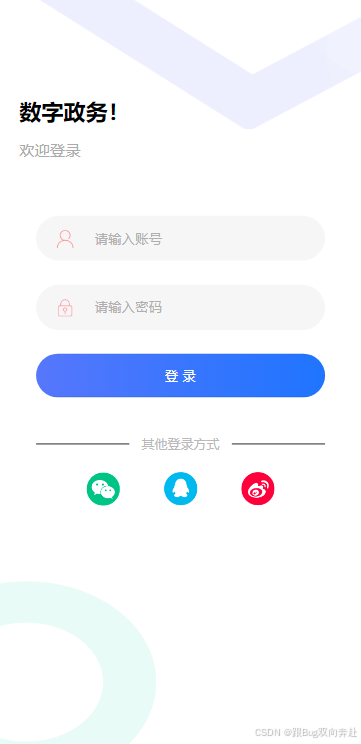

- <template>
- <view class="login-bg">
- <image class="img-a" src="https://zhoukaiwen.com/img/loginImg/2.png">image>
- <image class="img-b" src="https://zhoukaiwen.com/img/loginImg/3.png">image>
- <view class="t-b">{{ title }}view>
- <view class="t-b2">欢迎登录view>
- <view class="t-login">
- <form class="cl">
- <view class="t-a">
- <image src="https://zhoukaiwen.com/img/loginImg/user.png">image>
- <input type="number" name="phone" placeholder="请输入账号" maxlength="11" v-model="phone" />
- view>
- <view class="t-a">
- <image src="https://zhoukaiwen.com/img/loginImg/pwd.png">image>
- <input type="password" name="code" maxlength="6" placeholder="请输入密码" v-model="pwd" />
- view>
- <button @tap="login()">登 录button>
- <view class="t-c">
- <text class="t-c-txt" @tap="reg()">注册账号text>
- <text>返回首页text>
- view>
- form>
- <view class="t-f">
- <span :style="{width:width+'px'}">span>
- <text class="qt"> 其他登录方式 text>
- <span :style="{width:width+'px'}">span>
- view>
- <view class="t-e cl">
- <view class="t-g" @tap="wxLogin()">
- <image src="https://zhoukaiwen.com/img/loginImg/wx2.png">image>
- view>
- <view class="t-g" @tap="zfbLogin()">
- <image src="https://zhoukaiwen.com/img/loginImg/qq2.png">image>
- view>
- <view class="t-g" @tap="zfbLogin()">
- <image src="https://zhoukaiwen.com/img/loginImg/wb.png">image>
- view>
- view>
- view>
- <image class="img-a" src="https://zhoukaiwen.com/img/loginImg/bg1.png">image>
- view>
- template>
- <script>
- export default {
- data() {
- return {
- title: '数字政务!', //填写logo或者app名称,也可以用:欢迎回来,看您需求
- phone: '', //手机号码
- pwd: '', //密码
- width: ''
- };
- },
- onLoad() {
- setTimeout(() => {
- let query = uni.createSelectorQuery();
- query.select('.qt').boundingClientRect()
- query.select('.t-f').boundingClientRect()
- query.exec((res) => {
- console.log("res[0]", res[0]);
- console.log("res[1]", res[1])
- this.width = ((res[1].width - res[0].width) / 2) - 15
- })
- }, 200)
- },
- methods: {
- //当前登录按钮操作
- login() {
- var that = this;
- if (!that.phone) {
- uni.showToast({
- title: '请输入手机号',
- icon: 'none'
- });
- return;
- }
- if (!/^[1][3,4,5,7,8,9][0-9]{9}$/.test(that.phone)) {
- uni.showToast({
- title: '请输入正确手机号',
- icon: 'none'
- });
- return;
- }
- if (!that.pwd) {
- uni.showToast({
- title: '请输入密码',
- icon: 'none'
- });
- return;
- }
- uni.showToast({
- title: '登录成功!',
- icon: 'none'
- });
- },
- //立刻注册
- reg() {
- uni.showToast({
- title: '注册账号',
- icon: 'none'
- });
- }
- }
- };
- script>
- <style scoped>
- .img-a {
- position: absolute;
- width: 100%;
- top: -150rpx;
- right: 0;
- z-index: -1;
- }
- .img-b {
- position: absolute;
- width: 50%;
- bottom: 0;
- left: -50rpx;
- z-index: -1;
- }
- .login-bg {
- max-width: 750px;
- width: 100vw;
- min-height: 100vh;
- }
- .t-b {
- text-indent: 40rpx;
- font-size: 46rpx;
- color: #000;
- padding: 200rpx 0 30rpx 0;
- font-weight: bold;
- }
- .t-b2 {
- text-indent: 40rpx;
- font-size: 32rpx;
- color: #aaaaaa;
- padding: 0rpx 0 60rpx 0;
- }
- .t-login {
- width: 80%;
- padding: 55rpx;
- margin: 0rpx auto 0 auto;
- font-size: 28rpx;
- z-index: 9;
- }
- .t-login button {
- font-size: 28rpx;
- background: linear-gradient(to right, #5677fc, hsla(217 100% 56% / 1));
- /* background-image: linear-gradient(325deg,
- hsla(217 100% 56% / 1) 0%,
- hsla(194 100% 69% / 1) 55%,
- hsla(217 100% 56% / 1) 90%); */
- color: #fff;
- height: 90rpx;
- line-height: 90rpx;
- border-radius: 50rpx;
- }
- .t-login input {
- padding: 0 20rpx 0 120rpx;
- height: 90rpx;
- line-height: 90rpx;
- margin-bottom: 50rpx;
- background: #f6f6f6;
- border: 1px solid #f6f6f6;
- font-size: 28rpx;
- border-radius: 50rpx;
- }
- .t-login .t-a {
- position: relative;
- }
- .t-login .t-a image {
- width: 40rpx;
- height: 40rpx;
- position: absolute;
- left: 40rpx;
- top: 28rpx;
- }
- .t-login .t-b {
- text-align: left;
- font-size: 46rpx;
- color: #000;
- padding: 300rpx 0 120rpx 0;
- font-weight: bold;
- }
- .t-login .t-d {
- text-align: center;
- color: #999;
- margin: 80rpx 0;
- }
- .t-login .t-c {
- display: flex;
- justify-content: space-evenly;
- color: #666666;
- margin: 30rpx 30rpx 40rpx 0;
- }
- .t-login .t-c .t-c-txt {
- margin-right: 300rpx;
- }
- .t-login .t-e {
- text-align: center;
- width: 80%;
- margin: 40rpx auto 0;
- }
- .t-login .t-g {
- float: left;
- width: 33.33%;
- }
- .t-login .t-e image {
- width: 70rpx;
- height: 70rpx;
- }
- .t-login .t-f {
- width: 100%;
- display: flex;
- align-items: center;
- justify-content: space-between;
- margin: 80rpx 0 0 0;
- color: #999;
- position: relative;
- }
- .t-login .t-f text {
- color: #b9b9b9;
- font-size: 27rpx;
- }
- .t-login .t-f span {
- display: block;
- background-color: #000;
- width: auto;
- height: 1.5rpx;
- }
- .t-login .uni-input-placeholder {
- color: #aeaeae;
- }
- .cl {
- zoom: 1;
- }
- .cl:after {
- clear: both;
- display: block;
- visibility: hidden;
- height: 0;
- content: '\20';
- }
- style>
参考文章:
复制了这个博主的大部分html结构和部分css(目前放置的是我初版的样式和代码后续根据业务调整了下,同时为了适配兼容修改成弹性布局及动态宽度)
-
相关阅读:
并发编程 --- 信号量线程同步
excel中的引用与查找函数篇3
【产品运营】产品需求应该如何管理
unable to access xxxx: Failed to connect to xxxx
Vue中的SSR 服务端渲染技术概述
C# 异步操作汇总
【C++初阶学习】第十二弹——stack和queue的介绍和使用
Feign的简介及使用
AI时代设计工具Motiff亮相世界互联网大会 带来AI在SaaS领域落地应用案例
Leetcode刷题287. 寻找重复数
- 原文地址:https://blog.csdn.net/m0_72196169/article/details/142102228