-
SSM框架学习(三、MyBatis实践:提高持久层数据处理效率)
目录
一、Mybatis简介
1.简介
MyBatis 是一款优秀的持久层框架,它支持自定义 SQL、存储过程以及高级映射。MyBatis 免除了几乎所有的 JDBC 代码以及设置参数和获取结果集的工作。
MyBatis 可以通过简单的 XML 或注解来配置和映射原始类型、接口和 Java POJO(Plain Old Java Objects,普通老式 Java 对象)为数据库中的记录。

MyBatis最初是Apache的一个开源项目iBatis, 2010年6月这个项目由Apache Software Foundation迁移到了Google Code。随着开发团队转投Google Code旗下, iBatis3.x正式更名为MyBatis。代码于2013年11月迁移到Github。
2.持久层框架对比
JDBC:
SQL 夹杂在Java代码中耦合度高,导致硬编码内伤
维护不易且实际开发需求中 SQL 有变化,频繁修改的情况多见
代码冗长,开发效率低
Hibernate 和 JPA:
操作简便,开发效率高
程序中的长难复杂 SQL 需要绕过框架
内部自动生成的 SQL,不容易做特殊优化
基于全映射的全自动框架,大量字段的 POJO 进行部分映射时比较困难。
反射操作太多,导致数据库性能下降
MyBatis:
轻量级,性能出色
SQL 和 Java 编码分开,功能边界清晰。Java代码专注业务、SQL语句专注数据
开发效率稍逊于 Hibernate,但是完全能够接收
开发效率:Hibernate>Mybatis>JDBC
运行效率:JDBC>Mybatis>Hibernate
3.快速入门(基于Mybatis3方式)
a.准备数据模型
- CREATE DATABASE `mybatis-example`;
- USE `mybatis-example`;
- CREATE TABLE `t_emp`(
- emp_id INT AUTO_INCREMENT,
- emp_name CHAR(100),
- emp_salary DOUBLE(10,5),
- PRIMARY KEY(emp_id)
- );
- INSERT INTO `t_emp`(emp_name,emp_salary) VALUES("tom",200.33);
- INSERT INTO `t_emp`(emp_name,emp_salary) VALUES("jerry",666.66);
- INSERT INTO `t_emp`(emp_name,emp_salary) VALUES("andy",777.77);
b.项目搭建和准备
① 项目搭建

② 依赖导入
- <dependencies>
- <dependency>
- <groupId>org.mybatisgroupId>
- <artifactId>mybatisartifactId>
- <version>3.5.11version>
- dependency>
- <dependency>
- <groupId>mysqlgroupId>
- <artifactId>mysql-connector-javaartifactId>
- <version>8.0.25version>
- dependency>
- <dependency>
- <groupId>org.junit.jupitergroupId>
- <artifactId>junit-jupiter-apiartifactId>
- <version>5.3.1version>
- dependency>
- dependencies>
③ 实体类准备
- public class Employee {
- private Integer empId;
- private String empName;
- private Double empSalary;
- public Integer getEmpId() {
- return empId;
- }
- public void setEmpId(Integer empId) {
- this.empId = empId;
- }
- public String getEmpName() {
- return empName;
- }
- public void setEmpName(String empName) {
- this.empName = empName;
- }
- public Double getEmpSalary() {
- return empSalary;
- }
- public void setEmpSalary(Double empSalary) {
- this.empSalary = empSalary;
- }
- }
c.准备Mapper接口和MapperXML文件
MyBatis 框架下,SQL语句编写位置发生改变,从原来的Java类,改成XML或者注解定义!
推荐在XML文件中编写SQL语句,让用户能更专注于 SQL 代码,不用关注其他的JDBC代码。

Mybatis 中的 Mapper 接口相当于以前的 Dao。但是区别在于,Mapper 仅仅只是建接口即可,我们不需要提供实现类,具体的SQL写到对应的Mapper文件。
① 定义mapper接口
- package com.mihoyo.mapper;
- import com.mihoyo.pojo.Employee;
- public interface EmployMapper {
- //根据id查询员工信息
- Employee queryById(Integer id);
- }
② 定义mapper.xml
- "1.0" encoding="UTF-8" ?>
- mapper
- PUBLIC "-//mybatis.org//DTD Mapper 3.0//EN"
- "https://mybatis.org/dtd/mybatis-3-mapper.dtd">
- <mapper namespace="com.mihoyo.mapper.EmployeeMapper">
- <select id="queryById" resultType="com.mihoyo.pojo.Employee">
- select emp_id empId,emp_name empName, emp_salary empSalary from
- t_emp where emp_id = #{id}
- select>
- mapper>
注意:
① 四个一致:
方法名和 SQL 的 id 一致
方法返回值和 resultType 一致
方法的参数和 SQL 的参数一致
接口的全类名和映射配置文件的名称空间一致
② mapper 接口不能方法重载!因为虽然 java 语法不会出现问题,但 mapper.xml 无法识别,它是根据方法名进行识别的。
③ mapper.xml 一般写在 resource 目录下,这样编译后 maven 会打包到类路径(target/classes)中。
d.准备MyBatis配置文件
mybatis框架配置文件: 数据库连接信息,性能配置,mapper.xml配置等。
习惯上命名为 mybatis-config.xml,这个文件名仅仅只是建议,并非强制要求。将来整合 Spring 之后,这个配置文件可以省略,所以大家操作时可以直接复制、粘贴。
- "1.0" encoding="UTF-8" ?>
- configuration
- PUBLIC "-//mybatis.org//DTD Config 3.0//EN"
- "http://mybatis.org/dtd/mybatis-3-config.dtd">
- <configuration>
- <environments default="development">
- <environment id="development">
- <transactionManager type="JDBC"/>
- <dataSource type="POOLED">
- <property name="driver" value="com.mysql.cj.jdbc.Driver"/>
- <property name="url" value="jdbc:mysql://localhost:3306/mybatis-example"/>
- <property name="username" value="root"/>
- <property name="password" value="123456"/>
- dataSource>
- environment>
- environments>
- <mappers>
- <mapper resource="mappers/EmployeeMapper.xml"/>
- mappers>
- configuration>
e.运行和测试
- public class MybatisTest {
- //使用 mybatis 提供的api进行方法的调用
- @Test
- public void test_01() throws IOException {
- //1.读取外部配置文件(mybatis-config.xml)
- InputStream ips = Resources.getResourceAsStream("mybatis-config.xml");
- //2.创建sqlSessionFactory
- SqlSessionFactory sqlSessionFactory = new SqlSessionFactoryBuilder().build(ips);
- //3.根据创建sqlSessionFactory创建sqlSession(每次业务创建一个,用完就释放)
- SqlSession sqlSession = sqlSessionFactory.openSession();
- //4.获取接口的代理对象(通过代理技术),调用代理对象的方法,就会查找mapper接口的方法
- EmployeeMapper mapper = sqlSession.getMapper(EmployeeMapper.class);
- Employee employee = mapper.queryById(1);
- System.out.println("employee = "+ employee);
- //5.提交事务(非查询语句)和释放资源
- //sqlSession.commit();
- sqlSession.close();
- }
- }
说明:
SqlSession:代表Java 程序和数据库之间的会话。(HttpSession是Java程序和浏览器之间的会话)
SqlSessionFactory:是 “生产” SqlSession 的 “工厂”。
工厂模式:如果创建某一个对象,使用的过程基本固定,那么我们就可以把创建这个对象的相关代码封装到一个 “工厂类” 中,以后都使用这个工厂类来 “生产” 我们需要的对象。
SqlSession 和 HttpSession 区别:
HttpSession:工作在Web服务器上,属于表述层。
代表浏览器和Web服务器之间的会话。
SqlSession:不依赖Web服务器,属于持久化层。
代表Java程序和数据库之间的会话。

4.ibatis方式的实现和原理

a.准备数据模型
- use `mybatis-example`;
- create table student(
- sid int primary key auto_increment,
- sname varchar(20)
- );
- INSERT INTO `student` (sid, sname) VALUES (1, "tom");
- INSERT INTO `student` (sid, sname) VALUES (2, "jerry");
b.准备实体类
- public class Student {
- private Integer sid;
- private String sname;
- public Student() {
- }
- public Student(Integer sid, String sname) {
- this.sid = sid;
- this.sname = sname;
- }
- public Integer getSid() {
- return sid;
- }
- public void setSid(Integer sid) {
- this.sid = sid;
- }
- public String getSname() {
- return sname;
- }
- public void setSname(String sname) {
- this.sname = sname;
- }
- public String toString() {
- return "Student{sid = " + sid + ", sname = " + sname + "}";
- }
- }
c.定义mapper.xml (不用定义mapper接口)
- "1.0" encoding="UTF-8" ?>
- mapper
- PUBLIC "-//mybatis.org//DTD Mapper 3.0//EN"
- "https://mybatis.org/dtd/mybatis-3-mapper.dtd">
- <mapper namespace="xx.yy">
- <select id="kkk" resultType="com.mihoyo.pojo.Student">
- select * from student where sid = #{id}
- select>
- mapper>
d.准备MyBatis配置文件
- "1.0" encoding="UTF-8" ?>
- configuration
- PUBLIC "-//mybatis.org//DTD Config 3.0//EN"
- "http://mybatis.org/dtd/mybatis-3-config.dtd">
- <configuration>
- <environments default="development">
- <environment id="development">
- <transactionManager type="JDBC"/>
- <dataSource type="POOLED">
- <property name="driver" value="com.mysql.cj.jdbc.Driver"/>
- <property name="url" value="jdbc:mysql://localhost:3306/mybatis-example"/>
- <property name="username" value="root"/>
- <property name="password" value="123456"/>
- dataSource>
- environment>
- environments>
- <mappers>
- <mapper resource="mappers/StudentMapper.xml"/>
- mappers>
- configuration>
e.运行和测试
- @Test
- public void test_02() throws IOException {
- //1.读取外部配置文件(mybatis-config.xml)
- InputStream ips = Resources.getResourceAsStream("mybatis-config.xml");
- //2.创建sqlSessionFactory
- SqlSessionFactory sqlSessionFactory = new SqlSessionFactoryBuilder().build(ips);
- //3.根据创建sqlSessionFactory创建sqlSession(每次业务创建一个,用完就释放)
- SqlSession sqlSession = sqlSessionFactory.openSession();
- //4.使用sqlSession提供的增删改查方法进行数据库操作
- //参数1:sql标签对应的标识(id 或者 namespace.id)
- //参数2:执行sql语句传入的参数
- Student stu = sqlSession.selectOne("xx.yy.kkk", 1);
- System.out.println("Student = " + stu);
- //5.提交事务(非查询语句)和释放资源
- //sqlSession.commit();
- sqlSession.close();
- }
注意:
① ibatis 方式的缺点:
a. sql 语句标签对应的字符串标识太过随意,容易出现错误
b. 执行 sql 语句传入的参数只能传一个,多个参数需要整合成一个 Map 集合中
c. 返回值类型需要自己指定,不会提示,默认是 Object 类型
② sqlSession 提供了增删改查方法,但该方法并不是帮我们生成 sql 语句,而是帮我们查找对应的 sql 语句标签,再交给 mybatis 执行。

5.ibatis与mybatis之间的关系

Mybatis 会先使用 jdk 动态代理技术,生成一个代理对象。
① 代理对象 根据 接口的全限定符 和 方法名,内部拼接成 "接口的全限定符.方法名",再去调用 ibatis 对应的方法,去查找对应的 sql 语句标签,进行执行。
所以 mapper.xml 会严格限定 namespace 和 id,因为拼接后要根据它们去查找对应的 sql 标签。
这样就确保了 查找 sql 语句标签的过程不会出现错误!
② 代理对象也会将传入的参数进行整合,然后给 ibatis 对应的方法传入整合后的参数。
这样也优化了参数传递!
所以:mybatis 底层依然调用 ibatis,只不过底层进行了封装,有一套固定的模式!
二、Mybatis基本使用
1.向 sql 语句传参
(1)mybatis日志输出配置
mybatis配置文件设计标签和顶层结构如下:

我们可以在 mybatis 的配置文件使用 settings 标签设置,输出运过程SQL日志!
通过查看日志,我们可以判定#{} 和 ${}的输出效果!
settings 设置项:
logImpl
指定 MyBatis 所用日志的具体实现,未指定时将自动查找。 SLF4J
LOG4J(3.5.9 起废弃)
LOG4J2
JDK_LOGGING
COMMONS_LOGGING
STDOUT_LOGGING
NO_LOGGING
未设置 日志配置:
- "1.0" encoding="UTF-8" ?>
- configuration
- PUBLIC "-//mybatis.org//DTD Config 3.0//EN"
- "http://mybatis.org/dtd/mybatis-3-config.dtd">
- <configuration>
- <settings>
- <setting name="logImpl" value="STDOUT_LOGGING"/>
- settings>
- ...
- configuration>
(2)#{ key } 和 ${ key }
#{ key } 占位符 + 赋值 ${ key } 字符串拼接 #{ key } 形式:

${ key } 形式:

细节:
① 推荐使用 #{ key } 的形式,可以防止 SQL注入
② 存在即合理!#{ key } 只能替代值的位置,对于列名,容器名,关键字,都无法替代。
比如:select * from 表 where 动态列名 = 动态值
动态列名只能使用 ${ columnName },动态值可以使用 #{ columnValue }
所以:动态值,使用 #{ key }
动态列名,容器名,关键字,使用 ${ key }
2.数据输入

这里数据输入具体是指上层方法(例如Service方法)调用 Mapper接口 时,数据传入的形式。
简单类型:只包含一个值的数据类型(单值类型)
基本数据类型:int、byte、short、double、……
基本数据类型的包装类型:Integer、Character、Double、……
字符串类型:String
复杂类型:包含多个值的数据类型(多值类型)
实体类类型:Employee、Department、……
集合类型:List、Set、Map、……
数组类型:int[]、String[]、……
复合类型:List
、实体类中包含集合…… (1)单个简单类型参数
Mapper 接口中抽象方法的声明:
- //根据id删除员工信息
- int deleteById(Integer id);
- //根据工资查询员工信息
- List
queryBySalary(Double salary);
SQL语句:
- <delete id="deleteById">
- delete from t_emp where emp_id = #{empId}
- delete>
- <select id="queryBySalary" resultType="com.mihoyo.pojo.Employee">
- select emp_id empId,emp_name empName,emp_salary empSalary
- from t_emp where emp_salary= #{salary}
- select>
单个简单类型参数,在#{} 中可以随意命名,但是没有必要。通常还是使用和接口方法参数同名。
(2)实体类类型参数
Mapper 接口中抽象方法的声明:
- //插入员工数据(实体对象)
- int insertEmp(Employee employee);
SQL语句:
- <insert id="insertEmp">
- insert into t_emp(emp_name,emp_salary) values(#{empName},#{empSalary})
- insert>
当传入的是一个实体对象,key = 属性名
原理:Mybatis 会根据 #{} 中传入的数据,加工成getXxx()方法,通过反射在实体类对象中调用这个方法,从而获取到对应的数据。填充到 #{} 解析后的问号占位符这个位置。

(3)零散的简单类型数据
方案一:使用 mybatis 默认机制,形参从左到右依次对应:arg0 / param1, arg1 / param2 ...
Mapper接口中抽象方法的声明:
- //根据员工姓名和工资查询员工信息
- List
queryByNameAndSalary(String name,Double salary);
SQL语句:
- <select id="queryByNameAndSalary" resultType="com.mihoyo.pojo.Employee">
- select emp_id empId,emp_name empName,emp_salary empSalary
- from t_emp where emp_name = #{arg0} and emp_salary = ${arg1}
- select>
或者
- <select id="queryByNameAndSalary" resultType="com.mihoyo.pojo.Employee">
- select emp_id empId,emp_name empName,emp_salary empSalary
- from t_emp where emp_name = #{param1} and emp_salary = ${param2}
- select>
方案二:使用 @Param 注解指定(推荐)
Mapper接口中抽象方法的声明:
- //根据员工姓名和工资查询员工信息
- List
queryByNameAndSalary(@Param("eName") String name, @Param("eSalary") Double salary);
SQL语句:
- <select id="queryByNameAndSalary" resultType="com.mihoyo.pojo.Employee">
- select emp_id empId,emp_name empName,emp_salary empSalary
- from t_emp where emp_name = #{eName} and emp_salary = ${eSalary}
- select>
(4)Map类型参数
Mapper 接口中抽象方法的声明:
- //插入员工数据,传入一个map(name=员工名,salary=员工薪水)
- int insertEmpMap(Map data);
SQL语句:
"insertEmpMap"> - insert into t_emp(emp_name,emp_salary) values(#{name},#{salary})
当传入的是 map 类型的参数时,key = map 中的 key
测试:
- @Test
- public void test_01() throws IOException {
- //1.读取外部配置文件
- InputStream ips = Resources.getResourceAsStream("mybatis-config.xml");
- //2.创建sqlSessionFactory
- SqlSessionFactory sqlSessionFactory = new SqlSessionFactoryBuilder().build(ips);
- //3.获取sqlSession
- SqlSession sqlSession = sqlSessionFactory.openSession();
- //4.获取代理mapper对象
- EmployeeMapper mapper = sqlSession.getMapper(EmployeeMapper.class);
- Map
- //存入键值对
- paramMap.put("name", "zhangsan");
- paramMap.put("salary", 123.45);
- int result = mapper.insertEmpMap(paramMap);
- System.out.println("result = " + result);
- //5.提交事务或释放资源
- sqlSession.close();
- }
3.数据输出
数据输出总体上有两种形式:
增删改操作:默认返回的是受影响行数,直接使用 int 或 long 类型接收即可
查询操作:查询结果的返回值类型可能不确定
我们需要做的是,指定查询的输出数据类型,并且插入场景下,实现主键数据回显示。
(1)单个简单类型
Mapper 接口中的抽象方法:
- //dml语句(插入,修改,删除)-->返回受影响的行数
- int deleteById(Integer id);
- //根据员工的id查询员工姓名
- String queryNameById(Integer id);
- //根据员工的id查询员工工资
- Double querySalaryById(Integer id);
SQL语句:
- <delete id="deleteById">
- delete from t_emp where emp_id = #{id}
- delete>
- <select id="queryNameById" resultType="java.lang.String">
- select emp_name from t_emp where emp_id = #{id}
- select>
- <select id="querySalaryById" resultType="double">
- select emp_salary from t_emp where emp_id = #{id}
- select>
select 标签,通过 resultType 指定查询返回值类型。
resultType 的取值有两种:类的全限定符 或 类的别名
mybatis 给我们常用的 Java 数据类型,都提供了别名,如下:
映射的类型 别名 byte _byte char _char (since 3.5.10) char _character (since 3.5.10) long _long short _short int _int int _integer double _double float _float boolean _boolean String string Byte byte Character char (since 3.5.10) Character character (since 3.5.10) Long long Short short Integer int Integer integer Double double Float float Boolean boolean Date date BigDecimal decimal BigDecimal bigdecimal BigInteger biginteger Object object Date[] date[] BigDecimal[] decimal[] BigDecimal[] bigdecimal[] BigInteger[] biginteger[] Object[] object[] Map map HashMap hashmap List list ArrayList arraylist Collection collection Iterator iterator 不用死记,规则如下:
基本数据类型:int double -> _int _double
包装数据类型:Integer Double -> int / integer double
集合容器类型:Map List HashMap -> map list hashmap(小写即可)
Test:如果返回的类型,java 没有提供相应的别名,怎么办?
可以自定义别名,或 使用类的全限定符。
扩展(给自定义类定义别名):
① 给单独的类定义别名:
- "1.0" encoding="UTF-8" ?>
- configuration
- PUBLIC "-//mybatis.org//DTD Config 3.0//EN"
- "http://mybatis.org/dtd/mybatis-3-config.dtd">
- <configuration>
- <typeAliases>
- <typeAlias type="com.mihoyo.pojo.Employee" alias="employee"/>
- typeAliases>
- ...
- configuration>
② 批量定义别名
- "1.0" encoding="UTF-8" ?>
- configuration
- PUBLIC "-//mybatis.org//DTD Config 3.0//EN"
- "http://mybatis.org/dtd/mybatis-3-config.dtd">
- <configuration>
- <typeAliases>
- <package name="com.mihoyo.pojo"/>
- typeAliases>
- ...
- configuration>
批量将包下的类给于别名,别名就是首字母小写的类名(如 Employee --> employee)
③ 批量定义别名后(前提条件),不想使用批量的别名,可以使用 @Alias 注解重新定义别名
- @Alias("emp")
- public class Employee {
- ...
- }
(2)返回实体类对象
Mapper 接口的抽象方法:
- //返回单个自定义实体类型
- Employee queryById(Integer id);
SQL语句:
- <select id="queryById" resultType="com.mihoyo.pojo.Employee">
- select emp_id empId,emp_name empName,emp_salary empSalary
- from t_emp where emp_id = ${empId}
- select>
返回实体类对象时,resultType = 实体类型即可
注意:
当返回实体类对象时,存在一个默认要求:列名和属性名要一 一映射,因为底层会根据映射对应的属性名存入对象。
所以,sql 语句中需要给每个数据库表字段起别名。
但这种方式过于麻烦,我们可以增加全局配置自动识别对应关系:
- <settings>
- <setting name="mapUnderscoreToCamelCase" value="true"/>
- settings>
在 Mybatis 全局配置文件中,进行如上配置,select语句中可以不给字段设置别名。
可以自动将字段名(XXX_YYY)变为属性名(xxxYyy)。
(3)返回 Map 类型
SQL查询返回的各个字段综合起来并不和任何一个现有的实体类对应,没法封装到实体类对象中,就可以用map集合进行存储,key = 查询的列名,value = 查询到的值。
Mapper 接口的抽象方法:
- //查询部门的最高工资和平均工资
- Map
SQL语句:
- <select id="selectEmpNameAndMaxSalary" resultType="map">
- SELECT
- emp_name 员工姓名,
- emp_salary 员工工资,
- (SELECT AVG(emp_salary) FROM t_emp) 部门平均工资
- FROM t_emp WHERE emp_salary=(
- SELECT MAX(emp_salary) FROM t_emp
- )
- select>
测试:
- @Test
- public void test_01() throws IOException {
- //1.读取外部配置文件
- InputStream ips = Resources.getResourceAsStream("mybatis-config.xml");
- //2.创建sqlSessionFactory
- SqlSessionFactory sqlSessionFactory = new SqlSessionFactoryBuilder().build(ips);
- //3.获取sqlSession
- SqlSession sqlSession = sqlSessionFactory.openSession();
- //4.获取代理mapper对象
- EmployeeMapper mapper = sqlSession.getMapper(EmployeeMapper.class);
- Map
- Set
- for (Map.Entry
- String key = entry.getKey();
- Object value = entry.getValue();
- System.out.println(key + "=" + value);
- }
- //5.提交事务或释放资源
- sqlSession.close();
- }
(4)返回 List 类型
Mapper 接口中抽象方法:
- //查询工资高于传入值的员工姓名
- List
queryNameBySalary(Double salary); - //查询所有员工信息
- List
queryAll();
SQL语句:
- <select id="queryNameBySalary" resultType="string">
- select emp_name from t_emp where emp_salary > #{ salary }
- select>
- <select id="queryAll" resultType="employee">
- select * from t_emp
- select>
当返回的是 List 集合类型,此时不需要任何特殊处理,在 resultType 属性中指定泛型类型即可。
原理:
Mybatis 底层调用的是 ibatis,查询共有两个方法:selectOne 和 selectList,而 SelectOne 底层也是调用 selectList,所以底层本质全是按照 List 集合进行查找的。
(5)返回主键值
Ⅰ. 自增长类型主键
Mapper 接口中的抽象方法:
- //员工插入
- int insertEmp(Employee employee);
SQL语句:
- <insert id="insertEmp" useGeneratedKeys="true" keyColumn="emp_id" keyProperty="empId">
- insert into t_emp(emp_name,emp_salary) value(#{empName},#{empSalary})
- insert>
测试:
- @Test
- public void test_02() throws IOException {
- //1.读取外部配置文件
- InputStream ips = Resources.getResourceAsStream("mybatis-config.xml");
- //2.创建sqlSessionFactory
- SqlSessionFactory sqlSessionFactory = new SqlSessionFactoryBuilder().build(ips);
- //3.获取sqlSession
- SqlSession sqlSession = sqlSessionFactory.openSession();
- //4.获取代理mapper对象
- EmployeeMapper mapper = sqlSession.getMapper(EmployeeMapper.class);
- //准备实体对象
- Employee employee = new Employee();
- employee.setEmpName("zhangsan");
- employee.setEmpSalary(999.0);
- System.out.println("插入前,empId = " + employee.getEmpId());
- //插入
- mapper.insertEmp(employee);
- System.out.println("插入后,empId = " + employee.getEmpId());
- //5.提交事务或释放资源
- sqlSession.close();
- }
运行结果:

Ⅱ. 非自增长类型主键
a.准备数据库
- create table teacher(
- t_id varchar(64) primary key ,
- t_name varchar(20)
- )
b. 准备实体类
- public class Teacher {
- private String tId;
- private String tName;
- public Teacher() {
- }
- public Teacher(String tId, String tName) {
- this.tId = tId;
- this.tName = tName;
- }
- public String getTId() {
- return tId;
- }
- public void setTId(String tId) {
- this.tId = tId;
- }
- public String getTName() {
- return tName;
- }
- public void setTName(String tName) {
- this.tName = tName;
- }
- public String toString() {
- return "Teacher{tId = " + tId + ", tName = " + tName + "}";
- }
- }
Mapper 接口中的抽象方法:
- public interface TeacherMapper {
- //插入老师信息
- int insertTeacher(Teacher teacher);
- }
SQL语句:
- "1.0" encoding="UTF-8" ?>
- mapper
- PUBLIC "-//mybatis.org//DTD Mapper 3.0//EN"
- "https://mybatis.org/dtd/mybatis-3-mapper.dtd">
- <mapper namespace="com.mihoyo.mapper.TeacherMapper">
- <insert id="insertTeacher">
- insert into teacher(t_id, t_name) values (#{tId},#{tName})
- insert>
- mapper>
测试:
- @Test
- public void test_03() throws IOException {
- //1.读取外部配置文件
- InputStream ips = Resources.getResourceAsStream("mybatis-config.xml");
- //2.创建sqlSessionFactory
- SqlSessionFactory sqlSessionFactory = new SqlSessionFactoryBuilder().build(ips);
- //3.获取sqlSession
- SqlSession sqlSession = sqlSessionFactory.openSession();
- //4.获取代理mapper对象
- TeacherMapper mapper = sqlSession.getMapper(TeacherMapper.class);
- //准备实体对象
- Teacher teacher = new Teacher();
- teacher.setTName("zhangsan");
- //用UUID随机生产主键id
- String id= UUID.randomUUID().toString().replace("-","");
- teacher.setTId(id);
- //插入
- mapper.insertTeacher(teacher);
- //5.提交事务或释放资源
- sqlSession.close();
- }
上述数据库的主键是一个字符串类型的数据,每次插入新数据都需要书写一段代码来生成主键值,过于麻烦(需要自己维护主键)。
改进方案:Mybatis 可以帮助我们对主键进行维护,无需自己生成主键值。
- <insert id="insertTeacher">
- <selectKey order="BEFORE" resultType="string" keyProperty="tId">
- select replace(uuid(),'-','')
- selectKey>
- insert into teacher(t_id, t_name) values (#{tId},#{tName})
- insert>
此时,测试代码中无需再自行维护主键:
- @Test
- public void test_03() throws IOException {
- //1.读取外部配置文件
- InputStream ips = Resources.getResourceAsStream("mybatis-config.xml");
- //2.创建sqlSessionFactory
- SqlSessionFactory sqlSessionFactory = new SqlSessionFactoryBuilder().build(ips);
- //3.获取sqlSession
- SqlSession sqlSession = sqlSessionFactory.openSession();
- //4.获取代理mapper对象
- TeacherMapper mapper = sqlSession.getMapper(TeacherMapper.class);
- //准备实体对象
- Teacher teacher = new Teacher();
- teacher.setTName("zhangsan");
- System.out.println("插入前,tId = " + teacher.getTId());
- //插入
- mapper.insertTeacher(teacher);
- System.out.println("插入后,tId = " + teacher.getTId());
- //5.提交事务或释放资源
- sqlSession.close();
- }
运行结果:

(6)实体类属性和数据库字段对应关系
方案一:别名对应
- <select id="queryById" resultType="com.mihoyo.pojo.Employee">
- select emp_id empId,emp_name empName,emp_salary empSalary
- from t_emp where emp_id = ${empId}
- select>
方案二:全局配置自动识别驼峰式命名规则
- <settings>
- <setting name="mapUnderscoreToCamelCase" value="true"/>
- settings>
SQL语句中可以不使用别名:
- <select id="queryById" resultType="com.mihoyo.pojo.Employee">
- select emp_id,emp_name,emp_salary
- from t_emp where emp_id = ${empId}
- select>
还可以直接使用:select *
方案三:使用 resultMap 自定义映射
- <resultMap id="eMap" type="employee">
- <id column="emp_id" property="empId"/>
- <result column="emp_name" property="empName"/>
- <result column="emp_salary" property="empSalary"/>
- resultMap>
- <select id="queryById" resultMap="eMap">
- select emp_id,emp_name,emp_salary from t_emp where emp_id = ${empId}
- select>
使用 resultMap 标签定义映射关系,再在后面的SQL语句中引用这个对应关系。
三、Mybatis 多表映射
1.概念
开发中更多的是多表查询需求,这种情况我们如何让进行处理?
我们的学习目标:
① 多表查询语句使用
② 多表结果承接实体类设计
③ 使用ResultMap完成多表结果映射
(1)实体类设计方案
在数据库中,多表关系是双向查看的关系:一对一,一对多,多对多
而在 Java 实体类设计时,多表关系是单向查看的关系:
对一:一个订单对应一个客户
- //客户实体
- public class Customer {
- private Integer customerId;
- private String customerName;
- }
- //订单实体
- public class Order {
- private Integer orderId;
- private String orderName;
- private Customer customer;// 体现的是对一的关系
- }
实体类设计:对一关系下,类中只要包含单个对方对象类型属性即可。
对多:一个客户对应多个订单
- //订单实体
- public class Order {
- private Integer orderId;
- private String orderName;
- }
- //客户实体
- public class Customer {
- private Integer customerId;
- private String customerName;
- private List
orderList;// 体现的是对多的关系 - }
实体类设计:对多关系下,类中只要包含对方类型集合属性即可!
注意:
① 只有真实发生多表查询时,才需要设计和修改实体类,否则不提前设计和修改实体类。
② 无论多少张表联查,实体类设计都是两两考虑。
③ 在查询映射的时候,只需要关注本次查询相关的属性!例如:查询订单和对应的客户,就不要关注客户中的订单集合。
(2)多表映射案例准备
数据库:
- CREATE TABLE `t_customer` (`customer_id` INT NOT NULL AUTO_INCREMENT, `customer_name` CHAR(100), PRIMARY KEY (`customer_id`) );
- CREATE TABLE `t_order` ( `order_id` INT NOT NULL AUTO_INCREMENT, `order_name` CHAR(100), `customer_id` INT, PRIMARY KEY (`order_id`) );
- INSERT INTO `t_customer` (`customer_name`) VALUES ('c01');
- INSERT INTO `t_order` (`order_name`, `customer_id`) VALUES ('o1', '1');
- INSERT INTO `t_order` (`order_name`, `customer_id`) VALUES ('o2', '1');
- INSERT INTO `t_order` (`order_name`, `customer_id`) VALUES ('o3', '1');
注意:
实际开发时,一般在开发过程中,不给数据库表设置外键约束。
原因是避免调试不方便。 一般是功能开发完成,再加外键约束检查是否有bug。
实体类设计:
- @Data // lombok
- public class Customer {
- private Integer customerId;
- private String customerName;
- private List
orderList;// 体现的是对多的关系 - }
- @Data
- public class Order {
- private Integer orderId;
- private String orderName;
- private Integer customerId;//外键
- private Customer customer;// 体现的是对一的关系
- }
2.对一映射
需求:根据ID查询订单,以及订单关联的用户的信息
a. OrderMapper接口
- public interface OrderMapper {
- //根据订单id查询订单信息和订单所对应的客户
- Order queryOrderById(Integer id);//订单信息中包含客户
- }
b. OrderMapper.xml配置文件
- "1.0" encoding="UTF-8" ?>
- mapper
- PUBLIC "-//mybatis.org//DTD Mapper 3.0//EN"
- "https://mybatis.org/dtd/mybatis-3-mapper.dtd">
- <mapper namespace="com.mihoyo.mapper.OrderMapper">
- <resultMap id="orderMap" type="order">
- <id column="order_id" property="orderId"/>
- <result column="order_name" property="orderName"/>
- <result column="customer_id" property="customerId"/>
- <association property="customer" javaType="customer">
- <id column="customer_id" property="customerId"/>
- <result column="customer_name" property="customerName"/>
- association>
- resultMap>
- <select id="queryOrderById" resultMap="orderMap">
- select * from t_order tor join t_customer tcr
- on tor.customer_id = tcr.customer_id
- where tor.order_id = #{id}
- select>
- mapper>
对应关系可以参考下图:

细节:
resultType 只支持一层映射,而 resultMap 可以支持深层映射(可以多层嵌套 association)。
c. mybatis-config.xml 配置文件
- "1.0" encoding="UTF-8" ?>
- configuration
- PUBLIC "-//mybatis.org//DTD Config 3.0//EN"
- "http://mybatis.org/dtd/mybatis-3-config.dtd">
- <configuration>
- <settings>
- <setting name="logImpl" value="STDOUT_LOGGING"/>
- settings>
- <typeAliases>
- <package name="com.mihoyo.pojo"/>
- typeAliases>
- <environments default="development">
- <environment id="development">
- <transactionManager type="JDBC"/>
- <dataSource type="POOLED">
- <property name="driver" value="com.mysql.cj.jdbc.Driver"/>
- <property name="url" value="jdbc:mysql://localhost:3306/mybatis-example"/>
- <property name="username" value="root"/>
- <property name="password" value="123456"/>
- dataSource>
- environment>
- environments>
- <mappers>
- <mapper resource="mappers/OrderMapper.xml"/>
- mappers>
- configuration>
d. 测试
- public class MybatisTest {
- private SqlSession sqlSession;
- @BeforeEach // 每次都测试方法之前,先走的初始化方法
- public void init() throws IOException {
- //1.读取外部配置文件
- InputStream ips = Resources.getResourceAsStream("mybatis-config.xml");
- //2.创建sqlSessionFactory
- SqlSessionFactory sqlSessionFactory = new SqlSessionFactoryBuilder().build(ips);
- //3.获取sqlSession
- sqlSession = sqlSessionFactory.openSession();
- }
- @AfterEach // 每次都测试方法之后,调用的结束方法
- public void clean(){
- //5.提交事务或释放资源
- sqlSession.close();
- }
- @Test
- public void testToOne() {
- //根据id查询订单和对应的客户
- OrderMapper mapper = sqlSession.getMapper(OrderMapper.class);
- Order order = mapper.queryOrderById(1);
- System.out.println(order);
- System.out.println(order.getCustomer());
- }
- }
3.对多映射
需求:查询所有客户和客户关联的订单信息
a. CustomerMapper 接口:
- public interface CustomerMapper {
- //查询所有客户信息以及客户对应的订单信息
- List
queryCustomerAll(); - }
b. CustomerMapper.xml 文件
- "1.0" encoding="UTF-8" ?>
- mapper
- PUBLIC "-//mybatis.org//DTD Mapper 3.0//EN"
- "https://mybatis.org/dtd/mybatis-3-mapper.dtd">
- <mapper namespace="com.mihoyo.mapper.CustomerMapper">
- <resultMap id="customerMap" type="customer">
- <id column="customer_id" property="customerId"/>
- <result column="customer_name" property="customerName"/>
- <collection property="orderList" ofType="Order">
- <id column="order_id" property="orderId"/>
- <result column="order_name" property="orderName"/>
- <result column="customer_id" property="customerId"/>
- collection>
- resultMap>
- <select id="queryCustomerAll" resultMap="customerMap">
- select * from t_customer tcr
- join t_order tor
- on tcr.customer_id=tor.customer_id
- select>
- mapper>
对应关系可以参考下图:

c. Mybatis 全局注册Mapper文件
- <mappers>
- <mapper resource="mappers/OrderMapper.xml"/>
- <mapper resource="mappers/CustomerMapper.xml"/>
- mappers>
d. 测试:
- @Test
- public void testToMany(){
- CustomerMapper mapper = sqlSession.getMapper(CustomerMapper.class);
- List
customers = mapper.queryCustomerAll(); - System.out.println("customers = " + customers);
- for (Customer customer : customers) {
- List
orderList = customer.getOrderList(); - System.out.println("orderList = " + orderList);
- }
- }
总结:
关联关系 配置项关键词 所在配置文件和具体位置 对一 association标签 / javaType属性 / property属性 Mapper配置文件中的resultMap标签内 对多 collection标签 / ofType属性 / property属性 Mapper配置文件中的resultMap标签内 4.多表映射优化
setting属性 属性含义 可选值 默认值 autoMappingBehavior 指定 MyBatis 应如何自动映射列到字段或属性。
NONE 表示关闭自动映射;
PARTIAL 只会自动映射没有定义嵌套结果映射的字段(对于只有一层的 result 标签,可以自动映射)。
FULL 会自动映射任何复杂的结果集(无论是否多少层,都自动映射)。
NONE, PARTIAL,
FULL
PARTIAL 将 autoMappingBehavior 设置为 full,进行多表 resultMap 映射的时候,可以省略符合列和属性命名映射规则的 result 标签。
注意:
只有 列名=属性名,或者开启驼峰映射(XXX_YYY -> xxxYyy)的 reult 标签才能自动映射。
修改 mybati-sconfig.xml:
- <settings>
- <setting name="mapUnderscoreToCamelCase" value="true"/>
- <setting name="autoMappingBehavior" value="FULL"/>
- settings>
此时,CustomerMapper.xml 中的自定义映射可省略为:
- "1.0" encoding="UTF-8" ?>
- mapper
- PUBLIC "-//mybatis.org//DTD Mapper 3.0//EN"
- "https://mybatis.org/dtd/mybatis-3-mapper.dtd">
- <mapper namespace="com.mihoyo.mapper.CustomerMapper">
- <resultMap id="customerMap" type="customer">
- <id column="customer_id" property="customerId"/>
- <collection property="orderList" ofType="Order">
- <id column="order_id" property="orderId"/>
- collection>
- resultMap>
- <select id="queryCustomerAll" resultMap="customerMap">
- select * from t_customer tcr
- join t_order tor
- on tcr.customer_id=tor.customer_id
- select>
- mapper>
四、MyBatis动态语句
经常遇到很多按照很多查询条件进行查询的情况,比如智联招聘的职位搜索等。
其中经常出现很多条件不取值的情况,在后台应该如何完成最终的SQL语句呢?

动态 SQL 是 MyBatis 的强大特性之一!
1. if 和 where标签
需求:根据多个条件查询员工信息,但条件可能为空
Mapper 接口中的抽象方法:
- public interface EmployeeMapper {
- //根据员工的姓名和工资查询员工信息
- List
query(@Param("name") String name, @Param("salary") Double salary); - }
SQL语句:
- <select id="query" resultType="employee">
- select * from t_emp
- <where>
- <if test="name!=null">
- emp_name = #{name}
- if>
- <if test="salary !=null and salary > 0">
- and emp_salary = #{salary}
- if>
- where>
- select>
细节:
① if 标签可以通过 test 属性进行判断,如果为 true,就将标签内的 sql 语句进行拼接。
test 属性中的判断语句:key 比较符号 值(且:and 或:or)
大于和小于可以直接写符号(< >),但不推荐,因为低版本的 mybatis 可能会识别成标签的开始或者结束符号。推荐使用实体符号(大于:> 小于:< )
② where 标签的作用:
a.只要 where 内部有任何一个 if 满足,自动添加 where 关键字,否则不会添加 where 关键字
b.自动去掉条件中多余的 and 和 or 关键字
测试:
- @Test
- public void test_01() {
- //根据id查询订单和对应的客户
- EmployeeMapper mapper = sqlSession.getMapper(EmployeeMapper.class);
- List
list = mapper.query(null, 100d); - System.out.println("list = " + list);
- }
2. set 标签
Mapper 接口中的抽象方法:
- //根据员工id更新员工数据(要求name和salary不为空时才更新)
- int update(Employee employee);
SQL语句:
- <update id="update">
- update t_emp
- <set>
- <if test="empName!=null">
- emp_name = #{empName},
- if>
- <if test="empSalary !=null">
- emp_salary = #{empSalary}
- if>
- set>
- where emp_id = #{empId}
- update>
细节:
set 标签的作用:
a. 自动添加 set 关键字
b. 自动去掉多余的逗号(,)
注意:
update 方法中,必须保证至少一个 if 满足。因为如果都不满足,不管有没有 set 关键字,语法都是错的!
3. trim标签(了解)
使用 trim 标签控制条件部分两端是否包含某些字符
prefix属性 指定要动态添加的前缀 suffix属性 指定要动态添加的后缀 prefixOverrides属性 指定要动态去掉的前缀,使用“|”分隔有可能的多个值 suffixOverrides属性 指定要动态去掉的后缀,使用“|”分隔有可能的多个值 例如,前两个案例中的 SQL 语句可修改为:
- <select id="query" resultType="employee">
- select * from t_emp
- <trim prefix="where" prefixOverrides="and|or">
- <if test="name!=null">
- emp_name = #{name}
- if>
- <if test="salary !=null and salary > 0">
- and emp_salary = #{salary}
- if>
- trim>
- select>
- <update id="update">
- update t_emp
- <trim prefix="set" suffixOverrides=",">
- <if test="empName!=null">
- emp_name = #{empName},
- if>
- <if test="empSalary !=null">
- emp_salary = #{empSalary}
- if>
- trim>
- where emp_id = #{empId}
- update>
4. choose/when/otherwise 标签
在多个分支条件中,仅执行一个。
从上到下依次执行条件判断,遇到的第一个满足条件的分支会被采纳,被采纳分支后面的分支都将不被考虑。
如果所有的when分支都不满足,那么就执行otherwise分支。(类似于 switch-case-default)。
Mapper 接口中的抽象方法:
- /*
- 根据两个条件查询
- 如果name不为空,根据name查询
- 如果name为空,salary不为空,根据salary查询
- 都为空,查询全部
- */
- List
queryChoose(@Param("name") String name, @Param("salary") Double salary);
SQL语句:
- <select id="queryChoose" resultType="employee">
- select * from t_emp where
- <choose>
- <when test="name!=null">
- emp_name = #{name}
- when>
- <when test="salary !=null">
- and emp_salary = #{salary}
- when>
- <otherwise>1=1otherwise>
- choose>
- select>
5. foreach标签
Mapper 接口中的抽象方法:
- //根据id进行批量查询
- List
queryBatch(@Param("ids") List ids) ; - //批量插入
- int insertBatch(@Param("list") List
employeeList) ; - //批量更新
- int updateBatch(@Param("list") List
employeeList) ;
SQL语句:
- <select id="queryBatch" resultType="employee">
- select * from t_emp where emp_id in
- <foreach collection="ids" open="(" separator="," close=")" item="id">
- #{id}
- foreach>
- select>
- <insert id="insertBatch">
- insert into t_emp(emp_name,emp_salary) values
- <foreach collection="list" separator="," item="employee">
- (#{employee.empName},#{employee.empSalary})
- foreach>
- insert>
- <update id="updateBatch">
- <foreach collection="list" item="employee" separator=";">
- update t_emp set emp_name = #{employee.empName},emp_salary = #{employee.empSalary}
- where emp_id = #{employee.empId}
- foreach>
- update>
注意:
① 上述批量查询和批量插入,本质上都是一条 sql 语句执行。
而批量更新,事实上是一次性执行多条 sql 语句,中间用分号隔开。
当一次性发送多条SQL语句让数据库执行,此时需要在数据库连接信息的URL地址中设置:
<property name="url" value="jdbc:mysql://localhost:3306/mybatis-example?allowMultiQueries=true"/>② 关于 foreach 标签的 collection 属性:
如果没有给接口中 List 类型的参数使用 @Param 注解指定一个具体的名字,那么默认可以使用collection 或 list 或 arg0 来引用要遍历的集合。
但在实际开发中,为了避免隐晦的表达造成一定的误会,建议使用 @Param 注解明确声明变量的名称,然后 collection 属性使用注解指定的名称。
6. sql 片段提取
- <sql id="selectSql">
- select * from t_emp
- sql>
- <select id="query" resultType="employee">
- <include refid="selectSql"/>
- <where>
- <if test="name!=null">
- emp_name = #{name}
- if>
- <if test="salary !=null and salary > 0">
- and emp_salary = #{salary}
- if>
- where>
- select>
五、Mybatis 高级扩展
1. Mapper 批量映射优化
Mapper 配置文件很多时,在全局配置文件中一个一个注册太麻烦,我们希望可以批量注册。
配置方式:
- <mappers>
- <package name="com.mihoyo.mapper"/>
- mappers>
注意:
批量 mapper 配置文件指定,package = “Mapper 接口 和 Mapper.xml 打包后共同所在的包”。
所以,必要满足 2 个要求:
① 要求 Mapper 接口 和 Mapper.xml 的命名必须相同
② 要求 Mapper 接口 和 Mapper.xml 的所在的包名必须相同(最终打包的位置相同)
方案一:xml 文件也加入到接口所在包,并且 pom 文件中在 build 中配置 resources,来防止我们资源导出失败的问题

- <build>
- <resource>
- <directory>src/main/javadirectory>
- <includes>
- <include>**/*.propertiesinclude>
- <include>**/*.xmlinclude>
- includes>
- <filtering>falsefiltering>
- resource>
- resources>
- build>
方案二:resource 文件夹也创建和 mapper 接口一样的文件夹结构

细节:resources 目录下创建多级目录,用 / 分割,而不是 . (即 com/mihoyo/mapper )。
2. 插件和分页插件 PageHelper
(1)插件机制
MyBatis 对插件进行了标准化的设计,并提供了一套可扩展的插件机制。
插件可以在用于语句执行过程中进行拦截,并允许通过自定义处理程序来拦截和修改 SQL 语句、映射语句的结果等。
具体来说,MyBatis 的插件机制包括以下三个组件:
① Interceptor(拦截器):定义一个拦截方法 intercept,该方法在执行 SQL 语句、执行查询、查询结果的映射时会被调用。
② Invocation(调用):实际上是对被拦截的方法的封装,封装了Object target、Method method 和 Object[] args 这三个字段。
③ InterceptorChain(拦截器链):对所有的拦截器进行管理,包括将所有的链接成一条链,并在执行 SQL 语句时按顺序调用。
(2)PageHelper 插件使用
PageHelper 是 MyBatis 中比较著名的分页插件,它提供了多种分页方式(例如 MySQL 和 Oracle 分页方式),支持多种数据库,并且使用非常简单。

a. pom.xml 引入依赖
- <dependency>
- <groupId>com.github.pagehelpergroupId>
- <artifactId>pagehelperartifactId>
- <version>5.1.11version>
- dependency>
b. mybatis-config.xml配置分页插件
- <plugins>
- <plugin interceptor="com.github.pagehelper.PageInterceptor">
- <property name="helperDialect" value="mysql"/>
- plugin>
- plugins>
c. mapper接口 和 mapper.xml
- public interface EmployeeMapper {
- List
queryList(); - }
- <mapper namespace="com.mihoyo.mapper.EmployeeMapper">
- <select id="queryList" resultType="employee">
- select * from t_emp where emp_salary > 100
- select>
- mapper>
注意:sql 语句末尾不用加 ;
d. 分页插件使用
- //使用分页插件
- @Test
- public void test_01() {
- EmployeeMapper mapper = sqlSession.getMapper(EmployeeMapper.class);
- //调用方法之前,先设置分页数据(当前是第几页,每页显示多少数据)
- PageHelper.startPage(2,2);
- List
list = mapper.queryList(); - //将查询数据封装到一个 PageInfo 的分页实体类中
- PageInfo
pageInfo = new PageInfo<>(list); - //从 pageInfo 中获取分页的数据
- List
list1 = pageInfo.getList();//获取当前页的数据 - System.out.println("list1 = " + list1);
- int pages = pageInfo.getPages();//获取总页数
- System.out.println("pages = " + pages);
- long total = pageInfo.getTotal();//获取总条数
- System.out.println("total = " + total);
- int pageNum = pageInfo.getPageNum();//获取当前页数
- System.out.println("pageNum = " + pageNum);
- int pageSize = pageInfo.getPageSize();//获取每页容量
- System.out.println("pageSize = " + pageSize);
- //...
- }
注意:不能将两条查询装到一个分页区(PageInfo)。
运行结果:

3. 逆向工程和MybatisX插件
(1)ORM思维介绍

ORM(Object-Relational Mapping,对象-关系映射)是一种将数据库和面向对象编程语言中的对象之间进行转换的技术。
它将对象和关系数据库的概念进行映射,最后我们就可以通过方法调用进行数据库操作。
最终,让我们可以使用面向对象思维进行数据库操作。
ORM 框架的两种方式:
半自动 ORM :通常需要程序员手动编写 SQL 语句或者配置文件,将实体类和数据表进行映射,还需要手动将查询的结果集转换成实体对象。
全自动 ORM :将实体类和数据表进行自动映射,使用 API 进行数据库操作时,ORM 框架会自动执行 SQL 语句并将查询结果转换成实体对象,程序员无需再手动编写 SQL 语句和转换代码。
(2)逆向工程
MyBatis 的逆向工程是一种自动化生成持久层代码和映射文件的工具,它可以根据数据库表结构和设置的参数生成对应的实体类、Mapper.xml 文件、Mapper 接口等代码文件,简化了开发者手动生成的过程。逆向工程使开发者可以快速地构建起 DAO 层,并快速上手进行业务开发。
简单来说:逆向工程使得半自动 orm 框架,也能实现单表的 crud 自动生成,向全自动 orm 迈进!
注意:逆向工程只能生成单表 crud 的操作,多表查询依然需要我们自己编写!
(3)逆向工程插件 MyBatisX 使用
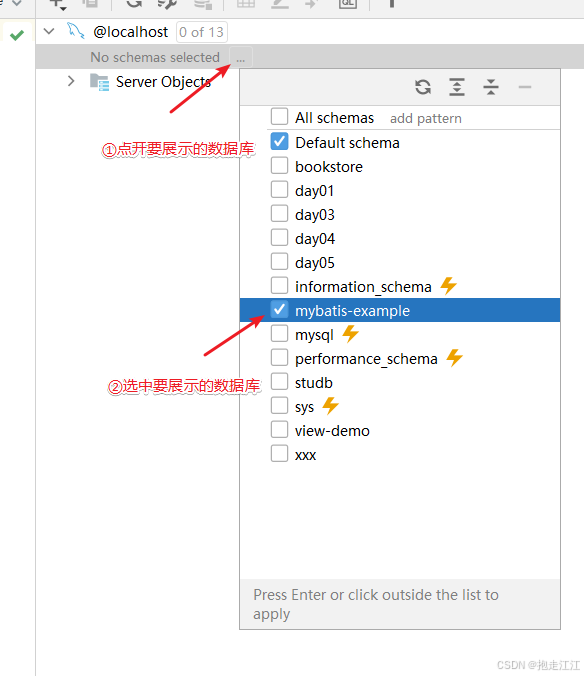
MyBatisX 是一个 MyBatis 的代码生成插件,可以通过简单的配置和操作快速生成 MyBatis Mapper、pojo 类和 Mapper.xml 文件。
步骤:
① 安装插件

② 使用 IntelliJ IDEA连接数据库
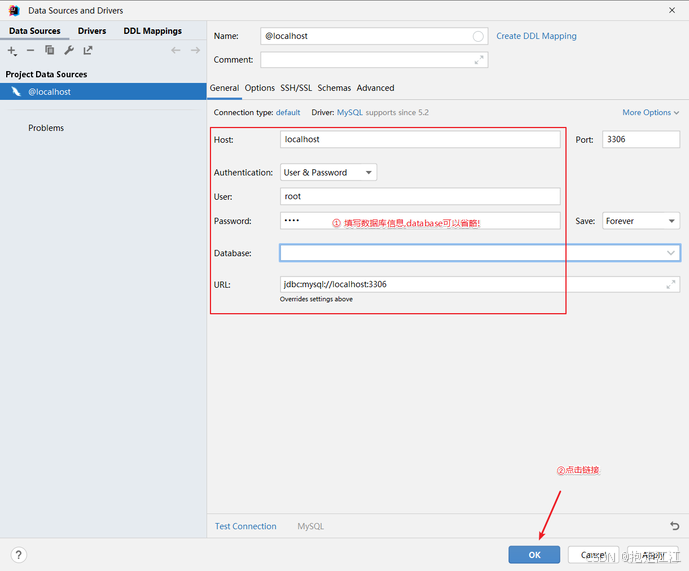
a. 连接数据库

b. 填写信息
c. 展示库表
d. 逆向工程使用


③ 查看生成结果

注意:逆向工程插件 MybatisX 只能生成单表 crud 的操作,多表查询依然需要我们自己编写!
-
相关阅读:
【Linux进程篇】进程地址空间
从lc560“和为 K 的子数组“带你认识“前缀和+哈希表“的解题思路
论文阅读【3】Efficient Estimation of Word Representations in Vector Space
rust &String 和 &str 区别
linux-sed命令使用方法记录
Cyanine5-N3细胞成像和显微镜CY5-N3/azide星戈瑞
luogu-P1462 通往奥格瑞玛的道路 && ybt-修建道路【最短路+二分】
docker 中给命令起别名
Bubble Fish Park
C++类与结构体、this指针(二)
- 原文地址:https://blog.csdn.net/xpy2428507302/article/details/142068272