-
HAProxy理论+实验
目录
一、基于cookie的会话保持
cookie value:为当前server指定cookie值,实现基于cookie的会话黏性,相对于基于 source 地址hash 调度算法对客户端的粒度更精准,但同时也加大了haproxy负载,目前此模式使用较少,已经被session共享服务器代替
注意:不支持 tcp mode,使用 http mode
1、配置选项
cookie name [rewrite | insert l prefix ][ indirect ][ nocache ][ postonly ] [preserve ][httponly][secure ][ domain ]*[ maxidle] [ maxlife ]name cookie的key名称,用于实现持久连接
insert 插入新的cookie,默认不插入cookie
indirect 如果客户端已经有cookie,则不会再发送cookie信息
nocache 当client和hapoxy之间有缓存服务器(如:CDN)时,不允许中间缓存器缓存cookie,因为这会导致很多经过同一个CDN的请求都发送到同一台后端服务器2、配置示例
- [root@haproxy ~]# dnf install haproxy -y
- [root@webserver1 ~]# dnf install nginx -y
- [root@webserver2 ~]# dnf install nginx -y
- [root@webserver1 ~]# echo webserver1 -- 172.25.254.10 > /usr/share/nginx/html/index.html
- [root@webserver1 ~]# systemctl enable --now nginx
- [root@webserver2 ~]# echo webserver2 -- 172.25.254.20 > /usr/share/nginx/html/index.html
- [root@webserver2 ~]# systemctl enable --now nginx
3、验证cookie信息
- [root@haproxy ~]# vim /etc/haproxy/haproxy.cfg
- [root@haproxy ~]# systemctl restart haproxy.service


curl访问时指定cookie

二、IP透传
web服务器中需要记录客户端的真实IP地址,用于做访问统计、安全防护、行为分析等场景。
IP透传需用到forwardfor参数
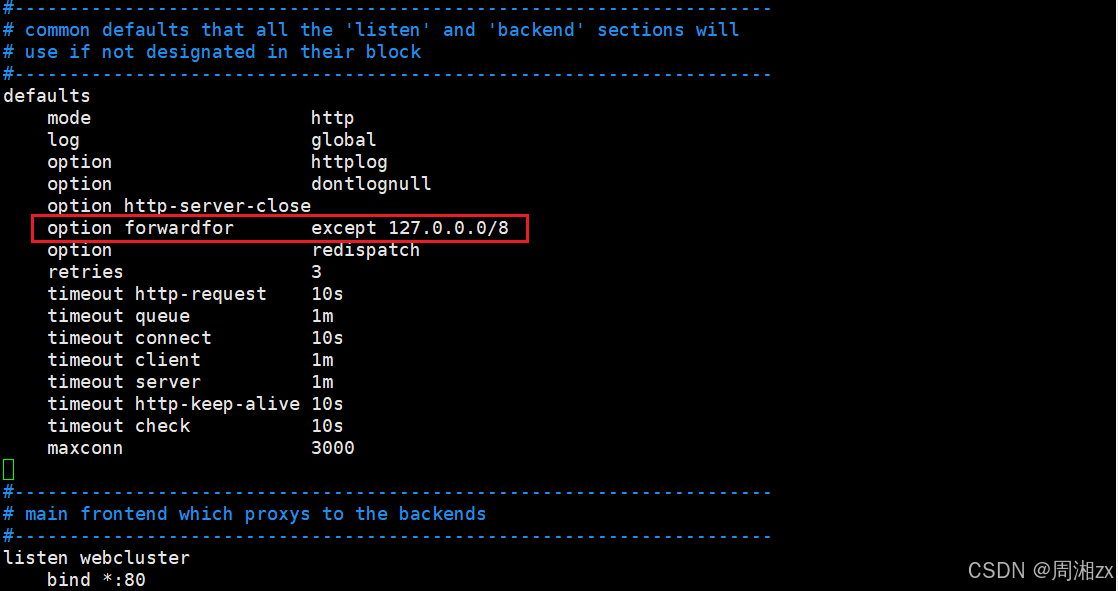
nginx可直接看到IP透传的效果,apache需添加参数才可看到
- echo webserver1 - 172.25.254.10 > /var/www/html/index.html
- systemctl start httpd
- cat /etc/httpd/logs/access_log # 未添加参数时,看不到真实地址
- vim /etc/httpd/conf/httpd.conf # 主配置文件,添加 {X-Forwarded-For}

1、layer4 与 layer7
(1)四层:IP+PORT转发
mode tcp
在四层负载设备中,把client发送的报文目标地址(原来是负载均衡设备的IP地址),根据均衡设备设置的选择web服务器的规则选择对应的web服务器IP地址,这样client就可以直接跟此服务器建立TCP连接并发送数据,而四层负载自身不参与建立连接,而和LVS不同,haproxy是伪四层负载均衡,因为haproxy需要分别和前端客户端及后端服务器建立连接


(2)七层:协议+内容交换
mode http
七层负载均衡服务器起了一个反向代理服务器的作用,服务器建立一-次TCP连接要三次握手,而client要访问Web Server要先与七层负载设备进行三次握手后建立TCP连接,把要访问的报文信息发送给七层负载均衡;然后七层负载均衡再根据设置的均衡规则选择特定的 Web Server,然后通过三次握手与此台Web Server建立TCP连接,然后Web Server把需要的数据发送给七层负载均衡设备,负载均衡设备再把数据发送给client;所以,七层负载均衡设备起到了代理服务器的作用,七层代理需要和Client和后端服务器分别建立连接
三、haproxy的ACL应用
访问控制列表ACL,Access Control Lists
是一种基于包过滤的访问控制技术
它可以根据设定的条件对经过服务器传输的数据包进行过滤(条件匹配)即对接收到的报文进行匹配和过滤,基于请求报文头部中的源地址、源端口、目标地址、目标端口、请求方法、URL、文件后缀等信息内容进行匹配并执行进一步操作,比如允许其通过或丢弃。1、ACL配置选项
- #用ac1来定义或声明一个ac1
- acl <aclname> <criterion> [flags] [operator] [<value>]
- acl 名称 匹配规范 匹配模式 具体操作符 操作对象类型
(1)名称
acl image_service hdr_dom(host) -i img.magedu.com
#ACL名称,可以使用大字母A-Z、小写字母a-z、数字0-9、冒号:、点·、中横线和下划线,并且严格区分大小写。(2)匹配规范
定义ACL匹配规范,即:判断条件
- hdr string 提取在一个HTTP请求报文的首部
- hdr([<name> [,<occ>]]) 完全匹配字符串,header的指定信息,<occ>表示在多值中使用的值的出现次数
- hdr_beg([<name> [,<occ>]]) 前缀匹配,header中指定匹配内容的begin
- hdr_end[<name> [,<occ>]]) 后缀匹配,header中指定匹配内容end
- hdr_dom([<name> [,<occ>]]) 域匹配,header中的domainname(host)
- hdr_dir([<name> [,<0CC>]]) 路径匹配,header的uri路径
- hdr_len([<name> [,<0CC>]]) 长度匹配,header的长度匹配
- hdr_reg([<name> [,<occ>]]) 正则表达式匹配,自定义表达式(regex)模糊匹配
- hdr_sub([<name> [,<occ>]]) 子串匹配,header中的uri模糊匹配 模糊匹配
- #示例:
- hdr(<string>) 用于测试请求头部首部指定内容
- hdr_dom(host) 请求的host名称,如www.zx.org
- hdr_beg(host) 请求的host开头,如www. img. video. download. ftp.
- hdr_end(host) 请求的host结尾,如.com. net .cn
- [root@haproxy ~]# vim /etc/haproxy/haproxy.cfg
- [root@haproxy ~]# systemctl restart haproxy.service

在Windows C:\Windows\System32\drivers\etc\hosts里添加解析


基于域名的访问(有域名解析)

- base :string
- #返回第一个主机头和请求的路径部分的连接,该请求从主机名开始,并在问号之前结束,对虚拟主机有用<scheme>://<user>:<password>@#<host>:<port>/<path>;<params>#?<query>#<frag>
- base :exact string match
- base_beg:prefix match
- base_dir:subdir match
- base dom:domain match
- base end:suffix match
- base len:length match
- base_reg:regex match
- base sub:substring match
- pathstring
- #提取请求的URL路径,该路径从第一个斜杠开始,并在问号之前结束(无主机部分)
- <scheme>://<user>:<password>@<host>:<port>#/<path>;<params>#?<query>#<frag>
- path :exact string match
- path_beg :prefix match #请求的URL开头,如/static、/images、/img、/css
- path end :suffix match #请求的URL中资源的结尾,如gif.png.cssjs.jpg .jpeg
- path_dom:domain match
- path_dir:subdir match
- path len:length match
- path_reg:regex match
- path_sub:substring match
- url :string
- #提取请求中的整个URL。一个典型的应用是具有预取能力的缓存,以及需要从数据库聚合多个信息并将它们保存在缓存中的网页门户入口,推荐使用path
- url:exact string match
- url beg :prefix match
- url_dir :subdir match
- url_dom :domain match
- url_end : suffix match
- ur1_len :length match
- url_reg :regex match
- url_sub :substring match
- dst #目标IP
- dst_port #目标PORT
- Src #源IP
- src_port #源PORT
(3)匹配模式
-i 不区分大小写
-m 使用指定的正则表达式匹配方法-n 不做DNS解析
-u 禁止ac1重名,否则多个同名ACL匹配或关系(4)具体操作符
整数比较:eq、ge、gt、le、lt
字符比较:
-exact match (-m str):字符串必须完全匹配模式
-substring match (-m sub):在提取的字符串中查找模式,如果其中任何一个被发现,ACL将匹配- prefix match (-m beg):在提取的字符串首部中查找模式,如果其中任何一个被发现,ACL将匹配
- suffix match (-m end):将模式与提取字符串的尾部进行比较,如果其中任何一个匹配,则ACL进行匹配
- subdir match (-m dir):查看提取出来的用斜线分隔(“/")的字符串,如其中任一个匹配,则ACL进行匹配
-domain match (-m dom):查找提取的用点(“.")分隔字符串,如果其中任何一个匹配,则ACL进行匹配(5)操作对象
- The AcL engine can match these types against patterns of the following types :
- -Boolean #布尔值
- -integer or integer range #整数或整数范围,比如用于匹配端口范围
- -IP address /network #IP地址或IP范围,192.168.0.1,192.168.0.1/24
- -string-->zx.org
- exact #精确比较
- substring #子串
- suffix #后缀比较
- prefix #前缀比较
- subdir #路径,/wp-includes/js/jquery/jquery.js
- domain #域名,www.timinglee.org
- -regular expression #正则表达式
- -hex block #16进制
2、多个ACL的组合调用方式
(1)多个ACL的逻辑处理
与:隐式(默认)使用
或:使用“or”或“|"表示
否定:使用"!”表示
(2)多个ACL调用方式
if valid_src valid_port #与关系,ACL中A和B都要满足为true,默认为与
if invalid_src || valid_port #或,ACL中A或者B满足一个为true
if !invalid src #非,取反,不满足ACL才为true四、自定义HAProxy错误界面
关闭后端的RS主机然后用浏览器去访问172.25.254.100
- [root@haproxy ~]# vim /etc/haproxy/haproxy.cfg
- [root@haproxy ~]# systemctl restart haproxy.service


五、基于HTTP重定向错误页面
浏览器访问172.25.254.100自动跳转到百度

六、HAProxy四层负载
如果使用frontend和backend,一定在 frontend 和 backend 段中都指定mode tcp
- listen mysql—port
- bind *:3306
- mode tcp
- balance leastconn
- server web1 172.25.254.10:3306 check
- server web2 172.25.254.20:3306 check backup
- 或者使用frontend和backend实
- frontend mysql_port
- bind :3306
- mode tcp
- use_backend mysqi_rs
- backend mysql_rs
- mode tcp
- balance leastconn
- server web1 172.25.254.10:3306 check
- server web2 172.25.254.20:3306 check
在后端服务器安装和配置mariadb服务
yum install mariadb-server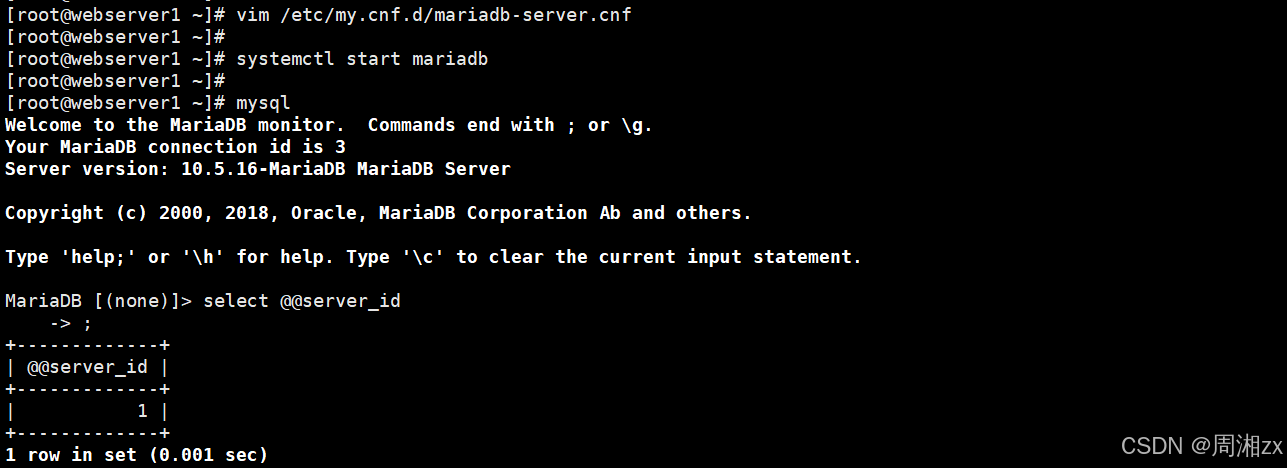

在另一台主机webserver2也做同样设置,将server-id设为2
- [root@webserver1 ~]# mysql -e "grant all on *.* to zx@'%' identified by 'zx';"
- [root@webserver2 ~]# mysql -e "grant all on *.* to zx@'%' identified by 'zx';"
[root@webserver1 ~]# mysql -uzx -pzx -h 172.25.254.100 -e "show variables like 'hostname'"七、HAPRoxy https实现
haproxy可以实现https的证书安全,从用户到haproxy为https,从haproxy到后端服务器用http通信但基于性能考虑,生产中证书都是在后端服务器比如nginx上实现
1、证书制作
- [root@haproxy ~]# mkdir -p /etc/haproxy/certs
- [root@haproxy ~]# openssl req -newkey rsa:2048 --nodes -sha256 -keyout /etc/haproxy/certs/zx.org.key -x509 -days 365

2、https配置
- frontend webserver
- bind *:80
- redirect scheme https if!{ssl_fc }
- mode http
- use backend webcluster
- frontend webserver-https
- bind *:443 ssl crt/etc/haproxy/certs/zx.pem
- mode http
- use_backend webcluster
- backend webcluster
- mode http
- balance roundrobin
- server webl 172.25.254.10:80 check inter 3s fall 3 rise 5
- server web2 172.25.254.20:80 check inter 3s fall 3 rise 5
[root@haproxy ~]# curl -IKL https://172.25.254.100 -
相关阅读:
数学分析_笔记_第3章:极限
MyBatis笔记——参数处理
时序分析 47 -- 时序数据转为空间数据 (六) 马尔可夫转换场 python 实践(中)
flink异常
动态代理是什么?应用场景在哪?
Jenkins+Gitee+Docker+Ruoyi项目前后端分离部署
c++ Qt 网络连接
表面富集季胺盐交联/多乙烯多胺接枝改性/甲基咪唑氯修饰聚苯乙烯微球的研究和制备
国产化Kettle、JDK、MySQL下载安装操作步骤
重制版 day 17 正则表达式
- 原文地址:https://blog.csdn.net/weixin_68256171/article/details/141094258