-
韦东山嵌入式linux系列-具体单板的 LED 驱动程序
笔者使用的是STM32MP157的板子
1 怎么写 LED 驱动程序?
详细步骤如下:
① 看原理图确定引脚,确定引脚输出什么电平才能点亮/熄灭 LED
② 看主芯片手册,确定寄存器操作方法:哪些寄存器?哪些位?地址是?
③ 编写驱动:先写框架,再写硬件操作的代码注意:在芯片手册中确定的寄存器地址被称为物理地址,在 Linux 内核中无法直接使用。
需要使用内核提供的 ioremap 把物理地址映射为虚拟地址,使用虚拟地址。
ioremap 函数的使用:
- #include
- void __iomem *ioremap(resource_size_t res_cookie, size_t size);
把物理地址 phys_addr 开始的一段空间(大小为 size),映射为虚拟地址;返回值是该段虚拟地址的首地址。
实际上,它是按页(4096 字节)进行映射的,是整页整页地映射的。
假设 phys_addr = 0x10002, size=4, ioremap 的内部实现是:
a) phys_addr 按页取整,得到地址 0x10000
b) size 按页取整,得到 4096
c) 把起始地址 0x10000,大小为 4096 的这一块物理地址空间,映射到虚拟地址空间,
假设得到的虚拟空间起始地址为 0xf0010000
d) 那么 phys_addr = 0x10002 对应的 virt_addr = 0xf0010002
③ 不再使用该段虚拟地址时,要 iounmap(virt_addr):void iounmap(volatile void __iomem *cookie);为什么有ioremap,这里解释的很清楚了。
同一个程序,同时运行2次,在内存中有两份代码,他们地址是不同的,但是打印出来的结果是一样的(虚拟地址),主要是MMU(内存管理单元)在起作用,完成物理地址到虚拟地址的转换。
感怪怪的,图中代码是全局变量


根据进程号转换成不同的物理地址。MMU将物理地址映射成虚拟地址,内核通过虚拟地址访问uart等硬件。
2 修改
修改之期的led_operations结构体,由它控制点灯的个数
led_operations.h
- #ifndef LED_OPERATIONS_H
- #define LED_OPERATIONS_H
- struct led_operations {
- int num; // 灯的数量
- int (*init) (int which); // 初始化LED,which是哪一个LED
- int (*ctl) (int which, char status); // 控制LED,which-哪一个LED,status-1亮,0灭
- };
- // 返回结构体指针
- struct led_operations* get_board_led_operations(void);
- #endif
stmp32mp157.c
(主要框架还是board_demo.c的,结合了之前的 韦东山嵌入式linux系列-LED驱动程序-CSDN博客)
- #include
- #include
- #include
- #include
- #include
- #include
- #include
- #include
- #include
- #include
- #include
- #include
- #include "led_operations.h"
- // 不能使用物理地址,需要映射
- // 1寄存器
- // RCC_PLL4CR地址:0x50000000 + 0x894,提供时钟的
- static volatile unsigned int* RCC_PLL4CR;
- // 2使能GPIOA本身
- // RCC_MP_AHB4ENSETR地址:0x50000000 + 0xA28
- static volatile unsigned int* RCC_MP_AHB4ENSETR;
- // 3设置引脚为输出模式
- // GPIOA_MODER地址:0x50002000 + 0x00,设置bit[21:20]=0b01,用于输出模式
- static volatile unsigned int* GPIOA_MODER;
- // 4设置输出电平
- // 方法2:直接写寄存器,一次操作即可,高效
- // GPIOA_BSRR地址: 0x50002000 + 0x18
- static volatile unsigned int* GPIOA_BSRR;
- // init函数-配置引脚,把引脚配置成GPIO输出功能
- static int board_demo_led_init(int which)
- {
- printk("%s %s line %d, led %d\n", __FILE__, __FUNCTION__, __LINE__, which);
- // 之前没有映射,就映射
- if (!RCC_PLL4CR)
- {
- // 驱动程序访问硬件,必须先ioremap,在这里映射,映射的是一页4k的地址,参考
- // ioremap(base_phy, size);
- // 1寄存器
- // RCC_PLL4CR地址:0x50000000 + 0x894,提供时钟的
- // static volatile unsigned int* RCC_PLL4CR;
- RCC_PLL4CR = ioremap(0x50000000 + 0x894, 4);
- // 2使能GPIOA本身
- // RCC_MP_AHB4ENSETR地址:0x50000000 + 0xA28
- // static volatile unsigned int* RCC_MP_AHB4ENSETR;
- RCC_MP_AHB4ENSETR = ioremap(0x50000000 + 0xA28, 4);
- // 3设置引脚为输出模式
- // GPIOA_MODER地址:0x50002000 + 0x00,设置bit[21:20]=0b01,用于输出模式
- // static volatile unsigned int* GPIOA_MODER;
- GPIOA_MODER = ioremap(0x50002000 + 0x00, 4);
- // 4设置输出电平
- // 方法2:直接写寄存器,一次操作即可,高效
- // GPIOA_BSRR地址: 0x50002000 + 0x18
- // static volatile unsigned int* GPIOA_BSRR;
- GPIOA_BSRR = ioremap(0x50002000 + 0x18, 4);
- }
- // 初始化引脚
- if (which == 0)
- {
- // 使能PLL4,是所有GPIO的时钟
- *RCC_PLL4CR |= (1 << 0); // 设置bit0为1
- while ((*RCC_PLL4CR & (1 << 1)) == 0); // 如果bit1一直为0的话,就等待
- // 使能GPIOA
- *RCC_MP_AHB4ENSETR |= (1 << 0); // 1左移0位
- // 将GPIOA的第十个引脚配置成GPIO
- // 配置GPIO是输出模式,只有用户程序open的时候,才表示要使用这个引脚,这个时候再配置引脚
- *GPIOA_MODER &= ~(3 << 20); // 清零 11左移20位,取反,
- *GPIOA_MODER |= (1 << 20); // 20位设置成1,配置成01,输出模式
- }
- return 0;
- }
- // ctl函数-通过参数把引脚设置成高/低电平
- static int board_demo_led_ctl(int which, char status)
- {
- printk("%s %s line %d, led %d, %s\n",
- __FILE__, __FUNCTION__, __LINE__, which, status ? "on" : "off");
- // 设置高/低电平
- if (which == 0)
- {
- // 设置GPIOA10寄存器1/0
- if (status)
- {
- // 设置led on,让引脚输出低电平
- *GPIOA_BSRR = (1 << 26); // 1左移26
- }
- else
- {
- // 设置led off,让引脚输出高电平
- *GPIOA_BSRR = (1 << 10); // 1左移10
- }
- }
- return 0;
- }
- // 加一个num属性
- static struct led_operations board_demo_led_operations = {
- .num = 1,
- .init = board_demo_led_init,
- .ctl = board_demo_led_ctl,
- };
- // 返回结构体
- struct led_operations* get_board_led_operations(void)
- {
- return &board_demo_led_operations;
- }
led_drv.c
- /*************************************************************************
- > File Name: led.drv.c
- > Author: Winter
- > Created Time: Sun 07 Jul 2024 12:35:19 AM EDT
- ************************************************************************/
- #include
- #include
- #include
- #include
- #include
- #include
- #include
- #include
- #include
- #include
- #include
- #include
- #include
- #include
- #include
- #include "led_operations.h"
- // #define LED_NUM 2
- // 1确定主设备号,也可以让内核分配
- static int major = 0; // 让内核分配
- static struct class *led_class;
- struct led_operations* p_led_operations;
- #define MIN(a, b) (a < b ? a : b)
- // 3 实现对应的 drv_open/drv_read/drv_write 等函数,填入 file_operations 结构体
- static ssize_t led_drv_read (struct file *file, char __user *buf, size_t size, loff_t *offset)
- {
- printk("%s %s line %d\n", __FILE__, __FUNCTION__, __LINE__);
- return 0;
- }
- // write(fd, &val, 1);
- static ssize_t led_drv_write (struct file *file, const char __user *buf, size_t size, loff_t *offset)
- {
- int err;
- char status;
- struct inode* node;
- int minor;
- printk("%s %s line %d\n", __FILE__, __FUNCTION__, __LINE__);
- // 把用户区的数据buf拷贝到内核区status,即向写到内核status中写数据
- err = copy_from_user(&status, buf, 1);
- // 根据次设备号和status控制LED
- node = file_inode(file);
- minor = iminor(node);
- p_led_operations->ctl(minor, status);
- return 1;
- }
- static int led_drv_open (struct inode *node, struct file *file)
- {
- int minor;
- printk("%s %s line %d\n", __FILE__, __FUNCTION__, __LINE__);
- // 得到次设备号
- minor = iminor(node);
- // 根据次设备号初始化LED
- p_led_operations->init(minor);
- return 0;
- }
- static int led_drv_close (struct inode *node, struct file *file)
- {
- printk("%s %s line %d\n", __FILE__, __FUNCTION__, __LINE__);
- return 0;
- }
- // 2定义自己的 file_operations 结构体
- static struct file_operations led_drv = {
- .owner = THIS_MODULE,
- .open = led_drv_open,
- .read = led_drv_read,
- .write = led_drv_write,
- .release = led_drv_close,
- };
- // 4把 file_operations 结构体告诉内核: register_chrdev
- // 5谁来注册驱动程序啊?得有一个入口函数:安装驱动程序时,就会去调用这个入口函数
- static int __init led_init(void)
- {
- int err, i;
- printk("%s %s line %d\n", __FILE__, __FUNCTION__, __LINE__);
- // 注册led_drv,返回主设备号
- major = register_chrdev(0, "winter_led", &led_drv); /* /dev/led */
- // 创建class
- led_class = class_create(THIS_MODULE, "led_class");
- err = PTR_ERR(led_class);
- if (IS_ERR(led_class)) {
- printk("%s %s line %d\n", __FILE__, __FUNCTION__, __LINE__);
- unregister_chrdev(major, "led_class");
- return -1;
- }
- // 入口函数获得结构体指针
- p_led_operations = get_board_led_operations();
- // 创建device
- // 根据次设备号访问多个LED
- // device_create(led_class, NULL, MKDEV(major, 0), NULL, "winter_led0"); /* /dev/winter_led0 */
- // device_create(led_class, NULL, MKDEV(major, 1), NULL, "winter_led1"); /* /dev/winter_led1 */
- for (i = 0; i < p_led_operations->num; i++)
- {
- device_create(led_class, NULL, MKDEV(major, i), NULL, "winter_led%d", i);
- }
- return 0;
- }
- // 6有入口函数就应该有出口函数:卸载驱动程序时,出口函数调用unregister_chrdev
- static void __exit led_exit(void)
- {
- int i;
- printk("%s %s line %d\n", __FILE__, __FUNCTION__, __LINE__);
- for (i = 0; i < p_led_operations->num; i++)
- {
- device_destroy(led_class, MKDEV(major, i));
- }
- class_destroy(led_class);
- // 卸载
- unregister_chrdev(major, "winter_led");
- }
- // 7其他完善:提供设备信息,自动创建设备节点: class_create,device_create
- module_init(led_init);
- module_exit(led_exit);
- MODULE_LICENSE("GPL");
led_drv_test.c
- /*************************************************************************
- > File Name: hello_test.c
- > Author: Winter
- > Created Time: Sun 07 Jul 2024 01:39:39 AM EDT
- ************************************************************************/
- #include
- #include
- #include
- #include
- #include
- #include
- /*
- * ./led_drv /dev/winter_led0 on
- * ./led_drv /dev/winter_led0 off
- */
- int main(int argc, char **argv)
- {
- int fd;
- char status;
- /* 1. 判断参数 */
- if (argc < 2)
- {
- printf("Usage: %s
\n" - return -1;
- }
- /* 2. 打开文件 */
- fd = open(argv[1], O_RDWR);
- if (fd == -1)
- {
- printf("can not open file %s\n", argv[1]);
- return -1;
- }
- /* 3. 写文件 */
- if (0 == strcmp(argv[2], "on"))
- {
- status = 1;
- }
- else
- {
- status = 0;
- }
- write(fd, &status, 1);
- close(fd);
- return 0;
- }
Makefile
- # 1. 使用不同的开发板内核时, 一定要修改KERN_DIR
- # 2. KERN_DIR中的内核要事先配置、编译, 为了能编译内核, 要先设置下列环境变量:
- # 2.1 ARCH, 比如: export ARCH=arm64
- # 2.2 CROSS_COMPILE, 比如: export CROSS_COMPILE=aarch64-linux-gnu-
- # 2.3 PATH, 比如: export PATH=$PATH:/home/book/100ask_roc-rk3399-pc/ToolChain-6.3.1/gcc-linaro-6.3.1-2017.05-x86_64_aarch64-linux-gnu/bin
- # 注意: 不同的开发板不同的编译器上述3个环境变量不一定相同,
- # 请参考各开发板的高级用户使用手册
- KERN_DIR = /home/book/100ask_stm32mp157_pro-sdk/Linux-5.4
- all:
- make -C $(KERN_DIR) M=`pwd` modules
- $(CROSS_COMPILE)gcc -o led_drv_test led_drv_test.c
- clean:
- make -C $(KERN_DIR) M=`pwd` modules clean
- rm -rf modules.order
- rm -f led_drv_test
- # 参考内核源码drivers/char/ipmi/Makefile
- # 要想把a.c, b.c编译成ab.ko, 可以这样指定:
- # ab-y := a.o b.o
- # obj-m += ab.o
- # leddrv.c board_demo.c 编译成 100ask.ko
- winter_led-y := led_drv.o stm32mp157.o
- obj-m += winter_led.o
编译
make
3 测试
在开发板挂载 Ubuntu 的NFS目录
mount -t nfs -o nolock,vers=3 192.168.5.11:/home/book/nfs_rootfs/ /mnt将ko文件和测试代码拷贝到挂载目录,安装驱动
insmod winter_led.ko
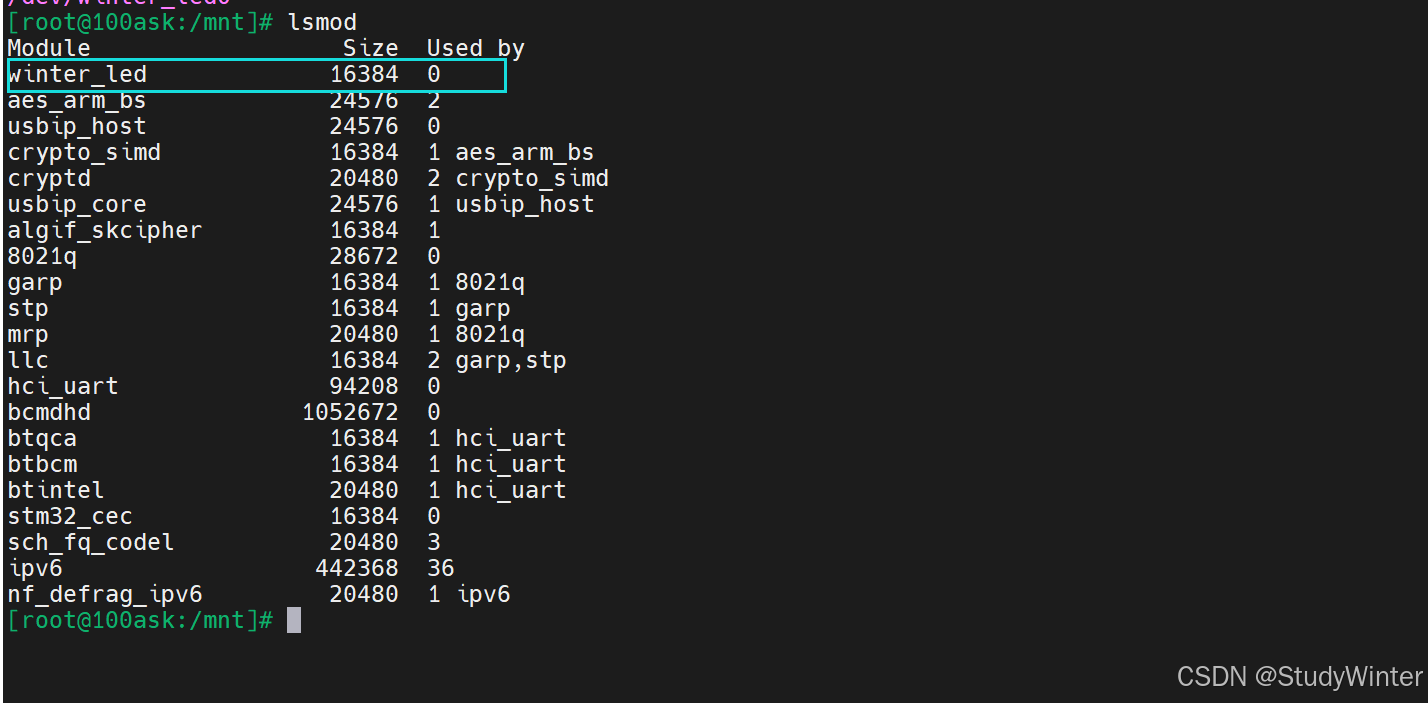
执行测试程序
- ./led_drv_test /dev/winter_led0 on
- ./led_drv_test /dev/winter_led0 off

板子上只有log,关掉【心跳灯】
- ls /sys/class/leds/
- echo none > /sys/class/leds/heartbeat/trigger
再执行on/off就可以看到灯的亮灭了

4 思考
a.在驱动里有 ioremap,什么时候执行 iounmap?请完善程序
答:需要在led_operations.h和stmp32mp157.c中加一个close函数,在close函数中执行iounmap操作,在led_drv.c的close函数中调用。
似乎不太行
b.视频里我们只实现了点一个 LED,修改代码支持两个 LED。
答:需要看原理图和手册,在stmp32mp157.c的init函数中配置引脚和输出高低电平。
-
相关阅读:
SpringMVC文件上传
请求被中止: 未能创建 SSL/TLS 安全通道
【遍历二叉树的非递归算法,二叉树的层次遍历】
数据结构与算法-队列
【CSS】5分钟带你彻底搞懂 W3C & IE 盒模型
SSM框架全套笔记
手机 IOS 软件 IPA 签名下载安装详情图文教程
微信小程序python+nodejs+php+springboot+vue 学习资料销售平台
Qt之读写文件
opengl 学习着色器
- 原文地址:https://blog.csdn.net/Zhouzi_heng/article/details/140397160