-
乾坤微服务的使用
前言:
在这里整理下用乾坤来开发微服务的一些资料。
使用好处:
使用乾坤可以实现什么效果呢?众所周知,前端的框架五花八门,react/vue/angular等各领风骚,那么如果我们有需要把不同技术栈的项目整合起来,应该怎么去做呢?如果统一技术栈进行开发,工作量太大,成本也高,那还能怎么做呢?没错,这就是我们乾坤技术出来的由来,可以通过他把不同的项目进行一个融会贯通,让他们可以实现亲密的联系,又能各自发展。
乾坤的官网地址:点我
乾坤的逻辑流程:
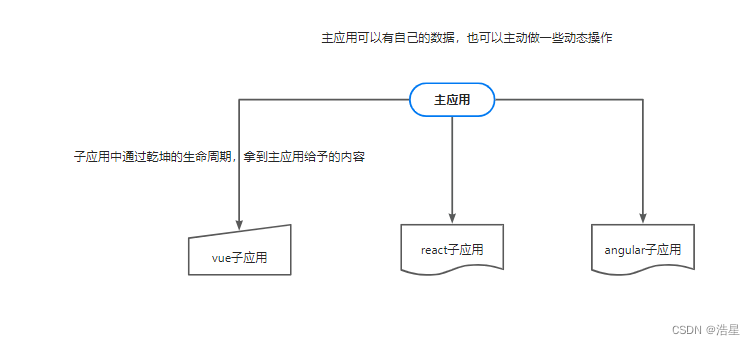
如何去使用:
1、安装
- yarn add qiankun
- npm i qiankun -S
2、主应用的main.js
- // (1)导入乾坤框架
- import { registerMicroApps, start } from "qiankun";
- // (2)注册乾坤子应用
- registerMicroApps([
- {
- name:"sub-application01", //子应用名称
- entry:"//localhost:8001", //子应用入库地址
- container:"#container", //主应用容器
- activeRule:"/sub-application01", //主应用路由匹配规则
- props:{
- token:"sub-application-001"
- } //主应用传递参数
- },
- // {
- // name:"sub-application02",
- // entry:"//localhost:8002",
- // container:"#container",
- // activeRule:"/sub-application02",
- // props:{
- // token:"sub-application-002"
- // }
- // }
- ]);
- //(3)开启乾坤
- start();
3、主应用的配置 initGlobalState(state)
- 参数
- state - Record
- 用法定义全局状态,并返回通信方法,建议在主应用使用,微应用通过 props 获取通信方法
- import { initGlobalState } from 'qiankun';
- // 跨应用共享状态
- const initialState = {
- hasCallPhone: false, // 是否拨打电话
- outsidePhone: '', // 外部电话号码
- isLocal: true, // 是否是本地号码
- channelId: '', // 渠道
- leadsId: '',
- hasSendMsg: false, // 是否发送短信
- maSend: {}, // MA的leadsId,channelId
- hasSendEmail: false, // 是否发送邮件
- contactHistory: false, // 是否展示联系历史
- customerId: '', // 联系历史需要的id,
- newDict: false, // 是否新增字典
- addDictId: '', // 传入字典id
- callDetails: false, // 是否展示通话详情
- channelSessionId: '', // 通话详情需要的id
- urgentObj: null, // 获取紧急程度
- socketCallback: null,
- taskList: [],
- isCustomerEdit: false, // 是否可以编辑客户
- trendsLayout: [], // 客户表单
- dynamicFields: [], // 动态字段
- fixedFieldsComponent: [], // 固定字段
- operateType: '', // 操作方式,是新增还是编辑
- callerName: '', // 主叫号人员名称
- calledName: '', // 被叫号人员名称
- roomNumber: '', // csp呼叫房间
- softPhone: {
- curOperate: '', // 呼叫状态
- hasSipConnected: false, // 电话连接状态
- mediaAvailabled: false, // 音频媒体
- webrtcConfig: {}, // 初始化连接webrtc配置
- },
- imPageNoticeInfo: {}, // 内部聊天页面通知相关数据
- iqcPageNoticeInfo: {}, // 内部支持页面通知相关数据
- reconnectCallback: null, // 内部支持断网重连回调
- reconnectImCallback: null, // IM
- callVoiceCallback: null,
- callVoiceInfo: {},
- goConversation: false, // 通讯录跳转
- };
- const actions = initGlobalState(initialState);
- export default actions;
4、主应用中手动加载微应用的方式:
- import { loadMicroApp } from 'qiankun';
- let leftMicroApp = null;
- 方法内部:
- leftMicroApp = loadMicroApp({
- name: 'crm_core',
- entry: '//localhost:9011',
- container: '#wrapper__right',
- props: {
- path: 'customerTabs',
- },
- });
- //组件销毁,调用子应用的 unmount方法
- destroyed() {
- leftMicroApp.unmount()
- },
5、子应用中
1、新建文件:public-path.ts/ public-path. js
- /* eslint-disable camelcase */
- if (window.__POWERED_BY_QIANKUN__) {
- __webpack_public_path__ = window.__INJECTED_PUBLIC_PATH_BY_QIANKUN__
- }
2、main.ts/main.js
- import './core/public-path'
- // vue3中写法
- const __qiankun__ = window.__POWERED_BY_QIANKUN__
- __qiankun__ || render()
- // vue2中写法
- //创建子应用渲染函数
- function render(props = {}) {
- const { container } = props;
- router = new VueRouter({
- base: window.__POWERED_BY_QIANKUN__ ? '/app-vue/' : '/',
- mode: 'history',
- routes,
- });
- instance = new Vue({
- router,
- render: (h) => h(App),
- }).$mount(container ? container.querySelector('#app') : '#app');
- };
- // 独立运行时
- if (!window.__POWERED_BY_QIANKUN__) {
- render();
- };
3、打包配置,vue.config.js
- configureWebpack: {
- output: {
- library: `${name}-[name]`,
- libraryTarget: 'umd', // 把微应用打包成 umd 库格式
- jsonpFunction: `webpackJsonp_${name}`,
- filename: 'static/js/[hash:8].bundle.js'
- },
- },
6、微应用不需要额外安装任何其他依赖即可接入 qiankun 主应用。
微应用需要在自己的入口 js (通常就是你配置的 webpack 的 entry js) 导出 bootstrap、mount、unmount 三个生命周期钩子,以供主应用在适当的时机调用。
生命周期钩子封装
- /**
- * bootstrap 只会在微应用初始化的时候调用一次,下次微应用重新进入时会直接调用 mount 钩子,不会再重复触发 bootstrap。
- * 通常我们可以在这里做一些全局变量的初始化,比如不会在 unmount 阶段被销毁的应用级别的缓存等。
- */
- export async function bootstrap() {
- console.log('react app bootstraped');
- }
- /**
- * 应用每次进入都会调用 mount 方法,通常我们在这里触发应用的渲染方法
- */
- export async function mount(props) {
- }
- /**
- * 应用每次 切出/卸载 会调用的方法,通常在这里我们会卸载微应用的应用实例
- */
- export async function unmount(props) {
- }
- /**
- * 可选生命周期钩子,仅使用 loadMicroApp 方式加载微应用时生效
- */
- export async function update(props) {
- console.log('update props', props);
- }
个人项目中用法:
main.ts
- import './core/public-path'
- import { lifeCycle, render } from './core/life-cycle'
- const { bootstrap, mount, unmount } = lifeCycle()
- export { bootstrap, mount, unmount }
- const __qiankun__ = window.__POWERED_BY_QIANKUN__
- __qiankun__ || render()
life-cycle.ts
- ...
- /**
- * 微应用生命周期
- */
- const lifeCycle = (): { [key: string]: (props?: qkProps) => Promise<void> } => {
- return {
- async bootstrap(props) {
- console.log(`bootstrap props: ${props}`);
- },
- async mount(props) {
- console.log(`mount props: ${props}`);
- if (props) {
- // 生成动态路由
- const availRoutes = assyAvailRoutes(props.menuLists, 1, "", APP_NAME);
- // 扁平化菜单树
- const flatMenus = flatMenuTree(props.menuLists);
- // 将菜单树、动态路由、扁平菜单树存入全局状态中
- store.commit("user/SET_MENUS", { menuLists: props.menuLists, availRoutes, flatMenus });
- // 将角色列表存入全局状态中
- store.commit("user/SET_ROLES", props.roles);
- store.commit("user/SET_USERINFO", props.userInfo);
- const routes = selfRoutes.concat(availRoutes);
- props.routes = routes;
- store.commit("chat/SET_SINGLE_CONFIG_EVO", []);
- // 如果开启内部聊天语音通话时获取有没有语音聊天权限
- if (matchFuncConfig("INTERNALCHAT_SOFTPHONE_ACTIVE") && store.state.chat.singleConfigEvo.length === 0) {
- getSingleMyConfigs();
- }
- // props.functions.sendOrder({
- // message: {
- // type: 'typing',
- // sendUserId: '',
- // groupType: ''
- // }
- // });
- actions.setActions(props);
- actions.setGlobalState({
- socketCallback: (data: any, extraParams: any) => {
- store.commit("chat/SET_SOCKET_MAINAPP_PARAMS", extraParams);
- const { namespace } = extraParams;
- // 接收到父应用分发的消息,进行处理
- if (namespace === "im") {
- if (data.type === spm.ON_PING) {
- imDispatchMessage({ messageType: cmd.SOCKET_PING });
- } else {
- imDispatchMessage({
- messageType: enumMsg[data.messageType],
- message: data.message,
- });
- }
- }
- if (namespace === "iqc") {
- if (data.type === spm.ON_PING) {
- iqcDispatchMessage({ messageType: cmd.SOCKET_PING });
- } else {
- iqcDispatchMessage({
- messageType: enumMsg[data.messageType],
- message: data.message,
- });
- }
- }
- },
- // 断网重连回调
- reconnectCallback: () => {
- store.commit("internal/SET_RECONNECTED_COUNT");
- },
- // 断网重连回调
- reconnectImCallback: (networkStatus:string) => {
- utilHelper.handleDisconnectOrOnreconnected(networkStatus)
- console.log('##################执行reconnectImCallback',networkStatus);
- },
- });
- }
- await render(props);
- },
- async unmount() {
- // 关闭所有的页面通知实例
- const { pageNoticeInstances = {} } = store.state.chat;
- const instanceKeys = Object.keys(pageNoticeInstances);
- forEach(instanceKeys, (key) => {
- const notifyInstance = pageNoticeInstances[key];
- notifyInstance.close();
- });
- console.log("unmount props");
- instance.unmount();
- instance = null;
- router = null;
- },
- async update(props) {
- console.log(`update props: ${props}`);
- },
- };
- };
- async function render(props?: qkProps): Promise<void> {
- let basePath = "";
- // 如果是生产环境
- if (process.env.NODE_DEV === "production") {
- // 如果是子应用,使用二级域名前缀,反之使用带internalPortal三级域名
- basePath = __qiankun__ ? `/${APP_NAME}` : `/internalPortal/${APP_KEY}/`;
- } else {
- // 如果非生产环境,并且不是子应用,
- basePath = __qiankun__ ? `/${APP_NAME}` : "/";
- }
- // 初始化固定路由
- let routes = selfRoutes;
- if (__qiankun__) {
- // 如果是微应用,则使用主应用传递的路由集合
- if (props?.routes) routes = props?.routes;
- } else if (store.state.user.accessToken) {
- // 如果没有授权令牌
- // 请求菜单树,非子应用时不控制权限
- const response: AxiosResponse = await axiosSingle(getCompleteTree(), false);
- if (response.data.length > 0) {
- // 获取当前子应用相关的菜单
- let menuLists = response.data[0].children.filter((item: IMenu) =>
- includes(["conversation", "organization"], item.i18n)
- );
- // 递归生成菜单
- menuLists = recurseTree(menuLists, "");
- if (menuLists.length) {
- // 生成动态路由
- const availRoutes = assyAvailRoutes(menuLists, 1, "", APP_NAME);
- // 扁平化菜单树
- const flatMenus = flatMenuTree(menuLists);
- // 将菜单树、动态路由、扁平菜单树存入全局状态中
- store.commit("user/SET_MENUS", { menuLists, availRoutes, flatMenus });
- // 叠加固定路由和动态路由
- // routes = selfRoutes.concat(availRoutes)
- selfRoutes[0].children = availRoutes;
- routes = selfRoutes;
- }
- }
- }
- router = createRouter({
- history: createMemoryHistory(basePath),
- routes,
- });
- instance = createApp(App).use(router).use(store).use(i18n).use(plugin, { imports: [] });
- // 全局注册El组件
- components.forEach((item) => {
- if (item) instance.use(item);
- });
- // 全量导入El图标
- for (const key in Icons) {
- if (Reflect.has(Icons, key)) {
- instance.component(key, Icons[key]);
- }
- }
- // 注册按钮授权指令
- instance.use(authDirective);
- // 注册按钮授权全局方法
- instance.config.globalProperties.$vAuth = function (key: any) {
- return directiveAuth(this, key);
- };
- instance.use(draggable);
- instance.mount(props?.container ? props.container.querySelector("#appInternalChat") : "#appInternalChat");
- // instance.use(VueVirtualScroller);
- // instance.component('DynamicScroller', VueVirtualScroller.DynamicScroller)
- // 前置路由守卫
- router.beforeEach(async (to: any, from: any) => {
- if (!__qiankun__) {
- // 1 如果不是子应用
- if (store.state.user.accessToken) {
- if (!store.state.user.userInfo) {
- const infoConfig = configRequest(`${GlobalConfig.API_HRMS_URL}/employee/current`, httpMethod.GET);
- const response1 = await axiosSingle(infoConfig);
- const userInfo = response1.data;
- store.commit("user/SET_USERINFO", userInfo);
- // 1.1 如果有授权令牌
- if (to.path === "/login") {
- // 1.1.1 如果访问页面为登录页,则跳转到首页
- return "/";
- } else if (to.matched.length) {
- // 1.1.2 如果有匹配的路由,则进行跳转
- return true;
- } else {
- // 1.1.3 如果找不到匹配路由,则跳转到未授权报错页面
- // next({ path: '/403', replace: true })
- return false;
- }
- }
- } else if (to.path === "/login" && to.query.code) {
- // 1.2 如果没有令牌并跳转到登录页,并有授权码
- return true;
- } else {
- // 如果没有令牌并且没有授权码,则跳转到sso进行登录
- signIn();
- }
- } else if (to.matched.length) {
- // 2 如果是子应用,并且有匹配的路由,则进行跳转
- return true;
- } else {
- // 3 如果没有匹配路由,则跳转到未授权报错页面
- // next({ path: '/403', replace: true })
- return false;
- }
- });
- }
- export { lifeCycle, render };
-
相关阅读:
通过电脑查看Wi-Fi密码的方法,提供三种方式
【解决】mysqladmin flush-hosts
单线双线多线服务器有哪些区别
05-prometheus的联邦模式-分布式监控
2022年双十一买哪款蓝牙耳机?学生党值得买的蓝牙耳机推荐
C/C++ 动态规划 算法
GUI-Guider软件使用
计算机专业毕业论文java毕业设计开题报告SSM项目源码实现的在线音乐歌曲网站[包运行成功]
01_SpringSecurity学习之配置HttpSecurity
Linux进程控制【概念 + 代码演示】
- 原文地址:https://blog.csdn.net/qq_41619796/article/details/139805601