[PE2-Vlanif60]
mpls ldp
[PE2-Vlanif60]
quit
上述配置完成后,
PE1
与
P
、
P
与
PE2
之间应能建立
LDP
会话,执行
display mpls ldp
session
命令可以看到显示结果中
Status
项为“
Operational
”。执行
display mpls ldp
lsp
命令,可以看到
LDP LSP
的建立情况。
以
PE1
的显示为例:
[PE1]
display mpls ldp session
LDP Session(s) in Public Network
Codes: LAM(Label Advertisement Mode), SsnAge Unit(DDDD:HH:MM)
A '*' before a session means the session is being deleted.
------------------------------------------------------------------------------
PeerID Status LAM SsnRole SsnAge KASent/Rcv
------------------------------------------------------------------------------
2.2.2.2:0
Operational
DU Passive 0000:15:29 3717/3717
------------------------------------------------------------------------------
TOTAL: 1 session(s) Found.
[PE1] display mpls ldp lsp
LDP LSP Information
-------------------------------------------------------------------------------
Flag after Out IF: (I) - LSP Is Only Iterated by RLFA
-------------------------------------------------------------------------------
DestAddress/Mask In/OutLabel UpstreamPeer NextHop OutInterface
-------------------------------------------------------------------------------
1.1.1.1/32 3/NULL 2.2.2.2 127.0.0.1 InLoop0
*1.1.1.1/32 Liberal/1024 DS/2.2.2.2
2.2.2.2/32 NULL/3 - 7.7.7.8 Vlanif30
2.2.2.2/32 1024/3 2.2.2.2 7.7.7.8 Vlanif30
3.3.3.3/32 NULL/1025 - 7.7.7.8 Vlanif30
3.3.3.3/32 1025/1025 2.2.2.2 7.7.7.8 Vlanif30
-------------------------------------------------------------------------------
TOTAL: 5 Normal LSP(s) Found.
TOTAL: 1 Liberal LSP(s) Found.
TOTAL: 0 Frr LSP(s) Found.
A '*' before an LSP means the LSP is not established
A '*' before a Label means the USCB or DSCB is stale
A '*' before a UpstreamPeer means the session is stale
A '*' before a DS means the session is stale
A '*' before a NextHop means the LSP is FRR LSP
步骤
3
在
PE
设备上配置
VPN
实例,将
CE
接入
PE
#
配置
PE1
。
[PE1]
ip vpn-instance vpna
[PE1-vpn-instance-vpna]
route-distinguisher 100:1
[PE1-vpn-instance-vpna-af-ipv4]
vpn-target 111:1 both
[PE1-vpn-instance-vpna-af-ipv4]
quit
[PE1-vpn-instance-vpna]
quit
[PE1]
ip vpn-instance vpnb
[PE1-vpn-instance-vpnb]
route-distinguisher 100:2
[PE1-vpn-instance-vpnb-af-ipv4]
vpn-target 222:2 both
[PE1-vpn-instance-vpnb-af-ipv4]
quit
[PE1-vpn-instance-vpnb]
quit
[PE1]
vcmp role silent
[PE1]
interface gigabitethernet 0/0/1
[PE1-GigabitEthernet0/0/1]
port link-type hybrid
[PE1-GigabitEthernet0/0/1]
quit
[PE1]
interface gigabitethernet 0/0/1.1
[PE1-GigabitEthernet0/0/1.1]
dot1q termination vid 10
[PE1-GigabitEthernet0/0/1.1]
ip binding vpn-instance vpna
[PE1-GigabitEthernet0/0/1.1]
ip address 10.1.1.2 24
[PE1-GigabitEthernet0/0/1.1]
arp broadcast enable
[PE1-GigabitEthernet0/0/1.1]
quit
[PE1]
interface gigabitethernet 0/0/2
[PE1-GigabitEthernet0/0/2]
port link-type hybrid
[PE1-GigabitEthernet0/0/2]
quit
[PE1]
interface gigabitethernet 0/0/2.1
[PE1-GigabitEthernet0/0/2.1]
dot1q termination vid 20
[PE1-GigabitEthernet0/0/2.1]
ip binding vpn-instance vpnb
[PE1-GigabitEthernet0/0/2.1]
ip address 10.2.1.2 24
[PE1-GigabitEthernet0/0/2.1]
arp broadcast enable
[PE1-GigabitEthernet0/0/2.1]
quit
#
配置
PE2
。
[PE2]
ip vpn-instance vpna
[PE2-vpn-instance-vpna]
route-distinguisher 200:1
[PE2-vpn-instance-vpna-af-ipv4]
vpn-target 111:1 both
[PE2-vpn-instance-vpna-af-ipv4]
quit
[PE2-vpn-instance-vpna]
quit
[PE2]
ip vpn-instance vpnb
[PE2-vpn-instance-vpnb]
route-distinguisher 200:2
[PE2-vpn-instance-vpnb-af-ipv4]
vpn-target 222:2 both
[PE2-vpn-instance-vpnb-af-ipv4]
quit
[PE2-vpn-instance-vpnb]
quit
[PE2]
vcmp role silent
[PE2]
interface gigabitethernet 0/0/1
[PE2-GigabitEthernet0/0/1]
port link-type hybrid
[PE2-GigabitEthernet0/0/1]
quit
[PE2]
interface gigabitethernet 0/0/1.1
[PE2-GigabitEthernet0/0/1.1]
dot1q termination vid 10
[PE2-GigabitEthernet0/0/1.1]
ip binding vpn-instance vpna
[PE2-GigabitEthernet0/0/1.1]
ip address 10.3.1.2 24
[PE2-GigabitEthernet0/0/1.1]
arp broadcast enable
[PE2-GigabitEthernet0/0/1.1]
quit
[PE2]
interface gigabitethernet 0/0/2
[PE2-GigabitEthernet0/0/2]
port link-type hybrid
[PE2-GigabitEthernet0/0/2]
quit
[PE2]
interface gigabitethernet 0/0/2.1
[PE2-GigabitEthernet0/0/2.1]
dot1q termination vid 20
[PE2-GigabitEthernet0/0/2.1]
ip binding vpn-instance vpnb
[PE2-GigabitEthernet0/0/2.1]
ip address 10.4.1.2 24
[PE2-GigabitEthernet0/0/2.1]
arp broadcast enable
[PE2-GigabitEthernet0/0/2.1]
quit
#
按
图
7-13
配置
CE1
的接口
IP
地址。
CE2
、
CE3
和
CE4
的配置与
CE1
类似,不再赘述。
system-view
[HUAWEI]
sysname CE1
[CE1]
vlan batch 10
[CE1]
interface gigabitethernet 0/0/1
[CE1-GigabitEthernet0/0/1]
port link-type hybrid
[CE1-GigabitEthernet0/0/1]
port hybrid pvid vlan 10
[CE1-GigabitEthernet0/0/1]
port hybrid tagged vlan 10
[CE1-GigabitEthernet0/0/1]
quit
[CE1]
interface vlanif 10
[CE1-Vlanif10]
ip address 10.1.1.1 24
[CE1-Vlanif10]
quit
配置完成后,在
PE
设备上执行
display ip vpn-instance verbose
命令可以看到
VPN
实
例的配置情况。各
PE
能
Ping
通自己接入的
CE
。
说明
当
PE
上有多个绑定了同一个
VPN
的接口,则使用
ping -vpn-instance
命令
Ping
对端
PE
接入的
CE
时,要指定源
IP
地址,即要指定
ping -vpn-instance
vpn-instance-name
-a
source-ip-address
dest-ip-address
命令中的参数
-a
source-ip-address
,否则可能
Ping
不通。
以
PE1
为例:
[PE1]
display ip vpn-instance verbose
Total VPN-Instances configured : 2
Total IPv4 VPN-Instances configured : 2
Total IPv6 VPN-Instances configured : 0
VPN-Instance Name and ID : vpna, 1
Interfaces : Gigabitethernet0/0/1.1
Address family ipv4
Create date : 2013-08-28 21:01:00+00:00
Up time : 0 days, 22 hours, 24 minutes and 53 seconds
Route Distinguisher : 100:1
Export VPN Targets : 111:1
Import VPN Targets : 111:1
Label Policy : label per instance
Per-Instance Label : 4098
Log Interval : 5
VPN-Instance Name and ID : vpnb, 2
Interfaces : Gigabitethernet0/0/2.1
Address family ipv4
Create date : 2013-08-28 21:01:00+00:00
Up time : 0 days, 22 hours, 24 minutes and 53 seconds
Route Distinguisher : 100:2
Export VPN Targets : 222:2
Import VPN Targets : 222:2
Label Policy : label per instance
Per-Instance Label : 4099
Log Interval : 5
[PE1]
ping -vpn-instance vpna 10.1.1.1
PING 10.1.1.1: 56 data bytes, press CTRL_C to break
Reply from 10.1.1.1: bytes=56 Sequence=1 ttl=255 time=5 ms
Reply from 10.1.1.1: bytes=56 Sequence=2 ttl=255 time=3 ms
Reply from 10.1.1.1: bytes=56 Sequence=3 ttl=255 time=3 ms
Reply from 10.1.1.1: bytes=56 Sequence=4 ttl=255 time=3 ms
Reply from 10.1.1.1: bytes=56 Sequence=5 ttl=255 time=16 ms
--- 10.1.1.1 ping statistics ---
5 packet(s) transmitted
5 packet(s) received
0.00% packet loss
round-trip min/avg/max = 3/6/16 ms
步骤
4
在
PE
与
CE
之间建立
EBGP
对等体关系,引入
VPN
路由
#
配置
CE1
。
CE2
、
CE3
和
CE4
的配置与
CE1
类似,不再赘述。
[CE1]
bgp 65410
[CE1-bgp]
peer 10.1.1.2 as-number 100
[CE1-bgp]
import-route direct
#
配置
PE1
。
PE2
的配置与
PE1
类似,不再赘述。
[PE1]
bgp 100
[PE1-bgp]
ipv4-family vpn-instance vpna
[PE1-bgp-vpna]
peer 10.1.1.1 as-number 65410
[PE1-bgp-vpna]
import-route direct
[PE1-bgp-vpna]
quit
[PE1-bgp]
ipv4-family vpn-instance vpnb
[PE1-bgp-vpnb]
peer 10.2.1.1 as-number 65420
[PE1-bgp-vpnb]
import-route direct
[PE1-bgp-vpnb]
quit
[PE1-bgp]
quit
配置完成后,在
PE
设备上执行
display bgp vpnv4 vpn-instance peer
命令,可以看到
PE
与
CE
之间的
BGP
对等体关系已建立,并达到
Established
状态。
以
PE1
与
CE1
的对等体关系为例:
[PE1]
display bgp vpnv4 vpn-instance vpna peer
BGP local router ID : 1.1.1.1
Local AS number : 100
VPN-Instance vpna, Router ID 1.1.1.1:
Total number of peers : 1 Peers in established state : 1
Peer V AS MsgRcvd MsgSent OutQ Up/Down State PrefRcv
10.1.1.1 4 65410 11 9 0 00:07:25
Established
1
步骤
5
在
PE
之间建立
MP-IBGP
对等体关系
#
配置
PE1
。
[PE1]
bgp 100
[PE1-bgp]
peer 3.3.3.3 as-number 100
[PE1-bgp]
peer 3.3.3.3 connect-interface loopback 1
[PE1-bgp]
ipv4-family vpnv4
[PE1-bgp-af-vpnv4]
peer 3.3.3.3 enable
[PE1-bgp-af-vpnv4]
quit
[PE1-bgp]
quit
#
配置
PE2
。
[PE2]
bgp 100
[PE2-bgp]
peer 1.1.1.1 as-number 100
[PE2-bgp]
peer 1.1.1.1 connect-interface loopback 1
[PE2-bgp]
ipv4-family vpnv4
[PE2-bgp-af-vpnv4]
peer 1.1.1.1 enable
[PE2-bgp-af-vpnv4]
quit
[PE2-bgp]
quit
配置完成后,在
PE
设备上执行
display bgp peer
或
display bgp vpnv4 all peer
命令,
可以看到
PE
之间的
BGP
对等体关系已建立,并达到
Established
状态。
[PE1]
display bgp peer
BGP local router ID : 1.1.1.1
Local AS number : 100
Total number of peers : 1 Peers in established state : 1
Peer V AS MsgRcvd MsgSent OutQ Up/Down State PrefRcv
3.3.3.3 4 100 12 6 0 00:02:21
Established
0
[PE1]
display bgp vpnv4 all peer
BGP local router ID : 1.1.1.1
Local AS number : 100
Total number of peers : 3 Peers in established state : 3
Peer V AS MsgRcvd MsgSent OutQ Up/Down State PrefRcv
3.3.3.3 4 100 12 18 0 00:09:38
Established
0
Peer of IPv4-family for vpn instance :
VPN-Instance vpna, Router ID 1.1.1.1:
10.1.1.1 4 65410 25 25 0 00:17:57
Established
1
VPN-Instance vpnb, Router ID 1.1.1.1:
10.2.1.1 4 65420 21 22 0 00:17:10
Established
1
步骤
6
检查配置结果
在
PE
设备上执行
display ip routing-table vpn-instance
命令,可以看到去往对端
CE
的路由。
以
PE1
的显示为例:
[PE1]
display ip routing-table vpn-instance vpna
Route Flags: R - relay, D - download to fibȀ T - to vpn-instance
------------------------------------------------------------------------------
Routing Tables: vpna
Destinations : 3 Routes : 3
Destination/Mask Proto Pre Cost Flags NextHop Interface
10.1.1.0/24 Direct 0 0 D 10.1.1.2 Gigabitethernet0/0/1.1
10.1.1.2/32 Direct 0 0 D 127.0.0.1 Gigabitethernet0/0/1.1
10.3.1.0/24 IBGP 255 0 RD 3.3.3.3 Vlanif30
[PE1]
display ip routing-table vpn-instance vpnb
Route Flags: R - relay, D - download to fibȀ T - to vpn-instance
------------------------------------------------------------------------------
Routing Tables: vpnb
Destinations : 3 Routes : 3
Destination/Mask Proto Pre Cost Flags NextHop Interface
10.2.1.0/24 Direct 0 0 D 10.2.1.2 Gigabitethernet0/0/2.1
10.2.1.2/32 Direct 0 0 D 127.0.0.1 Gigabitethernet0/0/2.1
10.4.1.0/24 IBGP 255 0 RD 3.3.3.3 Vlanif30
同一
VPN
的
CE
能够相互
Ping
通,不同
VPN
的
CE
不能相互
Ping
通。
例如:
CE1
能够
Ping
通
CE3
(
10.3.1.1
),但不能
Ping
通
CE4
(
10.4.1.1
)。
[CE1]
ping 10.3.1.1
PING 10.3.1.1: 56 data bytes, press CTRL_C to break
Reply from 10.3.1.1: bytes=56 Sequence=1 ttl=253 time=72 ms
Reply from 10.3.1.1: bytes=56 Sequence=2 ttl=253 time=34 ms
Reply from 10.3.1.1: bytes=56 Sequence=3 ttl=253 time=50 ms
Reply from 10.3.1.1: bytes=56 Sequence=4 ttl=253 time=50 ms
Reply from 10.3.1.1: bytes=56 Sequence=5 ttl=253 time=34 ms
--- 10.3.1.1 ping statistics ---
5 packet(s) transmitted
5 packet(s) received
0.00% packet loss
round-trip min/avg/max = 34/48/72 ms
[CE1]
ping 10.4.1.1
PING 10.4.1.1: 56 data bytes, press CTRL_C to break
Request time out
Request time out
Request time out
Request time out
Request time out
--- 10.4.1.1 ping statistics ---
5 packet(s) transmitted
0 packet(s) received
100.00% packet loss
PE1
的配置文件
#
sysname PE1
#
router id 1.1.1.1
#
vlan batch 30
#
ip vpn-instance vpna
ipv4-family
route-distinguisher 100:1
vpn-target 111:1 export-extcommunity
vpn-target 111:1 import-extcommunity
#
ip vpn-instance vpnb
ipv4-family
route-distinguisher 100:2
vpn-target 222:2 export-extcommunity
vpn-target 222:2 import-extcommunity
#
mpls lsr-id 1.1.1.1
mpls
#
mpls ldp
#
interface Vlanif30
ip address 7.7.7.7 255.255.255.0
mpls
mpls ldp
#
interface GigabitEthernet0/0/1
port link-type hybrid
#
interface GigabitEthernet0/0/1.1
dot1q termination vid 10
ip binding vpn-instance vpna
ip address 10.1.1.2 255.255.255.0
arp broadcast enable
#
interface GigabitEthernet0/0/2
port link-type hybrid
#
interface GigabitEthernet0/0/2.1
dot1q termination vid 20
ip binding vpn-instance vpnb
ip address 10.2.1.2 255.255.255.0
arp broadcast enable
#
interface GigabitEthernet0/0/3
port link-type hybrid
port hybrid pvid vlan 30
port hybrid untagged vlan 30
#
interface LoopBack1
ip address 1.1.1.1 255.255.255.255
#
bgp 100
peer 3.3.3.3 as-number 100
peer 3.3.3.3 connect-interface LoopBack1
#
ipv4-family unicast
undo synchronization
peer 3.3.3.3 enable
#
ipv4-family vpnv4
policy vpn-target
peer 3.3.3.3 enable
#
ipv4-family vpn-instance vpna
import-route direct
peer 10.1.1.1 as-number 65410
#
ipv4-family vpn-instance vpnb
import-route direct
peer 10.2.1.1 as-number 65420
#
ospf 1
area 0.0.0.0
network 1.1.1.1 0.0.0.0
network 7.7.7.0 0.0.0.255
#
return
● P
的配置文件
#
sysname P
#
router id 2.2.2.2
#
vlan batch 30 60
#
mpls lsr-id 2.2.2.2
mpls
#
mpls ldp
#
interface Vlanif30
ip address 7.7.7.8 255.255.255.0
mpls
mpls ldp
#
interface Vlanif60
ip address 6.6.6.6 255.255.255.0
mpls
mpls ldp
#
interface GigabitEthernet0/0/1
port link-type hybrid
port hybrid pvid vlan 30
port hybrid untagged vlan 30
#
interface GigabitEthernet0/0/2
port link-type hybrid
port hybrid pvid vlan 60
port hybrid untagged vlan 60
#
interface LoopBack1
ip address 2.2.2.2 255.255.255.255
#
ospf 1
area 0.0.0.0
network 2.2.2.2 0.0.0.0
network 6.6.6.0 0.0.0.255
network 7.7.7.0 0.0.0.255
#
return
● PE2
的配置文件
#
sysname PE2
#
router id 3.3.3.3
#
vlan batch 60
#
ip vpn-instance vpna
ipv4-family
route-distinguisher 200:1
vpn-target 111:1 export-extcommunity
vpn-target 111:1 import-extcommunity
#
ip vpn-instance vpnb
ipv4-family
route-distinguisher 200:2
vpn-target 222:2 export-extcommunity
vpn-target 222:2 import-extcommunity
#
mpls lsr-id 3.3.3.3
mpls
#
mpls ldp
#
interface Vlanif60
ip address 6.6.6.7 255.255.255.0
mpls
mpls ldp
#
interface GigabitEthernet0/0/1
port link-type hybrid
#
interface GigabitEthernet0/0/1.1
dot1q termination vid 10
ip binding vpn-instance vpna
ip address 10.3.1.2 255.255.255.0
arp broadcast enable
#
interface GigabitEthernet0/0/2
port link-type hybrid
#
interface GigabitEthernet0/0/2.1
dot1q termination vid 20
ip binding vpn-instance vpnb
ip address 10.4.1.2 255.255.255.0
arp broadcast enable
#
interface GigabitEthernet0/0/3
port link-type hybrid
port hybrid pvid vlan 60
port hybrid untagged vlan 60
#
interface LoopBack1
ip address 3.3.3.3 255.255.255.255
#
bgp 100
peer 1.1.1.1 as-number 100
peer 1.1.1.1 connect-interface LoopBack1
#
ipv4-family unicast
undo synchronization
peer 1.1.1.1 enable
#
ipv4-family vpnv4
policy vpn-target
peer 1.1.1.1 enable
#
ipv4-family vpn-instance vpna
import-route direct
peer 10.3.1.1 as-number 65430
#
ipv4-family vpn-instance vpnb
import-route direct
peer 10.4.1.1 as-number 65440
#
ospf 1
area 0.0.0.0
network 3.3.3.3 0.0.0.0
network 6.6.6.0 0.0.0.255
#
return
CE1
的配置文件
#
sysname CE1
#
vlan batch 10
#
interface Vlanif10
ip address 10.1.1.1 255.255.255.0
#
interface GigabitEthernet0/0/1
port link-type hybrid
port hybrid pvid vlan 10
port hybrid tagged vlan 10
#
bgp 65410
peer 10.1.1.2 as-number 100
#
ipv4-family unicast
undo synchronization
import-route direct
peer 10.1.1.2 enable
#
return
● CE2
的配置文件
#
sysname CE2
#
vlan batch 20
#
interface Vlanif20
ip address 10.2.1.1 255.255.255.0
#
interface GigabitEthernet0/0/1
port link-type hybrid
port hybrid pvid vlan 20
port hybrid tagged vlan 20
#
bgp 65420
peer 10.2.1.2 as-number 100
#
ipv4-family unicast
undo synchronization
import-route direct
peer 10.2.1.2 enable
#
return
● CE3
的配置文件
#
sysname CE3
#
vlan batch 10
#
interface Vlanif10
ip address 10.3.1.1 255.255.255.0
#
interface GigabitEthernet0/0/1
port link-type hybrid
port hybrid pvid vlan 10
port hybrid tagged vlan 10
#
bgp 65430
peer 10.3.1.2 as-number 100
#
ipv4-family unicast
undo synchronization
import-route direct
peer 10.3.1.2 enable
#
return
● CE4
的配置文件
#
sysname CE4
#
vlan batch 20
#
interface Vlanif20
ip address 10.4.1.1 255.255.255.0
#
interface GigabitEthernet0/0/1
port link-type hybrid
port hybrid pvid vlan 20
port hybrid tagged vlan 20
#
bgp 65440
peer 10.4.1.2 as-number 100
#
ipv4-family unicast
undo synchronization
import-route direct
peer 10.4.1.2 enable
#
return
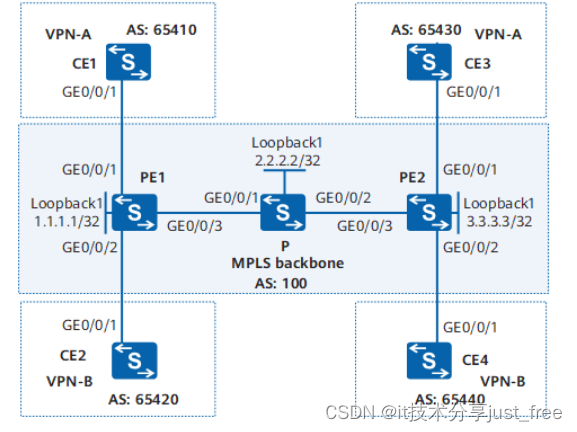

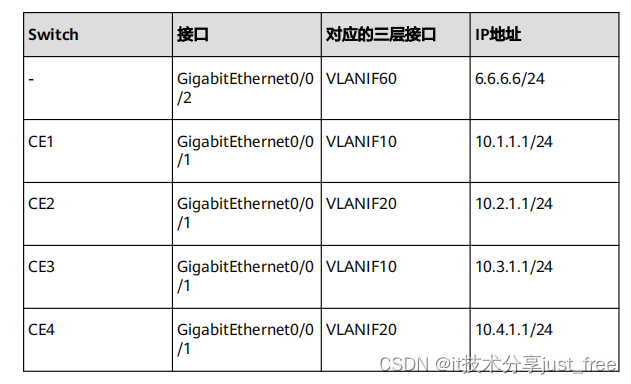 配置思路采用如下的思路配置 Dot1q 子接口接入 L3VPN :1. 骨干网中,与 CE 相连的 PE 上需配置 VPN 实例,并把与 CE 相连的接口和相应的 VPN实例绑定;绑定之后配置与 CE 相连的接口的 IP 地址。2. PE 与 PE 之间配置 OSPF 实现 PE 之间的互通。3. 配置 MPLS 基本能力和 MPLS LDP ,建立 MPLS LSP 。4. 配置 MP-IBGP 交换 VPN 路由信息。5. CE 与 PE 之间配置 EBGP 交换 VPN 路由信息。6. 在 PE 连接 CE 的接口上配置 Dot1q 子接口接入 L3VPN 。说明VCMP 的角色是 Client 时,不能配置 VLAN 终结子接口。操作步骤步骤 1 在 MPLS 骨干网上配置 IGP 协议,实现骨干网 PE 和 P 的互通# 配置 PE1 。