-
Flutter【组件】按钮
简介
flutter 按钮组件。提供一种封装按钮组件的思路,并不支持过多的自定义属性。根据使用场景及设计规范进行封装,使用起来比较方便。
github地址:https://github.com/ThinkerJack/jac_uikit
pub地址:https://pub.dev/packages/jac_uikit
使用方式:
  CButton(
              colorType: CButtonColorType.blue,
              sizeType: CButtonSizeType.ultraSmall,
              text: "最小号蓝色按钮",
              onTap: () {},
            ),
            CButton(
              colorType: CButtonColorType.blue,
              sizeType: CButtonSizeType.small,
              text: "小号蓝色按钮",
              onTap: () {},
            ),
            CButton(
              colorType: CButtonColorType.blue,
              sizeType: CButtonSizeType.middle,
              text: "中号蓝色按钮",
              onTap: () {},
            ),
            CButton(
              colorType: CButtonColorType.blue,
              sizeType: CButtonSizeType.large,
              text: "大号蓝色按钮",
              onTap: () {},
            ),
            CButton(
              colorType: CButtonColorType.white,
              sizeType: CButtonSizeType.large,
              text: "大号白色按钮",
              onTap: () {},
            ),
            CButton(
              colorType: CButtonColorType.gray,
              sizeType: CButtonSizeType.large,
              text: "大号灰色按钮",
              onTap: () {},
            ),
            CButton(
              colorType: CButtonColorType.blueBorder,
              sizeType: CButtonSizeType.large,
              text: "大号蓝边按钮",
              onTap: () {},
            ),
            CButton(
              colorType: CButtonColorType.blueBorder,
              sizeType: CButtonSizeType.large,
              width: 230,
              height: 80,
              text: "自定义宽高按钮",
              onTap: () {},
            ),
图片示例:
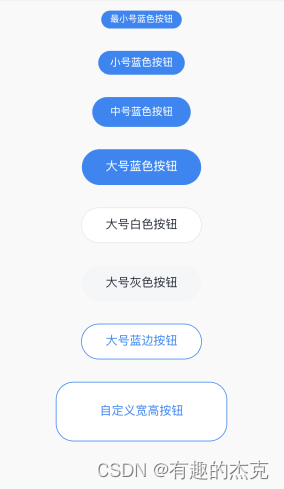
参数:final Function onTap; //点击事件 final String text; //文本内容 final JacButtonSizeType sizeType; //大小类型 final JacButtonColorType colorType; //颜色类型 final bool? visibility; //是否展示 final bool disable; //是否禁用 final double? width; //宽度 final double? height; //高度 final double? fontSize; //文字大小 final double? circular; //圆角度 final double? fontHeight; //文字行高 -
相关阅读:
数据结构之队列
STM32中的printf重定向uart1串口输出
Docker基础
大数据调优与传统数据调优之间有哪些异同点?
力扣热题100_链表_141_环形链表
游戏思考18:AOI视野同步算法介绍和简单实现(未完待续8/3)
虹科分享 | 知识产权盗窃:它是什么以及如何预防
软件测试 -- 进阶 5 软件测试用例
4.2——Node.js的npm和包
使用百度EasyDL实现钢筋计数
- 原文地址:https://blog.csdn.net/weixin_42731928/article/details/139839414