-
MySQL高级SQL语句
目录
1.MySQL进阶查询
数据库实例准备:- create database tan;
- use tan;
- ###在数据库tan中创建数据表location,并添加数据记录
- create table location (Region char(20),Store_Name char(20));
- insert into location values('East','Boston');
- insert into location values('East','New York');
- insert into location values('West','Los Angeles');
- insert into location values('West','Houston');
- ###在数据库tan中创建数据表store_info,并添加数据记录
- create table store_info (Store_Name char(20),Sales int(10),Date char(10));
- insert into store_info values('Los Angeles','1500','2020-12-05');
- insert into store_info values('Houston','250','2020-12-07');
- insert into store_info values('Los Angeles','300','2020-12-08');
- insert into store_info values('Boston','700','2020-12-08');
- insert into store_info values('Washington','1000','2020-12-09');
- insert into store_info values('Chicago','800','2020-12-10');
1.1 select
select:显示表格中一个或数个字段的所有数据记录
- 语法:SELECT "字段" FROM "表名";
- select store_name from store_info;
1.2 distinct
distinct:不显示重复的数据记录
- 语法:SELECT DISTINCT "字段" FROM "表名";
- select distinct Store_Name from store_info;

1.3 where
where:有条件查询
- 语法:SELECT "字段" FROM "表名" WHERE "条件";
- select * from store_info where Store_Name = 'Los Angeles';
- select * from store_info where Store_Name != 'Los Angeles';

1.4 and or
and or:且 或
- 语法:SELECT "字段" FROM "表名" WHERE "条件1" {[AND|OR] "条件2"}+ ;
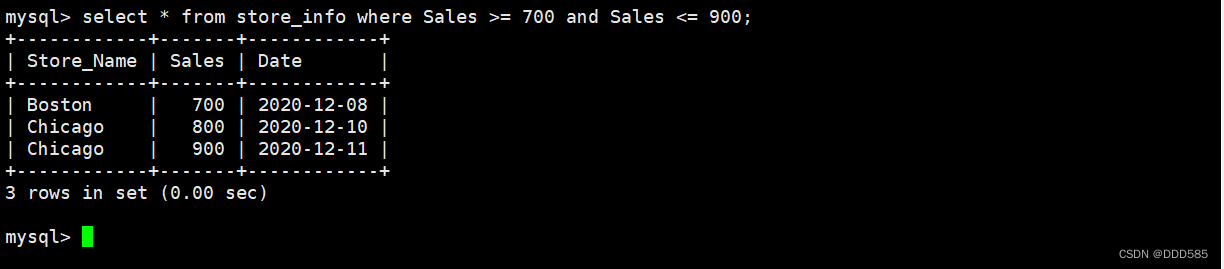
- select * from store_info where Sales >= 700 and Sales <= 900;
- select * from store_info where Store_Name='Los Angeles' or Store_Name = 'Houston';
- mysql> select * from store_info where (Store_Name='Los Angeles' or Store_Name = 'Houston') and sales > 1000;


1.5 in
in:显示已知的值的数据记录
- 语法:SELECT "字段" FROM "表名" WHERE "字段" IN ('值1', '值2', ...);
- select * from store_info where Sales in (1500, 250);
- 等于
- select * from store_info where sales=1500 or sales=250;
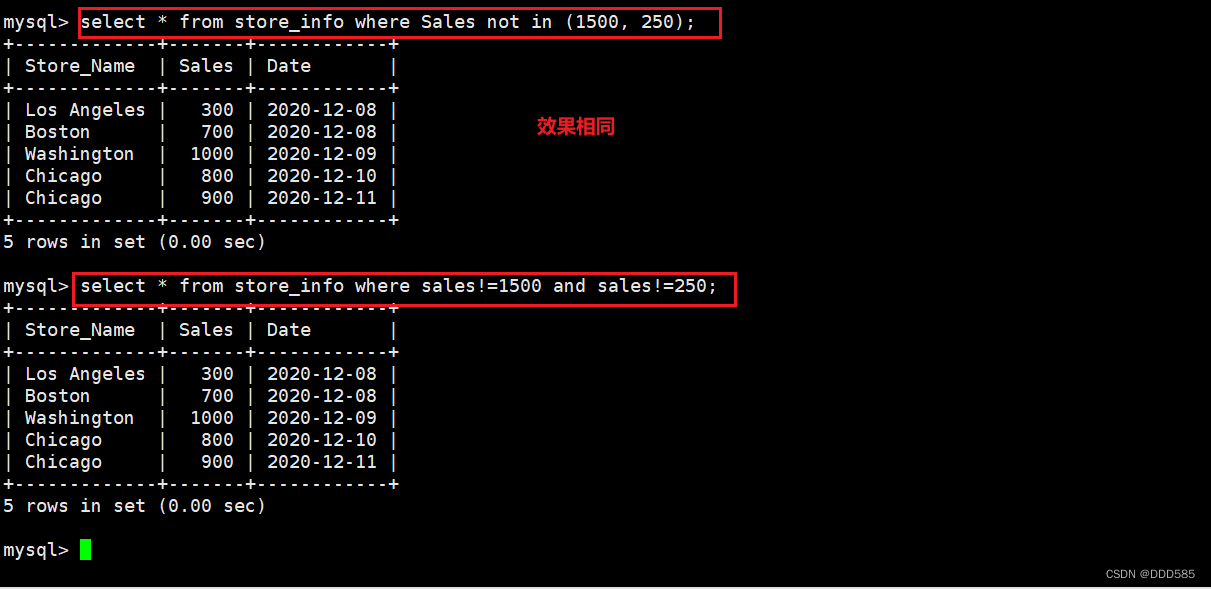
- select * from store_info where Sales not in (1500, 250);
- 等于
- select * from store_info where sales!=1500 and sales!=250;

1.6 between
between:显示两个值范围内的数据记录
- 语法:SELECT "字段" FROM "表名" WHERE "字段" BETWEEN '值1' AND '值2';
- select * from store_info where date between '2020-12-05' and '2020-12-08';
- 等于
- select * from store_info where date >='2020-12-05' and date<='2020-12-08';

1.7 通配符
通配符:通常通配符都是跟like一起使用的
- % :百分号表示零个、一个或多个字符
- _ :下划线表示单个字符
- 'A_Z':所有以 'A' 起头,另一个任何值的字符,且以'Z'为结尾的字符串。例如,'ABZ' 和 'A2Z' 都符合这一个模式,而 'AKKZ' 并不符合 (因为在A和Z之间有两个字符,而不是一个字符)。
- 'ABC%': 所有以 'ABC' 起头的字符串。例如,'ABCD' 和 'ABCABC' 都符合这个模式。
- '%XYZ': 所有以 'XYZ' 结尾的字符串。例如,'WXYZ' 和 'ZZXYZ' 都符合这个模式。
- '%AN%': 所有含有 'AN'这个模式的字符串。例如,'LOS ANGELES' 和 'SAN FRANCISCO' 都符合这个模式。
- '_AN%':所有第二个字母为 'A' 和第三个字母为 'N' 的字符串。例如,'SAN FRANCISCO' 符合这个模式,而 'LOS ANGELES' 则不符合这个模式。
- select * from store_info where Store_Name like '_os%';
- select * from store_info where Store_Name like '%on';
- select * from store_info where Store_Name like 'Los%';
1.8 like
like:匹配一个模式来找出我们要的数据记录
- 语法:SELECT "字段" FROM "表名" WHERE "字段" LIKE {模式};
- select * from store_info where store_name like '%on%';

1.9 ORDER BY
ORDER BY 按关键字排序
- 语法:SELECT "字段" FROM "表名" [WHERE "条件"] ORDER BY "字段" [ASC, DESC];
- #ASC 是按照升序进行排序的,是默认的排序方式。
- #DESC 是按降序方式进行排序。
- select * from store_info order by sales;
- select * from store_info order by sales desc;
- select * from store_info where Store_Name in ('Los Angeles', 'Chicago') order by sales desc;


2.MySQL数据库函数
2.1 数学函数
数学函数 作用 abs(x) 返回x的绝对值 rand() 返回0到1的随机数 mod(x, y) 返回x除以y以后的余数 power(x, y) 返回x的y次方 round(x) 返回离x最近的整数 round(x, y) 保留x的y位小数四舍五入后的值 sqrt(x) 返回x的平方根 truncate(x, y) 返回数字x截断为y位小数的值 #不四舍五入 ceil(x) 返回大于或等于x的最小整数 floor(x) 返回小于或等于x的最大整数 greatest(x1,x2,...) 返回集合中最大的值 least(x1,x2,...) 返回集合中最小的值 - SELECT abs(-1), rand(), mod(5,3), power(2,3), round(1.89);
- SELECT round(1.8937,3), truncate(1.235,2), ceil(5.2), floor(2.1), least(1.89,3,6.1,2.1);

2.2 聚合函数
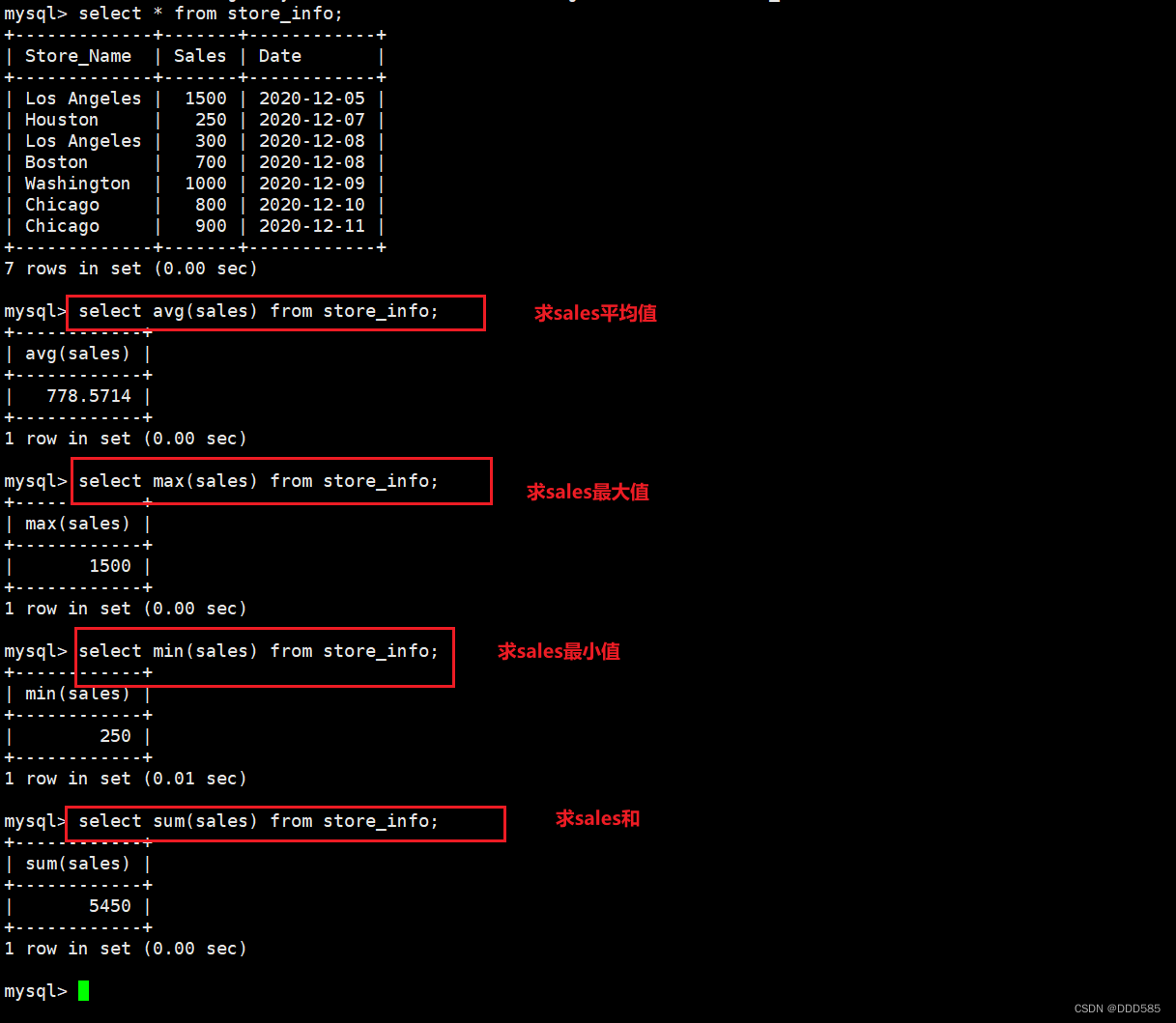
关键字 作用 avg() 返回指定列的平均值 count() 返回指定列中非 NULL 值的个数 min() 返回指定列的最小值 max() 返回指定列的最大值 sum(字段) 返回指定列的所有值之和 - ###返回指定列sales的平均值
- select avg(sales) from store_info;

- ###返回指定列store_name列中非NULL值的个数
- select count(store_name) from store_info;
- select count(distinct store_name) from store_info;


2.3 字符串函数
字符串函数 作用 trim() 返回去除指定格式的值 concat(x,y) 将提供的参数 x 和 y 拼接成一个字符串 substr(x,y) 获取从字符串 x 中的第 y 个位置开始的字符串,跟substring()函数作用相同 substr(x,y,z) 获取从字符串 x 中的第 y 个位置开始长度为 z 的字符串 length(x) 返回字符串 x 的长度 replace(x,y,z) 将字符串 z 替代字符串 x 中的字符串 y upper(x) 将字符串 x 的所有字母变成大写字母 lower(x) 将字符串 x 的所有字母变成小写字母 left(x,y) 返回字符串 x 的前 y 个字符 right(x,y) 返回字符串 x 的后 y 个字符 repeat(x,y) 将字符串 x 重复 y 次 space(x) 返回 x 个空格 strcmp(x,y) 比较 x 和 y,返回的值可以为-1,0,1 reverse(x) 将字符串 x 反转 补充:字符串截取三种方法

2.3.1 upper、lower大小写转换

2.3.2 concat拼接


使用“||”进行拼接

2.3.3 substr字符串截取


2.3.3 length长度查看
 2.3.3 replace替换


2.3.3 trim移除
- SELECT TRIM ([ [位置] [要移除的字符串] FROM ] 字符串);
- #[位置]:的值可以为 LEADING (起头), TRAILING (结尾), BOTH (起头及结尾)。
- #[要移除的字符串]:从字串的起头、结尾,或起头及结尾移除的字符串。缺省时为空格。


2.3.3 left、right取值

3.查询函数
3.1 group by汇总
group by:对group by后面字段的查询结果,进行汇总分组,通常是结合聚合函数一起使用的
- 语法:SELECT "字段1", SUM("字段2") FROM "表名" GROUP BY "字段1";
- select * from store_info group by Store_Name;
- select Store_Name, count(Sales) from store_info group by Store_Name;

3.2 having
having:用来过滤由group by语句返回的记录集,通常与group by语句联合使用
- 语法:SELECT "字段1", SUM("字段2") FROM "表格名" GROUP BY "字段1" HAVING (函数条件);
- select store_name,sum(sales) from store_info group by store_name having sum(sales) > 1000;

3.3 别名
别名:字段別名 表格別名
- 语法:SELECT "表格別名"."字段1" [AS] "字段別名" FROM "表格名" [AS] "表格別名";
- select A.store_name store,sum(A.sales) "total sales" from store_info A group p by A.store_name;

3.4 子查询
子查询:连接表格,在WHERE 子句或 HAVING 子句中插入另一个SQL语句
- 语法:SELECT "字段1" FROM "表格1" WHERE "字段2" [比较运算符] #外查询
- (SELECT "字段1" FROM "表格2" WHERE "条件"); #内查询
- #可以是符号的运算符,例如 =、>、<、>=、<= ;也可以是文字的运算符,例如 LIKE、IN、BETWEEN
- select sum(Sales) from store_info where Store_Name in (select Store_Name from location where Region='West');
- st');
- select sum(Sales) from store_info where Store_Name in (select Store_Name from location where Region='West');


3.5 exists(类查询)
exists:用来根据条件过滤查询结果,并只返回满足条件的行
- 语法:SELECT "字段1" FROM "表格1" WHERE EXISTS (SELECT * FROM "表格2" WHERE "条件");
- #这里的子查询作为条件进行判断。如果子查询返回至少一行结果,则外部查询的结果将包含该行
- select * from store_info A where exists (select Store_Name from location B where B.store_name = A.store_name);

4.连接查询
4.1 表连接
表连接方式 含义 inner join(内连接) 只返回两个表中联结字段相等的行
left join(左连接) 返回包括左表中的所有记录和右表中联结字段相等的记录
right join(右连接) 返回包括右表中的所有记录和左表中联结字段相等的记录

4.2 内连接
select * from store_info A inner join location B on A.Store_Name=B.Store_Name;
4.3 左连接
select * from store_info A left join location B on A.Store_Name=B.Store_Name;
4.3 右连接
select * from store_info A right join location B on A.Store_Name=B.Store_Name;
5.求交集、无交集方法总结
5.1 交集方法
1.内连接
- select A.Store_Name from store_info A inner join location B on A.Store_Name=B.Store_Name;
- select A.Store_Name from store_info A inner join location B using(Store_Name);


2.左连接
select B.Store_Name from location A left join store_info B on A.Store_Name=B.Store_Name where B.Store_Name is not null;
3.右连接
select A.Store_Name from location A right join store_info B on A.Store_Name=B.Store_Name where A.Store_Name is not null;
4.子查询
- select A.Store_Name from store_info A where A.Store_Name in (select B.Store_Name from location B);
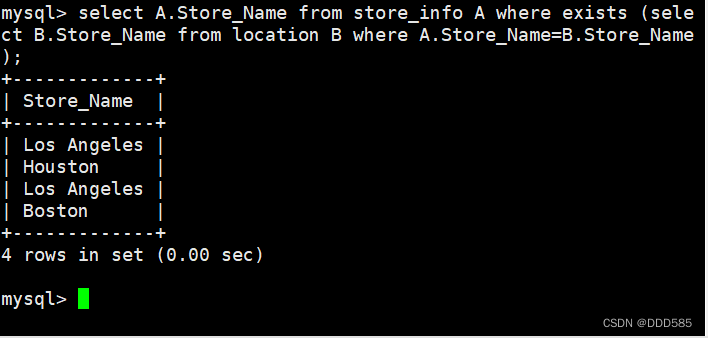
- select A.Store_Name from store_info A where exists (select B.Store_Name from location B where A.Store_Name=B.Store_Name));

5.多表查询
- select A.Store_Name from store_info A, location B where
- A.Store_Name=B.Store_Name;

6.联集+分组
select A.Store_Name from (select distinct Store_Name from store_info union all select distinct store_name from location) A group by A.Store_Name having count(A.Store_Name) > 1;
5.2 求无交集方法总结
求左表无交集
select A.Store_Name from location A left join store_info B on A.Store_Name=B.Store_Name where B.Store_Name is null;
select Store_Name from location where Store_Name not in (select Store_Name from store_info);
select A.Store_Name from location A where not exists (sellect B.Store_Name from store_info B where A.Store_Name=B.Store_NName);
求右表无交集
select B.Store_Name from location A right join store_info B on A.Store_Name=B.Store_Name where A.Store_Name is null;
select Store_Name from store_info where Store_Name not in (select Store_Name from location);
select A.Store_Name from store_info A where not exists (sselect B.Store_Name from location B where A.Store_Name=B.Store_NName);
求两个表无交集
- select A.Store_Name from location A left join store_info B on A.Store_Name=B.Store_Name where B.Store_Name is null
- -> union all
- -> select B.Store_Name from location A right join store_infoo B on A.Store_Name=B.Store_Name where A.Store_Name is null;

select A.Store_Name from (select distinct Store_Name from store_info union all select distinct store_name from location) A group by A.Store_Name having count(A.Store_Name) = 1;
6.view视图
view:视图,可以被当作是虚拟表或存储查询
视图跟表格的不同是,表格中有实际储存数据记录,而视图是建立在表格之上的一个架构,它本身并不实际储存数据记录。
临时表在用户退出或同数据库的连接断开后就自动消失了,而视图不会消失。
视图不含有数据,只存储它的定义,它的用途一般可以简化复杂的查询。比如你要对几个表进行连接查询,而且还要进行统计排序等操作,写SQL语句会很麻烦的,用视图将几个表联结起来,然后对这个视图进行查询操作,就和对一个表查询一样,很方便。- 语法:CREATE VIEW "视图表名" AS "SELECT 语句";
- 定义视图的方法求交集
- create view v_store_names as select distinct Store_Name from store_info union all select distinct Store_Name from location; #定义视图
- select * from v_store_names group by Store_Name having count(Store_Name)=1;
- #求两表的交集
- drop view v_sum; #删除视图方法


补充:
视图表能否修改数据?
视图表保存的是select查询语句的定义,如果select语句查询的字段是没有被处理过的源表字段,则可以通过视图表修改源表的数据;如果select语句查询的字段被函数或group by等处理的字段,则不可以通过视图表修改源表的数据。
7.CASE
是 SQL 用来做为 IF-THEN-ELSE 之类逻辑的关键字
- 语法一:
- SELECT CASE "字段名"
- WHEN "数值1" THEN "结果1"
- WHEN "数值2" THEN "结果2"
- ...
- [ELSE "default"]
- END
- FROM "表名";
- 语法二:
- SELECT CASE
- WHEN "公式1" THEN "结果1"
- WHEN "公式2" THEN "结果1"
- ...
- [ELSE "default"] END
- #ELSE 子句则并不是必须的。
- select Store_Name, Sales, case Store_Name
- when 'Houston' then Sales*2
- when 'Boston' then 7000
- else Sales end
- 'new sales'
- from store_info;
- select Store_Name, Sales, case
- when Store_Name='Houston' then Sales*2
- when Store_Name='Boston' then 7000
- else Sales end
- 'new sales'
- from store_info;


8.空值(NULL) 和 无值('')
1.无值的长度为 0,不占用空间的;而 NULL 值的长度是 NULL,是占用空间的。
2.IS NULL 或者 IS NOT NULL,是用来判断字段是不是为 NULL 或者不是 NULL,不能查出是不是无值的。
3.无值的判断使用=''或者<>''来处理。<> != 代表不等于。
4.在通过 count()指定字段统计有多少行数时,如果遇到 NULL 值会自动忽略掉,遇到无值会加入到记录中进行计算。


补充:
无值'' 和 空值NULL 的区别?
无值’‘ 的长度为0,不占用空间;可以通过 字段名= '' 或 字段名 != '' 来过滤字段的值是否为无值的行;指定字段使用函数 count(字段) 不会忽略 无值 的行;
空值NULL 的长度为NULL,占用空间;可以通过“字段名 is null” 或 “字段名 is not null”来过滤字段的值是否为NULL的行;指定字段使用函数 count(字段) 会忽略NULL的行。
9.过滤重复数据总结
案例1:删除重复数据


案例2:去除重复值,保留唯一

10.导出、导入数据
10.1 导出数据
- vim /etc/my.cnf
- 添加
- secure_file_priv="" #允许导入、导出文件
- systemctl restart mysqld.service
- mkdir /opt/mysql_files
- chmod 777 /opt/mysql_files
- select * into outfile '/opt/mysql_files/stroe.csv' fields terminated by ',' enclosed by '"' lines terminated by '\n' from store_info; #导出文件


10.2 导入数据
- create table store_info (Store_Name char(20),Sales int(10),Date char(10));
- load data infile '/opt/mysql_files/stroe.csv' into table store_info fields terminated by ',' enclosed by '"' lines terminated by '\n';


11.正则表达式
11.1 sql正则表达式的常见种类
正则符号 作用 ^ 匹配文本的开始字符 $ 匹配文本的结束字符 . 匹配任何单个字符 * 匹配零个或多个在它前面的字符 + 匹配前面的字符 1 次或多次 字符串 匹配包含指定的字符串 l 或,“|”前面的不成立时,就匹配后面的字符串 [...] 匹配字符集合中的任意一个字符 [^...] 匹配不在括号中的任何字符 {n} 匹配前面的字符串 n 次 {n,m} 匹配前面的字符串至少 n 次,至多m 次 语法:SELECT "字段" FROM "表名" WHERE "字段" REGEXP {模式};
-
相关阅读:
PHP:Math 函数
休闲娱乐 - PS4游戏 Journey 风之旅人
使用CDN有什么好处?
计算机毕业设计django基于python鲜花培育专家系统
【Linux】/proc/stat解析
【C++进阶之路】第九篇:特殊类设计
mysql颗粒归仓
JVM---类加载器
【数据结构】周末作业
算法设计与分析 SCAU8595 钱币组合的问题(优先做)
- 原文地址:https://blog.csdn.net/2402_83805984/article/details/139819624