-
HCIP-综合实验 知识覆盖全面 建议收藏
HCIP-综合实验
- 实验需求及步骤
- 实验拓扑
- 配置命令及实现
- 01.Eth-Trunk
- 02.VLAN与端口类型
- 03.MSTP多实例与优化
- 04.VRRP
- 05.端口安全
- 06.DHCP冗余部署
- 07.WLAN双链路热备
- 08.防火墙双机热备 及内容安全
- 10.OSPF多区域
- 11.OSPF特性(Vlink,认证,特殊区域,LSA3过滤,优化路径)
- 12.NAPT
- 13.SSH
- 14.NAT SERVER与NAT-ALG
- 15.PPOE&easy-ip
- 16.WLAN二层组网与VLAN_Pool
- 17.VLAN聚合
- 18.DHCP中继及OSPF
- 19.DHCP Snooping与ARP安全
- 20..防火墙NAT
- 21.ISIS多区域
- 22.MPLS LDP
- 23.MP-BGP
- 24.PE-CE使用BGP接入
- 25.ISIS路由渗透,BGP AS替换
- 26.BGP过滤与MPLS调优
- 27.IPSec VPN冗余部署
- 28.组播-PIM-SM
- 29.DHCPv6
- 30.OSPFv3
- 31.NAT64
- 32.6to4自动隧道
- 33.配置QOS
- 34.BFD&NQA
实验需求及步骤
交换部分
-
主校区部分
-
2.VLAN与端口类型
配置PC1,PC2位于VLAN10,无线用户位于VLAN20,SERVER1位于VLAN30
接口交换机与汇聚交换机之间部署Trunk,放行必要VLAN,链接AP的接口设置为Hybrid接口 -
3.配置MST实现以下需求
VLAN10,VLAN20通过SW1转发,VLAN30通过SW2转发
连接PC1,PC2接口支持快速接入,禁止用户私自接入交换机 -
4.VRRP
实现用户业务(VLAN10,VLAN20)通过SW3转发,服务器(VLAN30)通过SW4转发
若检测到上行链路故障,切换VRRP主备 -
5.局域网加固
PC1,PC2属于相同VLAN,但是不能互通
PC1,PC2连接的端口配置端口安全,抵御MAC泛洪或MAC地址欺骗攻击 -
6.SW1,SW2配置DHCP服务器,对STA1,无线客户端,AP分配地址采用冗余配置
WLAN部署
AC1,AC2部署VRRP双机热备
AC1地址:10.1.78.10
AC2地址:10.1.78.20
VRRP双机地址:10.1.78.254SSID:HQ
安全模板:WPA2-PSK Huawei@123
转发方式:隧道模式
业务VLAN:20S1,S2接口配置DHCP对AP分配地址
无线用户用户VLAN20,地址10.1.20.0/24 网关地址:10.1.20.254
支持无线漫游,保障用户连接到其他AP时,业务不中断
防火墙内容安全
- 配置防火墙双机热备采用负载分担的方式
- 若接口故障切换转发角色
- 面向DMZ区域公共服务器部署VRRP,其中FW-1作为MASTER,FW-2作为BACKUP设备
- 防火墙部署双机热备负载分担,若检测接口故障切换主备角色
- 使用web方式配置以下业务
- 1)禁止外网用户上传病毒文件到内部服务器
- 2)配置URL过滤,规范用户的上网行为
- 3)配置入侵防御对于访问公共服务器抵御注入跨站脚本类攻击
- 4)开启单包攻击防御机制
路由部分
- 主校区部分
- FW1,FW2,S1,S2,AR1位于OSPF区域0
- S1,S2互联位于区域1
- S1,S2下行链路位于区域1,上行链路位于区域0
- OSPF区域0开启MD5认证保障安全
- S1,S2添加Vlink防止区域0分裂
- vLAN10,VLAN20,VLAN30的网关以及FW1链接服务器的端口关闭OSPF邻居发现机制
- 修改VLAN10,VLAN20,VLAN30的开销配合VRRP的业务转发路径
WAN部分(公网部分)
-
主校区
- FW1,FW2部署默认路由访问公网,使用NAPT的方式进行地址转换
- FW1配置地址转换,其中地址池:136.1.12.16-136.1.122.19
- 使得AR1配置远程连接,使用ssh保证连接更加稳定
- FW1映射DMZ服务器SERVER1到公网:136.1.12.10 映射FTP与HTTP服务(nat server)
-
Internet访问
- Home作为互联网用户,采用PPPoE接入,其中Home作为PPPoE客户端,Internet作为PPPoE服务端
拨号账户:USER/HUAWEI - Home节点配置EASY_IP访问公网
- Home作为互联网用户,采用PPPoE接入,其中Home作为PPPoE客户端,Internet作为PPPoE服务端
分校区部分
- WLAN及OSPF
- 1)WLAN二层组网与vlan规划 AP管理vlan:254
- AP地址:172.16.254.0/24网关172.16.254.5
- AC地址:172.16.254.10
- 2)WLAN业务规划
- 用户位于VLAN11,VLAN12,以便减少广播内主机的数量 (做vlan聚合)
- 保障所有用户位于相同网段
- 用户流量转发采用直接转发
- SSID:SPOKE
- 安全模板:WPA2-PSK Huawei@123
- 3)配置FW-2作为DHCP服务器,SW5作为中继DHCP,对无线用户与AP分配地址
- 4)配置OSPF
- 配置FW3,SW5部署OSPF区域0
- SW5所有接口位于区域0
- 5)激活DHCP Snooping保护内网DHCP服务器的安全
- 配置防火墙NAT,让内网用户可以访问到internet
广域互联部分(MPLS专线)
-
部署ISP部分
-
R1部署ISIS区域49.0000,设置级别为Level-2
-
R2,R3位于区域49.0001.R3作为level-1节点
-
添加互联接口与Loopback接口到ISIS进程
-
部署MPLS VPN满足以下需求
- 1)R1,R3作为PE节点,R2作为VPNv4路由反射器
- FW1,FW2作为CE节点
- 2)PE,CE之间采用BGP接入
- 3)MPLS LSR-ID为设备的Loopback0
- 4)部署MPLS VPN实现主校区与分校区通信
- 1)R1,R3作为PE节点,R2作为VPNv4路由反射器
-
AR1与R1之间部署BGP,主小区位于AS65000
-
FW-3与R3之间部署BGP,其中分校区AS65000
-
-
IPSec VPN部分
- FW1,FW2与FW3部署IPSec HA VPN实现以下需求
- IPSEC流量 配置IPSec VPN实现分校区无线用户可以访问主校区内部服务器(SERVER1)
- IKE提议
- 共享密钥认证(HUAWEI)
- DH组2
- 加密认证:3DES/SHA1
- IPSec提议
- 数据加密算法:ESP-3DES/ESP-SHA1
组播部分
-
部分组播网络满足以下需求
-
MCS作为组播服务器
-
PC5作为组播接收者
-
C-RP,C-BSR位于R2的Lo0
-
组地址:239.1.1.1
-
IGMP版本:v2
-
RP的组播服务范围:239.1.1.0/24
-
若PC5加入组224.1.1.1也能收到224.1.1.1的组播流量
-
实现组播接收者能够接收到组播源的流量
IPv6部分
-
1)PC4配置IPv6地址:2001:155:1:1::10/64
- 网关地址2001:155:1:1::1/64
-
2)PC5作为DHCPv6 Client通过R3有状态地址自动配置
- 获取前缀信息为2001:155:1:3::/64
- DNS:2001:150:1:2::2
-
3)PC5作为IPv6主机,地址2001:172:16:5::10/64
- S5-VLANIF作为网关接口,网关地址2001:172:16:5::5/64
- FW2,SW5互联部署Link-local地址并部署OSPFv3
-
4)配置NAT64实现PC5能够访问130.1.2.2/32
- 采用动态NAT64实现
- NAT64前缀:2001:172:13::/96
-
5)配置R1,R3之间部署6TO4自动隧道实现PC4,PC5通信
实验拓扑

配置命令及实现
01.Eth-Trunk
sysname SW1
#
interface Eth-Trunk1
 mode lacp-static
#
interface GigabitEthernet0/0/23
 eth-trunk 1
#
interface GigabitEthernet0/0/24
 eth-trunk 1

sysname SW2
#
interface Eth-Trunk1
 mode lacp-static
#
interface GigabitEthernet0/0/23
 eth-trunk 1
#
interface GigabitEthernet0/0/24
 eth-trunk 1
02.VLAN与端口类型
SW1
vlan batch 10 20 30 78 127 254
#
interface Eth-Trunk1
 port link-type trunk
 port trunk allow-pass vlan 2 to 4094
#
interface GigabitEthernet0/0/1
 port link-type access
 port default vlan 127
#
interface GigabitEthernet0/0/10
 port link-type trunk
 port trunk allow-pass vlan 20 78
#
interface GigabitEthernet0/0/11
 port link-type trunk
 undo port trunk allow-pass vlan 1
 port trunk allow-pass vlan 2 to 4094
#
interface GigabitEthernet0/0/12
 port link-type trunk
 undo port trunk allow-pass vlan 1
 port trunk allow-pass vlan 2 to 4094
#
interface GigabitEthernet0/0/13
 port link-type trunk
 undo port trunk allow-pass vlan 1
 port trunk allow-pass vlan 2 to 4094
#

SW2
vlan batch 10 20 30 78 138 254
#
interface Eth-Trunk1
port link-type trunk
 port trunk allow-pass vlan 2 to 4094
#
interface GigabitEthernet0/0/1
 port link-type access
 port default vlan 138
#
interface GigabitEthernet0/0/2
 port link-type trunk
 undo port trunk allow-pass vlan 1
 port trunk allow-pass vlan 2 to 4094
#
interface GigabitEthernet0/0/10
 port link-type trunk
 port trunk allow-pass vlan 20 78
#
interface GigabitEthernet0/0/11
 port link-type trunk
 undo port trunk allow-pass vlan 1
 port trunk allow-pass vlan 2 to 4094
#
interface GigabitEthernet0/0/12
 port link-type trunk
 undo port trunk allow-pass vlan 1
 port trunk allow-pass vlan 2 to 4094
#
interface GigabitEthernet0/0/13
 port link-type trunk
 undo port trunk allow-pass vlan 1
 port trunk allow-pass vlan 2 to 4094
#
Acc1
sysname Acc1
#
vlan batch 10 20 30 254
#
interface Ethernet0/0/1
 port link-type access
 port default vlan 10
#
interface Ethernet0/0/2
 port link-type access
 port default vlan 10
#
interface GigabitEthernet0/0/1
 port link-type trunk
 undo port trunk allow-pass vlan 1
 port trunk allow-pass vlan 2 to 4094
#
interface GigabitEthernet0/0/2
 port link-type trunk
 undo port trunk allow-pass vlan 1
 port trunk allow-pass vlan 2 to 4094
#
Acc2
sysname Acc2
#
vlan batch 10 20 30 254
#
interface Ethernet0/0/1
 port hybrid pvid vlan 254
 port hybrid untagged vlan 254
#
interface Ethernet0/0/2
 port hybrid pvid vlan 254
 port hybrid untagged vlan 254
#
interface GigabitEthernet0/0/1
 port link-type trunk
 undo port trunk allow-pass vlan 1
 port trunk allow-pass vlan 2 to 4094
#
interface GigabitEthernet0/0/2
 port link-type trunk
 undo port trunk allow-pass vlan 1
 port trunk allow-pass vlan 2 to 4094
#
Acc3
sysname Acc3
#
vlan batch 10 20 30 254
#
interface Ethernet0/0/1
 port link-type access
 port default vlan 30
#
interface GigabitEthernet0/0/1
 port link-type trunk
 undo port trunk allow-pass vlan 1
 port trunk allow-pass vlan 2 to 4094
#
interface GigabitEthernet0/0/2
 port link-type trunk
 undo port trunk allow-pass vlan 1
 port trunk allow-pass vlan 2 to 4094
#
03.MSTP多实例与优化
SW1
stp instance 1 root primary
stp instance 2 root secondary
#
stp region-configuration
 region-name MST
 revision-level 1
 instance 1 vlan 10 20
 instance 2 vlan 30
 active region-configuration
#
interface GigabitEthernet0/0/11
 stp loop-protection
#
interface GigabitEthernet0/0/12
 stp loop-protection
#
interface GigabitEthernet0/0/13
 stp loop-protection

SW2
stp instance 1 root secondary
stp instance 2 root primary
#
stp region-configuration
 region-name MST
 revision-level 1
 instance 1 vlan 10 20
 instance 2 vlan 30
 active region-configuration
#
interface GigabitEthernet0/0/11
 stp loop-protection
#
interface GigabitEthernet0/0/12
 stp loop-protection
#
interface GigabitEthernet0/0/13
 stp loop-protection


Acc1
stp region-configuration
 region-name MST
 revision-level 1
 instance 1 vlan 10 20
 instance 2 vlan 30
 active region-configuration
#
interface GigabitEthernet0/0/1
 stp loop-protection  //开启防止环路保护
 stp edged-port disable   //关闭边缘端口
#
interface GigabitEthernet0/0/2
 stp loop-protection
 stp edged-port disable
#
stp edged-port default  //开启全局边缘端口
stp bpdu-protection //开启bpdu保护功能
#
//300秒后自动打开shutdown的端口
error-down auto-recovery cause bpdu-protection interval 300
#
Acc2
stp edged-port default
#
stp region-configuration
 region-name MST
 revision-level 1
 instance 1 vlan 10 20
 instance 2 vlan 30
 active region-configuration
#
interface GigabitEthernet0/0/1
 stp loop-protection
 stp edged-port disable
#
interface GigabitEthernet0/0/2
 stp loop-protection
 stp edged-port disable
#
Acc3
stp edged-port default
#
stp region-configuration
 region-name MST
 revision-level 1
 instance 1 vlan 10 20
 instance 2 vlan 30
 active region-configuration
#
interface Ethernet0/0/1
 stp root-protection  //服务器侧开启根端口保护
#
interface GigabitEthernet0/0/1
 stp loop-protection
 stp edged-port disable
#
interface GigabitEthernet0/0/2
 stp loop-protection
 stp edged-port disable
#
04.VRRP
SW1
#
interface Vlanif10
 ip address 10.1.10.7 255.255.255.0
 vrrp vrid 1 virtual-ip 10.1.10.254
 vrrp vrid 1 priority 101
 vrrp vrid 1 track interface GigabitEthernet0/0/1 reduced 5
#
interface Vlanif20
 ip address 10.1.20.7 255.255.255.0
 vrrp vrid 2 virtual-ip 10.1.20.254
 vrrp vrid 2 priority 101
 vrrp vrid 2 track interface GigabitEthernet0/0/1 reduced 5
#
interface Vlanif30
 ip address 10.1.30.7 255.255.255.0
 vrrp vrid 3 virtual-ip 10.1.30.254
#
interface Vlanif78
 ip address 10.1.78.7 255.255.255.0
#
interface Vlanif127
 ip address 10.1.127.7 255.255.255.0
#
interface Vlanif254
 ip address 10.1.254.7 255.255.255.0
#

SW2
interface Vlanif10
 ip address 10.1.10.8 255.255.255.0
 vrrp vrid 1 virtual-ip 10.1.10.254
#
interface Vlanif20
 ip address 10.1.20.8 255.255.255.0
 vrrp vrid 2 virtual-ip 10.1.20.254
#
interface Vlanif30
 ip address 10.1.30.8 255.255.255.0
 vrrp vrid 3 virtual-ip 10.1.30.254
 vrrp vrid 3 priority 101
 vrrp vrid 3 track interface GigabitEthernet0/0/1 reduced 5
#
interface Vlanif78
 ip address 10.1.78.8 255.255.255.0
#
interface Vlanif138
 ip address 10.1.138.8 255.255.255.0
#
interface Vlanif254
 ip address 10.1.254.8 255.255.255.0
#
05.端口安全
Acc1
interface Ethernet0/0/1
 port-security enable
 port-security protect-action shutdown
 port-security max-mac-num 2
 port-security mac-address sticky
#
interface Ethernet0/0/2
 port-security enable
 port-security protect-action shutdown
 port-security max-mac-num 2
 port-security mac-address sticky

//undo mac-address all   清空mac地址表,包括静态的
//dis mac-address   查看mac地址表
06.DHCP冗余部署
SW1
dhcp enable
#
ip pool dhcp_pool
 gateway-list 10.1.20.254
 network 10.1.20.0 mask 255.255.255.0
 excluded-ip-address 10.1.20.128 10.1.20.253
#
interface Vlanif20
 dhcp select global
#
interface Vlanif254
 dhcp select interface
 dhcp server excluded-ip-address 10.1.254.128 10.1.254.254
//使用option43 推送两个AC的地址,实现双机双备份
 dhcp server option 43 sub-option 2 ip-address 10.1.78.10 10.1.78.20
#

//重置dhcp已分配的地址
<SW1>reset ip pool interface vlanif254 used
//查看地址池状态
[SW1]dis ip pool interface vlanif254
SW2
dhcp enable
#
ip pool dhcp_pool
 gateway-list 10.1.20.254
 network 10.1.20.0 mask 255.255.255.0
 excluded-ip-address 10.1.20.1 10.1.20.7
 excluded-ip-address 10.1.20.9 10.1.20.127
#
interface Vlanif20
 dhcp select global
#
interface Vlanif254
 dhcp select interface
 dhcp server excluded-ip-address 10.1.254.1 10.1.254.7
 dhcp server excluded-ip-address 10.1.254.9 10.1.254.127
 dhcp server option 43 sub-option 2 ip-address 10.1.78.10 10.1.78.20
07.WLAN双链路热备
AC1
//AC1与AC2配置好IP地址后,测试AC1与AC2是否可以通信
 sysname AC1
#
vlan batch 20 78
#
interface Vlanif78
 ip address 10.1.78.10 255.255.255.0
#
interface GigabitEthernet0/0/1
 port link-type trunk
 port trunk allow-pass vlan 20 78
#
ip route-static 0.0.0.0 0.0.0.0 10.1.78.7
#
//双机双链路热备份
hsb-service 0
//指定两端的对等体,本端的和对端的IP地址以及通讯端口
 service-ip-port local-ip 10.1.78.10 peer-ip 10.1.78.20 local-data-port 10240 pe
er-data-port 10240
#
//配置hsb的同步内容,使用用户的上线信息做热备份
hsb-service-type access-user hsb-service 0
#
//配置hsb的同步内容,使用AP的上线信息热备份
hsb-service-type ap hsb-service 0

dis hsb-service 0  //查看hsb的状态
#
wlan
//配置双机双链路使能优先级,越小越优 这里AC1为主设备
 ac protect enable protect-ac 10.1.78.20 priority 1
//dis ac protect  查看一下状态是否激活
//配置AP上线
 ap-id 1  ap-mac 00e0-fc8a-1c70
  ap-name AREA_1
 ap-id 2  ap-mac 00e0-fc99-0f60
  ap-name AREA_2
//业务配置
//安全模板,加密的方式
 security-profile name SEC_PRO
  security wpa2 psk pass-phrase Huawei@123 aes
//ssid,无线的名字为HQ
 ssid-profile name SSID_PRO
  ssid HQ
//业务模板
 vap-profile name VAP_PRO
  forward-mode tunnel   //流量转发方式为通过AC集中转发
  service-vlan vlan-id 20
  ssid-profile SSID_PRO
  security-profile SEC_PRO

//关联到AP
 ap-id 1
  vap-profile VAP_PRO wlan 1 radio 0
  vap-profile VAP_PRO wlan 1 radio 1

 ap-id 2
   vap-profile VAP_PRO wlan 1  radio 0
   vap-profile VAP_PRO wlan 1  radio 1
#
capwap source interface vlanif78  //指定capwap接口
#
//dis ap all 查看AP上线状态
//dis station all  查看客户端在线状态

AC2
 sysname AC2
#
vlan batch 20 78
#
interface Vlanif78
 ip address 10.1.78.20 255.255.255.0
#
interface GigabitEthernet0/0/1
 port link-type trunk
 port trunk allow-pass vlan 20 78
#
ip route-static 0.0.0.0 0.0.0.0 10.1.78.8
#
hsb-service 0
 service-ip-port local-ip 10.1.78.20 peer-ip 10.1.78.10 local-data-port 10240 peer-data-port 10240
#
hsb-service-type access-user hsb-service 0
#
hsb-service-type ap hsb-service 0
#
wlan
//配置双机双链路使能优先级,越小越优
 ac protect enable protect-ac 10.1.78.10 priority 5
//dis ac protect  查看一下状态是否激活
//配置AP上线
 ap-id 1  ap-mac 00e0-fc8a-1c70
  ap-name AREA_1
 ap-id 2  ap-mac 00e0-fc99-0f60
  ap-name AREA_2
//业务配置
//安全模板,加密的方式
 security-profile name SEC_PRO
  security wpa2 psk pass-phrase Huawei@123
//ssid,无线的名字为HQ
 ssid-profile name SSID_PRO
  ssid HQ
//业务模板
 vap-profile name VAP_PRO
  forward-mode tunnel   //流量转发方式为通过AC集中转发
  service-vlan vlan-id 20
  ssid-profile SSID_PRO
  security-profile SEC_PRO

//关联到AP
 ap-id 1
  vap-profile VAP_PRO wlan 1 radio 0
  vap-profile VAP_PRO wlan 1 radio 1

 ap-id 2
   vap-profile VAP_PRO wlan 1  radio 0
   vap-profile VAP_PRO wlan 1  radio 1
#
capwap source interface vlanif78  //指定capwap接口
#
//dis ap all 查看AP上线状态
//dis station all  查看客户端在线状态
08.防火墙双机热备 及内容安全
sysname FW-1
#
//控制台初始化
user-interface con 0
 idle-timeout 0 0
//空闲超时配置为0,因此会话永远不会因为超时而断开连接。
#
firewall zone name Heart
 add interface GigabitEthernet1/0/3
#
interface GigabitEthernet1/0/3
 ip address 10.0.0.12 255.255.255.0
#
firewall zone dmz
 add interface GigabitEthernet1/0/2
#
//配置双机热备
 hrp enable
 hrp interface GigabitEthernet1/0/3 remote 10.0.0.13
 hrp mirror session enable  //双火机制,开启会话备份
#
//dis hrp state   查看双机热备激活状态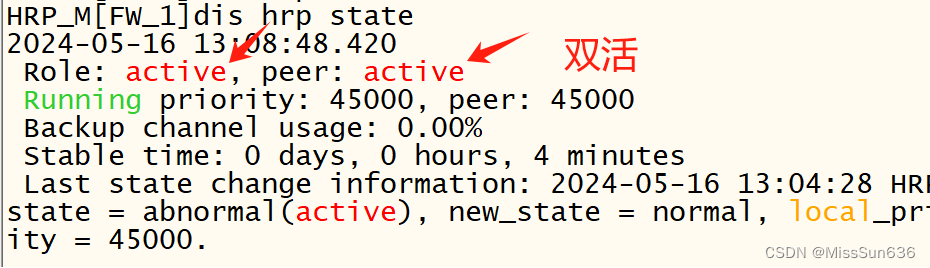
sysname FW-2
#
user-interface con 0
 idle-timeout 0 0
#
interface GigabitEthernet1/0/3
 ip address 10.0.0.13 255.255.255.0
#
firewall zone name Heart
 add interface GigabitEthernet1/0/3
#
firewall zone dmz
 add interface GigabitEthernet1/0/2
#
hrp enable
 hrp interface GigabitEthernet1/0/3 remote 10.0.0.12
 hrp mirror session enable
#
FW1 //这个配置也可以到后面在进行配置 interface GigabitEthernet0/0/0 ip address 配置桥接地址 //桥接到本地 service-manage https permit //开启网页服务 # https://本机桥接ip地址:8443 //就可以访问到模拟器中的防火墙
- 保证内网安全,把常用的攻击报文都丢弃

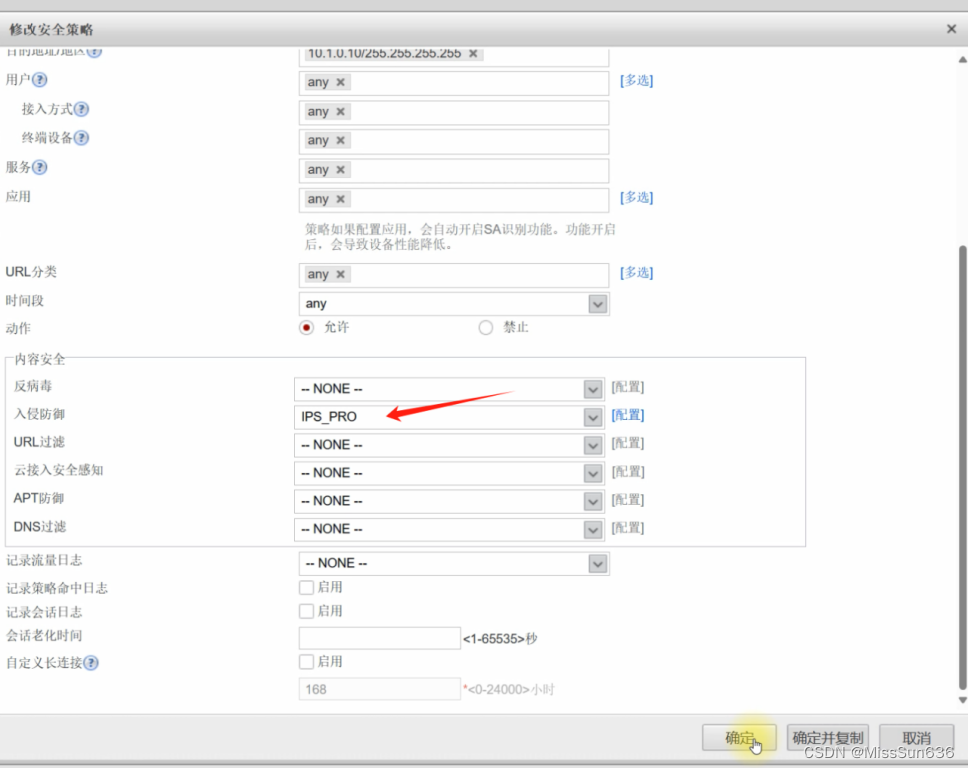
- 公共区域防止入侵

- 激活根据内网情况激活一部分签名

- 提交配置

- 应用到相应的策略里 选择上面做的入侵防御

- 设置反病毒


- 配置上网行为管理

- 新建需要控制的网站即可

- 配置好后应用到策略里就行了,和上面操作差不多
10.OSPF多区域
 sysname AR1
#
interface GigabitEthernet0/0/1
 ip address 10.1.121.1 255.255.255.0
#
interface GigabitEthernet0/0/2
 ip address 10.1.131.1 255.255.255.0
#
interface LoopBack0
 ip address 10.1.1.1 255.255.255.255
#
ospf 1
 area 0.0.0.0
  network 10.1.0.0 0.0.255.255

FW1
interface GigabitEthernet1/0/0
 ip address 10.1.121.12 255.255.255.0
#
interface GigabitEthernet1/0/1
 ip address 10.1.127.12 255.255.255.0
#
interface GigabitEthernet1/0/2
 ip address 10.1.0.12 255.255.255.0
#
firewall zone trust
 add interface GigabitEthernet0/0/0
 add interface GigabitEthernet1/0/1
#
firewall zone untrust
 add interface GigabitEthernet1/0/0
#
ospf 1
 area 0.0.0.0
  network 10.1.0.0 0.0.255.255
#

FW2
interface GigabitEthernet1/0/0
 ip address 10.1.131.13 255.255.255.0
#
interface GigabitEthernet1/0/1
 ip address 10.1.138.13 255.255.255.0
#
interface GigabitEthernet1/0/2
 ip address 10.1.0.13 255.255.255.0
#
firewall zone trust
 add interface GigabitEthernet0/0/0
 add interface GigabitEthernet1/0/1
#
firewall zone untrust
 add interface GigabitEthernet1/0/0
#
ospf 1
 area 0.0.0.0
  network 10.1.0.0 0.0.255.255

SW1
ospf 1 router-id 10.1.7.7
 area 0
 area 1
 area 2
#
interface Vlanif10
 ospf enable 1 area 0.0.0.1
#
interface Vlanif20
 ospf enable 1 area 0.0.0.1
#
interface Vlanif30
 ospf enable 1 area 0.0.0.1
#
interface Vlanif78
 ospf enable 1 area 0.0.0.2
#
interface Vlanif127
 ospf enable 1 area 0.0.0.0
#

SW2
ospf 1 router-id 10.1.8.8
 area 0
 area 1
area 2
#
interface Vlanif10
 ospf enable 1 area 0.0.0.1
#
interface Vlanif20
 ospf enable 1 area 0.0.0.1
#
interface Vlanif30
 ospf enable 1 area 0.0.0.1
#
interface Vlanif78
 ospf enable 1 area 0.0.0.2
#
interface Vlanif138
 ospf enable 1 area 0.0.0.0
#

//dis ospf lsdb   查看ospf数据库
11.OSPF特性(Vlink,认证,特殊区域,LSA3过滤,优化路径)
AR1 interface GigabitEthernet0/0/1 ospf network-type p2p # interface GigabitEthernet0/0/2 ospf network-type p2p # ospf 1 area 0.0.0.0 authentication-mode md5 1 plain HUAWEI FW1 interface GigabitEthernet1/0/0 ospf network-type p2p # interface GigabitEthernet1/0/1 ospf network-type p2p # ospf 1 silent-interface GigabitEthernet1/0/2 area 0.0.0.0 authentication-mode md5 1 plain HUAWEI FW2 interface GigabitEthernet1/0/0 ospf network-type p2p # interface GigabitEthernet1/0/1 ospf network-type p2p # ospf 1 silent-interface GigabitEthernet1/0/2 area 0.0.0.0 authentication-mode md5 1 plain HUAWEI # SW1 interface Vlanif78 ospf network-type p2p # interface Vlanif127 ospf network-type p2p # ospf 1 silent-interface all undo silent-interface Vlanif78 undo silent-interface Vlanif127 area 0.0.0.0 authentication-mode md5 1 plain HUAWEI area 0.0.0.1 stub no-summary area 0.0.0.2 filter ip-prefix DENY_ALL import vlink-peer 10.1.8.8 # ip ip-prefix DENY_ALL index 10 deny 0.0.0.0 0 less-equal 32 # SW2 interface Vlanif78 ospf network-type p2p # interface Vlanif138 ospf network-type p2p # ospf 1 router-id 10.1.8.8 silent-interface all undo silent-interface Vlanif78 undo silent-interface Vlanif138 area 0.0.0.0 authentication-mode md5 1 plain HUAWEI area 0.0.0.1 stub no-summary area 0.0.0.2 filter ip-prefix DENY_ALL import vlink-peer 10.1.7.7 # ip ip-prefix DENY_ALL index 10 deny 0.0.0.0 0 less-equal 32 #- 总部站点路径优化
SW1
interface Vlanif30
 ospf cost 10
#
SW2
interface Vlanif10
 ospf cost 10
#
interface Vlanif20
 ospf cost 10
#
//确保流量来回走的都是同一条路
//配置到这里,来回流量有问题需要检查一下
12.NAPT
Internet(AR2)
 sysname Internet
#
interface Ethernet1/0/0
 ip address 136.1.142.2 255.255.255.0
#
interface GigabitEthernet0/0/0
 ip address 136.1.12.2 255.255.255.0
#
interface LoopBack0
 ip address 130.1.2.2 255.255.255.255

AR1
acl number 2000
 rule 5 permit source 10.1.10.0 0.0.0.255
 rule 10 permit source 10.1.20.0 0.0.0.255
#
 nat address-group 1 136.1.12.16 136.1.12.19
#
interface GigabitEthernet0/0/0
 ip address 136.1.12.1 255.255.255.0
 nat outbound 2000 address-group 1
#
ip route-static 0.0.0.0 0.0.0.0 136.1.12.2
#
ospf 1
 default-route-advertise    //引入缺省路由
#

FW1
security-policy
 rule name LOCAL->ANY
  source-zone local
  action permit
 rule name IN->OUT
  source-zone trust
  destination-zone untrust
  source-address 10.1.10.0 mask 255.255.255.0
  source-address 10.1.20.0 mask 255.255.255.0
  action permit
FW2
//由于做了双机热备份,所以FW2会自动同步FW1的配置
security-policy
 rule name LOCAL->ANY
  source-zone local
  action permit
 rule name IN->OUT
  source-zone trust
  destination-zone untrust
  source-address 10.1.10.0 mask 255.255.255.0
  source-address 10.1.20.0 mask 255.255.255.0
  action permit
//做完这些此时内部有线PC以及无线用户都可以正常访问Internet
13.SSH
AR1
 stelnet server enable   //开启服务
#
rsa local-key-pair create  //创建rsa密钥对 全局配置查不到
Y
1024
#
acl number 2001
 rule 5 permit source 10.1.0.0 0.0.255.255
#
aaa
 local-user user password cipher HUAWEI
 local-user user privilege level 15
 local-user user service-type ssh
#
ssh user USER authentication-type password   全局配置查不到
//加一些规则,只允许内网用户远程访问
user-interface vty 0 4
authentication-mode aaa
protocol inbound ssh
  acl 2001 inbound

//dis users   查看ssh在线用户
SW1
ssh client first-time enable
stelnet 10.1.1.1
#
FW1
//如果用交换机测试连接,需要暂时放行一下
security-policy
 default action permit

dis security-policy rule all  //查看防火墙放行规则命中次数
14.NAT SERVER与NAT-ALG
AR1
 nat alg ftp enable   //开启ftp多信道
 #
interface GigabitEthernet0/0/0
 ip address 136.1.12.1 255.255.255.0
 nat server protocol tcp global 136.1.12.10 www inside 10.1.0.10 www
 nat server protocol tcp global 136.1.12.10 ftp inside 10.1.0.10 ftp

//公共服务器对应开启ftp以及web服务
#
security-policy
 rule name OUT->DMZ
  source-zone untrust
  destination-zone dmz
  destination-address 10.1.0.10 mask 255.255.255.255
  action permit
FW2
security-policy
 rule name OUT->DMZ
  source-zone untrust
  destination-zone dmz
  destination-address 10.1.0.10 mask 255.255.255.255
  action permit
15.PPOE&easy-ip
 sysname Home
#
interface Dialer1
 link-protocol ppp
 ppp ipcp default-route  //协商成功后自动生成一条默认路由
 ppp chap user USER
 ppp chap password simple HUAWEI
 mtu 1492
 ip address ppp-negotiate
 dialer user TEST
 dialer bundle 1
#
interface GigabitEthernet0/0/0
 ip address 192.168.1.1 255.255.255.0
#
interface GigabitEthernet0/0/1
 pppoe-client dial-bundle-number 1
#
//客户端配置完成后查看pppoe拨号状态
dis pppoe-client session summary

AR2
interface Virtual-Template1
 ppp authentication-mode chap
 remote address 136.1.2.1
//ip地址借用接口g0/0/1的ip地址
 ip address unnumbered interface GigabitEthernet0/0/1
#
interface GigabitEthernet0/0/1
 pppoe-server bind Virtual-Template 1
 ip address 136.1.2.2 255.255.255.0
#
aaa
 local-user user password cipher HUAWEI
 local-user user service-type ppp
#
//easy-ip
Home
acl number 2000
 rule 5 permit source 192.168.1.0 0.0.0.255
#
interface Dialer1
 nat outbound 2000
16.WLAN二层组网与VLAN_Pool
sysname SW5
#
vlan batch 5 10 to 12 145 254
#
interface Vlanif5
 ip address 172.16.5.5 255.255.255.0
#
interface Vlanif10
 ip address 172.16.10.5 255.255.255.0
#
interface Vlanif145
 ip address 172.16.145.5 255.255.255.0
#
interface Vlanif254
 ip address 172.16.254.5 255.255.255.0
#
interface GigabitEthernet0/0/1
 port hybrid pvid vlan 254
 port hybrid untagged vlan 254
#
interface GigabitEthernet0/0/10
 port link-type trunk
 port trunk allow-pass vlan 254
//AC这里只需要放行一个管理vlan就行了,用户流量不经过AC
#
interface GigabitEthernet0/0/11
 port link-type access
 port default vlan 5
#
interface GigabitEthernet0/0/24
 port link-type access
 port default vlan 145
#

sysname AC3
#
vlan batch 254
#
interface Vlanif254
 ip address 172.16.254.10 255.255.255.0
#
interface GigabitEthernet0/0/1
 port link-type trunk
 port trunk allow-pass vlan 254
#
vlan pool VLAN_POOL   //用于给AP用户使用不同的vlan
assignment even
  vlan 11 to 12
#
Wlan
 ap-id 1 ap-mac 00e0-fcab-0b30
  ap-name AREA_3
 security-profile name SEC_PRO
  security wpa2 psk pass-phrase Huawei@123 aes
 ssid-profile name SSID_PRO
  ssid SPOKE
 vap-profile name VAP_PRO
  service-vlan vlan-pool VLAN_POOL
  ssid-profile SSID_PRO
  security-profile SEC_PRO
forward-mode direct-forward    //默认转发方式
ap-id 1
vap-profile VAP_PRO wlan 1 radio 0
vap-profile VAP_PRO wlan 1 radio 1
#
capwap source interface vlanif254
17.VLAN聚合
SW5
vlan 10
 aggregate-vlan
 access-vlan 11 to 12
#
interface GigabitEthernet0/0/1
 port hybrid tagged vlan 11 to 12
#
interface Vlanif10
  arp-proxy inter-sub-vlan-proxy enable
dhcp select relay
  dhcp relay server-ip 172.16.145.14

//dis super-vlan 查看聚合vlan是否成功建立
18.DHCP中继及OSPF
FW3
sysname FW-3
#
dhcp enable
#
ip pool AP_POOL
 gateway-list 172.16.254.5
 network 172.16.254.0 mask 255.255.255.0
#
ip pool DHCP_POOL
 gateway-list 172.16.10.5
 network 172.16.10.0 mask 255.255.255.0
#
interface GigabitEthernet1/0/0
 ip address 136.1.142.14 255.255.255.0
#
interface GigabitEthernet1/0/1
 ip address 172.16.145.14 255.255.255.0
 dhcp select global
#
interface GigabitEthernet1/0/2
 ip address 100.1.143.14 255.255.255.0
#
firewall zone trust
  add interface GigabitEthernet1/0/1
#
firewall zone untrust
  add interface GigabitEthernet1/0/0
#
 firewall zone name MPLS id 4
  add interface GigabitEthernet1/0/2
#
ospf 1
 area 0.0.0.0
  network 172.16.0.0 0.0.255.255


SW5
dhcp enable
#
interface Vlanif254
 dhcp select relay
 dhcp relay server-ip 172.16.145.14
#
interface Vlanif10
 dhcp select relay
 dhcp relay server-ip 172.16.145.14
#
ospf 1
 area 0.0.0.0
  network 172.16.0.0 0.0.255.255
19.DHCP Snooping与ARP安全
SW5
dhcp snooping enable
dhcp snooping user-bind autosave flash:/dhcp.tbl  //根据绑定表项导出,便于以后查询
arp dhcp-snooping-detect enable   //开启ARP映射条目检查
#
vlan 11
 dhcp snooping enable
 dhcp snooping check dhcp-chaddr enable //检查客户端硬件地址,防止恶意消耗地址
 dhcp snooping check dhcp-rate enable
 dhcp snooping check dhcp-rate 10   //限速,每秒分配十个地址
vlan 12
 dhcp snooping enable
 dhcp snooping check dhcp-chaddr enable
 dhcp snooping check dhcp-rate enable
 dhcp snooping check dhcp-rate 10
#
interface GigabitEthernet0/0/24
 dhcp snooping trusted    //加入信任接口
#
//dis dhcp snooping user-bind all   查询dhcp snooping绑定表项
20…防火墙NAT
security-policy
 rule name LOCAL->ANY
  source-zone local
  action permit
 rule name IN->OUT
  source-zone trust
  destination-zone untrust
  source-address 172.16.10.0 mask 255.255.255.0
  action permit
#
nat-policy
 rule name EASY_IP
  source-zone trust
  destination-zone untrust
  source-address 172.16.10.0 mask 255.255.255.0
  action source-nat easy-ip
#
ospf 1
 default-route-advertise
#
ip route-static 0.0.0.0 0 136.1.142.2
//至此分校区客户端可以访问公网
21.ISIS多区域
sysname R1
#
isis 1
 is-level level-2
 network-entity 49.0000.0000.0000.0001.00
#
interface Ethernet0/0/1
 ip address 155.1.1.1 255.255.255.0
#
interface GigabitEthernet0/0/0
 ip address 155.1.12.1 255.255.255.0
 isis enable 1
#
interface LoopBack0
 ip address 150.1.1.1 255.255.255.255
 isis enable 1
#

sysname R2
#
isis 1
 network-entity 49.0001.0000.0000.0002.00
#
interface GigabitEthernet0/0/0
 ip address 155.1.12.2 255.255.255.0
 isis enable 1
#
interface GigabitEthernet0/0/1
 ip address 155.1.23.2 255.255.255.0
 isis enable 1
#
interface LoopBack0
 ip address 150.1.2.2 255.255.255.255
 isis enable 1
#


sysname R3
#
isis 1
 is-level level-1
 network-entity 49.0001.0000.0000.0003.00
#
interface Ethernet0/0/0
 ip address 155.1.3.3 255.255.255.0
#
interface GigabitEthernet0/0/1
 ip address 155.1.23.3 255.255.255.0
 isis enable 1
#
interface LoopBack0
 ip address 150.1.3.3 255.255.255.255
 isis enable 1
22.MPLS LDP
R1
mpls lsr-id 150.1.1.1
mpls
#
mpls ldp
#
interface GigabitEthernet0/0/0
 mpls
 mpls ldp
#
R2
mpls lsr-id 150.1.2.2
mpls
#
mpls ldp
#
interface GigabitEthernet0/0/0
 mpls
 mpls ldp
#
interface GigabitEthernet0/0/1
 mpls
 mpls ldp
#

R3
mpls lsr-id 150.1.3.3
mpls
#
mpls ldp
#
interface GigabitEthernet0/0/1
 mpls
 mpls ldp
#
//dis mpls ldp session 查看mpls建立状态
23.MP-BGP
R1
bgp 100
 peer 150.1.2.2 as-number 100
 peer 150.1.2.2 connect-interface LoopBack0
 #
 ipv4-family vpnv4
  policy vpn-target
  peer 150.1.2.2 enable
 #
R2
bgp 100
 peer 150.1.1.1 as-number 100
 peer 150.1.1.1 connect-interface LoopBack0
 peer 150.1.3.3 as-number 100
 peer 150.1.3.3 connect-interface LoopBack0
 #
 ipv4-family vpnv4
  undo policy vpn-target  //关闭RT过滤
  peer 150.1.1.1 enable
  peer 150.1.1.1 reflect-client
  peer 150.1.3.3 enable
  peer 150.1.3.3 reflect-client
#
R3
bgp 100
 peer 150.1.2.2 as-number 100
 peer 150.1.2.2 connect-interface LoopBack0
 #
 ipv4-family vpnv4
  peer 150.1.2.2 enable

//dis bgp vpnv4 all peer    查看vpnv4邻居关系
24.PE-CE使用BGP接入
AR1
interface Ethernet1/0/0
 ip address 100.1.1.1 255.255.255.0
#
bgp 65000
 peer 100.1.1.100 as-number 100
 import-route ospf 1
#
FW3
bgp 65000
 peer 100.1.143.100 as-number 100
import-route ospf 1
#
R1
ip vpn-instance VRF_A
 ipv4-family
  route-distinguisher 100:1
  vpn-target 100:1 export-extcommunity
  vpn-target 100:14 import-extcommunity
#
bgp 100
 ipv4-family vpn-instance VRF_A
  peer 100.1.1.1 as-number 65000
#
interface Ethernet0/0/0
 ip binding vpn-instance VRF_A
 ip address 100.1.1.100 255.255.255.0
#
R3
ip vpn-instance VRF_A
 ipv4-family
  route-distinguisher 100:14
  vpn-target 100:14 export-extcommunity
  vpn-target 100:1 import-extcommunity
#
bgp 100
 ipv4-family vpn-instance VRF_A
  peer 100.1.143.14 as-number 65000
#
interface Ethernet0/0/1
 ip binding vpn-instance VRF_A
 ip address 100.1.143.100 255.255.255.0
#
25.ISIS路由渗透,BGP AS替换
R2
// 测试R1与R3之间的 LSP隧道是否互通
// ping lsp ip 150.1.3.3 32
// 测试R3与R1之间的 LSP隧道是否互通
// ping lsp ip 150.1.1.1 32
// dis mpls lsp 查看lsp标签情况
isis 1
//由于l2的路由无法进入l1
 import-route isis level-2 into level-1    //isis路由渗透

//解决EBGP 防环
R1
bgp 100
 ipv4-family vpn-instance VRF_A
  peer 100.1.1.1 substitute-as
#
R3
bgp 100
 ipv4-family vpn-instance VRF_A
  peer 100.1.143.14 substitute-as
#
26.BGP过滤与MPLS调优
AR1
ip ip-prefix FROM_HQ index 10 permit 10.1.30.0 24
#
bgp 65000
  peer 100.1.1.100 ip-prefix FROM_HQ export
//此时查看分校区过来的路由,只能看到主校区服务器的网络

FW3
security-policy
 rule name IN->MPLS
  source-zone trust
  destination-zone MPLS
  source-address 172.16.10.0 mask 255.255.255.0
  destination-address 10.1.30.0 mask 255.255.255.0
  action permit
FW1
security-policy
 rule name OUT->IN
  source-zone untrust
  destination-zone trust
  source-address 172.16.10.0 mask 255.255.255.0
  destination-address 10.1.30.0 mask 255.255.255.0
  action permit

//由于网络过于庞大,MPLS从路由分发标签改为实例分发标签,节约资源
R1
ip vpn-instance VRF_A
 ipv4-family
  apply-label per-instance
#
R3
ip vpn-instance VRF_A
 ipv4-family
  apply-label per-instance
#
//至此分校区已经可以正常访问到主校区的服务器
27.IPSec VPN冗余部署
FW1
ike proposal 10   //ipSec策略提议
 encryption-algorithm 3des  //加密
 dh group2
 authentication-algorithm sha1   //完整性检查
 authentication-method pre-share  //对等体验证使用共享密钥,更加方便
 integrity-algorithm hmac-sha2-256  //创建密钥的算法
 prf hmac-sha2-256
#
ike peer FW-3  //设置对等体
 pre-shared-key HUAWEI  //指定共享密钥
 ike-proposal 10  //关联提议
 remote-address 136.1.142.14   //指定远端地址
#
acl number 3000   //设置需要保护的流量
 rule 5 permit ip source 10.1.30.0 0.0.0.255 destination 172.16.10.0 0.0.0.255
#
ipsec proposal LAN_SET  //IPSEC提议对数据的保护
 esp authentication-algorithm sha1  //认证
 esp encryption-algorithm 3des  //加密
#
ipsec policy LAN_MAP 10 isakmp   //设置IPSec的策略
 security acl 3000
 ike-peer FW-3
 proposal LAN_SET
#
interface Tunnel0  //不能直接使用本地接口,直接使用会导致上网有问题
//这里通过隧道借用本地端口
 ip address unnumbered interface GigabitEthernet1/0/0
 tunnel-protocol ipsec
 ipsec policy LAN_MAP
#
firewall zone dmz  //把隧道接口加入到dmz
 add interface Tunnel0
#
FW2
//由于FW1和FW2做的是双火,FW2会自动同步一部分FW1的配置

//这个没有同步过来,手动创建一下
interface Tunnel0
 ip address unnumbered interface GigabitEthernet1/0/0
 tunnel-protocol ipsec
 ipsec policy LAN_MAP
#

AR1
interface GigabitEthernet0/0/0
 nat server protocol udp global 136.1.12.12 500 inside 10.1.121.12 500
 nat server protocol udp global 136.1.12.13 500 inside 10.1.131.13 500
 nat server protocol udp global 136.1.12.12 4500 inside 10.1.121.12 4500
 nat server protocol udp global 136.1.12.13 4500 inside 10.1.131.13 4500

FW3
acl number 3000
 rule 5 permit ip source 172.16.10.0 0.0.0.255 destination 10.1.30.0 0.0.0.255
#
ipsec proposal LAN_SET
 esp authentication-algorithm sha1
 esp encryption-algorithm 3des
#
ike proposal 10
 encryption-algorithm 3des
 dh group2
 authentication-algorithm sha1
 authentication-method pre-share
 integrity-algorithm hmac-sha2-256
 prf hmac-sha2-256
#
ike peer ALL
 pre-shared-key HUAWEI
 ike-proposal 10
#
ipsec policy-template DY_MAP 10
 security acl 3000
 ike-peer ALL
 proposal LAN_SET
#
ipsec policy LAN_MAP 10 isakmp template DY_MAP
#
interface GigabitEthernet1/0/0  //作用再接口上
 ipsec policy LAN_MAP
#
security-policy
 rule name OUT->LOCAL
  source-zone untrust
  destination-zone local
  service protocol udp destination-port 4500
  service protocol udp destination-port 500
  action permit

FW1
security-policy
 rule name DMZ->IN
  source-zone dmz
  destination-zone trust
  source-address 172.16.10.0 mask 255.255.255.0
  destination-address 10.1.30.0 mask 255.255.255.0
  action permit
#
ipsec policy LAN_MAP 10 isakmp
 sa trigger-mode auto  //自动建立IPSec

//dis ike sa   查看建立状态
//dis security-policy rule all   查看防火墙策略状态


FW3
nat-policy
rule name NO_NAT   //IPSec直接作用再接口上会优先走easyip,这里增加一条nat策略让他访问服务器的数据优匹配这个
  source-zone trust
  destination-zone untrust
  source-address 172.16.10.0 mask 255.255.255.0
  destination-address 10.1.30.0 mask 255.255.255.0
  action no-nat

rule move NO_NAT top    //把这条策略移动到最前面
#

FW1
ipsec policy LAN_MAP 10 isakmp
 route inject dynamic   //添加一条反向路由
#
ospf 1  //引入到ospf,镇压默认路由
 import-route unr
#
IPSEC与MPLS备份 优化
FW1
ipsec policy LAN_MAP 10 isakmp
 route inject dynamic preference 151    //修改ipsec的优先级,使得MPLS专线线路更优
AR1
ospf 1
 import-route bgp
#
bgp 65000
  preference 149 255 255    //修改EBGP的优先级

//icmp ttl-exceeded send   可以使防火墙显示在追踪路径上
28.组播-PIM-SM
R1
multicast routing-enable  //开启组播
#
interface Ethernet0/0/1
 pim sm   //稀疏模式
#
interface GigabitEthernet0/0/0
 pim sm

R2
multicast routing-enable
#
interface GigabitEthernet0/0/0
 pim sm
#
interface GigabitEthernet0/0/1
 pim sm
#
interface LoopBack0
 pim sm
#
pim
 c-bsr LoopBack0
 c-rp LoopBack0

R3
multicast routing-enable
#
interface Ethernet0/0/0
 pim sm
 igmp enable
#
interface GigabitEthernet0/0/1
 pim sm
#
29.DHCPv6
R3
ipv6
#
dhcp enable
#
dhcpv6 pool DHCPv6_POOL  //创建ipv6地址池
 address prefix 2001:155:1:3::/64   //有状态地址自动配置
#
interface Ethernet0/0/0
 ipv6 enable
 ipv6 address 2001:155:1:3::3/64
 undo ipv6 nd ra halt    //打开ipv6的ra通告
 ipv6 nd autoconfig managed-address-flag   //设置ipv6 地址配置的M比特置位强制有状态
 dhcpv6 server DHCPv6_POOL   //关联ipv6服务器
#
30.OSPFv3
FW3
ipv6
#
ospfv3 1
 router-id 172.16.14.14
#
interface GigabitEthernet1/0/1
 ipv6 enable
 ipv6 address auto link-local
 ospfv3 1 area 0.0.0.0
#

//dis ospfv3 peer  查看ospfv3邻居关系
//dis ospfv3 routing  查看ospfv3路由表

SW5
ipv6
#
ospfv3 1
 router-id 172.16.5.5
#
interface Vlanif5
 ipv6 enable
 ipv6 address 2001:172:16:5::5/64
 ospfv3 1 area 0.0.0.0
#
interface Vlanif145
 ipv6 enable
 ipv6 address auto link-local
 ospfv3 1 area 0.0.0.0
#
31.NAT64
FW3
ospfv3 1
 default-route-advertise always
#
 nat64 prefix 2001:172:14:: 96
#
nat-policy
 rule name NAT64
  source-zone trust
  destination-zone untrust
  source-address 2001:172:16:5:: 64
  nat-type nat64
  action source-nat easy-ip   //使用源地址转换
#
interface GigabitEthernet1/0/1
 nat64 enable
#
security-policy
 rule name IN->OUT(IPv6)
  source-zone trust
  destination-zone untrust
  service protocol icmpv6
  action permit
#
//dis firewall ipv6 session table  //查看ipv6转换列表
//使用PC5ping公网是否可以通讯  ping 2001:172:14::8201:202 -6  (130.1.2.2)
ipv4地址:130.1.2.2
转换二进制:1000  0100 0000  0001  0000  0010  0000   0010
转换十六进制   8	   2	0	  1		0	  2	    0	   2
32.6to4自动隧道
R1
ipv6
#
interface GigabitEthernet0/0/1
 ipv6 enable
 ipv6 address 2001:155:1:1::1 64
#
interface Tunnel0/0/0
 ipv6 enable
 ipv6 address 2002:9601:101:13::1 64
 tunnel-protocol ipv6-ipv4 6to4
 source LoopBack0
#
ipv6 route-static 2001:155:1:3:: 64 2002:9601:303:13::3
ipv6 route-static 2002:: 16 Tunnel0/0/0
#

R3
interface Tunnel0/0/0
 ipv6 enable
 ipv6 address 2002:9601:303:13::3 64
 tunnel-protocol ipv6-ipv4 6to4
 source LoopBack0
#
ipv6 route-static 2001:155:1:1:: 64 2002:9601:101:13::1
ipv6 route-static 2002:: 16 Tunnel0/0/0
#
33.配置QOS
AR1
//把有线侧和无线侧网络抓取出来
acl number 2005
 rule 5 permit source 172.16.5.0 0.0.0.255
acl number 2010
 rule 5 permit source 172.16.10.0 0.0.0.255
#
//配置复杂流分类
traffic classifier NET5_CMAP operator or
 if-match acl 2005
traffic classifier NET10_CMAP operator or
 if-match acl 2010
#
//做标记
traffic behavior NET10_BMAP
 remark dscp af21
traffic behavior NET5_BMAP
 remark dscp af11
#
traffic policy REMARK  //做策略
 classifier NET5_CMAP behavior NET5_BMAP
 classifier NET10_CMAP behavior NET10_BMAP
#
//应用到接口
interface Ethernet1/0/0
 ip address 100.1.1.1 255.255.255.0
 traffic-policy REMARK inbound
#
//做拥塞避免
drop-profile NET10_WRED
wred dscp
  dscp af21 low-limit 50 high-limit 80 discard-percentage 50
#
//qos队列配置
qos queue-profile QUEUE_PRO
  queue 1 gts cir 512 cbs 12800
  queue 1 weight 50
  queue 2 weight 30
  schedule wfq 0 to 4
  queue 2 drop-profile NET10_WRED
#//应用到接口
interface GigabitEthernet0/0/1
 qos queue-profile QUEUE_PRO
#
interface GigabitEthernet0/0/2
 qos queue-profile QUEUE_PRO
# //为了保障上网体验,对网络做一下限制
acl number 3000
 rule 5 permit udp destination-port range 6881 6999 time-range WORKTIME
#
 time-range WORKTIME 09:00 to 18:00 working-day
#
interface GigabitEthernet0/0/0
 qos car inbound acl 3000 cir 256 cbs 48128 pbs 80128 green pass yellow pass red discard
#
34.BFD&NQA
BFD
AR1
bfd
#
interface GigabitEthernet0/0/1
 ospf bfd enable
#
interface GigabitEthernet0/0/2
 ospf bfd enable
#
FW1
bfd
#
interface GigabitEthernet1/0/0
 ospf bfd enable
#
FW2
bfd
#
interface GigabitEthernet1/0/0
 ospf bfd enable

//dis ospf bfd session all   查看bfd会话
NQA配置
FW3
//nqa的作用就是一直检测一个指定的地址是否还可以ping的通,这个功能再模拟器上做会有些bug可能看不到效果
ip route-static 0.0.0.0 0.0.0.0 136.1.142.2 track nqa ADMIN ICMP
#
nqa test-instance ADMIN ICMP
 test-type icmp   //测试类型
 destination-address ipv4 130.1.2.2  //测试地址
 records result 1   //把最近的记过记录下来
 records history 3 //记录最近的记录
 frequency 5 //五秒测试一次
 timeout 2 //两秒超时
 start now //开始测试
#
//dis nqa history 查看nqa状态
-
相关阅读:
数据结构与算法基础(王卓)(2)
Brew包的基本安装(手把手教学)
原生小程序小话题——引用、模板
基于微信小程序的健身私教预约系统
格密码学基础(一)
TiDB HTAP
【Java技巧】如何在HashMap中插入重复的key?
postman接口测试工具发起webservice请求
C++ :函数: 函数指针
mysql DBA常用的sql
- 原文地址:https://blog.csdn.net/qq_33794290/article/details/139800824