-
【八股系列】react里组件通信有几种方式,分别怎样进行通信?
🎉 博客主页:【剑九 六千里-CSDN博客】
🎨 上一篇文章:【HTTP请求特征是什么?】
🎠 系列专栏:【面试题-八股系列】
💖 感谢大家点赞👍收藏⭐评论✍

1. props传递(父向子通信):
- 说明: 父组件通过
props属性向子组件传递数据。 - 如何进行: 在父组件中定义子组件时,通过属性名将值传给子组件,子组件通过
this.props接收。
// 父组件
import ChildProps from "./ChildProps";
function ParentProps() {
    const message = "我是父组件";
    return <ChildProps message={message} />;
}

export default ParentProps;


// 子组件
function ChildProps(props: any) {
    return (<div>
        <span>{props.message}</span>
        <br />
        <span>我是子组件</span>
    </div>);
}

export default ChildProps;
2. 回调函数作为props(子向父通信):
- 说明: 子组件通过调用父组件传递的回调函数,将信息传回给父组件。
- 如何进行: 父组件定义一个方法,将其作为
prop传递给子组件;子组件在适当的时候调用这个函数,传递数据或事件信息。
// 父组件
import ChildrenEmit from "./ChildrenEmit";
function ParentEmit() {
    const handleButtonClick = (value: string) => {
        console.log(value, "ParentEmit: handleButtonClick");
    };
    return (
        <div>
            <ChildrenEmit onButtonClick={handleButtonClick}></ChildrenEmit>
        </div>
    );
}

export default ParentEmit;


// 子组件
function ChildrenEmit (props: { onButtonClick: (arg0: string) => void; }) {
    return (
        <button onClick={() => props.onButtonClick('按钮被点击了~')}>
            点击
        </button>
    )
}

export default ChildrenEmit;
3. Context API:
- 说明: 方式:
React提供了一个Context API,允许你在组件树中传递数据,而无需手动逐层传递props。 - 如何使用:创建一个
Context,使用React.createContext();在最顶层的组件中使用useContext(MyContext)来访问上下文中的值。
// MyContext.ts
// 创建Context
import { createContext } from "react";

export const MyContext = createContext('red');
// ParentContext.tsx // 父组件 import { useContext } from "react"; import { MyContext } from "./MyContext"; import ChildrenContext from "./ChildrenContext"; const ParentContext = () => { const contextValue = useContext(MyContext); return ( <MyContext.Provider value={contextValue}> <ChildrenContext /> </MyContext.Provider> ); }; export default ParentContext;// ChildrenContext.tsx // 子组件 import { useContext } from "react"; import { MyContext } from "./MyContext"; import GrandsonContext from "./GrandsonContext"; const ChildrenContext = () => { const contentValue = useContext(MyContext); return ( <div> <div>子组件颜色: {contentValue}</div> <GrandsonContext></GrandsonContext> </div> ); }; export default ChildrenContext;// GrandsonContext.tsx // 孙组件 import { useContext } from "react"; import { MyContext } from "./MyContext"; import GranddaughterContext from "./GranddaughterContext"; const GrandsonContext = () => { const contentValue = useContext(MyContext); return ( <div> <div>孙组件1颜色: {contentValue}</div> <GranddaughterContext></GranddaughterContext> </div> ); }; export default GrandsonContext;// GranddaughterContext.tsx // 孙组件 import { useContext } from "react"; import { MyContext } from "./MyContext"; const GranddaughterContext = () => { const contentValue = useContext(MyContext); return ( <div> <div>孙组件2颜色:{contentValue}</div> </div> ); }; export default GranddaughterContext;
4. Redux或MobX等状态管理库:
- 方式:适用于大型应用,通过将状态提升到一个单一的
store中管理,任何组件都可以访问和修改store中的状态。 - 如何使用:引入相应的库并设置
store,使用Provider组件将store包裹在应用的最外层,组件内部通过connect函数(Redux)或Observer(MobX)等与store连接,从而获取或改变状态。
4.1 Redux使用示例
这个例子展示了如何创建一个简单的计数器应用,通过Redux管理状态。用户点击加减按钮时,会触发actions,然后通过reducer更新state,最终React组件根据新的state重新渲染。
- 安装
redux和 和react-redux库。
npm install redux react-redux- 创建 Action
// actions.ts export const increment = () => { return { type: 'INCREMENT' }; }; export const decrement = () => { return { type: 'DECREMENT' }; };- 创建
reducer
// reducer.ts const initialState = { count: 0 }; function counterReducer(state = initialState, action: { type: any; }) { switch (action.type) { case 'INCREMENT': return { ...state, count: state.count + 1 }; case 'DECREMENT': return { ...state, count: state.count - 1 }; default: return state; } } export default counterReducer;- 创建
store
// store.ts import { createStore } from 'redux'; import counterReducer from './reducer'; const store = createStore(counterReducer); export default store;- 创建组件使用
import { connect } from 'react-redux'; import { increment, decrement } from './actions'; import { ReactElement, JSXElementConstructor, ReactNode, ReactPortal, MouseEventHandler } from 'react'; function ParentRedux(props: { count: string | number | boolean | ReactElement<any, string | JSXElementConstructor<any>> | Iterable<ReactNode> | ReactPortal | null | undefined; onIncrement: MouseEventHandler<HTMLButtonElement> | undefined; onDecrement: MouseEventHandler<HTMLButtonElement> | undefined; }) { return ( <div> <h1>Counter: {props.count}</h1> <button onClick={props.onIncrement}>+</button> <button onClick={props.onDecrement}>-</button> </div> ); } const mapStateToProps = (state: { count: any; }) => ({ count: state.count, }); const mapDispatchToProps = (dispatch: (arg0: { type: string; }) => any) => ({ onIncrement: () => dispatch(increment()), onDecrement: () => dispatch(decrement()), }); export default connect(mapStateToProps, mapDispatchToProps)(ParentRedux);- 根组件导入
import React from "react";
import "./App.css";
import { Provider } from 'react-redux';
import store from './page/redux/store';
import ParentProps from "./page/props/ParentProps";
import ParentEmit from "./page/emit/ParentEmit";
import ParentContext from "./page/context/ParentContext";
import ParentRefs from "./page/refs/ParentRefs";
import ParentRedux from "./page/redux/ParentRedux";

function App() {
    return (
        <div className="App">
            <div className="App-item">
                测试父子传参:<ParentProps></ParentProps>
            </div>
            <div className="App-item">
                测试子传父:<ParentEmit></ParentEmit>
            </div>
            <div className="App-item">
                测试context传参:<ParentContext></ParentContext>
            </div>
            <div className="App-item">
                测试refs传参:<ParentRefs></ParentRefs>
            </div>
            <Provider store={store}>
                <div className="App-item">
                    测试redux传参:<ParentRedux></ParentRedux>
                </div>
            </Provider>
        </div>
    );
}

export default App;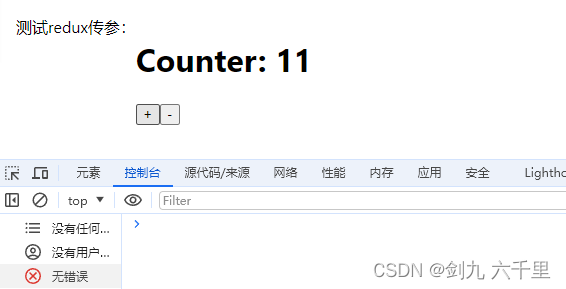
这个例子展示了如何创建一个简单的计数器应用,通过
Redux管理状态。用户点击加减按钮时,会触发actions,然后通过reducer更新state,最终React组件根据新的state重新渲染。5. refs:
- 方式:主要用于访问
DOM元素或在组件之间传递一个可变的引用。 - 如何使用:可以通过
React.createRef()创建ref,然后将其附加到特定的React元素上。在组件中,可以通过this.myRef.current访问DOM元素或在类组件间传递ref以直接操作另一个组件的实例。
// ParentRefs.tsx
// 父组件
import { useRef } from "react";
import ChildRefs from "./ChildRefs";

const ParentRefs = () => {
    const childRef = useRef<HTMLInputElement>(null);

    const handleClick = (): void => {
        childRef?.current?.focus();
    };

    return (
        <>
            <ChildRefs ref={childRef} />
            <button onClick={handleClick}>Focus Child Input</button>
        </>
    );
};

export default ParentRefs;
// ChildRefs.tsx // 子组件 import { forwardRef } from 'react'; const ChildRefs = forwardRef<HTMLInputElement>((props, ref) => { return ( <div> <input type="text" ref={ref} /> </div> ); }); export default ChildRefs; - 说明: 父组件通过
-
相关阅读:
抽象一个通用的配置冲突解决方案
Mybatis与Spring的集成
计算机毕业设计springboot驾校管理系统o2ehg源码+系统+程序+lw文档+部署
Mybatis-数据源与连接池
计算机视觉40例之案例03数字水印
屏幕状态自动检测+鼠标自动操作
Verilog中 generate语句的用法
SpringBoot使用AOP详解
linux常用三剑客
Autosar MCAL MCU配置时钟-基于cfg
- 原文地址:https://blog.csdn.net/to_the_Future/article/details/139614046