-
React基础教程(07):条件渲染
1 条件渲染
使用条件渲染,结合TodoList案例,进行完善,实现以下功能:
- 当列表中的数据为空的时候,现实提示信息
暂无待办事项 - 当列表中存在数据的时候,提示信息消失
这里介绍三种实现方式。
注意这里的
Empty是前端框架Antd的组件,如果安装了antd直接使用即可,如果没有安装可以用div代替也是可以的。这里为了更直观,所以使用了前端框架antd的Empty组件。1、三元操作符
{/*方式一*/}
{this.state.list.length === 0 ? <Empty style={{float:"left"}} description={"暂无待办事项"} /> : null}
2、逻辑与操作符
{/*方式二*/}
{ this.state.list.length === 0 && <Empty style={{float:"left"}} description={"暂无待办事项"} />}
3、css控制
方式三,主要是通过给
Empty容器绑定className属性为hidden,然后通过className属性,设置容器的display:none,来实现Empty的隐藏与现实,该方法中的Empty是一直都存在的。{/*方式三*/} <Empty className={this.state.list.length === 0 ? "" : "hidden"} style={{float:"left"}} description={"暂无待办事项"} />2、实现效果动图如下
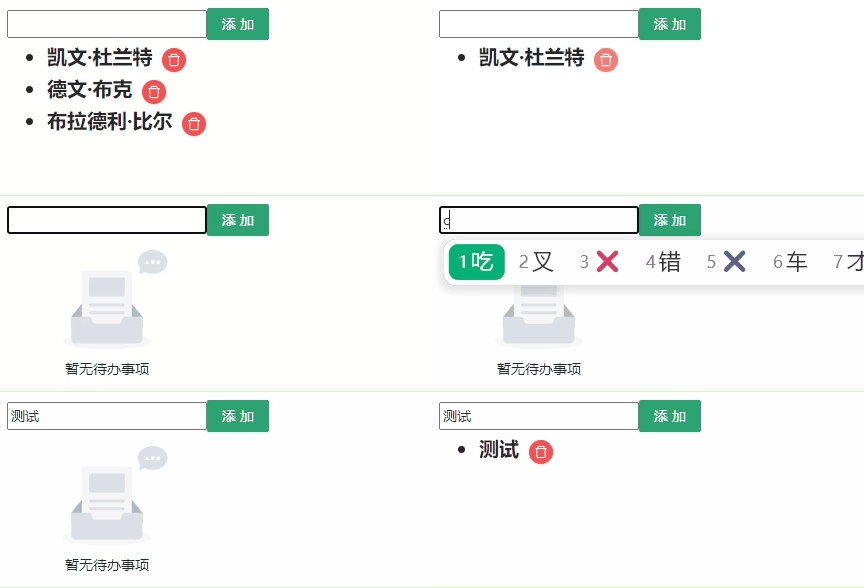
3、完整代码
import React, {Component} from "react"; import {Button, Empty} from 'antd'; import {DeleteOutlined} from '@ant-design/icons'; import './css/App.css' import './css/01-index.css' export default class App extends Component { a = 35; myRef = React.createRef(); // 定义状态 state = { list: [ { id: 1, name: "凯文·杜兰特" }, { id: 2, name: "德文·布克" }, { id: 3, name: "布拉德利·比尔" }] } render() { return ( <div style={{marginTop: 10, marginLeft: 10}}> <input style={{width: 200}} ref={this.myRef}/> {/*非常推荐*/} <Button style={{backgroundColor: '#2ba471', border: "none"}} size={"middle"} type={"primary"} onClick={() => { this.handlerClick() // 非常推荐,传参数 }}>添加</Button> <ul> { this.state.list.map((item, index) => <li style={{fontWeight: "bold", fontSize: "20px"}} key={item.id}>{item.name} <Button size={"small"} style={{marginLeft: 10}} type={"primary"} shape={"circle"} danger onClick={() => this.handlerDeleteClick(index)} icon={<DeleteOutlined/>}/> </li> ) } </ul> {/*方式一*/} {/*{this.state.list.length === 0 ?{float:"left"}} description={"暂无待办事项"} /> : null}*/ } {/*方式二*/} {/*{ this.state.list.length === 0 &&{float:"left"}} description={"暂无待办事项"} />}*/ } {/*方式三*/} <Empty className={this.state.list.length === 0 ? "" : "hidden"} style={{float:"left"}} description={"暂无待办事项"} /> </div> ) } handlerClick = () => { console.log("Click4", this.myRef.current.value); // 不要这样写,因为不要直接修改状态,可能会造成不可预期的问题 // this.state.list.push(this.myRef.current.value); let newList = [...this.state.list]; newList.push({ id: Math.random() * 100000000, // 生产不同的id name: this.myRef.current.value }); this.setState({ list: newList }) } handlerDeleteClick(index) { console.log("Del-", index); // 深复制 let newList = this.state.list.concat(); newList.splice(index, 1); this.setState({ list: newList }) // 清空输入框 this.myRef.current.value = ""; } } - 当列表中的数据为空的时候,现实提示信息
-
相关阅读:
UE4 Unlua源码解析12 - Lua与UE4的混合GC
docker-compose 升级
java刷题day 05
在springboot框架中用Configuration注解的方式写一个java过滤器的详细实例?
软件2班20240513
Ubuntu上通过源码方式安装Redis
SpringBoot 使用JDBC
计算机网络高频面试题集锦
c++面试题目汇总-1-57
这个项目,荣获“绽放杯”一等奖!
- 原文地址:https://blog.csdn.net/WwLK123/article/details/139624008