-
Unity API学习之消息机制理论与应用
目录
示例2:父与子对象之间的消息发送(BroadcastMassage)
消息机制
在Unity中,SendMessage 方法用于在游戏对象及其所有子对象上调用指定名称的方法。这种方法可以用于在不需要知道接收方的确切类型的情况下,向游戏对象发送消息。
基本语法如下:
void SendMessage(string methodName, object value = null, SendMessageOptions options = SendMessageOptions.RequireReceiver);methodName: 要调用的方法的名称。
value: 可选参数,要传递给方法的参数。
options: 可选参数,用于指定如何处理未找到接收方的情况。SendMessage的传参情况分析:(以下的调用方法名以Mesage为准)
1. 在当前物体中组件名为Mesage
2. 当前物体中的其他脚本中有Mesage方法
示例1:同一物体中不同组件之间发送消息
- using System.Collections;
- using System.Collections.Generic;
- using UnityEngine;
- public class NO8_Message : MonoBehaviour
- {
- // Start is called before the first frame update
- void Start()
- {
- gameObject.SendMessage("Mesage");
- gameObject.SendMessage("Mesages", 1);
- }
- // Update is called once per frame
- void Update()
- {
- }
- //无参发出消息
- public void Mesage()
- {
- print("消息发送!!!");
- }
- //有参发出消息
- public void Mesages(int value)
- {
- print("本组件接收到消息" + value);
- }
- }
- using System.Collections;
- using System.Collections.Generic;
- using UnityEngine;
- public class Mesages : MonoBehaviour
- {
- // Start is called before the first frame update
- void Start()
- {
- print("其他组件的消息发送给Mesages组件");
- }
- // Update is called once per frame
- void Update()
- {
- }
- }
- using System.Collections;
- using System.Collections.Generic;
- using UnityEngine;
- public class Mesage : MonoBehaviour
- {
- // Start is called before the first frame update
- void Start()
- {
- print("其他组件的消息发送给Mesage组件");
- }
- // Update is called once per frame
- void Update()
- {
- }
- }
- using System.Collections;
- using System.Collections.Generic;
- using UnityEngine;
- public class example : MonoBehaviour
- {
- // Start is called before the first frame update
- void Start()
- {
- }
- // Update is called once per frame
- void Update()
- {
- }
- public void Mesage()
- {
- print("消息发送!!!");
- }
- public void Mesages(int value)
- {
- print("example组件接收到消息" + value);
- }
- }


注:发送消息若没有接收者则会报错,若不想要报错则需要输入如下代码
SendMessage("GetTestMsg",SendMessageOptions.DontRequireReceiver);示例2:父与子对象之间的消息发送(BroadcastMassage)
父对象向子对象发送消息

- using System.Collections;
- using System.Collections.Generic;
- using UnityEngine;
- public class NO8_MessageParent : MonoBehaviour
- {
- // Start is called before the first frame update
- //BroadcastMessage向下广播,包括子对象
- void Start()
- {
- BroadcastMessage("getMesage");
- }
- public void getMesage()
- {
- print("Parent");
- }
- }
- using System.Collections;
- using System.Collections.Generic;
- using UnityEngine;
- public class NO8_MessageChild : MonoBehaviour
- {
- //向自身和上级发送消息,总当前的目录地位开始
- /*private void Start()
- {
- SendMessageUpwards("getMesage");
- }*/
- public void getMesage()
- {
- print("Child");
- }
- }
- using System.Collections;
- using System.Collections.Generic;
- using UnityEngine;
- public class NO8_MessageChild1 : MonoBehaviour
- {
- //向自身和上级发送消息,总当前的目录地位开始
- public void getMesage()
- {
- print("Child1");
- }
- }
- using System.Collections;
- using System.Collections.Generic;
- using UnityEngine;
- public class NO8_MessageChild_child : MonoBehaviour
- {
- //向自身和上级发送消息,总当前的目录地位开始
- public void getMesage()
- {
- print("Child_child");
- }
- }
- using System.Collections;
- using System.Collections.Generic;
- using UnityEngine;
- public class NO8_MessageChild_child1 : MonoBehaviour
- {
- //向自身和上级发送消息,总当前的目录地位开始
- public void getMesage()
- {
- print("Child_child1");
- }
- }
- using System.Collections;
- using System.Collections.Generic;
- using UnityEngine;
- public class NO8_MessageChild_child1 : MonoBehaviour
- {
- //向自身和上级发送消息,总当前的目录地位开始
- public void getMesage()
- {
- print("Child_child1");
- }
- }

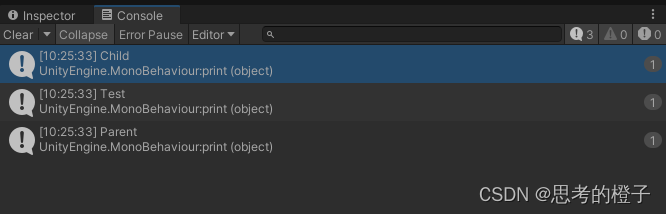
子对象向父对象发送消息
搜索范围:子对象以及上两级父对象

- using System.Collections;
- using System.Collections.Generic;
- using UnityEngine;
- public class NO8_MessageChild : MonoBehaviour
- {
- //向自身和上级发送消息,总当前的目录地位开始
- private void Start()
- {
- SendMessageUpwards("getMesage");
- }
- public void getMesage()
- {
- print("Child");
- }
- }
- using System.Collections;
- using System.Collections.Generic;
- using UnityEngine;
- public class NO8_MessageTest : MonoBehaviour
- {
- //向自身和上级发送消息,总当前的目录地位开始
- public void getMesage()
- {
- print("Test");
- }
- }
- using System.Collections;
- using System.Collections.Generic;
- using UnityEngine;
- public class NO8_MessageParent : MonoBehaviour
- {
- // Start is called before the first frame update
- //BroadcastMessage向下广播,包括子对象
- void Start()
- {
- /*BroadcastMessage("getMesage");*/
- }
- public void getMesage()
- {
- print("Parent");
- }
- }
- using System.Collections;
- using System.Collections.Generic;
- using UnityEngine;
- public class NO8_Message : MonoBehaviour
- {
- // Start is called before the first frame update
- void Start()
- {
- gameObject.SendMessage("Mesage");
- gameObject.SendMessage("Mesages", 1);
- }
- // Update is called once per frame
- void Update()
- {
- }
- //无参发出消息
- public void Mesage()
- {
- print("消息发送!!!");
- }
- //有参发出消息
- public void Mesages(int value)
- {
- print("本组件接收到消息" + value);
- }
- public void getMesage()
- {
- print("Message");
- }
- }
-
相关阅读:
Jenkins安装和使用
html静态网页-求爱表白代码(爱心特效代码520)
Linux上运行Nacos服务出现报错及解决方法
桥接模式学习
计算机毕业设计(附源码)python支持智能化管理的仓库管理
MAC 配置 Maven
单片机——软件部分开发过程介绍
什么是 eCPM?它与 CPM 有何不同?
基于VR元宇宙技术搭建林业生态模拟仿真教学系统
基于SpringBoot的篮球论坛系统
- 原文地址:https://blog.csdn.net/qq_75073393/article/details/139574158