-
WinForm之TCP客户端通讯
目录
一 设计界面

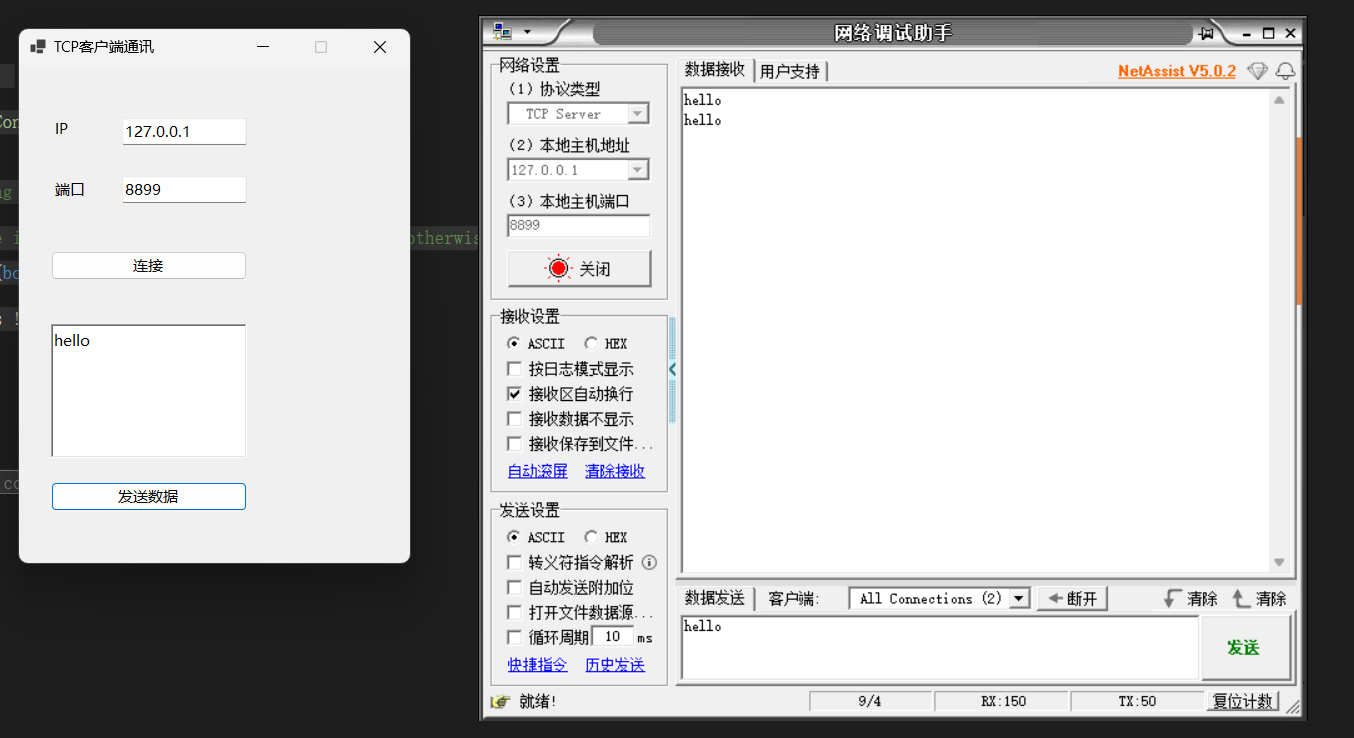
二 后台代码
- using System.Net.Sockets;
- using System.Text;
- namespace TCP网络客户端通讯
- {
- public partial class Form1 : Form
- {
- public Form1()
- {
- InitializeComponent();
- }
- TcpClient tcpClient = new TcpClient();
- private void connect_Click(object sender, EventArgs e)
- {
- if (!tcpClient.Connected)
- {
- tcpClient.Connect(IP.Text, int.Parse(PORT.Text));
- //开启线程一直读取数据
- Task.Run(() =>
- {
- while (true)
- {
- NetworkStream networkStream = tcpClient.GetStream();
- if (networkStream != null)
- {
- byte[] datas = new byte[1024];
- networkStream.Read(datas, 0, datas.Length);
- this.BeginInvoke(new Action(() =>
- {
- log.Text = Encoding.UTF8.GetString(datas);
- }));
- }
- }
- });
- }
- }
- private void send_Click(object sender, EventArgs e)
- {
- NetworkStream networkStream = tcpClient.GetStream();
- if (networkStream != null)
- {
- byte[] datas = Encoding.UTF8.GetBytes(log.Text);
- networkStream.Write(datas, 0, datas.Length);
- }
- }
- private void Form1_Load(object sender, EventArgs e)
- {
- IP.Text = "127.0.0.1";
- PORT.Text = "8899";
- }
- }
- }
设计器自动生成代码:
- namespace TCP网络客户端通讯
- {
- partial class Form1
- {
- ///
- /// Required designer variable.
- ///
- private System.ComponentModel.IContainer components = null;
- ///
- /// Clean up any resources being used.
- ///
- /// true if managed resources should be disposed; otherwise, false.
- protected override void Dispose(bool disposing)
- {
- if (disposing && (components != null))
- {
- components.Dispose();
- }
- base.Dispose(disposing);
- }
- #region Windows Form Designer generated code
- ///
- /// Required method for Designer support - do not modify
- /// the contents of this method with the code editor.
- ///
- private void InitializeComponent()
- {
- label1 = new Label();
- label2 = new Label();
- IP = new TextBox();
- PORT = new TextBox();
- connect = new Button();
- log = new RichTextBox();
- send = new Button();
- SuspendLayout();
- //
- // label1
- //
- label1.AutoSize = true;
- label1.Location = new Point(32, 52);
- label1.Name = "label1";
- label1.Size = new Size(22, 20);
- label1.TabIndex = 0;
- label1.Text = "IP";
- //
- // label2
- //
- label2.AutoSize = true;
- label2.Location = new Point(32, 113);
- label2.Name = "label2";
- label2.Size = new Size(39, 20);
- label2.TabIndex = 1;
- label2.Text = "端口";
- //
- // IP
- //
- IP.Location = new Point(103, 52);
- IP.Name = "IP";
- IP.Size = new Size(125, 27);
- IP.TabIndex = 2;
- //
- // PORT
- //
- PORT.Location = new Point(103, 110);
- PORT.Name = "PORT";
- PORT.Size = new Size(125, 27);
- PORT.TabIndex = 3;
- //
- // connect
- //
- connect.Location = new Point(32, 185);
- connect.Name = "connect";
- connect.Size = new Size(196, 29);
- connect.TabIndex = 4;
- connect.Text = "连接";
- connect.UseVisualStyleBackColor = true;
- connect.Click += connect_Click;
- //
- // log
- //
- log.Location = new Point(32, 258);
- log.Name = "log";
- log.Size = new Size(196, 134);
- log.TabIndex = 5;
- log.Text = "";
- //
- // send
- //
- send.Location = new Point(32, 416);
- send.Name = "send";
- send.Size = new Size(196, 29);
- send.TabIndex = 6;
- send.Text = "发送数据";
- send.UseVisualStyleBackColor = true;
- send.Click += send_Click;
- //
- // Form1
- //
- AutoScaleDimensions = new SizeF(9F, 20F);
- AutoScaleMode = AutoScaleMode.Font;
- ClientSize = new Size(391, 497);
- Controls.Add(send);
- Controls.Add(log);
- Controls.Add(connect);
- Controls.Add(PORT);
- Controls.Add(IP);
- Controls.Add(label2);
- Controls.Add(label1);
- MaximizeBox = false;
- Name = "Form1";
- Text = "TCP客户端通讯";
- Load += Form1_Load;
- ResumeLayout(false);
- PerformLayout();
- }
- #endregion
- private Label label1;
- private Label label2;
- private TextBox IP;
- private TextBox PORT;
- private Button connect;
- private RichTextBox log;
- private Button send;
- }
- }
-
相关阅读:
复制粘贴,快速将Python程序打包成exe
【JavaScript复习十七】作用域以及变量提升
树莓派等Linux开发板上使用 SSD1306 OLED 屏幕,bullseye系统 ubuntu,debian
REDIS可视化神器 | REDIS DESK MANAGER(2022.5.1)
springboot+共享电动单车管理系统 毕业设计-附源码131016
【vue3】12.跟着官网学习vue3-侦听器,watch方法
SpringSecurity学习笔记(一)springSecurity的整体架构
高并发下如何避免产生重复数据?
15:00面试,15:06就出来了,问的问题有点变态。。。
CSS的break-inside 属性 的使用
- 原文地址:https://blog.csdn.net/XiaoWang_csdn/article/details/139610369