-
百度地图1
地图的基本操作
设置地图
centerAndZoom(center: Point, zoom: Number)设初始化地图,center类型为Point时,zoom必须赋值,范围3-19级,
 // 百度地图API功能
  var map = new BMap.Map("map"); // 创建Map实例
  map.centerAndZoom("上海", 15); // 初始化地图,用城市名设置地图中心点
移动地图
panTo(center: Point, opts: PanOptions) 将地图的中心点更改为给定的点
Point(lng: Number, lat: Number):表示一个地理坐标点。// 百度地图API功能 var map = new BMap.Map("map"); // 创建Map实例 map.centerAndZoom("上海", 10); // 初始化地图,用城市名设置地图中心点 setTimeout(function () { map.panTo(new BMap.Point(113.262232, 23.154345), 10); //两秒后移动到广州 }, 2000); });拖拽
// 百度地图API功能
  var map = new BMap.Map("map"); // 创建Map实例
  map.centerAndZoom(new BMap.Point(116.4035, 39.915), 10); // 初始化地图,用城市名设置地图中心点
  map.disableDragging(); //禁止拖拽
  setTimeout(function () {
    map.enableDragging(); //两秒后开启拖拽
    //map.enableInertialDragging();   //两秒后开启惯性拖拽
  }, 2000);
设置地图显示范围
移动后,会自动返回
enableScrollWheelZoom():启用滚轮放大缩小//这里还要额外引入一个文件 <!DOCTYPE html> <html lang="en"> <head> <meta charset="UTF-8" /> <link rel="icon" href="/favicon.ico" /> <meta name="viewport" content="width=device-width, initial-scale=1.0" /> <script type="text/javascript" src="https://api.map.baidu.com/api?v=3.0&ak=lS9aVqMRyVSpOk8xJCbebvLmkGcCazpY" ></script> <script type="text/javascript" src="//api.map.baidu.com/library/AreaRestriction/1.2/src/AreaRestriction_min.js" ></script> <title>Vite App</title> </head> <body> <div id="app"></div> <script type="module" src="/src/main.js"></script> </body> </html> // 百度地图API功能 var map = new BMap.Map("map"); // 创建Map实例 map.centerAndZoom(new BMap.Point(116.404, 39.915), 13); map.enableScrollWheelZoom(); var b = new BMap.Bounds( new BMap.Point(116.027143, 39.772348), new BMap.Point(116.832025, 40.126349) ); try { BMapLib.AreaRestriction.setBounds(map, b); } catch (e) { alert(e); }地图控件
addControl(control: Control):将控件添加到地图
removeControl(control: Control):从地图中移除控件// 百度地图API功能 var map = new BMap.Map("map"); // 创建Map实例 map.centerAndZoom(new BMap.Point(116.404, 39.915), 13); map.enableScrollWheelZoom(); var top_left_control = new BMap.ScaleControl({ anchor: BMAP_ANCHOR_TOP_LEFT, }); // 左上角,添加比例尺 var top_left_navigation = new BMap.NavigationControl(); //左上角,添加默认缩放平移控件 map.addControl(top_left_control); map.addControl(top_left_navigation); var top_right_navigation = new BMap.NavigationControl({ anchor: BMAP_ANCHOR_TOP_RIGHT, type: BMAP_NAVIGATION_CONTROL_SMALL, }); //右上角,仅包含平移和缩放按钮 /*缩放控件type有四种类型: BMAP_NAVIGATION_CONTROL_SMALL:仅包含平移和缩放按钮; BMAP_NAVIGATION_CONTROL_PAN:仅包含平移按钮; BMAP_NAVIGATION_CONTROL_ZOOM:仅包含缩放按钮*/ map.addControl(top_right_navigation);
覆盖物
点覆盖物
添加覆盖物
Marker(point: Point, opts: MarkerOptions)表示地图上一个图像标注。
addOverlay(overlay: Overlay):将覆盖物添加到地图中,一个覆盖物实例只能向地图中添加一次。
setAnimation(animation: Animation | Null):设置标注动画效果。如果参数为null,则取消动画效果。该方法需要在addOverlay方法后设置。
animation的值:

  var map = new BMap.Map("map"); // 创建Map实例
  map.centerAndZoom(new BMap.Point(116.404, 39.915), 13);
  map.enableScrollWheelZoom();
  var point = new BMap.Point(116.404, 39.915);
  map.centerAndZoom(point, 15);
  var marker = new BMap.Marker(point); // 创建标注
  map.addOverlay(marker); // 将标注添加到地图中
  marker.setAnimation(BMAP_ANIMATION_BOUNCE); //跳动的动画
设置点是否可以拖拽
disableDragging():不可拖拽
enableDragging():开启标注拖拽功能// 百度地图API功能 var map = new BMap.Map("l-map"); var point = new BMap.Point(116.400244,39.92556); map.centerAndZoom(point, 12); var marker = new BMap.Marker(point);// 创建标注 map.addOverlay(marker); // 将标注添加到地图中 marker.disableDragging(); // 不可拖拽点聚合
 var map = new BMap.Map("map"); // 创建Map实例
  map.centerAndZoom(new BMap.Point(116.404, 39.915), 13);
  map.enableScrollWheelZoom();
  var MAX = 10;
  var markers = [];
  var pt = null;
  var i = 0;
  for (; i < MAX; i++) {
    pt = new BMap.Point(Math.random() * 40 + 85, Math.random() * 30 + 21);
    markers.push(new BMap.Marker(pt));
  }
  //最简单的用法,生成一个marker数组,然后调用markerClusterer类即可。
  var markerClusterer = new BMapLib.MarkerClusterer(map, { markers: markers });
矢量图形覆盖物
线
Polyline(points: Array, opts: PolylineOptions):使用浏览器的矢量制图工具。
线条的样式:

	var polyline = new BMap.Polyline([
		new BMap.Point(116.399, 39.910),
		new BMap.Point(116.405, 39.920),
		new BMap.Point(116.423493, 39.907445)
	], {strokeColor:"blue", strokeWeight:2, strokeOpacity:0.5});   //创建折线
	map.addOverlay(polyline);   //增加折线
多边形
Polygon(points: Array, opts: PolygonOptions):多边形覆盖物。
 var map = new BMap.Map("map"); // 创建Map实例
  map.centerAndZoom(new BMap.Point(116.404, 39.915), 10);
  map.enableScrollWheelZoom();
  var polygon = new BMap.Polygon(
    [
      new BMap.Point(116.387112, 39.920977),
      new BMap.Point(116.385243, 39.913063),
      new BMap.Point(116.394226, 39.917988),
      new BMap.Point(116.401772, 39.921364),
      new BMap.Point(116.41248, 39.927893),
    ],
    { strokeColor: "blue", strokeWeight: 2, strokeOpacity: 0.5 }
  ); //创建多边形
  map.addOverlay(polygon); //增加多边形
在折线上添加箭头
Symbol(path: String | SymboShapeType, opts: SymbolOptions):通过svg的path string创建的矢量图标类。
SymbolShapeType:枚举类型表示矢量图标类预设的图标样式。

SymbolOptions

IconSequence(symbol: Symbol, offset: string, repeat: string, fixedRotation: boolean):用于设置polyline上的符号显示。var map = new BMap.Map("map"); // 创建Map实例 map.centerAndZoom(new BMap.Point(116.404, 39.915), 10); map.enableScrollWheelZoom(); var sy = new BMap.Symbol(BMap_Symbol_SHAPE_BACKWARD_OPEN_ARROW, { scale: 0.6, //图标缩放大小 strokeColor: "#fff", //设置矢量图标的线填充颜色 strokeWeight: "2", //设置线宽 }); var icons = new BMap.IconSequence(sy, "10", "30"); // 创建polyline对象 var pois = [ new BMap.Point(116.350658, 39.938285), new BMap.Point(116.386446, 39.939281), new BMap.Point(116.389034, 39.913828), new BMap.Point(116.442501, 39.914603), ]; var polyline = new BMap.Polyline(pois, { enableEditing: false, //是否启用线编辑,默认为false enableClicking: true, //是否响应点击事件,默认为true icons: [icons], strokeWeight: "8", //折线的宽度,以像素为单位 strokeOpacity: 0.8, //折线的透明度,取值范围0 - 1 strokeColor: "#18a45b", //折线颜色 }); map.addOverlay(polyline); //增加折线
添加弧线
BMapLib.CurveLine():在地图上绘制曲线线段。
 var map = new BMap.Map("map"); // 创建Map实例
  map.centerAndZoom(new BMap.Point(116.404, 39.915), 10);
  map.enableScrollWheelZoom();
  var beijingPosition = new BMap.Point(116.432045, 39.910683),
    hangzhouPosition = new BMap.Point(120.129721, 30.314429),
    taiwanPosition = new BMap.Point(121.491121, 25.127053);
  var points = [beijingPosition, hangzhouPosition, taiwanPosition];
  var curve = new BMapLib.CurveLine(points, {
    strokeColor: "blue",
    strokeWeight: 3,
    strokeOpacity: 0.5,
  }); //创建弧线对象
  map.addOverlay(curve); //添加到地图中
  curve.enableEditing(); //开启编辑功能
添加行政规划区
Boundary():创建行政区域搜索的对象实例。
.get(name: String, callback: function):返回行政区域的边界。
setViewport(view: Array | Viewport, viewportOptions: ViewportOptions):根据提供的地理区域或坐标设置地图视野,
	function getBoundary(){
		var bdary = new BMap.Boundary();
		bdary.get("北京市海淀区", function(rs){       //获取行政区域
			console.log(rs.boundaries,'888')
			map.clearOverlays();        //清除地图覆盖物
			var count = rs.boundaries.length; //行政区域的点有多少个
			if (count === 0) {
				alert('未能获取当前输入行政区域');
				return ;
			}
          	var pointArray = [];
			for (var i = 0; i < count; i++) {
				var ply = new BMap.Polygon(rs.boundaries[i], {strokeWeight: 2, strokeColor: "#ff0000"}); //建立多边形覆盖物
				map.addOverlay(ply);  //添加覆盖物
				pointArray = pointArray.concat(ply.getPath());
			}
			map.setViewport(pointArray);    //调整视野
			addlabel();
		});
	}

	setTimeout(function(){
		getBoundary();
	}, 2000);
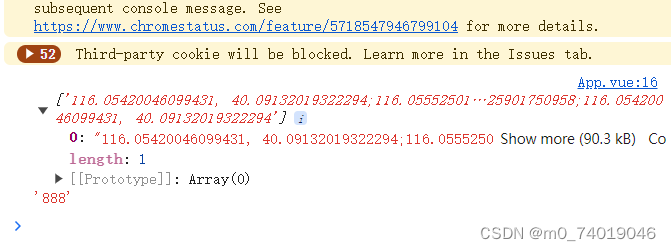
bdary.get(“北京市海淀区”, function(rs){ }) rs是一个数组,存放当前区域的地理位置。

添加自定义覆盖物
官网的例子:
// 百度地图API功能
	var mp = new BMap.Map("allmap");
	mp.centerAndZoom(new BMap.Point(116.3964,39.9093), 15);
	mp.enableScrollWheelZoom();
	// 复杂的自定义覆盖物
    function ComplexCustomOverlay(point, text, mouseoverText){
      this._point = point;
      this._text = text;
      this._overText = mouseoverText;
    }
    ComplexCustomOverlay.prototype = new BMap.Overlay();
    ComplexCustomOverlay.prototype.initialize = function(map){
      this._map = map;
      var div = this._div = document.createElement("div");
      div.style.position = "absolute";
      div.style.zIndex = BMap.Overlay.getZIndex(this._point.lat);
      div.style.backgroundColor = "#EE5D5B";
      div.style.border = "1px solid #BC3B3A";
      div.style.color = "white";
      div.style.height = "18px";
      div.style.padding = "2px";
      div.style.lineHeight = "18px";
      div.style.whiteSpace = "nowrap";
      div.style.MozUserSelect = "none";
      div.style.fontSize = "12px"
      var span = this._span = document.createElement("span");
      div.appendChild(span);
      span.appendChild(document.createTextNode(this._text));
      var that = this;

      var arrow = this._arrow = document.createElement("div");
      arrow.style.background = "url(//map.baidu.com/fwmap/upload/r/map/fwmap/static/house/images/label.png) no-repeat";
      arrow.style.position = "absolute";
      arrow.style.width = "11px";
      arrow.style.height = "10px";
      arrow.style.top = "22px";
      arrow.style.left = "10px";
      arrow.style.overflow = "hidden";
      div.appendChild(arrow);

      div.onmouseover = function(){
        this.style.backgroundColor = "#6BADCA";
        this.style.borderColor = "#0000ff";
        this.getElementsByTagName("span")[0].innerHTML = that._overText;
        arrow.style.backgroundPosition = "0px -20px";
      }

      div.onmouseout = function(){
        this.style.backgroundColor = "#EE5D5B";
        this.style.borderColor = "#BC3B3A";
        this.getElementsByTagName("span")[0].innerHTML = that._text;
        arrow.style.backgroundPosition = "0px 0px";
      }

      mp.getPanes().labelPane.appendChild(div);

      return div;
    }
    ComplexCustomOverlay.prototype.draw = function(){
      var map = this._map;
      var pixel = map.pointToOverlayPixel(this._point);
      this._div.style.left = pixel.x - parseInt(this._arrow.style.left) + "px";
      this._div.style.top  = pixel.y - 30 + "px";
    }
    var txt = "银湖海岸城", mouseoverTxt = txt + " " + parseInt(Math.random() * 1000,10) + "套" ;

    var myCompOverlay = new ComplexCustomOverlay(new BMap.Point(116.407845,39.914101), "银湖海岸城",mouseoverTxt);

    mp.addOverlay(myCompOverlay);
简化版
1.创建构造函数 ComplexCustomOverlay
2构造函数的原型指向BMap.Overlay() (Overlay:覆盖物的抽象基类,所有覆盖物均继承基类的方法)
3.设置initialize 用于初始化覆盖物,当调用map.addOverlay时,API将调用此方法
4. 用js设置元素
5. 使用 getContainer(),返回地图的容器元素。当创建用户自定义控件时,需要自行实现Control.initialize()方法,并将控件的容器元素添加到地图上,通过此方法可获得地图容器。var map = new BMap.Map("map"); // 创建Map实例 map.centerAndZoom(new BMap.Point(116.3964, 39.9093), 15); map.enableScrollWheelZoom(); // 复杂的自定义覆盖物 function ComplexCustomOverlay(point, text) { this._point = point; this._text = text; } ComplexCustomOverlay.prototype = new BMap.Overlay(); ComplexCustomOverlay.prototype.initialize = function () { var div = (this._div = document.createElement("div")); div.style.position = "absolute"; div.style.left = "50px"; div.style.top = "50px"; div.style.cursor = "pointer"; div.style.padding = "7px 10px"; div.style.cursor = "pointer"; div.style.backgroundColor = "red"; div.appendChild(document.createTextNode(this._text)); map.getContainer().appendChild(div); return div; }; var myCompOverlay = new ComplexCustomOverlay( new BMap.Point(116.407845, 39.914101), "银湖海岸城" ); map.addOverlay(myCompOverlay);
矢量图标
设置Marker的MarkerOptions中的icon
var map = new BMap.Map("map"); // 创建Map实例
  map.centerAndZoom(new BMap.Point(116.3964, 39.9093), 15);
  map.enableScrollWheelZoom();
  var point = new BMap.Point(116.473008, 39.916605);
  var vectorFCArrow = new BMap.Marker(
    new BMap.Point(point.lng - 0.01, point.lat),
    {
      // 初始化方向向上的闭合箭头
      icon: new BMap.Symbol(BMap_Symbol_SHAPE_FORWARD_CLOSED_ARROW, {
        scale: 5,
        strokeWeight: 1,
        rotation: 0, //顺时针旋转30度
        fillColor: "red",
        fillOpacity: 0.8,
      }),
    }
  );
  map.addOverlay(vectorFCArrow);
-
相关阅读:
一种基于傅里叶变换的横向与纵向剪切干涉仿真分析
百度前端二面常考面试题
彩虹桥架构演进之路-性能篇
概率论_复习_第7章:参数估计
文件描述符--Linux
IDEA找不到Database解决方法
梯度下降(机器学习)
数据结构:排序算法+查找算法
知识工程复习之十八类重点问题(8-12)
综合能力 ---- 2. 法律法规
- 原文地址:https://blog.csdn.net/m0_74019046/article/details/139329500