-
Android 应用开发-实现将公共存储空间内的文件复制到应用的私用存储空间中

一、前言
几个月前,我用Android Studio给公司销售部门的同事开发了一款手机app,让同事们用自己的手机就能进行商品的扫码盘点操作,帮他们提高了工作效率,他们用了一段时间,反映还不错。不过前几天,销售部门的同事找到我,说近期公司新增了一些商品,用我的这款软件无法正常扫码这些新商品,希望我能解决问题。
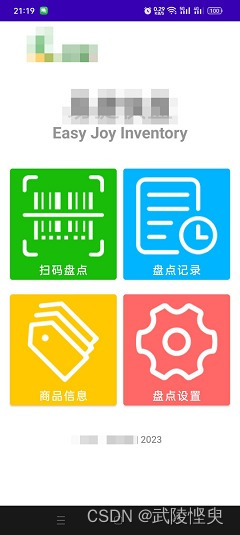

这个问题的产生原因是,因为我的能力和资源有限,开发的这款手机app只是一个单机版的辅助工具。在开发时,商品信息是以Sqlit3数据库文件的形式保存在raw文件夹下,随代码一并打包在apk里,软件安装后第一次运行时,会将raw文件夹内的数据库文件导入到应用的私有存储空间内,等于是内嵌在软件中的。这个应用提供了一个手工添加商品信息的功能,但只能一个个手工添加,遇到大量新增的商品信息会很麻烦。这次新增了400多个商品信息,因此同事赶紧找我们解决这个问题。
这篇日志记录了解决问题的过程以备忘。
二、实现过程
要解决这个问题,最简单的方法就是将raw文件夹里的数据库文件更新,再重新打包成apk后,让同事重装一下。但使用这个软件的同事有好些个,有些同事觉得这样的话,以后要是更新商品就要重装一次应用,觉得不妥。希望我还是提供批量添加新商品信息的功能。
鉴于此,我决定为这个应用开发一个导入商品信息的功能。该功能要达到的目标是,在商品更新后,由与我对接的同事按我要求的模板将商品信息做成一个xls文件,然后通过通信软件(如钉钉、微信)将这个xls文件发送给其他的同事。其他同事在手机上下载这个xls文件,然后进入本应用的导入商品模块,选择这个xls文件,将文件内的数据导入的应用内数据库文件中。这样的好处是,以后的商品更新操作都可以由同事们自己完成,不用我插手了。我按这个思路在网上搜索了相关的知识,我希望使用第三方的poi库读取xls文件的数据内容(因为之前开发的将db文件中将数据导出为xls文件就是用的poi库),然后将获取到的数据更新到应用的私有空间内。网上这方面的内容还是比较容易找到,将搜索到的几篇文章中的知识点了解清楚后,依瓢画葫芦就完成了这个功能。通过真机调试,实现了从选定的数据功能。
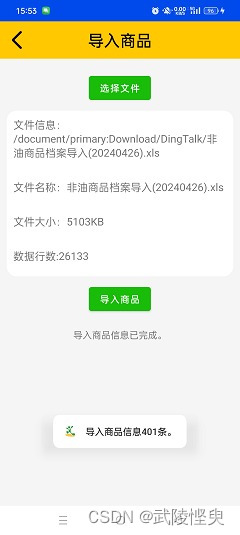
(Android Studio连真机调试,成功将xls文件中的数据添加到数据库中)
但是在我将应用打包成apk发给同事进行测试时,在所有测试的同事手机上使用该功能导入数据时都出现了闪退现象,这让我很疑惑,之后我将apk文件安装到我的手机上,也出现了闪退,我将手机连接电脑,通过Android Studio检查错误信息,看到了如下的错误提示:
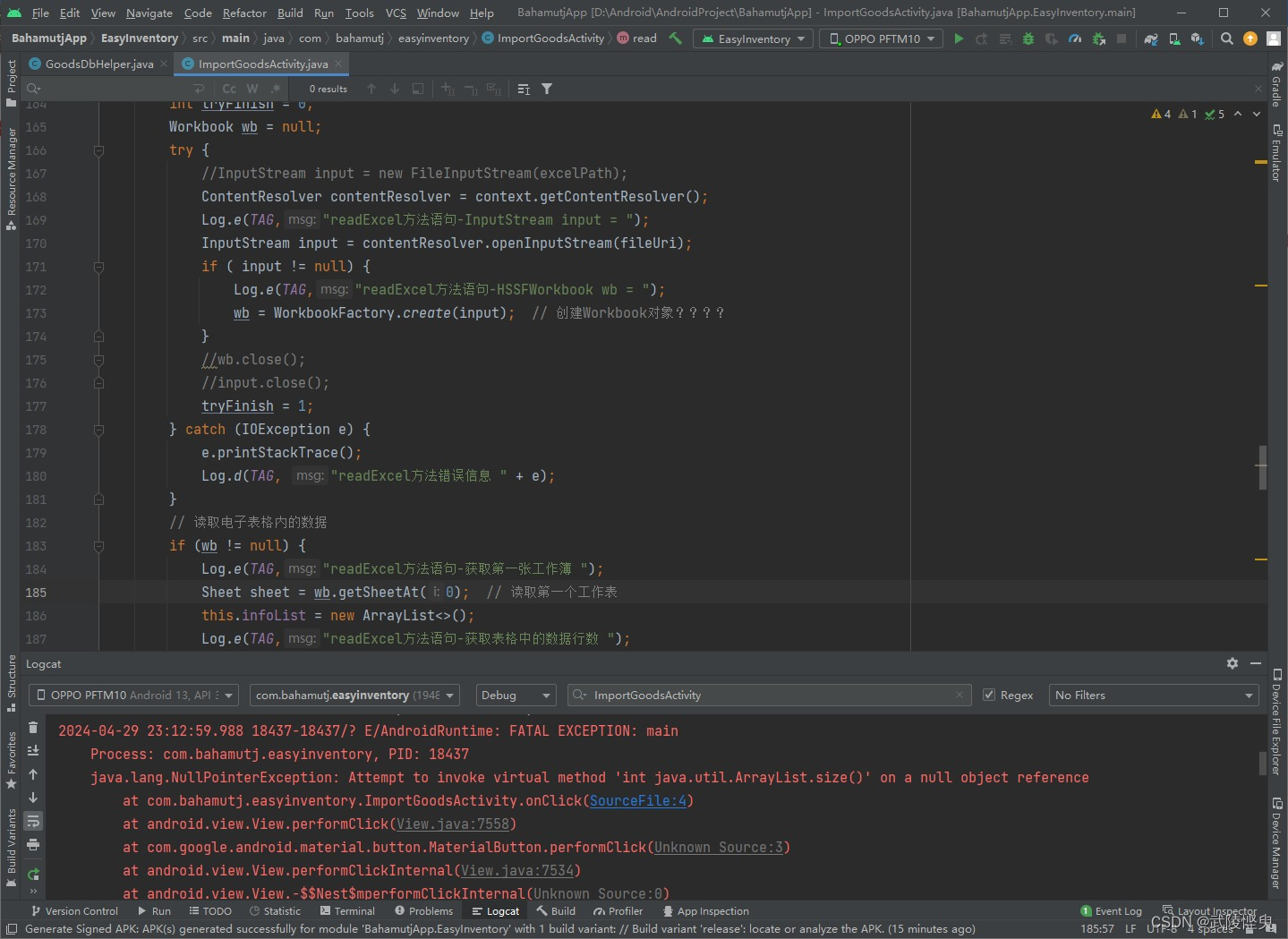
(执行导入商品操作时出现的错误提示)
通过对错误提示的分析,发现是执行语句“InputStream input = contentResolver.openInputStream(fileUri);”时出的错,获取到的对象为空。但是,我之后又通过Android Studio连真机执行“run”命令,用调试模式覆盖掉apk安装文件后,再测试又是正常的。反复进行安装apk和Android Studio连真机调试,都是安装apk后执行导入功能就闪退,调试模式下正常,这就很郁闷了。网上又找不要引起这个问题的原因,导致开发受阻。
但问题总要尽快解决,不然会让这款应用的使用感受严重下降。不得已我要另寻他法。
之后我转换一下思路,开发一个替换数据库文件的功能来解决问题。这个功能的要达到的目标是,在商品信息发生变化后,由与我对接的同事将新的商品信息提供给我,我做好db数据库文件,返回给他,由他通过通信软件(如钉钉、微信)将这个db文件发送给其他的同事。其他同事在手机上下载db文件,然后进入本应用的更新数据模块,选择这个db文件,将文件内容读取出来覆盖应用内原来的数据库文件,达到更新商品信息的目的。读取db文件不会用到poi库,有可能避开上面的问题。有了之前的开发经验,只需要对原来的代码做适当的修改就得到了新的功能,比之前的开发快了不少。在完成了新模块的开发后,再次进行真机调试和打包apk测试,均正常实现了从公共存储空间将db文件的内容复制到应用私有空间中,没有出现闪退问题。


(将db文件内容覆盖了原数据库) (更新后可以查询到新增的商品信息)
这样做,就绕开了上面读取xls文件出错的问题,但我的同事不会做db数据库文件,还需要我插手,相比前面的方案要略逊一筹。但至少同事提出的批量更新商品信息到手机内嵌的数据库中的需求得到了解决。以后如果找到了前述问题的解决办法,再做处理。有时候遇到些问题并不一定是坏事,在解决问题的过程中,也能学到很多的知识
三、部分代码展示
更新数据功能模块xml文件
- "1.0" encoding="utf-8"?>
- <LinearLayout xmlns:android="http://schemas.android.com/apk/res/android"
- xmlns:app="http://schemas.android.com/apk/res-auto"
- xmlns:tools="http://schemas.android.com/tools"
- android:layout_width="match_parent"
- android:layout_height="match_parent"
- android:background="@color/gray_245"
- android:orientation="vertical"
- tools:context=".UpdateDbActivity">
- <androidx.appcompat.widget.Toolbar
- android:id="@+id/toolbar"
- android:layout_width="match_parent"
- android:layout_height="wrap_content"
- android:background="@color/yellow_455"
- app:navigationIcon="@drawable/ic_back_b" >
- <TextView
- android:id="@+id/tv_title"
- android:layout_width="wrap_content"
- android:layout_height="wrap_content"
- android:layout_gravity="center"
- android:textColor="@color/black"
- android:textSize="24sp"
- android:textStyle="bold"
- android:text="@string/GoodsInfoActivity_update" />
- androidx.appcompat.widget.Toolbar>
- <LinearLayout
- android:layout_width="match_parent"
- android:layout_height="wrap_content"
- android:orientation="vertical" >
- <Button
- android:id="@+id/btn_select"
- android:layout_width="wrap_content"
- android:layout_height="wrap_content"
- android:layout_gravity="center"
- android:layout_marginTop="20dp"
- android:text="@string/select" />
- <TextView
- android:layout_width="match_parent"
- android:layout_height="wrap_content"
- android:layout_margin="10dp"
- android:text="选择DB文件,才能更新商品信息数据。"
- android:textSize="16sp" />
- <LinearLayout
- android:layout_width="match_parent"
- android:layout_height="wrap_content"
- android:layout_margin="10dp"
- android:padding="0dp"
- android:background="@drawable/shape_round_bg_white"
- android:orientation="vertical">
- <TextView
- android:id="@+id/tv_fileInfo"
- android:layout_width="match_parent"
- android:layout_height="wrap_content"
- android:layout_marginTop="10dp"
- android:paddingStart="10dp"
- android:paddingEnd="10dp"
- android:layout_marginBottom="20dp"
- android:text="@string/fileInfo"
- android:textSize="16sp" />
- <TextView
- android:id="@+id/tv_fileName"
- android:layout_width="match_parent"
- android:layout_height="wrap_content"
- android:layout_marginTop="10dp"
- android:paddingStart="10dp"
- android:paddingEnd="10dp"
- android:layout_marginBottom="20dp"
- android:text="@string/fileName"
- android:textSize="16sp" />
- <TextView
- android:id="@+id/tv_fileSize"
- android:layout_width="match_parent"
- android:layout_height="wrap_content"
- android:layout_marginTop="10dp"
- android:paddingStart="10dp"
- android:paddingEnd="10dp"
- android:layout_marginBottom="20dp"
- android:text="@string/fileSize"
- android:textSize="16sp" />
- LinearLayout>
- <Button
- android:id="@+id/btn_updateDB"
- android:layout_width="wrap_content"
- android:layout_height="wrap_content"
- android:layout_gravity="center"
- android:layout_marginBottom="20dp"
- android:text="@string/updateDB" />
- <TextView
- android:id="@+id/tv_tips"
- android:layout_width="wrap_content"
- android:layout_height="wrap_content"
- android:layout_gravity="center"
- android:layout_marginBottom="20dp"
- android:text="" />
- LinearLayout>
- LinearLayout>

功能模块java文件
- import androidx.appcompat.app.AppCompatActivity;
- import androidx.appcompat.widget.Toolbar;
- import android.content.Context;
- import android.content.Intent;
- import android.database.Cursor;
- import android.net.Uri;
- import android.os.Bundle;
- import android.provider.DocumentsContract;
- import android.provider.OpenableColumns;
- import android.util.Log;
- import android.view.View;
- import android.webkit.MimeTypeMap;
- import android.widget.TextView;
- import android.widget.Toast;
- import com.bahamutj.easyinventory.database.GoodsDbHelper;
- import java.util.Locale;
- public class UpdateDbActivity extends AppCompatActivity implements View.OnClickListener {
- private int state = 0; // 状态,0-初始状态,1-已选择了文件,2-已完成导入,-1-异常状态
- private final static int DB_CODE = 1;
- private Uri fileUri;
- private TextView tv_fileInfo, tv_fileName,tv_fileSize, tv_tips;
- @Override
- protected void onCreate(Bundle savedInstanceState) {
- super.onCreate(savedInstanceState);
- setContentView(R.layout.activity_update_db);
- Toolbar toolbar = findViewById(R.id.toolbar); // 工具栏
- toolbar.setTitle("");
- setSupportActionBar(toolbar); // 要导入androidx.appcompat.widget.Toolbar 否则报错
- toolbar.setNavigationOnClickListener(view -> {
- finish(); // 结束当前页面
- });
- tv_fileInfo = findViewById(R.id.tv_fileInfo);
- tv_fileName = findViewById(R.id.tv_fileName);
- tv_fileSize = findViewById(R.id.tv_fileSize);
- tv_tips = findViewById(R.id.tv_tips);
- findViewById(R.id.btn_select).setOnClickListener(this); // 选择文件按钮设置监听
- findViewById(R.id.btn_updateDB).setOnClickListener(this); // 导入商品按钮设置监听
- }
- @Override
- public void onClick(View v) {
- int id = v.getId();
- if ( id == R.id.btn_select) { // 选择DB文件
- this.tv_tips.setText("");
- // 打开Download目录Uri
- Uri uri = Uri.parse("content://com.android.externalstorage.documents/document/primary:Download");
- Intent intent = new Intent(Intent.ACTION_GET_CONTENT);
- intent.putExtra(Intent.EXTRA_ALLOW_MULTIPLE, false); // 是否允许多选
- intent.addCategory(Intent.CATEGORY_OPENABLE);
- // 设置文件类型
- String[] mimetypes = {"application/octet-stream", "application/x-sqlite3","application/vnd.sqlite3", "application/x-trash"};
- intent.putExtra(Intent.EXTRA_MIME_TYPES, mimetypes); // 设置文件格式
- intent.setType("*/*");
- intent.putExtra(DocumentsContract.EXTRA_INITIAL_URI, uri);
- startActivityForResult(intent, DB_CODE);
- } else if ( id == R.id.btn_updateDB ) { // 更新数据
- if (this.state == 1) {
- this.tv_tips.setText("更新数据中...");
- // 更新数据库
- GoodsDbHelper dbHelper = new GoodsDbHelper(this);
- int result = dbHelper.copyDatabase(this, this.fileUri);
- if (result ==1) {
- this.state = 2; // 设置状态
- this.tv_tips.setText("数据已完成更新。");
- } else {
- this.tv_tips.setText("数据更新失败。");
- }
- } else if (this.state == 0) {
- Toast.makeText(this, "未选择文件", Toast.LENGTH_SHORT).show();
- this.tv_tips.setText("");
- } else if (this.state == 2) {
- Toast.makeText(this, "数据已更新,不能重复更新", Toast.LENGTH_SHORT).show();
- this.tv_tips.setText("");
- }
- }
- }
- @Override
- protected void onActivityResult(int requestCode, int resultCode, Intent data) {
- super.onActivityResult(requestCode, resultCode, data);
- if (resultCode == RESULT_OK && data != null) {
- this.tv_tips.setText("");
- Uri uri = data.getData(); // 获取文件uri
- String uriString = uri.toString();
- // String type = getContentResolver().getType(uri); // 获取到文件的类型
- // 检查文件的扩展名
- String extension = MimeTypeMap.getFileExtensionFromUrl(uriString);
- if (!extension.equals("db")) {
- Toast.makeText(this, "选择的不是db格式数据库文件", Toast.LENGTH_SHORT).show();
- Toast.makeText(this, "未获取到文件", Toast.LENGTH_SHORT).show();
- this.tv_fileInfo.setText("文件信息:");
- this.tv_fileName.setText("文件名称:");
- this.tv_fileSize.setText("文件大小:");
- this.state = -1;
- } else {
- String fileName;
- // 获取文件路径、文件名称和文件大小
- String fileInfo = uri.getPath();
- fileName = this.getFileName(this, uri);
- long fileSize = this.getFileSize(this, uri) / 1024;
- this.tv_fileInfo.setText(String.format(Locale.CHINESE, "%s%s", "文件信息:\n" , fileInfo));
- this.tv_fileName.setText(String.format(Locale.CHINESE, "%s%s", "文件名称:" , fileName));
- this.tv_fileSize.setText(String.format(Locale.CHINESE, "%s%d%s", "文件大小:", fileSize, "KB"));
- this.state = 1; // 设置状态
- this.fileUri = uri;
- }
- } else {
- tv_fileInfo.setText("文件信息:");
- this.tv_fileName.setText("文件名称:");
- this.tv_fileSize.setText("文件大小:");
- this.state = 0;
- }
- }
- // 从uri获取文件的名称
- private String getFileName(Context context, Uri uri) {
- Cursor returnCursor = context.getContentResolver().query(uri, null, null, null, null);
- /*
- * Get the column indexes of the data in the Cursor,
- * move to the first row in the Cursor, get the data,
- * and close the Cursor.
- */
- int nameIndex = returnCursor.getColumnIndex(OpenableColumns.DISPLAY_NAME);
- returnCursor.moveToFirst();
- String name = (returnCursor.getString(nameIndex));
- returnCursor.close();
- return name;
- }
- // 从uri获取文件的大小
- private long getFileSize(Context context, Uri uri) {
- Cursor returnCursor = context.getContentResolver().query(uri, null, null, null, null);
- /*
- * Get the column indexes of the data in the Cursor,
- * move to the first row in the Cursor, get the data,
- * and close the Cursor.
- */
- int sizeIndex = returnCursor.getColumnIndex(OpenableColumns.SIZE);
- returnCursor.moveToFirst();
- long size = (returnCursor.getLong(sizeIndex));
- returnCursor.close();
- return size;
- }
- }
GoodsDbHelper.java部分代码
- public class GoodsDbHelper extends SQLiteOpenHelper {
- private static final String TAG = "GoodsDbHelper";
- private static final String DB_NAME = "easy_joy.db";
- public static final String TABLE_NAME = "tb_goods"; // 表的名称
- public static final String PACKAGE_NAME = "com.bahamutj.easyinventory";
- // 下面的设置,数据库的位置为(/data/data/com.bahamutj.easyinventory/databases/easy_joy.db)
- public static final String DB_PATH = "/data"
- + Environment.getDataDirectory().getAbsolutePath() + "/" + PACKAGE_NAME
- + "/databases/";
- public static final String DB_FILE = DB_PATH + DB_NAME;
- private static final int DB_VERSION = 1;
- private SQLiteDatabase mDB = null; // 数据库的实例
- public static GoodsDbHelper mHelper = null; // 数据库帮助器的实例
- //private final Context mContext;
- public GoodsDbHelper(Context context) {
- super(context, DB_NAME, null, DB_VERSION);
- //mContext = context;
- }
- @Override
- public void onCreate(SQLiteDatabase sqLiteDatabase) {
- // 在这里可以创建数据库表格,如果不需要可留空
- }
- @Override
- public void onUpgrade(SQLiteDatabase sqLiteDatabase, int oldVersion, int newVersion) {
- // 在这里可以处理数据库升级的逻辑,如果不需要可留空
- }
- // 利用单例模式获取数据库帮助器的唯一实例,防止重复获取
- public static GoodsDbHelper getInstance(Context context) {
- if (mHelper == null) {
- mHelper = new GoodsDbHelper(context);
- }
- return mHelper;
- }
- // 省略......
- // 复制用户选择的数据库文件到应用的数据库路径中
- public int copyDatabase(Context mContext, Uri fileUri){
- int result = 0;
- ContentResolver contentResolver = mContext.getContentResolver();
- try {
- InputStream inputStream = contentResolver.openInputStream(fileUri);
- OutputStream outputStream = new FileOutputStream(mContext.getDatabasePath(DB_NAME));
- byte[] buffer = new byte[2048]; // 设置缓存大小
- int length;
- while ((length = inputStream.read(buffer)) > 0) {
- outputStream.write(buffer, 0, length);
- }
- outputStream.flush();
- outputStream.close();
- inputStream.close();
- result = 1;
- } catch (IOException e) {e.printStackTrace(); }
- return result;
- }
- }
-
相关阅读:
html实训大作业《基于HTML+CSS+JavaScript红色文化传媒网站(20页)》
【数字信号处理】离散傅里叶变换(DFT)的物理意义
导入Maven项目遇到的一些问题及解决
GEE:根据影像最小值和最大值自适应可视化参数设置
springboot项目创建5种方式
Power BI: DAX - 用Rank函数求前N名
第n个程序员节
关于HTTPDNS,你知道多少?
day44
Java - 工具类参数初始化
- 原文地址:https://blog.csdn.net/bahamutj/article/details/138295819