-
MySQL数据库
1. 什么是数据库
1.1 概述
(1) 何时用数据库:持久化存储大量数据

(2) 为何用数据库:相比文件存储数据更安全、操作数据更高效、分析数据更强大

(3) 为何学数据库:软件测试、程序开发和人工智能等招聘岗位的硬性要求

(4) 名词解释

(5) MySQL
开源的关系型数据库管理系统(RDBMS),它是目前最流行的数据库管理系统之一
1996年由瑞典MySQL AB公司开发,目前由Oracle公司维护和支持

(6) 何为关系型
数据以表的形式存储,通过行和列表示数据之间的关系
在不同表之间建立共同列来实现多表连接查询,以获取更丰富的信息
1.2 安装

(1) 下载MySQL: https://dev.mysql.com/downloads/windows/installer/8.0.html

(2) 安装MySQL

(3) 设置MySQL密码

(4) 下载DBeaver
免费开源的通用数据库客户端,提供图形界面操作数据库
https://dbeaver.io/download

1.3 SQL
(1) 什么是SQL
SQL(Structured Query Language)被称为结构化查询语言,是一种用于管理关系型数据库系统的标准化编程语言。 (2) 通用语法
每条命令以 ; 结尾
除了数据库名、表名和列名以外的关键字不区分字母大小写
单行注释以 – 开头,MySQL还能以 # 开头
多行注释以 /* 开头以 */ 结尾
(3) 分类
DDL:数据定义语言,用来创建、修改、删除数据库、表、列
DML:数据操作语言,用来对数据库表中的行进行增、删、改
DQL:数据查询语言,用来对数据库表中的行进行查询
DCL:数据控制语言,用来创建数据库用户、控制数据库访问权限
2. 数据库基础操作
2.1 操作库
(1) 连接MySQL:在DBeaver中新建数据库连接
 (2) 创建数据库
在数据库连接中新建数据库

SQL语句:
create database 数据库名;- 1
(3) 删除数据库
在数据库中右键删除

SQL语句:
drop database 数据库名;- 1
(4) 创建SQL脚本
打开SQL编辑器创建SQL脚本,并使用指定的数据库

案例:
# 创建数据库 create database maoyan; # 删除数据库 drop database maoyan- 1
- 2
- 3
- 4
执行SQL语句:默认只执行一条语句执行
SQL脚本:执行选中的多条语句

(5) 使用数据库
SQL语句:use 数据库名;- 1
作用:通过SQL创建数据库后,使用use语句,可以将之后的操作集中在指定的数据库上
案例:create database maoyan; use maoyan;- 1
- 2
2.2 操作表
2.2.1创建表
在数据库表中右键"新建表格",指定表名、列名、数据类型和约束
 SQL语句:
create table 表名( 列名 数据类型 约束 comment "注释", 列名 数据类型 约束 comment "注释" );- 1
- 2
- 3
- 4
命名规则:
由字母、数字、下划线组成,但不以数字开头
字母小写,多个单词使用下划线隔开
不使用mysql关键字2.2.2数据类型
(1) 数值
 SQL语句:
create table 表名( 列名 int 约束, 列名 int unsigned 约束, 列名 float(5,2) 约束 );- 1
- 2
- 3
- 4
- 5
注意
int 后面使用 unsigned 修饰,表示无符号范围
float(5,2) 的5表示数字总位数,2表示精确到小数点后2位
(2) 字符串
 SQL语句:
create table 表名( 列名 char(10) 约束, 列名 varchar(10) 约束, );- 1
- 2
- 3
- 4
注意:
数字10表示最多存储10个字符
char类型会根据设定的长度占用固定的空间,所以搜索速度快
varchar类型只占用实际使用的空间,所以节省存储空间
(3) 时间
 SQL语句:
create table 表名( 列名 datatime 约束 );- 1
- 2
- 3
支持的数据格式:
“YYYY-MM-DD HH:MM:SS”
“YYYY/MM/DD HH:MM:SS”
(4) 案例:创建电影表

create table maoyan_movie ( id int unsigned comment '编号', name varchar(50) comment '电影名称', types varchar(50) comment '电影类型', duration int comment '片长(分钟)', release_date datetime comment '上映时间', score float(3,1) comment '分数' ) comment='电影表';- 1
- 2
- 3
- 4
- 5
- 6
- 7
- 8
(5) 案例:创建演职人员表

create table maoyan_cast ( id int unsigned comment '编号', name varchar(50) comment '姓名', job varchar(20) comment '职位', alias varchar(20) comment '饰演角色名', movie_id int unsigned comment '电影编号' ) comment ='演职人员表';- 1
- 2
- 3
- 4
- 5
- 6
- 7
2.2.3 约束
定义:约束用于限制表中数据的值。有助于确保数据的完整性和一致性,防止数据不符合预期或无
效。
种类:
1.主键约束 primary key :用于保证该字段的值具有唯一性并且非空
2.自增约束 auto_increment :一般用于主键,插入行时会自动加一
3.非空约束 not null :用于保证该字段的值不能为空
4.默认值约束 default(数据) :用于指定默认值
5.检查约束 check(条件) :保证值在设定范围内
案例:电影表

create table maoyan_movie ( id int unsigned primary key auto_increment comment '编号', name varchar(50) not null comment '电影名称', types varchar(50) comment '电影类型', duration int default(120) comment '片长(分钟)', release_date datetime comment '上映时间', score float(3,1) check(score>=0 and score<=10) comment '分数' ) comment='电影表';- 1
- 2
- 3
- 4
- 5
- 6
- 7
- 8
案例:演职人员表


create table maoyan_cast ( id int unsigned primary key auto_increment comment '编号', name varchar(50) not null comment '姓名', job varchar(20) comment '职位', alias varchar(20) comment '饰演角色名', movie_id int unsigned comment '电影编号' ) comment ='演职人员表';- 1
- 2
- 3
- 4
- 5
- 6
- 7
2.3操作数据
2.3.1 插入insert
向部分列插入数据
insert into 表名(列名2,列名3) values(数据,数据);- 1
向全部列插入数据
insert into 表名 values (数据,数据,数据);- 1
案例

insert into maoyan_movie(name,types,duration,release_date,score) values ('孤注一掷','犯罪 剧情',130,'2023-08-08',9.1); insert into maoyan_movie values (0,'我经过风暴','剧情 家庭',101,'2023/08/17',9.3); insert into maoyan_movie values (0,'长安三万里','历史 动画',168,'2023-07/08',9.4);- 1
- 2
- 3
- 4
2.3.2 查询select
查询部分列数据
select 列名1,列名2 from 表名;- 1
查询全部列数据
select * from 表名;- 1
案例
select name,types from maoyan_movie; select * from maoyan_movie;- 1
- 2

2.3.3 条件where
用于过滤出满足条件的数据行,在查询,删除,修改中都可使用
条件可以由比较、逻辑等运算符来描述
语法:select * from 表名 where 条件;- 1
案例
select * from maoyan_movie where duration > 120;- 1
比较运算符

select * from maoyan_movie where id = 1; select * from maoyan_movie where duration between 100 and 130; select * from maoyan_movie where score is null; select * from maoyan_movie where duration in (130,101); select * from maoyan_movie where types like "%剧情%";- 1
- 2
- 3
- 4
- 5
 l逻辑运算符
select * from maoyan_movie where duration > 100 and duration < 110;- 1

2.3.4 更新update
修改部分数据行
update 表名 set 列名1=值1,列名2=值2 where 条件;- 1
修改全部数据行
update 表名 set 列名1=值1,列名2=值2;- 1
案例

update maoyan_movie set types = "犯罪",score = 9.2 where id = 1; -- 数据库中空值为null update maoyan_movie set score = null where score = 0; -- 字符串拼接函数:concat(字符串,字符串) update maoyan_movie set types=concat(types," 家庭") where id=1; -- 字符串替换函数:replace(列名,"旧数据","新数据") update maoyan_movie set types = replace(types," ","/");- 1
- 2
- 3
- 4
- 5
- 6
- 7
2.3.5 删除delete
删除满足条件的数据行
delete from 表名 where 条件;- 1
删除全部数据行
delete from 表名;- 1
案例

delete from maoyan_movie where id=1; delete from maoyan_movie where release_date = "2023/8/8";- 1
- 2
3. 数据统计
3.1 聚合
(1) 何为聚合:将多行数据汇总为一个结果

(2) 如何聚合:
使用mysql聚合函数

语法select 聚合函数名(列名) from 表名 where 条件;- 1
案例:计算所有电影平均分
注意:聚合函数忽略null值,不影响最终计算结果select avg(score) from maoyan_movie;- 1
 (3) 去重语句
作用:不计算重复数据
需求:在演职人员表中计算不重复的职位select distinct job from maoyan_cast;- 1
 需求:在演职人员表中计算演职人员总数
select count(distinct name) from maoyan_cast;- 1
3.2 分组
(1) 何为分组:对数据进行分类汇总
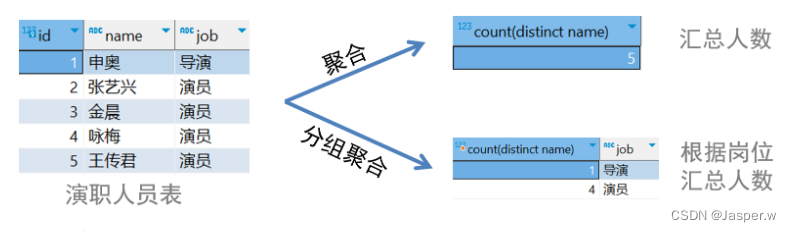 (2) 如何分组
语法select 聚合函数,列名1,列名2, from 表名 where 条件 group by 列名1,列名2;- 1
- 2
- 3
案例:在演职人员表中根据岗位汇总人数
select count(distinct name),job from maoyan_cast group by job;- 1
- 2
- 3

注意:select有聚合函数,无法再写其他列名,除非该列的在分组中出现
# 报错 select count(distinct name),job from maoyan_cast- 1
- 2
- 3
(3) 区间分组:根据区间或其他条件对数据进行分类汇总
 语法
语法select case when 条件 then 结果 else 结果 end as 别名, from 表名 group by 别名- 1
- 2
- 3
- 4
- 5
- 6
- 7
案例
select case when score >= 9.5 then "强烈推荐" when score >= 9 then "推荐" else "不推荐" end as grade, count(*) from maoyan_movie group by grade- 1
- 2
- 3
- 4
- 5
- 6
- 7
- 8
- 9
(4) 分组条件having
# 在演职人员表中显示每人参演的电影数 select count(*),name from maoyan_cast group by name;- 1
- 2
- 3
- 4
 案例:在演职人员表中,显示参演电影数大于1的演员
select count(*) as num,name from maoyan_cast group by name having num > 1;- 1
- 2
- 3
 having与where区别:
where在分组前执行,只能操作表中实际存在的列
having在分组后执行,用于过滤分组聚合的结果3.3 高级查询
3.3.1排序
(1)作用:使查询结果更容易观察和理解
(2)语法:select 列名 from 表名 where 条件 group by 列名 having 条件 order by 列名 asc或者desc;- 1
- 2
- 3
(3)注意:默认asc升序,desc表示降序
(4)案例:在电影表中按照分数降序排列select * from maoyan_movie order by score desc;- 1
 (5)案例:先按分数降序,再按时间降序
select * from maoyan_movie order by score desc, release_date desc;- 1
- 2
 (6)案例:显示参演电影数大于1的演员
select count(*) as num,name from maoyan_cast group by name having num > 1;- 1
- 2
 (7)案例:先按分数降序,再按时间降序
select count(*) as num,name from maoyan_cast group by name having num > 1 order by num;- 1
- 2
- 3

3.3.2限制
(1)作用1:使查询结果更容易观察和理解

(2)语法:select 列名 from 表名 where 条件 group by 列名 having 条件 order by 列名 asc或者desc limit 行数;- 1
- 2
- 3
- 4
(3)案例:
-- 按照分数降序排列,获取前三个 select * from maoyan_movie order by score desc limit 3;- 1
- 2
- 3
(4)作用2:分页显示查询结果

(5)语法:select 列名 from 表名 where 条件 group by 列名 having 条件 order by 列名 asc或者desc limit 行数 offset 跳过的行数;- 1
- 2
- 3
- 4
(6)案例:每页显示3行数据
第一页:limit 3 offset 0
第二页:limit 3 offset 3
第三页:limit 3 offset 6-- 第一页 select * from maoyan_movie limit 3 offset 0; -- 第二页 select * from maoyan_movie limit 3 offset 3; -- 第三页 select * from maoyan_movie limit 3 offset 6;- 1
- 2
- 3
- 4
- 5
- 6
- 7
- 8
- 9
注意:参与排序的列数据有重复,用复合排序

3.3.3联合查询
(1) 定义:将多个查询结果纵向连接为一个查询结果
 (2)语法:
select 列名 from 表名 ... union all select 列名 from 表名 ...- 1
- 2
- 3
(3)案例
第一页:limit 3 offset 0
第二页:limit 3 offset 3
第三页:limit 3 offset 6select id,name,types from maoyan_movie where types like "%爱情%" union all select id,name,types from maoyan_movie where types like "%喜剧%";- 1
- 2
- 3
注意:相同的列数和相似的类型
(4) 使用union代替union all,可去掉重复行
 (5) 思考以下两种写法相同吗?
# 写法1 select id,name,types from maoyan_movie where types like "%爱情%" union select id,name,types from maoyan_movie where types like "%喜剧%"; # 写法2 select id,name,types from maoyan_movie where types like "%爱情%" or types like "%喜剧%";- 1
- 2
- 3
- 4
- 5
- 6
- 7

4.多表查询
4.1 外键约束
(1) 为何用外键:演员要与特定电影对应,但没有外键约束时会发生以下情景,
插入无效的演员也不报错
删除电影后导致演员无效

(2) 名词解释
外键:一张表的列指向另一张表的主键
外键所在的表称之为从表,被关联的表称之为主表
(3) 如何用外键约束
建表时添加外键create table 从表名( 列名 数据类型 约束 comment '注释', foreign key(从表列名) references 主表(列名) );- 1
- 2
- 3
- 4
注意:从表外键的列类型与主表主键的列类型相同
(4) 演职人员表

create table maoyan_cast ( id int unsigned primary key auto_increment comment '编号', name varchar(50) not null comment '姓名', job varchar(20) comment '职位', alias varchar(20) comment '饰演角色名', movie_id int unsigned comment '电影编号', foreign key(movie_id) references maoyan_movie(id) ) comment ='演职人员表';- 1
- 2
- 3
- 4
- 5
- 6
- 7
- 8
插入:在演员表中插入无效数据
insert into maoyan_cast(name,job,alias,movie_id) values("祁大圣","演员","孙悟 空",999);- 1
- 2

删除:在电影表中删除被依赖数据
delete from maoyan_movie where id=1;- 1

4.2 多表关系
(1) 为何创建多张表
减少数据冗余:如果只有一张表,那么重复的数据需要在多行重复存储,导致空间浪费和数据更新
的不一致性。
 提高查询效率:根据具体的查询需求设计表结构,使查询操作更高效。
 (2) 一对多关系
A表的一行能够对应B表中的多行;但是反过来,B表中的一行只能对应A表中的一行。
例如:一个电影对应多个演员,一个演员只属于一个电影
往往会在从表中设置外键,关联主表的主键

(3) 多对多关系
A表的一行对应B表中的多行;同时B表中的一行也能对应A表中的多行
例如:一个电影对应多个影院,一个影院对应多个电影
往往会建立中间表,再用两个外键,关联两张表的主键
 影院表
影院表

create table maoyan_cinema ( id int unsigned primary key auto_increment comment '编号', name varchar(50) not null comment '影院名', address varchar(200) comment '位置', phone varchar(20) comment '电话' ) comment='影院表';- 1
- 2
- 3
- 4
- 5
- 6
电影与影院关系表

create table maoyan_movie_cinema_relation ( id int unsigned primary key auto_increment comment '编号', movie_id int unsigned not null comment '电影编号', cinema_id int unsigned not null comment '影院编号', foreign key(movie_id) references maoyan_movie(id), foreign key(cinema_id) references maoyan_cinema(id) ) comment='电影与影院关系表';- 1
- 2
- 3
- 4
- 5
- 6
- 7
(4) 一对一关系
A表的一行对应B表中的一行,同时B表中的一行也对应A表中的一行
例如:每个用户只有一个对应的详细信息
往往为了表结构拆分,在其中任何一方设置外键,关联另一方主键4.3 连接查询
4.3.1概述
定义:通过多表之间的相同列,获取相关数据的操作
作用:进行更复杂和全面的数据分析和处理
例如:根据电影名查找演员

4.3.2笛卡尔积查询
定义:将A表的每行与B表的每行强行拼在一起。如果A表有n行,B表有m行,结果就会产生n*m行。
语法select 列1,列2 ... from 表1,表2 ...- 1
案例
select * from maoyan_movie,maoyan_cast;- 1
假设两表数据

笛卡儿积结果

4.3.3隐式内连接
定义:返回两表交集(相关)部分的数据
-- 只查询电影与演员有对应关系的数据 select * from maoyan_movie mm,maoyan_cast mc where mm.id = mc.movie_id;- 1
- 2
- 3
假设两表数据

隐式内连结果

4.3.4显式内连接
语法
select 列名 from 表1 inner join 表2 on 表1.共同列名 = 表2.共同列名 ...;- 1
- 2
对比
-- 显式内连接 select * from maoyan_movie mm inner join maoyan_cast mc on mm.id = mc.movie_id; -- 隐式内连接 select * from maoyan_movie mm,maoyan_cast mc where mm.id = mc.movie_id;- 1
- 2
- 3
- 4
- 5
- 6
案例
select * from maoyan_movie mm inner join maoyan_cast mc on mm.id = mc.movie_id where mm.name = "莫斯科行动";- 1
- 2
- 3

4.3.5外连接
(1) 左外连接
定义:返回左表全部数据,以及与左表相关的右表数据。如果右表的行和左表的行无关,则右表行
数据为null。
语法:left joinselect * from maoyan_movie mm left join maoyan_cast mc on mm.id = mc.movie_id- 1
- 2
假设两表数据

左外连接结果

案例:显示没演员的电影名
select mm.name from maoyan_movie mm left join maoyan_cast mc on mm.id = mc.movie_id where mc.id is null;- 1
- 2
- 3
- 4

案例:显示没演员的电影名
select mm.name,count(mc.id) from maoyan_movie mm left join maoyan_cast mc on mm.id = mc.movie_id group by mm.id- 1
- 2
- 3
- 4
 (2) 右外连接
定义:返回右表全部数据,以及与右表相关的左表数据。如果左表的行和右表的行无关,则左表行
数据为null。
语法:right joinselect * from maoyan_movie mm right join maoyan_cast mc on mm.id = mc.movie_id- 1
- 2
假设两表数据
右外连接结果

案例:显示每个演员的参演数量
select mc.name,count(mm.id) from maoyan_movie mm right join maoyan_cast mc on mm.id = mc.movie_id group by mc.name;- 1
- 2
- 3
- 4

4.3.6子查询
(1) 概述
面对复杂的查询需求,往往需要分步逐一解决时,可以使用子查询实现
例如:在电影表中只显示高于平均分的电影-- 报错,where子句中不能使用聚合函数 select * from maoyan_movie where score > avg(score);- 1
- 2
第1步:计算所有电影的平均分
select avg(score) from maoyan_movie- 1
第2步:筛选大于平均分的电影
select * from maoyan_movie where score > 9.1- 1
第3步:使用小括号合并语句
select * from maoyan_movie where score > ( select avg(score) from maoyan_movie );- 1
- 2
- 3
定义:将一个查询结果嵌套在另一个SQL语句中
根据查询结果可划分为:
标量子查询(结果是一个值)
列子查询(结果是多行一列)
行子查询(结果是一行多列)
表子查询(结果是多行多列)
根据子查询位置可分为:
where之后
from之后
select之后
having之后(2) 标量子查询
子查询的结果是单个值
案例:查找与"坚如磐石"同月上映的电影
第1步:计算"坚如磐石"上映的月份select month(release_date) from maoyan_movie where name = "坚如磐石"- 1
- 2
第2步:根据月份查询电影
select * from maoyan_movie where month(release_date) = 9;- 1
- 2
第3步:合并查询语句
select * from maoyan_movie where month(release_date) = ( select month(release_date) from maoyan_movie where name = "坚如磐石" );- 1
- 2
- 3
- 4
- 5
(3) 列子查询
子查询的结果是多行一列的子查询
案例:查找与"坚如磐石"或"封神第一部"同月上映的电影
 第1步:计算"坚如磐石"或"封神第一部"上映月份
select month(release_date) from maoyan_movie where name="坚如磐石" or name = "封神第一部"- 1
- 2

将or改写为in
select month(release_date) from maoyan_movie where name in ("坚如磐石","封神第一部")- 1
- 2
第2步:根据月份查询电影
select * from maoyan_movie where month(release_date) in (9,7);- 1
- 2
第3步:合并查询语句
select * from maoyan_movie where month(release_date) in ( select month(release_date) from maoyan_movie where name in ("坚如磐石","封神第一部") );- 1
- 2
- 3
- 4
- 5
 (4) 行子查询
子查询的结果是一行多列的子查询
案例:查找与"孤注一掷"同月上映且分数相同的电影(一行)

第1步:计算"坚如磐石"上映的月份与分数select month(release_date),score from maoyan_movie where name = "坚如磐石";- 1
- 2
第2步:根据月份与分数查询电影
select * from maoyan_movie where month(release_date) = 9 and score = 9.2;- 1
- 2
第3步:变换写法
select * from maoyan_movie where (month(release_date),score) = (9,9.2);- 1
- 2
第4步:合并查询语句
select * from maoyan_movie where (month(release_date) ,score) = ( select month(release_date),score from maoyan_movie where name="坚如磐石" );- 1
- 2
- 3
- 4
- 5
 (5) 表子查询
子查询的结果是多行多列的子查询
案例:显示电影信息的同时显示当月电影平均分
第1步:计算每月电影平均分select month(release_date) month_num,avg(score) from maoyan_movie group by month_num- 1
- 2

第2步:电影表与临时表连接查询
select * from maoyan_movie mm inner join ( select month(release_date) month_num,avg(score) from maoyan_movie group by month_num ) temp on month(mm.release_date) = temp.month_num;- 1
- 2
- 3
- 4

(6) 优先连接查询而非子查询
需求:只显示黄渤参演的电影-- 子查询思想:多步 select * from maoyan_movie where id in ( select movie_id from maoyan_cast where name = "黄渤" ); -- 连接查询:一步 select * from maoyan_cast mc inner join maoyan_movie mm on mc.movie_id = mm.id where mc.name = "黄渤"- 1
- 2
- 3
- 4
- 5
- 6
- 7
- 8
在性能方面,连接查询(join)通常比子查询效率高。这是因为连接操作可以利用数据库索引和优化器更好地执行,并且通过一次查询获取所需数据,减少了查询次数。
相比之下,子查询需要执行多次查询,并且在每次子查询中可能需要扫描整个表格或子集,这可能导致性能下降。5. 数据库优化
5.1 设计范式
(1) 概述
数据库范式是规范化数据库设计的准则
常见范式有一般化(第一范式)、消除部分依赖(第二范式)、消除传递依赖(第三范式)等
每个范式都有其特定的规则和要求,目的是降低数据冗余,提高数据一致性
(2) 第一范式
表中每列数据,不可再被拆分,不允许多个数据存储在一列中

若违反需要将该列拆为到其他表中,从而降低数据冗余提高数据一致性

(3) 第二范式
每行必须可以被唯一区分,所有列依赖于主键列
 若片名重复无法唯一区分行,需要设置自增长列作为主键
 (4) 第三范式
非主键列不能依赖其他非主键列

若违反需要将多余列拆为到其他表中,例如:姓名、国籍

5.2 索引
(1) 何为索引
定义:加快数据库查询速度的一种数据结构

(2) B+树
树:由节点和边组成的数据类型。
B+树:多路平衡树,多路指的是每个节点有多(n)条边,最多包含n-1个数据;左侧数据小,右侧数据大;左边对应节点的数据都小于右边节点中的数据。平衡指的是当节点中数据量超过n-1时,中间数据会向上分裂。
数据结构可视化网站:https://www.cs.usfca.edu/~galles/visualization/Algorithms.html
名词解释:根节点:B+树的顶层节点,它是整个树的入口,只有一个。叶子节点:树中最底层的节点,在B+树中只有叶子节点存储键和值,包含了所有非叶子节点中存储的键;并且增加了链表,让范围查询更快。
(3) 索引的优缺点
优点:提高查询效率
缺点:
占用数据库物理存储空间;
当对表中数据增删改时,需要动态维护索引,降低更新效率
(4) 回表查询
索引无法提供查询所需数据时,需要进行二次查询来获取数据的过程

(5) 索引分类
主键索引:创建主键时自动构建,记录数据行
普通索引:可以有多个,对数据无约束,记录主键create index 索引名 on 表名(列名);- 1
唯一索引:可以有多个,数据不能重复,但可以为空null,记录主键
create unique index 索引名 on 表名(列名);- 1
联合索引:由多列组成
create index 索引名 on 表名(列名1,列名2); create unique index 索引名 on 表名(列名1,列名2);- 1
- 2
按照数据存储方式划分
聚集索引:行数据与索引保存在一起
非聚集索引:主键与索引保存在一起聚集索引选取原则
有主键,选主键索引
没主键,选第一个唯一索引
都没有,自动生成一个rowid列
(6) 案例
在电影表中,时长列可作为普通索引,姓名列可作为唯一索引create index duration_idx on maoyan_movie(duration); create unique index name_idx on maoyan_movie(name);- 1
- 2
 (7) 执行计划explain
通过执行计划,可以优化查询语句、索引设计和表结构,以提高性能
语法:explane select ... 或者 desc select ...- 1
案例1:
explain select name from maoyan_movie where id = 1;- 1

案例2:
explain select duration from maoyan_movie where score = 9.5;- 1

说明:
key:实际使用的索引5.3 SQL语句优化
(1) 何时用索引
为经常用于查询的列创建索引:
select后
where后
group by后
order by后
尽量选择区分度高的列作为索引,区分度越高索引效率越高
尽量避免使用select ,用具体列名代替,可减少回表查询
建立外键会自动建立索引,在关联查询时建议使用外键作为关联条件
(2) 以下操作会导致索引失效
在索引列上使用like模糊匹配,如果以通配符开头,会导致索引失效create index types_idx on maoyan_movie(types); explain select * from maoyan_movie where types like "%剧情";- 1
- 2

在索引列上进行运算操作,会导致索引失效
# 按空格拆分取第一部分 explain select * from maoyan_movie where substring_index(types," ",1) = "剧情";- 1
- 2

or两边的列有一个没索引,就会导致另一个索引失效
create index types_idx on maoyan_movie(types); create index duration_idx on maoyan_movie(duration); -- 以下sql语句能正常触发索引 explain select * from maoyan_movie where types = "剧情" or duration = 117; -- 以下sql语句不触发索引 explain select * from maoyan_movie where types = "剧情" or name = "消失的她"; explain select * from maoyan_movie where name = "消失的她" or types = "剧情";- 1
- 2
- 3
- 4
- 5
- 6
- 7
- 8
- 9
- 10
(3) 联合索引注意事项
联合索引要遵守最左前缀法则,即查询从索引的最左列开始create index union_idx on maoyan_movie(types,duration,release_date); -- 以下sql语句能正常触发索引 explain select * from maoyan_movie where types = "剧情"; ..types = "剧情" and duration = 117; ..types = "剧情" and duration = 117 and release_date = "2023-07-06"; -- 以下sql语句不触发索引 explain select * from maoyan_movie where duration = 117; ..duration = 117 and release_date = "2023-07-06" -- 以下sql语句触发部分索引 ..types = "剧情" and release_date = "2023-07-06" ;- 1
- 2
- 3
- 4
- 5
- 6
- 7
- 8
- 9
- 10
- 11
联合索引,范围查询时(> < !=),右侧引索列失效
explain select * from maoyan_movie where types = "剧情" and duration = 117 and release_date = "2023-07-06";- 1
- 2

explain select * from maoyan_movie where types = "剧情" and duration > 117 and release_date = "2023-07-06";- 1
- 2

关于count的效率
按效率:count() ≈ count(1) > count(主键) > count(列名)
count(*):数据库做了优化,不会取出全部列,而是直接累加
count(1):直接根据行数进行累加
count(主键):取出每行的主键值,然后进行累加
count(列名):取出每行该列的值,判断是否为null,如果不为null则累加;
如果该列有not null约束,则直接累加6. 事务transaction
6.1 概述
(1) 为何用事务
需求:张无忌要给赵敏转账

案例
drop database if exists demo; create database demo; use demo; create table account( name varchar(10) comment "姓名", money int comment "余额" ) comment "账户表"; insert into account values("张无忌",30000),("赵敏",30000); update account set money = money - 20000 where name = "张无忌"; ...此刻玄冥二老突然出现...(模拟报错) update account set money = money + 20000 where name = "赵敏";- 1
- 2
- 3
- 4
- 5
- 6
- 7
- 8
- 9
- 10
- 11

(2) 如何用事务
定义:将多个操作组成一个整体执行,确保所有操作全成功或全失败
执行操作前开启事务start transaction; 或者 begin;- 1
全成功后要提交事务
commit;
如果失败要回滚事务案例
rollback;begin; update account set money = money - 20000 where name = "张无忌"; ...此刻玄冥二老突然出现...(模拟报错) update account set money = money + 20000 where name = "赵敏"; rollback; # 暂时人工执行,将来Python可以遇到错误自动执行- 1
- 2
- 3
- 4
- 5

6.2 四大特性
(1) 原子性
事务是一个不可分割的操作单位,要么全部成功,要么全部失败回滚,不存在中间状态。即使在执
行过程中发生了错误,系统也会将数据恢复到事务开始之前的状态,保证数据的一致性。
实现原理:
回滚日志undolog:
记录数据被修改前的信息,供回滚到事务开始前
每行的2个隐藏列:
事务ID:最近操作当前行的事务编号
回滚指针:指向undolog中该行修改前的信息

演示


(2) 一致性
事务的执行能从一个数据完整的状态转换到另一个数据完整的状态,符合业务规则。
例如:默认"扣余额"与"增余额"是两个事务,执行update后会自动提交,可能出现"扣完未增"的状
态,不符合业务规则;开启事务后,两个操作组成了一个事务,在原子性的作用下,符合业务规则。
查看mysql是否自动提交select @@autocommit; # 1是自动提交,0是手动提交- 1
修改mysql自动提交状态
set @@autocommit = 0;- 1
(3)隔离性
数据库允许多个并发事务同时进行读写,而多个事务相互独立。隔离性可以防止多个事务并发执行时由于交叉执行而导致数据的不一致。

(4)持久性
提交事务后,对数据库的修改将永久保存,即使发生系统故障也不丢失
实现原理:重做日志redolog:
记录对数据的修改,供系统故障后能够恢复

6.3 隔离级别
(1) 概述
多个事务并发时,不同的隔离级别,读取数据的实时性和一致性不同。
查看当前事务隔离级别:select @@transaction_isolation;- 1
设置当前事务隔离级别
set session transaction isolation level 隔离级别名称;- 1
(2) 可重复读repeatable read
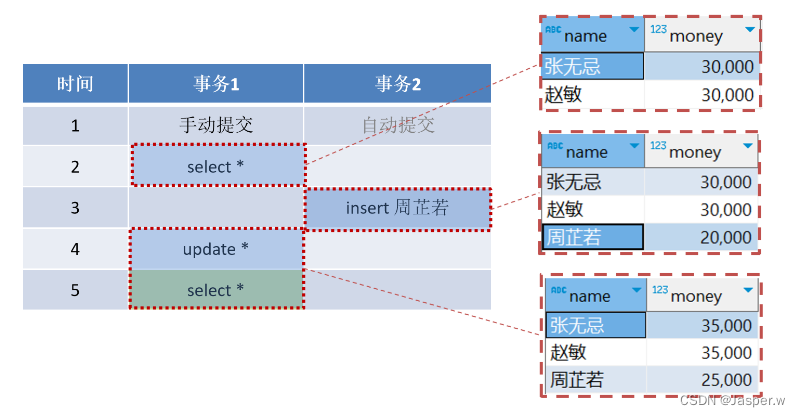
确保在当前事务执行期间,读取的数据是一致的,即使其他事务修改数据并提交,当前事务多次读取的结果也一样。

原理:第一次select时获取一个视图快照,在事务执行期间,其他事务对数据的修改不影响当前事
务的视图快照,保持了事务开始时的一致性。
缺点:可能造成幻读,即看似查询到符合条件的数据,但再次读取时却发现数据变化了
(3) 串行化serializable
多个事务排队执行,每个事务在执行完之前,下一个事务无法执行

特点:事务间互不影响,每次读取的都是真实存在的数据
缺点:系统性能最差
语法:set session transaction isolation level serializable;- 1
 特点:直接读取真实数据,读取的数据实时性较高
缺点:容易造成幻读,即看似查询到符合条件的数据,但再次读取时却发现数据变化了
语法:set session transaction isolation level read committed;- 1
(5) 读未提交read uncommitted
可以读取其他事务未提交的数据

可以读取其他事务未提交的数据
特点:读取的数据实时性最高缺点:容易造成脏读,即读取了其他事务未提交的数据,其他事物又进行了回滚,导致当前事务读取的数据实际上是无效的
语法:set session transaction isolation level read uncommitted;- 1
(6) 隔离级别从低到高

7. pymysql
7.1 概述
(1) 定义:pymysql是Python程序操作数据库的第三方模块

(2) 安装
在Pycharm最下方点击"Terminal"打开终端

在终端中输入安装指令后回车确认
pip install pymysql -i https://pypi.tuna.tsinghua.edu.cn/simple- 1
待终端中出现"Successfully"表示安装成功

(3) 使用基本流程
Python程序主要通过连接connection和游标cursor操作数据库
 (4) 连接对象
创建连接对象from pymysql import Connection conn = Connection(host="localhost",port=3306, user="root",password="123456",database="maoyan")- 1
- 2
- 3
关闭连接对象
conn.close()- 1
(5) 游标对象
定义:由连接对象所创建,用于执行SQL语句和获取结果的对象
语法:cursor = 连接对象.cursor() 受影响的行数 = cursor.execute(SQL语句,(参数1,参数2)) cursor.close()- 1
- 2
- 3
案例
cursor = conn.cursor() print(cursor.execute( "select * from maoyan_movie where types = %s or score = %s;", ("动画",9.3)) ) # 注意:即使types列是字符串,值也不能加引号,使用%s cursor.close()- 1
- 2
- 3
- 4
- 5
- 6
结果
6,表示查询了6行数据7.2 查询
(1) 使用pymysql实现
execute函数只是让数据库执行SQL语句,但结果还在数据库中
获取查询结果需要再调用fetchone函数或fetchall函数

查询满足条件的一行数据
from pymysql import Connection conn = Connection(host="localhost",port=3306, user="root",password="123456",database="demo") cursor = conn.cursor() print(cursor.execute( "select * from account where name = %s;",("张无忌",) ))# 1 print(cursor.fetchone()) # ('张无忌', 30000) cursor.close() conn.close()- 1
- 2
- 3
- 4
- 5
- 6
- 7
- 8
- 9
- 10
查询满足条件的全部行数据
from pymysql import Connection conn = Connection(host="localhost",port=3306, user="root",password="123456",database="demo") cursor = conn.cursor() print(cursor.execute( "select * from account" ))# 2 print(cursor.fetchall()) # (('张无忌', 30000), ('赵敏', 30000)) cursor.close() conn.close()- 1
- 2
- 3
- 4
- 5
- 6
- 7
- 8
- 9
- 10
(2) 使用MySqlHelper实现
查询满足条件的一行数据from common.sql_tools import MySqlHelper helper = MySqlHelper("demo") print(helper.fetch_one( "select * from account where name = %s;","张无忌") ) # ('张无忌', 30000) helper.close()- 1
- 2
- 3
- 4
- 5
- 6
查询满足条件的全部行数据
from common.sql_tools import MySqlHelper helper = MySqlHelper("demo") print(helper.fetch_all( "select * from account") ) # (('张无忌', 30000), ('赵敏', 30000)) helper.close()- 1
- 2
- 3
- 4
- 5
- 6
7.3 增删改
(1) 使用pymysql实现
pymysql默认手动提交事务
创建连接对象时,设置autocommit为True可以改为自动提交事务from pymysql import Connection conn = Connection(host="localhost",port=3306, user="root",password="123456",database="demo",autocommit=True) cursor = conn.cursor() print(cursor.execute( "insert into account values(%s,%s);", ("小昭", 50000) ))# 1 cursor.close() conn.close()- 1
- 2
- 3
- 4
- 5
- 6
- 7
- 8
- 9
(2) 使用MySqlHelper实现
插入数据from common.sql_tools import MySqlHelper helper = MySqlHelper("demo") print(helper.execute( "insert into account values(%s,%s);", "小昭", 50000) ) # 插入时可返回自增长的主键 helper.close()- 1
- 2
- 3
- 4
- 5
- 6
7.4 事务
通过execute_transaction函数直接执行多条sql语句
from common.sql_tools import MySqlHelper helper = MySqlHelper("demo") print(helper.execute_transaction( ("update account set money = money - %s where name = %s;", (20000,"张无忌")), ("update account set money = money + %s where name = %s;", (20000, "赵敏")) )) helper.close()- 1
- 2
- 3
- 4
- 5
- 6
- 7
- 8
- 9
8. 存储过程
8.1 概述
(1) 为何用存储过程:需要频繁执行一系列SQL语句,使用存储过程可以减少网络通信开销

(2) 如何用存储过程
定义:在数据库管理系统中存储的一组SQL语句,用于执行特定的功能
创建语法:delimiter $$ create procedure 存储过程名(参数名 数据类型) begin 语句组 select 结果; end$$- 1
- 2
- 3
- 4
- 5
- 6
调用语法:
call 存储过程名(参数);- 1
(3) 案例:定义同时向电影表与演员表插入信息的存储过程
delimiter $$ create procedure insert_movie_and_actor( movie_name varchar(50),types varchar(50), duration int,release_date datetime,score float(3,1), cast_name varchar(100),job varchar(10),alias varchar(100) ) begin -- 插入电影信息 insert into maoyan_movie(name,types,duration,release_date,score) values(movie_name,types,duration,release_date,score); -- 获取自增长的电影编号 set @movie_id = last_insert_id(); -- 插入演员信息 insert into maoyan_cast(name,job,alias,movie_id) values(cast_name,job,alias,@movie_id); -- 返回电影编号 select @movie_id; end$$ -- 调用 call insert_movie_and_actor( "西游记","科幻",120,null,null,"六小龄童","演员","孙悟空" );- 1
- 2
- 3
- 4
- 5
- 6
- 7
- 8
- 9
- 10
- 11
- 12
- 13
- 14
- 15
- 16
- 17
- 18
- 19
- 20
- 21
- 22
8.2 Python程序调用
(1) 使用pymysql实现
主要通过execute方法执行存储过程,fetchone、fetch_all获取结果
语法:# 执行存储过程 cursor.execute( "call 存储过程名(%s,%s);",(参数1,参数2) ) # 获取结果 print(cursor.fetchone())- 1
- 2
- 3
- 4
- 5
- 6
(2) 使用MySqlHelper实现
主要通过fetch_one、fetch_all方法执行存储过程并获取结果
语法:from common.sql_tools import MySqlHelper helper = MySqlHelper("数据库名") print(helper.fetch_one( "call 存储过程名(%s,%s);",参数1,参数2 ))- 1
- 2
- 3
- 4
- 5
(3) 案例:通过insert_movie_and_actor存储过程同时插入电影与演员
from common.sql_tools import MySqlHelper helper = MySqlHelper("maoyan") print(helper.fetch_one( "call insert_movie_and_actor(%s,%s,%s,%s,%s,%s,%s,%s);", "西游记2","科幻",120,None,None,"六小龄童","演员","孙悟空2" ))- 1
- 2
- 3
- 4
- 5
- 6
-
相关阅读:
c++基于CImage实现图片格式转换完整源代码
未来趋势:探索Facebook在数字化时代的发展方向
二叉树、二叉搜索树,平衡二叉树(旋转)红黑树(红黑规则)
MongoDB系列之适用场景和不适用场景
涅槃:时序数据库的终局与重生
Unity3d C# 使用Universal Media Player(ump)插件播放视频的众坑之无法播放视频和VLC播放器依赖的问题
netty系列之:我有一个可扩展的Enum你要不要看一下?
RDMA技术原理和三种实现方式
矩阵病态问题
智安网络|数据库入门秘籍:通俗易懂,轻松掌握与实践
- 原文地址:https://blog.csdn.net/Cerulea_n/article/details/138127350