-
基于onbar的备份与恢复实验
通过本文的备份恢复实验,我们可以深入了解onbar的使用方法和原理,包括如何进行完整备份、增量备份以及如何利用备份文件进行完全恢复与基于时间点的恢复。
1. 环境准备
1.1 配置存储管理器PSM的共享库
SinoDB 内置了一个存储管理器PSM,该存储管理器的接口库位置为$INFORMIXSERVER/lib/libbsapsm.so
- 查看接口库
[informix@vm84145 ~]$ cd $INFORMIXSERVER/lib
[informix@vm84145 lib]$ pwd
/home/informix/sinodb/lib
[informix@vm84145 lib]$ ll |grep libbsapsm.so
-r-xr-xr-x 1 informix informix 1927078 Aug 16 2017 libbsapsm.so
[informix@vm84145 lib]$- 使用onbar时,需要做一些简单的配置,配置参数如下:
参数 说明 BAR_BSALIB_PATH 指定不同存储管理器的共享库(XBSA) BAR_MAX_BACKUP 定义并行程度,确定要并发运行的备份和恢复进程数 LTAPEDEV 指定逻辑日志备份目录 - 配置参数
[informix@vm84145 ~]$ onstat -c |grep BAR_BSALIB_PATH |grep -v '#'
BAR_BSALIB_PATH
[informix@vm84145 ~]$ onmode -wf BAR_BSALIB_PATH=/home/informix/sinodb/lib/libbsapsm.so
Value of BAR_BSALIB_PATH has been changed to /home/informix/sinodb/lib/libbsapsm.so.
[informix@vm84145 ~]$ onstat -c |grep BAR_BSALIB_PATH |grep -v '#'
BAR_BSALIB_PATH /home/informix/sinodb/lib/libbsapsm.so
[informix@vm84145 ~]$ onmode -wf LTAPEDEV=/home/informix/backups
Value of LTAPEDEV has been changed to /home/informix/backups.
[informix@vm84145 ~]$ onstat -c |grep LTAPEDEV |grep -v '#'
LTAPEDEV /home/informix/backups
[informix@vm84145 ~]$说明:LTAPEDEV是ontape中的一个参数,在使用onbar时,该参数不能为/dev/null。我们可以临时为参数设置一个目录,实际备份时,逻辑日志并不保存在该目录中。
查看PSM设备情况
- 语法:
onpsm -D list
- 操作演示
[informix@vm84145 psmpool]$ onpsm -D list
SinoDB Primary Storage Manager Device List
Type Prio Block/Size (MB) Pool Name Device Name
FILE LOW --/-- DBSPOOL /home/informix/sinodb/backupsFILE LOW --/-- LOGPOOL /home/informix/sinodb/backups
[informix@vm84145 etc]$
配置PSM设备
我们不使用默认的PSM设备,使用下面的方法,添加一个自己的设备,并将原来的设备删除。
- 操作演示
[informix@vm84145 psmpool]$ onpsm -D list
SinoDB Primary Storage Manager Device ListType Prio Block/Size (MB) Pool Name Device Name
FILE LOW --/-- DBSPOOL /home/informix/sinodb/backupsFILE LOW --/-- LOGPOOL /home/informix/sinodb/backups
[informix@vm84145 psmpool]$mkdir -p /home/informix/psmpool/dbspool
[informix@vm84145 psmpool]$mkdir -p /home/informix/psmpool/logpool
[informix@vm84145 psmpool]$ onpsm -D add /home/informix/psmpool/dbspool -g DBSPOOL -p HIGHEST -t FILE
[informix@vm84145 psmpool]$ onpsm -D add /home/informix/psmpool/logpool -g LOGPOOL -p HIGHEST -t FILE
[informix@vm84145 psmpool]$ onpsm -D listSinoDB Primary Storage Manager Device List
Type Prio Block/Size (MB) Pool Name Device Name
FILE LOW --/-- DBSPOOL /home/informix/sinodb/backups
FILE HIGHEST --/-- DBSPOOL /home/informix/psmpool/dbspoolFILE LOW --/-- LOGPOOL /home/informix/sinodb/backups
FILE HIGHEST --/-- LOGPOOL /home/informix/psmpool/logpool[informix@vm84145 psmpool]$ onpsm -D del /home/informix/sinodb/backups -d
Delete the device from ALL pools and DELETE ALL backup objects stored in
FILE devices? (y/n) y
[informix@vm84145 psmpool]$ onpsm -D listSinoDB Primary Storage Manager Device List
Type Prio Block/Size (MB) Pool Name Device Name
FILE HIGHEST --/-- DBSPOOL /home/informix/psmpool/dbspoolFILE HIGHEST --/-- LOGPOOL /home/informix/psmpool/logpool
[informix@vm84145 psmpool]$ ^C
[informix@vm84145 psmpool]$ ll /home/informix/psmpool/dbspool
total 0
[informix@vm84145 psmpool]$ ll /home/informix/psmpool/logpool
total 0
[informix@vm84145 psmpool]$2. 备份与恢复实验
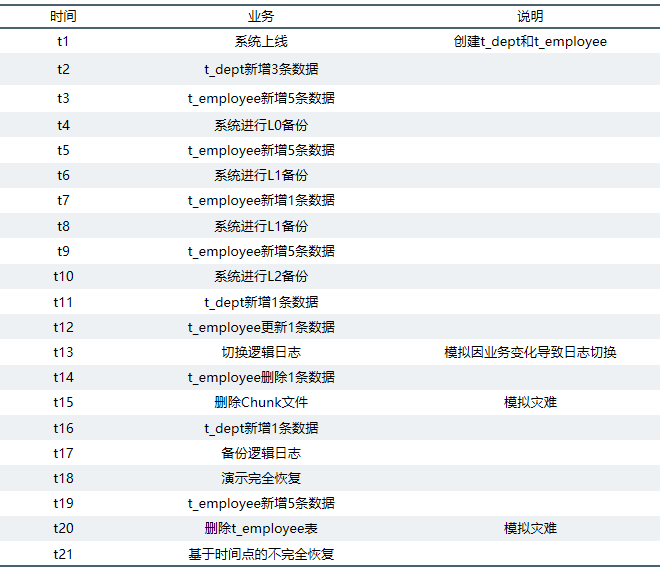
业务场景说明:
(1) 数据空间文件被删除时的数据完全恢复
(2) 表删除后基于时间点的不完全恢复
步骤1: 创建数据库和表(t1)
- 操作演示
[informix@vm84145 ~]$ dbaccess sysmaster -
Database selected.
> create database psmdb in datadbs1 with log;
Database closed.
Database created.
> create table t_dept(f_deptid int, f_deptname varchar(20));
Table created.
> create table t_employee(f_employeeid int, f_deptid int, f_employeename varchar(20));
Table created.
> info tables;
Table name
t_dept t_employee
>
步骤2:L0备份前的数据准备
t_dept新增3条数据(t2)
- 语法
insert into t_dept values(1, 'dept_1');
insert into t_dept values(2, 'dept_2');
insert into t_dept values(3, 'dept_3');- 查询结果
> select * from t_dept;
f_deptid f_deptname
1 dept_1
2 dept_2
3 dept_33 row(s) retrieved.
> !date +'%F %T'
2022-03-07 10:39:52
>t_employee新增5条数据(t3)
- 语法
insert into t_employee values(1, 1, 'employee_01');
insert into t_employee values(2, 1, 'employee_02');
insert into t_employee values(3, 2, 'employee_03');
insert into t_employee values(4, 2, 'employee_04');
insert into t_employee values(5, 3, 'employee_05');- 查询结果
> select * from t_employee;
f_employeeid f_deptid f_employeename1 1 employee_01
2 1 employee_02
3 2 employee_03
4 2 employee_04
5 3 employee_055 row(s) retrieved.
> !date +'%F %T'
2022-03-07 10:41:03
>步骤3: 系统进行L0备份(t4)
查看当前逻辑日志文件编号为16
[informix@vm84145 ~]$ onstat -l
Sinoregal SinoDB Dynamic Server Version 12.10.FC8 -- On-Line -- Up 5 days 17:42:00 -- 2374324 Kbytes
Physical Logging
Buffer bufused bufsize numpages numwrits pages/io
P-1 0 1024 57951 927 62.51
phybegin physize phypos phyused %used
3:53 1023945 142057 13 0.00Logical Logging
Buffer bufused bufsize numrecs numpages numwrits recs/pages pages/io
L-3 0 512 422146 50692 39539 8.3 1.3
Subsystem numrecs Log Space used
OLDRSAM 421482 44029124
HA 629 27676
DDL 35 12180address number flags uniqid begin size used %used
475dffa8 7 F------ 0 2:53 102390 0 0.00
475fbf88 8 A------ 0 2:102443 102390 0 0.00
4886fd90 9 A------ 0 2:204833 102390 0 0.00
4886fdf8 10 A------ 0 2:307223 102390 0 0.00
4886fe60 11 U-B---- 11 2:409613 102390 51 0.05
4886fec8 12 U-B---- 12 2:512003 102390 10 0.01
4886ff30 13 U------ 13 2:614393 102390 40589 39.64
4886ff98 14 U------ 14 2:716783 102390 8 0.01
473abf68 15 U------ 15 2:819173 102390 50582 49.40
47481f40 16 U---C-L 16 2:921563 102390 18 0.02
10 active, 10 total[informix@vm84145 ~]$
查看实例的服务器编号为0
[informix@vm84145 ~]$ onstat -g cfg |grep SERVERNUM
SERVERNUM 0
[informix@vm84145 ~]$执行L0备份
- 语法
onbar -b -L 0
- 操作演示
[informix@vm84145 ~]$ onbar -b -L 0
[informix@vm84145 ~]$ onpsm -O listSinoDB Primary Storage Manager Object List
Object ID Date Created Size (MB) Logical path (name.version)
1 2022-03-07 11:22:14 24.1 /sinodb/rootdbs/0/sinodb.1
2 2022-03-07 11:22:14 0.1 /sinodb/plogdbs/0/sinodb.1
3 2022-03-07 11:22:14 0.1 /sinodb/llogdbs/0/sinodb.1
4 2022-03-07 11:22:14 9.4 /sinodb/datadbs1/0/sinodb.1
5 2022-03-07 11:22:14 0.1 /sinodb/sbdbs1/0/sinodb.1
6 2022-03-07 11:22:14 0.1 /sinodb/datadbs4/0/sinodb.1
7 2022-03-07 11:22:14 1.0 /sinodb/bindbs1/0/sinodb.1
8 2022-03-07 11:22:15 0.1 /sinodb/datadbs3/0/sinodb.1
9 2022-03-07 11:22:15 0.1 /sinodb/datadbs2/0/sinodb.1
10 2022-03-07 11:22:15 0.1 /sinodb/datadbs5/0/sinodb.1
11 2022-03-07 11:22:15 79.3 /sinodb/0/13/sinodb.1
12 2022-03-07 11:22:16 0.0 /sinodb/0/14/sinodb.1
13 2022-03-07 11:22:16 98.8 /sinodb/0/15/sinodb.1
14 2022-03-07 11:22:16 0.2 /sinodb/0/16/sinodb.1
15 2022-03-07 11:22:16 0.0 /sinodb/critical_files/ixbar/sinodb.1
16 2022-03-07 11:22:16 0.0 /sinodb/critical_files/oncfg/sinodb.1
17 2022-03-07 11:22:16 0.1 /sinodb/critical_files/onconfig/sinodb.1
18 2022-03-07 11:22:16 0.0 /sinodb/critical_files/sqlhosts/sinodb.1
[informix@vm84145 ~]$可以看到,L0备份了rootdbs,plogdbs,llogdbs,datadbs,ixbar,oncfg,onconfig,sqlhosts。另外还有一个目录/sinodb/0/16/sinodb.1,其中的0为实例的服务器编号,16为当前逻辑日志的唯一编号(uniqid)。
步骤4:L1备份前的数据准备
t_employee新增5条数据(t5)
- 语法
insert into t_employee values(11, 1, 'employee_11');
insert into t_employee values(12, 1, 'employee_12');
insert into t_employee values(13, 2, 'employee_13');
insert into t_employee values(14, 2, 'employee_14');
insert into t_employee values(15, 3, 'employee_15');- 查询结果
> select * from t_employee;
f_employeeid f_deptid f_employeename1 1 employee_01
2 1 employee_02
3 2 employee_03
4 2 employee_04
5 3 employee_05
11 1 employee_11
12 1 employee_12
13 2 employee_13
14 2 employee_14
15 3 employee_1510 row(s) retrieved.
> !date +'%F %T'
2022-03-07 14:27:27
>步骤5:系统进行L1备份(t6)
- 语法
onbar -b -L 1
- 操作演示
[informix@vm84145 ~]$ onbar -b -L 1
[informix@vm84145 ~]$ onpsm -O listSinoDB Primary Storage Manager Object List
Object ID Date Created Size (MB) Logical path (name.version)
1 2022-03-07 11:22:14 24.1 /sinodb/rootdbs/0/sinodb.1
2 2022-03-07 11:22:14 0.1 /sinodb/plogdbs/0/sinodb.1
3 2022-03-07 11:22:14 0.1 /sinodb/llogdbs/0/sinodb.1
4 2022-03-07 11:22:14 9.4 /sinodb/datadbs1/0/sinodb.1
5 2022-03-07 11:22:14 0.1 /sinodb/sbdbs1/0/sinodb.1
6 2022-03-07 11:22:14 0.1 /sinodb/datadbs4/0/sinodb.1
7 2022-03-07 11:22:14 1.0 /sinodb/bindbs1/0/sinodb.1
8 2022-03-07 11:22:15 0.1 /sinodb/datadbs3/0/sinodb.1
9 2022-03-07 11:22:15 0.1 /sinodb/datadbs2/0/sinodb.1
10 2022-03-07 11:22:15 0.1 /sinodb/datadbs5/0/sinodb.1
11 2022-03-07 11:22:15 79.3 /sinodb/0/13/sinodb.1
12 2022-03-07 11:22:16 0.0 /sinodb/0/14/sinodb.1
13 2022-03-07 11:22:16 98.8 /sinodb/0/15/sinodb.1
14 2022-03-07 11:22:16 0.2 /sinodb/0/16/sinodb.1
15 2022-03-07 11:22:16 0.0 /sinodb/critical_files/ixbar/sinodb.1
16 2022-03-07 11:22:16 0.0 /sinodb/critical_files/oncfg/sinodb.1
17 2022-03-07 11:22:16 0.1 /sinodb/critical_files/onconfig/sinodb.1
18 2022-03-07 11:22:16 0.0 /sinodb/critical_files/sqlhosts/sinodb.1
19 2022-03-07 14:28:38 0.2 /sinodb/rootdbs/1/sinodb.1
20 2022-03-07 14:28:40 0.1 /sinodb/datadbs3/1/sinodb.1
21 2022-03-07 14:28:40 0.1 /sinodb/llogdbs/1/sinodb.1
22 2022-03-07 14:28:41 0.1 /sinodb/plogdbs/1/sinodb.1
23 2022-03-07 14:28:41 0.1 /sinodb/datadbs4/1/sinodb.1
24 2022-03-07 14:28:41 0.1 /sinodb/datadbs2/1/sinodb.1
25 2022-03-07 14:28:41 0.1 /sinodb/datadbs5/1/sinodb.1
26 2022-03-07 14:28:41 0.1 /sinodb/bindbs1/1/sinodb.1
27 2022-03-07 14:28:41 0.1 /sinodb/sbdbs1/1/sinodb.1
28 2022-03-07 14:28:41 0.1 /sinodb/datadbs1/1/sinodb.1
29 2022-03-07 14:28:42 0.2 /sinodb/0/17/sinodb.1
30 2022-03-07 14:28:42 0.0 /sinodb/critical_files/ixbar/sinodb.2
31 2022-03-07 14:28:42 0.0 /sinodb/critical_files/oncfg/sinodb.2
32 2022-03-07 14:28:42 0.1 /sinodb/critical_files/onconfig/sinodb.2
33 2022-03-07 14:28:42 0.0 /sinodb/critical_files/sqlhosts/sinodb.2
[informix@vm84145 ~]$进行L1备份后,备份文件数量由18个变为33个。
步骤6:L1备份前的数据准备(第二次)
t_employee新增1条数据(t7)
- 操作演示
[informix@vm84145 ~]$ dbaccess psmdb -
Database selected.
> insert into t_employee values(16, 3, 'employee_16');
1 row(s) inserted.
> select * from t_employee;
f_employeeid f_deptid f_employeename
1 1 employee_01
2 1 employee_02
3 2 employee_03
4 2 employee_04
5 3 employee_05
11 1 employee_11
12 1 employee_12
13 2 employee_13
14 2 employee_14
15 3 employee_15
16 3 employee_1611 row(s) retrieved.
> !date +'%F %T'
2022-03-07 14:33:01
>步骤7:系统进行L1备份(t8)
- 语法
onbar -b -L 1
- 操作演示
[informix@vm84145 ~]$ onbar -b -L 1
[informix@vm84145 ~]$ onpsm -O listSinoDB Primary Storage Manager Object List
Object ID Date Created Size (MB) Logical path (name.version)
1 2022-03-07 11:22:14 24.1 /sinodb/rootdbs/0/sinodb.1
2 2022-03-07 11:22:14 0.1 /sinodb/plogdbs/0/sinodb.1
3 2022-03-07 11:22:14 0.1 /sinodb/llogdbs/0/sinodb.1
4 2022-03-07 11:22:14 9.4 /sinodb/datadbs1/0/sinodb.1
5 2022-03-07 11:22:14 0.1 /sinodb/sbdbs1/0/sinodb.1
6 2022-03-07 11:22:14 0.1 /sinodb/datadbs4/0/sinodb.1
7 2022-03-07 11:22:14 1.0 /sinodb/bindbs1/0/sinodb.1
8 2022-03-07 11:22:15 0.1 /sinodb/datadbs3/0/sinodb.1
9 2022-03-07 11:22:15 0.1 /sinodb/datadbs2/0/sinodb.1
10 2022-03-07 11:22:15 0.1 /sinodb/datadbs5/0/sinodb.1
11 2022-03-07 11:22:15 79.3 /sinodb/0/13/sinodb.1
12 2022-03-07 11:22:16 0.0 /sinodb/0/14/sinodb.1
13 2022-03-07 11:22:16 98.8 /sinodb/0/15/sinodb.1
14 2022-03-07 11:22:16 0.2 /sinodb/0/16/sinodb.1
15 2022-03-07 11:22:16 0.0 /sinodb/critical_files/ixbar/sinodb.1
16 2022-03-07 11:22:16 0.0 /sinodb/critical_files/oncfg/sinodb.1
17 2022-03-07 11:22:16 0.1 /sinodb/critical_files/onconfig/sinodb.1
18 2022-03-07 11:22:16 0.0 /sinodb/critical_files/sqlhosts/sinodb.1
19 2022-03-07 14:28:38 0.2 /sinodb/rootdbs/1/sinodb.1
20 2022-03-07 14:28:40 0.1 /sinodb/datadbs3/1/sinodb.1
21 2022-03-07 14:28:40 0.1 /sinodb/llogdbs/1/sinodb.1
22 2022-03-07 14:28:41 0.1 /sinodb/plogdbs/1/sinodb.1
23 2022-03-07 14:28:41 0.1 /sinodb/datadbs4/1/sinodb.1
24 2022-03-07 14:28:41 0.1 /sinodb/datadbs2/1/sinodb.1
25 2022-03-07 14:28:41 0.1 /sinodb/datadbs5/1/sinodb.1
26 2022-03-07 14:28:41 0.1 /sinodb/bindbs1/1/sinodb.1
27 2022-03-07 14:28:41 0.1 /sinodb/sbdbs1/1/sinodb.1
28 2022-03-07 14:28:41 0.1 /sinodb/datadbs1/1/sinodb.1
29 2022-03-07 14:28:42 0.2 /sinodb/0/17/sinodb.1
30 2022-03-07 14:28:42 0.0 /sinodb/critical_files/ixbar/sinodb.2
31 2022-03-07 14:28:42 0.0 /sinodb/critical_files/oncfg/sinodb.2
32 2022-03-07 14:28:42 0.1 /sinodb/critical_files/onconfig/sinodb.2
33 2022-03-07 14:28:42 0.0 /sinodb/critical_files/sqlhosts/sinodb.2
34 2022-03-07 14:34:06 0.2 /sinodb/rootdbs/1/sinodb.2
35 2022-03-07 14:34:08 0.1 /sinodb/datadbs3/1/sinodb.2
36 2022-03-07 14:34:08 0.1 /sinodb/datadbs2/1/sinodb.2
37 2022-03-07 14:34:08 0.1 /sinodb/datadbs4/1/sinodb.3
38 2022-03-07 14:34:08 0.1 /sinodb/datadbs5/1/sinodb.2
39 2022-03-07 14:34:08 0.1 /sinodb/llogdbs/1/sinodb.4
40 2022-03-07 14:34:08 0.1 /sinodb/bindbs1/1/sinodb.2
41 2022-03-07 14:34:08 0.1 /sinodb/sbdbs1/1/sinodb.2
42 2022-03-07 14:34:08 0.1 /sinodb/datadbs1/1/sinodb.2
43 2022-03-07 14:34:09 0.1 /sinodb/plogdbs/1/sinodb.4
44 2022-03-07 14:34:10 0.1 /sinodb/0/18/sinodb.1
45 2022-03-07 14:34:10 0.0 /sinodb/critical_files/ixbar/sinodb.5
46 2022-03-07 14:34:10 0.0 /sinodb/critical_files/oncfg/sinodb.5
47 2022-03-07 14:34:10 0.1 /sinodb/critical_files/onconfig/sinodb.5
48 2022-03-07 14:34:10 0.0 /sinodb/critical_files/sqlhosts/sinodb.5
[informix@vm84145 ~]$进行两次L1备份后,备份文件变为48个。通过观察,onbar备份时,PSM是通过组织文件系统的目录来管理备份文件的。PSM为L0,L1,L2创建3个目录,分别为0,1,2。每个备份文件名称为
. 。
逻辑日志的备份,是按逻辑日志的唯一编号,创建对应的目录进行存储。步骤8:L2备份前的数据准备
t_employee新增5条数据(t9)
- 语法
insert into t_employee values(21, 1, 'employee_21');
insert into t_employee values(22, 1, 'employee_22');
insert into t_employee values(23, 2, 'employee_23');
insert into t_employee values(24, 2, 'employee_24');
insert into t_employee values(25, 3, 'employee_25');- 查看数据
[informix@vm84145 ~]$ dbaccess psmdb -
Database selected.
> select * from t_employee;
f_employeeid f_deptid f_employeename1 1 employee_01
2 1 employee_02
3 2 employee_03
4 2 employee_04
5 3 employee_05
11 1 employee_11
12 1 employee_12
13 2 employee_13
14 2 employee_14
15 3 employee_15
16 3 employee_16
21 1 employee_21
22 1 employee_22
23 2 employee_23
24 2 employee_24
25 3 employee_2516 row(s) retrieved.
> !date +'%F %T'
2022-03-07 14:40:09
>步骤9:系统进行L2备份(t10)
- 语法
onbar -b -L 2
- 操作演示
[informix@vm84145 ~]$ onbar -b -L 2
[informix@vm84145 ~]$ onpsm -O listSinoDB Primary Storage Manager Object List
Object ID Date Created Size (MB) Logical path (name.version)
1 2022-03-07 11:22:14 24.1 /sinodb/rootdbs/0/sinodb.1
2 2022-03-07 11:22:14 0.1 /sinodb/plogdbs/0/sinodb.1
3 2022-03-07 11:22:14 0.1 /sinodb/llogdbs/0/sinodb.1
4 2022-03-07 11:22:14 9.4 /sinodb/datadbs1/0/sinodb.1
5 2022-03-07 11:22:14 0.1 /sinodb/sbdbs1/0/sinodb.1
6 2022-03-07 11:22:14 0.1 /sinodb/datadbs4/0/sinodb.1
7 2022-03-07 11:22:14 1.0 /sinodb/bindbs1/0/sinodb.1
8 2022-03-07 11:22:15 0.1 /sinodb/datadbs3/0/sinodb.1
9 2022-03-07 11:22:15 0.1 /sinodb/datadbs2/0/sinodb.1
10 2022-03-07 11:22:15 0.1 /sinodb/datadbs5/0/sinodb.1
11 2022-03-07 11:22:15 79.3 /sinodb/0/13/sinodb.1
12 2022-03-07 11:22:16 0.0 /sinodb/0/14/sinodb.1
13 2022-03-07 11:22:16 98.8 /sinodb/0/15/sinodb.1
14 2022-03-07 11:22:16 0.2 /sinodb/0/16/sinodb.1
15 2022-03-07 11:22:16 0.0 /sinodb/critical_files/ixbar/sinodb.1
16 2022-03-07 11:22:16 0.0 /sinodb/critical_files/oncfg/sinodb.1
17 2022-03-07 11:22:16 0.1 /sinodb/critical_files/onconfig/sinodb.1
18 2022-03-07 11:22:16 0.0 /sinodb/critical_files/sqlhosts/sinodb.1
19 2022-03-07 14:28:38 0.2 /sinodb/rootdbs/1/sinodb.1
20 2022-03-07 14:28:40 0.1 /sinodb/datadbs3/1/sinodb.1
21 2022-03-07 14:28:40 0.1 /sinodb/llogdbs/1/sinodb.1
22 2022-03-07 14:28:41 0.1 /sinodb/plogdbs/1/sinodb.1
23 2022-03-07 14:28:41 0.1 /sinodb/datadbs4/1/sinodb.1
24 2022-03-07 14:28:41 0.1 /sinodb/datadbs2/1/sinodb.1
25 2022-03-07 14:28:41 0.1 /sinodb/datadbs5/1/sinodb.1
26 2022-03-07 14:28:41 0.1 /sinodb/bindbs1/1/sinodb.1
27 2022-03-07 14:28:41 0.1 /sinodb/sbdbs1/1/sinodb.1
28 2022-03-07 14:28:41 0.1 /sinodb/datadbs1/1/sinodb.1
29 2022-03-07 14:28:42 0.2 /sinodb/0/17/sinodb.1
30 2022-03-07 14:28:42 0.0 /sinodb/critical_files/ixbar/sinodb.2
31 2022-03-07 14:28:42 0.0 /sinodb/critical_files/oncfg/sinodb.2
32 2022-03-07 14:28:42 0.1 /sinodb/critical_files/onconfig/sinodb.2
33 2022-03-07 14:28:42 0.0 /sinodb/critical_files/sqlhosts/sinodb.2
34 2022-03-07 14:34:06 0.2 /sinodb/rootdbs/1/sinodb.2
35 2022-03-07 14:34:08 0.1 /sinodb/datadbs3/1/sinodb.2
36 2022-03-07 14:34:08 0.1 /sinodb/datadbs2/1/sinodb.2
37 2022-03-07 14:34:08 0.1 /sinodb/datadbs4/1/sinodb.3
38 2022-03-07 14:34:08 0.1 /sinodb/datadbs5/1/sinodb.2
39 2022-03-07 14:34:08 0.1 /sinodb/llogdbs/1/sinodb.4
40 2022-03-07 14:34:08 0.1 /sinodb/bindbs1/1/sinodb.2
41 2022-03-07 14:34:08 0.1 /sinodb/sbdbs1/1/sinodb.2
42 2022-03-07 14:34:08 0.1 /sinodb/datadbs1/1/sinodb.2
43 2022-03-07 14:34:09 0.1 /sinodb/plogdbs/1/sinodb.4
44 2022-03-07 14:34:10 0.1 /sinodb/0/18/sinodb.1
45 2022-03-07 14:34:10 0.0 /sinodb/critical_files/ixbar/sinodb.5
46 2022-03-07 14:34:10 0.0 /sinodb/critical_files/oncfg/sinodb.5
47 2022-03-07 14:34:10 0.1 /sinodb/critical_files/onconfig/sinodb.5
48 2022-03-07 14:34:10 0.0 /sinodb/critical_files/sqlhosts/sinodb.5
49 2022-03-07 14:53:10 0.2 /sinodb/rootdbs/2/sinodb.1
50 2022-03-07 14:53:11 0.1 /sinodb/sbdbs1/2/sinodb.1
51 2022-03-07 14:53:12 0.1 /sinodb/datadbs2/2/sinodb.1
52 2022-03-07 14:53:12 0.1 /sinodb/datadbs5/2/sinodb.1
53 2022-03-07 14:53:12 0.1 /sinodb/datadbs3/2/sinodb.1
54 2022-03-07 14:53:12 0.1 /sinodb/llogdbs/2/sinodb.1
55 2022-03-07 14:53:12 0.1 /sinodb/bindbs1/2/sinodb.1
56 2022-03-07 14:53:12 0.1 /sinodb/datadbs1/2/sinodb.1
57 2022-03-07 14:53:13 0.1 /sinodb/plogdbs/2/sinodb.1
58 2022-03-07 14:53:14 0.1 /sinodb/datadbs4/2/sinodb.1
59 2022-03-07 14:53:14 0.2 /sinodb/0/19/sinodb.1
60 2022-03-07 14:53:14 0.0 /sinodb/critical_files/ixbar/sinodb.6
61 2022-03-07 14:53:14 0.0 /sinodb/critical_files/oncfg/sinodb.6
62 2022-03-07 14:53:14 0.1 /sinodb/critical_files/onconfig/sinodb.6
63 2022-03-07 14:53:14 0.0 /sinodb/critical_files/sqlhosts/sinodb.6
[informix@vm84145 ~]$备份完成后,查看当前的逻辑日志唯一编号为20
- 操作演示
[informix@vm84145 ~]$ onstat -l
Sinoregal SinoDB Dynamic Server Version 12.10.FC8 -- On-Line -- Up 5 days 21:22:30 -- 2374324 Kbytes
Physical Logging
Buffer bufused bufsize numpages numwrits pages/io
P-1 38 1024 58319 939 62.11
phybegin physize phypos phyused %used
3:53 1023945 142425 38 0.00Logical Logging
Buffer bufused bufsize numrecs numpages numwrits recs/pages pages/io
L-3 0 512 424219 51014 39854 8.3 1.3
Subsystem numrecs Log Space used
OLDRSAM 423540 44231256
HA 644 28336
DDL 35 12180address number flags uniqid begin size used %used
475dffa8 7 U-B---- 17 2:53 102390 88 0.09
475fbf88 8 U-B---- 18 2:102443 102390 62 0.06
4886fd90 9 U-B---L 19 2:204833 102390 78 0.08
4886fdf8 10 U---C-- 20 2:307223 102390 11 0.01
4886fe60 11 U-B---- 11 2:409613 102390 51 0.05
4886fec8 12 U-B---- 12 2:512003 102390 10 0.01
4886ff30 13 U-B---- 13 2:614393 102390 40589 39.64
4886ff98 14 U-B---- 14 2:716783 102390 8 0.01
473abf68 15 U-B---- 15 2:819173 102390 50582 49.40
47481f40 16 U-B---- 16 2:921563 102390 101 0.10
10 active, 10 total[informix@vm84145 ~]$
至此,三级备份已完成。
步骤10:切换逻辑日志前的数据准备
t_dept新增1条数据(t11)
- 操作演示
[informix@vm84145 ~]$ dbaccess psmdb -
Database selected.
> insert into t_dept values(4, 'dept_4');
1 row(s) inserted.
> select * from t_dept;
f_deptid f_deptname
1 dept_1
2 dept_2
3 dept_3
4 dept_44 row(s) retrieved.
> !date +'%F %T'
2022-03-07 14:55:32
>t_employee更新1条数据(t12)
操作演示
[informix@vm84145 ~]$ dbaccess psmdb -
Database selected.
> update t_employee set f_employeename = 'employee_updated' where f_employeeid = 11;
1 row(s) updated.
> select * from t_employee;
f_employeeid f_deptid f_employeename1 1 employee_01
2 1 employee_02
3 2 employee_03
4 2 employee_04
5 3 employee_05
11 1 employee_updated
12 1 employee_12
13 2 employee_13
14 2 employee_14
15 3 employee_15
16 3 employee_16
21 1 employee_21
22 1 employee_22
23 2 employee_23
24 2 employee_24
25 3 employee_2516 row(s) retrieved.
> !date +'%F %T'
2022-03-07 14:56:24
>步骤11:切换逻辑日志(t13)
模拟因业务变化导致的日志切换
- 操作演示
[informix@vm84145 ~]$ onstat -l
Sinoregal SinoDB Dynamic Server Version 12.10.FC8 -- On-Line -- Up 5 days 21:26:14 -- 2374324 Kbytes
Physical Logging
Buffer bufused bufsize numpages numwrits pages/io
P-1 41 1024 58319 939 62.11
phybegin physize phypos phyused %used
3:53 1023945 142425 41 0.00Logical Logging
Buffer bufused bufsize numrecs numpages numwrits recs/pages pages/io
L-2 0 512 424226 51016 39856 8.3 1.3
Subsystem numrecs Log Space used
OLDRSAM 423547 44231732
HA 644 28336
DDL 35 12180address number flags uniqid begin size used %used
475dffa8 7 U-B---- 17 2:53 102390 88 0.09
475fbf88 8 U-B---- 18 2:102443 102390 62 0.06
4886fd90 9 U-B---L 19 2:204833 102390 78 0.08
4886fdf8 10 U---C-- 20 2:307223 102390 13 0.01
4886fe60 11 U-B---- 11 2:409613 102390 51 0.05
4886fec8 12 U-B---- 12 2:512003 102390 10 0.01
4886ff30 13 U-B---- 13 2:614393 102390 40589 39.64
4886ff98 14 U-B---- 14 2:716783 102390 8 0.01
473abf68 15 U-B---- 15 2:819173 102390 50582 49.40
47481f40 16 U-B---- 16 2:921563 102390 101 0.10
10 active, 10 total[informix@vm84145 ~]$ onmode -l
[informix@vm84145 ~]$ onstat -lSinoregal SinoDB Dynamic Server Version 12.10.FC8 -- On-Line -- Up 5 days 21:26:57 -- 2374324 Kbytes
Physical Logging
Buffer bufused bufsize numpages numwrits pages/io
P-1 41 1024 58319 939 62.11
phybegin physize phypos phyused %used
3:53 1023945 142425 41 0.00Logical Logging
Buffer bufused bufsize numrecs numpages numwrits recs/pages pages/io
L-1 0 512 424248 51021 39861 8.3 1.3
Subsystem numrecs Log Space used
OLDRSAM 423569 44234048
HA 644 28336
DDL 35 12180address number flags uniqid begin size used %used
475dffa8 7 U-B---- 17 2:53 102390 88 0.09
475fbf88 8 U-B---- 18 2:102443 102390 62 0.06
4886fd90 9 U-B---L 19 2:204833 102390 78 0.08
4886fdf8 10 U------ 20 2:307223 102390 14 0.01
4886fe60 11 U---C-- 21 2:409613 102390 4 0.00
4886fec8 12 U-B---- 12 2:512003 102390 10 0.01
4886ff30 13 U-B---- 13 2:614393 102390 40589 39.64
4886ff98 14 U-B---- 14 2:716783 102390 8 0.01
473abf68 15 U-B---- 15 2:819173 102390 50582 49.40
47481f40 16 U-B---- 16 2:921563 102390 101 0.10
10 active, 10 total[informix@vm84145 ~]$
切换逻辑日志后,当前逻辑日志唯一编号由20变为21。
步骤12:灾难前的最后一次数据变更
- 在灾难发生前,删除一个记录,用于后续恢复时的验证用例。
t_employee删除1条数据(t14)
[informix@vm84145 ~]$ dbaccess psmdb -
Database selected.
> delete from t_employee where f_employeeid = 14;
1 row(s) deleted.
> select * from t_employee;
f_employeeid f_deptid f_employeename1 1 employee_01
2 1 employee_02
3 2 employee_03
4 2 employee_04
5 3 employee_05
11 1 employee_updated
12 1 employee_12
13 2 employee_13
15 3 employee_15
16 3 employee_16
21 1 employee_21
22 1 employee_22
23 2 employee_23
24 2 employee_24
25 3 employee_2515 row(s) retrieved.
> !date +'%F %T'
2022-03-07 15:00:05
>步骤13:模拟灾难发生
删除Chunk文件(t15)
- 语法
cd /home/informix/dbs/
rm -rf datadbs1-1- 操作演示
[informix@vm84145 ~]$ cd /home/informix/dbs/
[informix@vm84145 dbs]$ ll
total 19968000
-rw-rw---- 1 informix informix 1048576000 Feb 25 18:13 bindbs1
-rw-rw---- 1 informix informix 2097152000 Mar 7 14:58 datadbs1-1
-rw-rw---- 1 informix informix 2097152000 Mar 1 17:31 datadbs2-1
-rw-rw---- 1 informix informix 2097152000 Mar 1 17:31 datadbs3-1
-rw-rw---- 1 informix informix 2097152000 Mar 1 17:31 datadbs4-1
-rw-rw---- 1 informix informix 2097152000 Mar 1 17:31 datadbs5-1
-rw-rw---- 1 informix informix 2097152000 Mar 7 14:59 llogdbs
-rw-rw---- 1 informix informix 2097152000 Mar 7 14:58 plogdbs
-rw-rw---- 1 informix informix 2097152000 Mar 7 14:58 rootdbs
-rw-rw---- 1 informix informix 1048576000 Mar 1 17:31 sbdbs1
-rw-rw---- 1 informix informix 524288000 Mar 7 14:58 tempdbs1
-rw-rw---- 1 informix informix 524288000 Mar 7 14:58 tempdbs2
-rw-rw---- 1 informix informix 524288000 Mar 7 14:58 tempdbs3
[informix@vm84145 dbs]$ rm -rf datadbs1-1
[informix@vm84145 dbs]$ ll
total 17920000
-rw-rw---- 1 informix informix 1048576000 Feb 25 18:13 bindbs1
-rw-rw---- 1 informix informix 2097152000 Mar 1 17:31 datadbs2-1
-rw-rw---- 1 informix informix 2097152000 Mar 1 17:31 datadbs3-1
-rw-rw---- 1 informix informix 2097152000 Mar 1 17:31 datadbs4-1
-rw-rw---- 1 informix informix 2097152000 Mar 1 17:31 datadbs5-1
-rw-rw---- 1 informix informix 2097152000 Mar 7 15:03 llogdbs
-rw-rw---- 1 informix informix 2097152000 Mar 7 15:03 plogdbs
-rw-rw---- 1 informix informix 2097152000 Mar 7 15:03 rootdbs
-rw-rw---- 1 informix informix 1048576000 Mar 1 17:31 sbdbs1
-rw-rw---- 1 informix informix 524288000 Mar 7 14:58 tempdbs1
-rw-rw---- 1 informix informix 524288000 Mar 7 14:58 tempdbs2
-rw-rw---- 1 informix informix 524288000 Mar 7 14:58 tempdbs3
[informix@vm84145 dbs]$删除数据空间文件成功。
步骤14:灾难后的第一次数据变更
t_dept新增1条数据(t16)
[informix@vm84145 dbs]$ dbaccess psmdb -
Database selected.
> insert into t_dept values(5, 'dept_5');
1 row(s) inserted.
> select * from t_dept;
f_deptid f_deptname1 dept_1
2 dept_2
3 dept_3
4 dept_4
5 dept_55 row(s) retrieved.
> !date +'%F %T'
2022-03-07 15:04:33
>即使在保存数据的Chunk文件被删除,最近的事务仍然可以执行成功。
备份逻辑日志(t17)
- 语法
onbar -b -l
- 操作演示
[informix@vm84145 dbs]$onbar -b l
[informix@vm84145 ~]$ onpsm -O listSinoDB Primary Storage Manager Object List
Object ID Date Created Size (MB) Logical path (name.version)
1 2022-03-07 11:22:14 24.1 /sinodb/rootdbs/0/sinodb.1
2 2022-03-07 11:22:14 0.1 /sinodb/plogdbs/0/sinodb.1
3 2022-03-07 11:22:14 0.1 /sinodb/llogdbs/0/sinodb.1
4 2022-03-07 11:22:14 9.4 /sinodb/datadbs1/0/sinodb.1
5 2022-03-07 11:22:14 0.1 /sinodb/sbdbs1/0/sinodb.1
6 2022-03-07 11:22:14 0.1 /sinodb/datadbs4/0/sinodb.1
7 2022-03-07 11:22:14 1.0 /sinodb/bindbs1/0/sinodb.1
8 2022-03-07 11:22:15 0.1 /sinodb/datadbs3/0/sinodb.1
9 2022-03-07 11:22:15 0.1 /sinodb/datadbs2/0/sinodb.1
10 2022-03-07 11:22:15 0.1 /sinodb/datadbs5/0/sinodb.1
11 2022-03-07 11:22:15 79.3 /sinodb/0/13/sinodb.1
12 2022-03-07 11:22:16 0.0 /sinodb/0/14/sinodb.1
13 2022-03-07 11:22:16 98.8 /sinodb/0/15/sinodb.1
14 2022-03-07 11:22:16 0.2 /sinodb/0/16/sinodb.1
15 2022-03-07 11:22:16 0.0 /sinodb/critical_files/ixbar/sinodb.1
16 2022-03-07 11:22:16 0.0 /sinodb/critical_files/oncfg/sinodb.1
17 2022-03-07 11:22:16 0.1 /sinodb/critical_files/onconfig/sinodb.1
18 2022-03-07 11:22:16 0.0 /sinodb/critical_files/sqlhosts/sinodb.1
19 2022-03-07 14:28:38 0.2 /sinodb/rootdbs/1/sinodb.1
20 2022-03-07 14:28:40 0.1 /sinodb/datadbs3/1/sinodb.1
21 2022-03-07 14:28:40 0.1 /sinodb/llogdbs/1/sinodb.1
22 2022-03-07 14:28:41 0.1 /sinodb/plogdbs/1/sinodb.1
23 2022-03-07 14:28:41 0.1 /sinodb/datadbs4/1/sinodb.1
24 2022-03-07 14:28:41 0.1 /sinodb/datadbs2/1/sinodb.1
25 2022-03-07 14:28:41 0.1 /sinodb/datadbs5/1/sinodb.1
26 2022-03-07 14:28:41 0.1 /sinodb/bindbs1/1/sinodb.1
27 2022-03-07 14:28:41 0.1 /sinodb/sbdbs1/1/sinodb.1
28 2022-03-07 14:28:41 0.1 /sinodb/datadbs1/1/sinodb.1
29 2022-03-07 14:28:42 0.2 /sinodb/0/17/sinodb.1
30 2022-03-07 14:28:42 0.0 /sinodb/critical_files/ixbar/sinodb.2
31 2022-03-07 14:28:42 0.0 /sinodb/critical_files/oncfg/sinodb.2
32 2022-03-07 14:28:42 0.1 /sinodb/critical_files/onconfig/sinodb.2
33 2022-03-07 14:28:42 0.0 /sinodb/critical_files/sqlhosts/sinodb.2
34 2022-03-07 14:34:06 0.2 /sinodb/rootdbs/1/sinodb.2
35 2022-03-07 14:34:08 0.1 /sinodb/datadbs3/1/sinodb.2
36 2022-03-07 14:34:08 0.1 /sinodb/datadbs2/1/sinodb.2
37 2022-03-07 14:34:08 0.1 /sinodb/datadbs4/1/sinodb.3
38 2022-03-07 14:34:08 0.1 /sinodb/datadbs5/1/sinodb.2
39 2022-03-07 14:34:08 0.1 /sinodb/llogdbs/1/sinodb.4
40 2022-03-07 14:34:08 0.1 /sinodb/bindbs1/1/sinodb.2
41 2022-03-07 14:34:08 0.1 /sinodb/sbdbs1/1/sinodb.2
42 2022-03-07 14:34:08 0.1 /sinodb/datadbs1/1/sinodb.2
43 2022-03-07 14:34:09 0.1 /sinodb/plogdbs/1/sinodb.4
44 2022-03-07 14:34:10 0.1 /sinodb/0/18/sinodb.1
45 2022-03-07 14:34:10 0.0 /sinodb/critical_files/ixbar/sinodb.5
46 2022-03-07 14:34:10 0.0 /sinodb/critical_files/oncfg/sinodb.5
47 2022-03-07 14:34:10 0.1 /sinodb/critical_files/onconfig/sinodb.5
48 2022-03-07 14:34:10 0.0 /sinodb/critical_files/sqlhosts/sinodb.5
49 2022-03-07 14:53:10 0.2 /sinodb/rootdbs/2/sinodb.1
50 2022-03-07 14:53:11 0.1 /sinodb/sbdbs1/2/sinodb.1
51 2022-03-07 14:53:12 0.1 /sinodb/datadbs2/2/sinodb.1
52 2022-03-07 14:53:12 0.1 /sinodb/datadbs5/2/sinodb.1
53 2022-03-07 14:53:12 0.1 /sinodb/datadbs3/2/sinodb.1
54 2022-03-07 14:53:12 0.1 /sinodb/llogdbs/2/sinodb.1
55 2022-03-07 14:53:12 0.1 /sinodb/bindbs1/2/sinodb.1
56 2022-03-07 14:53:12 0.1 /sinodb/datadbs1/2/sinodb.1
57 2022-03-07 14:53:13 0.1 /sinodb/plogdbs/2/sinodb.1
58 2022-03-07 14:53:14 0.1 /sinodb/datadbs4/2/sinodb.1
59 2022-03-07 14:53:14 0.2 /sinodb/0/19/sinodb.1
60 2022-03-07 14:53:14 0.0 /sinodb/critical_files/ixbar/sinodb.6
61 2022-03-07 14:53:14 0.0 /sinodb/critical_files/oncfg/sinodb.6
62 2022-03-07 14:53:14 0.1 /sinodb/critical_files/onconfig/sinodb.6
63 2022-03-07 14:53:14 0.0 /sinodb/critical_files/sqlhosts/sinodb.6
64 2022-03-07 15:05:24 0.0 /sinodb/0/20/sinodb.1
[informix@vm84145 dbs]$可以通过下面的命令,查看数据的最新备份情况。
[informix@vm84145 dbs]$ onstat -g arc
Sinoregal SinoDB Dynamic Server Version 12.10.FC8 -- On-Line -- Up 5 days 21:35:28 -- 2374324 Kbytes
num DBSpace Q Size Q Len Buffer partnum size scannerDbspaces - Archive Status
name number level date log log-position
rootdbs 1 0 03/07/2022.11:22 16 0x12018
1 03/07/2022.14:34 18 0xd018
2 03/07/2022.14:53 19 0x13018
llogdbs 2 0 03/07/2022.11:22 16 0x1d018
1 03/07/2022.14:34 18 0x16018
2 03/07/2022.14:53 19 0x1b018
plogdbs 3 0 03/07/2022.11:22 16 0x1d018
1 03/07/2022.14:34 18 0x16018
2 03/07/2022.14:53 19 0x1b018
bindbs1 7 0 03/07/2022.11:22 16 0x1d018
1 03/07/2022.14:34 18 0x16018
2 03/07/2022.14:53 19 0x1b018
sbdbs1 8 0 03/07/2022.11:22 16 0x1d018
1 03/07/2022.14:34 18 0x18018
2 03/07/2022.14:53 19 0x1b018
datadbs1 9 0 03/07/2022.11:22 16 0x1d018
1 03/07/2022.14:34 18 0x16018
2 03/07/2022.14:53 19 0x1b018
datadbs2 10 0 03/07/2022.11:22 16 0x1d018
1 03/07/2022.14:34 18 0x16018
2 03/07/2022.14:53 19 0x1b018
datadbs3 11 0 03/07/2022.11:22 16 0x1d018
1 03/07/2022.14:34 18 0x16018
2 03/07/2022.14:53 19 0x1b018
datadbs4 12 0 03/07/2022.11:22 16 0x1d018
1 03/07/2022.14:34 18 0x16018
2 03/07/2022.14:53 19 0x1b018
datadbs5 13 0 03/07/2022.11:22 16 0x1d018
1 03/07/2022.14:34 18 0x16018
2 03/07/2022.14:53 19 0x1b018[informix@vm84145 dbs]$
步骤15:演示完全恢复(t18)
重启数据库,确定被删除的文件
在SinoDB启动过程中,会因无法打开被删除的文件而报错。Cannot open chunk '/home/informix/dbs/datadbs1-1'
根据报错中的信息,得到被删除的Chunk文件(datadbs1_1)。
[informix@vm84145 dbs]$ onmode -ky
[informix@vm84145 dbs]$ onninit -vy
bash: onninit: command not found...
[informix@vm84145 dbs]$ oninit -vy
Reading configuration file '/home/informix/sinodb/etc/onconfig.sinodb'...succeeded
Creating /INFORMIXTMP/.infxdirs...succeeded
Allocating and attaching to shared memory...succeeded
Creating resident pool 22166 kbytes...succeeded
Creating infos file "/home/informix/sinodb/etc/.infos.sinodb"...succeeded
Linking conf file "/home/informix/sinodb/etc/.conf.sinodb"...succeeded
Initializing rhead structure...rhlock_t 32768 (1024K)... rlock_t (13281K)... Writing to infos file...succeeded
Initialization of Encryption...succeeded
Initializing ASF...succeeded
Initializing Dictionary Cache and SPL Routine Cache...succeeded
Initializing encryption-at-rest if necessary...succeeded
Bringing up ADM VP...succeeded
Creating VP classes...succeeded
Forking main_loop thread...succeeded
Initializing DR structures...succeeded
Forking 1 'soctcp' listener threads...succeeded
Starting tracing...succeeded
Initializing 32 flushers...succeeded
Initializing SDS Server network connections...succeeded
Initializing log/checkpoint information...succeeded
Initializing dbspaces...succeeded
Opening primary chunks...oninit: Cannot open chunk '/home/informix/dbs/datadbs1-1'. errno = 2
succeeded
Validating chunks...succeeded
Initialize Async Log Flusher...succeeded
Starting B-tree Scanner...succeeded
Init ReadAhead Daemon...succeeded
Init DB Util Daemon...succeeded
Initializing DBSPACETEMP list...succeeded
Init Auto Tuning Daemon...succeeded
Checking database partition index...succeeded
Initializing dataskip structure...succeeded
Checking for temporary tables to drop...succeeded
Updating Global Row Counter...succeeded
Forking onmode_mon thread...succeeded
Creating periodic thread...succeeded
Creating VP cache drain thread...succeeded
Creating limits manager thread...succeeded
Starting scheduling system...succeeded
Verbose output complete: mode = 5
[informix@vm84145 dbs]$ onstat -Sinoregal SinoDB Dynamic Server Version 12.10.FC8 -- On-Line (CKPT REQ) -- Up 00:00:26 -- 2374324 Kbytes
Blocked:CKPT[informix@vm84145 dbs]$
创建被删除的文件,并设置权限。
- 语法
touch datadbs1_1
chmod 660 datadbs1_1- 操作演示
[informix@vm84145 dbs]$ ll
total 17920000
-rw-rw---- 1 informix informix 1048576000 Feb 25 18:13 bindbs1
-rw-rw---- 1 informix informix 2097152000 Mar 1 17:31 datadbs2-1
-rw-rw---- 1 informix informix 2097152000 Mar 1 17:31 datadbs3-1
-rw-rw---- 1 informix informix 2097152000 Mar 1 17:31 datadbs4-1
-rw-rw---- 1 informix informix 2097152000 Mar 1 17:31 datadbs5-1
-rw-rw---- 1 informix informix 2097152000 Mar 7 15:08 llogdbs
-rw-rw---- 1 informix informix 2097152000 Mar 7 15:08 plogdbs
-rw-rw---- 1 informix informix 2097152000 Mar 7 15:08 rootdbs
-rw-rw---- 1 informix informix 1048576000 Mar 1 17:31 sbdbs1
-rw-rw---- 1 informix informix 524288000 Mar 7 14:58 tempdbs1
-rw-rw---- 1 informix informix 524288000 Mar 7 14:58 tempdbs2
-rw-rw---- 1 informix informix 524288000 Mar 7 14:58 tempdbs3
[informix@vm84145 dbs]$ touch datadbs1-1
[informix@vm84145 dbs]$ chmod 660 datadbs1-1
[informix@vm84145 dbs]$ ll
total 17920000
-rw-rw---- 1 informix informix 1048576000 Feb 25 18:13 bindbs1
-rw-rw---- 1 informix informix 0 Mar 7 15:10 datadbs1-1
-rw-rw---- 1 informix informix 2097152000 Mar 1 17:31 datadbs2-1
-rw-rw---- 1 informix informix 2097152000 Mar 1 17:31 datadbs3-1
-rw-rw---- 1 informix informix 2097152000 Mar 1 17:31 datadbs4-1
-rw-rw---- 1 informix informix 2097152000 Mar 1 17:31 datadbs5-1
-rw-rw---- 1 informix informix 2097152000 Mar 7 15:08 llogdbs
-rw-rw---- 1 informix informix 2097152000 Mar 7 15:08 plogdbs
-rw-rw---- 1 informix informix 2097152000 Mar 7 15:08 rootdbs
-rw-rw---- 1 informix informix 1048576000 Mar 1 17:31 sbdbs1
-rw-rw---- 1 informix informix 524288000 Mar 7 14:58 tempdbs1
-rw-rw---- 1 informix informix 524288000 Mar 7 14:58 tempdbs2
-rw-rw---- 1 informix informix 524288000 Mar 7 14:58 tempdbs3
[informix@vm84145 dbs]$完全恢复
- 语法
onstat -
onbar -r
onmode -m- 操作演示
[informix@vm84145 dbs]$ onmode -ky
[informix@vm84145 dbs]$ onstat -
shared memory not initialized for INFORMIXSERVER 'sinodb'
[informix@vm84145 dbs]$ onbar -r
[informix@vm84145 dbs]$ onstat -Sinoregal SinoDB Dynamic Server Version 12.10.FC8 -- Quiescent -- Up 00:00:45 -- 2374324 Kbytes
[informix@vm84145 dbs]$ onmode -m
[informix@vm84145 dbs]$ dbaccess psmdb -Database selected.
> select * from t_employee;
f_employeeid f_deptid f_employeename
1 1 employee_01
2 1 employee_02
3 2 employee_03
4 2 employee_04
5 3 employee_05
11 1 employee_updated
12 1 employee_12
13 2 employee_13
15 3 employee_15
16 3 employee_16
21 1 employee_21
22 1 employee_22
23 2 employee_23
24 2 employee_24
25 3 employee_2515 row(s) retrieved.
> select * from t_dept;
f_deptid f_deptname
1 dept_1
2 dept_2
3 dept_3
4 dept_4
5 dept_55 row(s) retrieved.
>
即使数据库空间的Chunk文件被删除,只要有备份,依然可以完全恢复,不丢失数据。
步骤16:时间点恢复前数据准备
t_employee新增5条数据(19)
- 语法
insert into t_employee values(101, 1, 'employee_101');
insert into t_employee values(102, 1, 'employee_102');
insert into t_employee values(103, 2, 'employee_103');
insert into t_employee values(104, 2, 'employee_104');
insert into t_employee values(105, 3, 'employee_105');- 查看数据
> select * from t_employee;
f_employeeid f_deptid f_employeename1 1 employee_01
2 1 employee_02
3 2 employee_03
4 2 employee_04
5 3 employee_05
11 1 employee_updated
12 1 employee_12
13 2 employee_13
101 1 employee_101
15 3 employee_15
16 3 employee_16
21 1 employee_21
22 1 employee_22
23 2 employee_23
24 2 employee_24
25 3 employee_25
102 1 employee_102
103 2 employee_103
104 2 employee_104
105 3 employee_10520 row(s) retrieved.
> !date +'%F %T'
2022-03-07 15:15:43
>删除t_employee表(20)
为了演示方便,在删除表之前,记录一个时间,用于后续的不完全恢复时间点。
> !date +'%F %T'
2022-03-07 15:17:01
> drop table t_employee;Table dropped.
> select * from t_employee;
206: The specified table (t_employee) is not in the database.
111: ISAM error: no record found.
Error in line 1
Near character position 24
> info tables;
Table namet_dept
>
步骤17: 基于时间点的不完全恢复(t21)
- 语法
onstat -
export GL_DATETIME="%iY-%m-%d %H:%M:%S"
onbar -r -t '2022-03-07 15:17:01'
echo "select * from t_employee" | dbaccess psmdb- 操作演示
根据上面测试时记录的时间点,进行不完全恢复。
[informix@vm84145 dbs]$ onstat -
Sinoregal SinoDB Dynamic Server Version 12.10.FC8 -- On-Line -- Up 00:07:13 -- 2374324 Kbytes
[informix@vm84145 dbs]$ onmode -ky
[informix@vm84145 dbs]$ onstat -
shared memory not initialized for INFORMIXSERVER 'sinodb'
[informix@vm84145 dbs]$
[informix@vm84145 dbs]$ export GL_DATETIME="%iY-%m-%d %H:%M:%S"
[informix@vm84145 dbs]$ echo $GL_DATETIME
%iY-%m-%d %H:%M:%S
[informix@vm84145 dbs]$ onbar -r -t '2022-03-07 15:17:01'
[informix@vm84145 dbs]$ onstat -Sinoregal SinoDB Dynamic Server Version 12.10.FC8 -- Quiescent -- Up 00:01:05 -- 2374324 Kbytes
[informix@vm84145 dbs]$ onmode -m
[informix@vm84145 dbs]$- 查看恢复结果
[informix@vm84145 dbs]$ echo "select * from t_employee" | dbaccess psmdb
Database selected.
f_employeeid f_deptid f_employeename
1 1 employee_01
2 1 employee_02
3 2 employee_03
4 2 employee_04
5 3 employee_05
11 1 employee_updated
12 1 employee_12
13 2 employee_13
101 1 employee_101
15 3 employee_15
16 3 employee_16
21 1 employee_21
22 1 employee_22
23 2 employee_23
24 2 employee_24
25 3 employee_25
102 1 employee_102
103 2 employee_103
104 2 employee_104
105 3 employee_10520 row(s) retrieved.
Database closed.
[informix@vm84145 dbs]$ echo "select * from t_dept" | dbaccess psmdb
Database selected.
f_deptid f_deptname
1 dept_1
2 dept_2
3 dept_3
4 dept_4
5 dept_55 row(s) retrieved.
Database closed.
[informix@vm84145 dbs]$
即使因为误操作删除了整个表,也依然可以通过不完全恢复,找回被删除的数据。
3. 附录
数据库与表(t1)
create database mydb in datadbs1 with log;
create table t_dept(f_deptid int, f_deptname varchar(20));
create table t_employee(f_employeeid int, f_deptid int, f_employeename varchar(20));数据(t2)
insert into t_dept values(1, 'dept_1');
insert into t_dept values(2, 'dept_2');
insert into t_dept values(3, 'dept_3');数据(t3)
insert into t_employee values(1, 1, 'employee_01');
insert into t_employee values(2, 1, 'employee_02');
insert into t_employee values(3, 2, 'employee_03');
insert into t_employee values(4, 2, 'employee_04');
insert into t_employee values(5, 3, 'employee_05');数据(t5)
insert into t_employee values(11, 1, 'employee_11');
insert into t_employee values(12, 1, 'employee_12');
insert into t_employee values(13, 2, 'employee_13');
insert into t_employee values(14, 2, 'employee_14');
insert into t_employee values(15, 3, 'employee_15');数据(t7)
insert into t_employee values(16, 3, 'employee_16');
数据(t9)
insert into t_employee values(21, 1, 'employee_21');
insert into t_employee values(22, 1, 'employee_22');
insert into t_employee values(23, 2, 'employee_23');
insert into t_employee values(24, 2, 'employee_24');
insert into t_employee values(25, 3, 'employee_25');数据(t11)
insert into t_dept values(4, 'dept_4');
数据(t12)
update t_employee set f_employeename = 'employee_updated' where f_employeeid = 11;
数据(t14)
delete from t_employee where f_employeeid = 14;
数据(t15)
drop table t_employee;
数据(t16)
insert into t_dept values(5, 'dept_5');
数据(t19)
insert into t_employee values(101, 1, 'employee_101');
insert into t_employee values(102, 1, 'employee_102');
insert into t_employee values(103, 2, 'employee_103');
insert into t_employee values(104, 2, 'employee_104');
insert into t_employee values(105, 3, 'employee_105');数据(t20)
drop table t_employee;
更多信息内容请移步星瑞格官方社区,期待大家加入
-
相关阅读:
Windows Server 2019 搭建WEB环境(IIS+CA)
Rookit系列二【文件隐藏】【支持Win7 x32/x64 ~ Win10 x32/x64平台的NTFS文件系统】
Swager如何使用
小黑子—MyBatis:第一章
Android随笔-虚拟机
3.jetson提供web服务
618过后,该如何做视频号?
深入理解计算机网络-10传输层4
“ BallEventsPersist“ app Tech Support(URL)
WPF打开对话框选择文件、选择文件夹
- 原文地址:https://blog.csdn.net/Sinoregal/article/details/138179357
 https://forum.sinoregal.cn/