-
Linux时间同步练习
题目如下:
一.配置server主机要求如下:
1.server主机的主机名称为 ntp_server.example.com
2.server主机的IP为: 172.25.254.100
3.server主机的时间为1984-11-11 11:11:11
4.配置server主机的时间同步服务要求可以被所有人使用
二.设定clinet主机要求如下
1.client主机的IP为:172.25.254.200
2.client主机的主机名称为: client.example.com
3.同步172.25.254.100主机的时间到达本机
4.用命令显示对于172.25.254.100主机的时间同步情况
一、配置server主机要求如下
1.1、server主机名修改为'ntp_server.example.com'
[root@node1 ~]# hostnamectl hostname ntp_server.example.com

1.2、添加ip地址
[root@node1 ~]# nmcli connection modify ens160 +ipv4.method manual ipv4.addresses 172.25.254.100/24 ipv4.gateway 172.25.254.2 ipv4.dns 223.5.5.5 autoconnect yes
激活网卡
[root@node1 ~]# nmcli connection up ens16

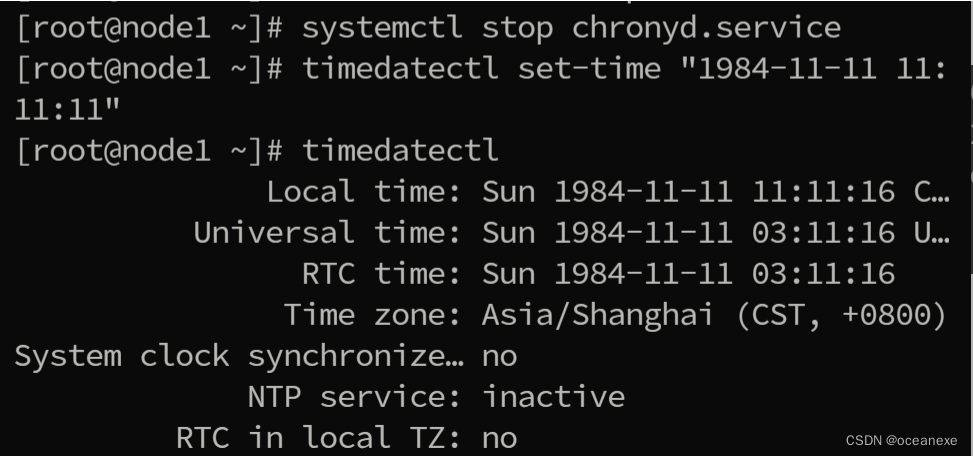
1.3、server主机的时间为`1984-11-11 11:11:11`
[root@node1 ~]# systemctl stop chronyd.service #先停时钟服务
[root@node1 ~]# timedatectl set-time "1984-11-11 11:11:11"
1.4、配置server主机的时间同步服务要求可以被所有人使用
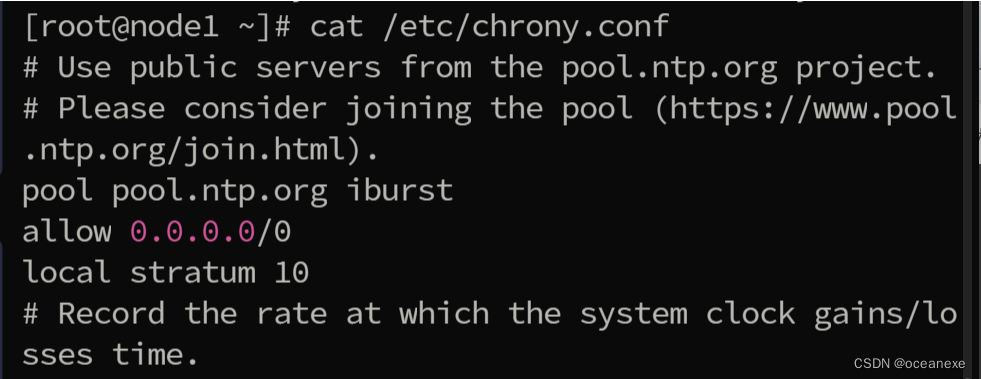
[root@node1 ~]# vim /etc/chrony.conf
pool pool.ntp.org iburst
allow 0.0.0.0/0
local stratum 10
二、设定client主机要求如下:
2.1、client主机的IP为:172.25.254.200
[root@node1 ~]# nmcli connection modify ens160 +ipv4.method manual ipv4.addresses 172.25.254.200/24 ipv4.gateway 172.25.254.2 ipv4.dns 223.5.5.5 autoconnect yes
#激活网卡
[root@node1 ~]# nmcli connection up ens160
2.2、修改主机名为`client.example.com`
[root@node1 ~]# hostnamectl hostname client.example.com
2.3、同步172.25.254.100主机的时间到达本机
 2.4、显示同步情况
[root@node1 ~]# chronyc sources -v
-
相关阅读:
吃透这份“Java进阶核心手册”再战字节,直接把面试官按在地上摩擦
流行的 Web 框架安全性比较
基于词云图的短信热词数据可视化
网络协议常见问题
2022科大讯飞AI开发者大赛,来了!
【Mac】破解死循环,成功安装 Homebrew、curl、wget,快速配置 zsh
正厚知识 | 超算“超”在何处
最详细STM32,cubeMX串口发送,接收数据
[多媒体] 多媒体封装格式 —— MP4 vs MKV
5、从RCNN到FasterRCNN(各模块独立训练到端到端检测框架)
- 原文地址:https://blog.csdn.net/weixin_73488808/article/details/137892762