-
vue2知识点————(声明周期,vue动态组件 )
vue2的知识点,更多前端知识在主页,还有其他知识会持续更新
初始化阶段

beforeCreate:在组件初始化完成后立即调用
会在实例初始化完成,props解析完成之后,data()和computed等选项处理之前立即调用
Created :在组件实例处理完所有状态相关的选项后调用
场景: 网络请求, 注册全局事件
这个钩子被调用时,以下内容已完成设置:响应式数据,计算属性,方法和侦听器,
但是此时挂载阶段未开始,因此$el属性不可用
挂载阶段

beforeMount :在组件被挂载之前调用
这个钩子被调用时,组件已经完成了其相应式状态的设置,但还没有创建dom节点,它即将首次执行dom渲染过程
场景:预处理data,不会触发updata钩子函数

Mounted :在组件被挂载之后调用
场景:挂载后真实DOM

更新阶段

beforeUpdate 在组件即将因为一个响应式状态更而更新其DOM树之前调用

Updated 在组件因为一个响应式状态变更而更新dom树其dom树之后调用

销毁阶段
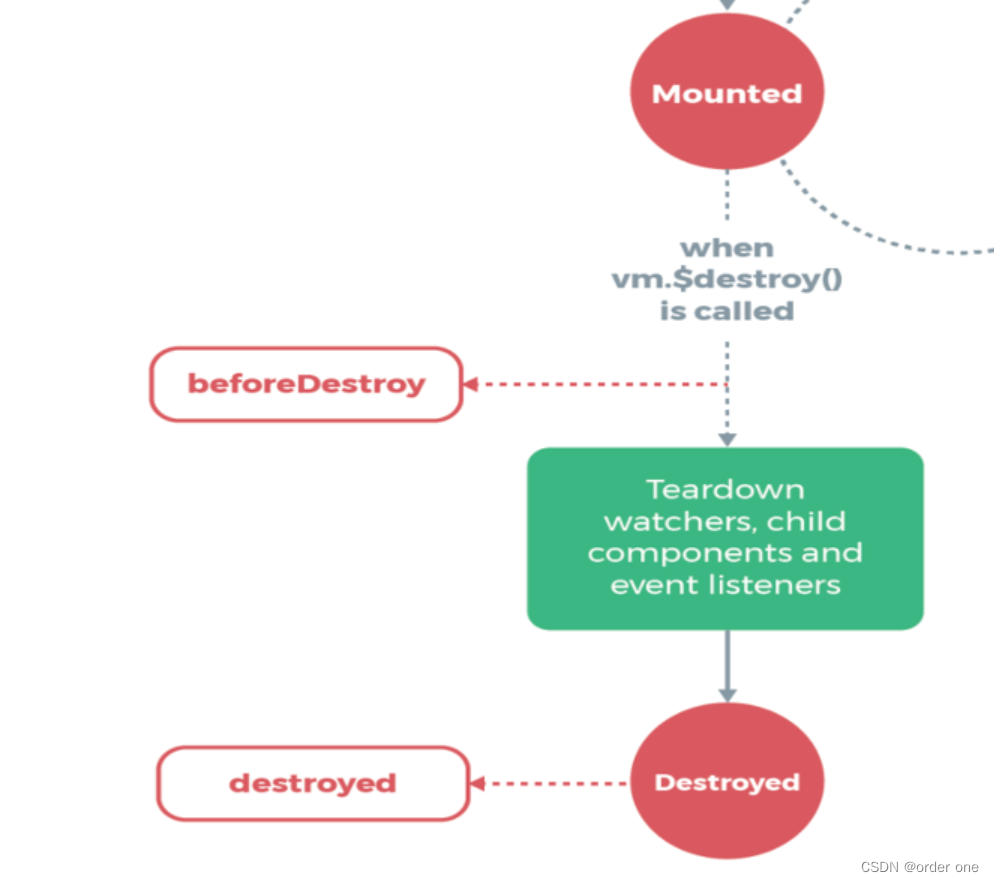
beforeDestroy() 生命周期钩子函数被执行
在实例销毁之前被调用。在这个阶段,实例仍然完全可用,可以访问到所有数据和方法。

Destrodyed
在实例销毁后被调用。此时,实例中的所有东西都已被解绑定,事件监听器已被移除,所有子实例也已被销毁。

vue动态组件
动态组件在 Vue.js 中是一种非常有用的功能,它允许你根据不同的条件渲染不同的组件。Vue 提供了多种方式来实现动态组件,主要包括以下几种方法:
使用
Vue 中的
- <template>
- <div>
- <component :is="currentComponent"></component>
- <button @click="toggleComponent">Toggle Component</button>
- </div>
- </template>
- <script>
- import ComponentA from './ComponentA.vue';
- import ComponentB from './ComponentB.vue';
- export default {
- data() {
- return {
- currentComponent: 'ComponentA'
- };
- },
- methods: {
- toggleComponent() {
- this.currentComponent = this.currentComponent === 'ComponentA' ? 'ComponentB' : 'ComponentA';
- }
- },
- components: {
- ComponentA,
- ComponentB
- }
- }
- </script>
使用
v-if和v-else通过
v-if和v-else指令,你可以根据条件切换不同的组件。- <template>
- <div>
- <ComponentA v-if="isComponentAVisible" />
- <ComponentB v-else />
- <button @click="toggleComponent">Toggle Component</button>
- </div>
- </template>
- <script>
- import ComponentA from './ComponentA.vue';
- import ComponentB from './ComponentB.vue';
- export default {
- data() {
- return {
- isComponentAVisible: true
- };
- },
- methods: {
- toggleComponent() {
- this.isComponentAVisible = !this.isComponentAVisible;
- }
- },
- components: {
- ComponentA,
- ComponentB
- }
- }
- </script>
使用
:is属性你也可以在动态组件上直接使用
:is属性来动态绑定组件名称。- <template>
- <div>
- <component :is="currentComponent"></component>
- <button @click="toggleComponent">Toggle Component</button>
- </div>
- </template>
- <script>
- import ComponentA from './ComponentA.vue';
- import ComponentB from './ComponentB.vue';
- export default {
- data() {
- return {
- currentComponent: ComponentA
- };
- },
- methods: {
- toggleComponent() {
- this.currentComponent = this.currentComponent === ComponentA ? ComponentB : ComponentA;
- }
- },
- components: {
- ComponentA,
- ComponentB
- }
- }
- </script>
-
相关阅读:
数据压缩STC稀疏三元压缩算法复现
接口性能优化的11个小技巧,每个都是精髓
全志T527 CPU测试
基于Orange Pi AIpro的3D性能展示
蜜雪冰城、茶颜悦色“卷”向咖啡赛道
网络服务器是干什么用的
Java的final修饰符
JAVA IDEA 下载
电脑中缺少dll文件怎么解决?电脑dll文件要怎么打开?
在嵌入式开发中如何提高自己的代码水平
- 原文地址:https://blog.csdn.net/gu644335363/article/details/138168543
