-
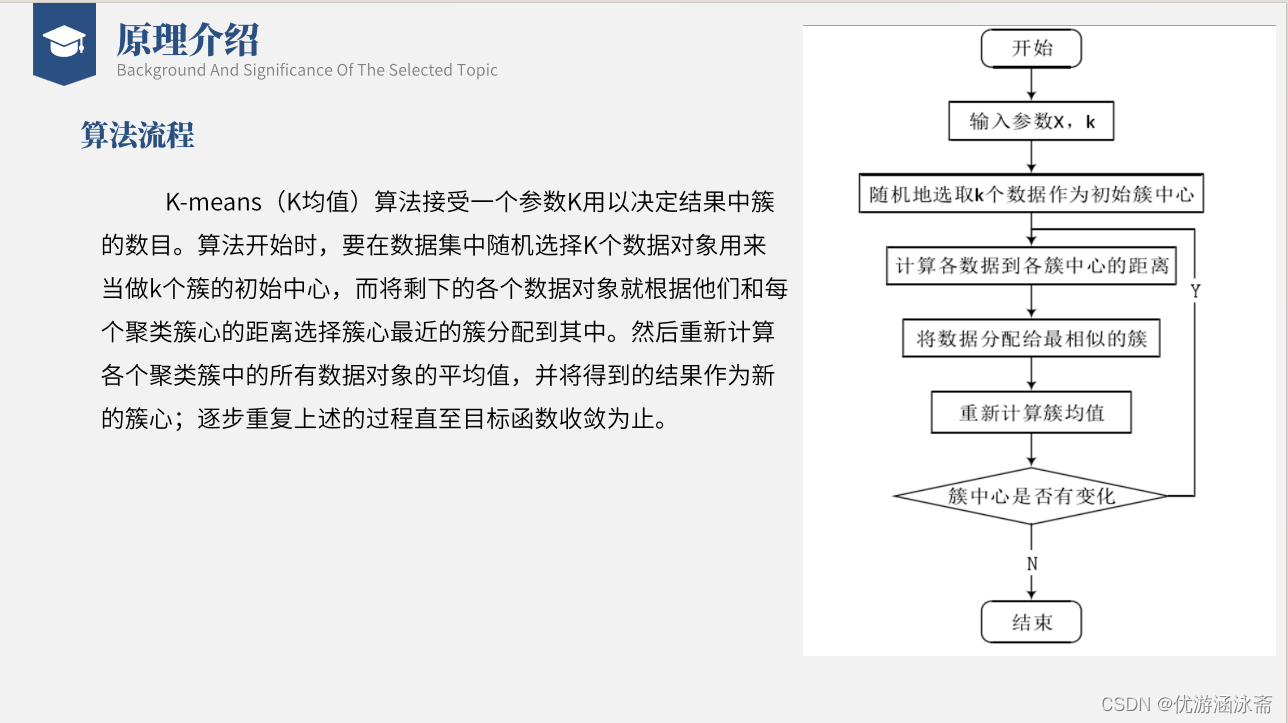
kmeans实现图像像素分类
代码
- import tkinter as tk
- from tkinter import filedialog
- from PIL import Image, ImageTk
- import numpy as np
- import random
- import math
- class Cluster(object):
- def __init__(self):
- # pixels是像素的意思,这里定义一个像素组用来存放像素的值
- self.pixels = []
- # 创建一个中心点
- self.centroid = None
- def addPoint(self, pixels):
- # 将像素值存放到这个空的pixels数组当中
- self.pixels.append(pixels)
- def setNewCentroid(self):
- # 这里通道R在像素点中进行轮寻R就会得到一个数组,里面是所有像素点R通道的像素值
- R = [colour[0] for colour in self.pixels]
- G = [colour[1] for colour in self.pixels]
- B = [colour[2] for colour in self.pixels]
- # 求R,G,B所有像素点的平均值
- R = sum(R) / len(R)
- R= round(R)
- G = sum(G) / len(G)
- G = round(G)
- B = sum(B) / len(B)
- B = round(B)
- self.centroid = (R,G,B)
- return self.centroid
- class Kmeans(object):
- # 初始化k个簇,最大迭代次数,阈值用来判断中心点与上一代中心点的误差,小于就结束,图片大小
- def __init__(self, k=10, max_iteration=10, min_distance=5.0, size=200):
- self.k = k
- self.max_iterations = max_iteration
- self.min_distance = min_distance
- self.size = (size, size)
- def run(self, image):
- self.image = image
- #将图像缩放到指定大小self.size
- self.image.thumbnail(self.size)
- # 将image转化为数组
- self.p = np.array(image)
- # 打印出来的是每个像素的数值[113, 110, 75]这是一个像素点RGB值
- self.pixels = np.array(image.getdata(), dtype=np.uint8)
- # return self.pixels,self.p
- # 创建了一个长度为 self.k 的列表,其中每个元素都被初始化为 None。这里,self.k 是一个类的属性,代表了你想要创建的簇(clusters)的数量。
- self.clusters = [None for i in range(self.k)]
- self.oldClusters = None
- # self.pixels 数组中随机选择 self.k 个像素点,并将这些像素点的值存储到 randomPixels 列表中
- randomPixels = random.sample(list(self.pixels), self.k)
- # 这里循环每个簇
- for idx in range(self.k):
- self.clusters[idx] = Cluster()
- self.clusters[idx].centroid = randomPixels[idx]
- iterations = 0
- while self.shouldExit(iterations) is False:
- self.oldClusters = [cluster.centroid for cluster in self.clusters]
- for pixel in self.pixels:
- self.assignClusters(pixel)
- for cluster in self.clusters:
- cluster.setNewCentroid()
- iterations += 1
- return [cluster.centroid for cluster in self.clusters]
- #分配簇,将像素分配到簇
- def assignClusters(self, pixel):
- # 可能是用来比较的shortest = float('Inf')这是设定距离为无穷大
- shortest = float('Inf')
- for cluster in self.clusters:
- distance = self.calcDistance(cluster.centroid, pixel)
- if distance < shortest:
- shortest = distance
- nearest = cluster
- nearest.addPoint(pixel)
- # 计算像素到中心点的欧式距离
- def calcDistance(self, a, b):
- # 计算欧氏距离
- result = math.sqrt((a[0] - b[0]) ** 2 + (a[1] - b[1]) ** 2 + (a[2] - b[2]) ** 2)
- # result = np.sqrt(sum((a-b) ** 2))
- return result
- # 迭代结束
- def shouldExit(self, iterations):
- if self.oldClusters is None:
- return False
- for idx in range(self.k):
- dist = self.calcDistance(
- np.array(self.clusters[idx].centroid),
- np.array(self.oldClusters[idx])
- )
- if distreturn Trueif iterations <= self.max_iterations:return Falsereturn True# 显示原图像def showImage(self):self.image.show()# 显示每个200*200的图像,颜色是每个聚类中心像素def showCentroidColours(self):# 创建cluster * 200大小的图像total_width = len(self.clusters) * 200# 整体高度是200total_height = 200big_image = Image.new("RGB", (total_width, total_height), "white")# 计算每个小图片在大图上的位置x_offset = 0y_offset = 0for cluster in self.clusters:image = Image.new("RGB", (200, 200), cluster.centroid)# 将小图片粘贴到大图上big_image.paste(image, (x_offset, y_offset))# 更新 x 偏移量以准备下一个图片的位置x_offset += 200# new_width = 1000# new_height = 400# new_image = Image.new('RGB', (new_width, new_height), 'white')## big_image = np.array(big_image)# image = np.concatenate((self.p, big_image), axis=0)# image = np.vstack((image, big_image))# big_image.show()big_image = big_image.resize((500, 30))return big_image# y_offset = 0# for img in zip([image, big_image]):# new_image.paste(img, (0, y_offset))# y_offset = y_offset + 1# new_image.show()# new_image.show()# 颜色图像显示def showClustering(self):# 创建一个与localPixels相同长度的localPixels =[None] * len(self.image.getdata())for idx, pixel in enumerate(self.image.getdata()):shortest = float('Inf')for cluster in self.clusters:distance =self.calcDistance(cluster.centroid, pixel)if distance < shortest:shortest = distancenearest = clusterlocalPixels[idx] = nearest.centroidw,h = self.image.size# 将localPixel转换为一个大小为(h, w, 3)的图像localPixels = np.asarray(localPixels)\.astype('uint8')\.reshape((h, w, 3))# 颜色图像显示colourMap = Image.fromarray(localPixels)colourMap = colourMap.resize((200, 200))return colourMap# colourMap.show()# 初始化Tkinter窗口root = tk.Tk()root.title("图片处理GUI")# 全局变量用于存储图片和图片数据image_path = Noneimage_data = Nonedef open_image():global image_path, image_data, image# 打开文件对话框,选择图片文件file_path = filedialog.askopenfilename(title="选择图片", filetypes=[("图像文件", "*.png;*.jpg;*.jpeg;*.bmp;*.gif")])if file_path:# 使用PIL打开图片image = Image.open(file_path)# 转换为Tkinter可以显示的格式image = image.resize((200, 200))tk_image = ImageTk.PhotoImage(image)# 展示图片label_image.config(image=tk_image)label_image.config(padx=10, pady=5)label_image.image = tk_image# 存储图片路径和图片数据(转换为numpy数组)image_path = file_pathimage_data = np.array(image)def apply_kmeans():global image_data, image_pathif image_data is not None:# 将图片数据重塑为二维数组,每行是一个像素,每列是RGB值image = Image.open(image_path)image = image.resize((200, 200))# 初始化自定义的Kmeans类并运行算法k = Kmeans()# k.showImage()k.run(image)segmented_image_pil = k.showCentroidColours()# 展示处理后的图片segmented_tk_image = ImageTk.PhotoImage(segmented_image_pil)label_segmented.config(image=segmented_tk_image)label_segmented.image = segmented_tk_imageelse:print("请先打开一张图片!")# 创建按钮来打开图片def apply_kmeans1():global image_data, image_pathif image_data is not None:# 将图片数据重塑为二维数组,每行是一个像素,每列是RGB值image = Image.open(image_path)image = image.resize((200, 200))# 初始化自定义的Kmeans类并运行算法k = Kmeans()# k.showImage()k.run(image)segmented_image_pil = k.showClustering()# 展示处理后的图片segmented_tk_image = ImageTk.PhotoImage(segmented_image_pil)label_segmented1.config(image=segmented_tk_image)label_segmented1.image = segmented_tk_imageelse:print("请先打开一张图片!")# 创建按钮来打开图片button_open = tk.Button(root, text="打开图片", command=open_image)# 使用 grid 布局,并指定在第0行第0列button_open.grid(row=0, column=0, sticky="ew")# 创建标签来展示原始图片label_image = tk.Label(root)# sticky="news" 表示填充所有方向label_image.grid(row=1, column=0, sticky="news")# 创建按钮来应用K-means算法button_kmeans = tk.Button(root, text="应用K-means", command=apply_kmeans)button_kmeans.grid(row=0, column=1, sticky="ew")# 创建标签来展示K-means处理后的图片label_segmented = tk.Label(root)label_segmented.grid(row=1, column=1, sticky="news")button_kmeans1 = tk.Button(root, text="返回图像", command=apply_kmeans1)button_kmeans1.grid(row=0, column=2, sticky="ew")label_segmented1 = tk.Label(root)label_segmented1.grid(row=1, column=2, sticky="news")# 运行Tkinter事件循环root.columnconfigure(0, weight=1)root.columnconfigure(1, weight=1)root.columnconfigure(2, weight=1)root.mainloop()


- 相关阅读:
[附源码]SSM计算机毕业设计中小企业人事管理系统JAVA
JdbcTemplate
排序1:直接插入排序
开发一款流行的国内App可能用到的SDK功能分析
gnss rtcm rtklib Ntrip...
【Kafka系列】(二)Kafka的基本使用
基于Python的性能优化
ECharts综合案例一:近七天跑步数据
孩子到底是食物过敏?还是食物不耐受?
【Java SE】“方法”论 — 《方法的概念及使用》
- 原文地址:https://blog.csdn.net/weixin_48433993/article/details/138161574
