-
React - 高级用法
React高级用法
Hooks
Reducer
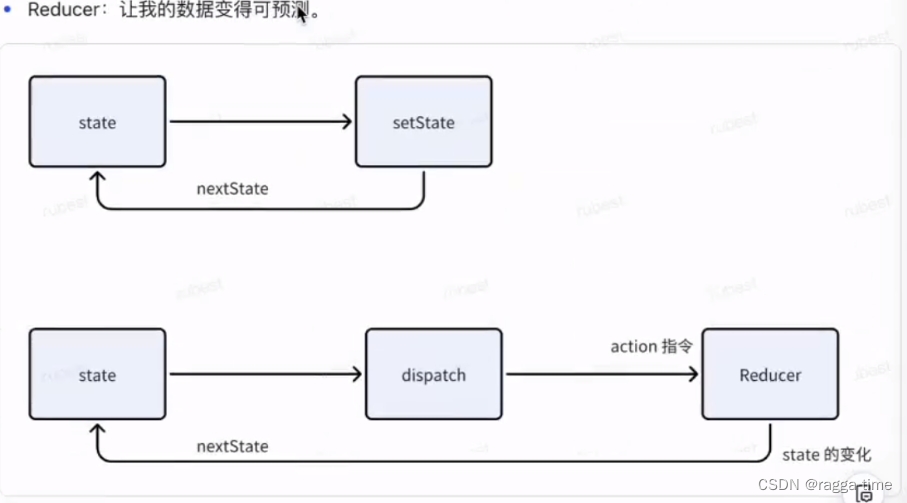
useReducer:
import React, { useReducer, useState } from 'react'; const initialState = { count: 0 }; function reducer(state, action) { switch (action.type) { case 'increment': return { count: state.count + 1 } case 'decrement': return { count: state.count - 1 } default: console.log('格式不通过!'); } } export default function Reducer() { const [number, setNumber] = useState(0); const [state, dispatch] = useReducer(reducer, initalState); return ( <div> {state.count} <button onClick={() => dispatch({ type: 'increment' })}>+</button> </div> ) }- 1
- 2
- 3
- 4
- 5
- 6
- 7
- 8
- 9
- 10
- 11
- 12
- 13
- 14
- 15
- 16
- 17
- 18
- 19
- 20
- 21
- 22
- 23
- 24
- 25
- 26
- 27
Ref
用来指代具体的dom节点
类组件: createRef
import React, { Component } from 'react'; export default class ClassRef extends Component { constructor(props) { super(props); this.eleRef = createRef(); this.inputRef = createRef(); } handleClick = () => { this.inputRef.current.focus(); console.log(this.eleRef.current); } render() { return ( <div> <div id="xxx" ref={this.eleRef}> eleRef </div> <input ref={this.inputRef} /> <button onClick={this.handleClick}></button> </div> ) } }- 1
- 2
- 3
- 4
- 5
- 6
- 7
- 8
- 9
- 10
- 11
- 12
- 13
- 14
- 15
- 16
- 17
- 18
- 19
- 20
- 21
- 22
- 23
- 24
- 25
- 26
- 27
- 28
- 29
函数组件:useRef
import { useRef } from 'react' export default function FuncRef(props) { const eleRef = useRef(null); const inputRef = useRef(null); return ( <div> <div id="xxx" ref={this.eleRef}> eleRef </div> <input ref={this.inputRef} /> <button onClick={this.handleClick}></button> </div> ) }- 1
- 2
- 3
- 4
- 5
- 6
- 7
- 8
- 9
- 10
- 11
- 12
- 13
- 14
- 15
- 16
- 17
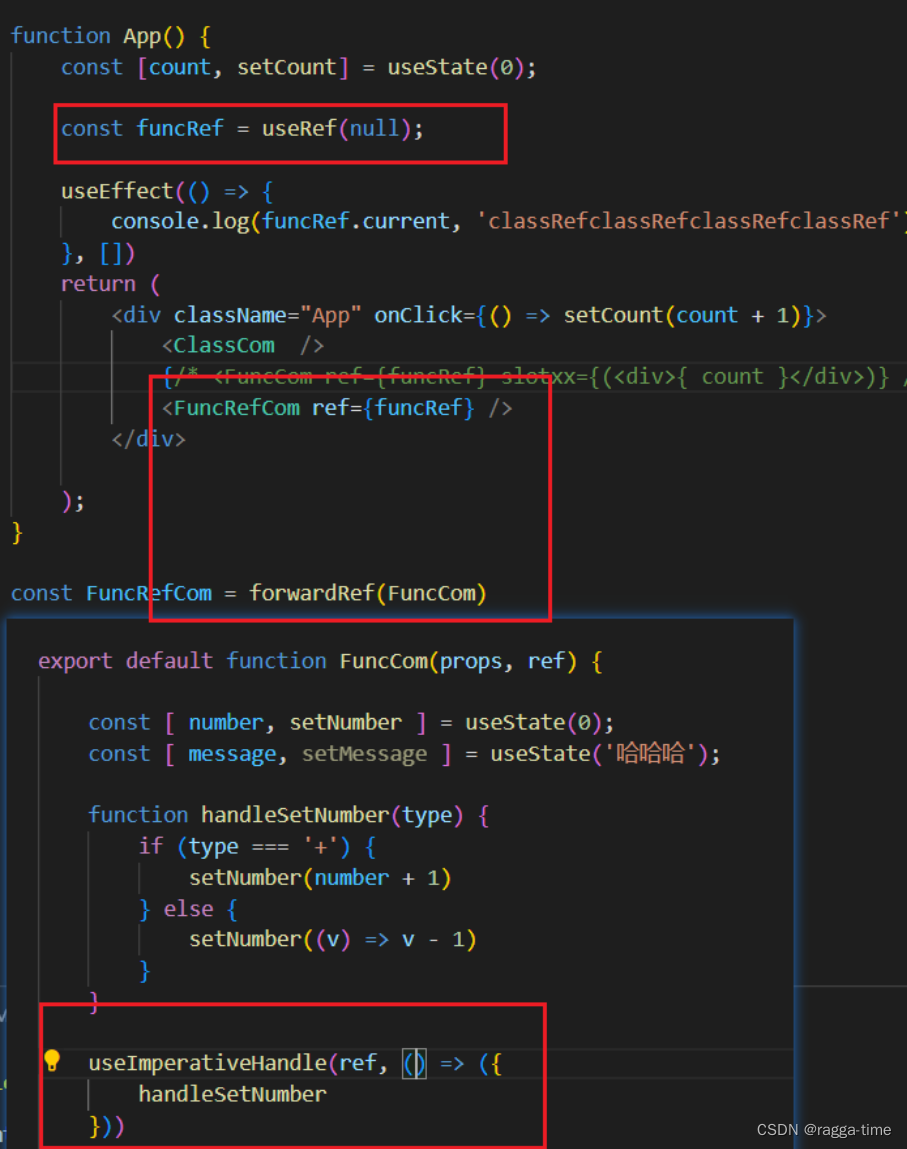
Ref转发
类似于vue中 调用子组件的方法 refs.xxx()
Context上下文
Provider
Comsumer
对应Vue,就是provide,inject
形成一个生成与消费模式的上下文类组件用法
import { createContext } from 'react'; const ThemeContext = createContext('light'); // ClassContext.jsx export default class ClassContext extends Component { constructor(props) { super(props); this.state = { theme: 'light' } } render() { return ( <div> <ThemeContext.Provider value={this.state.theme} > <Parent /> <button onClick={() => this.setState({ theme: 'light' })}></button> </ThemeContext.Provider> </div> ) } } const Parent = () => { return ( <div> <Child1 /> <Child2 /> </div> ) } class Child1 extends Component { static contextType = ThemeContext; render() { return ( <div> {this.context} </div> ) } } class Child2 extends Component { render() { return ( <ThemeContext.Consumer> { (theme) => ( <div>{theme}</div> ) } </ThemeContext.Consumer> ) } }- 1
- 2
- 3
- 4
- 5
- 6
- 7
- 8
- 9
- 10
- 11
- 12
- 13
- 14
- 15
- 16
- 17
- 18
- 19
- 20
- 21
- 22
- 23
- 24
- 25
- 26
- 27
- 28
- 29
- 30
- 31
- 32
- 33
- 34
- 35
- 36
- 37
- 38
- 39
- 40
- 41
- 42
- 43
- 44
- 45
- 46
- 47
- 48
- 49
- 50
- 51
- 52
- 53
- 54
- 55
- 56
- 57
- 58
- 59
- 60
- 61
- 62
- 63
History包装(函数组件)
import { useContext, useState, createContext } from 'react'; const ThemeContext = createContext(); const history = window.history; export default function FuncContext() { return ( <ThemeContext.Provider value={history}> <Parent /> </ThemeContext.Provider> ) } const Parent = () => { return <Child />; } const withRouter = (Component) => { console.log(Component, 'ComponentComponent') return () => { const nav = useContext(ThemeContext); return <Component navigator={nav} /> } } const Child = withRouter((props) => { console.log(props); return ( <div> <button onClick={() => props.navigator.pushState({}, undefined, 'hello')}> hello </button> </div> ) })- 1
- 2
- 3
- 4
- 5
- 6
- 7
- 8
- 9
- 10
- 11
- 12
- 13
- 14
- 15
- 16
- 17
- 18
- 19
- 20
- 21
- 22
- 23
- 24
- 25
- 26
- 27
- 28
- 29
- 30
- 31
- 32
- 33
- 34
- 35
- 36
高阶函数(HOC)
函数可以作为 参数 和 返回值 。
属性代理
// CardHoc.jsx export default function Card({ title, children }) { return <div> <h2>{ title }</h2> { children ? <div>{ children }</div> : null } </div> } export const withCard = (title) => (Component) => { return (props) => { const hocStyle = { margin: '12px', padding: '12px', border: '1px solid #ccc', borderRadius: '4px' } return <div style={hocStyle}> <h2>{title}</h2> <Component {....props} /> </div> } } // App.jsx const Text = ({ num }) => <div>{num}</div> const CardText = withCard('TextCard')(Text); <CardText num={100} />- 1
- 2
- 3
- 4
- 5
- 6
- 7
- 8
- 9
- 10
- 11
- 12
- 13
- 14
- 15
- 16
- 17
- 18
- 19
- 20
- 21
- 22
- 23
- 24
- 25
- 26
- 27
- 28
- 29
- 30
- 31
反向继承
import { Component } from 'react'; // 比如我们有一个案例: 我们需要优雅的实现 曝光埋点 /** * 有个按钮,我们想知道这个按钮在线上的漏斗转换 * 每次按钮点击时,记录一个sendLog('my_btn_click'), 其实就是触发一条请求 * 每次按钮出现时,记录一个sendLog('my_btn_show') * 那我的转化,pv('my_btn_click') / pv('my_btn_show') */ export default function Extending() { return ( <div><LogIndex /></div> ) } function logProps(logMap) { return (WrapperComponent) => { const didMount = WrapperComponent.prototype.componentDidMount; return class A extends WrapperComponent { componentDidMount() { if (didMount) { didMount.apply(this); } Object.entries(logMap).forEach([k, v] => { if (document.getElementById(k)) { console.log('事件曝光', v); } }) } render() { return super.render(); } } } } class Index extends Component { render() { <div> <div id="my_text">这是一个文字信息</div> <button id="my_btn">这是一个按钮</button> </div> } } const LogIndex = logProps({ my_text: 'my_text_show', my_btn: 'my_btn_show' })(Index)- 1
- 2
- 3
- 4
- 5
- 6
- 7
- 8
- 9
- 10
- 11
- 12
- 13
- 14
- 15
- 16
- 17
- 18
- 19
- 20
- 21
- 22
- 23
- 24
- 25
- 26
- 27
- 28
- 29
- 30
- 31
- 32
- 33
- 34
- 35
- 36
- 37
- 38
- 39
- 40
- 41
- 42
- 43
- 44
- 45
- 46
- 47
- 48
- 49
- 50
- 51
渲染优化
类组件 类似于useMemo
import React, { Component } from 'react' export default class renderControl extends Compoent { constructor(props) { super(props); this.state = { num: 0, count: 0 } this.component = <Child num={this.state.num}> } controlRender = () => { const { props } = this.component; if (props.num !== this.state.num) { return this.component = React.cloneElement( this.component, { num: this.state.num } ) } } render() { const { num, count } = this.state; return <div> {this.controlRender()} <button onClick={() => this.setState({ num: num + 1 })}>{num}</button> <button onClick={() => this.setState({ count: count + 1 })}>{count}</button> </div> } } const Child = ({ num }) => { console.log('子组件执行'); return <div>{ num }</div> }- 1
- 2
- 3
- 4
- 5
- 6
- 7
- 8
- 9
- 10
- 11
- 12
- 13
- 14
- 15
- 16
- 17
- 18
- 19
- 20
- 21
- 22
- 23
- 24
- 25
- 26
- 27
- 28
- 29
- 30
- 31
- 32
- 33
- 34
- 35
- 36
- 37
- 38
- 39
- 40
函数组件 - useMemo
import React, { Component, useState } from 'react' export default function renderControl() { const [ num, setNum ] = useState(0); const [ count, setCount ] = useState(0); return <div> {useMemo(() => <Child num={num} />, [num])} <button onClick={() => this.setState({ num: num + 1 })}>{num}</button> <button onClick={() => this.setState({ count: count + 1 })}>{count}</button> </div> } const Child = ({ num }) => { console.log('子组件执行'); return <div>{ num }</div> }- 1
- 2
- 3
- 4
- 5
- 6
- 7
- 8
- 9
- 10
- 11
- 12
- 13
- 14
- 15
- 16
- 17
- 18
- 19
- 20
- 21
useMemo
函数:返回值进行缓存;
Deps: 依赖项改变了,我就再次执行;useCallback
函数:函数进行缓存
Deps: 依赖项改变了,我就再次执行;import React, { useCallback, useState } from 'react'; export default function RenderControl() { const [num, setNum] = useState(0); const [count, setCount] = useState(0); const handleChange = useCallback(() => { setCount(count => count + 1); }, []) return ( <div> <MemoChild onChange={handleChange} /> <button onClick={() => setNum(num + 1)}>{num}</button> <button onClick={() => setCount(count + 1)}>{count}</button> </div> ) } const Child = ({ num, onChange }) => { console.log('子组件执行'); return <div> <button onClick={() => onChange()}> onChange </button> </div> } const MemoChild = React.memo(Child);- 1
- 2
- 3
- 4
- 5
- 6
- 7
- 8
- 9
- 10
- 11
- 12
- 13
- 14
- 15
- 16
- 17
- 18
- 19
- 20
- 21
- 22
- 23
- 24
- 25
- 26
- 27
- 28
- 29
- 30
- 31
-
相关阅读:
新疆旅游创新产品迎活力 伊吾胡杨文旅品牌发布
vue3中使用v-html解析后table表格的线不展示
会自动清除的文件——tempfile
JavaScript:将input标签中的内容打印到控制台
CUDA——向量化内存
单元测试到底是什么?应该怎么做?
Codeforces Round 857
【深度学习 论文篇 03-2】Pytorch搭建SSD模型踩坑集锦
error: cannot jump from this goto statement to its label
使用Amazon Bedrock托管的Claude3 学习中国历史
- 原文地址:https://blog.csdn.net/weixin_44273392/article/details/137874679
