-
Meta Llama 3本地部署
环境安装
项目文件
下载完后在根目录进入命令终端(windows下cmd、linux下终端、conda的话activate)
运行pip install -e .- 1
不要控制台,因为还要下载模型。这里挂着是节省时间
模型申请链接
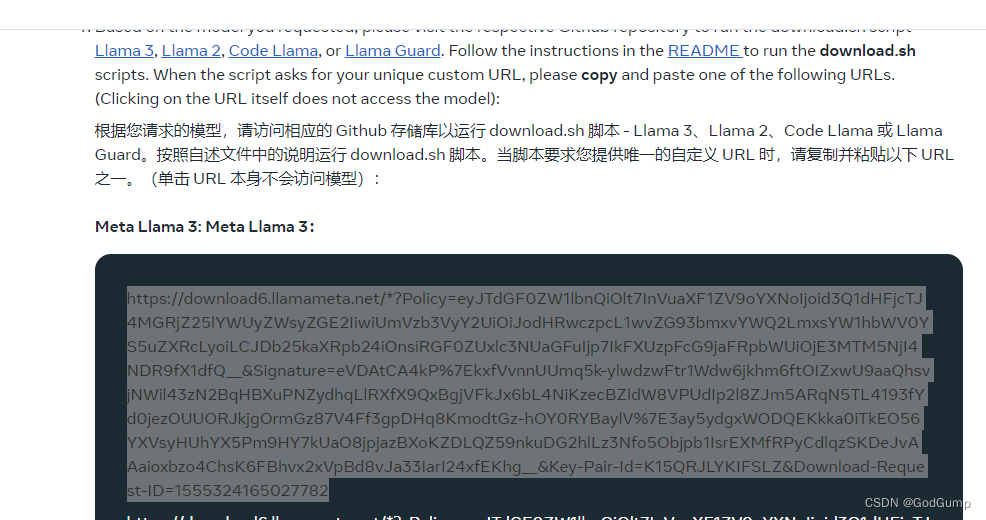
复制如图所示的链接
然后在刚才的控制台bash download.sh- 1
在验证哪里直接输入刚才链接即可
如果报错没有wget,则点我下载wget
然后放到C:\Windows\System32 下torchrun --nproc_per_node 1 example_chat_completion.py \ --ckpt_dir Meta-Llama-3-8B-Instruct/ \ --tokenizer_path Meta-Llama-3-8B-Instruct/tokenizer.model \ --max_seq_len 512 --max_batch_size 6- 1
- 2
- 3
- 4
收尾
创建chat.py脚本
# Copyright (c) Meta Platforms, Inc. and affiliates. # This software may be used and distributed in accordance with the terms of the Llama 3 Community License Agreement. from typing import List, Optional import fire from llama import Dialog, Llama def main( ckpt_dir: str, tokenizer_path: str, temperature: float = 0.6, top_p: float = 0.9, max_seq_len: int = 512, max_batch_size: int = 4, max_gen_len: Optional[int] = None, ): """ Examples to run with the models finetuned for chat. Prompts correspond of chat turns between the user and assistant with the final one always being the user. An optional system prompt at the beginning to control how the model should respond is also supported. The context window of llama3 models is 8192 tokens, so `max_seq_len` needs to be <= 8192. `max_gen_len` is optional because finetuned models are able to stop generations naturally. """ generator = Llama.build( ckpt_dir=ckpt_dir, tokenizer_path=tokenizer_path, max_seq_len=max_seq_len, max_batch_size=max_batch_size, ) # Modify the dialogs list to only include user inputs dialogs: List[Dialog] = [ [{"role": "user", "content": ""}], # Initialize with an empty user input ] # Start the conversation loop while True: # Get user input user_input = input("You: ") # Exit loop if user inputs 'exit' if user_input.lower() == 'exit': break # Append user input to the dialogs list dialogs[0][0]["content"] = user_input # Use the generator to get model response result = generator.chat_completion( dialogs, max_gen_len=max_gen_len, temperature=temperature, top_p=top_p, )[0] # Print model response print(f"Model: {result['generation']['content']}") if __name__ == "__main__": fire.Fire(main)- 1
- 2
- 3
- 4
- 5
- 6
- 7
- 8
- 9
- 10
- 11
- 12
- 13
- 14
- 15
- 16
- 17
- 18
- 19
- 20
- 21
- 22
- 23
- 24
- 25
- 26
- 27
- 28
- 29
- 30
- 31
- 32
- 33
- 34
- 35
- 36
- 37
- 38
- 39
- 40
- 41
- 42
- 43
- 44
- 45
- 46
- 47
- 48
- 49
- 50
- 51
- 52
- 53
- 54
- 55
- 56
- 57
- 58
- 59
- 60
- 61
- 62
- 63
- 64
- 65
- 66
- 67
然后运行
torchrun --nproc_per_node 1 chat.py --ckpt_dir Meta-Llama-3-8B-Instruct/ --tokenizer_path Meta-Llama-3-8B-Instruct/tokenizer.model --max_seq_len 512 --max_batch_size 6- 1
-
相关阅读:
Docker--1. 初识Docker安装与踩坑
深度学习 一:Deep Learning基本概念及线性、非线性回归对比分析(sigmoid v.s. ReLU)
VM系列振弦采集模块频率计算与质量评定
京东大数据:2023年Q3美妆行业数据分析报告
Vue生命周期
LeetCode-878-第N个神奇数字
MVP-3:登陆注册自定义token拦截器
Apache Drill 2万字面试题及参考答案
ESP8266-Arduino网络编程实例-HightCharts实时图表显示BME280数据
SpringBoot 配置文件这样加密,才足够安全!
- 原文地址:https://blog.csdn.net/GodGump/article/details/138139562
