-
CUDA编程:矩阵乘运算从CPU到GPU
CUDA编程:矩阵乘运算从CPU到GPU
本文内容涉及到CUDA矩阵1D运算、2D运算、共享内存、CUBLAS的使用。
文中的全部code:
https://github.com/CalvinXKY/BasicCUDA/tree/master/matrix_multiply
V100上的测试对比:

运行内容“./matMul wA=1024 hA=256 wB=128 hB=1024”
1 CPU矩阵乘运算
矩阵 C = A x B的数学运算,是线性代数里面最基本的内容, 计算的基本公式如下:
矩阵 中每个元素 为 的第 1 行与 的 列进行元素对应相乘再求和。
若:A 宽wA 高:hA; B 宽wB 高:hB; C 宽wC 高:hC 有:
通过计算机运算我们能够很容易的得到运算部分的代码,如下:
for (unsigned int i = 0; i < hA; ++i){ for (unsigned int j = 0; j < wB; ++j) { float Cij = 0; for (unsigned int k = 0; k < wA; ++k) { Cij += A[i][k] * B[k][j]; } C[i][j] = Cij ; } }- 1
- 2
- 3
- 4
- 5
- 6
- 7
- 8
- 9
进一步,我们还需要了解矩阵的一维数据运算方式。矩阵的数据在内存中存储的格式是线性格式(行优先/列优先),如下所示,展示的是一种行优先的存储方式。可以通过索引计算来定位矩阵中的某个元素,比如第i行第j列的元素,在线性内存中的位置:i * w + j。w为矩阵的宽度。
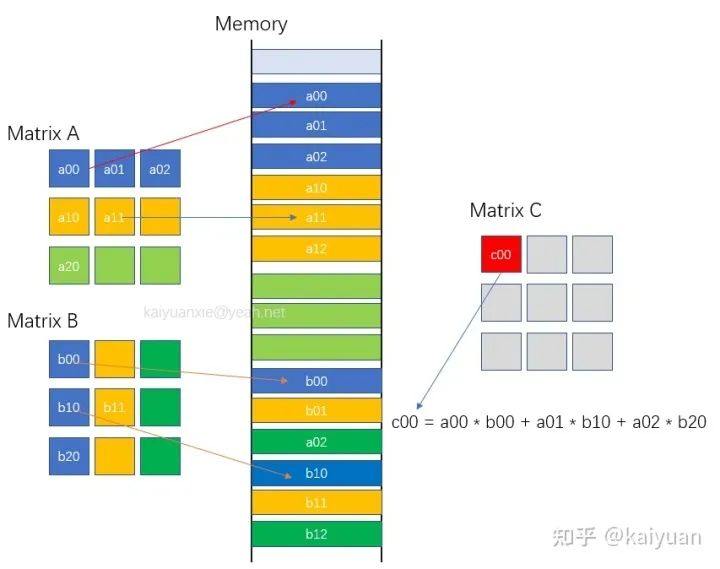
运算的CPU实现代码 如下所示:
/* * float *C, *A , *B: data pointer of matrix C, A, B each. * unsigned int wA: width of A. * unsigned int wC: width of C, which equals height of B. * unsigned int hC: hegith of C, which equals height of A. */ void matrixMulCPU(float *C, const float *A, const float *B, unsigned int wA, unsigned int wC, unsigned int hC) { unsigned int hA = hC; unsigned int wB = wC; for (unsigned int i = 0; i < hA; ++i) for (unsigned int j = 0; j < wB; ++j) { double sum = 0; for (unsigned int k = 0; k < wA; ++k) { sum += (double)A[i * wA + k] * (double)B[k * wB + j]; } C[i * wB + j] = (float)sum; } }- 1
- 2
- 3
- 4
- 5
- 6
- 7
- 8
- 9
- 10
- 11
- 12
- 13
- 14
- 15
- 16
- 17
- 18
- 19
上述代码采用三重循环实现了全部运算。最内层是计算每个Cij元素运算,再用两个for遍历获得了整个C矩阵的结果。显然,如果用单线程的CPU运算,该过程的计算时间是
其中hA、wA是矩阵A的高和宽,wB是矩阵B的宽度,deltaT表示每次运算消耗的时间。
由于过程只有一个CPU线程在串行计算,所以矩阵越大耗时越久。为了优化这个过程,我们采用GPU来计算,GPU有大量的线程,通过增加更多的线程来并行计算,降低运算时间。理论上当我们用N个线程来运算时,整个运算时间为:
2 一维块(1D block)构建运算
多线程编发计算道理很简单,让多个线程分担一个线程的工作量。在NVIDIA的GPU中使用多线程不像CPU中并行一样直接,如C++添加“#pragma omp parallel“。GPU中运算涉及数据的转移(CPU <-> GPU)、GPU工作流的创建等内容,但最核心的点是线程thread的运算过程。基本上,我们只需要明确两个问题:
-
> CUDA代码里面的Thread是如何调用的?
-
> 如何让不同的Thread与需要计算的数据匹配?
2.1 问题1: CUDA代码里面的Thread是如何调用的?
CUDA对thread的调用其实由编译器完成的。用户在编写代码时主要关注如何定义GPU能运行的函数,其次是如何调用这个函数。定义GPU线程(Thread)可运行函数,实际上就是在函数前面加上一个’\__global\__'的前缀:
__global__ void functionExample() { // code part. }- 1
- 2
- 3
函数的执行需要用一个特殊的语法"<<<…>>>" 在主机host上面执行上述函数,尖括号里面实际上是定义执行这个函数用多少线程threads
functionExample<<- 1
这里需要知道如果调用上述函数,那么每个Thread都会去执行functionExample这个函数。
Thread有多少?
thread总数量 = grids的数量 * 一个grid里面block数量 * 一个block里面threads的数量。
CUDA里面用Grid和Block作为线程组织的组织单位,一个Grid可包含了N个Block,一个Block包含N个thread。

示例的Grid包含8个block,每个block包含8个thread
在C++代码中(主机运行代码中)调用CUDA的多线程函数,一般过程是标记函数、设置线程数、执行函数。这里放一个CUDA GUIDE里面的样例代码:
// Kernel definition // kernel指的就是thread能运行的函数 __global__ void MatAdd(float A[N][N], float B[N][N], float C[N][N]) { int i = blockIdx.x * blockDim.x + threadIdx.x; int j = blockIdx.y * blockDim.y + threadIdx.y; if (i < N && j < N) C[i][j] = A[i][j] + B[i][j]; }int main() { ... // Kernel invocation dim3 threadsPerBlock(16, 16); // 定义一个block里面有多少thread 16*16 dim3 numBlocks(N / threadsPerBlock.x, N / threadsPerBlock.y); 定义grid里面有多少Block。 MatAdd<<- 1
- 2
- 3
- 4
- 5
- 6
- 7
- 8
- 9
- 10
- 11
- 12
- 13
- 14
- 15
- 16
- 17
2.2 问题2:如何让不同的Thread与需要计算的数据匹配?
既然有这么多的Thread去计算相同块的数据,会不会算重复或者漏算?现在是已知条件是:
-
一批GPU的Threads
-
一批待运算数据
我们需要做的是让数据与Thread对应起来。这里就涉及到了thread的编号。
thread的一维索引的计算相对简单,一般:
int thID = threadIdx.x + blockIdx.x * blockDim.x;- 1
计算示例如下,展示了获取第6个block里面的第5个thread的索引计算:

若对thread进行二维编号,那么每个thread的编号(索引)计算就需要多一个维度编号。在前面MatAdd示例中展示的就是二维的thread索引计算。
int i = blockIdx.x * blockDim.x + threadIdx.x; int j = blockIdx.y * blockDim.y + threadIdx.y;- 1
- 2
这样获得了这个thread的索引Idx, 函数里面需要用户自行去确定索引与数据的对应关系。即,用户要根据Idx,自己分配thread与计算数据映射关系。
2.3 代码的基本实现
根据矩阵运算CPU的代码,我们得到GPU运算的代码如下所示(详细源代码参看:MatMulKernel1D):
https://github.com/CalvinXKY/BasicCUDA/blob/master/matrix_multiply/matMul1DKernel.cu
__global__ void MatMulKernel1D(float *C, float *A, float *B, const int wh, const int wC, const int hC) { const int totalSize = wC * hC; int thID = threadIdx.x + blockIdx.x * blockDim.x; // 索引计算 while (thID < totalSize) { int Cx = thID / wC; //数据坐标 与 thread索引的映射 int Cy = thID % wC; float rst = 0.0; for (int i = 0; i < wh; i++) { rst += A[Cx * wh + i] * B[i * wC + Cy]; } C[Cx * wC + Cy] = rst; thID += gridDim.x * blockDim.x; } }- 1
- 2
- 3
- 4
- 5
- 6
- 7
- 8
- 9
- 10
- 11
- 12
- 13
- 14
- 15
相比CPU的code,主要的不同点:
-
for循环由三层变为了一层(不算while循环);
-
增加了一个thread的索引计算(thID);
-
每个thread完成1个(或多个)C矩阵中元素的计算;
-
while循环是为了在总threads数量不等于C矩阵元素总数量时,防止"数据计算不足"或者"访问越界";
2.4 共享内存优化计算
上述过程中我们已经实现了CUDA对矩阵的计算,为了进一步优化运算。需要使用一些加速手段,这里最常用的方式是使用共享内存。共享内存是一种片上内存,它的访问速度与L1相同。共享内存特点可参看GPU显存理解(https://zhuanlan.zhihu.com/p/462191421)。关键特点:
-
一个Block内的thread都能访问;
-
c++中通过 \__shared\__ 关键字定义;
对于一些访问频率高的数据,可以从全局内存转移到共享内存中,这样能够提升运算速度。在矩阵乘法中(C=A x B),要获得C矩阵的某一行(比如i行)数据,A矩阵中的i行数据需要与B矩阵的所有列数据都相乘一次。一般而言,数据都是在运算中从全局内存加载到寄存器中,那么A矩阵的i行数据在本次运算中需要加载B的列次(假设B有K列)。如果有共享内存,我们只需要将该数据从全局内存加载一次到共享内存,然后再反复使用。数据传输方式由:
(Global memory -> L2 -> L1 -> register) * K * factor1
变为:
Global memory -> shared memory + (shared memory -> register) * K * factor2
下图展示K=3的例子:
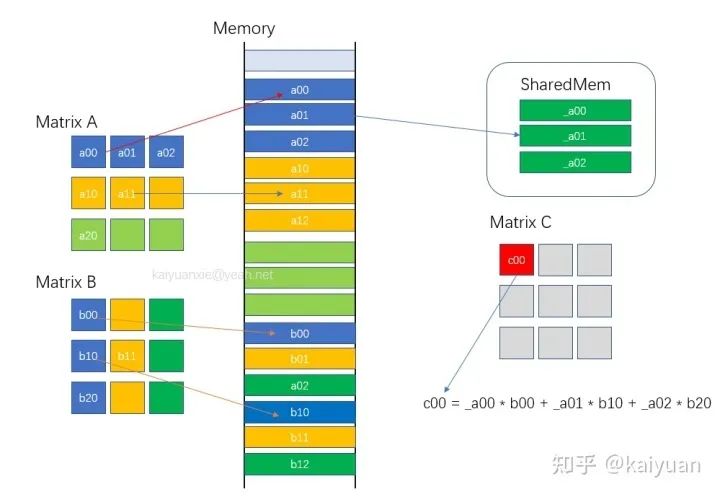
共享内存提速内存访问速度
所以每次运算,我们将A矩阵的i行放入到共享内存中,保证第i行数据不会反复从Global中加载,从而提升运算速度。函数代码片段如下:
template- 1
- 2
- 3
- 4
- 5
- 6
- 7
- 8
- 9
- 10
- 11
- 12
- 13
- 14
- 15
- 16
- 17
- 18
- 19
- 20
- 21
- 22
- 23
源码:MatMulKernel1DWithShMem
https://github.com/CalvinXKY/BasicCUDA/blob/master/matrix_multiply/matMul1DKernel.cu
需要注意的是,共享内存的大小是有限的,不同GPU的共享内存大小不一;其次,我们需要对共享内存里的值进行初始化,并且初始化后需要让block中的线程同步。关键内容如下:
// 使用while是用来保证thread的数量与矩阵A的宽度不相等时,数据多算或少算。 while (thIdx < wA) { sRow[thIdx] = A[blockID * wA + thIdx]; thIdx += blockDim.x; } __syncthreads(); // 需要让线程同步,不然后面的运算可能出错。- 1
- 2
- 3
- 4
- 5
- 6
采用了共享内存后,通过实测会发现,矩阵运算的时间不增反降。其实原因很简单,因为共享内存使用的成本高于其节约的时间。这样我们需要进一步优化,比如采用2D block 并配合共享内存。
3 二维块(2D Block) 优化运算
3.1 运算实现
2D block相比1D block,最大的差异是thread的编号idx由1维度变为了2维。在矩阵的乘法中,我们可以将矩阵拆成子矩阵,让每个block对应计算一个子矩阵。如下图所示,我们计算C=A x B,如果只获得C中某个子矩阵Cs(假设Cs的大小为M * M) , 只需要抽取A的M行数据,以及B的M列数据,进行运算。

Cs矩阵的具体运算可拆解为:Cs = As0 x Bs0 + As1 x Bs2 + … + Asm x Bsm. 如下图所示,我们用宽度为M的方块去分割数据。这样每个小矩阵的大小都是M * M。那么,为什么要进行分割运算,直接运算不是很简洁?实际上就是为了使用共享内存,减少数据的加载次数。上面运算中,例如As0 x Bs0运算由于As0与Bs0矩阵可以足够小,都能加载到共享内存中,每个数据可减少M - 1次全局内存读写。

一般而言M * M设置的大小与CUDA中2D Block的大小一致,这样能够简化运算:
优化的代码关键如下:
template- 1
- 2
- 3
- 4
- 5
- 6
- 7
- 8
- 9
- 10
- 11
- 12
- 13
- 14
- 15
- 16
- 17
- 18
- 19
- 20
源码:MatMulKernel2DBlockMultiplesSize
https://github.com/CalvinXKY/BasicCUDA/blob/master/matrix_multiply/matMul1DKernel.cu
3.2 运算支持动态尺寸
在上述2D运算中,我们忽略一个问题,就是运算矩阵的长宽有可能不能够被Block整除,如下所示:
示例1:矩阵宽度经过M整除后,最后一个行块的宽度小于M;
示例2:矩阵的高度经过M整除后,最后一个列块的高度小于M;

这样我们需要增加一些循环+条件判断来处理最后一个行块/最后一个列块的运算问题。
// .... if (flag * BLOCK_SIZE + ty < wA || flag * BLOCK_SIZE + tx < wC) { Bs[ty][tx] = B[b + wB * ty + tx]; } else { Bs[ty][tx] = 0.0; } //.... if (BLOCK_SIZE * bx + tx < wC && BLOCK_SIZE * by + ty < hC) { // thread could over max. C[wB * BLOCK_SIZE * by + BLOCK_SIZE * bx + wB * ty + tx] = Csub; }- 1
- 2
- 3
- 4
- 5
- 6
- 7
- 8
- 9
- 10
源码:MatMulKernel2DBlockMultiplesSize
https://github.com/CalvinXKY/BasicCUDA/blob/master/matrix_multiply/matMul1DKernel.cu
3.3 CUBLAS函数调用
常用的矩阵运算,在CUDA的库CUBLAS中有现成的API函数。一般而言,它的运算方法比普通的优化运算要快,比如本例中的矩阵乘,可以调用cublasSgemm来运算。cublasSgemm调用非常方便。如下形式:
// ... const float alpha = 1.0f; const float beta = 0.0f; cublasHandle_t handle; checkCudaErrors(cublasCreate(&handle)); checkCudaErrors(cublasSgemm( handle, CUBLAS_OP_N, CUBLAS_OP_N, dimsB.x, dimsA.y, dimsA.x, &alpha, d_B, dimsB.x, d_A, dimsA.x, &beta, d_C, dimsB.x)); // ... checkCudaErrors(cublasDestroy(handle));- 1
- 2
- 3
- 4
- 5
- 6
- 7
- 8
- 9
- 10
- 11
源码:matMulCublasKernel
https://github.com/CalvinXKY/BasicCUDA/blob/master/matrix_multiply/matMulCublasKernel.cu
但是不要过分迷信CUBLAS,毕竟它是个通用库,考虑的是通用性。对于一些特殊场景手写kernel有可能超过CUBLAS的运算。
4 代码的编译与运行
代码位置:
https://github.com/CalvinXKY/BasicCUDA/tree/master/matrix_multiply
默认编译:
$ cd$ make - 1
- 2
指定SM编译:比如A100机器,指定SMS=80
$ cd$ make SMS='80' - 1
- 2
运行直接执行matMul,例如A(312,1000) * B(1000,11),指定“MatMul_2D_KERNEL_ANY_SIZE”函数运行:
$ ./matMul wA=1000 hA=312 wB=11 hB=1000 algo=4- 1
algo是指定某个方法运算,如果不指定,即运行所有方法。可以用help查看:
$ ./matMul help Usage -device=n (n >= 0 for deviceID) -wA=WidthA -hA=HeightA (Width x Height of Matrix A) -wB=WidthB -hB=HeightB (Width x Height of Matrix B) -iter=n Iteration numbers of algorithm. Default:500 -algo=[0|1|2|3|4|5] 0: Test all, 1: MatMul_1D_KERENL, 2:MatMul_1D_KERNEL_WITH_SHARED_MEMORY, 3: MatMul_2D_KERENEL_BLOCK_MULTIPLES_SIZE, 4: MatMul_2D_KERNEL_ANY_SIZE 5: MatMul_CUBLAS_SGEMM_KERNEL Note: Outer matrix dimensions of A & B matrices must be equal.- 1
- 2
- 3
- 4
- 5
- 6
- 7
- 8
运行效果(Test on A100):
./matMul wA=1024 hA=256 wB=128 hB=1024NOTE: The CUDA Samples are not meant for performance measurements. Results may vary when GPU Boost is enabled. MatrixA(1024,256), MatrixB(128,1024) ========================= 1D blocks without shared memory ================= Computing result using MatrixMul1DTest Shared Mem: 0 Warmup operation done Performance= 883.88 GFlop/s, Time= 0.076 msec, Size= 67108864 Ops, WorkgroupSize= 1024 threads/block Checking computed result for correctness: Result = PASS ========================= 1D blocks with shared memory =================== Computing result using MatrixMul1DTest Shared Mem: 1 Warmup operation done Performance= 227.81 GFlop/s, Time= 0.295 msec, Size= 67108864 Ops, WorkgroupSize= 1024 threads/block Checking computed result for correctness: Result = PASS ========================= 2D blocks with block multiples size ============= Computing result using MatMul2DTest Kernel. Warmup operation done Performance= 1120.85 GFlop/s, Time= 0.060 msec, Size= 67108864 Ops, WorkgroupSize= 1024 threads/block Checking computed result for correctness: Result = PASS ========================= 2D blocks with any size ======================== Computing result using MatMul2DTest Kernel. Spport any size, e.g. wA=1000 hA=312 wB=11 hB=1000. Warmup operation done Performance= 1303.89 GFlop/s, Time= 0.051 msec, Size= 67108864 Ops, WorkgroupSize= 1024 threads/block Checking computed result for correctness: Result = PASS ========================= CUBLAS Sgemm kernel ======================== Computing result using CUBLAS Sgemmm Kernel. Warmup operation done Performance= 7189.46 GFlop/s, Time= 0.009 msec, Size= 67108864 Ops,Checking computed result for correctness: Result = PASS- 1
- 2
- 3
- 4
- 5
- 6
- 7
- 8
- 9
- 10
- 11
- 12
- 13
- 14
- 15
- 16
- 17
- 18
- 19
- 20
- 21
- 22
- 23
- 24
- 25
- 26
- 27
-
相关阅读:
图解==>渗透测试KAILI系统的基本操作(第九课)
ACL-IJCAI-SIGIR顶级会议论文报告会(AIS 2022)笔记2:分析与可解释性
【Fabric】libfabric
java计算机毕业设计航帆学院网站MyBatis+系统+LW文档+源码+调试部署
ADO连接Access的前期绑定方法实例(下)
【C++心愿便利店】No.5---构造函数和析构函数
Python内置函数--super()
C++重点归纳
使用docker搭建socks5代理
【优化模型】非线性规划问题
- 原文地址:https://blog.csdn.net/glaxy1/article/details/137261634
