-
c# wpf template ItemTemplate 简单试验
1.概要
ItemTemplate,定义列表类的控件形状
2.代码
2.1 控件
- <Window x:Class="WpfApp2.Window2"
- xmlns="http://schemas.microsoft.com/winfx/2006/xaml/presentation"
- xmlns:x="http://schemas.microsoft.com/winfx/2006/xaml"
- xmlns:d="http://schemas.microsoft.com/expression/blend/2008"
- xmlns:mc="http://schemas.openxmlformats.org/markup-compatibility/2006"
- xmlns:local="clr-namespace:WpfApp2"
- mc:Ignorable="d"
- Title="Window2" Name="win" Height="450" Width="800">
- <Window.Resources>
- <DataTemplate x:Key="MyDataTemplate">
- <StackPanel Orientation="Horizontal">
- <Border Background="Pink">
- <TextBlock Text="{Binding Title}"/>
- </Border>
- <Button Content="{Binding Author}" Cursor="Hand" Margin="10,0"/>
- </StackPanel>
- </DataTemplate>
- </Window.Resources>
- <Grid>
- <ListBox Name="nsmeList" Grid.Row="1" ItemsSource="{Binding BookList,ElementName=win}" ItemTemplate="{StaticResource MyDataTemplate}"/>
- </Grid>
- </Window>
2.2 代码
using System;
using System.Collections.Generic;
using System.ComponentModel;
using System.Linq;
using System.Text;
using System.Threading.Tasks;
using System.Windows;
using System.Windows.Controls;
using System.Windows.Data;
using System.Windows.Documents;
using System.Windows.Input;
using System.Windows.Media;
using System.Windows.Media.Imaging;
using System.Windows.Shapes;namespace WpfApp2
{
///
/// Window2.xaml 的交互逻辑
///
public partial class Window2 : Window
{
public ListBookList { get; set; } = new List ();
public Window2()
{
InitializeComponent();
initView();
}
public void initView()
{
BookList.Add(new Book() { Title = "三国演义", Author = "罗贯中", Time = DateTime.Now.AddYears(-200) });
BookList.Add(new Book() { Title = "红楼梦", Author = "曹雪芹", Time = DateTime.Now.AddYears(-150) });
BookList.Add(new Book() { Title = "西游记", Author = "吴承恩", Time = DateTime.Now.AddYears(-230) });
}
}
public class Book
{
public required string Title { get; set; }
public required string Author { get; set; }
public DateTime Time { get; set; }
}
}
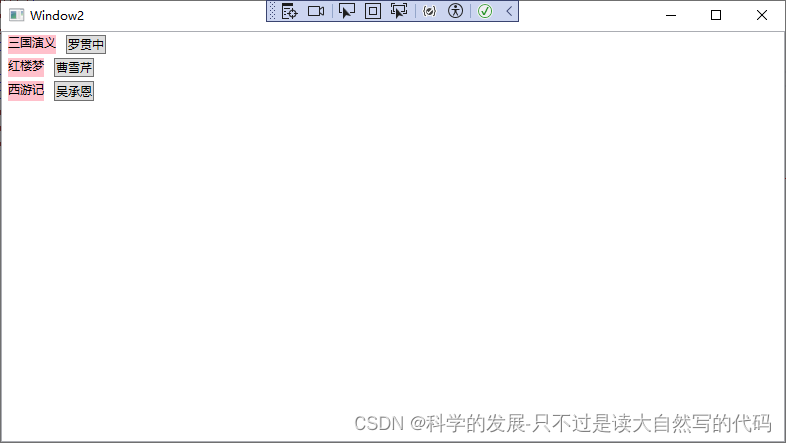
3.运行结果
-
相关阅读:
ArcGIS Pro创建、发布、调用GP服务全过程示例(等高线分析)
使用ElementPlus实现内嵌表格和内嵌分页
Map集合
Java 传统的生产者与消费问题以及虚假唤醒
从0基础开发搜索引擎(二)------实战项目
金蝶云星空企业版v8.0如何通过内网穿透实现异地公网远程访问
【校招VIP】前端HTML考察之meta标签相关
【MySql进阶】索引详解(一):索引数据页结构
uniapp实现IM即时通讯仿微信聊天功能
Unity实现帧序列
- 原文地址:https://blog.csdn.net/xie__jin__cheng/article/details/137407445
