-
海康威视H5无插件方式显示WSS协议的视频的笔记
由于要在麒麟桌面系统的浏览器也能显示视频,以前的插件方式就不行了。
一、从官网下载文档和demo
打开官网https://open.hikvision.com/download/5c67f1e2f05948198c909700?type=10
下载H5开发文件和demo
二、放入我的vue2的项目中
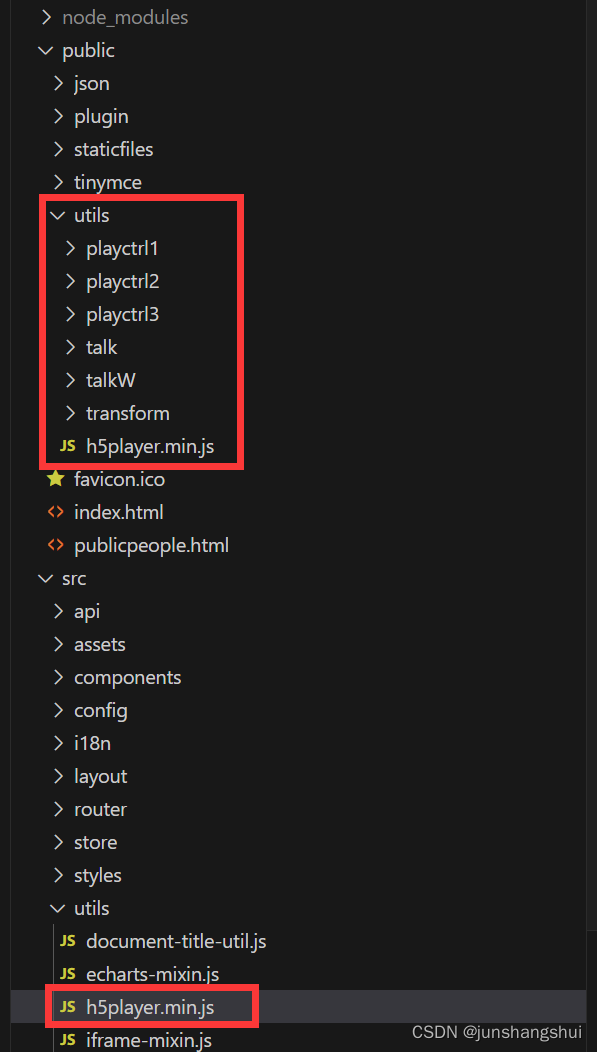
把demo中的相关文件复制到我的public的utils目录下,同时在src下的utils目录也放一份h5player.min.js
三、在index.html中引入

四、在显示视频的vue组件中引入
 并加入div
<div id="player" style="width: 100%; height: 700px;">div>- 1
五、这是我的部分代码片段
注意其中的szBasePath路径要写正确,为相对路径,对应src下的utils里的
//初始化播放器 initPlayer () { this.player = new window.JSPlugin({ // 需要英文字母开头 必填 szId: 'player', // 必填,引用H5player.min.js的js相对路径 szBasePath: '../../../utils', // 当容器div#play_window有固定宽高时,可不传iWidth和iHeight,窗口大小将自适应容器宽高 iWidth: 600, iHeight: 400, // 分屏播放,默认最大分屏4*4 iMaxSplit: 16, iCurrentSplit: 2, // 样式 oStyle: { border: '#343434', borderSelect: '#FFCC00', background: '#000' } }) },- 1
- 2
- 3
- 4
- 5
- 6
- 7
- 8
- 9
- 10
- 11
- 12
- 13
- 14
- 15
- 16
- 17
- 18
- 19
- 20
- 21
- 22
- 23
- 24
/** * 播放 */ play(index, cameraIndexCode) { const _this = this let params = { cameraIndexCode: cameraIndexCode, protocol: 'wss' } let preUrl = '' const loading = this.$loading({ lock: true }); videoApi.getPreviewURL(params).then(res => { if (!res) { this.$message.error('获取取流地址失败'); return; } preUrl = res; const param = { playURL: preUrl, // 1:高级模式 0:普通模式,高级模式支持所以 mode: 1//1 } // 索引默认0 if (!index) { index = 0 } _this.player.JS_Play(preUrl, param, index).then(() => { this.curVideoWindowIndex = index loading.close(); console.log('播放成功') }, (err) => { loading.close(); console.log('播放失败'+JSON.stringify(err)) }) }).catch((e) => { loading.close(); this.$message.error('未获取到相关信息。'+e.message); return ''; }); }, /* 回放 */ playback(index, cameraIndexCode, beginTime, endTime) { let playURL = ""; let beginStr = this.$moment(beginTime).format('YYYY-MM-DDTHH:mm:ss.SSS[Z]'); let endStr = this.$moment(endTime).format('YYYY-MM-DDTHH:mm:ss.SSS[Z]'); let params = { cameraIndexCode: cameraIndexCode, protocol: 'wss', beginTime: beginStr, endTime: endStr } const loading = this.$loading({ lock: true }); videoApi.getPlaybackData(params).then(res => { if(!res || !res.url){ this.$message.error('数据不存在'); return } playURL = res.url let mode = 1 let d1 = this.$moment(beginTime).format('YYYY-MM-DDTHH:mm:ss[Z]'); let d2 = this.$moment(endTime).format('YYYY-MM-DDTHH:mm:ss[Z]'); this.player.JS_Play(playURL, { playURL, mode }, index, d1, d2).then( () => { this.curVideoWindowIndex = index loading.close(); console.log('playbackStart success') }, e => { loading.close(); console.error(e) } ) }).catch((e) => { loading.close(); this.$message.error('未获取到相关信息。'+e.message); return ''; }); },- 1
- 2
- 3
- 4
- 5
- 6
- 7
- 8
- 9
- 10
- 11
- 12
- 13
- 14
- 15
- 16
- 17
- 18
- 19
- 20
- 21
- 22
- 23
- 24
- 25
- 26
- 27
- 28
- 29
- 30
- 31
- 32
- 33
- 34
- 35
- 36
- 37
- 38
- 39
- 40
- 41
- 42
- 43
- 44
- 45
- 46
- 47
- 48
- 49
- 50
- 51
- 52
- 53
- 54
- 55
- 56
- 57
- 58
- 59
- 60
- 61
- 62
- 63
- 64
- 65
- 66
- 67
- 68
- 69
- 70
- 71
- 72
- 73
- 74
- 75
- 76
- 77
- 78
- 79
- 80
六、后端部分JAVA代码
可先参考下载的JAVA代码
@Data public class HaiKangSearchDTO { public String cameraIndexCode; public String protocol; @JsonFormat(shape = JsonFormat.Shape.STRING, pattern = "yyyy-MM-dd'T'HH:mm:ss.SSS'Z'", timezone = "GMT+8") @ApiModelProperty("回放查询起始时间") public Date beginTime; @JsonFormat(shape = JsonFormat.Shape.STRING, pattern = "yyyy-MM-dd'T'HH:mm:ss.SSS'Z'", timezone = "GMT+8") @ApiModelProperty("回放查询结束时间") public Date endTime; }- 1
- 2
- 3
- 4
- 5
- 6
- 7
- 8
- 9
- 10
- 11
- 12
//请求回放视频的相关信息 ArtemisConfig config = new ArtemisConfig(); config.setHost(outerVideoConfig.getIp()+":"+outerVideoConfig.getPort()); // 代理API网关nginx服务器ip端口 config.setAppKey(outerVideoConfig.getAppkey()); config.setAppSecret(outerVideoConfig.getSecret()); final String getCamsApi = ARTEMIS_PATH + "/api/video/v2/cameras/playbackURLs"; Map<String, String> paramMap = new HashMap<String, String>(); paramMap.put("cameraIndexCode", dto.getCameraIndexCode()); paramMap.put("recordLocation", "1"); paramMap.put("transmode", "1"); paramMap.put("protocol", dto.getProtocol()); paramMap.put("beginTime", beginTimeString); paramMap.put("endTime", endTimeString); String body = JSON.toJSON(paramMap).toString(); Map<String, String> path = new HashMap<String, String>(2) { { put("https://", getCamsApi); } }; String resultStr = ArtemisHttpUtil.doPostStringArtemis(config, path, body, null, null, "application/json");- 1
- 2
- 3
- 4
- 5
- 6
- 7
- 8
- 9
- 10
- 11
- 12
- 13
- 14
- 15
- 16
- 17
- 18
- 19
- 20
七、其它
注意,因为我的系统是https的,所以请求的protocol为wss,如何海康的请求地址是https但却是IP地址,而不是域名形式,则不能显示视频。需要手动在麒麟系统的奇安信浏览器导入海康的证书。
-
相关阅读:
typescript86-react中类组件的类型
Detours框架实现原理探究
Java笔记八(instanceof,类型转换,static详解,抽象类,接口,内部类以及异常)
二叉搜索树的基本操作 || TreeMap和TreeSet介绍
Docker 及 Docker Compose 安装指南
参数估计的均方误差(MSE),偏置(Bias)与方差(Variance)分解,无偏估计
springboot项目报错can not register RM,err:can not connect to services-server.
反射的机制
YASKAWA安川机器人DX100轴板维修故障细节分享
Promise, async, await 学习
- 原文地址:https://blog.csdn.net/junshangshui/article/details/136683429
