-
【项目笔记】java微服务:黑马头条(day03)
自媒体文章发布
1)自媒体前后端搭建
1.1)后台搭建

①:资料中找到heima-leadnews-wemedia.zip解压
拷贝到heima-leadnews-service工程下,并指定子模块
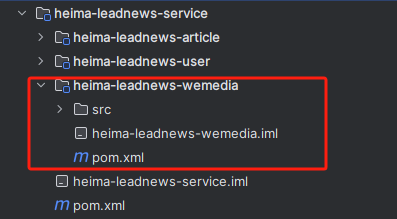
在heima-leadnews-service工程的pom文件中添加heima-leadnews-wemedia模块
创建leadnews_wemedia数据集,然后执行leadnews-wemedia.sql脚本:

添加对应的nacos配置

spring: datasource: driver-class-name: com.mysql.jdbc.Driver url: jdbc:mysql://localhost:3306/leadnews_wemedia?useUnicode=true&characterEncoding=UTF-8&serverTimezone=UTC username: root password: root # 设置Mapper接口所对应的XML文件位置,如果你在Mapper接口中有自定义方法,需要进行该配置 mybatis-plus: mapper-locations: classpath*:mapper/*.xml # 设置别名包扫描路径,通过该属性可以给包中的类注册别名 type-aliases-package: com.heima.model.media.pojos- 1
- 2
- 3
- 4
- 5
- 6
- 7
- 8
- 9
- 10
- 11
②:资料中找到heima-leadnews-wemedia-gateway.zip解压
拷贝到heima-leadnews-gateway工程下,并指定子模块

在heima-leadnews-gateway工程的pom文件中添加heima-leadnews-wemedia-gateway模块

添加对应的nacos配置

spring: cloud: gateway: globalcors: cors-configurations: '[/**]': # 匹配所有请求 allowedOrigins: "*" #跨域处理 允许所有的域 allowedMethods: # 支持的方法 - GET - POST - PUT - DELETE routes: # 平台管理 - id: wemedia uri: lb://leadnews-wemedia predicates: - Path=/wemedia/** filters: - StripPrefix= 1- 1
- 2
- 3
- 4
- 5
- 6
- 7
- 8
- 9
- 10
- 11
- 12
- 13
- 14
- 15
- 16
- 17
- 18
- 19
- 20
③:在资料中找到类文件夹
拷贝wemedia文件夹到heima-leadnews-model模块下的com.heima.model

启动WemediaApplication和WemediaGatewayAplication,可以成功运行了


1.2)前台搭建

通过nginx的虚拟主机功能,使用同一个nginx访问多个项目
搭建步骤:
①:资料中找到wemedia-web.zip解压

②:在nginx中leadnews.conf目录中新增heima-leadnews-wemedia.conf文件

-
网关地址修改(localhost:51602)
-
前端项目目录修改(wemedia-web解压的目录)
-
访问端口修改(8802)
upstream heima-wemedia-gateway{ server localhost:51602; } server { listen 8802; location / { root D:/java_doc/02-projects/wemedia-web/; index index.html; } location ~/wemedia/MEDIA/(.*) { proxy_pass http://heima-wemedia-gateway/$1; proxy_set_header HOST $host; # 不改变源请求头的值 proxy_pass_request_body on; #开启获取请求体 proxy_pass_request_headers on; #开启获取请求头 proxy_set_header X-Real-IP $remote_addr; # 记录真实发出请求的客户端IP proxy_set_header X-Forwarded-For $proxy_add_x_forwarded_for; #记录代理信息 } }- 1
- 2
- 3
- 4
- 5
- 6
- 7
- 8
- 9
- 10
- 11
- 12
- 13
- 14
- 15
- 16
- 17
- 18
- 19
- 20
③:启动nginx,启动自媒体微服务和对应网关(WemediaApplication和WemediaGatewayAplication)

④:联调测试登录功能 http://localhost:8802

2)自媒体素材管理
2.1)素材上传
2.2.1)需求分析

图片上传的页面,首先是展示素材信息,可以点击图片上传,弹窗后可以上传图片
2.2.2)素材管理-图片上传-表结构
媒体图文素材信息表wm_material

对应实体类:
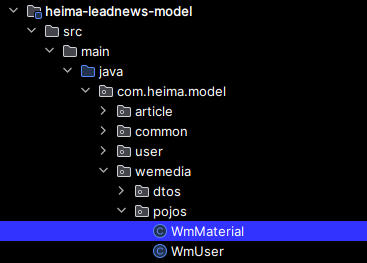
package com.heima.model.wemedia.pojos; import com.baomidou.mybatisplus.annotation.IdType; import com.baomidou.mybatisplus.annotation.TableField; import com.baomidou.mybatisplus.annotation.TableId; import com.baomidou.mybatisplus.annotation.TableName; import lombok.Data; import java.io.Serializable; import java.util.Date; /** ** 自媒体图文素材信息表 *
* * @author itheima */ @Data @TableName("wm_material") public class WmMaterial implements Serializable { private static final long serialVersionUID = 1L; /** * 主键 */ @TableId(value = "id", type = IdType.AUTO) private Integer id; /** * 自媒体用户ID */ @TableField("user_id") private Integer userId; /** * 图片地址 */ @TableField("url") private String url; /** * 素材类型 0 图片 1 视频 */ @TableField("type") private Short type; /** * 是否收藏 */ @TableField("is_collection") private Short isCollection; /** * 创建时间 */ @TableField("created_time") private Date createdTime; }- 1
- 2
- 3
- 4
- 5
- 6
- 7
- 8
- 9
- 10
- 11
- 12
- 13
- 14
- 15
- 16
- 17
- 18
- 19
- 20
- 21
- 22
- 23
- 24
- 25
- 26
- 27
- 28
- 29
- 30
- 31
- 32
- 33
- 34
- 35
- 36
- 37
- 38
- 39
- 40
- 41
- 42
- 43
- 44
- 45
- 46
- 47
- 48
- 49
- 50
- 51
- 52
- 53
- 54
- 55
- 56
- 57
- 58
- 59
- 60
- 61
- 62
- 63

2.2.3)实现思路

①:前端发送上传图片请求,类型为MultipartFile
②:网关进行token解析后,把解析后的用户信息存储到header中

//获得token解析后中的用户信息 Object userId = claimsBody.get("id"); //在header中添加新的信息 ServerHttpRequest serverHttpRequest = request.mutate().headers(httpHeaders -> { httpHeaders.add("userId", userId + ""); }).build(); //重置header exchange.mutate().request(serverHttpRequest).build();- 1
- 2
- 3
- 4
- 5
- 6
- 7
- 8
完整代码如下:
package com.heima.wemedia.gateway.filter; import com.heima.wemedia.gateway.util.AppJwtUtil; import io.jsonwebtoken.Claims; import lombok.extern.slf4j.Slf4j; import org.apache.commons.lang.StringUtils; import org.springframework.cloud.gateway.filter.GatewayFilterChain; import org.springframework.cloud.gateway.filter.GlobalFilter; import org.springframework.core.Ordered; import org.springframework.http.HttpStatus; import org.springframework.http.server.reactive.ServerHttpRequest; import org.springframework.http.server.reactive.ServerHttpResponse; import org.springframework.stereotype.Component; import org.springframework.web.server.ServerWebExchange; import reactor.core.publisher.Mono; @Component @Slf4j public class AuthorizeFilter implements Ordered, GlobalFilter { @Override public Mono<Void> filter(ServerWebExchange exchange, GatewayFilterChain chain) { //1.获取request和response对象 ServerHttpRequest request = exchange.getRequest(); ServerHttpResponse response = exchange.getResponse(); //2.判断是否是登录 if(request.getURI().getPath().contains("/login")){ //放行 return chain.filter(exchange); } //3.获取token String token = request.getHeaders().getFirst("token"); //4.判断token是否存在 if(StringUtils.isBlank(token)){ response.setStatusCode(HttpStatus.UNAUTHORIZED); return response.setComplete(); } //5.判断token是否有效 try { Claims claimsBody = AppJwtUtil.getClaimsBody(token); //是否是过期 int result = AppJwtUtil.verifyToken(claimsBody); if(result == 1 || result == 2){ response.setStatusCode(HttpStatus.UNAUTHORIZED); return response.setComplete(); } //获得token解析后中的用户信息 Object userId = claimsBody.get("id"); //在header中添加新的信息 ServerHttpRequest serverHttpRequest = request.mutate().headers(httpHeaders -> { httpHeaders.add("userId", userId + ""); }).build(); //重置header exchange.mutate().request(serverHttpRequest).build(); } catch (Exception e) { e.printStackTrace(); } //6.放行 return chain.filter(exchange); } /** * 优先级设置 值越小 优先级越高 * @return */ @Override public int getOrder() { return 0; } }- 1
- 2
- 3
- 4
- 5
- 6
- 7
- 8
- 9
- 10
- 11
- 12
- 13
- 14
- 15
- 16
- 17
- 18
- 19
- 20
- 21
- 22
- 23
- 24
- 25
- 26
- 27
- 28
- 29
- 30
- 31
- 32
- 33
- 34
- 35
- 36
- 37
- 38
- 39
- 40
- 41
- 42
- 43
- 44
- 45
- 46
- 47
- 48
- 49
- 50
- 51
- 52
- 53
- 54
- 55
- 56
- 57
- 58
- 59
- 60
- 61
- 62
- 63
- 64
- 65
- 66
- 67
- 68
- 69
- 70
- 71
- 72
- 73
- 74
- 75
- 76
- 77
- 78
③:自媒体微服务使用拦截器获取到header中的的用户信息,并放入到threadlocal中
在heima-leadnews-utils中新增工具类
注意:需要从资料中找出WmUser实体类拷贝到model工程下

package com.heima.utils.thread; import com.heima.model.wemedia.pojos.WmUser; public class WmThreadLocalUtils { private final static ThreadLocal<WmUser> WM_USER_THREAD_LOCAL = new ThreadLocal<>(); /** * 添加用户(存入线程) * @param wmUser */ public static void setUser(WmUser wmUser){ WM_USER_THREAD_LOCAL.set(wmUser); } /** * 获取用户(从线程中获取) */ public static WmUser getUser(){ return WM_USER_THREAD_LOCAL.get(); } /** * 清理用户 */ public static void clear(){ WM_USER_THREAD_LOCAL.remove(); } }- 1
- 2
- 3
- 4
- 5
- 6
- 7
- 8
- 9
- 10
- 11
- 12
- 13
- 14
- 15
- 16
- 17
- 18
- 19
- 20
- 21
- 22
- 23
- 24
- 25
- 26
- 27
- 28
- 29
- 30
在heima-leadnews-wemedia中新增拦截器

package com.heima.wemedia.interceptor; import com.heima.model.wemedia.pojos.WmUser; import com.heima.utils.thread.WmThreadLocalUtils; import lombok.extern.slf4j.Slf4j; import org.springframework.web.servlet.HandlerInterceptor; import org.springframework.web.servlet.ModelAndView; import javax.servlet.http.HttpServletRequest; import javax.servlet.http.HttpServletResponse; import java.util.Optional; @Slf4j public class WmTokenInterceptor implements HandlerInterceptor { /** * 得到header中的用户信息,并且存入到当前线程中 * @param request * @param response * @param handler * @return * @throws Exception */ @Override public boolean preHandle(HttpServletRequest request, HttpServletResponse response, Object handler) throws Exception { //得到header中的信息 String userId = request.getHeader("userId"); Optional<String> optional = Optional.ofNullable(userId); if(optional.isPresent()){ //把用户id存入threadloacl中 WmUser wmUser = new WmUser(); wmUser.setId(Integer.valueOf(userId)); WmThreadLocalUtils.setUser(wmUser); log.info("wmTokenFilter设置用户信息到threadlocal中..."); } return true; } /** * 清理线程中的数据 * @param request * @param response * @param handler * @param modelAndView * @throws Exception */ @Override public void postHandle(HttpServletRequest request, HttpServletResponse response, Object handler, ModelAndView modelAndView) throws Exception { log.info("清理threadlocal..."); WmThreadLocalUtils.clear(); } }- 1
- 2
- 3
- 4
- 5
- 6
- 7
- 8
- 9
- 10
- 11
- 12
- 13
- 14
- 15
- 16
- 17
- 18
- 19
- 20
- 21
- 22
- 23
- 24
- 25
- 26
- 27
- 28
- 29
- 30
- 31
- 32
- 33
- 34
- 35
- 36
- 37
- 38
- 39
- 40
- 41
- 42
- 43
- 44
- 45
- 46
- 47
- 48
- 49
- 50
- 51
- 52
配置使拦截器生效,拦截所有的请求

package com.heima.wemedia.config; import com.heima.wemedia.interceptor.WmTokenInterceptor; import org.springframework.context.annotation.Configuration; import org.springframework.web.servlet.config.annotation.InterceptorRegistry; import org.springframework.web.servlet.config.annotation.WebMvcConfigurer; @Configuration public class WebMvcConfig implements WebMvcConfigurer { @Override public void addInterceptors(InterceptorRegistry registry) { registry.addInterceptor(new WmTokenInterceptor()).addPathPatterns("/**"); } }- 1
- 2
- 3
- 4
- 5
- 6
- 7
- 8
- 9
- 10
- 11
- 12
- 13
- 14
- 15
④:先把图片上传到minIO中,获取到图片请求的路径——(2.2.5查看具体功能实现)
⑤:把用户id和图片上的路径保存到素材表中——(2.2.5查看具体功能实现)
2.2.4)接口定义
说明 接口路径 /api/v1/material/upload_picture 请求方式 POST 参数 MultipartFile 响应结果 ResponseResult MultipartFile :Springmvc指定的文件接收类型
ResponseResult :
成功需要回显图片,返回素材对象
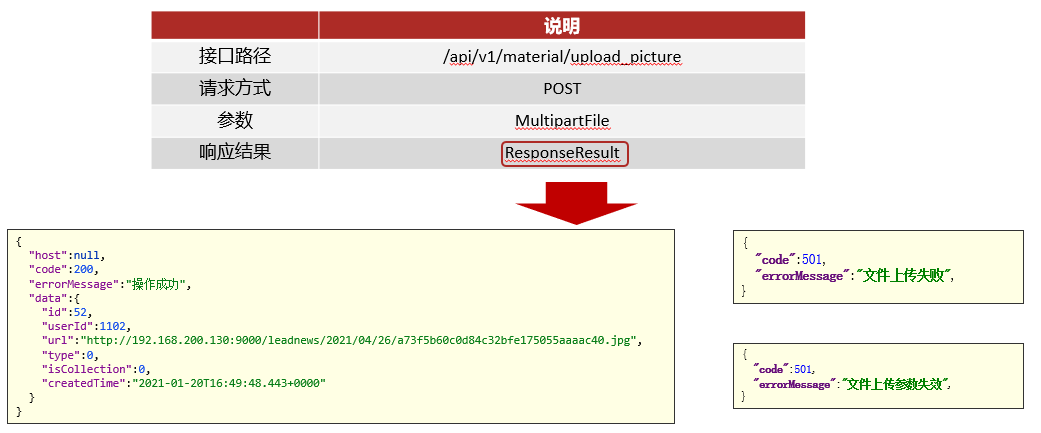
{ "host":null, "code":200, "errorMessage":"操作成功", "data":{ "id":52, "userId":1102, "url":"http://192.168.200.130:9000/leadnews/2021/04/26/a73f5b60c0d84c32bfe175055aaaac40.jpg", "type":0, "isCollection":0, "createdTime":"2021-01-20T16:49:48.443+0000" } }- 1
- 2
- 3
- 4
- 5
- 6
- 7
- 8
- 9
- 10
- 11
- 12
- 13
失败:
- 参数失效
- 文章上传失败
2.2.5)自媒体微服务集成heima-file-starter
①:导入heima-file-starter
<dependencies> <dependency> <groupId>com.heimagroupId> <artifactId>heima-file-starterartifactId> <version>1.0-SNAPSHOTversion> dependency> dependencies>- 1
- 2
- 3
- 4
- 5
- 6
- 7
②:在自媒体微服务的配置中心nacos添加以下配置:

minio: accessKey: minio secretKey: minio123 bucket: leadnews endpoint: http://192.168.200.130:9000 readPath: http://192.168.200.130:9000- 1
- 2
- 3
- 4
- 5
- 6
2.2.6)具体实现
①:创建WmMaterialController

package com.heima.wemedia.controller.v1; import com.heima.model.common.dtos.ResponseResult; import org.springframework.web.bind.annotation.PostMapping; import org.springframework.web.bind.annotation.RequestMapping; import org.springframework.web.bind.annotation.RestController; import org.springframework.web.multipart.MultipartFile; @RestController @RequestMapping("/api/v1/material") public class WmMaterialController { @PostMapping("/upload_picture") public ResponseResult uploadPicture(MultipartFile multipartFile){ return null; } }- 1
- 2
- 3
- 4
- 5
- 6
- 7
- 8
- 9
- 10
- 11
- 12
- 13
- 14
- 15
- 16
- 17
- 18
- 19
②:mapper

package com.heima.wemedia.mapper; import com.baomidou.mybatisplus.core.mapper.BaseMapper; import com.heima.model.wemedia.pojos.WmMaterial; import org.apache.ibatis.annotations.Mapper; @Mapper public interface WmMaterialMapper extends BaseMapper<WmMaterial> { }- 1
- 2
- 3
- 4
- 5
- 6
- 7
- 8
- 9
③:业务层:

package com.heima.wemedia.service; import com.baomidou.mybatisplus.extension.service.IService; import com.heima.model.common.dtos.ResponseResult; import com.heima.model.wemedia.pojos.WmMaterial; import org.springframework.web.multipart.MultipartFile; public interface WmMaterialService extends IService<WmMaterial> { /** * 图片上传 * @param multipartFile * @return */ public ResponseResult uploadPicture(MultipartFile multipartFile); }- 1
- 2
- 3
- 4
- 5
- 6
- 7
- 8
- 9
- 10
- 11
- 12
- 13
- 14
- 15
- 16
- 17
- 18
- 19
业务层实现类:

package com.heima.wemedia.service.impl; import com.baomidou.mybatisplus.extension.service.impl.ServiceImpl; import com.heima.file.service.FileStorageService; import com.heima.model.common.dtos.ResponseResult; import com.heima.model.common.enums.AppHttpCodeEnum; import com.heima.model.wemedia.pojos.WmMaterial; import com.heima.utils.thread.WmThreadLocalUtils; import com.heima.wemedia.mapper.WmMaterialMapper; import com.heima.wemedia.service.WmMaterialService; import lombok.extern.slf4j.Slf4j; import org.springframework.beans.factory.annotation.Autowired; import org.springframework.stereotype.Service; import org.springframework.transaction.annotation.Transactional; import org.springframework.web.multipart.MultipartFile; import java.io.IOException; import java.util.Date; import java.util.UUID; @Slf4j @Service @Transactional public class WmMaterialServiceImpl extends ServiceImpl<WmMaterialMapper, WmMaterial> implements WmMaterialService { @Autowired private FileStorageService fileStorageService; /** * 图片上传 * @param multipartFile * @return */ @Override public ResponseResult uploadPicture(MultipartFile multipartFile) { //1.检查参数 if(multipartFile == null || multipartFile.getSize() == 0){ return ResponseResult.errorResult(AppHttpCodeEnum.PARAM_INVALID); } //2.上传图片到minIO中 String fileName = UUID.randomUUID().toString().replace("-", ""); //aa.jpg String originalFilename = multipartFile.getOriginalFilename(); String postfix = originalFilename.substring(originalFilename.lastIndexOf(".")); String fileId = null; try { fileId = fileStorageService.uploadImgFile("", fileName + postfix, multipartFile.getInputStream()); log.info("上传图片到MinIO中,fileId:{}",fileId); } catch (IOException e) { e.printStackTrace(); log.error("WmMaterialServiceImpl-上传文件失败"); } //3.保存到数据库中 WmMaterial wmMaterial = new WmMaterial(); wmMaterial.setUserId(WmThreadLocalUtils.getUser().getId()); wmMaterial.setUrl(fileId); wmMaterial.setIsCollection((short)0); wmMaterial.setType((short)0); wmMaterial.setCreatedTime(new Date()); save(wmMaterial); //4.返回结果 return ResponseResult.okResult(wmMaterial); } }- 1
- 2
- 3
- 4
- 5
- 6
- 7
- 8
- 9
- 10
- 11
- 12
- 13
- 14
- 15
- 16
- 17
- 18
- 19
- 20
- 21
- 22
- 23
- 24
- 25
- 26
- 27
- 28
- 29
- 30
- 31
- 32
- 33
- 34
- 35
- 36
- 37
- 38
- 39
- 40
- 41
- 42
- 43
- 44
- 45
- 46
- 47
- 48
- 49
- 50
- 51
- 52
- 53
- 54
- 55
- 56
- 57
- 58
- 59
- 60
- 61
- 62
- 63
- 64
- 65
- 66
- 67
- 68
- 69
- 70
- 71
- 72
④:控制器

package com.heima.wemedia.controller.v1; import com.heima.model.common.dtos.ResponseResult; import com.heima.wemedia.service.WmMaterialService; import org.springframework.beans.factory.annotation.Autowired; import org.springframework.web.bind.annotation.PostMapping; import org.springframework.web.bind.annotation.RequestMapping; import org.springframework.web.bind.annotation.RestController; import org.springframework.web.multipart.MultipartFile; @RestController @RequestMapping("/api/v1/material") public class WmMaterialController { @Autowired private WmMaterialService wmMaterialService; @PostMapping("/upload_picture") public ResponseResult uploadPicture(MultipartFile multipartFile){ return wmMaterialService.uploadPicture(multipartFile); } }- 1
- 2
- 3
- 4
- 5
- 6
- 7
- 8
- 9
- 10
- 11
- 12
- 13
- 14
- 15
- 16
- 17
- 18
- 19
- 20
- 21
- 22
- 23
- 24
⑤:测试http://localhost:8802/#/login
启动自媒体网关WemediaGatewayAplication和自媒体微服务WemediaApplication,使用前端项目进行测试


回到数据库中,刷新列表

2.2)素材列表查询
2.2.1)接口定义
说明 接口路径 /api/v1/material/list 请求方式 POST 参数 WmMaterialDto 响应结果 ResponseResult WmMaterialDto :

@Data package com.heima.model.wemedia.dtos; import com.heima.model.common.dtos.PageRequestDto; import lombok.Data; @Data public class WmMaterialDto extends PageRequestDto { /** * 1 收藏 * 0 未收藏 */ private Short isCollection; }- 1
- 2
- 3
- 4
- 5
- 6
- 7
- 8
- 9
- 10
- 11
- 12
- 13
- 14
- 15
ResponseResult (和代码无关):
{ "host":null, "code":200, "errorMessage":"操作成功", "data":[ { "id":52, "userId":1102, "url":"http://192.168.200.130:9000/leadnews/2021/04/26/ec893175f18c4261af14df14b83cb25f.jpg", "type":0, "isCollection":0, "createdTime":"2021-01-20T16:49:48.000+0000" }, .... ], "currentPage":1, "size":20, "total":0 }- 1
- 2
- 3
- 4
- 5
- 6
- 7
- 8
- 9
- 10
- 11
- 12
- 13
- 14
- 15
- 16
- 17
- 18
- 19
2.2.2)功能实现
①:在WmMaterialController类中新增方法

@PostMapping("/list") public ResponseResult findList(@RequestBody WmMaterialDto dto){ return null; }- 1
- 2
- 3
- 4
完整代码如下:
package com.heima.wemedia.controller.v1; import com.heima.model.common.dtos.ResponseResult; import com.heima.model.wemedia.dtos.WmMaterialDto; import com.heima.wemedia.service.WmMaterialService; import org.springframework.beans.factory.annotation.Autowired; import org.springframework.web.bind.annotation.PostMapping; import org.springframework.web.bind.annotation.RequestBody; import org.springframework.web.bind.annotation.RequestMapping; import org.springframework.web.bind.annotation.RestController; import org.springframework.web.multipart.MultipartFile; @RestController @RequestMapping("/api/v1/material") public class WmMaterialController { @Autowired private WmMaterialService wmMaterialService; @PostMapping("/upload_picture") public ResponseResult uploadPicture(MultipartFile multipartFile){ return wmMaterialService.uploadPicture(multipartFile); } @PostMapping("/list") public ResponseResult findList(@RequestBody WmMaterialDto dto){ return null; } }- 1
- 2
- 3
- 4
- 5
- 6
- 7
- 8
- 9
- 10
- 11
- 12
- 13
- 14
- 15
- 16
- 17
- 18
- 19
- 20
- 21
- 22
- 23
- 24
- 25
- 26
- 27
- 28
- 29
- 30
- 31
②:mapper已定义
③:业务层
在WmMaterialService中新增方法

/** * 素材列表查询 * @param dto * @return */ public ResponseResult findList( WmMaterialDto dto);- 1
- 2
- 3
- 4
- 5
- 6
完整代码如下:
package com.heima.wemedia.service; import com.baomidou.mybatisplus.extension.service.IService; import com.heima.model.common.dtos.ResponseResult; import com.heima.model.wemedia.dtos.WmMaterialDto; import com.heima.model.wemedia.pojos.WmMaterial; import org.springframework.web.multipart.MultipartFile; public interface WmMaterialService extends IService<WmMaterial> { /** * 图片上传 * @param multipartFile * @return */ public ResponseResult uploadPicture(MultipartFile multipartFile); /** * 素材列表查询 * @param dto * @return */ public ResponseResult findList( WmMaterialDto dto); }- 1
- 2
- 3
- 4
- 5
- 6
- 7
- 8
- 9
- 10
- 11
- 12
- 13
- 14
- 15
- 16
- 17
- 18
- 19
- 20
- 21
- 22
- 23
- 24
- 25
实现方法:

/** * 素材列表查询 * @param dto * @return */ @Override public ResponseResult findList(WmMaterialDto dto) { //1.检查参数 dto.checkParam(); //2.分页查询 IPage page = new Page(dto.getPage(),dto.getSize()); LambdaQueryWrapper<WmMaterial> lambdaQueryWrapper = new LambdaQueryWrapper<>(); //是否收藏 if(dto.getIsCollection() != null && dto.getIsCollection() == 1){ lambdaQueryWrapper.eq(WmMaterial::getIsCollection,dto.getIsCollection()); } //按照用户查询 lambdaQueryWrapper.eq(WmMaterial::getUserId,WmThreadLocalUtils.getUser().getId()); //按照时间倒序 lambdaQueryWrapper.orderByDesc(WmMaterial::getCreatedTime); page = page(page,lambdaQueryWrapper); //3.结果返回 ResponseResult responseResult = new PageResponseResult(dto.getPage(),dto.getSize(),(int)page.getTotal()); responseResult.setData(page.getRecords()); return responseResult; }- 1
- 2
- 3
- 4
- 5
- 6
- 7
- 8
- 9
- 10
- 11
- 12
- 13
- 14
- 15
- 16
- 17
- 18
- 19
- 20
- 21
- 22
- 23
- 24
- 25
- 26
- 27
- 28
- 29
- 30
- 31
- 32
- 33
完整代码如下:
package com.heima.wemedia.service.impl; import com.baomidou.mybatisplus.core.conditions.query.LambdaQueryWrapper; import com.baomidou.mybatisplus.core.metadata.IPage; import com.baomidou.mybatisplus.extension.plugins.pagination.Page; import com.baomidou.mybatisplus.extension.service.impl.ServiceImpl; import com.heima.file.service.FileStorageService; import com.heima.model.common.dtos.PageResponseResult; import com.heima.model.common.dtos.ResponseResult; import com.heima.model.common.enums.AppHttpCodeEnum; import com.heima.model.wemedia.dtos.WmMaterialDto; import com.heima.model.wemedia.pojos.WmMaterial; import com.heima.utils.thread.WmThreadLocalUtils; import com.heima.wemedia.mapper.WmMaterialMapper; import com.heima.wemedia.service.WmMaterialService; import lombok.extern.slf4j.Slf4j; import org.springframework.beans.factory.annotation.Autowired; import org.springframework.stereotype.Service; import org.springframework.transaction.annotation.Transactional; import org.springframework.web.multipart.MultipartFile; import java.io.IOException; import java.util.Date; import java.util.UUID; @Slf4j @Service @Transactional public class WmMaterialServiceImpl extends ServiceImpl<WmMaterialMapper, WmMaterial> implements WmMaterialService { @Autowired private FileStorageService fileStorageService; /** * 图片上传 * @param multipartFile * @return */ @Override public ResponseResult uploadPicture(MultipartFile multipartFile) { //1.检查参数 if(multipartFile == null || multipartFile.getSize() == 0){ return ResponseResult.errorResult(AppHttpCodeEnum.PARAM_INVALID); } //2.上传图片到minIO中 String fileName = UUID.randomUUID().toString().replace("-", ""); //aa.jpg String originalFilename = multipartFile.getOriginalFilename(); String postfix = originalFilename.substring(originalFilename.lastIndexOf(".")); String fileId = null; try { fileId = fileStorageService.uploadImgFile("", fileName + postfix, multipartFile.getInputStream()); log.info("上传图片到MinIO中,fileId:{}",fileId); } catch (IOException e) { e.printStackTrace(); log.error("WmMaterialServiceImpl-上传文件失败"); } //3.保存到数据库中 WmMaterial wmMaterial = new WmMaterial(); wmMaterial.setUserId(WmThreadLocalUtils.getUser().getId()); wmMaterial.setUrl(fileId); wmMaterial.setIsCollection((short)0); wmMaterial.setType((short)0); wmMaterial.setCreatedTime(new Date()); save(wmMaterial); //4.返回结果 return ResponseResult.okResult(wmMaterial); } /** * 素材列表查询 * @param dto * @return */ @Override public ResponseResult findList(WmMaterialDto dto) { //1.检查参数 dto.checkParam(); //2.分页查询 IPage page = new Page(dto.getPage(),dto.getSize()); LambdaQueryWrapper<WmMaterial> lambdaQueryWrapper = new LambdaQueryWrapper<>(); //是否收藏 if(dto.getIsCollection() != null && dto.getIsCollection() == 1){ lambdaQueryWrapper.eq(WmMaterial::getIsCollection,dto.getIsCollection()); } //按照用户查询 lambdaQueryWrapper.eq(WmMaterial::getUserId,WmThreadLocalUtils.getUser().getId()); //按照时间倒序 lambdaQueryWrapper.orderByDesc(WmMaterial::getCreatedTime); page = page(page,lambdaQueryWrapper); //3.结果返回 ResponseResult responseResult = new PageResponseResult(dto.getPage(),dto.getSize(),(int)page.getTotal()); responseResult.setData(page.getRecords()); return responseResult; } }- 1
- 2
- 3
- 4
- 5
- 6
- 7
- 8
- 9
- 10
- 11
- 12
- 13
- 14
- 15
- 16
- 17
- 18
- 19
- 20
- 21
- 22
- 23
- 24
- 25
- 26
- 27
- 28
- 29
- 30
- 31
- 32
- 33
- 34
- 35
- 36
- 37
- 38
- 39
- 40
- 41
- 42
- 43
- 44
- 45
- 46
- 47
- 48
- 49
- 50
- 51
- 52
- 53
- 54
- 55
- 56
- 57
- 58
- 59
- 60
- 61
- 62
- 63
- 64
- 65
- 66
- 67
- 68
- 69
- 70
- 71
- 72
- 73
- 74
- 75
- 76
- 77
- 78
- 79
- 80
- 81
- 82
- 83
- 84
- 85
- 86
- 87
- 88
- 89
- 90
- 91
- 92
- 93
- 94
- 95
- 96
- 97
- 98
- 99
- 100
- 101
- 102
- 103
- 104
- 105
- 106
- 107
- 108
- 109
④:控制器:

@PostMapping("/list") public ResponseResult findList(@RequestBody WmMaterialDto dto){ return wmMaterialService.findList(dto); }- 1
- 2
- 3
- 4
完整代码如下:
package com.heima.wemedia.controller.v1; import com.heima.model.common.dtos.ResponseResult; import com.heima.model.wemedia.dtos.WmMaterialDto; import com.heima.wemedia.service.WmMaterialService; import org.springframework.beans.factory.annotation.Autowired; import org.springframework.web.bind.annotation.PostMapping; import org.springframework.web.bind.annotation.RequestBody; import org.springframework.web.bind.annotation.RequestMapping; import org.springframework.web.bind.annotation.RestController; import org.springframework.web.multipart.MultipartFile; @RestController @RequestMapping("/api/v1/material") public class WmMaterialController { @Autowired private WmMaterialService wmMaterialService; @PostMapping("/upload_picture") public ResponseResult uploadPicture(MultipartFile multipartFile){ return wmMaterialService.uploadPicture(multipartFile); } @PostMapping("/list") public ResponseResult findList(@RequestBody WmMaterialDto dto){ return wmMaterialService.findList(dto); } }- 1
- 2
- 3
- 4
- 5
- 6
- 7
- 8
- 9
- 10
- 11
- 12
- 13
- 14
- 15
- 16
- 17
- 18
- 19
- 20
- 21
- 22
- 23
- 24
- 25
- 26
- 27
- 28
- 29
- 30
- 31
⑤:在自媒体引导类中添加mybatis-plus的分页拦截器
@Bean public MybatisPlusInterceptor mybatisPlusInterceptor() { MybatisPlusInterceptor interceptor = new MybatisPlusInterceptor(); interceptor.addInnerInterceptor(new PaginationInnerInterceptor(DbType.MYSQL)); return interceptor; }- 1
- 2
- 3
- 4
- 5
- 6
完整代码如下:
package com.heima.wemedia; import com.baomidou.mybatisplus.annotation.DbType; import com.baomidou.mybatisplus.extension.plugins.MybatisPlusInterceptor; import com.baomidou.mybatisplus.extension.plugins.inner.PaginationInnerInterceptor; import org.mybatis.spring.annotation.MapperScan; import org.springframework.boot.SpringApplication; import org.springframework.boot.autoconfigure.SpringBootApplication; import org.springframework.cloud.client.discovery.EnableDiscoveryClient; import org.springframework.context.annotation.Bean; @SpringBootApplication @EnableDiscoveryClient @MapperScan("com.heima.wemedia.mapper") public class WemediaApplication { public static void main(String[] args) { SpringApplication.run(WemediaApplication.class,args); } @Bean public MybatisPlusInterceptor mybatisPlusInterceptor() { MybatisPlusInterceptor interceptor = new MybatisPlusInterceptor(); interceptor.addInnerInterceptor(new PaginationInnerInterceptor(DbType.MYSQL)); return interceptor; } }- 1
- 2
- 3
- 4
- 5
- 6
- 7
- 8
- 9
- 10
- 11
- 12
- 13
- 14
- 15
- 16
- 17
- 18
- 19
- 20
- 21
- 22
- 23
- 24
- 25
- 26
- 27
- 28
- 29
测试:http://localhost:8802/#/login
启动自媒体网关WemediaGatewayAplication和自媒体微服务WemediaApplication,使用前端项目进行测试

3)自媒体文章管理
3.1)查询所有频道
3.1.1)需求分析

3.1.2)表结构
wm_channel 频道信息表

对应实体类:
package com.heima.model.wemedia.pojos; import com.baomidou.mybatisplus.annotation.IdType; import com.baomidou.mybatisplus.annotation.TableField; import com.baomidou.mybatisplus.annotation.TableId; import com.baomidou.mybatisplus.annotation.TableName; import lombok.Data; import java.io.Serializable; import java.util.Date; /** ** 频道信息表 *
* * @author itheima */ @Data @TableName("wm_channel") public class WmChannel implements Serializable { private static final long serialVersionUID = 1L; @TableId(value = "id", type = IdType.AUTO) private Integer id; /** * 频道名称 */ @TableField("name") private String name; /** * 频道描述 */ @TableField("description") private String description; /** * 是否默认频道 * 1:默认 true * 0:非默认 false */ @TableField("is_default") private Boolean isDefault; /** * 是否启用 * 1:启用 true * 0:禁用 false */ @TableField("status") private Boolean status; /** * 默认排序 */ @TableField("ord") private Integer ord; /** * 创建时间 */ @TableField("created_time") private Date createdTime; }- 1
- 2
- 3
- 4
- 5
- 6
- 7
- 8
- 9
- 10
- 11
- 12
- 13
- 14
- 15
- 16
- 17
- 18
- 19
- 20
- 21
- 22
- 23
- 24
- 25
- 26
- 27
- 28
- 29
- 30
- 31
- 32
- 33
- 34
- 35
- 36
- 37
- 38
- 39
- 40
- 41
- 42
- 43
- 44
- 45
- 46
- 47
- 48
- 49
- 50
- 51
- 52
- 53
- 54
- 55
- 56
- 57
- 58
- 59
- 60
- 61
- 62
- 63
- 64
- 65
- 66
- 67
- 68
3.1.3)接口定义
说明 接口路径 /api/v1/channel/channels 请求方式 POST 参数 无 响应结果 ResponseResult ResponseResult (与代码无关) :
{ "host": "null", "code": 0, "errorMessage": "操作成功", "data": [ { "id": 4, "name": "java", "description": "java", "isDefault": true, "status": false, "ord": 3, "createdTime": "2019-08-16T10:55:41.000+0000" }, Object { ... }, Object { ... } ] }- 1
- 2
- 3
- 4
- 5
- 6
- 7
- 8
- 9
- 10
- 11
- 12
- 13
- 14
- 15
- 16
- 17
- 18
3.1.4)功能实现
接口定义:

package com.heima.wemedia.controller.v1; import com.heima.model.common.dtos.ResponseResult; import org.springframework.web.bind.annotation.GetMapping; import org.springframework.web.bind.annotation.RequestMapping; import org.springframework.web.bind.annotation.RestController; @RestController @RequestMapping("/api/v1/channel") public class WmchannelController { @GetMapping("/channels") public ResponseResult findAll(){ return null; } }- 1
- 2
- 3
- 4
- 5
- 6
- 7
- 8
- 9
- 10
- 11
- 12
- 13
- 14
- 15
- 16
- 17
mapper:

package com.heima.wemedia.mapper; import com.baomidou.mybatisplus.core.mapper.BaseMapper; import com.heima.model.wemedia.pojos.WmChannel; import org.apache.ibatis.annotations.Mapper; @Mapper public interface WmChannelMapper extends BaseMapper<WmChannel> { }- 1
- 2
- 3
- 4
- 5
- 6
- 7
- 8
- 9
service:
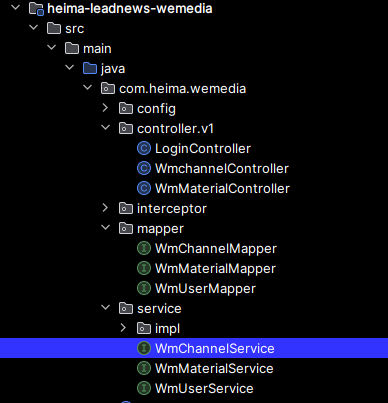
package com.heima.wemedia.service; import com.baomidou.mybatisplus.extension.service.IService; import com.heima.model.common.dtos.ResponseResult; import com.heima.model.wemedia.pojos.WmChannel; public interface WmChannelService extends IService<WmChannel> { /** * 查询所有频道 * @return */ public ResponseResult findAll(); }- 1
- 2
- 3
- 4
- 5
- 6
- 7
- 8
- 9
- 10
- 11
- 12
- 13
- 14
- 15
- 16
实现类:

package com.heima.wemedia.service.impl; import com.baomidou.mybatisplus.extension.service.impl.ServiceImpl; import com.heima.model.common.dtos.ResponseResult; import com.heima.model.wemedia.pojos.WmChannel; import com.heima.wemedia.mapper.WmChannelMapper; import com.heima.wemedia.service.WmChannelService; import lombok.extern.slf4j.Slf4j; import org.springframework.stereotype.Service; import org.springframework.transaction.annotation.Transactional; @Service @Transactional @Slf4j public class WmChannelServiceImpl extends ServiceImpl<WmChannelMapper, WmChannel> implements WmChannelService { /** * 查询所有频道 * @return */ @Override public ResponseResult findAll() { return ResponseResult.okResult(list()); } }- 1
- 2
- 3
- 4
- 5
- 6
- 7
- 8
- 9
- 10
- 11
- 12
- 13
- 14
- 15
- 16
- 17
- 18
- 19
- 20
- 21
- 22
- 23
- 24
- 25
- 26
控制层:

package com.heima.wemedia.controller.v1; import com.heima.model.common.dtos.ResponseResult; import com.heima.wemedia.service.WmChannelService; import org.springframework.beans.factory.annotation.Autowired; import org.springframework.web.bind.annotation.GetMapping; import org.springframework.web.bind.annotation.RequestMapping; import org.springframework.web.bind.annotation.RestController; @RestController @RequestMapping("/api/v1/channel") public class WmchannelController { @Autowired private WmChannelService wmChannelService; @GetMapping("/channels") public ResponseResult findAll(){ return wmChannelService.findAll(); } }- 1
- 2
- 3
- 4
- 5
- 6
- 7
- 8
- 9
- 10
- 11
- 12
- 13
- 14
- 15
- 16
- 17
- 18
- 19
- 20
- 21
3.1.5)测试
测试:http://localhost:8802/#/login
启动自媒体网关WemediaGatewayAplication和自媒体微服务WemediaApplication,使用前端项目进行测试
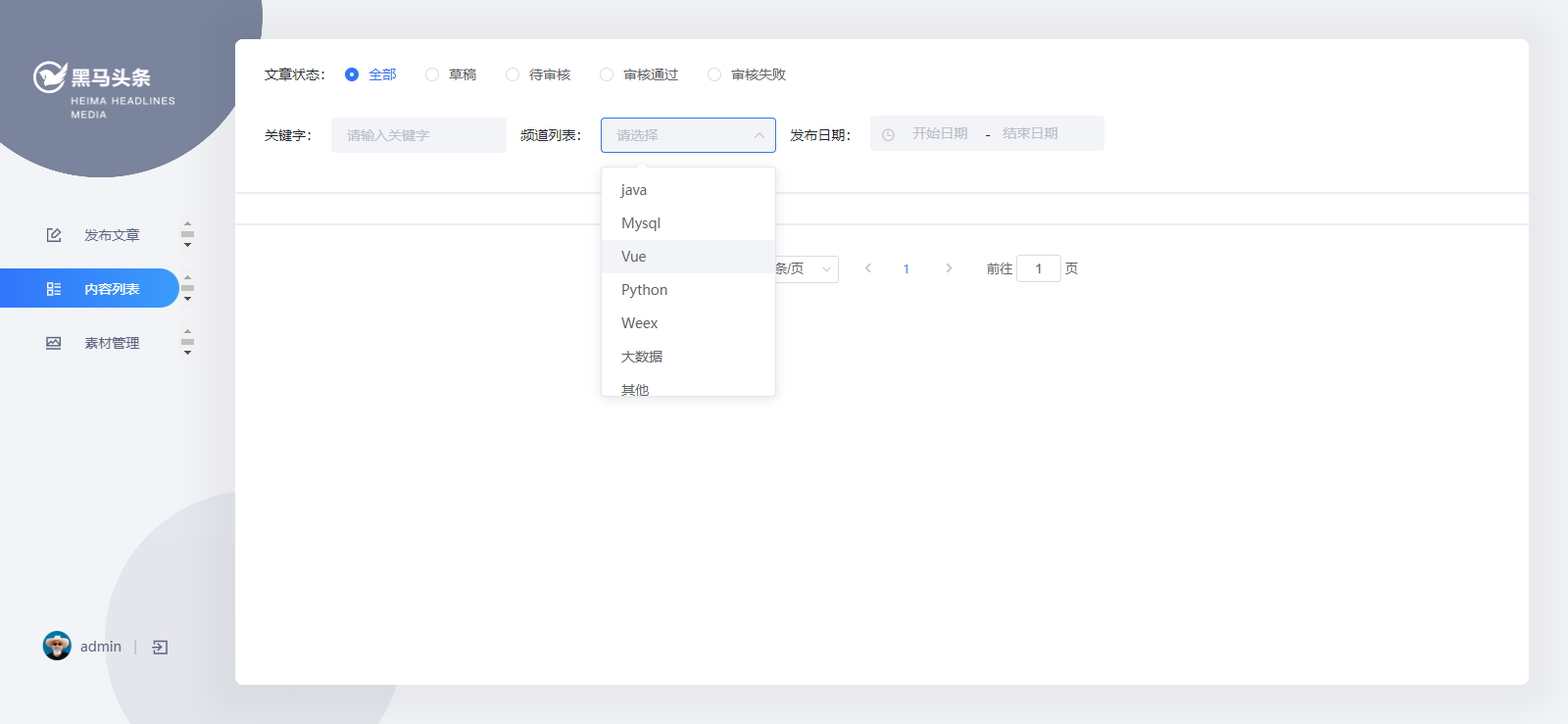
3.2)查询自媒体文章
3.2.1)需求说明

3.2.2)表结构分析
wm_news 自媒体文章表

对应实体类:

package com.heima.model.wemedia.pojos; import com.baomidou.mybatisplus.annotation.IdType; import com.baomidou.mybatisplus.annotation.TableField; import com.baomidou.mybatisplus.annotation.TableId; import com.baomidou.mybatisplus.annotation.TableName; import lombok.Data; import org.apache.ibatis.type.Alias; import java.io.Serializable; import java.util.Date; /** ** 自媒体图文内容信息表 *
* * @author itheima */ @Data @TableName("wm_news") public class WmNews implements Serializable { private static final long serialVersionUID = 1L; /** * 主键 */ @TableId(value = "id", type = IdType.AUTO) private Integer id; /** * 自媒体用户ID */ @TableField("user_id") private Integer userId; /** * 标题 */ @TableField("title") private String title; /** * 图文内容 */ @TableField("content") private String content; /** * 文章布局 0 无图文章 1 单图文章 3 多图文章 */ @TableField("type") private Short type; /** * 图文频道ID */ @TableField("channel_id") private Integer channelId; @TableField("labels") private String labels; /** * 创建时间 */ @TableField("created_time") private Date createdTime; /** * 提交时间 */ @TableField("submited_time") private Date submitedTime; /** * 当前状态 0 草稿 1 提交(待审核) 2 审核失败 3 人工审核 4 人工审核通过 8 审核通过(待发布) 9 已发布 */ @TableField("status") private Short status; /** * 定时发布时间,不定时则为空 */ @TableField("publish_time") private Date publishTime; /** * 拒绝理由 */ @TableField("reason") private String reason; /** * 发布库文章ID */ @TableField("article_id") private Long articleId; /** * //图片用逗号分隔 */ @TableField("images") private String images; @TableField("enable") private Short enable; //状态枚举类 @Alias("WmNewsStatus") public enum Status{ NORMAL((short)0),SUBMIT((short)1),FAIL((short)2),ADMIN_AUTH((short)3),ADMIN_SUCCESS((short)4),SUCCESS((short)8),PUBLISHED((short)9); short code; Status(short code){ this.code = code; } public short getCode(){ return this.code; } } }- 1
- 2
- 3
- 4
- 5
- 6
- 7
- 8
- 9
- 10
- 11
- 12
- 13
- 14
- 15
- 16
- 17
- 18
- 19
- 20
- 21
- 22
- 23
- 24
- 25
- 26
- 27
- 28
- 29
- 30
- 31
- 32
- 33
- 34
- 35
- 36
- 37
- 38
- 39
- 40
- 41
- 42
- 43
- 44
- 45
- 46
- 47
- 48
- 49
- 50
- 51
- 52
- 53
- 54
- 55
- 56
- 57
- 58
- 59
- 60
- 61
- 62
- 63
- 64
- 65
- 66
- 67
- 68
- 69
- 70
- 71
- 72
- 73
- 74
- 75
- 76
- 77
- 78
- 79
- 80
- 81
- 82
- 83
- 84
- 85
- 86
- 87
- 88
- 89
- 90
- 91
- 92
- 93
- 94
- 95
- 96
- 97
- 98
- 99
- 100
- 101
- 102
- 103
- 104
- 105
- 106
- 107
- 108
- 109
- 110
- 111
- 112
- 113
- 114
- 115
- 116
- 117
- 118
- 119
- 120
- 121
- 122
- 123
- 124
- 125
- 126
- 127
- 128
- 129
- 130
- 131
- 132
- 133
3.2.3)接口定义
说明 接口路径 /api/v1/news/list 请求方式 POST 参数 WmNewsPageReqDto 响应结果 ResponseResult WmNewsPageReqDto :
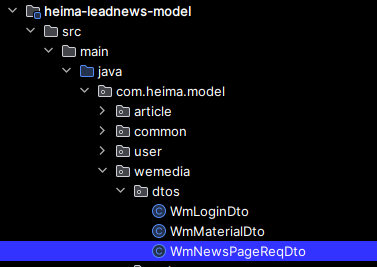
package com.heima.model.wemedia.dtos; import com.heima.model.common.dtos.PageRequestDto; import lombok.Data; import java.util.Date; @Data public class WmNewsPageReqDto extends PageRequestDto { /** * 状态 */ private Short status; /** * 开始时间 */ private Date beginPubDate; /** * 结束时间 */ private Date endPubDate; /** * 所属频道ID */ private Integer channelId; /** * 关键字 */ private String keyword; }- 1
- 2
- 3
- 4
- 5
- 6
- 7
- 8
- 9
- 10
- 11
- 12
- 13
- 14
- 15
- 16
- 17
- 18
- 19
- 20
- 21
- 22
- 23
- 24
- 25
- 26
- 27
- 28
- 29
- 30
- 31
ResponseResult :
{ "host": "null", "code": 0, "errorMessage": "操作成功", "data": [ Object { ... }, Object { ... }, Object { ... } ], "currentPage":1, "size":10, "total":21 }- 1
- 2
- 3
- 4
- 5
- 6
- 7
- 8
- 9
- 10
- 11
- 12
- 13
- 14
3.2.4)功能实现
①:新增WmNewsController

package com.heima.wemedia.controller.v1; import com.heima.model.common.dtos.ResponseResult; import com.heima.model.wemedia.dtos.WmNewsPageReqDto; import org.springframework.web.bind.annotation.PostMapping; import org.springframework.web.bind.annotation.RequestBody; import org.springframework.web.bind.annotation.RequestMapping; import org.springframework.web.bind.annotation.RestController; @RestController @RequestMapping("/api/v1/news") public class WmNewsController { @PostMapping("/list") public ResponseResult findAll(@RequestBody WmNewsPageReqDto dto){ return null; } }- 1
- 2
- 3
- 4
- 5
- 6
- 7
- 8
- 9
- 10
- 11
- 12
- 13
- 14
- 15
- 16
- 17
- 18
- 19
- 20
②:新增WmNewsMapper
package com.heima.wemedia.mapper; import com.baomidou.mybatisplus.core.mapper.BaseMapper; import com.heima.model.wemedia.pojos.WmNews; import org.apache.ibatis.annotations.Mapper; @Mapper public interface WmNewsMapper extends BaseMapper<WmNews> { }- 1
- 2
- 3
- 4
- 5
- 6
- 7
- 8
- 9
- 10
③:新增WmNewsService

package com.heima.wemedia.service; import com.baomidou.mybatisplus.extension.service.IService; import com.heima.model.common.dtos.ResponseResult; import com.heima.model.wemedia.dtos.WmNewsPageReqDto; import com.heima.model.wemedia.pojos.WmNews; public interface WmNewsService extends IService<WmNews> { /** * 查询文章 * @param dto * @return */ public ResponseResult findAll(WmNewsPageReqDto dto); }- 1
- 2
- 3
- 4
- 5
- 6
- 7
- 8
- 9
- 10
- 11
- 12
- 13
- 14
- 15
- 16
- 17
- 18
实现类:

package com.heima.wemedia.service.impl; import com.baomidou.mybatisplus.core.conditions.query.LambdaQueryWrapper; import com.baomidou.mybatisplus.core.metadata.IPage; import com.baomidou.mybatisplus.extension.plugins.pagination.Page; import com.baomidou.mybatisplus.extension.service.impl.ServiceImpl; import com.heima.model.common.dtos.PageResponseResult; import com.heima.model.common.dtos.ResponseResult; import com.heima.model.common.enums.AppHttpCodeEnum; import com.heima.model.wemedia.dtos.WmNewsPageReqDto; import com.heima.model.wemedia.pojos.WmNews; import com.heima.model.wemedia.pojos.WmUser; import com.heima.utils.thread.WmThreadLocalUtils; import com.heima.wemedia.mapper.WmNewsMapper; import com.heima.wemedia.service.WmNewsService; import lombok.extern.slf4j.Slf4j; import org.apache.commons.lang3.StringUtils; import org.springframework.stereotype.Service; import org.springframework.transaction.annotation.Transactional; @Service @Slf4j @Transactional public class WmNewsServiceImpl extends ServiceImpl<WmNewsMapper, WmNews> implements WmNewsService { /** * 查询文章 * @param dto * @return */ @Override public ResponseResult findAll(WmNewsPageReqDto dto) { //1.检查参数 if(dto == null){ return ResponseResult.errorResult(AppHttpCodeEnum.PARAM_INVALID); } //分页参数检查 dto.checkParam(); //获取当前登录人的信息 WmUser user = WmThreadLocalUtils.getUser(); if(user == null){ return ResponseResult.errorResult(AppHttpCodeEnum.NEED_LOGIN); } //2.分页条件查询 IPage page = new Page(dto.getPage(),dto.getSize()); LambdaQueryWrapper<WmNews> lambdaQueryWrapper = new LambdaQueryWrapper<>(); //状态精确查询 if(dto.getStatus() != null){ lambdaQueryWrapper.eq(WmNews::getStatus,dto.getStatus()); } //频道精确查询 if(dto.getChannelId() != null){ lambdaQueryWrapper.eq(WmNews::getChannelId,dto.getChannelId()); } //时间范围查询 if(dto.getBeginPubDate()!=null && dto.getEndPubDate()!=null){ lambdaQueryWrapper.between(WmNews::getPublishTime,dto.getBeginPubDate(),dto.getEndPubDate()); } //关键字模糊查询 if(StringUtils.isNotBlank(dto.getKeyword())){ lambdaQueryWrapper.like(WmNews::getTitle,dto.getKeyword()); } //查询当前登录用户的文章 lambdaQueryWrapper.eq(WmNews::getUserId,user.getId()); //发布时间倒序查询 lambdaQueryWrapper.orderByDesc(WmNews::getCreatedTime); page = page(page,lambdaQueryWrapper); //3.结果返回 ResponseResult responseResult = new PageResponseResult(dto.getPage(),dto.getSize(),(int)page.getTotal()); responseResult.setData(page.getRecords()); return responseResult; } }- 1
- 2
- 3
- 4
- 5
- 6
- 7
- 8
- 9
- 10
- 11
- 12
- 13
- 14
- 15
- 16
- 17
- 18
- 19
- 20
- 21
- 22
- 23
- 24
- 25
- 26
- 27
- 28
- 29
- 30
- 31
- 32
- 33
- 34
- 35
- 36
- 37
- 38
- 39
- 40
- 41
- 42
- 43
- 44
- 45
- 46
- 47
- 48
- 49
- 50
- 51
- 52
- 53
- 54
- 55
- 56
- 57
- 58
- 59
- 60
- 61
- 62
- 63
- 64
- 65
- 66
- 67
- 68
- 69
- 70
- 71
- 72
- 73
- 74
- 75
- 76
- 77
- 78
- 79
- 80
- 81
- 82
- 83
- 84
④:控制器

package com.heima.wemedia.controller.v1; import com.heima.model.common.dtos.ResponseResult; import com.heima.model.wemedia.dtos.WmNewsPageReqDto; import com.heima.wemedia.service.WmNewsService; import org.springframework.beans.factory.annotation.Autowired; import org.springframework.web.bind.annotation.PostMapping; import org.springframework.web.bind.annotation.RequestBody; import org.springframework.web.bind.annotation.RequestMapping; import org.springframework.web.bind.annotation.RestController; @RestController @RequestMapping("/api/v1/news") public class WmNewsController { @Autowired private WmNewsService wmNewsService; @PostMapping("/list") public ResponseResult findAll(@RequestBody WmNewsPageReqDto dto){ return wmNewsService.findAll(dto); } }- 1
- 2
- 3
- 4
- 5
- 6
- 7
- 8
- 9
- 10
- 11
- 12
- 13
- 14
- 15
- 16
- 17
- 18
- 19
- 20
- 21
- 22
- 23
- 24
- 25
3.2.5)测试
测试:http://localhost:8802/#/login
启动自媒体网关WemediaGatewayAplication和自媒体微服务WemediaApplication,测试文章列表查询

3.3)文章发布
3.3.1)需求分析
3.3.2)表结构分析
保存文章,除了需要wm_news表以外,还需要另外两张表
wm_material 素材表
wm_news_material 文章素材关系表

其中wm_material和wm_news表的实体类已经导入到了项目中,下面是wm_news_material表对应的实体类:

package com.heima.model.wemedia.pojos; import com.baomidou.mybatisplus.annotation.IdType; import com.baomidou.mybatisplus.annotation.TableField; import com.baomidou.mybatisplus.annotation.TableId; import com.baomidou.mybatisplus.annotation.TableName; import lombok.Data; import java.io.Serializable; /** ** 自媒体图文引用素材信息表 *
* * @author itheima */ @Data @TableName("wm_news_material") public class WmNewsMaterial implements Serializable { private static final long serialVersionUID = 1L; /** * 主键 */ @TableId(value = "id", type = IdType.AUTO) private Integer id; /** * 素材ID */ @TableField("material_id") private Integer materialId; /** * 图文ID */ @TableField("news_id") private Integer newsId; /** * 引用类型 0 内容引用 1 主图引用 */ @TableField("type") private Short type; /** * 引用排序 */ @TableField("ord") private Short ord; }- 1
- 2
- 3
- 4
- 5
- 6
- 7
- 8
- 9
- 10
- 11
- 12
- 13
- 14
- 15
- 16
- 17
- 18
- 19
- 20
- 21
- 22
- 23
- 24
- 25
- 26
- 27
- 28
- 29
- 30
- 31
- 32
- 33
- 34
- 35
- 36
- 37
- 38
- 39
- 40
- 41
- 42
- 43
- 44
- 45
- 46
- 47
- 48
- 49
- 50
- 51
- 52
- 53
- 54
- 55
- 56
3.3.3)实现思路分析


1.前端提交发布或保存为草稿
2.后台判断请求中是否包含了文章id
3.如果不包含id,则为新增
3.1 执行新增文章的操作
3.2 关联文章内容图片与素材的关系
3.3 关联文章封面图片与素材的关系
4.如果包含了id,则为修改请求
4.1 删除该文章与素材的所有关系
4.2 执行修改操作
4.3 关联文章内容图片与素材的关系
4.4 关联文章封面图片与素材的关系
3.3.4)接口定义
说明 接口路径 /api/v1/channel/submit 请求方式 POST 参数 WmNewsDto 响应结果 ResponseResult 
WmNewsDto :

package com.heima.model.wemedia.dtos; import lombok.Data; import java.util.Date; import java.util.List; @Data public class WmNewsDto { private Integer id; /** * 标题 */ private String title; /** * 频道id */ private Integer channelId; /** * 标签 */ private String labels; /** * 发布时间 */ private Date publishTime; /** * 文章内容 */ private String content; /** * 文章封面类型 0 无图 1 单图 3 多图 -1 自动 */ private Short type; /** * 提交时间 */ private Date submitedTime; /** * 状态 提交为1 草稿为0 */ private Short status; /** * 封面图片列表 多张图以逗号隔开 */ private List<String> images; }- 1
- 2
- 3
- 4
- 5
- 6
- 7
- 8
- 9
- 10
- 11
- 12
- 13
- 14
- 15
- 16
- 17
- 18
- 19
- 20
- 21
- 22
- 23
- 24
- 25
- 26
- 27
- 28
- 29
- 30
- 31
- 32
- 33
- 34
- 35
- 36
- 37
- 38
- 39
- 40
- 41
- 42
- 43
- 44
- 45
- 46
- 47
- 48
- 49
前端给传递过来的json数据格式为(与代码无关):
{ "title":"黑马头条项目背景", "type":"1",//这个 0 是无图 1 是单图 3 是多图 -1 是自动 "labels":"黑马头条", "publishTime":"2020-03-14T11:35:49.000Z", "channelId":1, "images":[ "http://192.168.200.130/group1/M00/00/00/wKjIgl5swbGATaSAAAEPfZfx6Iw790.png" ], "status":1, "content":"[ { "type":"text", "value":"随着智能手机的普及,人们更加习惯于通过手机来看新闻。由于生活节奏的加快,很多人只能利用碎片时间来获取信息,因此,对于移动资讯客户端的需求也越来越高。黑马头条项目正是在这样背景下开发出来。黑马头条项目采用当下火热的微服务+大数据技术架构实现。本项目主要着手于获取最新最热新闻资讯,通过大数据分析用户喜好精确推送咨询新闻" }, { "type":"image", "value":"http://192.168.200.130/group1/M00/00/00/wKjIgl5swbGATaSAAAEPfZfx6Iw790.png" } ]" }- 1
- 2
- 3
- 4
- 5
- 6
- 7
- 8
- 9
- 10
- 11
- 12
- 13
- 14
- 15
- 16
- 17
- 18
- 19
- 20
- 21
ResponseResult:
{ “code”:501, “errorMessage”:“参数失效" } { “code”:200, “errorMessage”:“操作成功" } { “code”:501, “errorMessage”:“素材引用失效" }- 1
- 2
- 3
- 4
- 5
- 6
- 7
- 8
- 9
- 10
- 11
- 12
- 13
- 14
3.3.5)功能实现
①:在新增WmNewsController中新增方法
@PostMapping("/submit") public ResponseResult submitNews(@RequestBody WmNewsDto dto){ return null; }- 1
- 2
- 3
- 4
完整代码如下:
package com.heima.wemedia.controller.v1; import com.heima.model.common.dtos.ResponseResult; import com.heima.model.wemedia.dtos.WmNewsDto; import com.heima.model.wemedia.dtos.WmNewsPageReqDto; import com.heima.wemedia.service.WmNewsService; import org.springframework.beans.factory.annotation.Autowired; import org.springframework.web.bind.annotation.PostMapping; import org.springframework.web.bind.annotation.RequestBody; import org.springframework.web.bind.annotation.RequestMapping; import org.springframework.web.bind.annotation.RestController; @RestController @RequestMapping("/api/v1/news") public class WmNewsController { @Autowired private WmNewsService wmNewsService; @PostMapping("/list") public ResponseResult findAll(@RequestBody WmNewsPageReqDto dto){ return wmNewsService.findAll(dto); } @PostMapping("/submit") public ResponseResult submitNews(@RequestBody WmNewsDto dto){ return null; } }- 1
- 2
- 3
- 4
- 5
- 6
- 7
- 8
- 9
- 10
- 11
- 12
- 13
- 14
- 15
- 16
- 17
- 18
- 19
- 20
- 21
- 22
- 23
- 24
- 25
- 26
- 27
- 28
- 29
- 30
- 31
②:新增WmNewsMaterialMapper类,文章与素材的关联关系需要批量保存,索引需要定义mapper文件和对应的映射文件

package com.heima.wemedia.mapper; import com.baomidou.mybatisplus.core.mapper.BaseMapper; import com.heima.model.wemedia.pojos.WmNewsMaterial; import org.apache.ibatis.annotations.Mapper; import org.apache.ibatis.annotations.Param; import java.util.List; @Mapper public interface WmNewsMaterialMapper extends BaseMapper<WmNewsMaterial> { void saveRelations(@Param("materialIds") List<Integer> materialIds,@Param("newsId") Integer newsId, @Param("type")Short type); }- 1
- 2
- 3
- 4
- 5
- 6
- 7
- 8
- 9
- 10
- 11
- 12
- 13
- 14
WmNewsMaterialMapper.xml

DOCTYPE mapper PUBLIC "-//mybatis.org//DTD Mapper 3.0//EN" "http://mybatis.org/dtd/mybatis-3-mapper.dtd"> <mapper namespace="com.heima.wemedia.mapper.WmNewsMaterialMapper"> <insert id="saveRelations"> insert into wm_news_material (material_id,news_id,type,ord) values <foreach collection="materialIds" index="ord" item="mid" separator=","> (#{mid},#{newsId},#{type},#{ord}) foreach> insert> mapper>- 1
- 2
- 3
- 4
- 5
- 6
- 7
- 8
- 9
- 10
- 11
- 12
- 13
③:常量类准备

package com.heima.common.constants; public class WemediaConstants { public static final Short COLLECT_MATERIAL = 1;//收藏 public static final Short CANCEL_COLLECT_MATERIAL = 0;//取消收藏 public static final String WM_NEWS_TYPE_IMAGE = "image"; public static final Short WM_NEWS_NONE_IMAGE = 0; public static final Short WM_NEWS_SINGLE_IMAGE = 1; public static final Short WM_NEWS_MANY_IMAGE = 3; public static final Short WM_NEWS_TYPE_AUTO = -1; public static final Short WM_CONTENT_REFERENCE = 0; public static final Short WM_COVER_REFERENCE = 1; }- 1
- 2
- 3
- 4
- 5
- 6
- 7
- 8
- 9
- 10
- 11
- 12
- 13
- 14
- 15
- 16
- 17
- 18
④:在WmNewsService中新增方法

/** * 发布文章或保存草稿 * @param dto * @return */ public ResponseResult submitNews(WmNewsDto dto);- 1
- 2
- 3
- 4
- 5
- 6
完整代码如下:
package com.heima.wemedia.service; import com.baomidou.mybatisplus.extension.service.IService; import com.heima.model.common.dtos.ResponseResult; import com.heima.model.wemedia.dtos.WmNewsDto; import com.heima.model.wemedia.dtos.WmNewsPageReqDto; import com.heima.model.wemedia.pojos.WmNews; public interface WmNewsService extends IService<WmNews> { /** * 查询文章 * @param dto * @return */ public ResponseResult findAll(WmNewsPageReqDto dto); /** * 发布文章或保存草稿 * @param dto * @return */ public ResponseResult submitNews(WmNewsDto dto); }- 1
- 2
- 3
- 4
- 5
- 6
- 7
- 8
- 9
- 10
- 11
- 12
- 13
- 14
- 15
- 16
- 17
- 18
- 19
- 20
- 21
- 22
- 23
- 24
- 25
- 26
实现方法:

/** * 发布修改文章或保存为草稿 * @param dto * @return */ @Override public ResponseResult submitNews(WmNewsDto dto) { //0.条件判断 if(dto == null || dto.getContent() == null){ return ResponseResult.errorResult(AppHttpCodeEnum.PARAM_INVALID); } //1.保存或修改文章 WmNews wmNews = new WmNews(); //属性拷贝 属性名词和类型相同才能拷贝 BeanUtils.copyProperties(dto,wmNews); //封面图片 list---> string if(dto.getImages() != null && dto.getImages().size() > 0){ //[1dddfsd.jpg,sdlfjldk.jpg]--> 1dddfsd.jpg,sdlfjldk.jpg String imageStr = StringUtils.join(dto.getImages(), ","); wmNews.setImages(imageStr); } //如果当前封面类型为自动 -1 if(dto.getType().equals(WemediaConstants.WM_NEWS_TYPE_AUTO)){ wmNews.setType(null); } saveOrUpdateWmNews(wmNews); //2.判断是否为草稿 如果为草稿结束当前方法 if(dto.getStatus().equals(WmNews.Status.NORMAL.getCode())){ return ResponseResult.okResult(AppHttpCodeEnum.SUCCESS); } //3.不是草稿,保存文章内容图片与素材的关系 //获取到文章内容中的图片信息 List<String> materials = ectractUrlInfo(dto.getContent()); saveRelativeInfoForContent(materials,wmNews.getId()); //4.不是草稿,保存文章封面图片与素材的关系,如果当前布局是自动,需要匹配封面图片 saveRelativeInfoForCover(dto,wmNews,materials); return ResponseResult.okResult(AppHttpCodeEnum.SUCCESS); } /** * 第一个功能:如果当前封面类型为自动,则设置封面类型的数据 * 匹配规则: * 1,如果内容图片大于等于1,小于3 单图 type 1 * 2,如果内容图片大于等于3 多图 type 3 * 3,如果内容没有图片,无图 type 0 * * 第二个功能:保存封面图片与素材的关系 * @param dto * @param wmNews * @param materials */ private void saveRelativeInfoForCover(WmNewsDto dto, WmNews wmNews, List<String> materials) { List<String> images = dto.getImages(); //如果当前封面类型为自动,则设置封面类型的数据 if(dto.getType().equals(WemediaConstants.WM_NEWS_TYPE_AUTO)){ //多图 if(materials.size() >= 3){ wmNews.setType(WemediaConstants.WM_NEWS_MANY_IMAGE); images = materials.stream().limit(3).collect(Collectors.toList()); }else if(materials.size() >= 1 && materials.size() < 3){ //单图 wmNews.setType(WemediaConstants.WM_NEWS_SINGLE_IMAGE); images = materials.stream().limit(1).collect(Collectors.toList()); }else { //无图 wmNews.setType(WemediaConstants.WM_NEWS_NONE_IMAGE); } //修改文章 if(images != null && images.size() > 0){ wmNews.setImages(StringUtils.join(images,",")); } updateById(wmNews); } if(images != null && images.size() > 0){ saveRelativeInfo(images,wmNews.getId(),WemediaConstants.WM_COVER_REFERENCE); } } /** * 处理文章内容图片与素材的关系 * @param materials * @param newsId */ private void saveRelativeInfoForContent(List<String> materials, Integer newsId) { saveRelativeInfo(materials,newsId,WemediaConstants.WM_CONTENT_REFERENCE); } @Autowired private WmMaterialMapper wmMaterialMapper; /** * 保存文章图片与素材的关系到数据库中 * @param materials * @param newsId * @param type */ private void saveRelativeInfo(List<String> materials, Integer newsId, Short type) { if(materials!=null && !materials.isEmpty()){ //通过图片的url查询素材的id List<WmMaterial> dbMaterials = wmMaterialMapper.selectList(Wrappers.<WmMaterial>lambdaQuery().in(WmMaterial::getUrl, materials)); //判断素材是否有效 if(dbMaterials==null || dbMaterials.size() == 0){ //手动抛出异常 第一个功能:能够提示调用者素材失效了,第二个功能,进行数据的回滚 throw new CustomException(AppHttpCodeEnum.MATERIASL_REFERENCE_FAIL); } if(materials.size() != dbMaterials.size()){ throw new CustomException(AppHttpCodeEnum.MATERIASL_REFERENCE_FAIL); } List<Integer> idList = dbMaterials.stream().map(WmMaterial::getId).collect(Collectors.toList()); //批量保存 wmNewsMaterialMapper.saveRelations(idList,newsId,type); } } /** * 提取文章内容中的图片信息 * @param content * @return */ private List<String> ectractUrlInfo(String content) { List<String> materials = new ArrayList<>(); List<Map> maps = JSON.parseArray(content, Map.class); for (Map map : maps) { if(map.get("type").equals("image")){ String imgUrl = (String) map.get("value"); materials.add(imgUrl); } } return materials; } @Autowired private WmNewsMaterialMapper wmNewsMaterialMapper; /** * 保存或修改文章 * @param wmNews */ private void saveOrUpdateWmNews(WmNews wmNews) { //补全属性 wmNews.setUserId(WmThreadLocalUtils.getUser().getId()); wmNews.setCreatedTime(new Date()); wmNews.setSubmitedTime(new Date()); wmNews.setEnable((short)1);//默认上架 if(wmNews.getId() == null){ //保存 save(wmNews); }else { //修改 //删除文章图片与素材的关系 wmNewsMaterialMapper.delete(Wrappers.<WmNewsMaterial>lambdaQuery().eq(WmNewsMaterial::getNewsId,wmNews.getId())); updateById(wmNews); } }- 1
- 2
- 3
- 4
- 5
- 6
- 7
- 8
- 9
- 10
- 11
- 12
- 13
- 14
- 15
- 16
- 17
- 18
- 19
- 20
- 21
- 22
- 23
- 24
- 25
- 26
- 27
- 28
- 29
- 30
- 31
- 32
- 33
- 34
- 35
- 36
- 37
- 38
- 39
- 40
- 41
- 42
- 43
- 44
- 45
- 46
- 47
- 48
- 49
- 50
- 51
- 52
- 53
- 54
- 55
- 56
- 57
- 58
- 59
- 60
- 61
- 62
- 63
- 64
- 65
- 66
- 67
- 68
- 69
- 70
- 71
- 72
- 73
- 74
- 75
- 76
- 77
- 78
- 79
- 80
- 81
- 82
- 83
- 84
- 85
- 86
- 87
- 88
- 89
- 90
- 91
- 92
- 93
- 94
- 95
- 96
- 97
- 98
- 99
- 100
- 101
- 102
- 103
- 104
- 105
- 106
- 107
- 108
- 109
- 110
- 111
- 112
- 113
- 114
- 115
- 116
- 117
- 118
- 119
- 120
- 121
- 122
- 123
- 124
- 125
- 126
- 127
- 128
- 129
- 130
- 131
- 132
- 133
- 134
- 135
- 136
- 137
- 138
- 139
- 140
- 141
- 142
- 143
- 144
- 145
- 146
- 147
- 148
- 149
- 150
- 151
- 152
- 153
- 154
- 155
- 156
- 157
- 158
- 159
- 160
- 161
- 162
- 163
- 164
- 165
- 166
- 167
- 168
- 169
- 170
- 171
- 172
- 173
- 174
- 175
- 176
- 177
- 178
完整代码如下:
添加MATERIASL_REFERENCE_FAIL常量:

//自媒体文章错误3501~3600 MATERIASL_REFERENCE_FAIL(3501,"素材引用失效");- 1
- 2
④:控制器

@PostMapping("/submit") public ResponseResult submitNews(@RequestBody WmNewsDto dto){ return wmNewsService.submitNews(dto); }- 1
- 2
- 3
- 4
完整代码如下:
package com.heima.wemedia.controller.v1; import com.heima.model.common.dtos.ResponseResult; import com.heima.model.wemedia.dtos.WmNewsDto; import com.heima.model.wemedia.dtos.WmNewsPageReqDto; import com.heima.wemedia.service.WmNewsService; import org.springframework.beans.factory.annotation.Autowired; import org.springframework.web.bind.annotation.PostMapping; import org.springframework.web.bind.annotation.RequestBody; import org.springframework.web.bind.annotation.RequestMapping; import org.springframework.web.bind.annotation.RestController; @RestController @RequestMapping("/api/v1/news") public class WmNewsController { @Autowired private WmNewsService wmNewsService; @PostMapping("/list") public ResponseResult findAll(@RequestBody WmNewsPageReqDto dto){ return wmNewsService.findAll(dto); } @PostMapping("/submit") public ResponseResult submitNews(@RequestBody WmNewsDto dto){ return wmNewsService.submitNews(dto); } }- 1
- 2
- 3
- 4
- 5
- 6
- 7
- 8
- 9
- 10
- 11
- 12
- 13
- 14
- 15
- 16
- 17
- 18
- 19
- 20
- 21
- 22
- 23
- 24
- 25
- 26
- 27
- 28
- 29
- 30
- 31
3.3.6)测试
测试:http://localhost:8802/#/login
启动自媒体网关WemediaGatewayAplication和自媒体微服务WemediaApplication,测试

点击提交审核,查看内容列表:

到数据库中,可以查看到刚刚保存的文章:

-
相关阅读:
Emgu CV4图像处理之轮廓查找与绘制15(C#)
DEVC++崩溃问题暨C语言c++软件相关软件安装教程
SummarizedExperiment 对象访问、操作和转换
淘宝/天猫按图搜索淘宝商品(拍立淘) API 返回值说明
Redis数据类型-zSet基本使用
java ssm德育分活动报名系统springboot+vue
Android 13.0 添加自定义服务,并生成jar给第三方app调用
整体记录一下asp.net core 认证和授权
如何选择合适的自动化测试工具?
从零开始搭建防抖音短视频APP-MongoDB的安装与配置,MongoDB的可视化管理工具,SpringBoot整合MongoDB
- 原文地址:https://blog.csdn.net/weixin_44883789/article/details/136525331
