-
Linux系统——Haproxy高性能负载均衡软件
目录
一、Haproxy介绍
四层代理
- LVS:Linux Virtual Server
- Nginx
- HAProxy:High Availability Proxy
七层代理
- HAProxy
- Nginx
硬件
- F5 https://f5.com/zh
- Netscaler https://www.citrix.com.cn/products/citrix-adc/
- Array https://www.arraynetworks.com.cn/
- 深信服 http://www.sangfor.com.cn/
- 北京灵州 http://www.lingzhou.com.cn/cpzx/llfzjh/
1.Haproxy定义
HAProxy是法国开发者威利塔罗(Willy Tarreau)在2000年使用C语言开发的一个开源软件,是一款具备高并发(一万以上)、高性能的TCP和HTTP负载均衡器,支持基于cookie的持久性,自动故障切换,支持正则表达式及web状态统计,目前最新TLS版本为2.2。
HAProxy是可提供高可用性、负载均衡以及基于TcP和HTTP应用的代理,是免费、快速并且可靠的一种解决方案。HProxy非常适用于并发大(并发达1w以上) web站点,这些站点通常又需要会话保持或七层处理。HAProxy的运行模式使得它可以很简单安全的整合至当前的架构中,同时可以保护web服务器不被暴露到网络上。
支持功能
- TCP 和 HTTP反向代理
- SSL/TSL服务器
- 可以针对HTTP请求添加cookie,进行路由后端服务器
- 可平衡负载至后端服务器,并支持持久连接
- 支持所有主服务器故障切换至备用服务器 keepalive
- 支持专用端口实现监控服务
- 支持停止接受新连接请求,而不影响现有连接
- 可以在双向添加,修改或删除HTTP报文首部字段
- 响应报文压缩
- 支持基于pattern实现连接请求的访问控制
- 通过特定的URI(url)为授权用户提供详细的状态信息
2.Haproxy主要特性
- 可靠性和稳定性非常好,可以与硬件级的F5负载均衡设备相媲美;
- 最高可以同时维护40000-50000个并发连接,单位时间内处理的最大请求数为20000个,最大处理能力可达10Git/s;
- 支持多达8种负载均衡算法,同时也支持会话保持;
- 支持虚拟机主机功能,从而实现web负载均衡更加灵活;
- 支持连接拒绝、全透明代理等独特的功能;
- 拥有强大的ACL支持,用于访问控制; sendfile
- 其独特的弹性二x树数据结构,使数据结构的复杂性上升到了0(1),即数据的查寻速度不会随着数据条日的增加而速度有所下降;·支持客户端的keepalive功能,减少客户端与haproxy的多次三次握手导致资源浪费,让多个请求在一个tcp连接中完成;
- 支持TCP加速,零复制功能,类似于mmap机制;
- 支持响应池(response buffering) ;
- 支持RDP协议;
- 基于源的粘性,类似nginx的ip hash功能,把来自同一客户端的请求在一定时间内始终调度到上游的同一服务器;·更好统计数据接口,其web接口显示后端集群中各个服务器的接收、发送、拒绝、错误等数据的统计信息;
- 详细的健康状态检测,web接口中有关于对上游服务器的健康检测状态,并提供了一定的管理功能;
- 基于流量的健康评估机制;
- 基于http认证;
- 基于命令行的管理接口;
- 日志分析器,可对日志进行分析
3.Haproxy调度算法原理
3.1RR(Round Robin)
RR算法是最简单最常用的一种算法,即轮询调度
3.2LC(Least Connections)
最小连接数算法,根据后端的节点连接数大小动态分配前端请求
3.3SH(Source Hashing)
基于来源访问调度算法,用于一些有Session会话记录在服务器前端的场景,可以基于来源的IP、Cookie等做集群调度
二、安装Haproxy
1.yum安装
CentOS 7 的默认的base仓库中包含haproxy的安装包文件,但是版本比较旧,是1.5.18的版本,距离当前版本已经有较长时间没有更新,由于版本比较旧所以有很多功能不支持,如果对功能和性能没有要求可以使用此版本,否则推荐使用新版本。
- [root@localhost ~]#yum install centos-release-scl-rh -y
- #安装额外源
- [root@localhost ~]#yum install rh-haproxy18-haproxy -y
- [root@localhost ~]#yum install haproxy -y
- [root@localhost ~]#rpm -q haproxy
- haproxy-1.5.18-9.el7_9.1.x86_64
- [root@localhost ~]#haproxy -v
- HA-Proxy version 1.5.18 2016/05/10
- Copyright 2000-2016 Willy Tarreau
2.第三方rpm包安装
官方没有提供rpm相关的包,可以通过第三方仓库的rpm包
从第三方网站下载rpm包:https://pkgs.org/download/haproxy
基于互联网第三方仓库在线安装
- [root@localhost opt]#rz -E
- rz waiting to receive.
- [root@localhost opt]#rz -E
- rz waiting to receive.
- [root@localhost opt]#ls
- rh-haproxy18-haproxy-1.8.24-3.el7.x86_64.rpm
- rh-haproxy18-runtime-3.1-2.el7.x86_64.rpm
- [root@localhost opt]#yum install rh-haproxy18-runtime-3.1-2.el7.x86_64.rpm -y
- [root@localhost opt]#yum install rh-haproxy18-haproxy-1.8.24-3.el7.x86_64.rpm -y
- [root@localhost opt]#systemctl start rh-haproxy18-haproxy.service
- [root@localhost opt]#systemctl status rh-haproxy18-haproxy.service
- ● rh-haproxy18-haproxy.service - HAProxy Load Balancer
- Loaded: loaded (/usr/lib/systemd/system/rh-haproxy18-haproxy.service; disabled; vendor preset: disabled)
- Active: active (running) since 五 2024-03-08 12:14:13 CST; 4s ago
- Process: 3109 ExecStartPre=/opt/rh/rh-haproxy18/root/usr/sbin/haproxy -f $CONFIG -c -q $OPTIONS (code=exited, status=0/SUCCESS)
- Main PID: 3113 (haproxy)
- CGroup: /system.slice/rh-haproxy18-haproxy.service
- ├─3113 /opt/rh/rh-haproxy18/root/usr/sbin/haproxy -Ws -f /etc/o...
- └─3114 /opt/rh/rh-haproxy18/root/usr/sbin/haproxy -Ws -f /etc/o...
- 3月 08 12:14:13 localhost.localdomain systemd[1]: Starting HAProxy Load B...
- 3月 08 12:14:13 localhost.localdomain systemd[1]: Started HAProxy Load Ba...
- Hint: Some lines were ellipsized, use -l to show in full.
- [root@localhost data]#/opt/rh/rh-haproxy18/root/usr/sbin/haproxy -v
- HA-Proxy version 1.8.24 2020/02/15
- Copyright 2000-2020 Willy Tarreau
3.编译安装
编译安装HAProxy 2.0 LTS版本,更多源码包下载地址:http://www.haproxy.org/download/
3.1解决Lua环境
HAProxy 支持基于lua实现功能扩展,lua是一种小巧的脚本语言,于1993年由巴西里约热内卢天主教大学(Pontifical Catholic University of Rio de Janeiro)里的一个研究小组开发,其设计目的是为了嵌入应用程序中,从而为应用程序提供灵活的扩展和定制功能。
Lua 官网:www.lua.org
Lua 应用场景
- 游戏开发
- 独立应用脚本
- Web 应用脚本
- 扩展和数据库插件,如MySQL Proxy
- 安全系统,如入侵检测系统
3.2编译安装Haproxy
由于CentOS7 之前版本自带的lua版本比较低并不符合HAProxy要求的lua最低版本(5.3)的要求,因此需要编译安装较新版本的lua环境,然后才能编译安装HAProxy
- [root@localhost ~]#lua -v
- Lua 5.1.4 Copyright (C) 1994-2008 Lua.org, PUC-Rio
- [root@localhost opt]#curl -R -O http://www.lua.org/ftp/lua-5.4.6.tar.gz
- % Total % Received % Xferd Average Speed Time Time Time Current
- Dload Upload Total Spent Left Speed
- 0 0 0 0 0 0 0 0 --:--:-- --:--:-- --:--:-- 0 0 0 0 0 0 0 0 --:--:-- 0:00:01 --:--:-- 0 0 0 0 0 0 0 0 --:--:-- 0:00:02 --:--:-- 0 0 0 0 0 0 0 0 --:--:-- 0:00:03 --:--:-- 0 0 0 0 0 0 0 0 --:--:-- 0:00:03 --:--:-- 100 169 100 169 0 0 40 0 0:00:04 0:00:04 --:--:-- 40
- [root@localhost opt]#ls
- lua-5.4.6.tar.gz
- [root@localhost opt]#tar zxf lua-5.4.6.tar.gz
- [root@localhost opt]#cd lua-5.4.4/
- [root@localhost lua-5.4.4]#make all
- [root@localhost lua-5.4.4]#cd ..
- [root@localhost opt]#ls
- lua-5.4.4 lua-5.4.4.tar.gz
- [root@localhost opt]#ln -s lua-5.4.4 lua
- [root@localhost opt]#ls
- lua lua-5.4.4 lua-5.4.4.tar.gz
- [root@localhost opt]#rz -E
- rz waiting to receive.
- [root@localhost opt]#ls
- haproxy-2.4.25.tar.gz lua lua-5.4.4 lua-5.4.4.tar.gz
- [root@localhost opt]#tar xf haproxy-2.4.25.tar.gz
- [root@localhost opt]#cd haproxy-2.4.25/
- [root@localhost haproxy-2.4.25]#ls
- addons CONTRIBUTING include Makefile scripts VERDATE
- admin dev INSTALL README src VERSION
- BRANCHES doc LICENSE reg-tests SUBVERS
- CHANGELOG examples MAINTAINERS ROADMAP tests
- [root@localhost haproxy-2.4.25]#vim INSTALL
- #可以查看如何编译安装
- [root@localhost haproxy-2.4.25]#yum -y install gcc openssl-devel pcre-devel systemd-devel
- #安装依赖环境
- [root@localhost haproxy-2.4.25]#make ARCH=x86_64 TARGET=linux-glibc USE_PCRE=1 USE_OPENSSL=1 USE_ZLIB=1 USE_SYSTEMD=1 USE_LUA=1 LUA_INC=/opt/lua/src/ LUA_LIB=/opt/lua/src/
- [root@localhost haproxy-2.4.25]#make install PREFIX=/apps/haproxy
- [root@localhost haproxy-2.4.25]#ls /apps/haproxy/
- doc sbin share
- [root@localhost haproxy]#ln -s /apps/haproxy/sbin/haproxy /usr/sbin/
- [root@localhost haproxy]#haproxy -v
- HAProxy version 2.4.25-6cfe787 2023/12/14 - https://haproxy.org/
- Status: long-term supported branch - will stop receiving fixes around Q2 2026.
- Known bugs: http://www.haproxy.org/bugs/bugs-2.4.25.html
- Running on: Linux 3.10.0-693.el7.x86_64 #1 SMP Tue Aug 22 21:09:27 UTC 2017 x86_64
- [root@localhost haproxy]#tee /usr/lib/systemd/system/haproxy.service <
- >
- > [Unit]
- > Description=HAProxy Load Balancer
- > After=syslog.target network.target
- >
- > [Service]
- > ExecStartPre=/usr/sbin/haproxy -f /etc/haproxy/haproxy.cfg -c -q
- > ExecStart=/usr/sbin/haproxy -Ws -f /etc/haproxy/haproxy.cfg -p /var/lib/haproxy/haproxy.pid
- > ExecReload=/bin/kill -USR2 $MAINPID
- > LimitNOFILE=100000
- >
- > [Install]
- > WantedBy=multi-user.target
- >
- >
- > eof
- [root@localhost haproxy]#cat /usr/lib/systemd/system/haproxy.service
- [Unit]
- Description=HAProxy Load Balancer
- After=syslog.target network.target
- [Service]
- ExecStartPre=/usr/sbin/haproxy -f /etc/haproxy/haproxy.cfg -c -q
- ExecStart=/usr/sbin/haproxy -Ws -f /etc/haproxy/haproxy.cfg -p /var/lib/haproxy/haproxy.pid
- ExecReload=/bin/kill -USR2
- LimitNOFILE=100000
- [Install]
- WantedBy=multi-user.target
- [root@localhost haproxy]#mkdir /etc/haproxy
- [root@localhost haproxy]#vim /etc/haproxy/haproxy.cfg
- [root@localhost haproxy]#mkdir /var/lib/haproxy
- [root@localhost haproxy]#useradd -r -s /sbin/nologin haproxy
- [root@localhost haproxy]#id haproxy
- uid=990(haproxy) gid=985(haproxy) 组=985(haproxy)
- [root@localhost haproxy]#systemctl enable --now haproxy.service
- Created symlink from /etc/systemd/system/multi-user.target.wants/haproxy.service to /usr/lib/systemd/system/haproxy.service.
- [root@localhost haproxy]#systemctl status haproxy.service
- ● haproxy.service - HAProxy Load Balancer
- Loaded: loaded (/usr/lib/systemd/system/haproxy.service; enabled; vendor preset: disabled)
- Active: active (running) since 五 2024-03-08 13:18:01 CST; 6s ago
- Process: 5041 ExecStartPre=/usr/sbin/haproxy -f /etc/haproxy/haproxy.cfg -c -q (code=exited, status=0/SUCCESS)
- Main PID: 5044 (haproxy)
- CGroup: /system.slice/haproxy.service
- ├─5044 /usr/sbin/haproxy -Ws -f /etc/haproxy/haproxy.cfg -p /va...
- └─5049 /usr/sbin/haproxy -Ws -f /etc/haproxy/haproxy.cfg -p /va...
- 3月 08 13:18:01 localhost.localdomain systemd[1]: Starting HAProxy Load B...
- 3月 08 13:18:01 localhost.localdomain systemd[1]: Started HAProxy Load Ba...
- 3月 08 13:18:01 localhost.localdomain haproxy[5044]: [NOTICE] (5044) : ...
- 3月 08 13:18:01 localhost.localdomain haproxy[5044]: [WARNING] (5049) : ...
- 3月 08 13:18:01 localhost.localdomain haproxy[5044]: [NOTICE] (5049) : ...
- 3月 08 13:18:01 localhost.localdomain haproxy[5044]: [NOTICE] (5049) : ...
- 3月 08 13:18:01 localhost.localdomain haproxy[5044]: [ALERT] (5049) : ...
- Hint: Some lines were ellipsized, use -l to show in full.
- [root@localhost haproxy]#pstree|grep haproxy
- |-haproxy---haproxy---{haproxy}
三、配置文件详解
官方地址配置文件官方帮助文档
http://cbonte.github.io/haproxy-dconv/
http://cbonte.github.io/haproxy-dconv/2.4/configuration.html
https://www.haproxy.org/download/2.5/doc/configuration.txtHAProxy 的配置文件haproxy.cfg由两大部分组成,分别是global和proxies部分
- global:全局配置段 进程及安全配置相关的参数;性能调整相关参数;Debug参数
- proxies:代理配置段
- defaults:为frontend, backend, listen提供默认配置
- frontend:前端,相当于nginx中的server {}
- backend:后端,相当于nginx中的upstream {}
- listen:同时拥有前端和后端配置,配置简单,生产推荐使用
- global
- #全局配置
- maxconn 100000
- #最大连接数
- chroot /apps/haproxy
- #锁定运行目录,类似于ftp中的禁锢
- stats socket /var/lib/haproxy/haproxy.sock mode 600 level admin
- #Socket文件 进程间通信
- uid 99
- #运行haproxy用户身份
- gid 99
- #运行haproxy用户身份
- daemon
- #后台运行
- #nbproc 4
- #开启的haproxy work 进程数,默认进程数是一个
- #nbthread 1 #和多进程 nbproc配置互斥(版本有关,CentOS8的haproxy1.8无此问题),指定每个haproxy进程开启的线程数,默认为每个进程一个线程
- #如果同时启用nbproc和nbthread 会出现以下日志的错误,无法启动服务Apr 714:46:23 haproxy haproxy: [ALERT] 097/144623 (1454) : config : cannot enable multiple processes if multiple threads are configured. Please use either nbproc or nbthread but not both.
- #cpu-map 1 0
- #绑定haproxy worker 进程至指定CPU,将第1个work进程绑定至0号CPU
- #cpu-map 2 1
- ##绑定haproxy worker 进程至指定CPU,将第2个work进程绑定至1号CPU
- #cpu-map 3 2
- #cpu-map 4 3
- #CPU的亲缘性 绑定cpu 可以通过ps axo pid,cmd,psr,pid |grep haproxy查看cpu亲缘性状态
- #maxsslconn n
- #每个haproxy进程ssl最大连接数,用于haproxy配置了证书的场景下
- #maxconnrate n
- #每个进程每秒创建的最大连接数量
- #spread-checks n
- #后端server状态check随机提前或延迟百分比时间,建议2-5(20%-50%)之间,默认值0
- pidfile /var/lib/haproxy/haproxy.pid
- #pid运行路径
- log 127.0.0.1 local3 info
- #日志级别
- defaults
- #默认模块
- option http-keep-alive
- #可以和http Keepalive进行搭配使用 模式为http(7层代理http,4层代理tcp)
- option forwardfor
- #可以IP透传
- #option httplog #日志类别为http日志格式
- #option dontlognull #不记录健康检查日志信息
- #retries 3 #检查节点服务器失败次数,连续达到3次,则反馈不可用
- #redispatch #当服务器负载很高时,自动结束当前队列处理比较久的连接
- maxconn 100000
- #最大连接数,此处的数值不能大于全局里的数值
- mode http
- #模式 http
- timeout connect 300000ms
- #设置连接超时时间,默认单位是毫秒
- timeout client 300000ms
- #设置客户端超时时间,默认单位是毫秒
- timeout server 300000ms
- #设置服务器超时时间,默认单位是毫秒
- listen stats
- #状态页
- mode http
- #模式http
- bind 0.0.0.0:9999
- #绑定任意地址的9999端口
- stats enable
- #开启
- log global
- #引入global定义的日志格式
- stats uri /haproxy-status
- #状态页位置
- stats auth haadmin:123456
- #用户为haadmin 密码为123456
- listen web_port
- bind 0.0.0.0:8899
- mode http
- log global
- server web1 127.0.0.1:8080 check inter 3000 fall 2 rise 5
- #后端真实服务器 检查健康性 延迟等待3000毫秒 失败两次 五次之后重连
- defaults [
] - #默认配置项,针对以下的frontend、backend和listen生效,可以多个name也可以没有name
- frontend
- #前端servername,类似于Nginx的一个虚拟主机 server和LVS服务集群。
- backend
- #后端服务器组,等于nginx的upstream和LVS中的RS服务器
- listen
- #将frontend和backend合并在一起配置,相对于frontend和backend配置更简洁,生产常用
- 使用listen替换 frontend和backend的配置方式,可以简化设置,通常只用于TCP协议的应用
- #官网业务访问入口
- listen webcluster 0.0.0.0:80
- option httpchk GET /test.html
- balance roundrobin
- server inst1 192.168.241.22:80 check inter 2000 fall 3
- server inst2 192.168.241.23:80 check inter 2000 fall 3
1.状态页
- [root@localhost ~]#vim /etc/haproxy/haproxy.cfg
- listen stats
- #状态页
- mode http
- #模式为http
- bind 192.168.241.11:9999
- #绑定在192.168.241.11 端口为9999上
- stats enable
- #状态开启
- log global
- stats uri /haproxy-status
- #状态页位置
- stats auth haadmin:123456
- #状态页登录用户名为haadmin 密码为123456
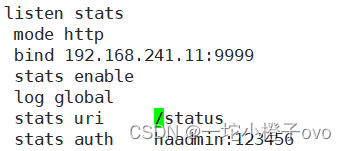
[root@localhost ~]#systemctl restart haproxy.service


2.日志管理
HAproxy本身不记录客户端的访问日志.此外为减少服务器负载,一般生产中HAProxy不记录日志.也可以配置HAProxy利用rsyslog服务记录日志到指定日志服务器文件中
[root@localhost ~]#vim /etc/haproxy/haproxy.cfg
[root@localhost ~]#vim /etc/rsyslog.conf
定义haproxy的日志站点为/var/log/haproxy.log
- [root@localhost ~]#systemctl restart haproxy.service rsyslog.service
- [root@localhost ~]#tail -f /var/log/haproxy.log
- Mar 8 14:04:51 localhost haproxy[10999]: Connect from 192.168.241.1:51168 to 192.168.241.11:9999 (stats/HTTP)
- Mar 8 14:04:52 localhost haproxy[10999]: Connect from 192.168.241.1:51168 to 192.168.241.11:9999 (stats/HTTP)
2.1定义日志到其他主机站点
[root@localhost ~]#vim /etc/haproxy/haproxy.cfg
[root@node2 ~]#vim /etc/rsyslog.conf

[root@node2 ~]#systemctl restart rsyslog.service[root@localhost ~]#systemctl restart haproxy.service不建议在本机开启日志功能
- [root@node2 ~]#tail -f /var/log/haproxy.log
- Mar 8 14:09:10 192.168.241.11 haproxy[11100]: Server web_port/web1 is DOWN, reason: Layer4 connection problem, info: "Connection refused", check duration: 0ms. 0 active and 0 backup servers left. 0 sessions active, 0 requeued, 0 remaining in queue.
- Mar 8 14:09:10 192.168.241.11 haproxy[11100]: proxy web_port has no server available!
3.指定进程线程个数
进程与线程会有冲突
- nbproc n #开启的haproxy work 进程数,默认进程数是一个
- #nbthread 1 #和多进程 nbproc配置互斥(版本有关,CentOS8的haproxy1.8无此问题),指定每个haproxy进程开启的线程数,默认为每个进程一个线程
- #如果同时启用nbproc和nbthread 会出现以下日志的错误,无法启动服务Apr 714:46:23 haproxy haproxy: [ALERT] 097/144623 (1454) : config : cannot enable multiple processes if multiple threads are configured. Please use either nbproc or nbthread but not both.
- [root@localhost ~]#vim /etc/haproxy/haproxy.cfg
- [root@localhost ~]#pstree |grep haproxy
- |-haproxy---haproxy---{haproxy}
- [root@localhost ~]#vim /etc/haproxy/haproxy.cfg
- [root@localhost ~]#systemctl restart haproxy.service
- [root@localhost ~]#pstree |grep haproxy
- |-haproxy---4*[haproxy]
4.cpu亲缘性
- nbproc 2
- cpu-map 1 0 #绑定haproxy worker 进程至指定CPU,将第1个work进程绑定至0号CPU
- cpu-map 2 1 #绑定haproxy worker 进程至指定CPU,将第2个work进程绑定至1 号CPU
- ps axo pid,cmd,psr,pid |grep haproxy
- [root@localhost ~]#vim /etc/haproxy/haproxy.cfg
- cpu-map 1 0
- cpu-map 2 1
- cpu-map 3 2
- cpu-map 4 3
- [root@localhost ~]#ps axo pid,cmd,psr|grep haproxy
- 11270 /usr/sbin/haproxy -Ws -f /e 1
- 11274 /usr/sbin/haproxy -Ws -f /e 0
- 11275 /usr/sbin/haproxy -Ws -f /e 1
- 11276 /usr/sbin/haproxy -Ws -f /e 0
- 11277 /usr/sbin/haproxy -Ws -f /e 0
- 11303 grep --color=auto haproxy 1
- [root@localhost ~]#vim /etc/haproxy/haproxy.cfg
- #cpu-map 1 0
- #cpu-map 2 1
- #cpu-map 3 2
- #cpu-map 4 3
- [root@localhost ~]#systemctl restart haproxy
- [root@localhost ~]#ps axo pid,cmd,psr|grep haproxy
- 11319 /usr/sbin/haproxy -Ws -f /e 1
- 11324 /usr/sbin/haproxy -Ws -f /e 1
- 11325 /usr/sbin/haproxy -Ws -f /e 0
- 11326 /usr/sbin/haproxy -Ws -f /e 1
- 11327 /usr/sbin/haproxy -Ws -f /e 0
- 11329 grep --color=auto haproxy 1
5.多进程和线程
- [root@localhost ~]#vim /etc/haproxy/haproxy.cfg
- stats socket /var/lib/haproxy/haproxy.sock1 mode 600 level admin process 1
- stats socket /var/lib/haproxy/haproxy.sock2 mode 600 level admin process 2
- [root@localhost ~]#systemctl restart haproxy.service
- [root@localhost ~]#pstree -p|grep haproxy
- |-haproxy(11416)-+-haproxy(11420)
- | |-haproxy(11421)
- | |-haproxy(11422)
- | `-haproxy(11423)
- [root@localhost ~]#ll /var/lib/haproxy/
- 总用量 4
- -rw-r--r-- 1 root root 6 3月 8 14:24 haproxy.pid
- srw------- 1 root root 0 3月 8 14:21 haproxy.sock
- srw------- 1 root root 0 3月 8 14:24 haproxy.sock1
- srw------- 1 root root 0 3月 8 14:24 haproxy.sock2
四、Proxies配置
官方文档:http://cbonte.github.io/haproxy-dconv/2.1/configuration.html#4
- defaults [
] #默认配置项,针对以下的frontend、backend和listen生效,可以多个name也可以没有name - frontend
#前端servername,类似于Nginx的一个虚拟主机 server和LVS服务集群。 - backend
#后端服务器组,等于nginx的upstream和LVS中的RS服务器 - listen
#将frontend和backend合并在一起配置,相对于frontend和backend配置更简洁,生产常用
注意:name字段只能使用大小写字母,数字,‘-’(dash),'_‘(underscore),'.' (dot)和 ':'(colon),并且严格区分大小写
1.Proxies配置——defaults
- option redispatch
- #当server Id对应的服务器挂掉后,强制定向到其他健康的服务器,重新派发
- option abortonclose
- #当服务器负载很高时,自动结束掉当前队列处理比较久的连接,针对业务情况选择开启
- option http-keep-alive
- #开启与客户端的会话保持
- option forwardfor
- #透传客户端真实IP至后端web服务器
- mode http|tcp
- #设置默认工作类型,使用TCP服务器性能更好,减少压力
- timeout http-keep-alive 120s
- #session 会话保持超时时间,此时间段内会转发到相同的后端服务器
- timeout connect 120s
- #客户端请求从haproxy到后端server最长连接等待时间(TCP连接之前),默认单位ms
- timeout server 600s
- #客户端请求从haproxy到后端服务端的请求处理超时时长(TCP连接之后),默认单位ms,如果超时,会出现502错误,此值建议设置较大些,防止502错误
- timeout client 600s
- #设置haproxy与客户端的最长非活动时间,默认单位ms,建议和timeout server相同
- timeout check 5s
- #对后端服务器的默认检测超时时间
- default-server inter 1000 weight 3
- #指定后端服务器的默认设置
2.Proxies配置——listen
使用listen替换 frontend和backend的配置方式,可以简化设置,通常只用于TCP协议的应用
- #官网业务访问入口
- listen WEB_PORT_80 #业务名称 支持自定义
- bind 10.0.0.7:80 #ip加端口
- mode http #默认 可以不写
- option forwardfor #透传客户端真实IP至后端web服务器
- server web1 10.0.0.17:8080 check inter 3000 fall 3 rise 5
- server web2 10.0.0.27:8080 check inter 3000 fall 3 rise 5
2.1举例——默认无后端健康性检测
- listen Web_port_80
- bind 192.168.241.11:80
- mode http
- log global
- server rs1 192.168.241.22:80
- server rs2 192.168.241.23:80
2.2加入健康性检测——Check
- listen WEb_port_80
- bind 192.168.241.11:80
- mode http
- log global
- server rs1 192.168.241.22:80 check
- server rs2 192.168.241.23:80 check
3.Proxies配置——frontend
3.1配置参数
- bind:
- #指定HAProxy的监听地址,可以是IPV4或IPV6,可以同时监听多个IP或端口,可同时用于
- listen字段中
- #格式:
- bind []:
[, ...] [param*] - #注意:如果需要绑定在非本机的IP,需要开启内核参数:net.ipv4.ip_nonlocal_bind=1
- backlog
#针对所有server配置,当前端服务器的连接数达到上限后的后援队列长度,注 - 意:不支持backend
3.2举例
- listen http_proxy #监听http的多个IP的多个端口和sock文件
- bind :80,:443,:8801-8810
- bind 10.0.0.1:10080,10.0.0.1:10443
- bind /var/run/ssl-frontend.sock user root mode 600 accept-proxy
- listen http_https_proxy #https监听
- bind :80
- bind :443 ssl crt /etc/haproxy/site.pem #公钥和私钥公共文件
- listen http_https_proxy_explicit #监听ipv6、ipv4和unix sock文件
- bind ipv6@:80
- bind ipv4@public_ssl:443 ssl crt /etc/haproxy/site.pem
- bind unix@ssl-frontend.sock user root mode 600 accept-proxy
- listen external_bind_app1 #监听file descriptor
- bind "fd@${FD_APP1}"
- frontend sport_web_port
- #可以采用后面形式命名:业务-服务-端口号
- bind :80,:8080
- #指定监听地址80和8080
- bind 10.0.0.7:10080,:8801-8810,10.0.0.17:9001-9010
- mode http|tcp #指定负载协议类型
- use_backend
#调用的后端服务器组名称
4.Proxies配置——backend
定义一组后端服务器,backend服务器将被frontend进行调用。
注意: backend 的名称必须唯一,并且必须在listen或frontend中事先定义才可以使用,否则服务无法启动
- mode http|tcp
- #指定负载协议类型,和对应的frontend必须一致
- option
- #配置选项
- server
- 定义后端real server,必须指定IP和端口
4.1server配置
- #针对一个RS(real server后端真实服务器)配置
- check
- #对指定real进行健康状态检查,如果不加此设置,默认不开启检查,只有check后面没有其它配置也可以启用检查功能
- #默认对相应的后端服务器IP和端口,利用TCP连接进行周期性健康性检查,注意必须指定端口才能实现健康性检查
- addr
#可指定的健康状态监测IP,可以是专门的数据网段,减少业务网络的流量 - port
#指定的健康状态监测端口 - inter
#健康状态检查间隔时间,默认2000 ms - fall
#后端服务器从线上转为线下的检查的连续失效次数,默认为3 - rise
#后端服务器从下线恢复上线的检查的连续有效次数,默认为2 - weight
#默认为1,最大值为256,0(状态为蓝色)表示不参与负载均衡,但仍接受持久连 - 接
- backup
- #将后端服务器标记为备份状态,只在所有非备份主机down机时提供服务,类似
- Sorry Server
- disabled
- #将后端服务器标记为不可用状态,即维护状态,除了持久模式,将不再接受连接,状态为深黄色,优雅下线,不再接受新用户的请求
- redirect prefix http://www.baidu.com/
- #将请求临时(302)重定向至其它URL,只适用于http模式
- redir http://www.baidu.com
- #将请求临时(302)重定向至其它URL,只适用于http模式
- maxconn
- #当前后端server的最大并发连接数
五、实际操作
1.搭建实验环境
Centos7-1作为haproxy服务器;Centos7-2作为提供Web服务器的后端真实服务器1;Centos7-3作为提供Web服务的后端真实服务器2。
- [root@localhost ~]#systemctl stop firewalld
- [root@localhost ~]#setenforce 0
- setenforce: SELinux is disabled
- [root@node2 ~]#systemctl stop firewalld
- [root@node2 ~]#setenforce 0
- [root@node2 ~]#yum install httpd -y
- [root@node2 ~]#systemctl start httpd
- [root@node2 ~]#systemctl status httpd
- [root@node2 ~]#echo cxk > /var/www/html/index.html
- [root@node2 ~]#cat /var/www/html/index.html
- cxk
- [root@node3 ~]#systemctl stop firewalld
- [root@node3 ~]#setenforce 0
- [root@node3 ~]#yum install httpd -y
- [root@node3 ~]#systemctl start httpd
- [root@node3 ~]#systemctl status httpd
- [root@node3 ~]#echo wyb > /var/www/html/index.html
- [root@node3 ~]#cat /var/www/html/index.html
- wyb
2.配置haproxy
[root@localhost ~]#vim /etc/haproxy/haproxy.cfg
[root@localhost ~]#systemctl restart haproxy.service
如果将其中一台后端真实服务器Web服务停止的话,会报错
[root@node2 ~]#systemctl stop httpd- [root@localhost ~]#curl 192.168.241.11
- wyb
- [root@localhost ~]#curl 192.168.241.11
503 Service Unavailable
- No server is available to handle this request.
开启haproxy的健康性检测
[root@localhost ~]#vim /etc/haproxy/haproxy.cfg
[root@localhost ~]#systemctl restart haproxy.service可以通过抓包看到实际上是haproxy三次握手没有成功
[root@localhost ~]#tcpdump -i ens33 -nn src host 192.168.241.22 and dst host 192.168.241.11
明显看到是丢包,所以haproxy是通过三次握手进行健康性检测
- [root@localhost ~]#ss -natp |grep 80
- LISTEN 0 128 192.168.241.11:80 *:* users:(("haproxy",pid=11941,fd=13),("haproxy",pid=11940,fd=13),("haproxy",pid=11939,fd=13),("haproxy",pid=11938,fd=13))
80端口是haproxy代为监听,如果有Web服务的请求将转到后端真实服务器
3.前后端配置
[root@localhost ~]#vim /etc/haproxy/haproxy.cfg
[root@localhost ~]#systemctl restart haproxy.service[root@node2 ~]#systemctl start httpd
-
相关阅读:
【头歌实验】四、Python分支结构
Layui数据表格table排序(后端PHP)
【线性系统理论】笔记二-状态转移矩阵+状态运动轨迹
【每日一题】打卡 47
Spring多线程事务处理
Postman如何携带token——Bearer Token和Headers
CMake教程-第 3 步:添加库的使用要求
leetcode:504. 七进制数
Clickhouse数据库应用
rust内存优化
- 原文地址:https://blog.csdn.net/G_D0120/article/details/136557846
