-
【SSM】任务列表案例 基本CRUD SSM整合
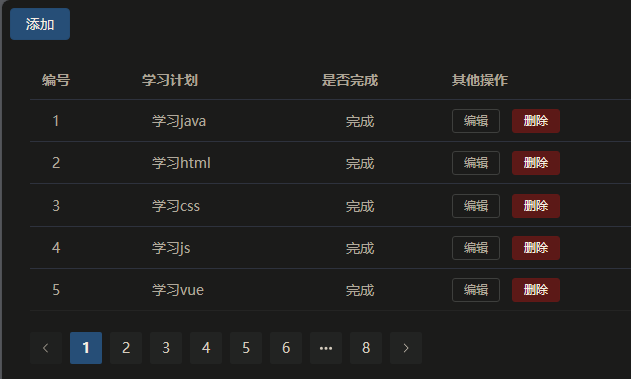
一、案例功能预览
Github 地址 : ssm-integration-part
二、接口分析
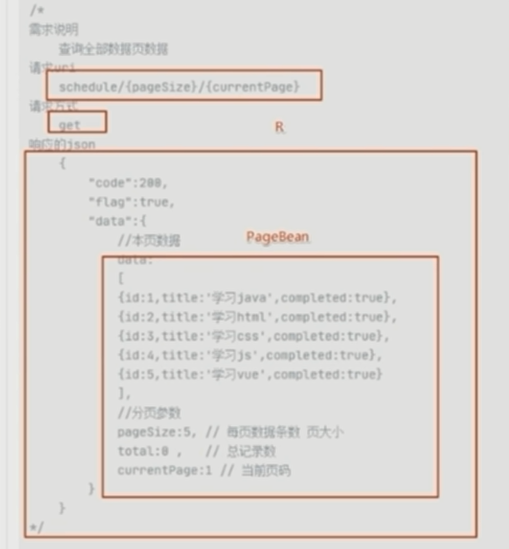
- 学习计划分页查询
/* 需求说明 查询全部数据页数据 请求uri schedule/{pageSize}/{currentPage} 请求方式 get 响应的json { "code":200, "flag":true, "data":{ //本页数据 data: [ {id:1,title:'学习java',completed:true}, {id:2,title:'学习html',completed:true}, {id:3,title:'学习css',completed:true}, {id:4,title:'学习js',completed:true}, {id:5,title:'学习vue',completed:true} ], //分页参数 pageSize:5, // 每页数据条数 页大小 total:0 , // 总记录数 currentPage:1 // 当前页码 } } */- 1
- 2
- 3
- 4
- 5
- 6
- 7
- 8
- 9
- 10
- 11
- 12
- 13
- 14
- 15
- 16
- 17
- 18
- 19
- 20
- 21
- 22
- 23
- 24
- 25
- 26
- 27
- 28
- 学习计划删除
/* 需求说明 根据id删除日程 请求uri schedule/{id} 请求方式 delete 响应的json { "code":200, "flag":true, "data":null } */- 1
- 2
- 3
- 4
- 5
- 6
- 7
- 8
- 9
- 10
- 11
- 12
- 13
- 14
- 学习计划保存
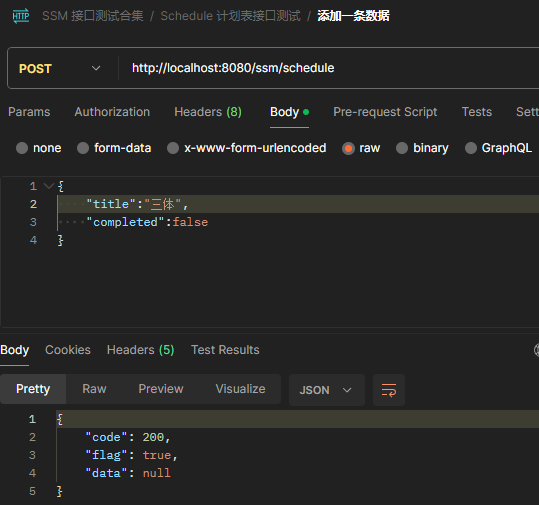
/* 需求说明 增加日程 请求uri schedule 请求方式 post 请求体中的JSON { title: '', completed: false } 响应的json { "code":200, "flag":true, "data":null } */- 1
- 2
- 3
- 4
- 5
- 6
- 7
- 8
- 9
- 10
- 11
- 12
- 13
- 14
- 15
- 16
- 17
- 18
- 19
- 学习计划修改
/* 需求说明 根据id修改数据 请求uri schedule 请求方式 put 请求体中的JSON { id: 1, title: '', completed: false } 响应的json { "code":200, "flag":true, "data":null } */- 1
- 2
- 3
- 4
- 5
- 6
- 7
- 8
- 9
- 10
- 11
- 12
- 13
- 14
- 15
- 16
- 17
- 18
- 19
- 20
三、前端工程导入
vscode 需要用管理员模式启动 下载依赖

npm install //安装依赖 npm run dev //运行测试- 1
- 2
四、后端程序实现和测试
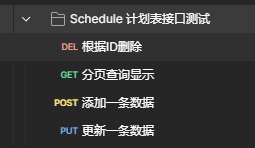
4.1 准备
- 数据库
CREATE TABLE schedule ( id INT NOT NULL AUTO_INCREMENT, title VARCHAR(255) NOT NULL, completed BOOLEAN NOT NULL, PRIMARY KEY (id) ); INSERT INTO schedule (title, completed) VALUES ('学习java', true), ('学习Python', false), ('学习C++', true), ('学习JavaScript', false), ('学习HTML5', true), ('学习CSS3', false), ('学习Vue.js', true), ('学习React', false), ('学习Angular', true), ('学习Node.js', false), ('学习Express', true), ('学习Koa', false), ('学习MongoDB', true), ('学习MySQL', false), ('学习Redis', true), ('学习Git', false), ('学习Docker', true), ('学习Kubernetes', false), ('学习AWS', true), ('学习Azure', false);- 1
- 2
- 3
- 4
- 5
- 6
- 7
- 8
- 9
- 10
- 11
- 12
- 13
- 14
- 15
- 16
- 17
- 18
- 19
- 20
- 21
- 22
- 23
- 24
- 25
- 26
- 27
- 28
- 29
- pojo
@Data public class Schedule { private Integer id; private String title; private Boolean completed; }- 1
- 2
- 3
- 4
- 5
- 6
- 工具类
- com.wake.utils
package com.wake.utils; /** * 返回结果类 */ public class R { private int code = 200; //200成功状态码 private boolean flag = true; //返回状态 private Object data; //返回具体数据 public static R ok(Object data){ R r = new R(); r.data = data; return r; } public static R fail(Object data){ R r = new R(); r.code = 500; //错误码 r.flag = false; //错误状态 r.data = data; return r; } public int getCode() { return code; } public void setCode(int code) { this.code = code; } public boolean isFlag() { return flag; } public void setFlag(boolean flag) { this.flag = flag; } public Object getData() { return data; } public void setData(Object data) { this.data = data; } }- 1
- 2
- 3
- 4
- 5
- 6
- 7
- 8
- 9
- 10
- 11
- 12
- 13
- 14
- 15
- 16
- 17
- 18
- 19
- 20
- 21
- 22
- 23
- 24
- 25
- 26
- 27
- 28
- 29
- 30
- 31
- 32
- 33
- 34
- 35
- 36
- 37
- 38
- 39
- 40
- 41
- 42
- 43
- 44
- 45
- 46
- 47
- 48
- 49
- 50
- 51
- 52
- 53
@Data @NoArgsConstructor @AllArgsConstructor public class PageBean<T> { private int currentPage; // 当前页码 private int pageSize; // 每页显示的数据量 private long total; // 总数据条数 private List<T> data; // 当前页的数据集合 }- 1
- 2
- 3
- 4
- 5
- 6
- 7
- 8
- 9
4.2 功能实现
4.2.1 分页查询显示
- controller
@RestController @RequestMapping("schedule") @Slf4j public class ScheduleController { @Autowired private ScheduleService scheduleService; @GetMapping("/{pageSize}/{currentPage}") public R page(@PathVariable int pageSize, @PathVariable int currentPage) { R r = scheduleService.page(pageSize,currentPage); log.info("查询信息为:{}",r); return r; } }- 1
- 2
- 3
- 4
- 5
- 6
- 7
- 8
- 9
- 10
- 11
- 12
- 13
- 14
- 15
- service
public interface ScheduleService { /** * 分页查询信息 * @param pageSize * @param currentPage * @return */ R page(int pageSize, int currentPage); }- 1
- 2
- 3
- 4
- 5
- 6
- 7
- 8
- 9
- 10
- 11
@Service public class ScheduleServiceImpl implements ScheduleService { @Autowired private ScheduleMapper scheduleMapper; @Override public R page(int pageSize, int currentPage) { PageHelper.startPage(currentPage,pageSize); List<Schedule> scheduleList = scheduleMapper.queryList(); PageInfo<Schedule> info = new PageInfo<>(scheduleList); PageBean<Schedule> data = new PageBean<>(currentPage,pageSize,info.getTotal(),info.getList()); return R.ok(data); } }- 1
- 2
- 3
- 4
- 5
- 6
- 7
- 8
- 9
- 10
- 11
- 12
- 13
- 14
- 15
- 16
- 17
- 18
- 19
- mapper
public interface ScheduleMapper { /** * 查询显示全部计划表信息 * @return */ List<Schedule> queryList(); }- 1
- 2
- 3
- 4
- 5
- 6
- 7
- 8
- 9
<mapper namespace="com.wake.mapper.ScheduleMapper"> <select id="queryList" resultType="com.wake.pojo.Schedule"> select * from schedule select> mapper>- 1
- 2
- 3
- 4
- 5
- result


4.2.2 添加计划
实体类 加上不能为空注解
@Data public class Schedule { private Integer id; @NotBlank private String title; @NotNull private Boolean completed; }- 1
- 2
- 3
- 4
- 5
- 6
- 7
- 8
- controller
@PostMapping public R save(@Validated @RequestBody Schedule schedule, BindingResult result){ if (result.hasErrors()){ return R.fail("参数为空Null!不能保存!"); } R r = scheduleService.add(schedule); return r; }- 1
- 2
- 3
- 4
- 5
- 6
- 7
- 8
- service
@Override public R add(Schedule schedule) { int row = scheduleMapper.insert(schedule); return row > 0 ? R.ok(null) : R.fail(null); }- 1
- 2
- 3
- 4
- 5
- 6
- 7
- Mapper
/** * 增加一条数据 * @param schedule * @return */ int insert(Schedule schedule);- 1
- 2
- 3
- 4
- 5
- 6
- result
4.2.2 删除计划
- controller
@DeleteMapping("/{id}") public R remove(@PathVariable Integer id){ R r = scheduleService.remove(id); return r; }- 1
- 2
- 3
- 4
- 5
- service
/** * 根据ID删除日程 * @param id * @return */ R remove(Integer id);- 1
- 2
- 3
- 4
- 5
- 6
@Override public R remove(Integer id) { int row = scheduleMapper.deleteById(id); if(row > 0){ return R.ok(null); }else{ return R.fail(null); } }- 1
- 2
- 3
- 4
- 5
- 6
- 7
- 8
- 9
- 10
- Mapper
/** * 根据ID删除日程 * @param id * @return */ int deleteById(Integer id);- 1
- 2
- 3
- 4
- 5
- 6
<delete id="deleteById"> delete from schedule where id = #{id} delete>- 1
- 2
- 3
- result


4.2.3 修改计划
- controller
@PutMapping public R update(@Validated @RequestBody Schedule schedule, BindingResult result){ if (result.hasErrors()){ return R.fail("参数为空Null!不能修改!"); } R r = scheduleService.update(schedule); return r; }- 1
- 2
- 3
- 4
- 5
- 6
- 7
- 8
- service
@Override public R update(Schedule schedule) { //判断ID为空 if (schedule.getId() == null){ return R.fail("ID不能为空!"); } int row = scheduleMapper.update(schedule); if (row > 0) { return R.ok(null); } return R.fail(null); }- 1
- 2
- 3
- 4
- 5
- 6
- 7
- 8
- 9
- 10
- 11
- 12
- 13
- 14
- Mapper
<update id="update"> update schedule set title = #{title},completed = #{completed} where id = #{id} update>- 1
- 2
- 3
- result

4.3 前后联调
跨域问题:

前端是 node 服务器
后端是 tomcat 服务器解决:
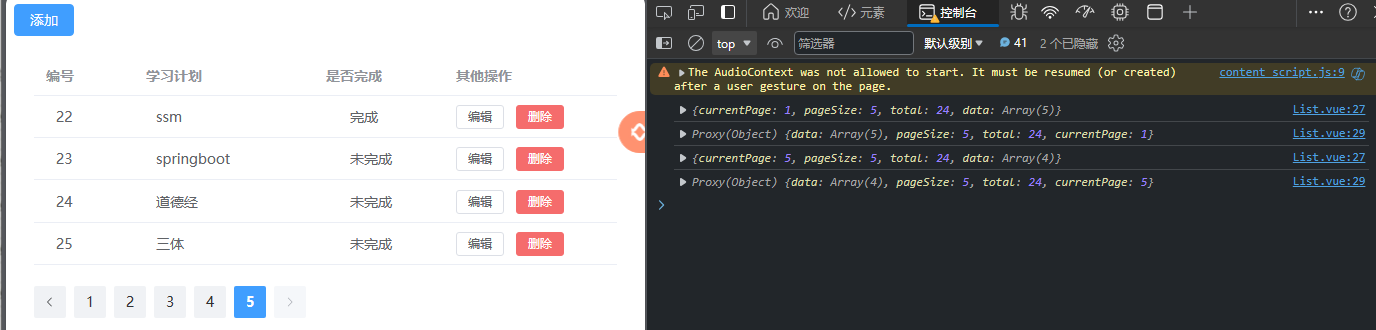
在controller类上加注解*(也可以单独加方法上)*@CrossOrigin //允许其他源访问,浏览器就不会拦截- 1

success!
-
相关阅读:
请说一下浏览器从输入URL 到页面展示这个过程中都经历了什么?你能答出来吗?
springboot基于javaweb的社区留守儿童帮扶系统毕业设计源码101603
scss、less
-2 Hello World 小案例
【RuoYi-Vue-Plus】扩展笔记 05 - CentOS 8 配置 Jenkins + Docker 自动发布
软考高项-项目资源管理的相关概念
Linux的screen工具库实现多终端
MES的发展历程及功能模块
格物云设备接入-MQTT方式
开箱即用,你不可错过的好东西「GitHub 热点速览」
- 原文地址:https://blog.csdn.net/GavinGroves/article/details/136590926
