-
鸿蒙API9+axios封装一个通用工具类
使用方式:
打开Harmony第三方工具仓,找到axios,如图:
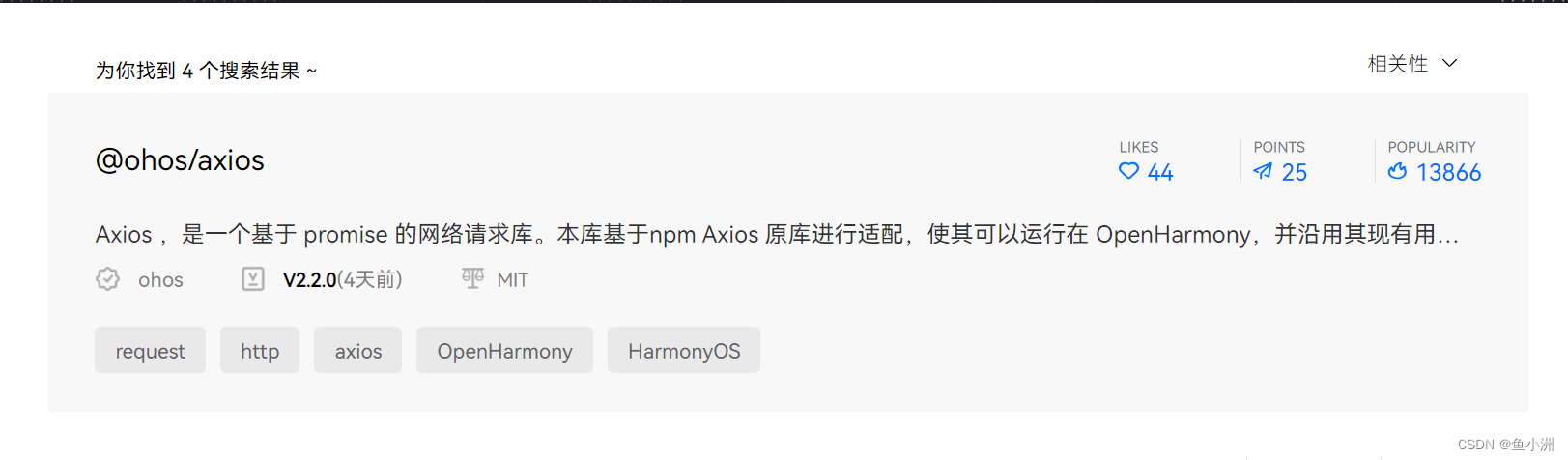
第三方工具仓网址:https://ohpm.openharmony.cn/#/cn/home
在你的项目执行命令:ohpm install @ohos/axios
前提是你已经装好了ohpm ,如果没有安装,可以在官网找到详细的安装教程;注意:不是在你的entry目录下,比如你的项目名称:

在父级目录安装。接着封装工具类,新建一个ts类:
import axios, { AxiosError, AxiosInstance, AxiosResponse, FormData, InternalAxiosRequestConfig } from '@ohos/axios' import defaultAppManager from '@ohos.bundle.defaultAppManager'; import ResultData from './ResultData'; class AxiosUtil { private instance: AxiosInstance; constructor() { this.instance = this.getInstance(); this.addInterceptor(this.instance) } getInstance(): AxiosInstance { const instance = axios.create({ baseURL: "http://127.0.0.1:10001/jianshen" }) return instance; } addInterceptor(instance: AxiosInstance): void { instance.interceptors.request.use((config: InternalAxiosRequestConfig) => { if (config.url.concat('login')) { // 如果是登录路径跳过,其余都需要带上token return config; } else { // 从全局缓存中取token config.headers.set("Authorization", AppStorage.Get("token")) return config; } }, (error: AxiosError) => { return Promise.reject(error); }) instance.interceptors.response.use((response: AxiosResponse) => { if (response.status == 200) { return response.data; } else { return Promise.reject(response.statusText) } }, (error: AxiosError) => { return Promise.reject(error) }) } httpGet(url: string, params: object = {}) { return new Promise((resolve, reject) => { this.instance.get(url, params) .then(response => { resolve(response); }) .catch(error => { reject(error) }) }) } httpPost(url: string, params: object = {}) { return new Promise((resolve, reject) => { this.instance.post(url, params) .then(response => { resolve(response); }) .catch(error => { reject(error) }) }) } httpFileUpload(url: string, formData: FormData) { return new Promise((resolve, reject) => { this.instance.post(url, formData, { headers: { 'Content-Type': 'multipart/form-data' } }) .then(response => { resolve(response); }) .catch(error => { reject(error) }) }) } } const axiosUtil: AxiosUtil = new AxiosUtil(); export default axiosUtil;- 1
- 2
- 3
- 4
- 5
- 6
- 7
- 8
- 9
- 10
- 11
- 12
- 13
- 14
- 15
- 16
- 17
- 18
- 19
- 20
- 21
- 22
- 23
- 24
- 25
- 26
- 27
- 28
- 29
- 30
- 31
- 32
- 33
- 34
- 35
- 36
- 37
- 38
- 39
- 40
- 41
- 42
- 43
- 44
- 45
- 46
- 47
- 48
- 49
- 50
- 51
- 52
- 53
- 54
- 55
- 56
- 57
- 58
- 59
- 60
- 61
- 62
- 63
- 64
- 65
- 66
- 67
- 68
- 69
- 70
- 71
- 72
- 73
- 74
- 75
- 76
- 77
- 78
- 79
- 80
- 81
- 82
- 83
- 84
- 85
- 86
- 87
- 88
如何使用?
import axiosUtil from '../../common/AxiosUtil- 1
然后就可以直接在你的arkts代码中使用了;例如:
// @ts-nocheck import CommonUtil from '../../common/CommonUtil' import ResultData from '../../common/ResultData' import axiosUtil from '../../common/AxiosUtil' import { Banner } from './model/Banner' import { Teacher } from './model/Teacher' @Component @Preview export default struct ShowYePage { @State message: string = '首页' private swiperController: SwiperController = new SwiperController(); @State bannerList: Banner[] = []; @State teacherFilterValue: string = '' @State teacherList: Teacher[] = []; pageIndex: number = 1; pageSize: number = 10; total: number = 0; arr:number[] = [1,2,3,4,5,6,7,8,9,10] build() { Scroll() { Column() { Flex({ justifyContent: FlexAlign.Center }) { // 上面的搜索栏 Search({ placeholder: '支持按教练名称/标签进行查询哦~' }).searchButton("搜索").onSubmit(value => { this.teacherFilterValue = value; }) } .margin({ top: 14 }) // 轮播图 Swiper(this.swiperController) { if (this.bannerList.length > 0) { ForEach(this.bannerList, item => { Image(item.img).height(50).width('100%') }) } else { Text('占位') } } .cachedCount(2) // 设置预加载子组件个数 .index(1) // 设置当前在容器中显示的子组件的索引值 .autoPlay(true) // 子组件是否自动播放 .interval(4000) // 使用自动播放时播放的时间间隔,单位为毫秒 .indicator(true) // 是否启用导航点指示器 .loop(true) // 是否开启循环 .duration(1000) // 子组件切换的动画时长,单位为毫秒 .itemSpace(0) // 设置子组件与子组件之间间隙 .curve(Curve.Linear) // 设置Swiper的动画曲线,默认为淡入淡出曲线 .borderRadius(15) .margin({top:14}) .height(150) .onChange((index: number) => { console.info(index.toString()) }) // 教练列表 Column() { Flex({justifyContent:FlexAlign.Start}){ Text('教练列表').fontSize(24).fontWeight(500).padding({left:14}) }.height(50).width('100%') List() { ForEach(this.teacherList,(item:Teacher)=>{ ListItem() { TeacherComponent({teacher:item}) } }) } .onReachEnd(()=>{ console.log('触底了') }) .onReachStart(()=>{ console.log('上拉了') }) .width('100%') .layoutWeight(1) } .borderRadius({ topLeft: 20, topRight: 20 }) .margin({ top: 20 }) .layoutWeight(1) }.height('100%').width('100%') }.height('100%').width('100%') .padding({ left: 14, right: 14 }) } aboutToAppear() { this.getBannerList(); this.getTeacherList(); } // 支持async和await的用法 async getBannerList() { const result: Banner[] = await axiosUtil.httpPost("banner/list"); this.bannerList = result; } async getTeacherList() { const params = { pageIndex: this.pageIndex, pageSize: this.pageSize, filterValue: this.teacherFilterValue } const result = await axiosUtil.httpPost("teacher/list", params); const teacherList = result.list; this.teacherList = teacherList; this.total = result.total; } } @Component struct TeacherComponent { @State teacher:Teacher = null; build() { Flex({ justifyContent: FlexAlign.Center }) { // 左侧头像 Flex({ justifyContent: FlexAlign.Start }) { Image(this.teacher.avatar).width('100%').height('100%').borderRadius(10) }.margin({ top: 5, bottom: 5, right: 5 }).height('95%').width('30%') // 右侧描述 Flex({justifyContent:FlexAlign.Start,direction:FlexDirection.Column}) { Text(`教练名称:${this.teacher.username}`).fontSize(24).fontWeight(100).fontStyle(FontStyle.Italic) Text(`教练简介:${this.teacher.content}`).fontSize(18).fontWeight(90) Text(`标签:${this.teacher.flag}`).fontSize(14) }.margin({top:5,bottom:5,right:5}).height('100%').width('70%').onClick(()=>{ // 跳转教练详情页面 带参数id console.log(this.teacher.id) }) } .height(150) .width('100%') .borderRadius(20) .margin({bottom:20}) .backgroundColor(Color.White) } }- 1
- 2
- 3
- 4
- 5
- 6
- 7
- 8
- 9
- 10
- 11
- 12
- 13
- 14
- 15
- 16
- 17
- 18
- 19
- 20
- 21
- 22
- 23
- 24
- 25
- 26
- 27
- 28
- 29
- 30
- 31
- 32
- 33
- 34
- 35
- 36
- 37
- 38
- 39
- 40
- 41
- 42
- 43
- 44
- 45
- 46
- 47
- 48
- 49
- 50
- 51
- 52
- 53
- 54
- 55
- 56
- 57
- 58
- 59
- 60
- 61
- 62
- 63
- 64
- 65
- 66
- 67
- 68
- 69
- 70
- 71
- 72
- 73
- 74
- 75
- 76
- 77
- 78
- 79
- 80
- 81
- 82
- 83
- 84
- 85
- 86
- 87
- 88
- 89
- 90
- 91
- 92
- 93
- 94
- 95
- 96
- 97
- 98
- 99
- 100
- 101
- 102
- 103
- 104
- 105
- 106
- 107
- 108
- 109
- 110
- 111
- 112
- 113
- 114
- 115
- 116
- 117
- 118
- 119
- 120
- 121
- 122
- 123
- 124
- 125
- 126
- 127
- 128
- 129
- 130
- 131
- 132
- 133
- 134
- 135
- 136
- 137
- 138
- 139
- 140
- 141
- 142
- 143
到此结束,有任何问题欢迎大佬留言指正
-
相关阅读:
安卓玩机搞机之. 更换内核 .内核比rom重要.了解内核相关
修改ant-design-vue的switch样式,去除顿顿的样式
为什么应该尽可能避免在静态构造函数中初始化静态字段?
短信验证码实现(阿里云)
爬虫HTTP代理:获取多种类型数据的神器
Neo4j安装(Docker中安装Neo4j)
Oracle常用函数
java实现倒水瓶排序
conda常用命令参数,指定版本,依赖库文件,创建虚拟环境,删除,激活,退出,内部安装包,pip通过代理安装包
操作系统内核原理
- 原文地址:https://blog.csdn.net/weixin_43581288/article/details/136680293
