-
CSS 用 flex 布局绘制骰子

- html>
- <html>
- <head>
- <meta charset="utf-8">
- <title>title>
- <style>
- .box {
- height: 100px;
- width: 100px;
- border: 2px solid grey;
- border-radius: 10px;
- display: flex;
- justify-content: center; // 水平居中
- /* align-items: center; */
- }
- .point {
- width: 20px;
- height: 20px;
- border-radius: 50%;
- background: black;
- /* align-self 写在子元素上,覆盖父元素指定的交叉轴对齐方式 */
- align-self: center;
- }
- style>
- head>
- <body>
- <div class="box">
- <div class="point">div>
- div>
- body>
- html>

- html>
- <html>
- <head>
- <meta charset="utf-8">
- <title>title>
- <style>
- .box {
- height: 100px;
- width: 100px;
- border: 2px solid grey;
- border-radius: 10px;
- display: flex;
- /* 主轴改为纵向 */
- flex-direction: column;
- /* 等分 */
- justify-content: space-evenly;
- /* 垂直居中 */
- align-items: center;
- }
- .point {
- width: 20px;
- height: 20px;
- border-radius: 50%;
- background: black;
- }
- style>
- head>
- <body>
- <div class="box">
- <div class="point">div>
- <div class="point">div>
- div>
- body>
- html>
- html>
- <html>
- <head>
- <meta charset="utf-8">
- <title>title>
- <style>
- .box {
- height: 100px;
- width: 100px;
- border: 2px solid grey;
- border-radius: 10px;
- display: flex;
- padding: 10px;
- /* 主轴改为纵向 */
- flex-direction: column;
- /* 子元素间距相等*/
- justify-content: space-between;
- }
- .point {
- width: 25px;
- height: 25px;
- border-radius: 50%;
- background: black;
- }
- .point:nth-child(2) {
- /* 居中对齐 */
- align-self: center;
- }
- .point:nth-child(3) {
- /* 终点对齐 */
- align-self: flex-end;
- }
- style>
- head>
- <body>
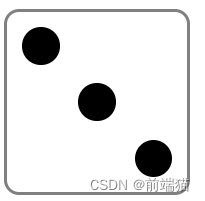
- <div class="box">
- <div class="point">div>
- <div class="point">div>
- <div class="point">div>
- div>
- body>
- html>

- html>
- <html lang="en">
- <head>
- <meta charset="UTF-8" />
- <meta name="viewport" content="width=device-width, initial-scale=1.0" />
- <title>title>
- <style>
- .box {
- margin: 20px;
- height: 100px;
- width: 100px;
- border: 2px solid grey;
- border-radius: 10px;
- padding: 10px;
- box-sizing: border-box;
- display: flex;
- /* 纵向 */
- flex-wrap: wrap;
- /* 相对均匀对齐 */
- align-content: space-between;
- }
- .row {
- /* 空间大小 */
- flex-basis: 100%;
- display: flex;
- justify-content: space-between
- }
- .point {
- border-radius: 50%;
- height: 25px;
- width: 25px;
- background: black;
- }
- style>
- head>
- <body>
- <div class="box">
- <div class="row">
- <div class="point">div>
- <div class="point">div>
- div>
- <div class="row">
- <div class="point">div>
- <div class="point">div>
- div>
- div>
- body>
- html>

- html>
- <html lang="en">
- <head>
- <meta charset="UTF-8" />
- <meta name="viewport" content="width=device-width, initial-scale=1.0" />
- <title>title>
- <style>
- .box {
- margin: 20px;
- height: 100px;
- width: 100px;
- border: 2px solid grey;
- border-radius: 10px;
- padding: 10px;
- box-sizing: border-box;
- /* 容器内元素使用flex布局 */
- display: flex;
- /* 将主轴改为纵向 */
- flex-direction: column;
- /* 主轴(纵向)绝对均匀对齐(子元素间距以及两端边缘间距都相等) */
- justify-content: space-evenly;
- }
- .row1 {
- /* 每行内元素使用flex布局 */
- display: flex;
- /* 主轴(横向)相对均匀对齐 */
- justify-content: space-between;
- }
- .row2 {
- /* 每行内元素使用flex布局 */
- display: flex;
- /* 主轴(横向)居中对齐 */
- justify-content: center;
- }
- .point {
- border-radius: 50%;
- height: 25px;
- width: 25px;
- background: black;
- }
- style>
- head>
- <body>
- <div class="box">
- <div class="row1">
- <div class="point">div>
- <div class="point">div>
- div>
- <div class="row2">
- <div class="point">div>
- div>
- <div class="row1">
- <div class="point">div>
- <div class="point">div>
- div>
- div>
- body>
- html>

- html>
- <html lang="en">
- <head>
- <meta charset="UTF-8" />
- <meta name="viewport" content="width=device-width, initial-scale=1.0" />
- <title>title>
- <style>
- .box {
- margin: 20px;
- height: 100px;
- width: 100px;
- border: 2px solid grey;
- border-radius: 10px;
- padding: 10px;
- box-sizing: border-box;
- /* 容器内元素使用flex布局 */
- display: flex;
- /* 将主轴改为纵向 */
- flex-direction: column;
- /* 主轴(纵向)相对均匀对齐 */
- justify-content: space-between;
- }
- .row {
- /* 每行内元素使用flex布局 */
- display: flex;
- /* 主轴(横向)绝对均匀对齐 */
- justify-content: space-evenly;
- }
- .point {
- border-radius: 50%;
- height: 20px;
- width: 20px;
- background: black;
- }
- style>
- head>
- <body>
- <div class="box">
- <div class="row">
- <div class="point">div>
- <div class="point">div>
- <div class="point">div>
- div>
- <div class="row">
- <div class="point">div>
- <div class="point">div>
- <div class="point">div>
- div>
- <div class="row">
- <div class="point">div>
- <div class="point">div>
- <div class="point">div>
- div>
- div>
- body>
- html>
-
相关阅读:
JavaScript 教程---互联网文档计划
jQuery【事件】
Nacos从0到1(基础篇)
计算机毕业设计(附源码)python疫情隔离便民系统
Java语言Map中GetOrDefault方法的使用
小程序源码:全新外卖侠cps5.6全套微信小程序源码下载-多玩法安装简单
C#:画许多圆
快速搭建Linux网站,并利用内网穿透实现宝塔面板的公网访问【内网穿透】
Web前端中横线:深入探索与实际应用
沁恒 CH32V208(四): CH32V208 网络DHCP示例代码分析
- 原文地址:https://blog.csdn.net/m0_60559048/article/details/136587541
