-
基于Skywalking开发分布式监控(四)一个案例
上一篇我们简单介绍了基于SkyWalking自定义增强的基本架构,即通过把Trace数据导入数据加工模块进行加工,进行持久化,并赋能grafana展示。
现在我们给出一个例子,对于量化交易系统,市场交易订单提交,该订单可以走模拟盘也可以走实盘,可以自动提交,也可以走人工提交,订单提交后,会把交易所给到的订单信息反馈回来。 需要监控的需求很简单:可以按,自动实盘/虚拟盘,人工实盘/虚拟盘订单分类监控,提交和反馈流程,满足指标项:
1 每分钟延时、延时百分位(P50/75/90/95/99 MAX)、每分钟请求数,排名前5的慢请求等监控项(metrics)
2 以及按排名前5的慢请求对应的SPAN进行抓取,分析出最慢的SPAN
那么SW原生监控有啥问题呢?
1 需要根据该流程在不同阶段的特征才能定位该流程,按Trace-Span模型来说,即需要一个Trace链根据不同Span提供的特征才能抓取该Trace,SW并不支持例如 分辨人工/自动订单实际上是按Trace相关EndpointName来的
人工订单走页面,EntrySpan的 endpointName为POST:/api/trade/order/send
但自动订单由程序发起,EntrySpan的 endpointName为“rpc.OrderTradeService.send”而分辨是否走实盘/虚拟盘,则是在后续Span,按tag systemFlag=1或2,来确认

而SW的搜索显然是不支持的- 问题2 反馈消息是根据交易所API生成的,不是一个标准通讯架构,只能根据自定义用户增强(customize-enhance),生成的localSpan形成跟踪链,那SW原生Trace查询根本没法按endpoint名字搜索,只能按tag搜索,然后按时间取定位,效率非常低
- 还有一个上一篇说了,SW对Trace和Span不提供metric聚合项
那增强计算模块怎么解决上述问题
对问题1: 按人工、自动、虚拟、实盘,形成4个搜索项,然后定时(基本)同时执行,把搜索结果叠加到ES索引中,按订单编号trade_id更新索引项,利用ES的向量特征形加上业务标签,供下游按业务标签定位需要的Trace对问题2: 按预先设计的Tag值标识反馈消息,然后按Tag搜索,把搜索结果叠加到ES索引中,按订单编号trade_id更新索引项,利用ES的向量特征形加上业务标签,供下游按业务标签定位需要的Trace
对问题3 按业务标签计算各监控项(metrics),并按时间点汇总最慢的5个Trace,查找Span
我们按配置config来说明
关于问题1,我们配置了4个搜索项"tasks" : [ { #查找按EndpointName=rpc.OrderTradeService.send查找自动订单,并且在ES索引中增加业务标签 businessTag:: Auto "name": "task.QueryTraces", "para" : { "serviceName" : "TradeService", "endpointName" : "rpc.OrderTradeService.send", "businessTag" : { "key": "businessTag", "value": "Auto"}, "tags" : {}, "traces_index" : "traces-" #索引名,xx-后面跟着日期 }, "switch" : "on", #搜索项有效 "interval" : "60" #每隔60秒执行一次 }, { #查找按EndpointName=POST:/api/trade/order/send查找人工订单,并且在ES索引中增加业务标签 businessTag:: manual "name" : "task.QueryTraces", "para" : { "serviceName" : "TradeService", "endpointName" : "POST:/api/trade/order/send", "businessTag" : { "key": "businessTag", "value": "manual"}, "tags" : {}, "traces_index" : "traces-" }, "switch" : "on", "interval" : "60" }, { #查找按tag: systemFlag=1 查找人工订单,并且在ES索引中增加业务标签 systemFlag:: 1 (实盘) "name" : "task.QueryTraces", "para" : { "serviceName" : "TradeService", "endpointName" : "", "businessTag" : { "key": "systemFlag", "value": "sim"}, "tags" : { "key": "systemFlag", "value": "1"}, "traces_index" : "traces-" }, "switch" : "on", "interval" : "60" }, { #查找按tag: systemFlag=2 查找人工订单,并且在ES索引中增加业务标签 systemFlag:: 2 (实盘) "name" : "task.QueryTraces", "para" : { "serviceName" : "TradeService", "endpointName" : "", "businessTag" : { "key": "systemFlag", "value": "RealTime"}, "tags" : { "key": "systemFlag", "value": "2"}, "traces_index" : "traces-" }, "switch" : "on", "interval" : "60" },- 1
- 2
- 3
- 4
- 5
- 6
- 7
- 8
- 9
- 10
- 11
- 12
- 13
- 14
- 15
- 16
- 17
- 18
- 19
- 20
- 21
- 22
- 23
- 24
- 25
- 26
- 27
- 28
- 29
- 30
- 31
- 32
- 33
- 34
- 35
- 36
- 37
- 38
- 39
- 40
- 41
- 42
- 43
- 44
- 45
- 46
- 47
- 48
- 49
task.QueryTraces是查询程序,按每分钟1次的节奏,按Graphql接口查询,需要用到的接口,按ServiceName按SW内置查询searchService接口查ServiceId , 按SW内置查询searchEndpoint接口查EndpointId
然后根据ServiceId , EndpointId调用,或者ServiceId和预置Tag,按SW内置查询接口queryBasicTraces查询相关Traces,注意点如下:
1 查询窗口要注意,也就是要防止Trace形成前执行查询语句,建议做成滑动窗口,可以调节窗口的大小,或者隔几秒多试几次(比如10秒执行3次)
2 要注意应用多页查询,queryBasicTraces有页数限制,一次最多1000条,要查全需要比较完整多页查询结构
查询完更新ES索引之后

很容易根据业务标签,获取我们所需的Traces同理对问题2,我们引入配置文件,实际上我们利用FIX报文msgtype=8 报文的特征来标识反馈消息,然后按ordStatus,表示是否是成交或者订单有效的报文,即按tags msgType=8, ordStatus=2/0 查询相关Traces
{ "name" : "task.QueryTraces", "para" : { "serviceName" : "APIService", "endpointName" : "", "businessTag" : { "key": "OrdStatus", "value": "deal"}, "tags" : [{ "key": "msgType", "value": "8"},{"key": "ordStatus","value": "2"}], "traces_index" : "traces-" }, "switch" : "on", "interval" : "60" }, { "name" : "task.TracesQueryInfo", "para" : { "serviceName" : "APIService", "endpointName" : "", "businessTag" : { "key": "OrdStatus", "value": "effect"}, "tags" : [{ "key": "msgType", "value": "8"},{"key": "ordStatus","value": "0"}], "traces_index" : "traces-" }, "switch" : "on", "interval" : "60" },- 1
- 2
- 3
- 4
- 5
- 6
- 7
- 8
- 9
- 10
- 11
- 12
- 13
- 14
- 15
- 16
- 17
- 18
- 19
- 20
- 21
- 22
- 23
- 24
对于问题3,我们配置两种计算模块: 一是 task.Caculator用于计算各类Metrics,与SW无关,二是 task.SpanInfo计算 ES索引库中 按大于95%分位数延时的慢Traces,逐条查找全部Span
{ # 按业务标签查人工实盘的订单traces(businessTag=manual,systemFlag=RealTime),计算监控项 "name": "task.Caculator", "para" : { "businessTags" :[{ "key": "businessTag", "value": "manual"},{"key": "systemFlag","value": "RealTime"}], "traces_index" : "traces-", # 源索引 "stat_index" : "traces_index-" #监控项索引 }, "switch" : "on", "interval" : "60", "delay" : 10 # 比源索引执行慢10秒 }, { # 按业务标签查自动虚拟盘的订单traces(businessTag=auto,systemFlag=sim),计算监控项 "name": "task.Caculator", "para" : { "businessTags" :[{ "key": "businessTag", "value": "Auto"},{"key": "systemFlag","value": "sim"}], "traces_index" : "traces-", "stat_index" : "traces_index-" }, "switch" : "on", "interval" : "60", "delay" : 10 }, { # 按业务标签查自动实盘的订单traces(businessTag=auto,systemFlag=Realtime),计算监控项 "name": "task.Caculator", "para" : { "businessTags" :[{ "key": "businessTag", "value": "Auto"},{"key": "systemFlag","value": "RealTime"}], "traces_index" : "traces-", "stat_index" : "traces_index-" }, "switch" : "on", "interval" : "60", "delay" : 10 }, { # 按业务标签查反馈提交有效订单(OrdStatus=effect,systemFlag=Realtime),计算监控项 "name": "task.Caculator", "para" : { "businessTags" : { "key": "OrdStatus", "value": "effect"}, "traces_index" : "traces-", "stat_index" : "traces_index-" }, "switch" : "on", "interval" : "60", "delay" : 10 }, { # 计算 ES索引库中 按大于95%分位数延时的慢Traces,逐条查找全部Span "name": "task.SpanInfo", "para" : { "percentile" : 0.95, "traces_index" : "traces-", "span_index" : "traces_index-" }, "switch" : "on", "interval" : "60", "delay" : 10 }- 1
- 2
- 3
- 4
- 5
- 6
- 7
- 8
- 9
- 10
- 11
- 12
- 13
- 14
- 15
- 16
- 17
- 18
- 19
- 20
- 21
- 22
- 23
- 24
- 25
- 26
- 27
- 28
- 29
- 30
- 31
- 32
- 33
- 34
- 35
- 36
- 37
- 38
- 39
- 40
- 41
- 42
- 43
- 44
- 45
- 46
- 47
- 48
- 49
- 50
- 51
- 52
- 53
- 54
- 55
我们看一下订单提交计算结果索引

以及慢Trace相关Span的索引

关于task.QueryTraces,task.Caculator,task.SpanInfo,主要代码如下
task.QueryTracespublic class QueryTraces extends AbstractTraceQuery implements TaskService,Runnable{ private static final Lock lock = new ReentrantLock(); //对不同任务的竞争性资源加锁 ObjectMapper objectMapper = new ObjectMapper(); String serviceName,serviceId,endpointName,endpointId,traces_index; ArrayNode businessTags; JsonNode businessTag,tags; DatasourceService datasource; TargetdbService targetdb; @Override public void run() { logger.info("QueryInfo begin..."); if("".equals(serviceId)){ //防止获取不到serviceId serviceId=this.datasource.queryServiceId(serviceName); if("".equals(serviceId)){ //第二次获取不成功就终止线程 logger.error("query serviceId fail"); return; } } if(endpointName.equals("")){ //检查tags是否为空,为空就终止线程 if(tags.isNull() || tags.isMissingNode()) { logger.error("endpointName & tags is both empty"); return; } } else{ if("".equals(endpointId)){ //防止获取不到endpointId endpointId=this.datasource.queryEndPointId(endpointName,serviceName); if("".equals(endpointId)){ //第二次获取不成功就终止线程 logger.error("query endpointId fail"); return; } } } targetdb.createForm(traces_index); String endTime=getTimeEndPoint(1,40); String startTime=getTimeEndPoint(3,41); int retry=3; //重试次数 int lastArraylistSize=0; ArrayNode traceList= JsonNodeFactory.instance.arrayNode(); logger.info("QueryInfo startTime:: {} endTime:: {}",startTime,endTime); try{ while(retry>0){ //查询SW的traces数据,注意有可能需要分页查询 traceList=getMultiPageResult(datasource,serviceId,endpointId,startTime,endTime,tags); logger.info("traceList:: {} retry:: {}",traceList.toString(),retry); if(traceList.size()>lastArraylistSize){ //如果查到结果,打业务标签,并按TraceId调批量更新目标库 lastArraylistSize=traceList.size(); Map<String, List<Map<String,Object>>> traceMap = genTraceMap(businessTags, traceList); //结果集合 targetdb.updateDate(traces_index,traceMap); //打时间戳 logger.info("TracesQuery update is done. {}",System.currentTimeMillis()); } try { // 暂停执行5秒钟 Thread.sleep(5000); } catch (InterruptedException e) { e.printStackTrace(); } retry--; } }catch (Exception e) { e.printStackTrace(); return; } } @Override public void init(JsonNode paraData, DatasourceService datasourceService, TargetdbService targetdbService) { ...... } }- 1
- 2
- 3
- 4
- 5
- 6
- 7
- 8
- 9
- 10
- 11
- 12
- 13
- 14
- 15
- 16
- 17
- 18
- 19
- 20
- 21
- 22
- 23
- 24
- 25
- 26
- 27
- 28
- 29
- 30
- 31
- 32
- 33
- 34
- 35
- 36
- 37
- 38
- 39
- 40
- 41
- 42
- 43
- 44
- 45
- 46
- 47
- 48
- 49
- 50
- 51
- 52
- 53
- 54
- 55
- 56
- 57
- 58
- 59
- 60
- 61
- 62
- 63
- 64
- 65
- 66
- 67
- 68
- 69
- 70
- 71
- 72
- 73
- 74
- 75
- 76
- 77
- 78
- 79
- 80
- 81
- 82
- 83
- 84
- 85
- 86
- 87
- 88
- 89
task.Caculator
public class Caculator extends AbstractTraceQuery implements TaskService,Runnable { private final static Logger logger = LoggerFactory.getLogger(TracesQueryInfo.class); private static final Lock lock = new ReentrantLock(); //对不同任务的竞争性资源加锁 String traces_index, stat_index; ArrayNode businessTags; JsonNode businessTag; DatasourceService datasource; TargetdbService targetdb; private Map<String,Object> traceProcess(Map<String,Object> sourceMap){ //处理traces查询结果 AtomicInteger durationSum= new AtomicInteger(); AtomicInteger count= new AtomicInteger(); AtomicInteger maxDuration=new AtomicInteger(); double durationAvg,p50,p75,p90,p95,p99; ArrayList<Integer> durationArray = new ArrayList<>();; //延时集合,用于计算分位数 sourceMap.entrySet().stream().forEach((Map.Entry<String,Object> entry) -> { count.getAndIncrement(); String traceId = entry.getKey(); System.out.println("traceId::" + traceId); Integer duration = (int) Double.parseDouble(entry.getValue().toString()); durationSum.addAndGet(duration); if (duration > maxDuration.get()) { maxDuration.getAndSet(duration); } durationArray.add(duration); }); durationAvg=(durationSum.get())/(count.get()); p50=percentile(durationArray.toArray(new Integer[durationArray.size()]),0.5); p75=percentile(durationArray.toArray(new Integer[durationArray.size()]),0.75); p90=percentile(durationArray.toArray(new Integer[durationArray.size()]),0.90); p95=percentile(durationArray.toArray(new Integer[durationArray.size()]),0.95); p99=percentile(durationArray.toArray(new Integer[durationArray.size()]),0.99); Map<String,Object> resultMap = new HashMap<>(); resultMap.put("max_resp",maxDuration.get()); resultMap.put("mean_resp",durationAvg); resultMap.put("count",count.get()); resultMap.put("p50",p50); resultMap.put("p75",p75); resultMap.put("p90",p90); resultMap.put("p95",p95); resultMap.put("p99",p99); return resultMap; } @Override public void run() { if(targetdb.isExisted(traces_index)){ logger.info("TracesStatInfo begin..."); String endTime =getTimeUtcEndPoint(1,30); String startTime=getTimeUtcEndPoint(2,31); logger.info("startTime:: {} endTime:: {}",startTime,endTime); try{ // 在es trace表中,按bussinesTagList 查找local_time_stamp在当前时间范围内的记录 logger.info("statQuery queryDate begins ... {}",System.currentTimeMillis()); Map<String, Object> dataMap=targetdb.queryData(traces_index,businessTags,startTime,endTime,"duration"); Map<String, Object> resMap = new HashMap<>(); if(null!=dataMap) { //Map<String, Object> resMap = new HashMap<>(); logger.info("TracesStatInfo resultMap:: {} ", dataMap.toString()); resMap = traceProcess(dataMap); // targetdb.createForm(stat_index); //targetdb.insertDate(stat_index, seqNo, resMap); }else{ //找不到置0 logger.info("StatInfo resultMap is null "); resMap.put("max_resp", 0); resMap.put("mean_resp", 0); resMap.put("count", 0); resMap.put("p50", 0); resMap.put("p75", 0); resMap.put("p90", 0); resMap.put("p95", 0); resMap.put("p99", 0); } //打业务标签和时间戳 resMap = getMapWithTags(businessTags, resMap); String seqNo = generateSeqNo(); //生成序号 // 加锁 lock.lock(); targetdb.createForm(stat_index); targetdb.insertDate(stat_index, seqNo, resMap) }catch(Exception e){ e.printStackTrace(); return; }finally { // 释放锁 lock.unlock(); } }else{ logger.info("trace_index {} is not existed",traces_index); } } @Override public void init(JsonNode paraData, DatasourceService datasourceService, TargetdbService targetdbService) { ..... } }- 1
- 2
- 3
- 4
- 5
- 6
- 7
- 8
- 9
- 10
- 11
- 12
- 13
- 14
- 15
- 16
- 17
- 18
- 19
- 20
- 21
- 22
- 23
- 24
- 25
- 26
- 27
- 28
- 29
- 30
- 31
- 32
- 33
- 34
- 35
- 36
- 37
- 38
- 39
- 40
- 41
- 42
- 43
- 44
- 45
- 46
- 47
- 48
- 49
- 50
- 51
- 52
- 53
- 54
- 55
- 56
- 57
- 58
- 59
- 60
- 61
- 62
- 63
- 64
- 65
- 66
- 67
- 68
- 69
- 70
- 71
- 72
- 73
- 74
- 75
- 76
- 77
- 78
- 79
- 80
- 81
- 82
- 83
- 84
- 85
- 86
- 87
- 88
- 89
- 90
- 91
- 92
- 93
- 94
- 95
- 96
- 97
- 98
- 99
- 100
- 101
- 102
- 103
- 104
- 105
- 106
- 107
- 108
- 109
- 110
- 111
- 112
- 113
- 114
- 115
- 116
- 117
- 118
- 119
- 120
- 121
- 122
- 123
task.SpanInfo
public class SpanInfo extends AbstractTraceQuery implements TaskService,Runnable{ private final static Logger logger = LoggerFactory.getLogger(SpanQueryInfo.class); private static final Lock lock = new ReentrantLock(); //对不同任务的竞争性资源加锁 String traces_index, span_index; DatasourceService datasource; TargetdbService targetdb; double percentile; private Map<String,Object> findTraces(Map<String,Object> sourceMap,double percentile){ ArrayList<Integer> durationArray = new ArrayList<>();; //延时集合,用于计算分位数 Map<String,Object> resultMap = new HashMap<>(); //结果集合 //计算percentile分位 sourceMap.entrySet().stream().forEach((Map.Entry<String,Object> entry) ->{ Integer duration = (int) Double.parseDouble(entry.getValue().toString()); durationArray.add(duration); }); double percentileData = percentile(durationArray.toArray(new Integer[0]), percentile); logger.info("percentileData:: {}",percentileData); //查找超过percentile的traceId sourceMap.entrySet().stream().forEach((Map.Entry<String,Object> entry) ->{ double duration = (double) Double.parseDouble(entry.getValue().toString()); if(duration>=percentileData){ String traceId=entry.getKey().toString(); resultMap.put(traceId,duration); } }); return resultMap; } @Override public void run() { logger.info("SpanInfo begin..."); //建表 targetdb.createForm(span_index); try{ logger.info("SpanInfo try begin..."); //找到当前trace_index索引中所有高出95%的值的traceId集合 Map<String, Object> dataMap=targetdb.queryAllData(traces_index,"duration"); if(null!=dataMap) { logger.info("SpanInfo resultMap:: {} ", dataMap.toString()); //查找高于percentile分位数的值 Map<String, Object> resMap = findTraces(dataMap, percentile); logger.info("spanInfo foundedMap:: {} ", resMap.toString()); //遍历查询结果,如果span_index中不存在,则查询span后插入span_index resMap.entrySet().stream().forEach((Map.Entry<String, Object> entry) -> { String traceId = entry.getKey(); if (targetdb.isNotInTheIndex(span_index, "traceId", traceId)) { //按traceId查询span ArrayNode spanList = datasource.getTraceSpans(traceId); Map<String, List<Map<String, Object>>> spansMap = genSpanMap(traceId, spanList); //组成SpanList //插入span_index targetdb.updateDate(span_index, spansMap); } }); }else{ logger.info("SpanInfo resultMap is null "); } }catch(Exception e){ e.printStackTrace(); return; } } @Override public void init(JsonNode paraData, DatasourceService datasourceService, TargetdbService targetdbService) { .... } }- 1
- 2
- 3
- 4
- 5
- 6
- 7
- 8
- 9
- 10
- 11
- 12
- 13
- 14
- 15
- 16
- 17
- 18
- 19
- 20
- 21
- 22
- 23
- 24
- 25
- 26
- 27
- 28
- 29
- 30
- 31
- 32
- 33
- 34
- 35
- 36
- 37
- 38
- 39
- 40
- 41
- 42
- 43
- 44
- 45
- 46
- 47
- 48
- 49
- 50
- 51
- 52
- 53
- 54
- 55
- 56
- 57
- 58
- 59
- 60
- 61
- 62
- 63
- 64
- 65
- 66
- 67
- 68
- 69
- 70
- 71
- 72
- 73
- 74
- 75
- 76
- 77
- 78
- 79
- 80
- 81
- 82
- 83
- 84
- 85
完成索引持久化后,就可以以grafana访问ES库形成展示,这部分不展开,看一下效果
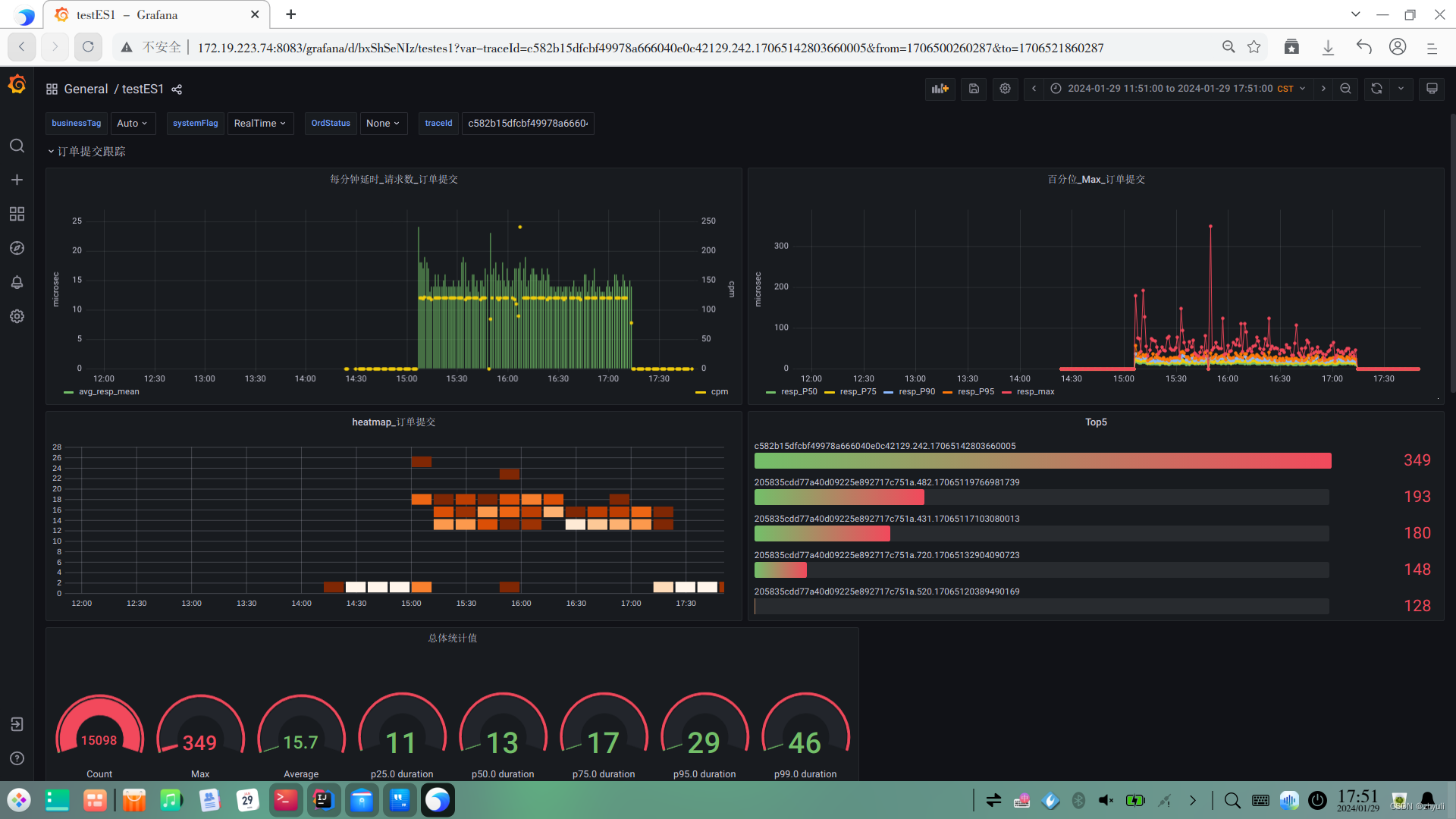

姑且算抛砖引玉吧,希望各位大佬也分享一下方案
-
相关阅读:
08 MyBatis 注解开发
SQL基础知识
三位数的IMU长什么样?二位数的呢?不要钱的呢?| 为FishBot配置IMU惯性测量单元
Maven配置阿里云中央仓库settings.xml
【2023七夕】星河漫舞,七夕的璀璨之夜。分享:七夕表白的前端特效(附完整原代码+详细注释),情不知何起,却一往情深。愿天下有情人终成眷属
荐书丨《好奇心的秘密》:一个针尖上可以站多少跳舞的小天使?
题解 Codeforces Round #811 (Div. 3)
【Yann LeCun点赞B站UP主使用Minecraft制作的红石神经网络】
wifi管理软件 WiFi Signal mac中文介绍
JavaScript(Array,String,window对象)入门
- 原文地址:https://blog.csdn.net/zhyuli/article/details/136508021
