-
c语言游戏实战(10):坤坤的篮球回避秀
前言:
这款小游戏是博主耗时两天半完成的,玩家需要控制坤坤在游戏界面上移动,来躲避游戏界面上方不断掉下来的篮球。本游戏使用C语言和easyx图形库编写,旨在帮助初学者了解游戏开发的基本概念和技巧。
在开始编写代码之前,我们需要先了解一下游戏的基本规则和功能:
游戏界面:游戏界面是一个矩形区域,玩家可以在这个区域内控制球的移动。
坤坤:玩家控制的坤坤可以在游戏界面内自由移动,按下特定的按键后可以跳跃。
篮球:篮球在游戏界面的正上方源源不断地生成,并下降。
坤坤触碰篮球:当坤坤触碰到上方掉下来的篮球时,坤坤的血量就会降低一格,一共五格血量降完为止。
接下来,我们将通过以下几个步骤来实现这个游戏:
1. 初始化游戏界面和模型的信息。
2. 处理键盘输入,实现玩家控制坤坤的移动和跳跃。
3. 生成足够数量的篮球。
4. 生成篮球,并控制其移动。
5. 检测篮球与坤坤之间的触碰关系,并减少相应的血量。
通过学习这个游戏的开发过程,初学者将能够掌握C语言编程和easyx图形库的基本技巧。
1. 前期准备
第一步:我们需要在easyx官网下载好easyx图形库。(具体操作可以去b站搜索相关视频)
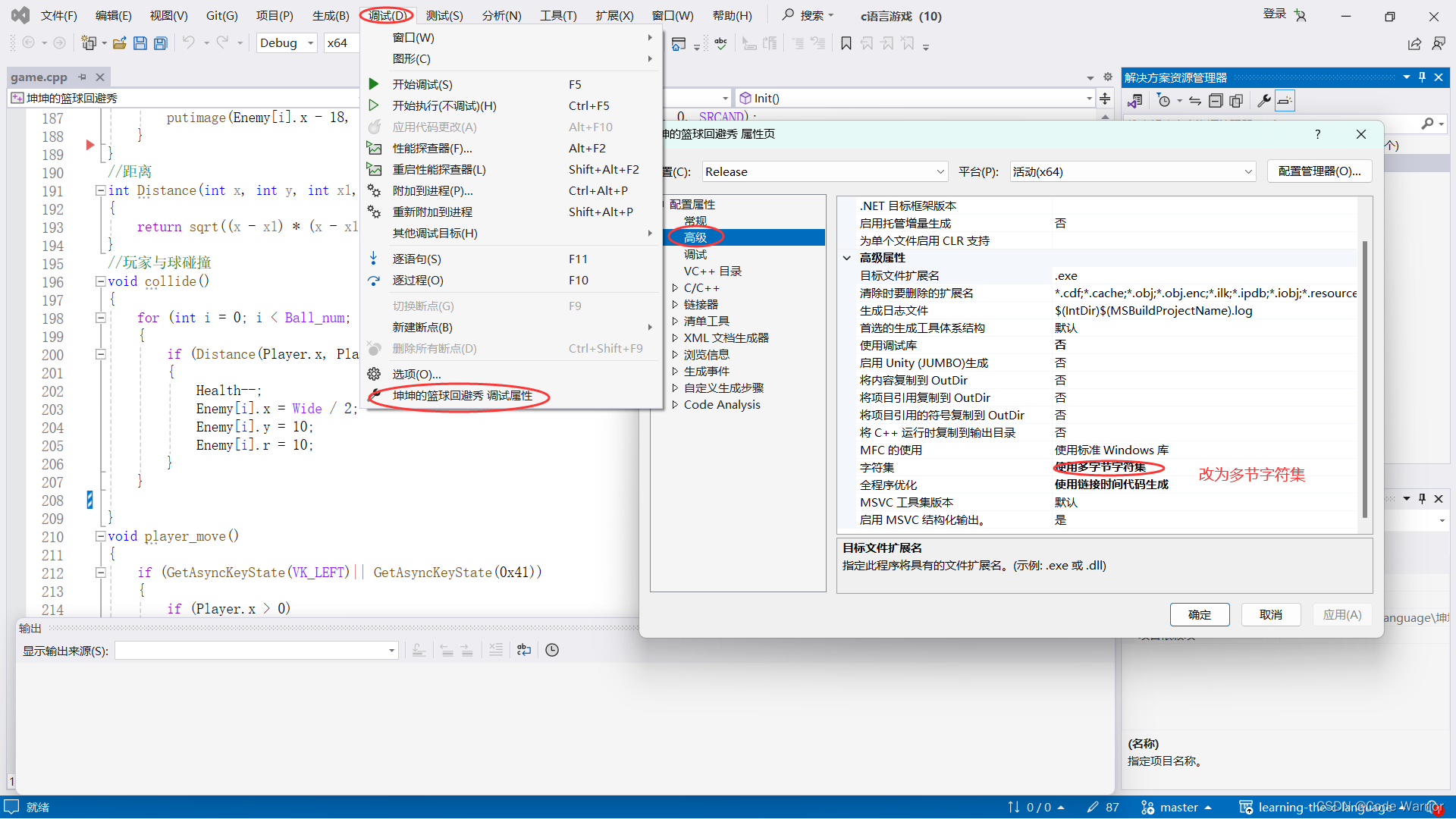
第二步:按照下图的步骤将字符集改为多节字符集,因为如果使用的字符集只包含有限数量的字符,可能无法支持所有需要的字符,导致无法正确加载图像。因此,将字符集改为多字符集可以确保包含所有可能需要的字符,从而避免加载图像时出现错误或乱码问题。
2. 游戏的背景设置
游戏界面的长和宽根据背景图片的长宽(右键点击图片的属性可以查看)来设置,这里的背景图片有两张一张是游戏界面,另一张是游戏结束的图片。这里首先需要声明一个IMAGE类型的变量来存储加载的图片数据。这是后续对图片进行处理的基础,利用函数loadimage可以从本地文件中加载图片(尽量将游戏所需要的素材放在和代码的同一个目录里),最后利用putimage可以将图片绘制到窗口上来。
- int main()
- {
- Init();
- Itset();
- //设置窗口的长宽
- initgraph(Wide, Hight);
- //缓冲
- BeginBatchDraw();
- while (1)
- {
- show();
- //刷新
- FlushBatchDraw();
- }
- closegraph;
- return 0;
- }
- //声明IMAGE类型的变量
- IMAGE img[2];
- //加载图片
- loadimage(&img[0], "resource/微信图片_20240222202456.jpg");
- loadimage(&img[1], "resource/微信图片_20240303132408.jpg");
- //绘制图片
- putimage(0, 0, &img[Img]);
3. 初始模型的信息
在这里篮球和坤坤的模型都是球,只是后面用图片覆盖而已。首先在游戏游戏界面的正上方生成多个球(具体数量自己定),然后在游戏的下方生成一个玩家控制的球,最后就是加载图片了。
初始化小球
- void Itset()
- {
- //
- for (int i = 0; i < Ball_num; i++)
- {
- Enemy[i].x = Wide / 2;
- Enemy[i].y = 10;
- Enemy[i].r = 10;
- }
- //玩家
- Player.x = Wide / 2;
- Player.r = 10;
- Player.y = Hight - Player.r * 4;
- }
加载图片
因为loadimage函数只能加载图片,加载不了视频或者动图,所以我们需要将视频一帧一帧的加载上去,然后用循环绘制图片,这样就产生了一个动图的效果。
- IMAGE kunkun[58];
- IMAGE ball[Ball_num];
- loadimage(&kunkun[0], "resource/2月22日.png", 34, 34);
- loadimage(&kunkun[1], "resource/2月22日(1).png", 34, 34);
- loadimage(&kunkun[2], "resource/2月22日(2).png", 34, 34);
- loadimage(&kunkun[3], "resource/2月22日(3).png", 34, 34);
- loadimage(&kunkun[4], "resource/2月22日(4).png", 34, 34);
- loadimage(&kunkun[5], "resource/2月22日(5).png", 34, 34);
- loadimage(&kunkun[6], "resource/2月22日(6).png", 34, 34);
- loadimage(&kunkun[7], "resource/2月22日(7).png", 34, 34);
- loadimage(&kunkun[8], "resource/2月22日(8).png", 34, 34);
- loadimage(&kunkun[9], "resource/2月22日(9).png", 34, 34);
- loadimage(&kunkun[10], "resource/2月22日(10).png", 34, 34);
- loadimage(&kunkun[11], "resource/2月22日(11).png", 34, 34);
- loadimage(&kunkun[12], "resource/2月22日(12).png", 34, 34);
- loadimage(&kunkun[13], "resource/2月22日(13).png", 34, 34);
- loadimage(&kunkun[14], "resource/2月22日(14).png", 34, 34);
- loadimage(&kunkun[15], "resource/2月22日(15).png", 34, 34);
- loadimage(&kunkun[16], "resource/2月22日(16).png", 34, 34);
- loadimage(&kunkun[17], "resource/2月22日(17).png", 34, 34);
- loadimage(&kunkun[18], "resource/2月22日(18).png", 34, 34);
- loadimage(&kunkun[19], "resource/2月22日(19).png", 34, 34);
- loadimage(&kunkun[20], "resource/2月22日(20).png", 34, 34);
- loadimage(&kunkun[21], "resource/2月22日(21).png", 34, 34);
- loadimage(&kunkun[22], "resource/2月22日(22).png", 34, 34);
- loadimage(&kunkun[23], "resource/2月22日(23).png", 34, 34);
- loadimage(&kunkun[24], "resource/2月22日(24).png", 34, 34);
- loadimage(&kunkun[25], "resource/2月22日(25).png", 34, 34);
- loadimage(&kunkun[26], "resource/2月22日(26).png", 34, 34);
- loadimage(&kunkun[27], "resource/2月22日(27).png", 34, 34);
- loadimage(&kunkun[28], "resource/2月22日(28).png", 34, 34);
- loadimage(&kunkun[29], "resource/2月22日(29).png", 34, 34);
- loadimage(&kunkun[30], "resource/2月22日(30).png", 34, 34);
- loadimage(&kunkun[31], "resource/2月22日(31).png", 34, 34);
- loadimage(&kunkun[32], "resource/2月22日(32).png", 34, 34);
- loadimage(&kunkun[33], "resource/2月22日(33).png", 34, 34);
- loadimage(&kunkun[34], "resource/2月22日(34).png", 34, 34);
- loadimage(&kunkun[35], "resource/2月22日(35).png", 34, 34);
- loadimage(&kunkun[36], "resource/2月22日(36).png", 34, 34);
- loadimage(&kunkun[37], "resource/2月22日(37).png", 34, 34);
- loadimage(&kunkun[38], "resource/2月22日(38).png", 34, 34);
- loadimage(&kunkun[39], "resource/2月22日(39).png", 34, 34);
- loadimage(&kunkun[40], "resource/2月22日(40).png", 34, 34);
- loadimage(&kunkun[41], "resource/2月22日(41).png", 34, 34);
- loadimage(&kunkun[42], "resource/2月22日(42).png", 34, 34);
- loadimage(&kunkun[43], "resource/2月22日(43).png", 34, 34);
- loadimage(&kunkun[44], "resource/2月22日(44).png", 34, 34);
- loadimage(&kunkun[45], "resource/2月22日(45).png", 34, 34);
- loadimage(&kunkun[46], "resource/2月22日(46).png", 34, 34);
- loadimage(&kunkun[47], "resource/2月22日(47).png", 34, 34);
- loadimage(&kunkun[48], "resource/2月22日(48).png", 34, 34);
- loadimage(&kunkun[49], "resource/2月22日(49).png", 34, 34);
- loadimage(&kunkun[50], "resource/2月22日(50).png", 34, 34);
- loadimage(&kunkun[51], "resource/2月22日(51).png", 34, 34);
- loadimage(&kunkun[52], "resource/2月22日(52).png", 34, 34);
- loadimage(&kunkun[53], "resource/2月22日(53).png", 34, 34);
- loadimage(&kunkun[54], "resource/2月22日(54).png", 34, 34);
- loadimage(&kunkun[55], "resource/2月22日(55).png", 34, 34);
- loadimage(&kunkun[56], "resource/2月22日(56).png", 34, 34);
- for (int i = 0; i < Ball_num; i++)
- {
- loadimage(&ball[i], "resource/5459.png_860.png", 36, 36);
- }
4. 绘制图片
图片是需要根据球来移动的,所以putimage函数的格式应该为:
putimage(x, y, Wide, Hight, &kunkun[a], 0, 0,SRCAND);x, y:图像左上角在窗口中的坐标。Wide, Hight:要绘制的图像的宽度和高度。&kunkun[a]:指向图像数据数组的指针,a是数组中图像数据的索引。0, 0:源图像中要复制的区域的左上角坐标。
这样图片的位置就可以根据球的为止移动了。
- void show()
- {
- srand((unsigned)time(NULL));
- //清屏函数
- cleardevice();
- //setbkcolor(WHITE);
- putimage(0, 0, &img[Img]);
- putimage(0, 0, &Heal[Health], SRCAND);
- for (int i = 0; i < Ball_num; i++)
- {
- setfillcolor(RGB(229, 124, 77));
- solidcircle(Enemy[i].x, Enemy[i].y, Enemy[i].r);
- }
- putimage(Player.x - 14, Player.y - 14, Wide, Hight, &kunkun[a], 0, 0,SRCAND);
- for (int i = 0; i < Ball_num; i++)
- {
- putimage(Enemy[i].x - 18, Enemy[i].y - 18, Wide, Hight, &ball[i], 0, 0, SRCAND);
- }
- }
5. 篮球的移动
随机生成8个随机数,然后根据这八个随机数在执行向下移动的同时执行向左或向右的指令。为了防止篮球的移动速度太快,我们需要加一个Sleep(10)函数给它降速。当篮球移动出游戏界面的时候我们让它重新生成。
- void Enemy_move()
- {
- srand((unsigned)time(NULL));
- for (int i = 0; i < Ball_num; i++)
- {
- int direction = rand() % 8;
- if (direction == 0)
- {
- Enemy[i].y++;
- Enemy[i].x--;
- }
- else if (direction == 1)
- {
- Enemy[i].y++;
- Enemy[i].x++;
- }
- else if (direction == 2)
- {
- Enemy[i].y += 2;
- Enemy[i].x += 2;
- }
- else if (direction == 3)
- {
- Enemy[i].y += 2;
- Enemy[i].x -= 2;
- }
- else if (direction == 4)
- {
- Enemy[i].y += 3;
- Enemy[i].x += 3;
- }
- else if (direction == 5)
- {
- Enemy[i].y += 3;
- Enemy[i].x -= 3;
- }
- else if (direction == 6)
- {
- Enemy[i].y += 4;
- Enemy[i].x -= 4;
- }
- else if (direction == 7)
- {
- Enemy[i].y += 4;
- Enemy[i].x += 4;
- }
- if (Enemy[i].x <0 || Enemy[i].x>Wide || Enemy[i].y > Hight - Player.r * 3)
- {
- Enemy[i].x = Wide / 2;
- Enemy[i].y = 10;
- Enemy[i].r = 10;
- }
- }
- }
6. 玩家与球碰撞
生成游戏血条,每碰撞一次血条减少,并且重新生成篮球。
- IMAGE Heal[6];
- loadimage(&Heal[5], "resource/微信图片_20240303142935.jpg");
- loadimage(&Heal[4], "resource/微信图片_20240303142958.jpg");
- loadimage(&Heal[3], "resource/微信图片_20240303142931.jpg");
- loadimage(&Heal[2], "resource/微信图片_20240303142926.jpg");
- loadimage(&Heal[1], "resource/微信图片_20240303142922.jpg");
- //玩家与球碰撞
- void collide()
- {
- for (int i = 0; i < Ball_num; i++)
- {
- if (Distance(Player.x, Player.y, Enemy[i].x, Enemy[i].y) < Player.r + Enemy[i].r && Health > 0)
- {
- Health--;
- Enemy[i].x = Wide / 2;
- Enemy[i].y = 10;
- Enemy[i].r = 10;
- }
- }
- }
7. 人物的移动
在这里需要用到GetAsyncKeyState(vk virtual key)函数获取异步按键状态,其中vk virtual key是虚拟键值,如果接受到这个虚拟键值,它会返回真。VK_UP、VK_LEFT、VK_RIGHT、0x20、0x41、0x44、0x57分别是上箭头键、左箭头键、右箭头键、空格键、a、d、w的虚拟键值。最后这里比较难处理的就是跳跃的这个动作了,我在这里设置人物跳跃后最高上升60个像素格,然后通过while循环循环上升每次上升5个像素个,如果是直接上升60个像素格的话,就是闪现了达不到跳跃的效果,在人物上升的同时其他动作是任然要进行的,所以我们还需要将这些动作函数打包放到这个人物跳跃的while循环当中。值得注意的是我们还需要在这个while循环中加一个Sleep(20)调节循环速度,使这里运动速度与主函数的while循环的运动速度一致。
- void player_move()
- {
- if (GetAsyncKeyState(VK_LEFT)|| GetAsyncKeyState(0x41))
- {
- if (Player.x > 0)
- Player.x -= Player_sleep;
- }
- if (GetAsyncKeyState(VK_RIGHT)|| GetAsyncKeyState(0x44))
- {
- if (Player.x < Wide)
- Player.x += Player_sleep;
- }
- if (Player.y == Hight - Player.r * 4)
- {
- if (GetAsyncKeyState(0x20) || GetAsyncKeyState(0x57)|| GetAsyncKeyState(VK_UP))
- {
- BeginBatchDraw();
- while (Player.y > Hight - Player.r * 4 - 60)
- {
- Sleep(20);
- Player.y -= 5;
- player_move();
- Enemy_move();
- show();
- collide();
- FlushBatchDraw();
- }
- }
- if (Health == 0)
- {
- printf("\a");
- system("pause");
- exit(0);
- }
- }
- }
效果展示:
坤坤的篮球回避秀
源码:
- #include
- #include
- #include
- #include
- #include
- #include
- #pragma comment(lib,"winmm.lib")
- #define Wide 1280
- #define Hight 720
- #define Wide1 780
- #define Hight1 286
- #define Ball_num 20
- #define Player_sleep 5
- int Health = 5;
- int sleep = 1;
- int Img = 0;
- struct Ball
- {
- float x = 0;
- int y = 0;
- float r = 0;
- };
- struct Ball Enemy[Ball_num];
- struct Ball Player;
- IMAGE img[2];
- IMAGE kunkun[58];
- IMAGE ball[Ball_num];
- IMAGE Heal[6];
- int a = 0;
- //加载图片
- void Init()
- {
- loadimage(&img[0], "resource/微信图片_20240222202456.jpg");
- loadimage(&img[1], "resource/微信图片_20240303132408.jpg");
- loadimage(&Heal[5], "resource/微信图片_20240303142935.jpg");
- loadimage(&Heal[4], "resource/微信图片_20240303142958.jpg");
- loadimage(&Heal[3], "resource/微信图片_20240303142931.jpg");
- loadimage(&Heal[2], "resource/微信图片_20240303142926.jpg");
- loadimage(&Heal[1], "resource/微信图片_20240303142922.jpg");
- loadimage(&kunkun[0], "resource/2月22日.png", 34, 34);
- loadimage(&kunkun[1], "resource/2月22日(1).png", 34, 34);
- loadimage(&kunkun[2], "resource/2月22日(2).png", 34, 34);
- loadimage(&kunkun[3], "resource/2月22日(3).png", 34, 34);
- loadimage(&kunkun[4], "resource/2月22日(4).png", 34, 34);
- loadimage(&kunkun[5], "resource/2月22日(5).png", 34, 34);
- loadimage(&kunkun[6], "resource/2月22日(6).png", 34, 34);
- loadimage(&kunkun[7], "resource/2月22日(7).png", 34, 34);
- loadimage(&kunkun[8], "resource/2月22日(8).png", 34, 34);
- loadimage(&kunkun[9], "resource/2月22日(9).png", 34, 34);
- loadimage(&kunkun[10], "resource/2月22日(10).png", 34, 34);
- loadimage(&kunkun[11], "resource/2月22日(11).png", 34, 34);
- loadimage(&kunkun[12], "resource/2月22日(12).png", 34, 34);
- loadimage(&kunkun[13], "resource/2月22日(13).png", 34, 34);
- loadimage(&kunkun[14], "resource/2月22日(14).png", 34, 34);
- loadimage(&kunkun[15], "resource/2月22日(15).png", 34, 34);
- loadimage(&kunkun[16], "resource/2月22日(16).png", 34, 34);
- loadimage(&kunkun[17], "resource/2月22日(17).png", 34, 34);
- loadimage(&kunkun[18], "resource/2月22日(18).png", 34, 34);
- loadimage(&kunkun[19], "resource/2月22日(19).png", 34, 34);
- loadimage(&kunkun[20], "resource/2月22日(20).png", 34, 34);
- loadimage(&kunkun[21], "resource/2月22日(21).png", 34, 34);
- loadimage(&kunkun[22], "resource/2月22日(22).png", 34, 34);
- loadimage(&kunkun[23], "resource/2月22日(23).png", 34, 34);
- loadimage(&kunkun[24], "resource/2月22日(24).png", 34, 34);
- loadimage(&kunkun[25], "resource/2月22日(25).png", 34, 34);
- loadimage(&kunkun[26], "resource/2月22日(26).png", 34, 34);
- loadimage(&kunkun[27], "resource/2月22日(27).png", 34, 34);
- loadimage(&kunkun[28], "resource/2月22日(28).png", 34, 34);
- loadimage(&kunkun[29], "resource/2月22日(29).png", 34, 34);
- loadimage(&kunkun[30], "resource/2月22日(30).png", 34, 34);
- loadimage(&kunkun[31], "resource/2月22日(31).png", 34, 34);
- loadimage(&kunkun[32], "resource/2月22日(32).png", 34, 34);
- loadimage(&kunkun[33], "resource/2月22日(33).png", 34, 34);
- loadimage(&kunkun[34], "resource/2月22日(34).png", 34, 34);
- loadimage(&kunkun[35], "resource/2月22日(35).png", 34, 34);
- loadimage(&kunkun[36], "resource/2月22日(36).png", 34, 34);
- loadimage(&kunkun[37], "resource/2月22日(37).png", 34, 34);
- loadimage(&kunkun[38], "resource/2月22日(38).png", 34, 34);
- loadimage(&kunkun[39], "resource/2月22日(39).png", 34, 34);
- loadimage(&kunkun[40], "resource/2月22日(40).png", 34, 34);
- loadimage(&kunkun[41], "resource/2月22日(41).png", 34, 34);
- loadimage(&kunkun[42], "resource/2月22日(42).png", 34, 34);
- loadimage(&kunkun[43], "resource/2月22日(43).png", 34, 34);
- loadimage(&kunkun[44], "resource/2月22日(44).png", 34, 34);
- loadimage(&kunkun[45], "resource/2月22日(45).png", 34, 34);
- loadimage(&kunkun[46], "resource/2月22日(46).png", 34, 34);
- loadimage(&kunkun[47], "resource/2月22日(47).png", 34, 34);
- loadimage(&kunkun[48], "resource/2月22日(48).png", 34, 34);
- loadimage(&kunkun[49], "resource/2月22日(49).png", 34, 34);
- loadimage(&kunkun[50], "resource/2月22日(50).png", 34, 34);
- loadimage(&kunkun[51], "resource/2月22日(51).png", 34, 34);
- loadimage(&kunkun[52], "resource/2月22日(52).png", 34, 34);
- loadimage(&kunkun[53], "resource/2月22日(53).png", 34, 34);
- loadimage(&kunkun[54], "resource/2月22日(54).png", 34, 34);
- loadimage(&kunkun[55], "resource/2月22日(55).png", 34, 34);
- loadimage(&kunkun[56], "resource/2月22日(56).png", 34, 34);
- for (int i = 0; i < Ball_num; i++)
- {
- loadimage(&ball[i], "resource/5459.png_860.png", 36, 36);
- }
- }
- //初始化小球的信息
- void Itset()
- {
- //
- for (int i = 0; i < Ball_num; i++)
- {
- Enemy[i].x = Wide / 2;
- Enemy[i].y = 10;
- Enemy[i].r = 10;
- }
- //玩家
- Player.x = Wide / 2;
- Player.r = 10;
- Player.y = Hight - Player.r * 4;
- }
- void Enemy_move()
- {
- srand((unsigned)time(NULL));
- for (int i = 0; i < Ball_num; i++)
- {
- int direction = rand() % 8;
- if (direction == 0)
- {
- Enemy[i].y++;
- Enemy[i].x--;
- }
- else if (direction == 1)
- {
- Enemy[i].y++;
- Enemy[i].x++;
- }
- else if (direction == 2)
- {
- Enemy[i].y += 2;
- Enemy[i].x += 2;
- }
- else if (direction == 3)
- {
- Enemy[i].y += 2;
- Enemy[i].x -= 2;
- }
- else if (direction == 4)
- {
- Enemy[i].y += 3;
- Enemy[i].x += 3;
- }
- else if (direction == 5)
- {
- Enemy[i].y += 3;
- Enemy[i].x -= 3;
- }
- else if (direction == 6)
- {
- Enemy[i].y += 4;
- Enemy[i].x -= 4;
- }
- else if (direction == 7)
- {
- Enemy[i].y += 4;
- Enemy[i].x += 4;
- }
- if (Enemy[i].x <0 || Enemy[i].x>Wide || Enemy[i].y > Hight - Player.r * 3)
- {
- Enemy[i].x = Wide / 2;
- Enemy[i].y = 10;
- Enemy[i].r = 10;
- }
- }
- }
- void show()
- {
- srand((unsigned)time(NULL));
- cleardevice();
- putimage(0, 0, &img[Img]);
- putimage(0, 0, &Heal[Health], SRCAND);
- for (int i = 0; i < Ball_num; i++)
- {
- setfillcolor(RGB(229, 124, 77));
- solidcircle(Enemy[i].x, Enemy[i].y, Enemy[i].r);
- }
- putimage(Player.x - 14, Player.y - 14, Wide, Hight, &kunkun[a], 0, 0,SRCAND);
- for (int i = 0; i < Ball_num; i++)
- {
- putimage(Enemy[i].x - 18, Enemy[i].y - 18, Wide, Hight, &ball[i], 0, 0, SRCAND);
- }
- }
- //距离
- int Distance(int x, int y, int x1, int y1)
- {
- return sqrt((x - x1) * (x - x1) + (y - y1) * (y - y1));
- }
- //玩家与球碰撞
- void collide()
- {
- for (int i = 0; i < Ball_num; i++)
- {
- if (Distance(Player.x, Player.y, Enemy[i].x, Enemy[i].y) < Player.r + Enemy[i].r && Health > 0)
- {
- Health--;
- Enemy[i].x = Wide / 2;
- Enemy[i].y = 10;
- Enemy[i].r = 10;
- }
- }
- }
- void player_move()
- {
- if (GetAsyncKeyState(VK_LEFT)|| GetAsyncKeyState(0x41))
- {
- if (Player.x > 0)
- Player.x -= Player_sleep;
- }
- if (GetAsyncKeyState(VK_RIGHT)|| GetAsyncKeyState(0x44))
- {
- if (Player.x < Wide)
- Player.x += Player_sleep;
- }
- if (Player.y == Hight - Player.r * 4)
- {
- if (GetAsyncKeyState(0x20) || GetAsyncKeyState(0x57)|| GetAsyncKeyState(VK_UP))
- {
- BeginBatchDraw();
- while (Player.y > Hight - Player.r * 4 - 60)
- {
- Sleep(20);
- Player.y -= 5;
- player_move();
- Enemy_move();
- show();
- collide();
- FlushBatchDraw();
- }
- }
- if (Health == 0)
- {
- printf("\a");
- system("pause");
- exit(0);
- }
- }
- }
- int main()
- {
- Init();
- Itset();
- initgraph(Wide, Hight);
- BeginBatchDraw();
- while (1)
- {
- Sleep(20);
- if (a <= 56)
- {
- a++;
- }
- if (a > 56)
- {
- a = 0;
- }
- if (Player.y < Hight - Player.r * 4)
- {
- Player.y += 2;
- }
- if (sleep > 0)
- {
- sleep--;
- }
- if (Health == 0)
- Img = 1;
- show();
- FlushBatchDraw();
- Enemy_move();
- player_move();
- collide();
- }
- closegraph;
- return 0;
- }
-
相关阅读:
java并发编程看这一篇就够了
【DW组队学习—动手学数据分析】第二章:第三节数据重构2
【总结】ui自动化selenium知识点总结
目标检测YOLO实战应用案例100讲-船舶目标检测及编队识别(续)
基于群智能的路径规划算法(三)------遗传算法
使用TortoiseGit建立本地仓库,上传初版工程
帆软FineBI随时记
暂停数据迁移任务
分页存储逻辑地址转物理地址
如何将Python程序打包并保护源代码
- 原文地址:https://blog.csdn.net/weixin_58252863/article/details/136459373
