-
VuePress + GitHub 搭建个人博客踩坑记录
最近想给我教练搭个网站,本来选的是 VuePress 框架,也折腾完了,起码是搭建出来了,踩的坑也都总结好了
但是最近发现了一个更简洁的模板: VuePress-theme-hope ,所以最终网站使用的样式是这个
不过我觉得这里面踩坑的记录应该还是有些价值的,分享出来,看看能不能帮到一些小伙伴~
关于教程网上一大堆,我这里就不赘述了
用的 VuePress 版本是1.9.9config.js 配置
config.js配置如下:module.exports = { title: '', description: '', head: [ ['link', { rel: 'icon', href: 'logo.jpg' }], ], base: '/', markdown: { lineNumbers: false }, themeConfig: { logo:'logo.jpg', nav: require('./nav'), sidebar: require('./sidebar_config.json'), sidebarDepth: 1 } };- 1
- 2
- 3
- 4
- 5
- 6
- 7
- 8
- 9
- 10
- 11
- 12
- 13
- 14
- 15
- 16
- 17
上面配置中,
title是网站名称,description是网站描述,head就是访问网站时左上角的那个小标标,base是要上传的github仓库主要是
themeConfig里面的内容,logo不用说了,nav是导航栏,这里我是整体把导航栏放到了同级目录下,config.js文件简洁一些
sidebar这块配置,有些难度,主要在于,如果使用sidebar: auto的话,我试了下,效果不是很理想,如果是自己配置的话,就很麻烦,详细可见官网 多个侧边栏sidebar 脚本:
作为一个程序员,要自己一个一个手动添加,着实是不能忍
所以就写了个脚本去跑,脚本代码如下:const fs = require('fs'); const path = require('path'); function generateSidebar(folderPath) { const sidebar = {}; function traverseFolder(folderPath, basePath = '') { const files = fs.readdirSync(folderPath); // 排序文件列表 const sortedFiles = files.sort((a, b) => { if (a === 'README.md') { return -1; } else if (b === 'README.md') { return 1; } else { return a.localeCompare(b); } }); sortedFiles.forEach(file => { const filePath = path.join(folderPath, file); const stat = fs.statSync(filePath); // 如果是文件夹,递归调用 traverseFolder 方法,获取文件夹下的文件 if (stat.isDirectory()) { const subFolderPath = path.join(folderPath, file); const subBasePath = path.join(basePath, `/${file}/`); traverseFolder(subFolderPath, subBasePath); } else if (file.endsWith('.md')) { let fileName = path.parse(file).name; if (fileName === 'README') { fileName = ''; } // 替换路径中的反斜杠为正斜杠 const normalizedBasePath = basePath.replace(/\\/g, '/'); // 只有当 basePath 不为空时才加入到 sidebar 中 if (normalizedBasePath !== '') { sidebar[normalizedBasePath] = sidebar[normalizedBasePath] || []; sidebar[normalizedBasePath].push(fileName); } } }); } traverseFolder(folderPath); return sidebar; } try { const sidebarConfig = generateSidebar('./docs'); const jsonContent = JSON.stringify(sidebarConfig, null, 2); fs.writeFileSync('./docs/.vuepress/sidebar_config.json', jsonContent); console.log('JSON file generated successfully.'); } catch (error) { console.error(error.message); }- 1
- 2
- 3
- 4
- 5
- 6
- 7
- 8
- 9
- 10
- 11
- 12
- 13
- 14
- 15
- 16
- 17
- 18
- 19
- 20
- 21
- 22
- 23
- 24
- 25
- 26
- 27
- 28
- 29
- 30
- 31
- 32
- 33
- 34
- 35
- 36
- 37
- 38
- 39
- 40
- 41
- 42
- 43
- 44
- 45
- 46
- 47
- 48
- 49
- 50
- 51
- 52
- 53
- 54
- 55
- 56
- 57
- 58
- 59
- 60
脚本逻辑大概是:遍历循环
docs文件夹下的所有文件,获取到之后,再按照0102排序,在目录./docs/.vuepress/下生成sidebar_config.json文件,config.js文件里面sidebar配置需要这个文件,多个侧边栏搞定
然后将上面脚本放在与docs文件夹同级目录下,运行命令node auto_sidebar.js,如无意外,应该会在目录./docs/.vuepress下看到生成的sidebar_config.json文件
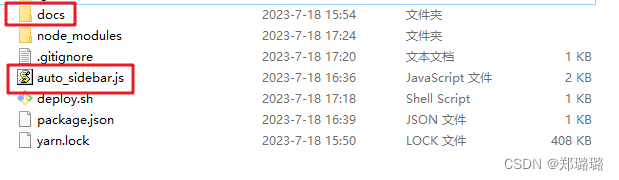
注意:因为我的
md文件命名是以01_xx02_xx开头的,所以排序是基于这个来排序的,如果你的文件命名规则和我的不同,请自行调整脚本逻辑deploy 到 github 仓库
在本地开发好之后,到最后是要推送到 github 仓库的
首先要建立一个仓库,比如建了一个test仓库
VuePress 官方也给了脚本,详细可见: 部署- GitHub Pages
如果懒得访问链接,我把脚本内容也贴下:#!/usr/bin/env sh # 确保脚本抛出遇到的错误 set -e # 生成静态文件 npm run docs:build # 进入生成的文件夹 cd docs/.vuepress/dist # 如果是发布到自定义域名 # echo 'www.example.com' > CNAME git init git add -A git commit -m 'deploy' # 如果发布到 https://<USERNAME>.github.io # git push -f git@github.com:<USERNAME>/<USERNAME>.github.io.git master # 如果发布到 https://<USERNAME>.github.io/<REPO> # git push -f git@github.com:<USERNAME>/<REPO>.git master:gh-pages cd -- 1
- 2
- 3
- 4
- 5
- 6
- 7
- 8
- 9
- 10
- 11
- 12
- 13
- 14
- 15
- 16
- 17
- 18
- 19
- 20
- 21
- 22
- 23
- 24
- 25
其他优化点
对于 VuePress 来说,导航栏的增删改倒是还好,侧边栏增删改些微麻烦
主要在于,假设我的文件夹下,有 1_xx 2_xx 3_xx 4_xx 文件,现在新写了一篇文章,想把它放在 1 和 2 之间,按照我的脚本逻辑,需要把 2 以及以后的文件命名都修改才行
我这种懒人,肯定不想一个一个去修改,哈哈哈哈,所以也写了一个脚本出来
有需自取:const fs = require('fs'); const path = require('path'); function renameFiles(folderPath, startNumber) { const files = fs.readdirSync(folderPath); // 找出以数字加下划线开头的文件 const targetFiles = files.filter(file => /^\d+_/g.test(file)); // 判断起始数字是否在文件名中存在,如果存在则开始重命名 if (targetFiles.some(file => file.startsWith(`${startNumber}_`))) { const startIndex = targetFiles.findIndex(file => file.startsWith(`${startNumber}_`)); // 将文件名按照数字大小进行排序 targetFiles.sort((a, b) => { const numberA = parseInt(a.match(/^\d+/)[0]); const numberB = parseInt(b.match(/^\d+/)[0]); return numberA - numberB; }); for (let i = startIndex - 1; i < targetFiles.length; i++) { const file = targetFiles[i]; const currentName = file.replace(/^\d+_/, ''); const currentNumber = parseInt(file.match(/^\d+/)[0]); const newNumber = currentNumber + 1; const newFile = `${newNumber}_${currentName}`; const oldFilePath = path.join(folderPath, file); const newFilePath = path.join(folderPath, newFile); fs.renameSync(oldFilePath, newFilePath); } } } // 传入目标文件夹路径和要更改的起始数字 renameFiles('./blog', 2);- 1
- 2
- 3
- 4
- 5
- 6
- 7
- 8
- 9
- 10
- 11
- 12
- 13
- 14
- 15
- 16
- 17
- 18
- 19
- 20
- 21
- 22
- 23
- 24
- 25
- 26
- 27
- 28
- 29
- 30
- 31
- 32
- 33
- 34
- 35
- 36
- 37
- 38
- 39
- 40
以上
感谢您的阅读~ -
相关阅读:
数据结构(六)单向循环链表
讲透计算机网络知识(实战篇)01——计算机网络和协议
Python文件操作
决策树(上):数据挖掘十大算法之一
C#:实现Google S2算法(附完整源码)
代码随想录阅读笔记-哈希表【两个数组的交集】
C++之运算符重载的简明了解其原理
iptables服务简单使用
重测序基因组:Pi核酸多样性计算
Redis主从复制集群
- 原文地址:https://blog.csdn.net/zll_0405/article/details/131767778
