-
一个实时波形图的封装demo(QT)(qcustomplot)
前言:
封装的一个实时波形图的类,可以直接提升使用。 提供了接口,可以更改颜色,样式,等等

参考:
Qt Plotting Widget QCustomPlot - Introduction
另外参考了一个大神的作品,链接没找到。
项目文件:
123盘
123盘 实时波形图官方版下载丨最新版下载丨绿色版下载丨APP下载-123云盘
CSDN
【免费】一个实时波形图的封装demo(QT)(qcustomplot)资源-CSDN文库

源码
WaveChart文件夹:
1.加入文件qcustomplot.h 和 qcustomplot.cpp:
2.WaveChart.pri文件:
- QT += core gui
- greaterThan(QT_MAJOR_VERSION, 4): QT += widgets printsupport
- FORMS += \
- $$PWD/waveWidget.ui
- HEADERS += \
- $$PWD/qcustomplot.h \
- $$PWD/waveWidget.h
- SOURCES += \
- $$PWD/qcustomplot.cpp \
- $$PWD/waveWidget.cpp
3.waveWidget.h文件:
- #ifndef WAVEWIDGET_H
- #define WAVEWIDGET_H
- #include
- #include
- #include
- #include
- #include
- //#include
- #include "qcustomplot.h"
- using std::vector;
- namespace Ui {
- class WaveWidget;
- }
- class WaveWidget : public QWidget
- {
- Q_OBJECT
- public:
- explicit WaveWidget(QWidget *parent = nullptr);
- ~WaveWidget();
- void init(bool isShowTicks=true, bool isShowTickLables=true, bool isShowGrid=true, bool isShowSubGrid=true, bool isShowAxis2=true, bool isGraphBigAndSmall=true);
- void setTheme(QColor axis, QColor background);
- void setXAxisLable(const char* name, const char* name2 = "");
- void setYAxisLable(const char* name, const char* name2 = "");
- void setPen(Qt::GlobalColor penColor, QCPGraph::LineStyle lineStyle = QCPGraph::lsLine, QColor brushColor = QColor(255,255, 255, 100), bool isShow = true);
- void addNewData(double data);
- void setTitle(const char* name);
- double getMax();
- double getMin();
- double getAverage();
- QCustomPlot* getTheChartPlot();
- QCPGraph* getTheGraph();
- vector<double> &getTheVector();
- private:
- Ui::WaveWidget *ui;
- QCustomPlot* chartPlot = new QCustomPlot(this); // 图表
- QCPGraph* graph; // 曲线
- //QScrollBar horizontalScrollBar;
- vector<double> graphData; // 图表数据,只作记录使用
- int timeRange = 10; // 时间轴范围
- QTime time;
- double sum = 0.0;
- };
- #endif // WAVEWIDGET_H
4.waveWidget.cpp文件
- #include "waveWidget.h"
- #include "ui_waveWidget.h"
- WaveWidget::WaveWidget(QWidget *parent) :
- QWidget(parent),
- ui(new Ui::WaveWidget)
- {
- ui->setupUi(this);
- // 初始化图表
- graph = chartPlot->addGraph();
- // graph->addData(1,1);
- // graph->addData(2,3);
- // 初始化设置
- // chartPlot->xAxis->setRange(1, 4096);
- // chartPlot->yAxis->setRange(-1, 350); // 假设灰度值的范围为0-255
- // chartPlot->xAxis->setLabel("Pixel");
- // chartPlot->yAxis->setLabel("Gray Value");
- QVBoxLayout* layout = new QVBoxLayout;
- layout->addWidget(ui->title);
- layout->addWidget(chartPlot);
- chartPlot->setSizePolicy(QSizePolicy::Policy(QSizePolicy::Preferred), QSizePolicy::Policy(QSizePolicy::Expanding));
- //layout->addWidget((QWidget)horizontalScrollBar);
- setLayout(layout);
- // init();
- }
- WaveWidget::~WaveWidget()
- {
- delete ui;
- }
- void WaveWidget::init(bool isShowTicks, bool isShowTickLables, bool isShowGrid, bool isShowSubGrid, bool isShowAxis2, bool isGraphBigAndSmall)
- {
- time = QTime::currentTime();
- // 刻度显示
- chartPlot->xAxis->setTicks(isShowTicks);
- chartPlot->yAxis->setTicks(isShowTicks);
- // 刻度值显示
- chartPlot->xAxis->setTickLabels(isShowTickLables);
- chartPlot->yAxis->setTickLabels(isShowTickLables);
- // 网格显示
- chartPlot->xAxis->grid()->setVisible(isShowGrid);
- chartPlot->yAxis->grid()->setVisible(isShowGrid);
- // 子网格显示
- chartPlot->xAxis->grid()->setSubGridVisible(isShowSubGrid);
- chartPlot->yAxis->grid()->setSubGridVisible(isShowSubGrid);
- // 右和上坐标轴、刻度值显示
- chartPlot->xAxis2->setVisible(isShowAxis2);
- chartPlot->yAxis2->setVisible(isShowAxis2);
- chartPlot->yAxis2->setTicks(isShowAxis2);
- chartPlot->yAxis2->setTickLabels(isShowAxis2);
- // make top right axes clones of bottom left axes. Looks prettier:
- // chartPlot->axisRect()->setupFullAxesBox();
- // make left and bottom axes always transfer their ranges to right and top axes:
- if(isShowAxis2){
- connect(chartPlot->xAxis, SIGNAL(rangeChanged(QCPRange)), chartPlot->xAxis2, SLOT(setRange(QCPRange)));
- connect(chartPlot->yAxis, SIGNAL(rangeChanged(QCPRange)), chartPlot->yAxis2, SLOT(setRange(QCPRange)));
- }
- // 暗色主题
- //setPlotTheme(Qt::white, Qt::black);
- // 亮色主题
- setTheme(Qt::black, Qt::white);
- if(isGraphBigAndSmall){
- // 可放大缩小和移动
- chartPlot->setInteractions(QCP::iRangeDrag | QCP::iRangeZoom);
- }
- // x轴以时间形式显示
- QSharedPointer
timeTicker(new QCPAxisTickerTime) ; - timeTicker->setTimeFormat("%h:%m:%s");
- chartPlot->xAxis->setTicker(timeTicker);
- chartPlot->axisRect()->setupFullAxesBox();
- chartPlot->replot();
- }
- void WaveWidget::setTheme(QColor axis, QColor background)
- {
- //----------------------------------------------------------------------------------------//
- // 坐标标注颜色
- chartPlot->xAxis->setLabelColor(axis);
- chartPlot->yAxis->setLabelColor(axis);
- // 坐标刻度值颜色
- chartPlot->xAxis->setTickLabelColor(axis);
- chartPlot->yAxis->setTickLabelColor(axis);
- // 坐标基线颜色和宽度
- chartPlot->xAxis->setBasePen(QPen(axis, 1));
- chartPlot->yAxis->setBasePen(QPen(axis, 1));
- // 坐标主刻度颜色和宽度
- chartPlot->xAxis->setTickPen(QPen(axis, 1));
- chartPlot->yAxis->setTickPen(QPen(axis, 1));
- // 坐标子刻度颜色和宽度
- chartPlot->xAxis->setSubTickPen(QPen(axis, 1));
- chartPlot->yAxis->setSubTickPen(QPen(axis, 1));
- // 坐标标注颜色
- chartPlot->xAxis2->setLabelColor(axis);
- chartPlot->yAxis2->setLabelColor(axis);
- // 坐标刻度值颜色
- chartPlot->xAxis2->setTickLabelColor(axis);
- chartPlot->yAxis2->setTickLabelColor(axis);
- // 坐标基线颜色和宽度
- chartPlot->xAxis2->setBasePen(QPen(axis, 1));
- chartPlot->yAxis2->setBasePen(QPen(axis, 1));
- // 坐标主刻度颜色和宽度
- chartPlot->xAxis2->setTickPen(QPen(axis, 1));
- chartPlot->yAxis2->setTickPen(QPen(axis, 1));
- // 坐标子刻度颜色和宽度
- chartPlot->xAxis2->setSubTickPen(QPen(axis, 1));
- chartPlot->yAxis2->setSubTickPen(QPen(axis, 1));
- // 整个画布背景色
- chartPlot->setBackground(background);
- // 绘图区域背景色
- chartPlot->axisRect()->setBackground(background);
- // 刷新绘图
- chartPlot->replot();
- }
- void WaveWidget::setXAxisLable(const char *name, const char* name2)
- {
- chartPlot->xAxis->setLabel(name);
- if(strlen(name2)!=0)
- chartPlot->xAxis2->setLabel(name2);
- chartPlot->replot();
- }
- void WaveWidget::setYAxisLable(const char *name, const char* name2)
- {
- chartPlot->yAxis->setLabel(name);
- if(strlen(name2)!=0)
- chartPlot->yAxis2->setLabel(name2);
- chartPlot->replot();
- }
- void WaveWidget::setPen(Qt::GlobalColor penColor, QCPGraph::LineStyle lineStyle, QColor brushColor, bool isShow)
- {
- graph->setPen(QPen(penColor)); // 设置线条颜色为蓝色
- graph->setLineStyle(lineStyle); // 设置线型为直线
- graph->setVisible(isShow);
- chartPlot->graph()->setBrush(QBrush(brushColor));
- chartPlot->replot();
- }
- void WaveWidget::addNewData(double data)
- {
- // 系统当前时间 = 系统运行初始时间 + 系统运行时间
- static double start = time.hour()*60*60 + time.minute()*60 + time.second() + time.msec()/1000.0;
- double key = start + time.elapsed()/1000.0;
- // 设置时间轴
- chartPlot->xAxis->setRange(key, timeRange, Qt::AlignRight);
- //chartPlot->rescaleAxes();
- // 刷新绘图水平滚动条
- //horizontalScrollBar.setRange(int(start), int(key)); // 刷新滚动条的范围
- //horizontalScrollBar.setPageStep(1); // 设置翻页步长为 1s 的宽度
- //horizontalScrollBar.setValue(int(key)); // 调整滑块位置到最右边
- // 更新曲线绘图
- chartPlot->graph()->addData(key, data);
- chartPlot->replot(QCustomPlot::rpQueuedReplot);
- // 存储曲线的当前值
- graphData.push_back(data);
- sum += data;
- }
- void WaveWidget::setTitle(const char *name)
- {
- ui->title->setText(name);
- }
- double WaveWidget::getMax()
- {
- return *std::max_element(graphData.begin(),graphData.end());
- }
- double WaveWidget::getMin()
- {
- return *std::min_element(graphData.begin(),graphData.end());
- }
- double WaveWidget::getAverage()
- {
- return 1.0*sum/(graphData.size());
- }
- QCustomPlot *WaveWidget::getTheChartPlot()
- {
- return chartPlot;
- }
- QCPGraph *WaveWidget::getTheGraph()
- {
- return graph;
- }
- vector<double> &WaveWidget::getTheVector()
- {
- return graphData;
- }
5.测试demo:
新建测试界面:
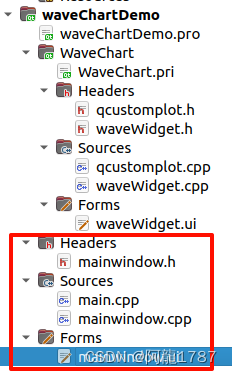
提升为刚刚的类:

效果:

测试:
- ui->setupUi(this);
- // 初始化:可以设置参数
- ui->waveWidget->init();
- // 可选设置:
- ui->waveWidget->setXAxisLable("Time");
- ui->waveWidget->setYAxisLable("Value");
- ui->waveWidget->setPen(Qt::blue, QCPGraph::lsLine, QColor( 36,141,218,255));
- ui->waveWidget->setTheme(Qt::red, Qt::white);
- ui->waveWidget->setTitle("Wave Chart Test");
- // 测试加入数据:
- QTimer *timer = new QTimer(this);
- connect(timer,&QTimer::timeout,[=](){
- ui->waveWidget->addNewData((qrand()%1000)/1000.0);
- qDebug()<<"max:"<
waveWidget->getMax()<<" min:"< waveWidget->getMin()<<" average:"< waveWidget->getAverage(); - if(num%10==0){
- qDebug()<<"size: "<
waveWidget->getTheVector().size(); - ui->waveWidget->getTheVector().clear();
- qDebug()<<"size: "<
waveWidget->getTheVector().size()<<"********"; - }
- if(num>50){
- timer->stop();
- }
- num++;
- });
- timer->start(100);
-
相关阅读:
[复习]C语言中的函数
Elasticsearch实现词云效果Demo
FinalShell远程连接操作
关于计算机中补码的理解
中国各朝代行政区划、点位矢量数据下载与背景介绍
cronet 库各个调用栈记录
猿创征文 | 《深入浅出Vue.js》打卡Day5
渗透测试——信息收集思路
我用PYQT5做的第一个实用的上位机项目(三)
中英文说明书:艾美捷肝细胞培养基试剂盒
- 原文地址:https://blog.csdn.net/Alon1787/article/details/136345749
