-
【JavaEE】 spring boot的配置文件详解
spring boot的配置文件详解
常用配置
spring: datasource: url: jdbc:mysql://127.0.0.1:3306/mycnblog?characterEncoding=utf8&useSSL=false username: root password: root driver-class-name: com.mysql.cj.jdbc.Driver mvc: favicon: enable: false profiles: #多平台配置 active: dev # 设置 Mybatis 的 xml 保存路径 mybatis: mapper-locations: classpath:mapper/*Mapper.xml configuration: # 配置打印 MyBatis 执行的 SQL log-impl: org.apache.ibatis.logging.stdout.StdOutImpl map-underscore-to-camel-case: true #自动驼峰转换 # 配置打印 MyBatis 执行的 SQL logging: file: name: logs/springboot.log logback: rollingpolicy: max-file-size: 1KB file-name-pattern: ${LOG_FILE}.%d{yyyy-MM-dd}.%i level: com: example: demo: debug- 1
- 2
- 3
- 4
- 5
- 6
- 7
- 8
- 9
- 10
- 11
- 12
- 13
- 14
- 15
- 16
- 17
- 18
- 19
- 20
- 21
- 22
- 23
- 24
- 25
- 26
- 27
- 28
- 29
spring boot的配置文件
SpringBoot⽀持并定义了配置⽂件的格式, 也在另⼀个层⾯达到了规范其他框架集成到SpringBoot的
⽬的.
很多项⽬或者框架的配置信息也放在配置⽂件中, ⽐如:
- 项⽬的启动端⼝
- 数据库的连接信息(包含⽤⼾名和密码的设置)
- 第三⽅系统的调⽤密钥等信息
- ⽤于发现和定位问题的普通⽇志和异常⽇志等.
在idea中我们修改
application.properties⽂件即可。Spring Boot 配置文件详解
在 Spring Boot 中,配置文件是管理应用程序配置的重要组成部分。它可以用来配置应用程序的各种属性,包括数据库连接、日志级别、端口号等。Spring Boot 支持多种类型的配置文件,包括 properties 文件、YAML 文件等。本文将详细介绍 Spring Boot 配置文件的使用方法和常见配置项。
1. properties 文件
示例:application.properties
# 设置应用程序端口号 server.port=8080 # 配置数据库连接 spring.datasource.url=jdbc:mysql://localhost:3306/mydatabase spring.datasource.username=root spring.datasource.password=root # 配置日志级别 logging.level.org.springframework=INFO- 1
- 2
- 3
- 4
- 5
- 6
- 7
- 8
- 9
- 10
2. YAML 文件
YAML和YML文件是一样的。
示例:application.yaml
# 设置应用程序端口号 server: port: 8080 # 配置数据库连接 spring: datasource: url: jdbc:mysql://localhost:3306/mydatabase username: root password: root # 配置日志级别 logging: level: org: springframework: INFO- 1
- 2
- 3
- 4
- 5
- 6
- 7
- 8
- 9
- 10
- 11
- 12
- 13
- 14
- 15
- 16
3. 多环境配置
示例:application-{profile}.properties 或 application-{profile}.yaml
# 开发环境配置 # application-dev.properties server.port=8080 spring.datasource.url=jdbc:mysql://localhost:3306/dev_database spring.datasource.username=root spring.datasource.password=root- 1
- 2
- 3
- 4
- 5
- 6
- 7
# 生产环境配置 # application-prod.properties server.port=80 spring.datasource.url=jdbc:mysql://localhost:3306/prod_database spring.datasource.username=admin spring.datasource.password=admin- 1
- 2
- 3
- 4
- 5
- 6
- 7
4. 配置文件优先级
Spring Boot 配置文件的优先级顺序如下:
- 命令行参数:使用命令行参数可以覆盖配置文件中的属性。
- 内置默认值:Spring Boot 内置了许多默认属性,如果没有在配置文件中指定,则会使用这些默认值。
- 当前目录下的
config文件夹:Spring Boot 会在当前目录下的config文件夹中查找配置文件。 - 当前目录:Spring Boot 会在当前目录中查找配置文件。
- classpath 下的
/config文件夹:Spring Boot 会在类路径下的/config文件夹中查找配置文件。 - classpath 根目录:Spring Boot 会在类路径的根目录下查找配置文件。

5. 配置属性注入
Spring Boot 支持在配置文件中定义属性,并使用
@Value注解将属性值注入到 Java 类中。示例:
import org.springframework.beans.factory.annotation.Value; import org.springframework.stereotype.Component; @Component public class MyComponent { @Value("${myapp.message}") private String message; public void displayMessage() { System.out.println("Message from properties file: " + message); } }- 1
- 2
- 3
- 4
- 5
- 6
- 7
- 8
- 9
- 10
- 11
- 12
- 13
在配置文件中设置
myapp.message=Hello, World!,则message属性的值会被注入为 “Hello, World!”。特殊说明
- 理论上讲
.properties和.yml可以并存在于⼀个项⽬中,当.properties和.yml
并存时,两个配置都会加载. 如果配置⽂件内容有冲突, 则以
.properties为主, 也就是.properties优先级更⾼.- 虽然理论上来讲
.properties可以和.yml共存,但实际的业务当中,我们通常会采取⼀种
统⼀的配置⽂件格式,这样可以更好的维护 (降低故障率)
properties配置文件
配置文件官网可参考学习
基本语法
Properties 文件是一种常见的配置文件格式,用于存储键值对形式的配置信息。它通常用于配置应用程序的参数、属性、设置等。下面是 Properties 文件的语法:
-
键值对:Properties 文件由多个键值对组成,每个键值对由键和值组成,中间用等号连接,如:
key=value。 -
注释:可以在 Properties 文件中添加注释,以
#或!开头的行被视为注释,不会被解析。 -
空行:空行会被忽略,不会被解析。
-
转义字符:可以使用反斜杠
\进行转义,表示特殊字符的转义,如\n表示换行符。 -
Unicode 编码:可以使用 Unicode 编码表示非 ASCII 字符。
下面是一个简单的 Properties 文件示例:
# This is a sample properties file # Database configuration db.url=jdbc:mysql://localhost:3306/mydatabase db.username=admin db.password=123456 # Server configuration server.port=8080 server.host=localhost- 1
- 2
- 3
- 4
- 5
- 6
- 7
- 8
- 9
- 10
在这个示例中,我们定义了数据库和服务器的配置信息,每个键值对代表一个配置项,键表示配置项的名称,值表示配置项的值。注释以
#开头,表示注释内容。例子
# 项目常用端口号 server.port=8080 # 配置数据库连接信息 spring.datasource.url=jdbc:mysql://127.0.0.1:3306/testdb?characterEncoding=utf8&useSSL=false spring.datasource.username=root spring.datasource.password=root # 自定义一些配置 ben.key1=ben666 ben.key2=789- 1
- 2
- 3
- 4
- 5
- 6
- 7
- 8
- 9
- 10
package org.haobin.ioc.demo.Controller; import org.springframework.beans.factory.annotation.Value; import org.springframework.web.bind.annotation.RequestMapping; import org.springframework.web.bind.annotation.RestController; /** * @author 刘浩彬 * @date 2024/2/25 */ @RestController @RequestMapping("/prop") public class PropertiesController { @Value("${ben.key1}") private String key1; @Value("${ben.key2}") private Integer key2; @RequestMapping("/readValue") public String readValue(){ return "从Properties读取配置文件,key1:"+key1; } @RequestMapping("/readValue2") public String readValue2(){ return "从Properties读取配置文件,key2:"+key2; } }- 1
- 2
- 3
- 4
- 5
- 6
- 7
- 8
- 9
- 10
- 11
- 12
- 13
- 14
- 15
- 16
- 17
- 18
- 19
- 20
- 21
- 22
- 23
- 24
- 25
- 26
- 27
- 28
- 29
- 30


peoperties文件的缺点
虽然 Properties 文件在很多情况下都是一种方便的配置方式,但也存在一些缺点,包括:
-
扩展性差:Properties 文件的结构简单,只支持键值对形式的配置,无法表示复杂的数据结构,如列表、嵌套对象等,因此在需要表示复杂配置信息时,会显得不够灵活。
-
类型转换不方便:Properties 文件中的值都是字符串形式,无法直接表示其他类型的数据,比如整数、浮点数、布尔值等。在读取配置时,需要手动进行类型转换,增加了开发的复杂度和出错的可能性。
-
不支持注释嵌套:Properties 文件的注释只能位于行首,无法在行内或值之后添加注释。这样的限制可能会导致注释和配置项的关系不够清晰,不利于代码的维护和阅读。
-
不支持环境变量替换:Properties 文件无法直接引用环境变量,需要借助外部工具或框架来实现环境变量的替换,增加了配置的复杂度。
-
不支持多语言:Properties 文件中的配置项只能使用一种语言表示,无法方便地支持多语言配置,这在国际化的应用程序中可能会造成不便。
YML配置文件
yml 是树形结构的配置⽂件,它的基础语法是"
key: value".key 和 value 之间使⽤英⽂冒号加空格的⽅式组成,空格不可省略YAML(YAML Ain’t Markup Language)是一种人类友好的数据序列化格式,常用于配置文件和数据交换。YAML 文件采用缩进和空格来表示层次结构,具有清晰简洁、易读易写的特点。下面是 YAML 配置文件的主要语法:
-
基本规则:
- YAML 文件以
.yml或.yaml扩展名结尾。 - 使用缩进表示层次结构,缩进时只能使用空格,不能使用制表符。
- 使用
#符号表示注释,注释可以单独一行或在行尾。
- YAML 文件以
-
键值对:
- 使用冒号
:将键和值分隔开。 - 键值对可以写在同一行,也可以换行写,但冒号后必须跟一个空格。
- 使用冒号
-
列表:
- 使用连字符
-表示列表项。 - 列表项可以是简单值,也可以是对象或其他列表。
- 使用连字符
-
对象:
- 对象使用缩进表示层次结构,每个属性都是键值对形式。
- 对象的属性可以是简单值,也可以是嵌套的对象或列表。
-
引号:
- 字符串值可以使用单引号
' '或双引号" "包裹,也可以省略引号。 - 使用引号可以保留字符串的空白字符或特殊字符。
- 字符串值可以使用单引号
-
多行字符串:
- 使用
|符号表示多行字符串,保留换行符和缩进。 - 使用
>符号表示多行字符串,忽略换行符,但保留缩进。
- 使用
-
特殊值:
true、false和null分别表示布尔值 true、false 和空值。
下面是一个简单的 YAML 示例:
# YAML 示例配置文件 server: port: 8080 hostname: localhost database: url: jdbc:mysql://localhost:3306/mydb username: root password: password logging: level: root: info com.example: debug profiles: - dev - test - prod- 1
- 2
- 3
- 4
- 5
- 6
- 7
- 8
- 9
- 10
- 11
- 12
- 13
- 14
- 15
- 16
- 17
- 18
- 19
- 20
server: port: 9090 spring: datasource: url: jdbc:mysql://127.0.0.0:3306/dbname?characterEncoding=utf8&useSSL=false username: root password: root- 1
- 2
- 3
- 4
- 5
- 6
- 7
- 8
YML使用
yml 配置不同数据类型及 null
server: port: 9090 spring: datasource: url: jdbc:mysql://127.0.0.0:3306/dbname?characterEncoding=utf8&useSSL=false username: root password: root # 自定义配置项 string.value: ben666 string: value2: ben22222222- 1
- 2
- 3
- 4
- 5
- 6
- 7
- 8
- 9
- 10
- 11
- 12
- 13
package org.haobin.ioc.demo.Controller; import org.springframework.beans.factory.annotation.Value; import org.springframework.web.bind.annotation.RequestMapping; import org.springframework.web.bind.annotation.RestController; @RestController @RequestMapping("/yml") public class ymlController { @Value("${string.value}") private String value; @Value("${string.value2}") private String key2; @Value("${spring.datasource.url}") private String url; @RequestMapping("/readValue") public String readValue() { return "从yml读取配置文件,value:" + value; } @RequestMapping("/readValue2") public String readValue2() { return "从yml读取配置文件,key2:" + key2; } @RequestMapping("/url") public String readUrl() { return "从yml读取配置文件,url:" + url; } }- 1
- 2
- 3
- 4
- 5
- 6
- 7
- 8
- 9
- 10
- 11
- 12
- 13
- 14
- 15
- 16
- 17
- 18
- 19
- 20
- 21
- 22
- 23
- 24
- 25
- 26
- 27
- 28
- 29
- 30
- 31
- 32
- 33
- 34
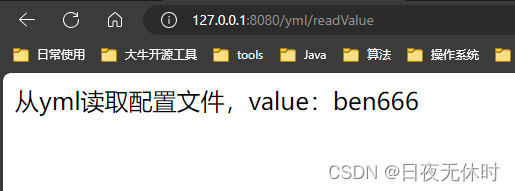
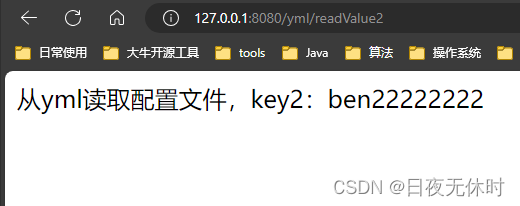

# 字符串 string.value: Hello # 布尔值,true或false boolean.value: true boolean.value1: false # 整数 int.value: 10 # 浮点数 float.value: 3.14159 # Null,~代表null null.value: ~ # 如果使用字符串接收,字符串的值是 ~ # "" 空字符串 #, 直接后⾯什么都不加就可以了, 但这种⽅式不直观, 更多的表⽰是使⽤引号括起来 empty.value:- 1
- 2
- 3
- 4
- 5
- 6
- 7
- 8
- 9
- 10
- 11
- 12
- 13
- 14
- 15
- 16
注意事项
value 值加单双引号
字符串默认不⽤加上单引号或者双引号,如果加英⽂的单双引号可以表⽰特殊的含义。
尝试在 application.yml 中配置如下信息
string: str1: Hello \n Spring Boot. str2: 'Hello \n Spring Boot.' str3: "Hello \n Spring Boot."- 1
- 2
- 3
- 4
@Value("${string.str1}") private String str1; @Value("${string.str2}") private String str2; @Value("${string.str3}") private String str3; @RequestMapping("/yml") public String readYml(){ System.out.println(str1); System.out.println(str2); System.out.println(str3); return "yml"; }- 1
- 2
- 3
- 4
- 5
- 6
- 7
- 8
- 9
- 10
- 11
- 12
- 13

从上述结果可以看出:
- 字符串默认不⽤加上单引号或者双引号。
- 单引号会转义特殊字符,使其失去特殊功能, 始终是⼀个普通的字符串.
- 双引号不会转义字符串⾥⾯的特殊字符, 特殊字符会表⽰本⾝的含义.
此处的转义理解起来会有些拗⼝, \n 本意表⽰的是换⾏
使⽤单引号会转义, 就是说, \n 不再表⽰换⾏了, ⽽是表⽰⼀个普通的字符串
使⽤双引号不会转义, 表⽰ \n 表⽰的是它本⾝的含义, 就是换⾏
配置对象
@Autowired private Student student; @RequestMapping("/stu") public String readStu(){ return student.toString(); }- 1
- 2
- 3
- 4
- 5
- 6
- 7
package org.haobin.ioc.demo.model; import lombok.Data; import org.springframework.boot.context.properties.ConfigurationProperties; import org.springframework.stereotype.Component; @Component @ConfigurationProperties(prefix = "student") @Data public class Student { private Integer id; private Integer age; private String name; }- 1
- 2
- 3
- 4
- 5
- 6
- 7
- 8
- 9
- 10
- 11
- 12
- 13
- 14
student: id: 1 name: java age: 18- 1
- 2
- 3
- 4

配置集合
配置⽂件也可以配置 list 集合,如下所⽰:
dbtypes: name: - mysql - sqlserver - db2- 1
- 2
- 3
- 4
- 5
注意点:
dbtypes: name: - mysql - sqlserver - db2- 1
- 2
- 3
- 4
- 5
如果
- mysql中的空格省略了,不会报错。但是含义是变了的,这几个元素就会被当做一个元素来处理集合的读取和对象⼀样,也是使⽤
@ConfigurationProperties来读取的,具体实现如下:@Component @Data @ConfigurationProperties("dbtypes") public class Dbtypes { private List<String> name; }- 1
- 2
- 3
- 4
- 5
- 6
访问集合的实现如下:
@Autowired private Dbtypes dbtypes; @RequestMapping("/list") public String readList(){ return dbtypes.toString(); }- 1
- 2
- 3
- 4
- 5
- 6
- 7

配置map
道理和配置list一样
不做解释,给示例代码如下:
maptypes: map: k1: kk1 k2: kk2 k3: kk3- 1
- 2
- 3
- 4
- 5
@Component @Data @ConfigurationProperties("maptypes") public class Maptypes { private HashMap<String, String> map; }- 1
- 2
- 3
- 4
- 5
- 6
@Autowired private Maptypes maptypes; @RequestMapping("/map") public String readMap(){ return maptypes.toString(); }- 1
- 2
- 3
- 4
- 5
- 6
- 7

YML 的优缺点
优点
-
易读性高:
- YML 使用缩进和空格来表示层次结构,与传统的大括号和逗号相比,更接近自然语言,更易于理解和阅读。
- YML 文件结构清晰简洁,注重可读性,适合人类阅读和编辑。
-
简洁清晰:
- YML 使用简洁的语法,可以轻松地表示复杂的数据结构,如列表、对象和多行字符串,使配置文件更加简洁明了。
-
可扩展性:
- YML 具有灵活的语法和结构,可以轻松地扩展和调整配置文件的内容,适用于各种类型的应用场景和需求。
-
与多种编程语言兼容:
- YML 格式与多种编程语言兼容,包括 Java、Python、JavaScript 等,可以方便地在不同语言环境中使用和解析。
缺点
-
空格敏感:
- YML 的语法对空格敏感,缩进和空格的使用必须严格遵循规范,否则可能会导致解析错误或意外结果。
-
复杂性:
- 随着配置文件的复杂度增加,YML 文件的结构也可能变得复杂,不易于管理和维护,尤其是对于大型项目。
-
不适合所有场景:
- 尽管 YML 在配置文件和数据交换方面表现良好,但并不适合所有场景。对于某些特定需求或环境,可能存在更合适的选择。
-
缺乏严格的规范:
- YML 并没有像 JSON 那样严格的规范,不同的实现可能存在细微差异,可能会导致不同解析器之间的兼容性问题。
-
相关阅读:
python+django新生入学报到迎新系统nodejs+vue+elementui
[SQL-SERVER:数据库安全及维护]:MSSM工具进行附加还原备份等操作
信息爆炸!78天闭门深造千页SpringCloud,再战京东
数据备份与恢复
4基于pytorch的蚁群算法求解TSP(旅行商问题),访问一座城市并回到最初位置的最佳路径,解决组合中的NP问题。程序已调通,替换自己的数据可以直接运行。
【Gin】绑定参数到结构
计算机网络
flex布局 H5携程移动端头部个人中心和图标 (三)
ASP.NET Core如何知道一个请求执行了哪些中间件?
感谢十二年的陪伴——分享回归,不忘初心(Eastmount博客总结及未来规划)
- 原文地址:https://blog.csdn.net/m0_73075027/article/details/136284691
