-
MyBatis使⽤PageHelper(MySQL)
- PageHelper 在 github 的项目地址:https://github.com/pagehelper/Mybatis-PageHelper
- PageHelper 官网:https://pagehelper.github.io/
一、 limit分⻚
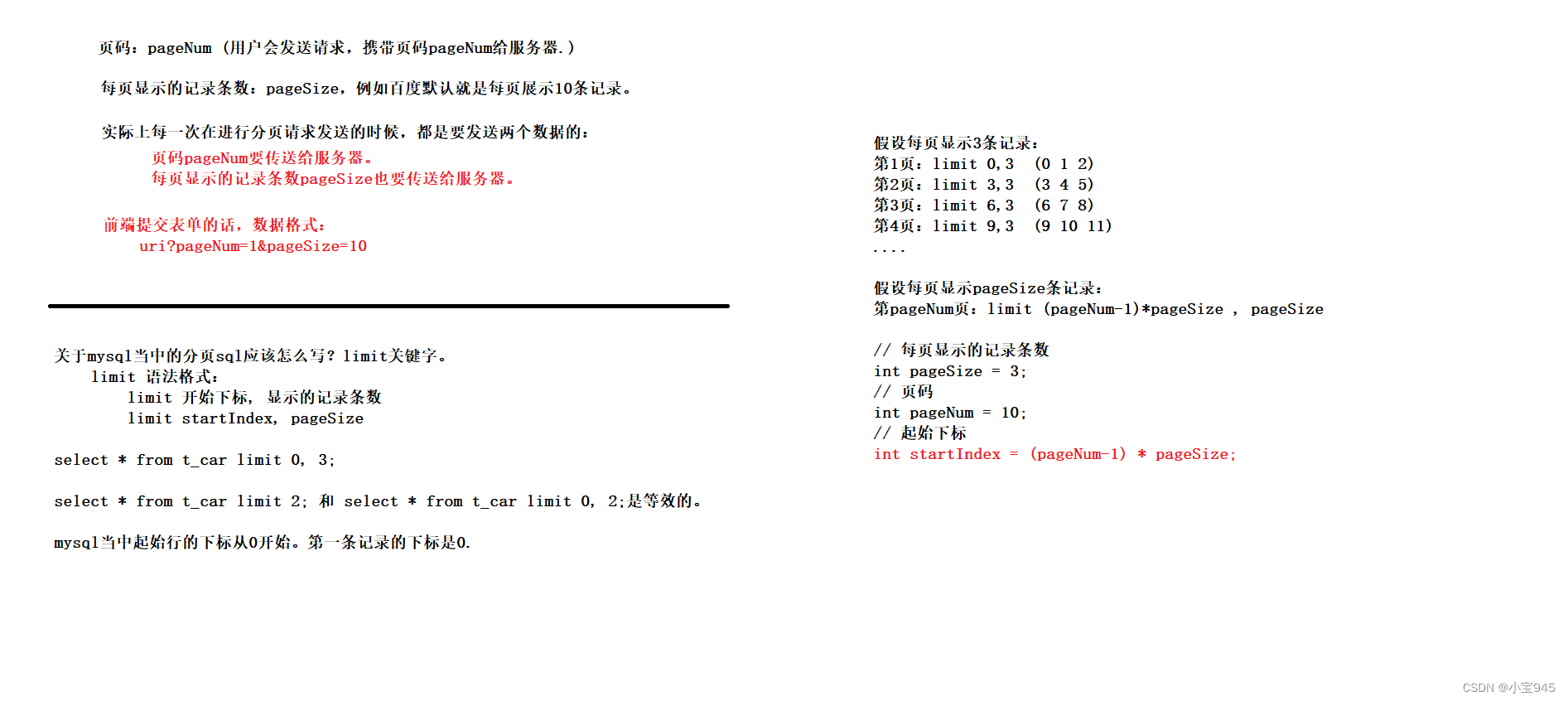
- mysql的limit后⾯两个数字:
- 第⼀个数字:startIndex(起始下标。下标从0开始。)
- 第⼆个数字:pageSize(每⻚显示的记录条数)
- 假设已知⻚码pageNum,还有每⻚显示的记录条数pageSize,startIndex = (pageNum - 1) * pageSize
- 所以,标准通⽤的mysql分⻚SQL:
select * from tableName ...... limit (pageNum - 1) * pageSize, pageSize- 1
- 2
- 3
- 在实际的开发中,一般由前端或者后端人员将 pageNum、pageSize 计算好后传递给 mybatis。
<select id="selectActivityByConditionForPage" parameterType="map" resultMap="BaseResultMap"> select a.id,u1.name as owner,a.name,a.start_date,a.end_date,a.cost,a.description,a.create_time,u2.name as create_by,a.edit_time,u3.name as edit_by from tbl_activity a join tbl_user u1 on a.owner=u1.id join tbl_user u2 on a.create_by=u2.id left join tbl_user u3 on a.edit_by=u3.id <where> <if test="name!=null and name!=''"> and a.name like '%' #{name} '%' if> <if test="owner!=null and owner!=''"> and u1.name like '%' #{owner} '%' if> <if test="startDate!=null and startDate!=''"> and a.start_date>=#{startDate} if> <if test="endDate!=null and endDate!=''"> and a.end_date<=#{endDate} if> where> order by a.create_time desc limit #{beginNo},#{pageSize} select>- 1
- 2
- 3
- 4
- 5
- 6
- 7
- 8
- 9
- 10
- 11
- 12
- 13
- 14
- 15
- 16
- 17
- 18
- 19
- 20
- 21
- 22
- 23
- 24
- 25
- 26
- 27
- 28
二、PageHelper插件
第⼀步:引⼊依赖
<dependency> <groupId>com.github.pagehelpergroupId> <artifactId>pagehelperartifactId> <version>5.3.2version> dependency>- 1
- 2
- 3
- 4
- 5
第⼆步:在mybatis-config.xml⽂件中配置插件
-
typeAliases标签下⾯进⾏配置:
<plugins> <plugin interceptor="com.github.pagehelper.PageInterceptor"/> plugins>- 1
- 2
- 3
第三步:编写Java代码
- 关键点:
- 在查询语句之前开启分⻚功能。(只有紧跟在 PageHelper.startPage 方法后的第一个 Mybatis 的查询(Select)方法会被分页。)
- 在查询语句之后封装PageInfo对象。(PageInfo对象将来会存储到 request 域当中。在⻚⾯上展示。)
@Test public void testPageHelper() throws Exception{ SqlSessionFactory sqlSessionFactory = new SqlSessionFactoryBuilder().build(Resources.getResourceAsStream("mybatis-config.xml")); SqlSession sqlSession = sqlSessionFactory.openSession(); CarMapper mapper = sqlSession.getMapper(CarMapper.class); // 开启分⻚ PageHelper.startPage(2, 2); // 执⾏查询语句 List<Car> cars = mapper.selectAll(); // 获取分⻚信息对象 PageInfo<Car> pageInfo = new PageInfo<>(cars, 5); System.out.println(pageInfo); }- 1
- 2
- 3
- 4
- 5
- 6
- 7
- 8
- 9
- 10
- 11
- 12
- 13
第四步:格式化结果查看
- 对于其中的属性都有对应的方法来获取,需要的时候查找即可。
- 每个属性的含义可以在使用的时候上网查找。
PageInfo{ pageNum=2, pageSize=2, size=2, startRow=3, endRow=4, total=6, pages=3,list=Page{count=true, pageNum=2, pageSize=2, startRow=2, endRow=4, total=6, pages=3, reasonable=false, pageSizeZero=false} [Car{id=86, carNum='1234', brand='丰⽥霸道', guidePrice=50.5, produceTime='2020-1011', carType='燃油⻋'}, Car{id=87, carNum='1234', brand='丰⽥霸道', guidePrice=50.5, produceTime='2020-10-11', carType='燃油⻋'}], prePage=1, nextPage=3, isFirstPage=false, isLastPage=false, hasPreviousPage=true, hasNextPage=true,navigatePages=5, navigateFirstPage=1, navigateLastPage=3,navigatepageNums=[1, 2, 3] }- 1
- 2
- 3
- 4
- 5
- 6
三、SpringBoot3 集成 PageHelper 插件
- Add the following dependency to your pom.xml:
<dependency> <groupId>com.github.pagehelpergroupId> <artifactId>pagehelper-spring-boot-starterartifactId> <version>2.1.0version> dependency>- 1
- 2
- 3
- 4
- 5
-
相关阅读:
[Spring MVC7] 解决Redis乱码前缀问题
04 【折线图】
C/S架构学习之多进程实现TCP并发服务器
我们又组织了一次欧洲最大开源社区活动,Hugging Face 博客欢迎社区成员发帖、Hugging Chat 功能更新!...
如何简单上手清华AutoGPT并搭建到本地环境
文件包含_具体场景、zip、php相关问题
AI大模型-启航
腾讯云学生专享云服务器介绍及购买攻略
使用Selenium-PO设计模式提高Web自动化测试效率
JSP:Tag文件的使用
- 原文地址:https://blog.csdn.net/weixin_65032328/article/details/136288770
