-
naive-ui-admin BasicTable 列表操作栏显示图标icon
效果图
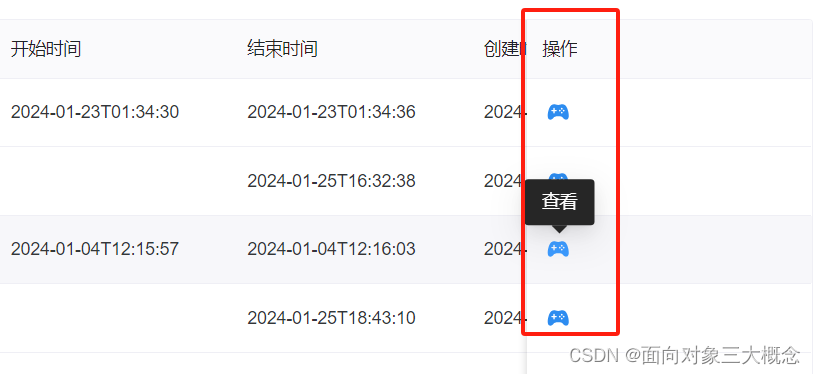
在使用BasicTable的页面添加引用,这里随便弄了个icon
import { GameController } from "@vicons/ionicons5"自定义列
- const actionColumn = reactive({
- width: 180,
- title: "操作",
- key: "action",
- fixed: "right",
- render(record: any) {
- return h(TableAction, {
- style: "text",
- actions: [
- {
- label: "",
- icon: GameController,
- toolTip: "查看",
- onClick: view.bind(null, record)
- }
- ]
- });
- }
- });
这里label设置为空,icon就是刚刚导入的图标,toolTip是自定义属性,在原来封装好的组件里添加的,不然只有一个图标可能不是很明确。
自定义的如下:
打开components/Table/src/components/TableAction.vue ,修改n-button 里的内容。
"action" class="mx-1"> - {{ action.label }}
- if="action.hasOwnProperty('icon')">
- <n-tooltip trigger="hover">
- <template #trigger>
- <n-icon :component="action.icon" />
- template>
- {{ action.toolTip }}
- n-tooltip>
然后组件的props添加toolTip字段

-
相关阅读:
网络技术一:计算机网络概述
从C语言到C++:C++入门知识(2)
向黑客精神致敬!
每日一题之干草堆的移动
【图论】求最长路径
基于机器学习和深度学习的C-MAPSS涡扇发动机剩余寿命RUL预测(Python,Jupyter Notebook环境)
IObit Unlocker丨解除占用程序软件
AI项目十五:PP-Humanseg训练及onnxruntime部署
第一章 概述
各省GDP可视化案列,附带csv Metabase处理
- 原文地址:https://blog.csdn.net/jsrgckf/article/details/136300463
