-
Vue | (六)使用Vue脚手架(下)| 尚硅谷Vue2.0+Vue3.0全套教程
学习链接:尚硅谷Vue2.0+Vue3.0全套教程丨vuejs从入门到精通,本文对应p79-p95,博客参考尚硅谷公开笔记,补充记录实操。
📚Vue 中的自定义事件
🐇使用方法
-
区别于JS里的内置事件。
-
一种组件间通信的方式,适用于:
子组件 ===> 父组件 -
使用场景:A是父组件,B是子组件,B想给A传数据,那么就要在A中给B绑定自定义事件(事件的回调在A中)。
-
绑定自定义事件:
- 第一种方式,在父组件中:
- 第二种方式,在父组件中:
<Demo ref="demo"/> ...... mounted(){ this.$refs.xxx.$on('atguigu',this.test) }- 1
- 2
- 3
- 4
- 5
- 第一种方式,在父组件中:
-
若想让自定义事件只能触发一次,可以使用
once修饰符,或$once方法。 -
触发自定义事件:
this.$emit('atguigu',数据) -
解绑自定义事件
this.$off('atguigu'),多个一起解绑套在一个数组里。this.$off(),解绑所有的自定义事件。 -
组件上也可以绑定原生DOM事件,需要使用
native修饰符。 -
注意:通过
this.$refs.xxx.$on('atguigu',回调)绑定自定义事件时,回调要么配置在methods中,要么用箭头函数,否则this指向会出问题!
🐇案例练习
- 案例实现,实操见真知😄
Student-Test.vue<template> <div class="student"> <h2>学生姓名:{{name}}h2> <h2>学生性别:{{sex}}h2> <h2>当前求和为:{{number}}h2> <button @click="add">点我number++button> <button @click="sendStudentlName">把学生名给Appbutton> <button @click="unbind">解绑atguigu事件button> <button @click="death">销毁当前Student组件的实例(vc)button> div> template> <script> export default { name:'Student-Test', data() { return { name:'右一', sex:'女', number:0 } }, methods: { add(){ console.log('add回调被调用了') this.number++ }, sendStudentlName(){ //触发Student组件实例身上的atguigu事件 this.$emit('atguigu',this.name,666,888,900) // this.$emit('demo') // this.$emit('click') }, unbind(){ this.$off('atguigu') //解绑一个自定义事件 console.log('解绑了') // this.$off(['atguigu','demo']) //解绑多个自定义事件(写在一个数组里) // this.$off() //解绑所有的自定义事件 }, death(){ //销毁了当前Student组件的实例,销毁后所有Student实例的自定义事件全都不奏效。 //和视频里展示的不一样,现在销毁后原生num++也不奏效了,不论是console还是响应式。 this.$destroy() console.log('销毁了') } }, } script> <style scoped> .student{ background-color: pink; padding: 5px; margin-top: 30px; } style>- 1
- 2
- 3
- 4
- 5
- 6
- 7
- 8
- 9
- 10
- 11
- 12
- 13
- 14
- 15
- 16
- 17
- 18
- 19
- 20
- 21
- 22
- 23
- 24
- 25
- 26
- 27
- 28
- 29
- 30
- 31
- 32
- 33
- 34
- 35
- 36
- 37
- 38
- 39
- 40
- 41
- 42
- 43
- 44
- 45
- 46
- 47
- 48
- 49
- 50
- 51
- 52
- 53
- 54
- 55
- 56
School-Test.vue<template> <div class="school"> <h2>学校名称:{{name}}h2> <h2>学校地址:{{address}}h2> <button @click="sendSchoolName">把学校名给Appbutton> div> template> <script> export default { name:'School-Test', props:['getSchoolName'], data() { return { name:'哔哩哔哩大学', address:'bilibili', } }, methods: { sendSchoolName(){ this.getSchoolName(this.name) } }, } script> <style scoped> .school{ background-color: skyblue; padding: 5px; } style>- 1
- 2
- 3
- 4
- 5
- 6
- 7
- 8
- 9
- 10
- 11
- 12
- 13
- 14
- 15
- 16
- 17
- 18
- 19
- 20
- 21
- 22
- 23
- 24
- 25
- 26
- 27
- 28
- 29
- 30
- 31
- 32
App.vue<template> <div class="app"> <h1>{{msg}}学生姓名是:{{studentName}}h1> <School :getSchoolName="getSchoolName"/> <Student ref="student" @click.native="show"/> div> template> <script> import Student from './components/Student-Test' import School from './components/School-Test' export default { name:'App', components:{School,Student}, data() { return { msg:'你好啊!', studentName:'' } }, methods: { getSchoolName(name){ console.log('App收到了学校名:',name) }, getStudentName(name,...params){ console.log('App收到了学生名:',name,params) this.studentName = name }, m1(){ console.log('demo事件被触发了!') }, show(){ alert(123) } }, mounted() { this.$refs.student.$on('atguigu',this.getStudentName) //绑定自定义事件 // this.$refs.student.$once('atguigu',this.getStudentName) //绑定自定义事件(一次性) }, } script> <style scoped> .app{ background-color: gray; padding: 5px; } style>- 1
- 2
- 3
- 4
- 5
- 6
- 7
- 8
- 9
- 10
- 11
- 12
- 13
- 14
- 15
- 16
- 17
- 18
- 19
- 20
- 21
- 22
- 23
- 24
- 25
- 26
- 27
- 28
- 29
- 30
- 31
- 32
- 33
- 34
- 35
- 36
- 37
- 38
- 39
- 40
- 41
- 42
- 43
- 44
- 45
- 46
- 47
- 48
- 49
- 50
- 51
- 52
- 53
- 54
- 55
- 56
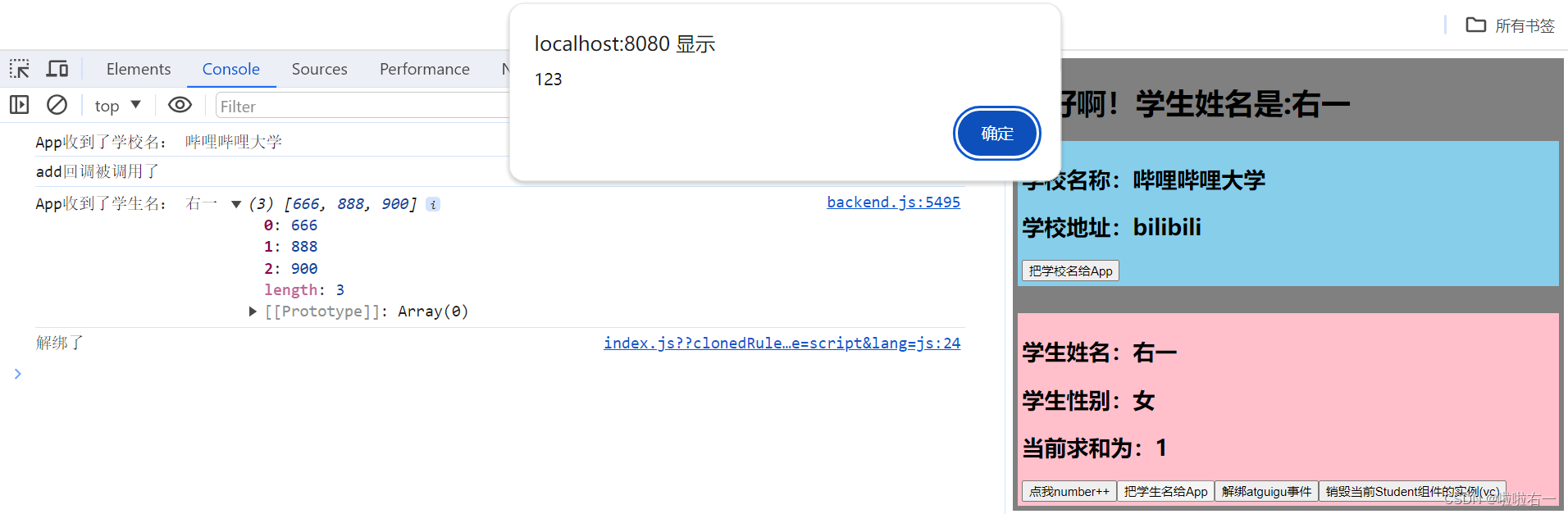
- num++

- 发送学生名

- 解绑

- 解绑后学生名发不出去了
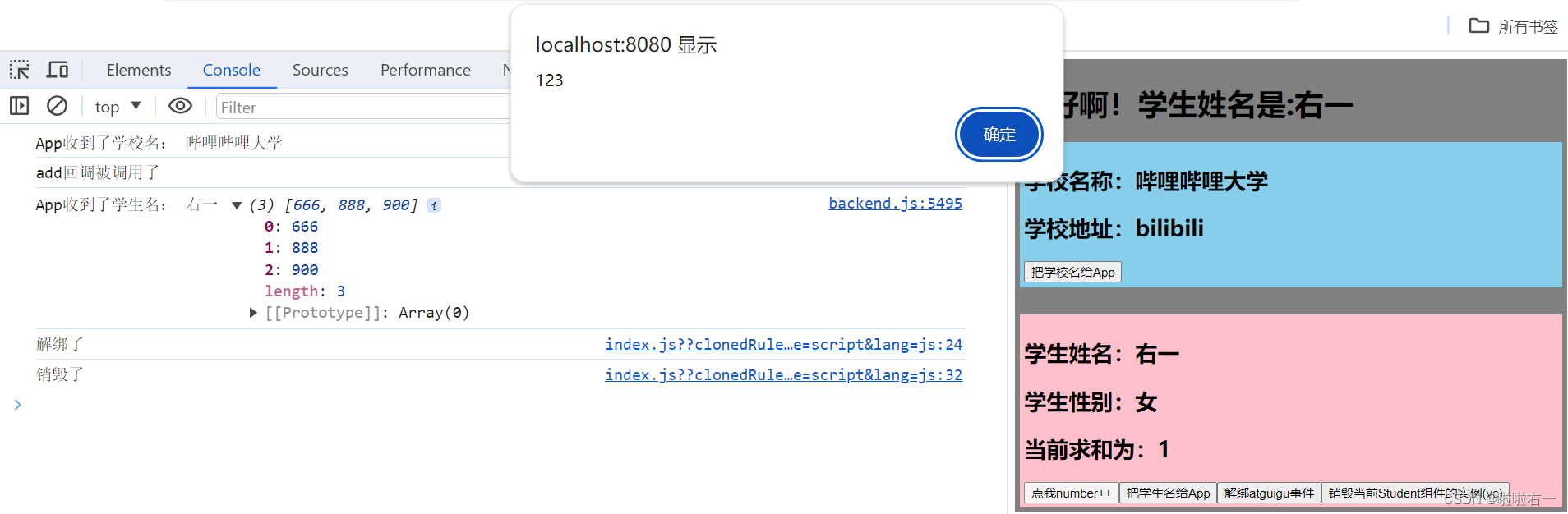
- 销毁

- num++可点击,但不奏效
🐇TodoList案例优化
- 所有涉及到子组件给父组件传输的:
- 添加一个todo,
addTodo - 底部全选,
checkAllTodo - 清除已完成,
clearAllTodo - 以
addTodo为例,- 首先,在App.vue中把
:addTodo="addTodo"改为@addTodo="addTodo"。 - 而后在UserHeader中把
props去除(不用接收了)。 - 功能实现处:
// 通知APP组件去添加一个todo对象 this.$emit('addTodo',todoObj)- 1
- 2
- 首先,在App.vue中把
- 添加一个todo,
📚全局事件总线
🐇使用方法
-
一种组件间通信的方式,适用于任意组件间通信。
-
安装全局事件总线:
new Vue({ ...... beforeCreate() { Vue.prototype.$bus = this //安装全局事件总线,$bus就是当前应用的vm }, ...... })- 1
- 2
- 3
- 4
- 5
- 6
- 7
-
使用事件总线:
-
接收数据:A组件想接收数据,则在A组件中给
$bus绑定自定义事件,事件的回调留在A组件自身。methods(){ demo(data){......} } ...... mounted() { this.$bus.$on('xxxx',this.demo) }- 1
- 2
- 3
- 4
- 5
- 6
- 7
-
提供数据:
this.$bus.$emit('xxxx',数据)
-
-
最好在beforeDestroy钩子中,用
$off去解绑当前组件所用到的事件。
🐇案例练习
main.js:安装全局事件总线。//引入Vue import Vue from 'vue' //引入App import App from './App.vue' //关闭Vue的生产提示 Vue.config.productionTip = false //创建vm new Vue({ el:'#app', render: h => h(App), beforeCreate() { Vue.prototype.$bus = this //安装全局事件总线 }, })- 1
- 2
- 3
- 4
- 5
- 6
- 7
- 8
- 9
- 10
- 11
- 12
- 13
- 14
- 15
Student-Test.vue:提供数据。<template> <div class="student"> <h2>学生姓名:{{name}}h2> <h2>学生性别:{{sex}}h2> <button @click="sendStudentName">把学生名给School组件button> div> template> <script> export default { name:'Student-Test', data() { return { name:'youyi', sex:'女', } }, methods: { sendStudentName(){ this.$bus.$emit('hello',this.name) } }, } script> <style scoped> .student{ background-color: pink; padding: 5px; margin-top: 30px; } style>- 1
- 2
- 3
- 4
- 5
- 6
- 7
- 8
- 9
- 10
- 11
- 12
- 13
- 14
- 15
- 16
- 17
- 18
- 19
- 20
- 21
- 22
- 23
- 24
- 25
- 26
- 27
- 28
- 29
- 30
- 31
- 32
School-Test.vue:接收数据。<template> <div class="school"> <h2>学校名称:{{name}}h2> <h2>学校地址:{{address}}h2> div> template> <script> export default { name:'School-Test', data() { return { name:'哔哩哔哩大学', address:'bilibili', } }, mounted() { // console.log('School',this) this.$bus.$on('hello',(data)=>{ console.log('我是School组件,收到了数据',data) }) }, beforeDestroy() { this.$bus.$off('hello') }, } script> <style scoped> .school{ background-color: skyblue; padding: 5px; } style>- 1
- 2
- 3
- 4
- 5
- 6
- 7
- 8
- 9
- 10
- 11
- 12
- 13
- 14
- 15
- 16
- 17
- 18
- 19
- 20
- 21
- 22
- 23
- 24
- 25
- 26
- 27
- 28
- 29
- 30
- 31
- 32
- 33
- 34

🐇TodoList案例优化
- 把“爷孙”之间的改成全局事件总线:
- 勾选一个todo,
checkTodo - 删除一个todo,
deleteTodo - 修改点:
- 在main.js安装全局事件总线
new Vue({ el:'#app', render: h => h(App), beforeCreate(){ Vue.prototype.$bus = this } })- 1
- 2
- 3
- 4
- 5
- 6
- 7
checkTodo和deleteTodo不用给List传了,List对应也不用接收了。同样的,List也不用给Item,后者也不收了。也就是之前的层级传递过程删掉。- 收数据的(App.vue)绑定事件总线。
mounted(){ this.$bus.$on('checkTodo',this.checkTodo) this.$bus.$on('deleteTodo',this.deleteTodo) }, beforeDestroy(){ this.$bus.$off('checkTodo') this.$bus.$off('deleteTodo') }- 1
- 2
- 3
- 4
- 5
- 6
- 7
- 8
- Item提供数据。
methods:{ // 勾选or取消勾选 handleCheck(id){ // 通知App组件将对应的todo对象的done值取反 this.$bus.$emit('checkTodo',id) }, // 删除 handleDelete(id){ if(confirm('确定删除吗?')){ // 通知App组件删除 this.$bus.$emit('deleteTodo',id) } } }- 1
- 2
- 3
- 4
- 5
- 6
- 7
- 8
- 9
- 10
- 11
- 12
- 13
- 14
- 在main.js安装全局事件总线
- 勾选一个todo,
📚消息订阅与发布
🐇使用方法
-
一种组件间通信的方式,适用于任意组件间通信。
-
使用步骤:
- 安装pubsub:
npm i pubsub-js - 引入:
import pubsub from 'pubsub-js' - 接收数据:A组件想接收数据,则在A组件中订阅消息,订阅的回调留在A组件自身。
methods(){ demo(data){......} } ...... mounted() { this.pid = pubsub.subscribe('xxx',this.demo) //订阅消息 }- 1
- 2
- 3
- 4
- 5
- 6
- 7
-
提供数据:
pubsub.publish('xxx',数据) -
最好在beforeDestroy钩子中,用
PubSub.unsubscribe(pid)去取消订阅。
- 安装pubsub:
🐇TodoList案例优化
⭐️把删除一个todo(
deleteTodo)改成消息订阅与发布- 引入pubsub库(用到的vue都需要引入),
import pubsub from 'pubsub-js'。 App.vue需要数据,订阅消息。这里需要methods里deleteTodo(_,id)用_占个位。mounted(){ this.$bus.$on('checkTodo',this.checkTodo) this.pubId = pubsub.subscribe('deleteTodo',this.deleteTodo) }, beforeDestroy(){ this.$bus.$off('checkTodo') pubsub.unsubscribe(this.pubId) }- 1
- 2
- 3
- 4
- 5
- 6
- 7
- 8
UserItem.vue提供数据。methods:{ // 勾选or取消勾选 handleCheck(id){ // 通知App组件将对应的todo对象的done值取反 this.$bus.$emit('checkTodo',id) }, // 删除 handleDelete(id){ if(confirm('确定删除吗?')){ // 通知App组件删除 pubsub.publish('deleteTodo',id) } } }- 1
- 2
- 3
- 4
- 5
- 6
- 7
- 8
- 9
- 10
- 11
- 12
- 13
- 14
⭐️添加编辑todo效果
UserItem.vue样式添加编辑按钮。

UserItem.vue<template> <li> <label> <input type="checkbox" :checked="fasong.done" @change="handleCheck(fasong.id)"/> <span v-show="!fasong.isEdit">{{fasong.title}}span> <input type="text" v-show="fasong.isEdit" :value="fasong.title" @blur="handleBlur(fasong,$event)" > label> <button class="btn btn-danger" @click="handleDelete(fasong.id)">删除button> <button v-show="!fasong.isEdit" class="btn btn-edit" @click="handleEdit(fasong)">编辑button> li> template> <script> import pubsub from 'pubsub-js' export default { name:'UserItem', // 声明接收发送内容 props:['fasong'], methods:{ // 勾选or取消勾选 handleCheck(id){ // 通知App组件将对应的todo对象的done值取反 this.$bus.$emit('checkTodo',id) }, // 删除 handleDelete(id){ if(confirm('确定删除吗?')){ // 通知App组件删除 pubsub.publish('deleteTodo',id) } }, //编辑 handleEdit(fasong){ // 已经有了isEdit if(fasong.hasOwnProperty.call('isEdit')){ fasong.isEdit = true }else{ this.$set(fasong,'isEdit',true) } }, // 失去焦点回调(真正执行修改) handleBlur(fasong,e){ fasong.isEdit = false this.$bus.$emit('updateTodo',fasong.id,e.target.value) } } } script>- 1
- 2
- 3
- 4
- 5
- 6
- 7
- 8
- 9
- 10
- 11
- 12
- 13
- 14
- 15
- 16
- 17
- 18
- 19
- 20
- 21
- 22
- 23
- 24
- 25
- 26
- 27
- 28
- 29
- 30
- 31
- 32
- 33
- 34
- 35
- 36
- 37
- 38
- 39
- 40
- 41
- 42
- 43
- 44
- 45
- 46
- 47
- 48
- 49
- 50
- 51
- 52
- 53
App.vue<template> <div id="root"> <div class="todo-container"> <div class="todo-wrap"> <UserHeader @addTodo="addTodo">UserHeader> <UserList :todos="todos">UserList> <UserFooter :todos="todos" @checkAllTodo="checkAllTodo" @clearAllTodo="clearAllTodo">UserFooter> div> div> div> template> <script> import pubsub from 'pubsub-js' import UserHeader from './components/UserHeader.vue' import UserList from './components/UserList' import UserFooter from './components/UserFooter' export default { name:'App', components:{UserHeader,UserList,UserFooter}, data(){ return{ todos:JSON.parse(localStorage.getItem('todos')) || [] } }, methods:{ // 数据在哪,对数据的操作就在哪 // 添加一个todo addTodo(todoObj){ this.todos.unshift(todoObj) }, // 勾选or取消勾选一个todo checkTodo(id){ this.todos.forEach((todo)=>{ if(todo.id === id) todo.done = !todo.done }) }, // 修改一个todo updateTodo(id,title){ this.todos.forEach((todo)=>{ if(todo.id === id) todo.title = title }) }, // 删除一个todo deleteTodo(_,id){ // this.todos = this.todos.filter((todo)=>{ // return todo.id !== id // }) // 精简写法 this.todos = this.todos.filter(todo => todo.id != id) }, // 全选or取消全选 checkAllTodo(done){ this.todos.forEach((todo)=>{ todo.done = done }) }, // 清除所有已经完成的todo clearAllTodo(){ this.todos = this.todos.filter((todo)=>{ return !todo.done }) } }, watch:{ todos:{ // 开启深度监视 deep:true, handler(value){ localStorage.setItem('todos',JSON.stringify(value)) } } }, mounted(){ this.$bus.$on('checkTodo',this.checkTodo) this.$bus.$on('updateTodo',this.updateTodo) this.pubId = pubsub.subscribe('deleteTodo',this.deleteTodo) }, beforeDestroy(){ this.$bus.$off('checkTodo') this.$bus.$off('updateTodo') pubsub.unsubscribe(this.pubId) } } script>- 1
- 2
- 3
- 4
- 5
- 6
- 7
- 8
- 9
- 10
- 11
- 12
- 13
- 14
- 15
- 16
- 17
- 18
- 19
- 20
- 21
- 22
- 23
- 24
- 25
- 26
- 27
- 28
- 29
- 30
- 31
- 32
- 33
- 34
- 35
- 36
- 37
- 38
- 39
- 40
- 41
- 42
- 43
- 44
- 45
- 46
- 47
- 48
- 49
- 50
- 51
- 52
- 53
- 54
- 55
- 56
- 57
- 58
- 59
- 60
- 61
- 62
- 63
- 64
- 65
- 66
- 67
- 68
- 69
- 70
- 71
- 72
- 73
- 74
- 75
- 76
- 77
- 78
- 79
- 80
- 81
- 82
- 83
- 84
- 85
- 86
- 87
- 88
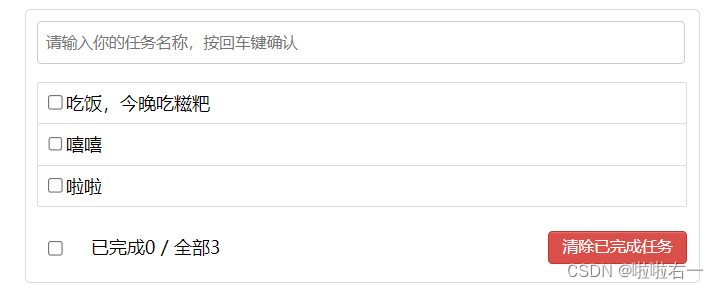
- 准备编辑

- 正在编辑(按钮不显示)

- 焦点移除,修改
⭐️内容不为空限制
// 失去焦点回调(真正执行修改) handleBlur(fasong,e){ fasong.isEdit = false if(!e.target.value.trim()) return alert('输入不能为空') this.$bus.$emit('updateTodo',fasong.id,e.target.value) }- 1
- 2
- 3
- 4
- 5
- 6

⭐️点击编辑按钮自动获取焦点
this.$nextTick(function(){ this.$refs.inputTitle.focus() })- 1
- 2
- 3
- 🔥
nextTick- 语法:
this.$nextTick(回调函数) - 作用:在下一次 DOM 更新结束后执行其指定的回调。
- 什么时候用:当改变数据后,要基于更新后的新DOM进行某些操作时,要在nextTick所指定的回调函数中执行。
- 语法:
📚Vue封装的过度与动画
🐇使用方法
- 作用:在插入、更新或移除 DOM元素时,在合适的时候给元素添加样式类名。
- 写法:
-
准备好样式:
- 元素进入的样式:
v-enter:进入的起点v-enter-active:进入过程中v-enter-to:进入的终点
- 元素离开的样式:
v-leave:离开的起点v-leave-active:离开过程中v-leave-to:离开的终点

- 元素进入的样式:
-
使用
<transition name="hello"> <h1 v-show="isShow">你好啊!h1> transition>- 1
- 2
- 3
-
备注:若有多个元素需要过度,则需要使用:
key值。
-
🐇案例练习
-
过度效果
<template> <div> <button @click="isShow = !isShow">显示/隐藏button> <transition name="hello" appear> <h1 v-show="isShow">你好啊!h1> transition> div> template> <script> export default { name:'Final-Test', data() { return { isShow:true } }, } script> <style scoped> h1{ background-color: pink; } .hello-enter-active{ animation: atguigu 0.5s linear; } .hello-leave-active{ animation: atguigu 0.5s linear reverse; } @keyframes atguigu { from{ transform: translateX(-100%); } to{ transform: translateX(0px); } } style>- 1
- 2
- 3
- 4
- 5
- 6
- 7
- 8
- 9
- 10
- 11
- 12
- 13
- 14
- 15
- 16
- 17
- 18
- 19
- 20
- 21
- 22
- 23
- 24
- 25
- 26
- 27
- 28
- 29
- 30
- 31
- 32
- 33
- 34
- 35
- 36
- 37
- 38
- 39
- 40
- 41
- 42
-
多个元素过度
<template> <div> <button @click="isShow = !isShow">显示/隐藏button> <transition-group name="hello" appear> <h1 v-show="!isShow" key="1">你好啊!h1> <h1 v-show="isShow" key="2">尚硅谷!h1> transition-group> div> template> <script> export default { name:'Final-Test2', data() { return { isShow:true } }, } script> <style scoped> h1{ background-color: skyblue; } /* 进入的起点、离开的终点 */ .hello-enter,.hello-leave-to{ transform: translateX(-100%); } .hello-enter-active,.hello-leave-active{ transition: 0.5s linear; } /* 进入的终点、离开的起点 */ .hello-enter-to,.hello-leave{ transform: translateX(0); } style>- 1
- 2
- 3
- 4
- 5
- 6
- 7
- 8
- 9
- 10
- 11
- 12
- 13
- 14
- 15
- 16
- 17
- 18
- 19
- 20
- 21
- 22
- 23
- 24
- 25
- 26
- 27
- 28
- 29
- 30
- 31
- 32
- 33
- 34
- 35
- 36
- 37
-
集成第三方动画,animate.css官网
<template> <div> <button @click="isShow = !isShow">显示/隐藏button> <transition-group appear name="animate__animated animate__bounce" enter-active-class="animate__swing" leave-active-class="animate__backOutUp" > <h1 v-show="!isShow" key="1">你好啊!h1> <h1 v-show="isShow" key="2">尚硅谷!h1> transition-group> div> template> <script> // npm install animate.css import 'animate.css' export default { name:'Final-Test3', data() { return { isShow:true } }, } script> <style scoped> h1{ background-color: rgb(0, 255, 183); } style>- 1
- 2
- 3
- 4
- 5
- 6
- 7
- 8
- 9
- 10
- 11
- 12
- 13
- 14
- 15
- 16
- 17
- 18
- 19
- 20
- 21
- 22
- 23
- 24
- 25
- 26
- 27
- 28
- 29
- 30
- 31
- 32
- 33

🐇TodoList案例优化
- 让每一个todo的添加和删除都很柔和
- 法①:
UserItem.vue的整个li加过度和动画 - 法②:在
UserList.vue添加(关注多组是transition-group)(以下代码实现方式)
- 法①:
- 结构部分
<template> <ul class="todo-main"> <transition-group name="todo" appear> <UserItem v-for="todoObj in todos" :key="todoObj.id" :fasong="todoObj" >UserItem> transition-group> ul> template>- 1
- 2
- 3
- 4
- 5
- 6
- 7
- 8
- 9
- 10
- 11
- 样式部分
.todo-enter-active{ animation: atguigu 0.5s linear; } .todo-leave-active{ animation: atguigu 0.5s linear reverse; } @keyframes atguigu { from{ transform: translateX(100%); } to{ transform: translateX(0px); } }- 1
- 2
- 3
- 4
- 5
- 6
- 7
- 8
- 9
- 10
- 11
- 12
- 13
- 14
- 15
- 16
-
-
相关阅读:
华为浏览器,Chrome的平替,插件无缝连接
Windows Server安全配置
TResNet: ResNet改进,实现高精度的同时保持高 GPU 利用率
python面试题总结(五)
Python描述 LeetCode 81. 搜索旋转排序数组 II
【毕业设计】大数据工作岗位数据分析与可视化 - python flask
如何在 Linux 中检查我的网卡速度?
8月问题总结~Android 12适配
虹科 | 解决方案 | 汽车示波器 远程诊断方案
C++&QT 作业8
- 原文地址:https://blog.csdn.net/m0_63398413/article/details/136196152
