-
C#上位机与三菱PLC的通信11---开发自己的通讯工具软件(WPF版)
1、先看颜值

2、开始干
1、创建项目
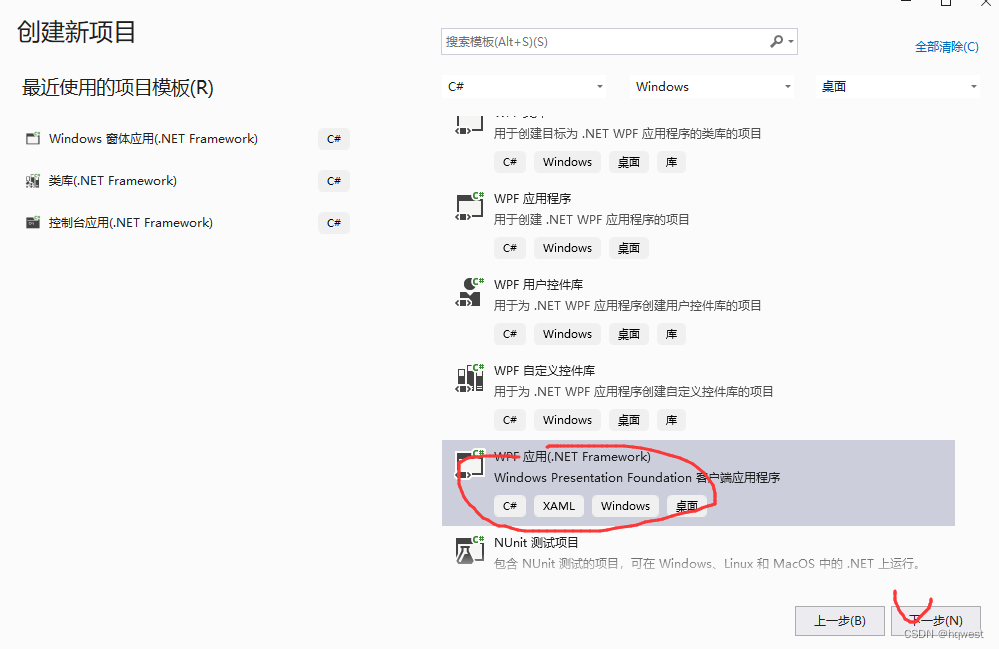

2、引入前面的通讯库
创建目录将前面生成的通讯库dll文件复制到项目的目录

本项目引入dll文件


3、创建命令基类

RelayCommand.cs代码
- using System;
- using System.Collections.Generic;
- using System.Linq;
- using System.Text;
- using System.Threading.Tasks;
- using System.Windows.Input;
- namespace MitsubishiMcToolWPF.Common
- {
- ///
- /// 命令实现类
- ///
- public class RelayCommand : ICommand
- {
- public event EventHandler CanExecuteChanged;
- ///
- /// 要执行的操作
- ///
- private Action<object> executeActions;
- ///
- /// 是否可以执行的委托
- ///
- private Func<object, bool> canExecuteFunc;
- ///
- /// 构造函数 无参构造
- ///
- public RelayCommand() { }
- ///
- /// 通过执行的委托构造
- ///
- ///
- public RelayCommand(Action<object> execute) : this(execute, null)
- {
- }
- ///
- /// 通过执行的操作与是否可执行的委托
- ///
- /// 要执行的操作
- /// 是否可以被执行
- public RelayCommand(Action<object> execute, Func<object, bool> canExecute)
- {
- this.executeActions = execute;
- this.canExecuteFunc = canExecute;
- }
- ///
- /// 命令是否可以执行
- ///
- ///
- ///
- public bool CanExecute(object parameter)
- {
- if (canExecuteFunc != null)
- return this.canExecuteFunc(parameter);
- else
- return true;
- }
- ///
- /// 要执行的操作
- ///
- ///
- public void Execute(object parameter)
- {
- if (executeActions == null)
- return;
- this.executeActions(parameter);
- }
- ///
- /// 执行CanExecuteChanged事件
- ///
- public void OnCanExecuteChanged()
- {
- this.CanExecuteChanged?.Invoke(this, new EventArgs());
- }
- }
- }
4、创建PLC实体类

PLCMemoryModel.cs代码
- using System;
- using System.Collections.Generic;
- using System.Linq;
- using System.Text;
- using System.Threading.Tasks;
- namespace MitsubishiMcToolWPF.Model
- {
- ///
- /// PLC内存模型类
- ///
- public class PLCMemoryModel
- {
- ///
- /// 存储区
- ///
- public string Area { get; set; } = "";
- ///
- /// 地址
- ///
- public string Address { get; set; } = "";
- ///
- /// 数据类型
- ///
- public string DataType { get; set; } = "";
- ///
- /// 读取或写入数据
- ///
- public string Count { get; set; } = "";
- }
- }
5、添加资源字典,即样式文件

CommonResource.xaml完整代码
"ComboBox.Static.Background" EndPoint="0,1" StartPoint="0,0"> "White" Offset="0"/> "#FFE4E4E4" Offset="1"/> "ComboBox.Static.Border" Color="#FF105190"/>

6、创建viewmodel
viewmodel是视图模型,wpf采用的是mvvm的渲染模式,即控件绑定对象的属性,属性发生更改时,驱动控件的数据显示,而控件动作是由命令command执行
1、模型基类

ViewModelBase.cs代码
- using System;
- using System.Collections.Generic;
- using System.ComponentModel;
- using System.Linq;
- using System.Runtime.CompilerServices;
- using System.Text;
- using System.Threading.Tasks;
- using static MitsubishiMcToolWPF.MsgBoxWindow;
- namespace MitsubishiMcToolWPF.ViewModel
- {
- ///
- /// 视图模型基类
- ///
- public class ViewModelBase : INotifyPropertyChanged
- {
- ///
- /// 属性值发生更改时触发
- ///
- public event PropertyChangedEventHandler PropertyChanged;
- ///
- /// 执行更改
- /// C#5.0中的新特性CallerMemberName
- ///
- ///
- protected void OnPropertyChanged([CallerMemberName] string propertyName = "")
- {
- if (PropertyChanged != null)
- {
- PropertyChanged.Invoke(this, new PropertyChangedEventArgs(propertyName));
- }
- }
- ///
- /// 成功消息提示
- ///
- ///
- ///
- ///
- public void ShowMessage(string message, string title = "提示", CustomMessageBoxButton buttons = CustomMessageBoxButton.OK)
- {
- Show(message, title, buttons, CustomMessageBoxIcon.Infomation);
- }
- ///
- /// 错误消息框
- ///
- ///
- ///
- ///
- public void ShowError(string message, string title = "错误", CustomMessageBoxButton buttons = CustomMessageBoxButton.OK)
- {
- Show(message, title, buttons, CustomMessageBoxIcon.Error);
- }
- ///
- /// 询问消息框
- ///
- ///
- ///
- ///
- ///
- public CustomMessageBoxResult ShowQuestion(string message, string title = "询问", CustomMessageBoxButton buttons = CustomMessageBoxButton.OKCancel)
- {
- return Show(message, title, buttons, CustomMessageBoxIcon.Question);
- }
- }
- }
2、主页模型mainviewmodel
MainViewModel.cs代码
- using Mitsubishi.Communication.MC.Mitsubishi;
- using MitsubishiMcToolWPF.Common;
- using MitsubishiMcToolWPF.Model;
- using System;
- using System.Collections.Generic;
- using System.Linq;
- using System.Text;
- using System.Threading.Tasks;
- using System.Windows.Input;
- namespace MitsubishiMcToolWPF.ViewModel
- {
- ///
- /// 视图模型
- ///
- public class MainViewModel : ViewModelBase
- {
- ///
- /// mctcp对象
- ///
- A3E mctcp;
- #region 属性
- PLCMemoryModel readPLCModel = SetInitModel();
- ///
- /// 读取PLC
- ///
- public PLCMemoryModel ReadPLCModel
- {
- get { return readPLCModel; }
- set
- {
- readPLCModel = ReadPLCModel;
- OnPropertyChanged();//属性通知
- }
- }
- PLCMemoryModel writePLCModel = SetInitModel();
- ///
- /// 写入PLC
- ///
- public PLCMemoryModel WritePLCModel
- {
- get { return writePLCModel; }
- set
- {
- writePLCModel = WritePLCModel;
- OnPropertyChanged();
- }
- }
- ///
- /// 初始化页面参数
- ///
- ///
- private static PLCMemoryModel SetInitModel()
- {
- PLCMemoryModel model = new PLCMemoryModel();
- model.Area = "D";
- model.DataType = "short";
- model.Address = "100";
- model.Count = "1";
- return model;
- }
- private string hostName = "192.168.1.7";
- ///
- /// PLC地址
- ///
- public string HostName
- {
- get
- {
- return hostName;
- }
- set
- {
- hostName = value;
- }
- }
- private string hostPort = "6000";
- ///
- /// PLC端口
- ///
- public string HostPort
- {
- get { return hostPort; }
- set
- {
- hostPort = value;
- }
- }
- ///
- /// 存储区下拉框数据源
- ///
- public List<string> CboCustTypes
- {
- get
- {
- return new List<string>() { "D", "X", "Y", "M", "R", "S", "TS" };
- }
- }
- ///
- /// 数据类型
- ///
- public List<string> CboCustDatas
- {
- get
- {
- return new List<string>() { "short", "float", "bool" };
- }
- }
- private string readWords = "";
- ///
- /// 读数结果
- ///
- public string ReadWords
- {
- get { return readWords; }
- set
- {
- readWords = value;
- OnPropertyChanged();
- }
- }
- private string writeWords = "";
- ///
- /// 写入数据
- ///
- public string WriteWords
- {
- get { return writeWords; }
- set
- {
- writeWords = value;
- OnPropertyChanged();
- }
- }
- private string connectWords = "当前未连接";
- ///
- /// 连接状态
- ///
- public string ConnectWords
- {
- get { return connectWords; }
- set
- {
- connectWords = value;
- OnPropertyChanged();
- }
- }
- #endregion
- #region 命令
- ///
- ///
- ///连接按钮的命令
- ///
- public ICommand ConnCommand
- {
- get
- {
- return new RelayCommand(o =>
- {
- var name = HostName;
- var port = HostPort;
- mctcp = new A3E(name, short.Parse(port));// 创建连接
- var result = mctcp.Connect();// 开始连接PLC
- if (!result.IsSuccessed)
- {
- ShowError(result.Message, "错误");
- return;
- }
- ConnectWords = "PLC已连接";
- ShowMessage("PLC连接成功", "提示");
- });
- }
- }
- ///
- ///
- ///断开按钮的命令
- ///
- public ICommand CloseCommand
- {
- get
- {
- return new RelayCommand(o =>
- {
- if (mctcp == null)
- {
- ShowError("PLC没有连接,不能断开", "错误");
- return;
- }
- mctcp = null;
- ConnectWords = "PLC已断开";
- });
- }
- }
- ///
- ///
- /// 读取按钮的命令
- ///
- public ICommand ReadCommand
- {
- get
- {
- return new RelayCommand(o =>
- {
- ReadWords = "";
- var d = ReadPLCModel;
- if (mctcp == null)
- {
- ShowError("PLC未连接,不能读取数据", "错误");
- return;
- }
- //内存地址
- string plcAddr = ReadPLCModel.Area + ReadPLCModel.Address;
- //读取数量
- short readCount = short.Parse(ReadPLCModel.Count);
- //数据类型
- string dataType = ReadPLCModel.DataType;
- switch (dataType)
- {
- case "short":
- var datas2 = mctcp.Read<short>(plcAddr, readCount);
- if (!datas2.IsSuccessed)
- {
- ShowMessage(datas2.Message, "提示");
- return;
- }
- ReadWords = string.Join(",", datas2.Datas);
- break;
- case "float":
- var datas3 = mctcp.Read<float>(plcAddr, readCount);
- if (!datas3.IsSuccessed)
- {
- ShowMessage(datas3.Message, "提示");
- return;
- }
- ReadWords = string.Join(",", datas3.Datas);
- break;
- case "bool":
- var datas4 = mctcp.Read<bool>(plcAddr, readCount);
- if (!datas4.IsSuccessed)
- {
- ShowMessage(datas4.Message, "提示");
- return;
- }
- ReadWords = string.Join(",", datas4.Datas);
- break;
- }
- });
- }
- }
- ///
- ///
- /// 写入按钮的命令处理
- ///
- public ICommand WriteCommand
- {
- get
- {
- return new RelayCommand(o =>
- {
- if (mctcp == null)
- {
- ShowError("PLC未连接,不能写入数据", "错误");
- return;
- }
- var d = WritePLCModel;
- //内存地址
- string plcAddr = WritePLCModel.Area + WritePLCModel.Address;
- //写入数量
- ushort writeCount = ushort.Parse(WritePLCModel.Count);
- //数据类型
- string dataType = WritePLCModel.DataType;
- //实际数量
- string objWriteVals = WriteWords;
- ushort objWCount = (ushort)objWriteVals.Split(',').Length;
- //实际数量与要求数量不一致,不允许操作
- if (writeCount != objWCount)
- {
- ShowError("写入值的数量不正确!");
- return;
- }
- List<string> vals = objWriteVals.Split(',').ToList();
- switch (dataType)
- {
- case "short":
- //实际数值转换成list集合 short类型
- List<short> objshort = new List<short>();
- vals.ForEach((x) =>
- {
- objshort.Add(short.Parse(x));
- });
- var finish2 = mctcp.Write<short>(objshort, plcAddr);
- if (finish2.IsSuccessed)
- {
- ShowMessage("写入成功", "提示");
- }
- break;
- case "float":
- //实际数值转换成list集合 float
- List<float> objfloat = new List<float>();
- vals.ForEach((x) =>
- {
- objfloat.Add(float.Parse(x));
- });
- var finish3 = mctcp.Write<float>(objfloat, plcAddr);
- if (finish3.IsSuccessed)
- {
- ShowMessage("写入成功", "提示");
- }
- break;
- case "bool":
- //实际数值转换成list集合bool
- List<bool> objbool = new List<bool>();
- vals.ForEach((x) =>
- {
- if (x == "1")
- {
- objbool.Add(true);
- }
- else
- {
- objbool.Add(false);
- }
- });
- var finish4 = mctcp.Write<bool>(objbool, plcAddr);
- if (finish4.IsSuccessed)
- {
- ShowMessage("写入成功", "提示");
- }
- break;
- }
- });
- }
- }
- #endregion
- }
- }
7、主界面布局
 MainWindow.xaml完整代码
"MitsubishiMcToolWPF.MainWindow" - xmlns="http://schemas.microsoft.com/winfx/2006/xaml/presentation"
- xmlns:x="http://schemas.microsoft.com/winfx/2006/xaml"
- xmlns:d="http://schemas.microsoft.com/expression/blend/2008"
- xmlns:mc="http://schemas.openxmlformats.org/markup-compatibility/2006"
- xmlns:local="clr-namespace:MitsubishiMcToolWPF.ViewModel"
- mc:Ignorable="d"
- FontSize="13" FontFamily="Microsoft YaHei" ResizeMode="CanMinimize" Title="三菱PLC通讯工具" FontWeight="ExtraLight" WindowStartupLocation="CenterScreen" Height="450" Width="880" Name="mainWin" >
"true"> "62"/> "0" Background="BlanchedAlmond"> "100" /> "0" Source="/imgs/log1.png" Width="60" Height="60" Margin="20,0" /> "1" Text="三菱MC协议通讯调试助手(Qna-3E模式)" FontSize="23" VerticalAlignment="Center" FontWeight="Bold" /> "1" Margin="0 10 0 0"> "200"/> "4"/> "0" Margin="20"> "PLC地址"/> "30" VerticalContentAlignment="Center" Padding="5,0" Margin="0,10" Text="{Binding HostName}" /> "端口号" Margin="0,10,0,0"/> "30" VerticalContentAlignment="Center" Padding="5,0" Margin="0,10" Text="{Binding HostPort}" /> "{Binding ConnectWords,Mode=TwoWay,UpdateSourceTrigger=PropertyChanged}" Margin="0,10,0,0" Foreground="Blue"/> "1" Background="#4490AC" Width="2" Height="450" Margin="0 -11 0 0"> "2"> "60"/> "80"/> "30"/> "60"/> "80"/> "Horizontal" Grid.Row="0" Grid.Column="0" Grid.ColumnSpan="2" Margin="10"> "存储区:" Style="{StaticResource txtTextBlockStyle}" Margin="0 0 0 0" > "{Binding CboCustTypes}" SelectedValue="{Binding ReadPLCModel.Area}" Width="70" Style="{StaticResource cboStyle}"> "数据类型:" Style="{StaticResource txtTextBlockStyle}" > "{Binding CboCustDatas}" SelectedValue="{Binding ReadPLCModel.DataType}" Width="70" Style="{StaticResource cboStyle}"> "地址:" Style="{StaticResource txtTextBlockStyle}" > "{Binding ReadPLCModel.Address}" Width="100" Style="{StaticResource txtTextBoxStyle}" /> "数量:" Style="{StaticResource txtTextBlockStyle}" > "{Binding ReadPLCModel.Count}" Width="60" Style="{StaticResource txtTextBoxStyle}" /> "Vertical" Grid.Row="1" Grid.Column="0" Grid.ColumnSpan="2" Margin="10"> "读取结果(多个数据之间用逗号隔开)" Style="{StaticResource txtTextBlockStyle}" Margin="0 3 0 9"> "{Binding ReadWords,Mode=TwoWay,UpdateSourceTrigger=PropertyChanged}" Width="616" Style="{StaticResource txtTextBoxStyle}" Margin="-23,0,0,0" /> "Horizontal" Grid.Row="2" Grid.Column="0" Grid.ColumnSpan="2" Background="#4490AC" Width="706" Height="2" Margin="-1,0,0,0"> "Horizontal" Grid.Row="3" Grid.Column="0" Grid.ColumnSpan="2" Margin="10"> "存储区:" Style="{StaticResource txtTextBlockStyle}" Margin="0 0 0 0"> "{Binding CboCustTypes}" SelectedValue="{Binding WritePLCModel.Area }" Width="70" Style="{StaticResource cboStyle}"> "数据类型:" Style="{StaticResource txtTextBlockStyle}" > "{Binding CboCustDatas}" SelectedValue="{Binding WritePLCModel.DataType }" Width="70" Style="{StaticResource cboStyle}"> "地址:" Style="{StaticResource txtTextBlockStyle}" > "{Binding WritePLCModel.Address }" Width="100" Style="{StaticResource txtTextBoxStyle}" /> "数量:" Style="{StaticResource txtTextBlockStyle}" > "{Binding WritePLCModel.Count}" Width="60" Style="{StaticResource txtTextBoxStyle}" /> "Vertical" Grid.Row="4" Grid.Column="0" Grid.ColumnSpan="2" Margin="10"> "写入数据(多个数据之间用逗号隔开)" Style="{StaticResource txtTextBlockStyle}" Margin="0 3 0 9" > "{Binding WriteWords ,Mode=TwoWay,UpdateSourceTrigger=PropertyChanged}" Width="616" Style="{StaticResource txtTextBoxStyle}" Margin="-23,0,0,0" />


8、启动MC服务器

9、异常错误处理


10、操作测试
1、连接PLC

2、读取数据,short,float,bool


3、写入数据,short,float
写入short

写入float

3、小结
走过路过不要错过,点赞关注收藏又圈粉,共同致富。
欢迎抄袭,复制,分享,转载,学习,截图..............
欢迎抄袭,复制,分享,转载,学习,截图..............

-
相关阅读:
Android开发 期末复习
React - ref 命令为什么代替父子组件的数据传递
CRM软件系统维护客户的主要方法
IDEA中创建Web工程流程
SpringBoot概念、创建和运行
Instance Tunnel 使用
做web自动化测试遇到Chrome浏览器老是自动更新,怎么办 ? 这里提供两个解决办法 。
用 Rust 编写 eBPF/XDP 负载均衡器
计算机网络(自顶向下方法)-链路层和局域网
SSE图像算法优化系列三十一:RGB2HSL/RGB2HSV及HSL2RGB/HSV2RGB的指令集优化-上。
- 原文地址:https://blog.csdn.net/hqwest/article/details/136250638
