-
Rust ?运算符 Rust读写txt文件
一、Rust ?运算符
?运算符:传播错误的一种快捷方式。
-
如果Result是Ok:Ok中的值就是表达式的结果,然后继续执行程序。
-
如果Result是Err:Err就是整个函数的返回值,就像使用了return
?运算符只能用于返回Result的函数。
?运算符与main函数
-
main函数返回类型是:()
-
main函数的返回类型也可以是:Result
-
Box是trait对象,简单理解:“任何可能的错误类型”
二、Rust读写txt文件
Rust可以对txt文件读、写、创建、添加、打开操作。
use std::fs::{self, OpenOptions}; let file = OpenOptions::new() .read(true) .write(true) .create(true) .append(true) .open(filepath)?;- 1
- 2
- 3
- 4
- 5
- 6
- 7
- 8
三、Rust实例测试
main.rs
use std::fs::{self, OpenOptions}; use std::io::{BufRead, BufReader, BufWriter, Write}; fn main() -> Result<(), Box<dyn std::error::Error>> { let filepath = "test1.txt"; let filepath2 = "test2.txt"; let str = read_file_string(filepath); println!("{:#?}", str); let vec = read_file_vec(filepath); println!("{:#?}", vec); read_file_buffer(filepath)?; write_file_buffer(filepath2)?; Ok(()) } //将整个文件作为字符串读取 fn read_file_string(filepath: &str) -> Result<String, Box<dyn std::error::Error>> { let data = fs::read_to_string(filepath)?; Ok(data) } //将整个文件作为Vector读取 fn read_file_vec(filepath: &str) -> Result<Vec<u8>, Box<dyn std::error::Error>> { let data = fs::read(filepath)?; Ok(data) } //BufReader按行读取 fn read_file_buffer(filepath: &str) -> Result<(), Box<dyn std::error::Error>> { let file = OpenOptions::new().read(true).open(filepath)?; let reader = BufReader::new(file); //按行读取 for line in reader.lines() { let str: String = line.unwrap(); println!("{}", str); } Ok(()) } //BufWriter带缓冲写入 fn write_file_buffer(filepath: &str) -> Result<(), Box<dyn std::error::Error>> { let file = OpenOptions::new() .create(true) .append(true) .open(filepath)?; let mut reader = BufWriter::new(file); // 带缓冲写入 reader.write(b"hello\n")?; reader.write(b"word\n")?; //确保缓冲中的内容全部写入文件 reader.flush()?; Ok(()) }- 1
- 2
- 3
- 4
- 5
- 6
- 7
- 8
- 9
- 10
- 11
- 12
- 13
- 14
- 15
- 16
- 17
- 18
- 19
- 20
- 21
- 22
- 23
- 24
- 25
- 26
- 27
- 28
- 29
- 30
- 31
- 32
- 33
- 34
- 35
- 36
- 37
- 38
- 39
- 40
- 41
- 42
- 43
- 44
- 45
- 46
- 47
- 48
- 49
- 50
- 51
- 52
- 53
- 54
- 55
- 56
- 57
- 58
- 59
- 60
- 61
- 62
- 63
其中test1.txt文件内容如下:
白日依山尽, 黄河入海流。- 1
- 2
运行效果如下:

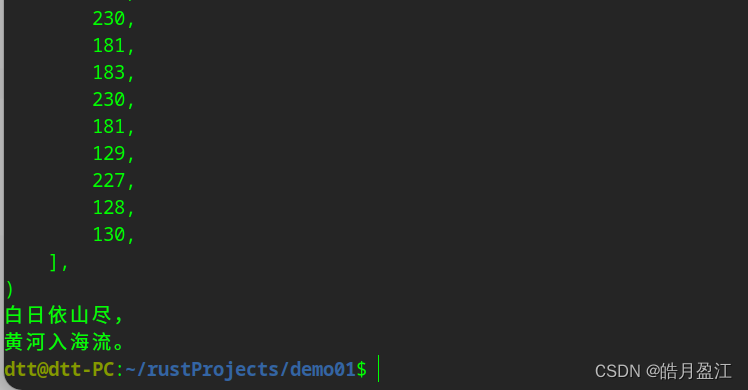
生成的test2.txt文件,内容如下:
hello word- 1
- 2
-
-
相关阅读:
使用分支——Git Checkout
【Arma3脚本教程】二、常用命令
计算机毕业设计(附源码)python在线音乐网站
javaee ssm框架项目整合thymeleaf2.0 更多thymeleaf标签用法 项目结构图
用HTML、CSS技术设计的个人网页与实现制作(web前端期末大作业)
Spring循环依赖
【k8s管理--可视化界面】
【数组基础知识】
SpringSecurity系列——记住我(remember me)day3-3(源于官网5.7.2版本)
c++视觉图像线性混合
- 原文地址:https://blog.csdn.net/u013541325/article/details/136221382
