-
CSS弹性布局
CSS弹性布局
一、概念
弹性盒子是 CSS3 的一种新的布局模式。
CSS3 弹性盒( Flexible Box 或 flexbox),是一种当页面需要适应不同的屏幕大小以及设备类型时确保元素拥有恰当的行为的布局方式。
引入弹性盒布局模型的目的是提供一种更加有效的方式来对一个容器中的子元素进行排列、对齐和分配空白空间
弹性盒子由弹性容器(Flex container)和弹性子元素(Flex item)组成。
弹性容器通过设置 display 属性的值为 flex 或 inline-flex将其定义为弹性容器。
弹性容器内包含了一个或多个弹性子元素。
注意: 弹性容器外及弹性子元素内是正常渲染的。弹性盒子只定义了弹性子元素如何在弹性容器内布局。
弹性子元素通常在弹性盒子内一行显示。默认情况每个容器只有一行。
#box1{ width: 800px; height: 600px; background-color: gray; display: flex; /*将div设置为弹性容器*/ }- 1
- 2
- 3
- 4
- 5
- 6
二、弹性容器属性
2.1 flex-direction属性
顺序指定了弹性子元素在父容器中的位置。
语法:
flex-direction: row | row-reverse | column | column-reverse- 1
- row:横向从左到右排列(左对齐),默认的排列方式。
- row-reverse:反转横向排列(右对齐,从后往前排,最后一项排在最前面。
- column:纵向排列。
- column-reverse:反转纵向排列,从后往前排,最后一项排在最上面。
示例1:子元素水平排列
#box1{ width: 800px; height: 600px; background-color: gray; display: flex; /*将div设置为弹性盒模型对象*/ flex-direction: row; /*默认,子元素水平排列*/ }- 1
- 2
- 3
- 4
- 5
- 6
- 7

示例2:子元素水平反向排列
#box1{ width: 800px; height: 600px; background-color: gray; display: flex; /*将div设置为弹性盒模型对象*/ flex-direction: row-reverse; /*子元素水平反向排列*/ }- 1
- 2
- 3
- 4
- 5
- 6
- 7
示例3:子元素纵向排列
#box1{ width: 800px; height: 600px; background-color: gray; display: flex; /*将div设置为弹性盒模型对象*/ flex-direction: column; /*子元素纵向排列*/ }- 1
- 2
- 3
- 4
- 5
- 6
- 7

示例4:子元素纵向反向排列
#box1{ width: 800px; height: 600px; background-color: gray; display: flex; /*将div设置为弹性盒模型对象*/ flex-direction: column-reverse; /*子元素纵向反向排列*/ }- 1
- 2
- 3
- 4
- 5
- 6
- 7

2.2 justify-content 属性
应用在弹性容器上,把弹性项沿着弹性容器的主轴线(main axis)对齐。
语法:
justify-content: flex-start | flex-end | center | space-between | space-around- 1
-
flex-start:
弹性项目向行头紧挨着填充。这个是默认值。第一个弹性项的main-start外边距边线被放置在该行的main-start边线,而后续弹性项依次平齐摆放。
-
flex-end:
弹性项目向行尾紧挨着填充。第一个弹性项的main-end外边距边线被放置在该行的main-end边线,而后续弹性项依次平齐摆放。
-
center:
弹性项目居中紧挨着填充。(如果剩余的自由空间是负的,则弹性项目将在两个方向上同时溢出)。
-
space-between:
弹性项目平均分布在该行上。如果剩余空间为负或者只有一个弹性项,则该值等同于flex-start。否则,第1个弹性项的外边距和行的main-start边线对齐,而最后1个弹性项的外边距和行的main-end边线对齐,然后剩余的弹性项分布在该行上,相邻项目的间隔相等。
-
space-around:
弹性项目平均分布在该行上,两边留有一半的间隔空间。如果剩余空间为负或者只有一个弹性项,则该值等同于center。否则,弹性项目沿该行分布,且彼此间隔相等(比如是20px),同时首尾两边和弹性容器之间留有一半的间隔(1/2*20px=10px)。
示例1:头部对齐
#box1{ width: 800px; height: 600px; background-color: gray; display: flex; /*将div设置为弹性盒模型对象*/ justify-content: flex-start; /*头部对齐*/ }- 1
- 2
- 3
- 4
- 5
- 6
- 7

示例2:尾部对齐
#box1{ width: 800px; height: 600px; background-color: gray; display: flex; /*将div设置为弹性盒模型对象*/ justify-content: flex-end; /*尾部对齐*/ }- 1
- 2
- 3
- 4
- 5
- 6
- 7

示例3:居中对齐
#box1{ width: 800px; height: 600px; background-color: gray; display: flex; /*将div设置为弹性盒模型对象*/ justify-content: center; /*居中对齐*/ }- 1
- 2
- 3
- 4
- 5
- 6
- 7

示例4:平均分布1
#box1{ width: 800px; height: 600px; background-color: gray; display: flex; /*将div设置为弹性盒模型对象*/ justify-content: space-between; /*平均分布1*/ }- 1
- 2
- 3
- 4
- 5
- 6
- 7

示例4:平均分布2
#box1{ width: 800px; height: 600px; background-color: gray; display: flex; /*将div设置为弹性盒模型对象*/ justify-content: space-around; /*平均分布2*/ }- 1
- 2
- 3
- 4
- 5
- 6
- 7

2.3 align-items 属性
设置或检索弹性盒子元素在侧轴(纵轴)方向上的对齐方式。
语法:
align-items: flex-start | flex-end | center | baseline | stretch- 1
- flex-start:弹性盒子元素的侧轴(纵轴)起始位置的边界紧靠住该行的侧轴起始边界。
- flex-end:弹性盒子元素的侧轴(纵轴)起始位置的边界紧靠住该行的侧轴结束边界。
- center:弹性盒子元素在该行的侧轴(纵轴)上居中放置。(如果该行的尺寸小于弹性盒子元素的尺寸,则会向两个方向溢出相同的长度)。
- baseline:如弹性盒子元素的行内轴与侧轴为同一条,则该值与’flex-start’等效。其它情况下,该值将参与基线对齐。
- stretch:如果指定侧轴大小的属性值为’auto’,则其值会使项目的边距盒的尺寸尽可能接近所在行的尺寸,但同时会遵照’min/max-width/height’属性的限制。 默认值,如果弹性子元素没有高度或高度为auto,将占满整个容器的高度
示例1:侧轴(纵轴)方向头部对齐
#box1{ width: 800px; height: 600px; background-color: gray; display: flex; /*将div设置为弹性盒模型对象*/ align-items: flex-start; /*侧轴(纵轴)方向头部对齐*/ }- 1
- 2
- 3
- 4
- 5
- 6
- 7

示例2:侧轴(纵轴)方向尾部对齐
#box1{ width: 800px; height: 600px; background-color: gray; display: flex; /*将div设置为弹性盒模型对象*/ align-items: flex-end; /*侧轴(纵轴)方向尾部对齐*/ }- 1
- 2
- 3
- 4
- 5
- 6
- 7

示例3:侧轴(纵轴)方向居中对齐
#box1{ width: 800px; height: 600px; background-color: gray; display: flex; /*将div设置为弹性盒模型对象*/ align-items: center; /*侧轴(纵轴)方向居中对齐*/ }- 1
- 2
- 3
- 4
- 5
- 6
- 7

示例4:按文本的基线对齐
#box1{ width: 800px; height: 600px; background-color: gray; display: flex; /*将div设置为弹性盒模型对象*/ align-items: baseline; /*侧轴(纵轴)方向按子元素内文本基线对齐*/ }- 1
- 2
- 3
- 4
- 5
- 6
- 7

示例5:stretch(默认值)
#box1{ width: 800px; height: 600px; background-color: gray; display: flex; /*将div设置为弹性盒模型对象*/ align-items: stretch; /*默认值,如果弹性子元素没有高度或高度为auto,将占满整个容器的高度*/ }- 1
- 2
- 3
- 4
- 5
- 6
- 7
2.4 flex-wrap 属性
用于指定弹性盒子的子元素换行方式。
语法:
flex-flow: nowrap|wrap| wrap-reverse- 1
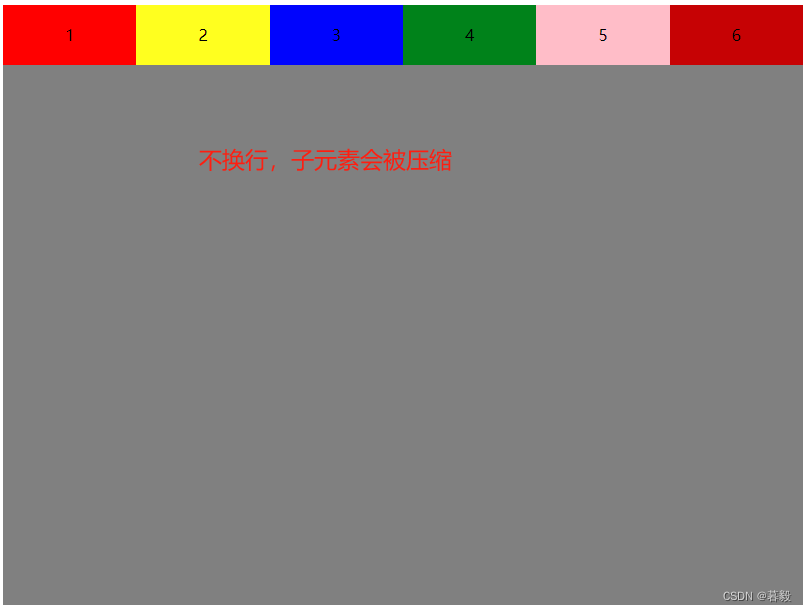
- nowrap - 默认, 弹性容器为单行。该情况下弹性子项可能会溢出容器。
- wrap - 弹性容器为多行。该情况下弹性子项溢出的部分会被放置到新行,子项内部会发生断行
- wrap-reverse -反转 wrap 排列。
示例1:不换行,子元素的宽度会被压缩
#box1{ width: 800px; height: 600px; background-color: gray; display: flex; /*将div设置为弹性盒模型对象*/ flex-wrap: nowrap; /*默认值,不换行*/ }- 1
- 2
- 3
- 4
- 5
- 6
- 7
示例2:换行
#box1{ width: 800px; height: 600px; background-color: gray; display: flex; /*将div设置为弹性盒模型对象*/ flex-wrap: wrap; /*换行*/ }- 1
- 2
- 3
- 4
- 5
- 6
- 7

示例3:反转 wrap 排列
#box1{ width: 800px; height: 600px; background-color: gray; display: flex; /*将div设置为弹性盒模型对象*/ flex-wrap: wrap-reverse; /*反转 wrap 排列*/ }- 1
- 2
- 3
- 4
- 5
- 6
- 7

2.5 align-content 属性
用于修改
flex-wrap属性的行为。类似于align-items, 但它不是设置弹性子元素的对齐,而是设置各个行的对齐。align-content: flex-start | flex-end | center | space-between | space-around | stretch- 1
stretch- 默认。各行将会伸展以占用剩余的空间。flex-start- 各行向弹性盒容器的起始位置堆叠。flex-end- 各行向弹性盒容器的结束位置堆叠。center-各行向弹性盒容器的中间位置堆叠。space-between-各行在弹性盒容器中平均分布。space-around- 各行在弹性盒容器中平均分布,两端保留子元素与子元素之间间距大小的一半。
示例1:各行向弹性盒容器的起始位置堆叠
#box1{ width: 800px; height: 600px; background-color: gray; display: flex; /*将div设置为弹性盒模型对象*/ flex-wrap: wrap; align-content: flex-start; /*各行向弹性盒容器的起始位置堆叠*/ }- 1
- 2
- 3
- 4
- 5
- 6
- 7
- 8

示例2:各行向弹性盒容器的结束位置堆叠
#box1{ width: 800px; height: 600px; background-color: gray; display: flex; /*将div设置为弹性盒模型对象*/ flex-wrap: wrap; align-content: flex-end; /*各行向弹性盒容器的结束位置堆叠*/ }- 1
- 2
- 3
- 4
- 5
- 6
- 7
- 8

示例3:各行向弹性盒容器的中间位置堆叠
#box1{ width: 800px; height: 600px; background-color: gray; display: flex; /*将div设置为弹性盒模型对象*/ flex-wrap: wrap; align-content: center; /*各行向弹性盒容器的中间位置堆叠*/ }- 1
- 2
- 3
- 4
- 5
- 6
- 7
- 8
示例4:各行在弹性盒容器中平均分布1

示例5:各行在弹性盒容器中平均分布2
#box1{ width: 800px; height: 600px; background-color: gray; display: flex; /*将div设置为弹性盒模型对象*/ flex-wrap: wrap; align-content: space-around; /*各行在弹性盒容器中平均分布*/ }- 1
- 2
- 3
- 4
- 5
- 6
- 7
- 8

三、弹性子元素属性
3.1 order属性
子元素排序,用整数值来定义排列顺序,数值小的排在前面。可以为负值。
语法:
order:- 1
示例:
#box1{ width: 800px; height: 200px; background-color: gray; display: flex; /*将div设置为弹性盒模型对象*/ } #box1 div{ width:200px; height: 60px; line-height: 60px; text-align: center; } #item1{ background-color: red; order:6 /*排序顺序,数字越小顺序越靠前*/ } #item2{ background-color: yellow; order:5 /*排序顺序,数字越小顺序越靠前*/ } #item3{ background-color: blue; order:4 /*排序顺序,数字越小顺序越靠前*/ } #item4{ background-color: green; order:3 /*排序顺序,数字越小顺序越靠前*/ } #item5{ background-color: pink; order:2 /*排序顺序,数字越小顺序越靠前*/ } #item6{ background-color: firebrick; order:1 /*排序顺序,数字越小顺序越靠前*/ }'box1'>'item1'>1'item2'>2'item3'>3'item4'>4'item5'>5'item6'>6- 1
- 2
- 3
- 4
- 5
- 6
- 7
- 8
- 9
- 10
- 11
- 12
- 13
- 14
- 15
- 16
- 17
- 18
- 19
- 20
- 21
- 22
- 23
- 24
- 25
- 26
- 27
- 28
- 29
- 30
- 31
- 32
- 33
- 34
- 35
- 36
- 37
- 38
- 39
- 40
- 41
- 42
- 43
- 44
- 45
- 46
- 47
- 48
- 49

3.2 margin属性
设置"margin"值为"auto"值,自动获取弹性容器中剩余的空间。所以设置垂直方向margin值为"auto",可以使弹性子元素在弹性容器的两上轴方向都完全集中。
示例1:margin-right,自动获取弹性容器右侧的空间
#item1{ background-color: red; margin-right: auto; /*自动获取弹性容器右侧的空间*/ }- 1
- 2
- 3
- 4

示例2:margin-left,自动获取弹性容器左侧的空间
#item1{ background-color: red; margin-left: auto; /*自动获取弹性容器左侧的空间*/ }- 1
- 2
- 3
- 4

示例3:margin-top:自动获取弹性容器上侧的空间
#item1{ background-color: red; margin-top:auto /*自动获取弹性容器上侧的空间*/ }- 1
- 2
- 3
- 4

示例4:margin-bottom:自动获取弹性容器下侧的空间
#item1{ background-color: red; margin-bottom:auto; /*自动获取弹性容器下侧的空间*/ }- 1
- 2
- 3
- 4

示例4:margin:自动获取弹性容器上下左右侧的空间
#item1{ background-color: red; margin:auto /*自动获取弹性容器上下左右侧的空间*/ }- 1
- 2
- 3
- 4

3.3 align-self属性
用于设置弹性元素自身在侧轴(纵轴)方向上的对齐方式。
语法:
align-self: auto | flex-start | flex-end | center | baseline | stretch- 1
- auto:如果’align-self’的值为’auto’,则其计算值为元素的父元素的’align-items’值,如果其没有父元素,则计算值为’stretch’。
- flex-start:弹性盒子元素的侧轴(纵轴)起始位置的边界紧靠住该行的侧轴起始边界。
- flex-end:弹性盒子元素的侧轴(纵轴)起始位置的边界紧靠住该行的侧轴结束边界。
- center:弹性盒子元素在该行的侧轴(纵轴)上居中放置。(如果该行的尺寸小于弹性盒子元素的尺寸,则会向两个方向溢出相同的长度)。
- baseline:如弹性盒子元素的行内轴与侧轴为同一条,则该值与’flex-start’等效。其它情况下,该值将参与基线对齐。
- stretch:如果指定侧轴大小的属性值为’auto’,则其值会使项目的边距盒的尺寸尽可能接近所在行的尺寸,但同时会遵照’min/max-width/height’属性的限制。
3.4 flex-grow属性
用于设置或检索弹性盒的扩展比率
语法:
flex-grow: number|initial|inherit;- 1
number:一个数字,规定项目将相对于其他灵活的项目进行扩展的量。默认值是 0(扩展)。
#box1{ width: 800px; /*弹性容器的总宽度*/ height: 200px; background-color: gray; display: flex; /*将div设置为弹性盒模型对象*/ } #box1 div{ width:100px; /*每个子元素的宽度*/ height: 60px; line-height: 60px; text-align: center; } #item1{ background-color: red; flex-grow: 2; /*扩展的空间为剩余空间*1/5,即(800-100*3)*2/5=200,实际宽度为100+200=300px */ } #item2{ background-color: yellow; flex-grow: 2; /*扩展的空间为剩余空间*1/5,即(800-100*3)*2/5=200,实际宽度为100+200=300px */ } #item3{ background-color: blue; flex-grow: 1; /*扩展的空间为剩余空间*1/5,即(800-100*3)*1/5=100,实际宽度为100+100=200px */ }- 1
- 2
- 3
- 4
- 5
- 6
- 7
- 8
- 9
- 10
- 11
- 12
- 13
- 14
- 15
- 16
- 17
- 18
- 19
- 20
- 21
- 22
- 23
- 24

3.5 flex-shrink属性
用于设置或检索弹性盒的收缩比率。。
**注意:**如果元素不是弹性盒对象的元素,则 flex-shrink 属性不起作用。
语法:
flex-shrink: number|initial|inherit;- 1
number:一个数字,规定项目将相对于其他灵活的项目进行收缩的量。默认值是 0
示例:
#box1{ width: 800px; /*弹性容器的总宽度*/ height: 200px; background-color: gray; display: flex; /*将div设置为弹性盒模型对象*/ } #box1 div{ width:300px; /*每个子元素的宽度*/ height: 60px; line-height: 60px; text-align: center; } #item1{ background-color: red; flex-shrink: 2; /*收缩的空间为所有子元素空间之和减弹性容器空间,即300*3-800=100px,该子元素收缩空间为100*2/5=40px,该子元素实际宽度为300-40=260px*/ } #item2{ background-color: yellow; flex-shrink: 2; /*收缩的空间为所有子元素空间之和减弹性容器空间,即300*3-800=100px,该子元素收缩空间为100*2/5=40px,该子元素实际宽度为300-40=260px*/ } #item3{ background-color: blue; flex-shrink: 1; /*收缩的空间为所有子元素空间之和减弹性容器空间,即300*3-800=100px,该子元素收缩空间为100*1/5=20px,该子元素实际宽度为300-20=280px*/ }- 1
- 2
- 3
- 4
- 5
- 6
- 7
- 8
- 9
- 10
- 11
- 12
- 13
- 14
- 15
- 16
- 17
- 18
- 19
- 20
- 21
- 22
- 23
- 24
- 25
- 26

3.6 flex属性
用于指定弹性子元素如何分配空间。
语法:
flex:none | [ flex-grow ] || [ flex-shrink ] || [ flex-basis ]- 1
- none:none关键字的计算值为: 0 0 auto
- [ flex-grow ]:定义弹性盒子元素的扩展比率。
- [ flex-shrink ]:定义弹性盒子元素的收缩比率。
- [ flex-basis ]:定义弹性盒子元素的默认基准值。
示例1:flex-grow
#item1{ background-color: red; flex:2 /*占2/5的空间*/ } #item2{ background-color: yellow; flex:2 /*占1/5的空间*/ } #item3{ background-color: blue; flex:1 /*占1/5的空间*/ }- 1
- 2
- 3
- 4
- 5
- 6
- 7
- 8
- 9
- 10
- 11
- 12

-
相关阅读:
JVM的类加载过程
RTT学习笔记11- gpio使用和GPIO设备驱动框架层
R语言偏相关和典型相关
Solidity智能合约开发 — 4.2-合约的fallback和函数重载
Redisson入坑篇
C++:程序运行的开始和结束
[技术发展-27]:互联网平台的常见算法与新的治理办法
软件研发的十大浪费:研发效能的另一面
1130 - Host ‘17216.18083‘ is not allowed to connect to this MySQL server
Laravel Octane 和 Swoole 协程的使用分析
- 原文地址:https://blog.csdn.net/weixin_43631940/article/details/136119067
