-
Axios简单使用与配置安装-Vue
安装Axios
npm i axios
main.js 导入
import Axios from 'axios' Vue.prototype.$axios = Axios- 1
- 2
简单发送请求
get
getTest() { this.$axios({ method: 'GET', url: 'https://apis.jxcxin.cn/api/title?url=https://apis.jxcxin.cn/' }).then(res => { //请求成功回调 console.log(res) }) }- 1
- 2
- 3
- 4
- 5
- 6
- 7
- 8
- 9
post
postTest() { // let data = new URLSearchParams() 表单方式 this.$axios({ method: 'POST', url: 'https://service3.91suke.com/sk/login', //data:data 表单方式 data: { id: 120, name: '123' //post请求参数 这种写法是json格式的 // {id:120,name:'123' } } }).then(res => {//请求成功回 console.log(res) }) }- 1
- 2
- 3
- 4
- 5
- 6
- 7
- 8
- 9
- 10
- 11
- 12
- 13
- 14
- 15
- 16
- 17
- 18
put
putTest() { this.$axios({ method: 'PUT', url: 'www.xxxxx.com/alter', data: { id: 123 } }).then(res => { consoloe.log(res) }) }- 1
- 2
- 3
- 4
- 5
- 6
- 7
- 8
- 9
- 10
- 11
- 12
- 13
delete
deleteTest() { this.$axios({ method: 'DELETE', url: 'www.xxxxx.com/alter?id=100', }).then(res => { consoloe.log(res) }) }- 1
- 2
- 3
- 4
- 5
- 6
- 7
- 8
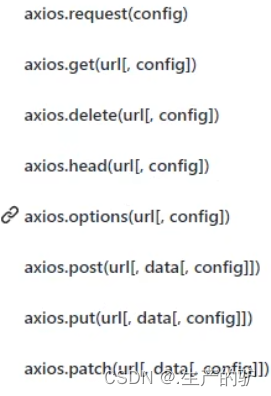
方法发送请求(推荐)
get
axios.get(url,params)
params,confing 非必须,参数可以直接在url拼接this.$axios.get('https://apis.jxcxin.cn/api/title?url=https://apis.jxcxin.cn/', { params: { //请求参数对象 xxxxx?id=10 id: 10 } }).then(res => { console.log(res) })- 1
- 2
- 3
- 4
- 5
- 6
- 7
- 8
post
this.$axios.post('https://service3.91suke.com/sk/login', { id: 123, name: '哈哈哈' }).then(res => { consoloe.log(res) })- 1
- 2
- 3
- 4
- 5
- 6
- 7
- 8
其他方法一样
-
相关阅读:
位图(bitmap)原理以及实现
uni-app解决表格uni-table样式问题
【Python】学生管理系统——详细解释+代码+详细注释(课设必过)
ES6初步了解生成器
695. 岛屿的最大面积-深度优先遍历
U_BOOT_DRIVER简析
Linux实战记录
Launch SkyWalking
E Parity Split (江西CCPC省赛)题解
【无标题】
- 原文地址:https://blog.csdn.net/dpc5201314/article/details/134535723
