-
【用unity实现100个游戏之16】Unity中程序化生成的2D地牢4(附项目源码)
最终效果

前言
本期紧跟着上期内容,主要实现在地牢中生成物品、放置玩家和敌人。
素材
物品素材:
https://itch.io/c/1597630/super-retro-world

按程序放置物品
新增ItemData,定义物品数据
// 放置类型枚举 public enum PlacementType { OpenSpace, // 空地 NearWall // 靠近墙壁 } [CreateAssetMenu(menuName = "Dungeon/ItemData")] public class ItemData : ScriptableObject { [Header("物品图片")] public Sprite sprite; [Header("物品大小")] public Vector2Int size; [Header("放置类型枚举")] public PlacementType placementType; [Header("是否添加偏移量,可以有效防止物品阻塞路径")] public bool addOffset; } [Serializable] public class ItemDataInfo { public ItemData itemData; public int minQuantity;//最小数量 public int maxQuantity;//最大数量 }- 1
- 2
- 3
- 4
- 5
- 6
- 7
- 8
- 9
- 10
- 11
- 12
- 13
- 14
- 15
- 16
- 17
- 18
- 19
- 20
- 21
- 22
- 23
- 24
- 25
添加各种物品配置

新增Graph,实现一个简单的图数据结构,其中包含了获取邻居节点的功能
public class Graph { // 四个方向邻居偏移量列表 private static List<Vector2Int> neighbours4Directions = new List<Vector2Int> { new Vector2Int(0, 1), // 上 new Vector2Int(1, 0), // 右 new Vector2Int(0, -1), // 下 new Vector2Int(-1, 0) // 左 }; // 八个方向邻居偏移量列表 private static List<Vector2Int> neighbours8Directions = new List<Vector2Int> { new Vector2Int(0, 1), // 上 new Vector2Int(1, 0), // 右 new Vector2Int(0, -1), // 下 new Vector2Int(-1, 0), // 左 new Vector2Int(1, 1), // 右上 new Vector2Int(1, -1), // 右下 new Vector2Int(-1, 1), // 左上 new Vector2Int(-1, -1) // 左下 }; private List<Vector2Int> graph; // 图的节点列表 public Graph(IEnumerable<Vector2Int> vertices) { graph = new List<Vector2Int>(vertices); } // 获取起始位置的四个方向邻居节点 public List<Vector2Int> GetNeighbours4Directions(Vector2Int startPosition) { return GetNeighbours(startPosition, neighbours4Directions); } // 获取起始位置的八个方向邻居节点 public List<Vector2Int> GetNeighbours8Directions(Vector2Int startPosition) { return GetNeighbours(startPosition, neighbours8Directions); } // 获取指定位置的邻居节点 private List<Vector2Int> GetNeighbours(Vector2Int startPosition, List<Vector2Int> neighboursOffsetList) { List<Vector2Int> neighbours = new List<Vector2Int>(); foreach (var neighbourDirection in neighboursOffsetList) { Vector2Int potentialNeighbour = startPosition + neighbourDirection; if (graph.Contains(potentialNeighbour)) { neighbours.Add(potentialNeighbour); } } return neighbours; } }- 1
- 2
- 3
- 4
- 5
- 6
- 7
- 8
- 9
- 10
- 11
- 12
- 13
- 14
- 15
- 16
- 17
- 18
- 19
- 20
- 21
- 22
- 23
- 24
- 25
- 26
- 27
- 28
- 29
- 30
- 31
- 32
- 33
- 34
- 35
- 36
- 37
- 38
- 39
- 40
- 41
- 42
- 43
- 44
- 45
- 46
- 47
- 48
- 49
- 50
- 51
- 52
- 53
- 54
- 55
- 56
- 57
- 58
- 59
新增ItemPlacementHelper,辅助物品放置的帮助类,根据房间地板信息和不包括走廊的房间地板信息进行初始化,提供了根据放置类型、最大迭代次数和物品区域大小获取物品放置位置的功能。
public class ItemPlacementHelper { // 存储每种放置类型的所有可用位置 Dictionary<PlacementType, HashSet<Vector2Int>> tileByType = new Dictionary<PlacementType, HashSet<Vector2Int>>(); // 房间内不包含走廊的地板格子集合 HashSet<Vector2Int> roomFloorNoCorridor; ////// 用于辅助物品放置的帮助类,根据房间地板信息和不包括走廊的房间地板信息进行初始化。 /// /// 包括走廊在内的房间地板位置集合 /// 不包括走廊的房间地板位置集合 public ItemPlacementHelper(HashSet<Vector2Int> roomFloor, HashSet<Vector2Int> roomFloorNoCorridor) { // 根据房间地板位置集合构建图 Graph graph = new Graph(roomFloor); // 初始化不包括走廊的房间地板位置集合 this.roomFloorNoCorridor = roomFloorNoCorridor; // 遍历每个房间地板位置 foreach (var position in roomFloorNoCorridor) { // 获取当前位置的8个方向的邻居数量 int neighboursCount8Dir = graph.GetNeighbours8Directions(position).Count; // 根据邻居数量判断放置类型 PlacementType type = neighboursCount8Dir < 8 ? PlacementType.NearWall : PlacementType.OpenSpace; // 如果该放置类型不在字典中,则添加一个新的放置类型 if (tileByType.ContainsKey(type) == false) { tileByType[type] = new HashSet<Vector2Int>(); } // 对于靠墙的位置,如果有4个方向的邻居,则跳过该位置 if (type == PlacementType.NearWall && graph.GetNeighbours4Directions(position).Count == 4) { continue; } // 将位置添加到对应放置类型的集合中 tileByType[type].Add(position); } } /// /// 根据放置类型、最大迭代次数和物品区域大小获取物品放置位置。 /// /// 放置类型 /// 最大迭代次数 /// 物品区域大小 /// 物品放置位置的二维向量,如果找不到合适位置则返回null public Vector2? GetItemPlacementPosition(PlacementType placementType, int iterationsMax, Vector2Int itemAreaSize, bool addOffset) { int itemArea = itemAreaSize.x * itemAreaSize.y; // 如果指定放置类型的可用位置数量小于物品区域的大小,则无法放置,返回null if (tileByType[placementType].Count < itemArea) { return null; } int iteration = 0; while (iteration < iterationsMax) { iteration++; // 随机选择一个位置 int index = UnityEngine.Random.Range(0, tileByType[placementType].Count); // if(tileByType[placementType] == null) return null; var position = tileByType[placementType].ElementAtOrDefault(index); if (position == null) { continue; // 集合中没有指定索引的位置 } // Vector2Int position = tileByType[placementType].ElementAt(index); // 如果物品区域大小大于1,则尝试放置较大的物品 if (itemArea > 1) { var (result, placementPositions) = PlaceBigItem(position, itemAreaSize, addOffset); if (result == false) { continue; // 放置失败,进行下一次迭代 } // 从放置类型和邻近墙壁的位置集合中排除已放置的位置 tileByType[placementType].ExceptWith(placementPositions); tileByType[PlacementType.NearWall].ExceptWith(placementPositions); } else { // 移除单个位置 tileByType[placementType].Remove(position); } return position; // 返回成功放置的位置 } return null; // 达到最大迭代次数仍未找到合适位置,返回null } ////// 放置较大物品,返回放置是否成功以及放置的位置列表。 /// /// 起始位置 /// 物品尺寸 /// 是否添加偏移量 /// 放置是否成功以及放置的位置列表 private (bool, List<Vector2Int>) PlaceBigItem(Vector2Int originPosition, Vector2Int size, bool addOffset) { // 初始化放置的位置列表,并加入起始位置 List<Vector2Int> positions = new List<Vector2Int>() { originPosition }; // 计算边界值 int maxX = addOffset ? size.x + 1 : size.x; int maxY = addOffset ? size.y + 1 : size.y; int minX = addOffset ? -1 : 0; int minY = addOffset ? -1 : 0; // 遍历每个位置 for (int row = minX; row <= maxX; row++) { for (int col = minY; col <= maxY; col++) { // 跳过起始位置 if (col == 0 && row == 0) { continue; } // 计算新位置 Vector2Int newPosToCheck = new Vector2Int(originPosition.x + row, originPosition.y + col); // 检查新位置是否可用 if (roomFloorNoCorridor.Contains(newPosToCheck) == false) { return (false, positions); // 放置失败,返回失败状态和已放置的位置列表 } positions.Add(newPosToCheck); // 将新位置加入已放置的位置列表 } } return (true, positions); // 放置成功,返回成功状态和已放置的位置列表 } }- 1
- 2
- 3
- 4
- 5
- 6
- 7
- 8
- 9
- 10
- 11
- 12
- 13
- 14
- 15
- 16
- 17
- 18
- 19
- 20
- 21
- 22
- 23
- 24
- 25
- 26
- 27
- 28
- 29
- 30
- 31
- 32
- 33
- 34
- 35
- 36
- 37
- 38
- 39
- 40
- 41
- 42
- 43
- 44
- 45
- 46
- 47
- 48
- 49
- 50
- 51
- 52
- 53
- 54
- 55
- 56
- 57
- 58
- 59
- 60
- 61
- 62
- 63
- 64
- 65
- 66
- 67
- 68
- 69
- 70
- 71
- 72
- 73
- 74
- 75
- 76
- 77
- 78
- 79
- 80
- 81
- 82
- 83
- 84
- 85
- 86
- 87
- 88
- 89
- 90
- 91
- 92
- 93
- 94
- 95
- 96
- 97
- 98
- 99
- 100
- 101
- 102
- 103
- 104
- 105
- 106
- 107
- 108
- 109
- 110
- 111
- 112
- 113
- 114
- 115
- 116
- 117
- 118
- 119
- 120
- 121
- 122
- 123
- 124
- 125
- 126
- 127
- 128
- 129
- 130
- 131
- 132
- 133
- 134
- 135
- 136
- 137
- 138
- 139
- 140
- 141
- 142
- 143
- 144
- 145
新增PropPlacementManager,定义放置功能
public class PropPlacementManager : MonoBehaviour { [SerializeField, Header("道具的预制体")] private GameObject propPrefab; [SerializeField] [Header("需要放置的道具列表")] private List<ItemDataInfo> itemDataInfos; private GameObject itemDataParent;//物品父类 // 放置物品 public void SetData(ItemPlacementHelper itemPlacementHelper) { ClearData(); foreach (var itemDataInfo in itemDataInfos) { int count = UnityEngine.Random.Range(itemDataInfo.minQuantity, itemDataInfo.maxQuantity + 1); for (int i = 0; i < count; i++) { var position = itemPlacementHelper.GetItemPlacementPosition(itemDataInfo.itemData.placementType, 10, itemDataInfo.itemData.size, itemDataInfo.itemData.addOffset); if (position != null) { SetIteamData((Vector3)position, itemDataInfo); } } } } //清空物品 private void ClearData() { itemDataParent = GameObject.Find("ItemDataParent"); //清空物品 if (itemDataParent) DestroyImmediate(itemDataParent); itemDataParent = new GameObject("ItemDataParent"); } //放置物品 private void SetIteamData(Vector3 position, ItemDataInfo itemDataInfo) { // 实例化道具对象 GameObject prop = Instantiate(propPrefab, position, Quaternion.identity); //绑定父级 prop.transform.SetParent(itemDataParent.transform); //修改名称 prop.name = itemDataInfo.itemData.name; SpriteRenderer propSpriteRenderer = prop.GetComponentInChildren<SpriteRenderer>(); // 添加碰撞体 CapsuleCollider2D collider = propSpriteRenderer.gameObject.AddComponent<CapsuleCollider2D>(); collider.offset = Vector2.zero; // 根据道具大小设置碰撞体方向 if (itemDataInfo.itemData.size.x > itemDataInfo.itemData.size.y) { collider.direction = CapsuleDirection2D.Horizontal; } // 根据道具大小设置碰撞体大小 Vector2 size = new Vector2(itemDataInfo.itemData.size.x * 0.8f, itemDataInfo.itemData.size.y * 0.8f); collider.size = size; // 设置道具的精灵图片 propSpriteRenderer.sprite = itemDataInfo.itemData.sprite; //调整精灵图片的位置 propSpriteRenderer.transform.localPosition = new Vector2(1, 1) * 0.5f; } }- 1
- 2
- 3
- 4
- 5
- 6
- 7
- 8
- 9
- 10
- 11
- 12
- 13
- 14
- 15
- 16
- 17
- 18
- 19
- 20
- 21
- 22
- 23
- 24
- 25
- 26
- 27
- 28
- 29
- 30
- 31
- 32
- 33
- 34
- 35
- 36
- 37
- 38
- 39
- 40
- 41
- 42
- 43
- 44
- 45
- 46
- 47
- 48
- 49
- 50
- 51
- 52
- 53
- 54
- 55
- 56
- 57
- 58
- 59
- 60
- 61
- 62
- 63
- 64
- 65
- 66
- 67
- 68
- 69
- 70
- 71
修改CorridorFirstDungeonGenerator,调用放置物品功能
// 走廊优先生成方法 private void CorridorFirstGeneration() { //。。。 //放置物品 ItemPlacementHelper itemPlacementHelper = new ItemPlacementHelper(floorPositions, roomPositions); PropPlacementManager propPlacementManager = FindObjectOfType<PropPlacementManager>(); propPlacementManager.SetData(itemPlacementHelper); }- 1
- 2
- 3
- 4
- 5
- 6
- 7
- 8
- 9
- 10
添加道具预制体

挂载放置功能脚本并配置参数

效果

放置玩家和敌人
修改PropPlacementManager
[SerializeField, Header("敌人和玩家预制体")] private GameObject enemyPrefab, playerPrefab; [SerializeField, Header("虚拟相机")] private CinemachineVirtualCamera vCamera; //放置主角 public void SetPlayer(ItemPlacementHelper itemPlacementHelper) { ClearPlayer(); var position = itemPlacementHelper.GetItemPlacementPosition(PlacementType.OpenSpace, 10, new Vector2Int(1, 1), false); if (position == null) return; GameObject player = Instantiate(playerPrefab, (Vector3)position, Quaternion.identity); player.transform.localPosition = new Vector2(1, 1) * 0.5f; //使相机跟随玩家 vCamera.Follow = player.transform; vCamera.LookAt = player.transform; } //清空主角 private void ClearPlayer() { GameObject player = GameObject.FindGameObjectWithTag("Player"); if (player) DestroyImmediate(player); } //放置敌人 public void SetEnemy(ItemPlacementHelper itemPlacementHelper) { ClearEnemy(); //测试放置10个敌人 for (int i = 0; i < 10; i++) { var position = itemPlacementHelper.GetItemPlacementPosition(PlacementType.OpenSpace, 10, new Vector2Int(1, 1), false); if (position == null) return; GameObject enemy= Instantiate(enemyPrefab, (Vector3)position, Quaternion.identity); enemy.transform.localPosition = new Vector2(1, 1) * 0.5f; } } //清空敌人 private void ClearEnemy() { GameObject[] enemys = GameObject.FindGameObjectsWithTag("Enemy"); foreach (GameObject enemy in enemys) { DestroyImmediate(enemy); } }- 1
- 2
- 3
- 4
- 5
- 6
- 7
- 8
- 9
- 10
- 11
- 12
- 13
- 14
- 15
- 16
- 17
- 18
- 19
- 20
- 21
- 22
- 23
- 24
- 25
- 26
- 27
- 28
- 29
- 30
- 31
- 32
- 33
- 34
- 35
- 36
- 37
- 38
- 39
- 40
- 41
- 42
- 43
- 44
- 45
- 46
- 47
- 48
- 49
- 50
修改CorridorFirstDungeonGenerator,调用
private void CorridorFirstGeneration() { //。。。 //放置主角 propPlacementManager.SetPlayer(itemPlacementHelper); //放置敌人 propPlacementManager.SetEnemy(itemPlacementHelper); }- 1
- 2
- 3
- 4
- 5
- 6
- 7
- 8
- 9
- 10
配置主角和敌人预制体,记得配置对应的标签

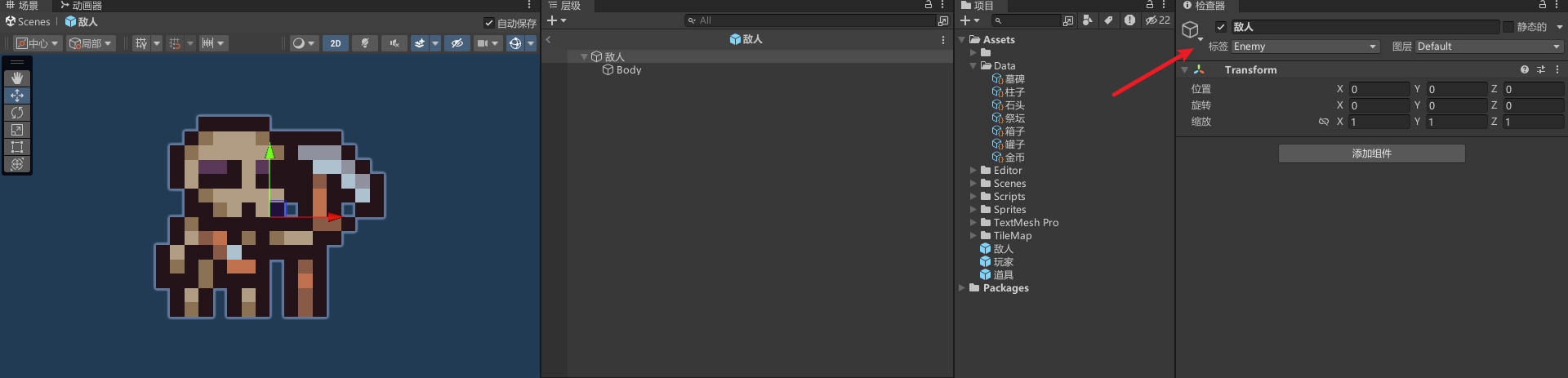
添加虚拟相机,并配置参数

效果

控制主角移动
新增代码,简单实现人物移动
public class Player : MonoBehaviour { [Header("移动速度")] public float speed; Vector3 movement; void Update() { //移动 movement = new Vector3(Input.GetAxisRaw("Horizontal") * Time.deltaTime * speed, Input.GetAxisRaw("Vertical") * Time.deltaTime * speed, transform.position.z); transform.Translate(movement); //翻面 if (movement.x > 0) { transform.GetChild(0).localScale = new Vector3(1, 1, 1); } if (movement.x < 0) { transform.GetChild(0).localScale = new Vector3(-1, 1, 1); } } }- 1
- 2
- 3
- 4
- 5
- 6
- 7
- 8
- 9
- 10
- 11
- 12
- 13
- 14
- 15
- 16
- 17
- 18
- 19
- 20
- 21
- 22
- 23
效果
参考
【视频】https://www.youtube.com/watch?app=desktop&v=-QOCX6SVFsk&list=PLcRSafycjWFenI87z7uZHFv6cUG2Tzu9v&index=1
源码
源码整理好我会放上来
完结
赠人玫瑰,手有余香!如果文章内容对你有所帮助,请不要吝啬你的
点赞评论和关注,以便我第一时间收到反馈,你的每一次支持都是我不断创作的最大动力。当然如果你发现了文章中存在错误或者有更好的解决方法,也欢迎评论私信告诉我哦!好了,我是
向宇,https://xiangyu.blog.csdn.net一位在小公司默默奋斗的开发者,出于兴趣爱好,于是最近才开始自习unity。如果你遇到任何问题,也欢迎你评论私信找我, 虽然有些问题我可能也不一定会,但是我会查阅各方资料,争取给出最好的建议,希望可以帮助更多想学编程的人,共勉~

-
相关阅读:
刷题记录(NC19246 数据结构)
在Boss直聘上投简历时,怎样保证有新消息时能及时收到
18-Go语言之单元测试
nodejs+vue+elementui 青少年编程在线考试系统python java php
资产连接支持会话分屏,新增Passkey用户认证方式,支持查看在线用户信息,JumpServer堡垒机v3.7.0发布
单源最短路径 -- Dijkstra
过来人:玩游戏不如做游戏,会上瘾的建模工作
终端业务下滑,ICT基础设施业务保持稳定增长,3016亿符合预期
计算机毕设(附源码)JAVA-SSM基于的校园疫情防控管理
18、设计模式之解释器模式(Interpreter)
- 原文地址:https://blog.csdn.net/qq_36303853/article/details/134549221
