-
vue中原生H5拖拽排序_拖拽图片也是同样的道理
H5有基于拖拽的事件机制,如果你还不熟悉,请看我之前的文章【拖拽上传】中有介绍。
原生拖拽API实现
由于比较简单直接上代码了:
DOCTYPE html> <html lang="en"> <head> <meta charset="UTF-8"> <meta http-equiv="X-UA-Compatible" content="IE=edge"> <meta name="viewport" content="width=device-width, initial-scale=1.0"> <title>拖拽排序title> <script src="https://cdn.bootcdn.net/ajax/libs/vue/2.7.9/vue.min.js">script> <style> ul { clear: both; list-style: none; overflow: hidden; } li { cursor: pointer; float: left; height: 32px; line-height: 30px; padding: 0 10px; color: #409eff; border: 1px solid #d9ecff; background-color: #ecf5ff; } style> head> <body> <div id="app">div> <script> new Vue({ template: ``, el: '#app', data() { return { oldWord: null, newWord: null, list: ["校长", "爷爷", "我", "给", "唱了首歌"] } }, methods: { dragstart(word) { this.oldWord = word }, // 记录移动过程中信息 onDragEnter(word, e) { this.newWord = word e.preventDefault() }, // 拖拽结束 onDragEnd() { if (this.oldWord !== this.newWord) { let oldWordIndex = this.list.indexOf(this.oldWord); let newWordIndex = this.list.indexOf(this.newWord); let newList = [...this.list]; // 删除老的节点 newList.splice(oldWordIndex, 1); // 在列表中目标位置增加新的节点 newList.splice(newWordIndex, 0, this.oldWord); this.list = [...newList]; } } } }) script> body> html>连词成句
- {{item}}
- 1
- 2
- 3
- 4
- 5
- 6
- 7
- 8
- 9
- 10
- 11
- 12
- 13
- 14
- 15
- 16
- 17
- 18
- 19
- 20
- 21
- 22
- 23
- 24
- 25
- 26
- 27
- 28
- 29
- 30
- 31
- 32
- 33
- 34
- 35
- 36
- 37
- 38
- 39
- 40
- 41
- 42
- 43
- 44
- 45
- 46
- 47
- 48
- 49
- 50
- 51
- 52
- 53
- 54
- 55
- 56
- 57
- 58
- 59
- 60
- 61
- 62
- 63
- 64
- 65
- 66
- 67
- 68
- 69
- 70
- 71
- 72
- 73
- 74
- 75
- 76
- 77
- 78
- 79
- 80
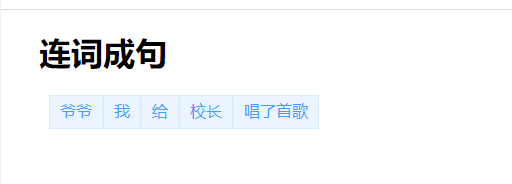
效果如下:
使用
vuedraggable实现拖拽排序vuedraggable 是基于sortable.js实现的,所以需要先引入sortable.js,如果是npm安装的,则无需再引入。
使用起来也比较简单,代码如下DOCTYPE html> <html lang="en"> <head> <meta charset="UTF-8"> <meta http-equiv="X-UA-Compatible" content="IE=edge"> <meta name="viewport" content="width=device-width, initial-scale=1.0"> <title>拖拽排序title> <script src="https://cdn.bootcdn.net/ajax/libs/vue/2.7.9/vue.min.js">script> <script src="//cdn.jsdelivr.net/npm/sortablejs@1.8.4/Sortable.min.js">script> <script src="//cdnjs.cloudflare.com/ajax/libs/Vue.Draggable/2.20.0/vuedraggable.umd.min.js">script> <style> ul { clear: both; list-style: none; overflow: hidden; } li { cursor: pointer; float: left; height: 32px; line-height: 30px; padding: 0 10px; color: #409eff; border: 1px solid #d9ecff; background-color: #ecf5ff; } style> head> <body> <div id="app">div> <script> let draggable = vuedraggable; new Vue({ components: {draggable}, template: ``, el: '#app', data() { return { drag: false, list: ["校长", "爷爷", "我", "给", "唱了首歌"] } } }) script> body> html>连词成句
- {{item}}
- 1
- 2
- 3
- 4
- 5
- 6
- 7
- 8
- 9
- 10
- 11
- 12
- 13
- 14
- 15
- 16
- 17
- 18
- 19
- 20
- 21
- 22
- 23
- 24
- 25
- 26
- 27
- 28
- 29
- 30
- 31
- 32
- 33
- 34
- 35
- 36
- 37
- 38
- 39
- 40
- 41
- 42
- 43
- 44
- 45
- 46
- 47
- 48
- 49
- 50
- 51
- 52
- 53
- 54
- 55
- 56
- 57
- 58
- 59
参考资料
-
相关阅读:
[附源码]计算机毕业设计人体健康管理appSpringboot程序
docker学习进阶之docker-compose(二)
由113号元素鉨114号元素夫115号元素镆元素汞银金等元素构成的超导体
Ray+GPU支持高性能计算
worthington是谁?worthington抑制剂对酶活性的影响研究
React - Redux Hooks的使用细节详解
jeecgboot-3.5.5本地安装部署
k8s部署rocketmq5.1.4
【Golang基本语法】介绍
this.$set用法
- 原文地址:https://blog.csdn.net/my_study_everyday/article/details/134543221
