-
Vue2+Vue3
文章目录
- 第 1 章:Vue 核心
- 第 2 章:Vue 组件化编程
- 第 3 章:使用 Vue 脚手架
- 第 4 章:Vue 中的 ajax
- 第 5 章:vuex
- 第 6 章:vue-router路由
- vue3快速上手
- 一、创建Vue3.0工程
- 二、常用 Composition API
- 三、其它 Composition API
- 四、Composition API 的优势
- 五、新的组件
- 六、其他
- 第三方库
- 浏览器本地存储
第 1 章:Vue 核心
1、 Vue 简介
1.官网
- 英文官网: https://vuejs.org/
- 中文官网: https://cn.vuejs.org/
2.介绍与描述
1、动态构建用户界面的渐进式 JavaScript 框架
构造用户界面:将数据展示到用户可以看见的界面
渐进式:vue可以自底向上逐层的应用
简单应用:只需一个轻量小巧的核心库
复杂应用:可以引入各式各样的vue插件2、 作者: 尤雨溪
3. Vue 的特点
- 遵循 MVVM 模式
- 编码简洁, 体积小, 运行效率高, 适合移动/PC 端开发
- 它本身只关注 UI, 也可以引入其它第三方库开发项目
- 采用组件化模式,提高代码复用率、且让代码更好维护
- 声明式编码,让编码人员无需直接操作DOM,提高开发效率
4. 与其它 JS 框架的关联
- 借鉴 Angular 的模板和数据绑定技术
- 借鉴 React 的组件化和虚拟 DOM 技术
5. Vue 周边库
- vue-cli: vue 脚手架
- vue-resource
- axios
- vue-router: 路由
- vuex: 状态管理
- element-ui: 基于 vue 的 UI 组件库(PC 端)等
2、初始Vue
1.想让Vue工作,就必须创建一个Vue实例,且要传入一个配置对象;
2.root容器里的代码依然符合htm1规范,只不过混入了一些特殊的Vue语法;
3.root容器里的代码被称为[Vue模板]:
4.Vue实例和容器是一 一对应的;
5.真实开发中只有一个Vue实例,并且会配合着组件一起使用;
6.{{xxx}}中的xxx要写js表达式,且xxx可以自动读取到data中的所有属性;
7.一旦data中的数据发生改变,那么模板中用到该数据的地方也会自动更新:
注意区分:JS表达式和JS代码
1、表达式:一个表达式会产成一个值,可以放在任何一个需要值的地方,如:a+b 等
2、JS代码:如for循环,if语句DOCTYPE html> <html lang="en"> <head> <meta charset="UTF-8"> <meta http-equiv="X-UA-Compatible" content="IE=edge"> <meta name="viewport" content="width=device-width, initial-scale=1.0"> <title>Documenttitle> <script type="text/javascript" src="../js/vue.js">script> head> <body> <div id="root"> <h1>插值语法h1> <h1>你好,我是:{{name}}h1> div> <script type="text/javascript"> //阻止vue 在启动时生成生产提示 Vue.config.productionTip=false //创建Vue实例 new Vue({ el:'#root',//el用于指定当前vue实例为那个容器服务,值通常为css选择器字符串 data:{ //data中用来存储数据,数据供el所指定的容器去使用,值我们暂时先写成一个对象 name:'vue' } }) script> body> html>- 1
- 2
- 3
- 4
- 5
- 6
- 7
- 8
- 9
- 10
- 11
- 12
- 13
- 14
- 15
- 16
- 17
- 18
- 19
- 20
- 21
- 22
- 23
- 24
- 25
- 26
- 27
- 28
- 29
- 30
3、模板语法
1、Vue模板语法有2大类:
1.插值语法:
功能:用于解析标签体内容。(双标签中间的内容)
写法: {{xxx}},xxx是js表达式,且可以直接读取到data中的所有属性。
2.指令语法:
功能:用于解析标签(包括: 标签属性、标签体内容、绑定事件…)
举例:v-bind:href="xxx”或 简写为 :href=“xxx”,xxx同样要写js表达式,且可以直接读取到data中的所有属性。
备注:Vue中有很多的指令,且形式都是: v-???,此处我们只是拿v-bind举个例子。2、插值语法和指令语法
<body> <div id="root"> <h1>插值语法h1> <h2>Hello,{{name}}h2> <h1>指令语法h1> <a v-bind:href="school.url">点击我去{{school.name}}a> <a :href="school.url">a> div> <script type="text/javascript"> //阻止vue 在启动时生成生产提示 Vue.config.productionTip=false //创建Vue实例 new Vue({ el:'#root',//el用于指定当前vue实例为那个容器服务,值通常为css选择器字符串 data:{ //data中用来存储数据,数据供el所指定的容器去使用,值我们暂时先写成一个对象 name:'vue', school:{ name:'学习', url:'https:www.baidu.com' } } }) script> body>- 1
- 2
- 3
- 4
- 5
- 6
- 7
- 8
- 9
- 10
- 11
- 12
- 13
- 14
- 15
- 16
- 17
- 18
- 19
- 20
- 21
- 22
- 23
- 24
- 25
- 26
- 27
4、数据绑定
1. 单向数据绑定
- 语法:v-bind:href =“xxx” 或简写为 :href
- 特点:数据只能从 data 流向页面
2. 双向数据绑定
- 语法:v-mode:value=“xxx” 或简写为 v-model=“xxx”
- 特点:数据不仅能从 data 流向页面,还能从页面流向data
备注:
1.双向绑定一般都应用在表单类元素上 (如: input、select等)
2.v-model:value 可以简写为 v-model,因为v-model默认收集的就是value值.
如:
<body> <div id="root"> 单向数据绑定:<input type="text" v-bind:value="name"> <br> 双向数据绑定:<input type="text" v-model:value="name"> 单向数据绑定:<input type="text" :value="name"> <br> 双向数据绑定:<input type="text" v-model="name"> div> <script type="text/javascript"> //阻止vue 在启动时生成生产提示 Vue.config.productionTip=false //创建Vue实例 new Vue({ el:'#root',//el用于指定当前vue实例为那个容器服务,值通常为css选择器字符串 data:{ //data中用来存储数据,数据供el所指定的容器去使用,值我们暂时先写成一个对象 name:'vue' } }) script> body>- 1
- 2
- 3
- 4
- 5
- 6
- 7
- 8
- 9
- 10
- 11
- 12
- 13
- 14
- 15
- 16
- 17
- 18
- 19
- 20
- 21
- 22
- 23
- 24
- 25
- 26
5、el与data的两种写法
1.e1有2种写法
(1).new Vue时候配置el属性。
(2).先创建Vue实例,随后再通过vm.$mount(‘#root’)指定el的值。2.data有2种写法
(1).对象式
(2).函数式
如何选择: 目前哪种写法都可以,以后学习到组件时,data必须使用函数式,否则会报错3.一个重要的原则:
出Vue管理的函数,一定不要写箭头函数,一旦写了箭头函数,this就不再是Vue实例了。
如:
<body> <div id="root"> <h1>你好:{{name}}h1> div> <script type="text/javascript"> //阻止vue 在启动时生成生产提示 Vue.config.productionTip=false //el的两种写法 const v= new Vue({ //第一种写法 // el:'#root', data:{ //data中用来存储数据,数据供el所指定的容器去使用,值我们暂时先写成一个对象 name:'vue' } }) console.log(v) v.$mount('#root')//第二种写法 // data的两种写法 new Vue({ el:'#root',//第一种写法 // data的第一种写法:对象式 data:{ name:'vue' } //data的第二种写法:函数式 data:function(){ console.log(this)//此处的this是vue实例对象 return{ name:'Vue' } } //函数式可以简写成 data(){ console.log(this)//此处的this是vue实例对象 return{ name:'Vue' } } }) script> body>- 1
- 2
- 3
- 4
- 5
- 6
- 7
- 8
- 9
- 10
- 11
- 12
- 13
- 14
- 15
- 16
- 17
- 18
- 19
- 20
- 21
- 22
- 23
- 24
- 25
- 26
- 27
- 28
- 29
- 30
- 31
- 32
- 33
- 34
- 35
- 36
- 37
- 38
- 39
- 40
- 41
- 42
- 43
- 44
- 45
- 46
6、 MVVM 模型
- M:模型(Model) :对应 data 中的数据
- V:视图(View) :模板
- VM:视图模型(ViewModel) : Vue 实例对象
观察发现:
1.data中所有的属性,最后都出现在了vm身上。
2.vm身上所有的属性 及 Vue原型上所有属性,在Vue模板中都可以直接使用。

7、数据代理
1、 Object.defineProperty方法:
Object.defineProperty方法:是给一个对象添加(定义)属性用的
语法格式:Object.defineProperty(要添加的对象,添加的属性名,{配置项(基本配置项和高级配置项)})
<body> <script type="text/javascript"> let obj={x:100} let obj2={y:200} Object.defineProperty(obj2,'x',{ //基本配置项 value:18, enumerable:true,//控制属性是否可以枚举(遍历),默认为false writable:true,//控制属性是否可以被修改,默认值为false configurable:true,//控制属性是否可以被删除,默认值是false //高级配置项 //当有人读取对象的的x属性是,get函数就会被调用,且返回值就是x的值 get(){ return obj.x }, //当有人修改对象的的x属性是,set函数就会被调用,且会收到修改的具体值 set(value){ obj.x=value } }) script> body>- 1
- 2
- 3
- 4
- 5
- 6
- 7
- 8
- 9
- 10
- 11
- 12
- 13
- 14
- 15
- 16
- 17
- 18
- 19
- 20
- 21
- 22
- 23
2、数据代理
1、概念
数据代理:通过一个对象代理对另一个对象中属性的操作(读/写)
2、Vue中的数据代理:
通过vm对象来代理data对象中属性的操作(读/写)
3、Vue中数据代理的好处:
更加方便的操作data中的数据
4、基本原理:
通过object.defineProperty()把data对象中所有属性添加到vm上。
为每一个添加到vm上的属性,都指定一个getter/setter。
在getter/setter内部去操作 (读/写) data中对应的属性8、事件处理
1、事件的基本使用:
1.使用v-on:xxx 或 @xxx 绑定事件,其中xxx是事件名:
2.事件的回调需要配置在methods对象中,最终会在vm上;
3.methods中配置的函数,不要用箭头函数!否则this就不是vm了,是windows:
4.methods中配置的函数,都是被Vue所管理的函数,this的指向是vm 或 组件实例对象;
5.@click="demo”和 @click="demo($event)” 效果一致,但后者可以传参:DOCTYPE html> <html lang="en"> <head> <meta charset="UTF-8" /> <meta http-equiv="X-UA-Compatible" content="IE=edge" /> <meta name="viewport" content="width=device-width, initial-scale=1.0" /> <title>Documenttitle> <script type="text/javascript" src="../js/vue.js">script> head> <body> <div id="root"> <h1>Hello,{{name}}h1> <button v-on:click="showInfo">点我提示信息button> <button @click="showInfo1">点我提示信息(不传参数)button> <button @click="showInfo2(66,$event)">点我提示信息( 传参数)button> div> <script type="text/javascript"> //阻止vue 在启动时生成生产提示 Vue.config.productionTip = false; //创建Vue实例 const vm = new Vue({ el: "#root", //el用于指定当前vue实例为那个容器服务,值通常为css选择器字符串 data: { //data中用来存储数据,数据供el所指定的容器去使用,值我们暂时先写成一个对象 name: "vue" }, methods:{ showInfo(event){ console.log(event.target.innerText) alert("dddd") }, showInfo2(number,event){ console.log(event.target.innerText) alert("dddd",number) } } }); script> body> html>- 1
- 2
- 3
- 4
- 5
- 6
- 7
- 8
- 9
- 10
- 11
- 12
- 13
- 14
- 15
- 16
- 17
- 18
- 19
- 20
- 21
- 22
- 23
- 24
- 25
- 26
- 27
- 28
- 29
- 30
- 31
- 32
- 33
- 34
- 35
- 36
- 37
- 38
- 39
- 40
- 41
- 42
- 43
- 44
- 45
2、事件修饰符
1.prevent: 阻止默认事件 (常用) :
2.stop:阻止事件冒泡 (常用) ;
3.once: 事件只触发一次 (常用) :
4.capture:使用事件的捕获模式;
5.self: 只有event.target是当前操作的元素时才触发事件;
6.passive:事件的默认行为立即执行,无需等待事件回调执行完毕:
注意: 修饰符可以连续写 如 @click.prevent.stop=“showInfo”DOCTYPE html> <html lang="en"> <head> <meta charset="UTF-8" /> <meta http-equiv="X-UA-Compatible" content="IE=edge" /> <meta name="viewport" content="width=device-width, initial-scale=1.0" /> <title>Documenttitle> <script type="text/javascript" src="../js/vue.js">script> <style> * { margin-top: 20px; } .demo1 { height: 50px; background-color: skyblue; } .box1 { padding: 5px; background-color: skyblue; } .box2 { padding: 5px; background-color: antiquewhite; } .list{ width: 200px; height: 200px; background-color: bisque; overflow: auto; } li{ height: 100px; } style> head> <body> <div id="root"> <h1>Hello,{{name}}h1> <a href="www.baidu.com" @click.prevent="showInfo">点我提示信息a> <div class="demo1" @click="showInfo"> <button @click.stop="showInfo">点我提示信息button> div> <button @click.once="showInfo">点我提示信息button> <div class="box1" @click.capture="showMsg()1"> div1 <div class="box2" @click="showMsg(2)">div2div> div> <div class="demo1" @click.elf="showInfo"> <button @click="showInfo">点我提示信息button> div> <ul class="list" @scroll="demo"> <li>1li> <li>2li> <li>3li> <li>4li> ul> div> <script type="text/javascript"> //阻止vue 在启动时生成生产提示 Vue.config.productionTip = false; //创建Vue实例 const vm = new Vue({ el: "#root", //el用于指定当前vue实例为那个容器服务,值通常为css选择器字符串 data: { //data中用来存储数据,数据供el所指定的容器去使用,值我们暂时先写成一个对象 name: "vue", }, methods: { showInfo(event) { console.log(event.target.innerText); alert("dddd"); }, showMsg(msg) { alert(msg); }, demo(){ alert("滚动了") } }, }); script> body> html>- 1
- 2
- 3
- 4
- 5
- 6
- 7
- 8
- 9
- 10
- 11
- 12
- 13
- 14
- 15
- 16
- 17
- 18
- 19
- 20
- 21
- 22
- 23
- 24
- 25
- 26
- 27
- 28
- 29
- 30
- 31
- 32
- 33
- 34
- 35
- 36
- 37
- 38
- 39
- 40
- 41
- 42
- 43
- 44
- 45
- 46
- 47
- 48
- 49
- 50
- 51
- 52
- 53
- 54
- 55
- 56
- 57
- 58
- 59
- 60
- 61
- 62
- 63
- 64
- 65
- 66
- 67
- 68
- 69
- 70
- 71
- 72
- 73
- 74
- 75
- 76
- 77
- 78
- 79
- 80
- 81
- 82
- 83
- 84
- 85
- 86
- 87
- 88
- 89
- 90
- 91
- 92
- 93
- 94
- 95
- 96
- 97
- 98
- 99
- 100
- 101
- 102
3、键盘事件
1.Vue中常用的按键别名:
回车 => enter
删除 => delete (捕获“删除”和“退格”键)
退出 => esc
空格 => space
换行 => tab(特殊,必须配合keydown使用)
上 => up
下 => down
左 => left
右 => right2.Vue未提供别名的按键,可以使用按键原始的key值去绑定,但注意要转为kebab-case (短横线命名)
3.系统修饰键(用法特殊) : ctr1、alt、shift、meta(1),配合keyup使用: 按下修饰键的同时,再按下其他键,随后释放其他键,事件才被触发。
(2).配合keydown使用: 正常触发事件。4.也可以使用keyCode去指定具体的按键(不推荐) @keyup.13=“showInfo”
5.Vue.config.keyCodes.自定义键名 = 键码,可以去定制按键别名//自定义别名按键
Vue.config.keyCodes.huiche=13DOCTYPE html> <html lang="en"> <head> <meta charset="UTF-8" /> <meta http-equiv="X-UA-Compatible" content="IE=edge" /> <meta name="viewport" content="width=device-width, initial-scale=1.0" /> <title>Documenttitle> <script type="text/javascript" src="../js/vue.js">script> head> <body> <div id="root"> <h1>Hello,{{name}}h1> <input type="text" placeholder="按下回车提示输入" @keyup.enter="showInfo"/> div> <script type="text/javascript"> //阻止vue 在启动时生成生产提示 Vue.config.productionTip = false; //自定义别名按键 Vue.config.keyCodes.huiche=13 //创建Vue实例 const vm = new Vue({ el: "#root", //el用于指定当前vue实例为那个容器服务,值通常为css选择器字符串 data: { //data中用来存储数据,数据供el所指定的容器去使用,值我们暂时先写成一个对象 name: "vue", }, methods: { showInfo(e) { // if(e.keyCode!==13) return console.log(e.target.value); } }, }); script> body> html>- 1
- 2
- 3
- 4
- 5
- 6
- 7
- 8
- 9
- 10
- 11
- 12
- 13
- 14
- 15
- 16
- 17
- 18
- 19
- 20
- 21
- 22
- 23
- 24
- 25
- 26
- 27
- 28
- 29
- 30
- 31
- 32
- 33
- 34
- 35
- 36
- 37
- 38
- 39
- 40
- 41
- 42
- 43
9、计算属性与监视
1、计算属性 computed
1.定义:要用的属性不存在,要通过已有属性计算得来。
在 computed 对象中定义计算属性。 在页面中使用{{方法名}}来显示计算的结果。
2.原理: 底层借助了objcet,defineproperty方法提供的getter和setter。
3.get函数什么时候执行?(1).初次读取时会执行一次。
(2).当依赖的数据发生改变时会被再次调用。4.优势:与methods实现相比,内部有缓存机制(复用) ,效率更高,调试方便。
5.备注:1.计算属性最终会出现在vm上,直接读取使用即可。
2.如果计算属性要被修改,那必须写set函数去响应修改,且set中要引起计算时依赖的数据发生改变DOCTYPE html> <html lang="en"> <head> <meta charset="UTF-8" /> <meta http-equiv="X-UA-Compatible" content="IE=edge" /> <meta name="viewport" content="width=device-width, initial-scale=1.0" /> <title>Documenttitle> <script type="text/javascript" src="../js/vue.js">script> head> <body> <div id="root"> 姓:<input type="text" v-model="firstName"/><br> 名:<input type="text" v-model="lastName"/><br> 全名:<span>{{fullName}}span> div> <script type="text/javascript"> //阻止vue 在启动时生成生产提示 Vue.config.productionTip = false; //自定义别名按键 Vue.config.keyCodes.huiche=13 //创建Vue实例 const vm = new Vue({ el: "#root", //el用于指定当前vue实例为那个容器服务,值通常为css选择器字符串 data: { //data中用来存储数据,数据供el所指定的容器去使用,值我们暂时先写成一个对象 firstName: "vue", lastName:'三' }, computed:{ // 完整写法 fullName:{ //get的作用:当有人读取fullName时,get就会被调用,且返回值就作为fullName的值 //get什么时候调用?1、初次读取fullName时。2、所依赖的数据发生变化时 get(){ return this.firstName+'-'+this.lastName }, //set什么时候调用?当fullName被修改时 set(value){ const arr =value.split('-') this.firstName=arr[0] this.lastName=arr[1] } } //简写 只考虑读取,不考虑修改时才能用 fullName(){ return this.firstName+'-'+this.lastName } } }) script> body> html>- 1
- 2
- 3
- 4
- 5
- 6
- 7
- 8
- 9
- 10
- 11
- 12
- 13
- 14
- 15
- 16
- 17
- 18
- 19
- 20
- 21
- 22
- 23
- 24
- 25
- 26
- 27
- 28
- 29
- 30
- 31
- 32
- 33
- 34
- 35
- 36
- 37
- 38
- 39
- 40
- 41
- 42
- 43
- 44
- 45
- 46
- 47
- 48
- 49
- 50
- 51
- 52
- 53
- 54
- 55
- 56
- 57
- 58
2、监视属性
- 通过 vm 对象的$watch()或 watch 配置来监视指定的属性
- 当属性变化时, 回调函数自动调用, 在函数内部进行计算
1、监视属性 watch及简写方式:
1.当被监视的属性变化时,回调函数自动调用,进行相关操作
2.监视的属性必须存在,才能进行监视
3.监视的两种写法:(1).new Vue时传入watch配置;当创建实例时很明确监视谁时用
(2).通过vm.$watch监视;当创建实例时很不明确监视谁时用DOCTYPE html> <html lang="en"> <head> <meta charset="UTF-8" /> <meta http-equiv="X-UA-Compatible" content="IE=edge" /> <meta name="viewport" content="width=device-width, initial-scale=1.0" /> <title>Documenttitle> <script type="text/javascript" src="../js/vue.js">script> head> <body> <div id="root"> <h2>今天天气很{{info}}h2> <button @click="isHot=!isHot">切换天气1button> <button @click="changWeather">切换天气button> div> <script type="text/javascript"> //阻止vue 在启动时生成生产提示 Vue.config.productionTip = false; //自定义别名按键 Vue.config.keyCodes.huiche=13 //创建Vue实例 const vm = new Vue({ el: "#root", //el用于指定当前vue实例为那个容器服务,值通常为css选择器字符串 data: { isHot:true }, methods: { changWeather(){ this.isHot=!this.isHot } }, computed:{ info(){ return this.isHot?'炎热':'凉爽' } }, //当创建实例时很明确监视谁时用 //正常写法 isHot:{ //immediate:false,//初始化时让handler调用一下 //deep:true,//深度监视 //handler什么时候调用?当isHot发生改变时 handler(newValue,oldValue){ console.log("isHot被修改了",newValue,oldValue) }, }, //简写形式 前提是没有其他配置项,只有hander是才能用 isHot(newValue,oldValue){ console.log("isHot被修改了",newValue,oldValue) }, }); //正常写法 //当创建实例时很不明确监视谁时用 vm.$watch('isHot',{ immediate:false,//初始化时让handler调用一下 //handler什么时候调用?当isHot发生改变时 handler(newValue,oldValue){ console.log("isHot被修改了",newValue,oldValue) } }) //简写 vm.$watch('isHot',function(newValue,oldValue){ console.log("isHot被修改了",newValue,oldValue) }) script> body> html>- 1
- 2
- 3
- 4
- 5
- 6
- 7
- 8
- 9
- 10
- 11
- 12
- 13
- 14
- 15
- 16
- 17
- 18
- 19
- 20
- 21
- 22
- 23
- 24
- 25
- 26
- 27
- 28
- 29
- 30
- 31
- 32
- 33
- 34
- 35
- 36
- 37
- 38
- 39
- 40
- 41
- 42
- 43
- 44
- 45
- 46
- 47
- 48
- 49
- 50
- 51
- 52
- 53
- 54
- 55
- 56
- 57
- 58
- 59
- 60
- 61
- 62
- 63
- 64
- 65
- 66
- 67
- 68
- 69
- 70
- 71
- 72
- 73
- 74
1、深度监听 deep
(1).Vue中的watch默认不监测对象内部值的改变 (一层)
(2).配置deep:true可以监测对象内部值改变(多层)。
备注:
(1).Vue自身可以监测对象内部值的改变,但vue提供的watch默认不可以!
(2).使用watch时根据数据的具体结构,决定是否采用深度监视。DOCTYPE html> <html lang="en"> <head> <meta charset="UTF-8" /> <meta http-equiv="X-UA-Compatible" content="IE=edge" /> <meta name="viewport" content="width=device-width, initial-scale=1.0" /> <title>Documenttitle> <script type="text/javascript" src="../js/vue.js">script> head> <body> <div id="root"> <h2>今天天气很{{info}}h2> <button @click="isHot=!isHot">切换天气1button> <button @click="changWeather">切换天气button> <hr/> <h3>a的值是:{{numbers.a}}h3> <button @click="numbers.a++">点我让a+1button> <hr/> <h3>b的值是:{{numbers.b}}h3> <button @click="numbers.b++">点我让b+1button> div> <script type="text/javascript"> //阻止vue 在启动时生成生产提示 Vue.config.productionTip = false; //自定义别名按键 Vue.config.keyCodes.huiche=13 //创建Vue实例 const vm = new Vue({ el: "#root", //el用于指定当前vue实例为那个容器服务,值通常为css选择器字符串 data: { isHot:true, numbers:{ a:1, b:1 } }, methods: { changWeather(){ this.isHot=!this.isHot } }, computed:{ info(){ return this.isHot?'炎热':'凉爽' } }, //当创建实例时很明确监视谁时用 watch:{ isHot:{ //immediate:false,//初始化时让handler调用一下 //handler什么时候调用?当isHot发生改变时 handler(newValue,oldValue){ console.log("isHot被修改了",newValue,oldValue) }, }, //监视多级结构中某个属性的变化 'number.a':{ handler(){ console.log("a被改变了") }, }, //监视多级结构中所有属性的变化 numbers:{ deep:true, handler(){ console.log("a被改变了") }, } } }); script> body> html>- 1
- 2
- 3
- 4
- 5
- 6
- 7
- 8
- 9
- 10
- 11
- 12
- 13
- 14
- 15
- 16
- 17
- 18
- 19
- 20
- 21
- 22
- 23
- 24
- 25
- 26
- 27
- 28
- 29
- 30
- 31
- 32
- 33
- 34
- 35
- 36
- 37
- 38
- 39
- 40
- 41
- 42
- 43
- 44
- 45
- 46
- 47
- 48
- 49
- 50
- 51
- 52
- 53
- 54
- 55
- 56
- 57
- 58
- 59
- 60
- 61
- 62
- 63
- 64
- 65
- 66
- 67
- 68
- 69
- 70
- 71
- 72
- 73
- 74
- 75
- 76
- 77
3、计算属性computed和监听属性watch的对比
computed利lwatch之间的区别:
1.computed能完成的功能,watch都可以完成。
2.watch能完成的功能,computed不一定能完成,例如: watch可以进行异步操作。
两个重要的小原则:
1.所被Vue管理的函数,最好写成普通函数,这样this的指向才是vm 或 组件实例对象。
2.所有不被Vue所管理的函数(定时器的回调函数、ajax的回调函数等),最好写成箭头函数,这样this的指向才是vm 或 组件实例对象。10、class 与style的绑定
1。class样式
写法:class="xxxxx可以是宁符串、对象、数组。
字符串写法适用于:类名不确定,要动态获取。
对象写法适用于:要绑定多个样式,个数不确定,名字也不确定。
数组写法适用于:要绑定多个样式,个数确定,名宁也确定,但不确定用不用,2。style样式
:style="(fontsize: xxx]“其中xxx是动态值。
:style=”[a,b]"其中a、b是样式对象。DOCTYPE html> <html lang="en"> <head> <meta charset="UTF-8" /> <meta http-equiv="X-UA-Compatible" content="IE=edge" /> <meta name="viewport" content="width=device-width, initial-scale=1.0" /> <title>Documenttitle> <script type="text/javascript" src="../js/vue.js">script> <style> .basic{ } .happy{ } .sad{ } style> head> <body> <div id="root"> <div class="basic" :class="mood" @click="chanageMood">{{name}}div> <div class="basic" :class="classArr">{{name}}div>I <div class="basic" :class="calssObj">{{name}}div>I <div class="basic" :style="styleObj">{{name}}div>I div> <script type="text/javascript"> //阻止vue 在启动时生成生产提示 Vue.config.productionTip = false; //创建Vue实例 const vm = new Vue({ el: "#root", //el用于指定当前vue实例为那个容器服务,值通常为css选择器字符串 data: { name:'Vue', mood:'normal', classArr:['style1','style2','style3'], classObj:{ class1:false, class2:false }, styleObj:{ fontSize:'40px', color:'red', backgroundColor:'orange' } }, methods: { chanageMood(){ this.mood='变换后的class名' } }, }); script> body> html>- 1
- 2
- 3
- 4
- 5
- 6
- 7
- 8
- 9
- 10
- 11
- 12
- 13
- 14
- 15
- 16
- 17
- 18
- 19
- 20
- 21
- 22
- 23
- 24
- 25
- 26
- 27
- 28
- 29
- 30
- 31
- 32
- 33
- 34
- 35
- 36
- 37
- 38
- 39
- 40
- 41
- 42
- 43
- 44
- 45
- 46
- 47
- 48
- 49
- 50
- 51
- 52
- 53
- 54
- 55
- 56
- 57
- 58
- 59
- 60
- 61
- 62
- 63
- 64
- 65
- 66
11、条件渲染
1.V-if
写法:
(1).v-if=“表达式”
(2).V-else-if=“表达式”
(3).v-else=“表达式”
适用于:切换频率较低的场景。
特点:不展示的DOM元素直接被移除。
注意:v-if可以和:v-else-if、v-else一起使用,但要求结构不能被“打断”2.V-show
写法:v-show="表达式"适用于:切换频率较高的场景。
特点:不展示的DOM元素术被移除,仅仅是使用样式隐藏掉3.备注:
使用v-if的时,元素可能无法获取到,而使用v-show一定可以获取到。
DOCTYPE html> <html lang="en"> <head> <meta charset="UTF-8" /> <meta http-equiv="X-UA-Compatible" content="IE=edge" /> <meta name="viewport" content="width=device-width, initial-scale=1.0" /> <title>Documenttitle> <script type="text/javascript" src="../js/vue.js">script> <style> style> head> <body> <div id="root"> <h2 v-show="false">欢迎来到{{name}}h2> <h2 v-if="false">欢迎来到{{name}}h2> <div v-if="n === 1">Angulardiv> <div>@div>//等于打断了 <div v-else-if="n === 2">Reactdiv> <div v-else-if="n === 3">Vuediv> <div v-else>哈哈div> <template v-if="n===1"> <h2>ddddh2> <h2>ddddh2> <h2>ddddh2> template> div> <script type="text/javascript"> //阻止vue 在启动时生成生产提示 Vue.config.productionTip = false; //创建Vue实例 const vm = new Vue({ el: "#root", //el用于指定当前vue实例为那个容器服务,值通常为css选择器字符串 data: { name:'Vue', } }); script> body> html>- 1
- 2
- 3
- 4
- 5
- 6
- 7
- 8
- 9
- 10
- 11
- 12
- 13
- 14
- 15
- 16
- 17
- 18
- 19
- 20
- 21
- 22
- 23
- 24
- 25
- 26
- 27
- 28
- 29
- 30
- 31
- 32
- 33
- 34
- 35
- 36
- 37
- 38
- 39
- 40
- 41
- 42
- 43
- 44
- 45
- 46
- 47
- 48
- 49
12、列表渲染
v-for指令
1.用于展示列表数据
2.语法: v-for="(item,index) in xxx”:key=“index” 或 v-for="item in xxx”:key=“item.id”
3.可遍历: 数组、对象、字符串(用的很少)、指定次数(用的很少)DOCTYPE html> <html lang="en"> <head> <meta charset="UTF-8" /> <meta http-equiv="X-UA-Compatible" content="IE=edge" /> <meta name="viewport" content="width=device-width, initial-scale=1.0" /> <title>Documenttitle> <script type="text/javascript" src="../js/vue.js">script> <style> style> head> <body> <div id="root"> <h2>人员列表(遍历数组)h2> <ul> <li v-for="(person,index) in persons" :key="index"> {{person.name}}-{{person.age}} li> ul> <h2>汽车信息(遍历对象)h2> <ul> <li v-for="(value,k) in car" :key="k"> {{k}}----{{value}} li> ul> <h2>测试遍历字符串(用的少)h2> <ul> <li v-for="(value,k) in str" :key="k"> {{k}}----{{value}} li> ul> <h2>测试遍历指定次数(用的少)h2> <ul> <li v-for="(value,k) in 5" :key="k"> {{k}}----{{value}} li> ul> div> <script type="text/javascript"> //阻止vue 在启动时生成生产提示 Vue.config.productionTip = false; //创建Vue实例 const vm = new Vue({ el: "#root", //el用于指定当前vue实例为那个容器服务,值通常为css选择器字符串 data: { persons:[ {id:'001',name:'张三1',age:'18'}, {id:'002',name:'张三2',age:'188'}, {id:'003',name:'张三3',age:'198'} ], car:{ name:'奥迪A3', price:'18万' }, str:'hello world' } }); script> body> html>- 1
- 2
- 3
- 4
- 5
- 6
- 7
- 8
- 9
- 10
- 11
- 12
- 13
- 14
- 15
- 16
- 17
- 18
- 19
- 20
- 21
- 22
- 23
- 24
- 25
- 26
- 27
- 28
- 29
- 30
- 31
- 32
- 33
- 34
- 35
- 36
- 37
- 38
- 39
- 40
- 41
- 42
- 43
- 44
- 45
- 46
- 47
- 48
- 49
- 50
- 51
- 52
- 53
- 54
- 55
- 56
- 57
- 58
- 59
- 60
- 61
- 62
- 63
- 64
- 65
- 66
- 67
- 68
- 69
- 70
- 71
1、遍历列表时key的作用(index作为key)

2、遍历列表时key的作用(id作为key)

3、面试题: react、vue中的key有什么作用? (key的内部原理)
1。虚拟DOM中key的作用:
key是虚拟DOM对象的标识,当状态中的数据发生变化时,Vue会根据[新数据]生成[新的虚拟DOM]随后Vue进行[新虚拟DOM] 与[旧虚拟DOM] 的差异比较,比较规则如下:
2.对比规则:
- (1).旧虚拟DOM中找到了与新虚拟DOM相同的key:
若虚拟DOM中内容没变,直接使用之前的真实DOM!
若虚拟DOM中内容变了,则生成新的真实DOM,随后替换掉贞面中之前的真实DOM.- (2).旧虚拟DOM中未找到与新虚拟DOM相同的key
创建新的真实DOM,随后渲染到到页面。
3。用index作为key可能会引发的问题:
- 1。若对数据进行:逆序添加、逆序删除等破坏顺序操作:会产生没有必要的真实DOM更新 ==> 界面效果没问题,但效率低。
- 2。如果结构中还包含输入类的DOM:会产生错误DOM更新 ==> 界面有问题。
4。开发中如何选择key?:
- 1.最好使用每条数据的唯一标识作为key,比如id、手机号、身份证号、学号等唯一值。
- 2.如果不存在对数据的逆序添加、逆序删除等破坏顺序操作,仅用于渲染列表用于展示,使用index作为key是没有问题的。
13、列表过滤
DOCTYPE html> <html lang="en"> <head> <meta charset="UTF-8" /> <meta http-equiv="X-UA-Compatible" content="IE=edge" /> <meta name="viewport" content="width=device-width, initial-scale=1.0" /> <title>Documenttitle> <script type="text/javascript" src="../js/vue.js">script> <style> style> head> <body> <div id="root"> <h2>人员列表(遍历数组)h2> <input type="text" placeholder="请输入名字" v-model="keyworkd"/> <ul> <li v-for="(person,index) in filPersons" :key="index"> {{person.name}}-{{person.age}} li> ul> div> <script type="text/javascript"> //阻止vue 在启动时生成生产提示 Vue.config.productionTip = false; //watch实现 /* const vm = new Vue({ el: "#root", //el用于指定当前vue实例为那个容器服务,值通常为css选择器字符串 data: { keyworkd:'', filPersons:[], persons:[ {id:'001',name:'张三1',age:'18'}, {id:'002',name:'张三2',age:'188'}, {id:'003',name:'张三3',age:'198'} ] }, watch:{ keyworkd:{ immediate:true, handler(val){ this.filPersons = this.persons.filter((p)=>{ return p.name.indexOf(val) !== -1 }) } } } }); */ //用computed实现 const vm = new Vue({ el: "#root", //el用于指定当前vue实例为那个容器服务,值通常为css选择器字符串 data: { keyworkd:'', persons:[ {id:'001',name:'张三1',age:'18'}, {id:'002',name:'张三2',age:'188'}, {id:'003',name:'张三3',age:'198'} ] }, computed:{ filPerons(){ return this.persons.filter((p)=>{ return p.name.indexOf(this.keyworkd) !== -1 }) } } }); script> body> html>- 1
- 2
- 3
- 4
- 5
- 6
- 7
- 8
- 9
- 10
- 11
- 12
- 13
- 14
- 15
- 16
- 17
- 18
- 19
- 20
- 21
- 22
- 23
- 24
- 25
- 26
- 27
- 28
- 29
- 30
- 31
- 32
- 33
- 34
- 35
- 36
- 37
- 38
- 39
- 40
- 41
- 42
- 43
- 44
- 45
- 46
- 47
- 48
- 49
- 50
- 51
- 52
- 53
- 54
- 55
- 56
- 57
- 58
- 59
- 60
- 61
- 62
- 63
- 64
- 65
- 66
- 67
- 68
- 69
- 70
- 71
- 72
- 73
- 74
- 75
- 76
14、列表排序
DOCTYPE html> <html lang="en"> <head> <meta charset="UTF-8" /> <meta http-equiv="X-UA-Compatible" content="IE=edge" /> <meta name="viewport" content="width=device-width, initial-scale=1.0" /> <title>Documenttitle> <script type="text/javascript" src="../js/vue.js">script> <style> style> head> <body> <div id="root"> <h2>人员列表(遍历数组)h2> <input type="text" placeholder="请输入名字" v-model="keyworkd"/> <button @click='sortType=2'>升序button> <button @click='sortType=1'>降序序button> <button @click='sortType=0'>原序button> <ul> <li v-for="(person,index) in filPersons" :key="index"> {{person.name}}-{{person.age}} li> ul> div> <script type="text/javascript"> //阻止vue 在启动时生成生产提示 Vue.config.productionTip = false; //watch实现 /* const vm = new Vue({ el: "#root", //el用于指定当前vue实例为那个容器服务,值通常为css选择器字符串 data: { keyworkd:'', filPersons:[], persons:[ {id:'001',name:'张三1',age:'18'}, {id:'002',name:'张三2',age:'188'}, {id:'003',name:'张三3',age:'198'} ] }, watch:{ keyworkd:{ immediate:true, handler(val){ this.filPersons = this.persons.filter((p)=>{ return p.name.indexOf(val) !== -1 }) } } } }); */ //用computed实现 const vm = new Vue({ el: "#root", //el用于指定当前vue实例为那个容器服务,值通常为css选择器字符串 data: { keyworkd:'', sortType:0,//0代表原顺序 1 降序 2 升序 persons:[ {id:'001',name:'张三1',age:'18'}, {id:'002',name:'张三2',age:'188'}, {id:'003',name:'张三3',age:'198'} ] }, computed:{ filPerons(){ const arr= this.persons.filter((p)=>{ return p.name.indexOf(this.keyworkd) !== -1 }) if(this.sortType){ arr.sort((p1,p2)=>{ return this.sortType===1?p2.age-p1.age:p1.age-p2.age }) } return arr } } }); script> body> html>- 1
- 2
- 3
- 4
- 5
- 6
- 7
- 8
- 9
- 10
- 11
- 12
- 13
- 14
- 15
- 16
- 17
- 18
- 19
- 20
- 21
- 22
- 23
- 24
- 25
- 26
- 27
- 28
- 29
- 30
- 31
- 32
- 33
- 34
- 35
- 36
- 37
- 38
- 39
- 40
- 41
- 42
- 43
- 44
- 45
- 46
- 47
- 48
- 49
- 50
- 51
- 52
- 53
- 54
- 55
- 56
- 57
- 58
- 59
- 60
- 61
- 62
- 63
- 64
- 65
- 66
- 67
- 68
- 69
- 70
- 71
- 72
- 73
- 74
- 75
- 76
- 77
- 78
- 79
- 80
- 81
- 82
- 83
- 84
- 85
- 86
15、vue检测数据的原理
1,vue会监视data中所有层次数据。
2。如何监测对象中的数据?
通过setter实现监视,且要在new Vue时就传入要监测的数据。(1).对象中后追加的属性,Vue默认不做响应式处理
(2).如需给后添加的属性做响应式,请使用如下API:
Vue.set(target,propertyName/index, value) 或
vm.$set(target,propertyName/index,value)3,如何监测数组中的数据?
通过包裹数组更新元素的方法实现,本质就是做了两件事:(1).调用原生对应的方法对数组进行更新。
(2).重新解析模板,进而更新页面。4.在Vue修改数组中的某个元素一定要用如下方法:
1.使用这些API:push()、pop()、shift()、unshift()、splice()、sort()、reverse()
2.Vue.set() 或 vm.$set()特别注意: Vue.set() 和 vm.$set() 不能给vm 或 vm的根数据对象 添加属性
16、收集表单数据
若:<input type="text"/>,则v-model收集的是value值,用户输入的就是value值。 若:<input type="radio"/>,则v-model收集的是value值,且要给标签配置value值 若: <input type="checkbox"/> 1.没有配置input的value属性,那么收集的就是checked (勾选 or 未勾选,是布尔值) 2.配置input的value属性: (1)v-model的初始值是非数组,那么收集的就是checked(勾选 or 未勾选,是布尔值) (2)v-model的初始值是数组,那么收集的的就是value组成的数组 备注:v-model的三个修饰符: lazy:失去焦点再收集数据 number:输入字符串转为有效的数字 trim:输入首尾空格过滤- 1
- 2
- 3
- 4
- 5
- 6
- 7
- 8
- 9
- 10
- 11
DOCTYPE html> <html lang="en"> <head> <meta charset="UTF-8" /> <meta http-equiv="X-UA-Compatible" content="IE=edge" /> <meta name="viewport" content="width=device-width, initial-scale=1.0" /> <title>Documenttitle> <script type="text/javascript" src="../js/vue.js">script> <style> style> head> <body> <div id="root"> <form @submit='demo'> //绑定提交事件 账号: <input type="text" v-model.trim="account"/><br> 密码:<input type="password" v-model="password"/><br> 年龄:<input type="number" v-model.number="age"/><br> 性别: 男:<input type="radio" name="sex" value="男" checked v-model="sex"/> 女:<input type="radio" name="sex" value="女" v-model="sex"/><br> 爱好: 学习:<input type="checkbox" value="学习" v-model="hobby"> 学习1:<input type="checkbox" value="学习1" v-model="hobby"> 学习2:<input type="checkbox" value="学习2" v-model="hobby"><br> 所属校区: <select v-model="city"> <option value="">请选择校区option> <option value="1">1option> <option value="2">2option> <option value="3">3option> select> <br> 其他: <textarea v-model.lazy="other">textarea><br> <input type="checkbox" v-model="agree"> 阅读并接受<a href="www.baidu.com">用户协议a> <br> <button>提交button> form> div> <script type="text/javascript"> //阻止vue 在启动时生成生产提示 Vue.config.productionTip = false; const vm = new Vue({ el: "#root", //el用于指定当前vue实例为那个容器服务,值通常为css选择器字符串 data: { account:'', password:'', sex:'', age:'', hobby:[], city:'', other:'', agree:'' }, methods: { demo(){ console.log(JSON.stringify(this._data)) } }, }); script> body> html>- 1
- 2
- 3
- 4
- 5
- 6
- 7
- 8
- 9
- 10
- 11
- 12
- 13
- 14
- 15
- 16
- 17
- 18
- 19
- 20
- 21
- 22
- 23
- 24
- 25
- 26
- 27
- 28
- 29
- 30
- 31
- 32
- 33
- 34
- 35
- 36
- 37
- 38
- 39
- 40
- 41
- 42
- 43
- 44
- 45
- 46
- 47
- 48
- 49
- 50
- 51
- 52
- 53
- 54
- 55
- 56
- 57
- 58
- 59
- 60
- 61
- 62
- 63
- 64
- 65
- 66
- 67
- 68
17、过滤器
定义:对要显示的数据进行特定格式化后再显示(适用于一些简单逻辑的处理)
语法: 1.注册过滤器:Vue.filter(name,callback) 或 new Vue{filters:{}} 2.使用过滤器:{{ xxx | 过滤器名}} 或 v-bind:属性 = “xxx | 过滤器名 备注: 1.过滤器也可以接收额外参数、多个过滤器也可以串联 2.并没有改变原本的数据,是产生新的对应的数据- 1
- 2
- 3
- 4
- 5
- 6
DOCTYPE html> <html lang="en"> <head> <meta charset="UTF-8" /> <meta http-equiv="X-UA-Compatible" content="IE=edge" /> <meta name="viewport" content="width=device-width, initial-scale=1.0" /> <title>Documenttitle> <script type="text/javascript" src="../js/vue.js">script> <script type="text/javascript" src="../js/dayjs.min.js">script> <style> style> head> <body> <div id="root"> <h1>显示格式化后的时间h1> 现在是:<h2>{{time}}h2> 现在是:<h2>{{getFmtTime()}}h2> 现在是:<h2>{{time | timeFormater}}h2> 现在是:<h2>{{time | timeFormater('yyyy_MM_DD') |mySlice }}h2> div> <script type="text/javascript"> //阻止vue 在启动时生成生产提示 Vue.config.productionTip = false; //全局过滤器 Vue.filter('mySlice',function(value){ return value.slice(0,4) }) const vm = new Vue({ el: "#root", //el用于指定当前vue实例为那个容器服务,值通常为css选择器字符串 data: { time:1621561377603 }, //计算属性实现 computed:{ fmtTime(){ return dayjs(this.time).format('yyyy-MM-DD HH:mm:ss') } }, //methods实现 methods: { getFmtTime(){ return dayjs(this.time).format('yyyy-MM-DD HH:mm:ss') } }, //过滤器实现,(局部过滤器) filters:{ //过滤器配置项 timeFormater(value,str='yyyy-MM-DD HH:mm:ss'){ return dayjs(value).format(str) }, mySlice(value){ return value.slice(0,4) } } }); script> body> html>- 1
- 2
- 3
- 4
- 5
- 6
- 7
- 8
- 9
- 10
- 11
- 12
- 13
- 14
- 15
- 16
- 17
- 18
- 19
- 20
- 21
- 22
- 23
- 24
- 25
- 26
- 27
- 28
- 29
- 30
- 31
- 32
- 33
- 34
- 35
- 36
- 37
- 38
- 39
- 40
- 41
- 42
- 43
- 44
- 45
- 46
- 47
- 48
- 49
- 50
- 51
- 52
- 53
- 54
- 55
- 56
- 57
- 58
- 59
- 60
- 61
- 62
- 63
- 64
- 65
- 66
18、内置指令与自定义指令
1、常用内置指令
v-text指令:
1.作用:向其所在的节点中渲染文本内容。(会替换内容,可以解析html标签)
2.与插值语法的区别: v-text会替换掉节点中的内容,{[xx}}则不会v-html: 和v-text一样
v-html: 和v-text一样,但能解析html标签
1.作用:向指定节点中渲染包含htm1结构的内容。
2.与插值语法的区别:
(1).v-htm1会替换掉节点中所有的内容,{{xx}}则不会
(2).v-htm1可以识别htm1结构。
3.严重注意: v-html有安全性问题!!! !
(1).在网站上动态渲染任意HTML是非常危险的,容易导致XSS攻击。
(2).一定要在可信的内容上使用v-htm1,永不要用在用户提交的内容上!v-cloak (没有值) :
1.本质是一个特殊属性,Vue实例创建完毕并接管容器后,会厕掉v-cloak属性。
2.使用css配合v-cloak可以解决网速慢时页面展示出{[xxx}}的问题。v-once指令:
1.v-once所在节点在初次动态渲染后,就视为静态内容了。
2.以后数据的改变不会引起v-once所在结构的更新,可以用于优化性能。V-pre(没有值)
1.跳过其所在节点的编译过程。
2.可利用它跳过:没有使用指令语法、没有使用插值语法的节点,会加快编译DOCTYPE html> <html lang="en"> <head> <meta charset="UTF-8" /> <meta http-equiv="X-UA-Compatible" content="IE=edge" /> <meta name="viewport" content="width=device-width, initial-scale=1.0" /> <title>Documenttitle> <script type="text/javascript" src="../js/vue.js">script> <script type="text/javascript" src="../js/dayjs.min.js">script> <style> /* v-cloak用 */ [v-cloak]{ display: none; } style> head> <body> <div id="root"> <div v-text="name">div> <div v-html="str">div> <h1 v-cloak>{{name1}}h1> <h2 v-once>初始的n值是:{{n}}h2> <h2>当前的n值是:{{n}}h2> <button @click="n++">点我n+1button> <h1 v-pre>Vue不简单h1> div> <script type="text/javascript"> //阻止vue 在启动时生成生产提示 Vue.config.productionTip = false; const vm = new Vue({ el: "#root", //el用于指定当前vue实例为那个容器服务,值通常为css选择器字符串 data: { name:'vue', str:'xxxxx
', name1:'pppp', n:1 }, }); script> body> html>- 1
- 2
- 3
- 4
- 5
- 6
- 7
- 8
- 9
- 10
- 11
- 12
- 13
- 14
- 15
- 16
- 17
- 18
- 19
- 20
- 21
- 22
- 23
- 24
- 25
- 26
- 27
- 28
- 29
- 30
- 31
- 32
- 33
- 34
- 35
- 36
- 37
- 38
- 39
- 40
- 41
- 42
- 43
- 44
- 45
- 46
- 47
19、自定义指令
1、自定义指令总结:

2、自定义指令案例(函数式及对象式)
需求1:定义个v-big指令,莉v-text功能类似,但会把绑定的数值放大10倍。
需求2: 定义一个v-fbind指令,和v-bind功能类似,但可以让其所绑定的input元素默认获取焦点。DOCTYPE html> <html lang="en"> <head> <meta charset="UTF-8" /> <meta http-equiv="X-UA-Compatible" content="IE=edge" /> <meta name="viewport" content="width=device-width, initial-scale=1.0" /> <title>Documenttitle> <script type="text/javascript" src="../js/vue.js">script> <script type="text/javascript" src="../js/dayjs.min.js">script> <style> style> head> <body> <div id="root"> <h1>当前的n值是:<span v-text="n">span>h1> <h1>放大10倍后的值<span v-big="n">span>h1> <button @click="n++">点我n+1button> div> <script type="text/javascript"> //阻止vue 在启动时生成生产提示 Vue.config.productionTip = false; //自定义全局指令 Vue.directives('fbind',{ //指令与元素成功绑定时 bind(element,binding){ element.value=binding.value }, //指令所在元素被插入页面时 inserted(element,binding){ element.focus() }, //指令所在的模板被重新解析时 update(element,binding){ element.value=binding.value } }) const vm = new Vue({ el: "#root", //el用于指定当前vue实例为那个容器服务,值通常为css选择器字符串 data: { n:1 }, //自定义big指令 局部指令 directives:{ //big何时调用?1、指令与元素成功绑定时 2、指令所在的模板被重新解析时(数据发生改变时) //函数式 big(element,binding){ element.innerText=binding.value*10 }, //对象式 fbind:{ //指令与元素成功绑定时 bind(element,binding){ element.value=binding.value }, //指令所在元素被插入页面时 inserted(element,binding){ element.focus() }, //指令所在的模板被重新解析时 update(element,binding){ element.value=binding.value } } } }); script> body> html>- 1
- 2
- 3
- 4
- 5
- 6
- 7
- 8
- 9
- 10
- 11
- 12
- 13
- 14
- 15
- 16
- 17
- 18
- 19
- 20
- 21
- 22
- 23
- 24
- 25
- 26
- 27
- 28
- 29
- 30
- 31
- 32
- 33
- 34
- 35
- 36
- 37
- 38
- 39
- 40
- 41
- 42
- 43
- 44
- 45
- 46
- 47
- 48
- 49
- 50
- 51
- 52
- 53
- 54
- 55
- 56
- 57
- 58
- 59
- 60
- 61
- 62
- 63
- 64
- 65
- 66
- 67
- 68
- 69
- 70
- 71
20、生命周期
1.又名:生命周期回调函数、生命周期函数、生命周期钩子。
2.是什么:Vue在关键时刻帮我们调用的一些特殊名称的函数。
3.生命周期函数的名字不可更改,但函数的具体内容是程序员根据需求编写的。
4.生命周期函数中的this指向是vm 或 组件实例对象。1、vm的生命周期
将要创建:调用beforeCreate函数
创建完毕:调用created函数。
将要挂载:调用beforeMount函数。
挂载完毕:调用mounted函数。
将要更新:调用beforeUpdate函数
更新完毕:调用updated函数。
将要销毁:调用beforeDestroy函数
销毁完毕:调用destroyed函数。

2、常用的生命周期钩子:
1.mounted: 发送ajax请求、启动定时器、绑定自定义事件、订阅消息等[初始化操作]
2.beforeDestroy: 清除定时器、解绑自定义事件、取消订阅消息等[收尾工作]。3、关于销毁Vue实例
1.销毁后借助Vue开发者工具看不到任何信息。
2.销毁后自定义事件会失效,但原生DOM事件依然有效。
3.一般不会beforeDestroy操作数据,因为即便操作数据,也不会再触发更新流程了。常用指令总结
v-bind:单向绑定解析表达式,可简写为 :xxx v-model:双向数据绑定 v-for:遍历数组/对象/字符串 v-on:绑定事件监听,可简写为@ v-if:条件渲染(动态控制节点是否存存在) V-else:条件渲染(动态控制节点是否存存在) V-show:条件渲染 (动态控制节点是否展示) v-text:向其所在的标签插入文本 v-text 1.作用:向其所在的节点中渲染文本内容。(会替换内容) 2.与插值语法的区别: v-text会替换掉节点中的内容,{[xx}}则不会 v-html: 和v-text一样,但能解析html标签 1.作用:向指定节点中渲染包含htm1结构的内容。 2.与插值语法的区别: (1).v-htm1会替换掉节点中所有的内容,{{xx}}则不会 (2).v-htm1可以识别htm1结构。 3.严重注意: v-html有安全性问题!!! ! (1).在网站上动态渲染任意HTML是非常危险的,容易导致XSS攻击。 (2).一定要在可信的内容上使用v-htm1,永不要用在用户提交的内容上! v-cloak (没有值) : 1.本质是一个特殊属性,Vue实例创建完毕并接管容器后,会厕掉v-cloak属性。 2.使用css配合v-cloak可以解决网速慢时页面展示出{[xxx}}的问题。 v-once(没有值) 1.v-once所在节点在初次动态渲染后,就视为静态内容了。 2.以后数据的改变不会引起v-once所在结构的更新,可以用于优化性能。 V-pre(没有值) 1.跳过其所在节点的编译过程。 2.可利用它跳过:没有使用指令语法、没有使用插值语法的节点,会加快编译- 1
- 2
- 3
- 4
- 5
- 6
- 7
- 8
- 9
- 10
- 11
- 12
- 13
- 14
- 15
- 16
- 17
- 18
- 19
- 20
- 21
- 22
- 23
- 24
- 25
- 26
- 27
- 28
- 29
- 30
- 31
- 32
- 33
- 34
- 35
第 2 章:Vue 组件化编程
1、 模块与组件、模块化与组件化
1. 模块
1.理解: 向外提供特定功能的 js 程序, 一般就是一个 js 文件
2. 为什么: js 文件很多很复杂
3. 作用: 复用 js, 简化 js 的编写, 提高 js 运行效率2. 组件
1.理解: 用来实现局部(特定)功能效果代码和资源的集合(html/css/js/image……)
2. 为什么: 一个界面的功能很复杂
3. 作用: 复用编码, 简化项目编码, 提高运行效率3. 模块化
当应用中的 js 都以模块来编写的, 那这个应用就是一个模块化的应用。
4. 组件化
当应用中的功能都是多组件的方式来编写的, 那这个应用就是一个组件化的应用,。
2、非单文件组件
1、概念
非单文件组件:一个文件中包含有n个组件
单文件组件:一个文件中只包含有1一个组件3、Vue中使用组件的三大步骤:
一、定义组件(创建组件)
二、注册组件
三、使用组体(写组件标签)一、 如何定义一个组件?
使用Vue.extend(options)创建,其中options和new Vue(options)时传入的那个options几乎一样,但也有点区别:区别如下:
1、el不要写,为什么? 最终所有的组件都要经过一个vm的管理,由vm中的el决定服务哪个容器。
2、data必须写成函数,为什么? 避免组件被复用时,数据存在引用关系。备注:使用template可以配置组件结构。
二、如何注册组件?
1.局部注册: 靠new Vue的时候传入components选项
2.全局注册:靠Vue.component('组件名,组件)三、编写组件标签:
<school>schoo1>- 1
例如:
DOCTYPE html> <html lang="en"> <head> <meta charset="UTF-8" /> <meta http-equiv="X-UA-Compatible" content="IE=edge" /> <meta name="viewport" content="width=device-width, initial-scale=1.0" /> <title>Documenttitle> <script type="text/javascript" src="../js/vue.js">script> <script type="text/javascript" src="../js/dayjs.min.js">script> <style>style> head> <body> <div id="root"> <school>school> div> <script type="text/javascript"> //阻止vue 在启动时生成生产提示 Vue.config.productionTip = false; //第一步:创建school组件 const school = Vue.extend({ // el: "#root",//组件定义时一定不要写el配置项,因为最终所有的组件都要被一个vm管理,由vm决定服务于哪个容器 data() { return { schoolName: "学校", address: "xxxx", }; }, template:``, methods: { showName(){ alert(this.schoolName) } }, }); //第一步:创建hello组件 const he = VUe.extend({ name:'cy',//可以使用name配置项指定组件在开发者工具中呈现的名字。 template:`学习名称:{{schoolName}}
学习地址:{{address}}
`, data(){ return { name:'TOM' } } }) //第二步:注册组件(全局注册) Vue.component('hello',he) new Vue({ el: "#root", //el用于指定当前vue实例为那个容器服务,值通常为css选择器字符串 //第二步:注册组件(局部注册) components:{ school:school //可以简写 // school } }) script> body> html>你好呀!{{name}}
- 1
- 2
- 3
- 4
- 5
- 6
- 7
- 8
- 9
- 10
- 11
- 12
- 13
- 14
- 15
- 16
- 17
- 18
- 19
- 20
- 21
- 22
- 23
- 24
- 25
- 26
- 27
- 28
- 29
- 30
- 31
- 32
- 33
- 34
- 35
- 36
- 37
- 38
- 39
- 40
- 41
- 42
- 43
- 44
- 45
- 46
- 47
- 48
- 49
- 50
- 51
- 52
- 53
- 54
- 55
- 56
- 57
- 58
- 59
- 60
- 61
- 62
- 63
- 64
- 65
- 66
- 67
- 68
- 69
- 70
- 71
- 72
- 73
- 74
- 75
- 76
4、组件的几个注意事项
1.关于组件名:
一个单词组成:
第一种写法(首字母小写):school
第二种写法(首字母大写): school多个单词组成:
第一种写法(kebab-case命名): my-school
第二种写法(CamelCase命名): MySchool (需要Vue脚手架支持)备注:
(1).组件名尽可能回避HTML中己有的元素名称,例如: h2、H2都不行。
(2).可以使用name配置项指定组件在开发者工具中呈现的名字。2.关于组件标签:
第一种写法:
第二种写法:
备注:不用使用脚手架时,会导致后续组件不能渲染3.一个简写方式:
options:表示配置项 { }
const school = Vue,extend(options) 可简写: const school = options
如
//第一步:创建hello组件 const he ={ name:'cy',//可以使用name配置项指定组件在开发者工具中呈现的名字。 template:``, data(){ return { name:'TOM' } } }你好呀!{{name}}
- 1
- 2
- 3
- 4
- 5
- 6
- 7
- 8
- 9
- 10
- 11
- 12
- 13
- 14
5、组件的嵌套
DOCTYPE html> <html lang="en"> <head> <meta charset="UTF-8" /> <meta http-equiv="X-UA-Compatible" content="IE=edge" /> <meta name="viewport" content="width=device-width, initial-scale=1.0" /> <title>Documenttitle> <script type="text/javascript" src="../js/vue.js">script> <script type="text/javascript" src="../js/dayjs.min.js">script> <style>style> head> <body> <div id="root"> <school>school> <hr /> div> <script type="text/javascript"> //阻止vue 在启动时生成生产提示 Vue.config.productionTip = false; //第一步:创建student组件 const student = Vue.extend({ data() { return { studentname: "名字", age: 18, }; }, template:``, }); //第一步:创建school组件 const school = Vue.extend({ // el: "#root",//组件定义时一定不要写el配置项,因为最终所有的组件都要被一个vm管理,由vm决定服务于哪个容器 data() { return { schoolName: "学校", address: "xxxx", }; }, template:`学生名称:{{studentname}}
学习年龄:{{age}}
`, methods: { showName(){ alert(this.schoolName) } }, //注册组件(局部注册)嵌套组件 components:{ student } }); new Vue({ el: "#root", //el用于指定当前vue实例为那个容器服务,值通常为css选择器字符串 //第二步:注册组件(局部注册) components:{ school:school, //可以简写 // school, } }) script> body> html>学习名称:{{schoolName}}
学习地址:{{address}}
//引入student组件 - 1
- 2
- 3
- 4
- 5
- 6
- 7
- 8
- 9
- 10
- 11
- 12
- 13
- 14
- 15
- 16
- 17
- 18
- 19
- 20
- 21
- 22
- 23
- 24
- 25
- 26
- 27
- 28
- 29
- 30
- 31
- 32
- 33
- 34
- 35
- 36
- 37
- 38
- 39
- 40
- 41
- 42
- 43
- 44
- 45
- 46
- 47
- 48
- 49
- 50
- 51
- 52
- 53
- 54
- 55
- 56
- 57
- 58
- 59
- 60
- 61
- 62
- 63
- 64
- 65
- 66
- 67
- 68
- 69
- 70
- 71
- 72
- 73
- 74
- 75
- 76
- 77
- 78
- 79
- 80
6、关丁VueComponent:
1.school组件本质是一个名为VueComponent的构造函数,且不是程序员定义的,是Vue,extend生成的。 2.我们只需要写<school/>或,Vue解析时会帮我们创建school组件的实例对象,即Vue帮我们执行的: new VueComponent(options)。 3.特别注意: 每次调用Vue.extend,返回的都是一个全新的VueComponent!!!! 4.关于this指向: (1).组件配置中: data函数、methods中的函数、watch中的函数、computed中的函数 它们的this均是[VueComponent实例对象] (2).new Vue()配置中: data函数、methods中的函数、watch中的函数、computed中的函数 它们的this均是[Vue实例对象] 5.VueComponent的实例对象,以后简称vc (也可称之为: 组件实例对象)。 Vue的实例对象,以后简称vm。 - 1
- 2
- 3
- 4
- 5
- 6
- 7
- 8
- 9
- 10
7、一个重要的内置关系:
1.一个重要的内置关系:
VueComponent.prototype._proto_=== Vue.prototype- 1
2.为什么要有这个关系:
让组件实例对象 (vc) 可以访问到 Vue原型上的属性、方法。
8、单文件组件
1. 一个.vue 文件的组成(3 个部分)
// 1、模板页面 <template> <div> div> template> // 2、JS模板对象 <script> //组件交互相关的代码(数据、方法) script> // 3、样式 <style > /* //组件的样式 */ style>- 1
- 2
- 3
- 4
- 5
- 6
- 7
- 8
- 9
- 10
- 11
- 12
- 13
- 14
- 15
如:School.vue
// 1、模板页面 <template> <div class="demo"> <h2>学习名称:{{schoolName}}h2> <h2>学习地址:{{address}}h2> <button @click="showName">点我提示学校名button> div> template> // 2、JS模板对象 <script> //组件交互相关的代码(数据、方法) export default { name:'School', data() { return { schoolName: "学校", address: "xxxx", }; }, methods: { showName(){ alert(this.schoolName) } }, } script> // 3、样式 <style > /* //组件的样式 */ .demo{ background-color: aliceblue; } style>- 1
- 2
- 3
- 4
- 5
- 6
- 7
- 8
- 9
- 10
- 11
- 12
- 13
- 14
- 15
- 16
- 17
- 18
- 19
- 20
- 21
- 22
- 23
- 24
- 25
- 26
- 27
- 28
- 29
- 30
- 31
- 32
- 33
- 34
- 35
Student.vue
// 1、模板页面 <template> <div class="demo"> <h2>学生姓名{{name}}h2> <h2>学生年龄{{age}}h2> <button @click="showName">点我提示学名字button> div> template> // 2、JS模板对象 <script> //组件交互相关的代码(数据、方法) export default { name:'School', data() { return { name: "谢谢谢", age: 19, }; }, methods: { showName(){ alert(this.schoolName) } }, } script> // 3、样式 <style > /* //组件的样式 */ .demo{ background-color: aliceblue; } style>- 1
- 2
- 3
- 4
- 5
- 6
- 7
- 8
- 9
- 10
- 11
- 12
- 13
- 14
- 15
- 16
- 17
- 18
- 19
- 20
- 21
- 22
- 23
- 24
- 25
- 26
- 27
- 28
- 29
- 30
- 31
- 32
- 33
- 34
- 35
App.vue
<template> <div> <School>School> <Student>Student> div> template> <script> //引入组件 import School from '01初始vue/单文件组件/School' import Student from '01初始vue/单文件组件/Student' export default { name:'App', //注册组件 components:{ School, Student } } script> <style> style>- 1
- 2
- 3
- 4
- 5
- 6
- 7
- 8
- 9
- 10
- 11
- 12
- 13
- 14
- 15
- 16
- 17
- 18
- 19
- 20
- 21
- 22
- 23
- 24
- 25
main.js
import App from '01初始vue/单文件组件/App' new Vue({ el:'#root', template:``, components:{ App } }) - 1
- 2
- 3
- 4
- 5
- 6
- 7
- 8
- 9
index.html
DOCTYPE html> <html lang="en"> <head> <meta charset="UTF-8"> <meta http-equiv="X-UA-Compatible" content="IE=edge"> <meta name="viewport" content="width=device-width, initial-scale=1.0"> <title>Documenttitle> head> <body> <div id="root">div> body> html>- 1
- 2
- 3
- 4
- 5
- 6
- 7
- 8
- 9
- 10
- 11
- 12
- 13
- 14
- 15
第 3 章:使用 Vue 脚手架
1 初始化脚手架
1、说明
1.Vue 脚手架是 Vue 官方提供的标准化开发工具(开发平台)。
2. 最新的版本是 4.x。
3. 文档: https://cli.vuejs.org/zh/。2 、具体步骤
第一步(仅第一次执行):全局安装@vue/cli。
npm install -g @vue/cli- 1
第二步:切换到你要创建项目的目录,然后使用命令创建项目
vue create xxxx- 1
第三步:启动项目
npm run serve- 1
备注:
1.如出现下载缓慢请配置 npm 淘宝镜像:
npm config set registry https://registry.npm.taobao.org- 1
2.Vue 脚手架隐藏了所有 webpack 相关的配置,若想查看具体的webpakc 配置,请执行:
vue inspect > output.js- 1
3 模板项目的结构

4、关于不同版本的Vue:
1.vue.js与vue.runtime.xxx.js的区别:
(1).vue.js是完整版的Vue,包含: 楼心功能+模板解析器。
(2).vue.runtime.xxx.js是运行版的Vue,只包含: 核心功能;没有模板解析器.2.因为vue.runtime.xxx.js没有模板解析器,所以不能使用template配置项,需要使用render函数接收到的createElement函数去指定具体内容。
2 ref 与 props
1、ref
1.被用来给元素或子组件注册引用信息I(id的替代者)
2.应用在htm1标签上获取的是真实DOM元素,应用在组件标签上是组件实例对象 (vc)
3.使用方式:打标识: <h1 ref="xxx">.....h1> 或<School ref="xxx">Schoo1> 获取: this.$refs.xxx- 1
- 2
如:
<template> <div> <School>School> <Student ref="stud">Student> <h1 v-text="msg" ref="title">h1> <button @click="showDOM">点我输入h2的DOM元素button> div> template> <script> //引入组件 import School from '@/components/School' import Student from '@/components/Student' export default { name:'App', //注册组件 components:{ School, Student }, data(){ return{ msg:'欢迎回来!' } }, methods:{ showDOM(){ console.log(this.$refs.title) //真实的DOM元素欢迎回来!
console.log(this.$refs.stud) //VC的组件实例对象 } } } script> <style> style>- 1
- 2
- 3
- 4
- 5
- 6
- 7
- 8
- 9
- 10
- 11
- 12
- 13
- 14
- 15
- 16
- 17
- 18
- 19
- 20
- 21
- 22
- 23
- 24
- 25
- 26
- 27
- 28
- 29
- 30
- 31
- 32
- 33
- 34
- 35
- 36
- 37
- 38
- 39
2、props
1.作用:用于父组件给子组件传递数据
2. 读取方式一: 只指定名称props: ['name', 'age', 'setName']- 1
3.读取方式二: 指定名称和类型
props: { name: String, age: Number, setNmae: Function }- 1
- 2
- 3
- 4
- 5
4.读取方式三: 指定名称/类型/必要性/默认值
props: { name: {type: String, required: true, default:xxx}, }- 1
- 2
- 3
5.传递数据:
<Student name="xxx" age=18/>- 1
备注: props是只读的,Vue底层会监测你对props的修改,如果进行了修改,就会发出警告,若业务需求确实需要修改,那么请复制props的内容到data中一份,然后去修改data中的数据。
如:
传值<template> <div> <Student name='学生1' age='19'/> //传值 div> template> <script> //引入组件 import Student from '@/components/Student' export default { name:'App', //注册组件 components:{ Student } } script> <style> style>- 1
- 2
- 3
- 4
- 5
- 6
- 7
- 8
- 9
- 10
- 11
- 12
- 13
- 14
- 15
- 16
- 17
- 18
- 19
- 20
- 21
- 22
- 23
接收值
// 1、模板页面 <template> <div class="demo" > <h2 v-text="msg">h2> <h2>学生姓名:{{name}}h2> <h2>学生年龄:{{myAge}}h2> <button @click="updateage">点我修改年龄button> div> template> // 2、JS模板对象 <script> //组件交互相关的代码(数据、方法) export default { name:'Student', data() { return { msg:'我是学生', myAge:this.age }; }, methods:{ updateage(){ this.myAge++ } }, //方式一:简单接受 // props:['name','age'] //方式二:接收的同时对数据进行类型限制 /* props:{ name:String, age:Number } */ //方式三:接收的同时指定名称/类型/必要性/默认值 props:{ name:{ type:Stirng,//name的类型是字符串 required:true //name是必要的 }, age:{ type:Number, default:99//默认值 } } } script> // 3、样式 <style > /* //组件的样式 */ .demo{ background-color: aliceblue; } style>- 1
- 2
- 3
- 4
- 5
- 6
- 7
- 8
- 9
- 10
- 11
- 12
- 13
- 14
- 15
- 16
- 17
- 18
- 19
- 20
- 21
- 22
- 23
- 24
- 25
- 26
- 27
- 28
- 29
- 30
- 31
- 32
- 33
- 34
- 35
- 36
- 37
- 38
- 39
- 40
- 41
- 42
- 43
- 44
- 45
- 46
- 47
- 48
- 49
- 50
- 51
- 52
- 53
- 54
- 55
- 56
3 混入minxin
功能:可以把多个组件共用的配置提取成一个混入对象
使用方式:
第一步自定义混合,例如:{ data()(....}, methods:{....] }- 1
- 2
- 3
- 4
- 5
第二步使用混入,例如:
(1).全局混入: Vue.mixin(xxx)
(2).局部混入: mixins:[‘xxx’]如:
第一步:自定义混合mixin.js文件export const hunhe={ methods: { showName(){ alert(this.schoolName) } } }- 1
- 2
- 3
- 4
- 5
- 6
- 7
第二步:使用混入
<script> // 局部引用 import {hunhe} from '../minxin' //组件交互相关的代码(数据、方法) export default { name:'School', data() { return { schoolName: "学校", address: "xxxx", }; }, mixins:[hunhe] } </script>- 1
- 2
- 3
- 4
- 5
- 6
- 7
- 8
- 9
- 10
- 11
- 12
- 13
- 14
- 15
再main.js中全局引入
//引入Vue import Vue from 'vue' //引入App import App from './App.vue' import { hunhe } from './minxin' //关闭Vue的生产提示 Vue.config.productionTip = false //全局引入 Vue.mixin(hunhe) //创建VM new Vue({ render: h => h(App), }).$mount('#app')- 1
- 2
- 3
- 4
- 5
- 6
- 7
- 8
- 9
- 10
- 11
- 12
- 13
- 14
- 15
- 16
4 插件
1、功能:
用于增强Vue
2、本质:
包含install方法的一个对象,install的第一个参数是Vue,第二个以后的参数是插件使用者传递的数据。
3、定义插件:
对象.install = function (Vue, options) { // 1。添加全局过滤器 Vue.filter(....) // 2.添加全局指令 Vue.directive(....) // 3。配置全局混入(合 )Vue.mixin(....) // 4。添加实例方法 Vue.prototype.$myMethod = function () [...} Vue.prototype.$myProperty = xxxx }- 1
- 2
- 3
- 4
- 5
- 6
- 7
- 8
- 9
- 10
- 11
如:
export default { install(Vue,x,y,z){ console.log(x,y,z) //全局过滤器 Vue.filter('mySlice',function(value){ return value.slice(0,4) }) //定义全局指令 Vue.directive('fbind',{ //指令与元素成功绑定时(一上来) bind(element,binding){ element.value = binding.value }, //指令所在元素被插入页面时 inserted(element,binding){ element.focus() }, //指令所在的模板被重新解析时 update(element,binding){ element.value = binding.value } }) //定义混入 Vue.mixin({ data() { return { x:100, y:200 } }, }) //给Vue原型上添加一个方法(vm和vc就都能用了) Vue.prototype.hello = ()=>{alert('你好啊')} } }- 1
- 2
- 3
- 4
- 5
- 6
- 7
- 8
- 9
- 10
- 11
- 12
- 13
- 14
- 15
- 16
- 17
- 18
- 19
- 20
- 21
- 22
- 23
- 24
- 25
- 26
- 27
- 28
- 29
- 30
- 31
- 32
- 33
- 34
- 35
- 36
- 37
- 38
4、再main.js中使用插件:
Vue.use(插件名)- 1
如:
//引入Vue import Vue from 'vue' //引入App import App from './App.vue' //关闭Vue的生产提示 Vue.config.productionTip = false //引入插件 import plugins from './plugins' //使用插件 Vue.use(plugins) //创建VM new Vue({ render: h => h(App), }).$mount('#app')- 1
- 2
- 3
- 4
- 5
- 6
- 7
- 8
- 9
- 10
- 11
- 12
- 13
- 14
- 15
- 16
- 17
- 18
5、scoped样式
作用:让样式在局部生效,防止冲突。
写法:style scoped> //样式 </style>- 1
- 2
- 3
6、组件的自定义事件

App.vue
<template> <div> <!-- 通过父组件给子组件传递函数类型的props实现:子给父传递数据 --> <School :getSchoolName='getSchoolName'/> <!-- 写法一:使用@或v-on:通过父组件给子组件绑定一个自定义事件实现:子给父传递数据 --> <Student v-on:cy="getStudentName"/> <!-- 只在第一次起作用 --> <Student v-on:cy.once="getStudentName"/> <!-- 写法二:使用ref:通过父组件给子组件绑定一个自定义事件实现:子给父传递数据 --> <Student ref='student'/> </div> </template> <script> //引入组件 import Student from '@/components/Student' import School from './components/School.vue' export default { name:'App', //注册组件 components:{ Student, School, }, methods:{ getSchoolName(name){ return this.name }, getStudentName(name){ console.log("cy事件被触发了") return this.name } }, mounted(){ // 绑定自定义事件 this.$refs.Student.$on('cy',this.getStudentName) // 只在第一次起作用 this.$refs.Student.$once('cy',this.getStudentName) } } </script> <style> </style>- 1
- 2
- 3
- 4
- 5
- 6
- 7
- 8
- 9
- 10
- 11
- 12
- 13
- 14
- 15
- 16
- 17
- 18
- 19
- 20
- 21
- 22
- 23
- 24
- 25
- 26
- 27
- 28
- 29
- 30
- 31
- 32
- 33
- 34
- 35
- 36
- 37
- 38
- 39
- 40
- 41
- 42
- 43
- 44
- 45
- 46
- 47
Student.vue
<template> <div class="test"> <h2>学生姓名:{{name}}</h2> <h2>学生性别:{{sex}}</h2> <button @click="sendStudentName">把学生名给App</button> <button @click="unbind">解绑cy事件</button> <button @click="death">销毁了当前组件就的实例</button> </div> </template> <script> export default { name:'Student', data() { return { name:'张三', sex:'男' } }, methods:{ sendStudentName(){ //触发Student组件实例身上的cy事件 this.$emit('cy',this.name) }, unbind(){ //解绑自定义事件(只使用与一个自定义事件) this.$off('cy') //解绑多个自定义事件 this.$off(['cy','自定义事件2','xxx']) this.$off()//所有的自定义事件全部解绑 }, death(){ this.$destroy()//销毁了当前组件就的实例,销毁后该组件实例的自定义事件全部不奏效 } } } </script> <style scoped> .test{ background-color: bisque; } </style>- 1
- 2
- 3
- 4
- 5
- 6
- 7
- 8
- 9
- 10
- 11
- 12
- 13
- 14
- 15
- 16
- 17
- 18
- 19
- 20
- 21
- 22
- 23
- 24
- 25
- 26
- 27
- 28
- 29
- 30
- 31
- 32
- 33
- 34
- 35
- 36
- 37
- 38
- 39
- 40
- 41
- 42
- 43
7、全局事件总线 (GlobalEventBus):任意组件间通信
1.一种组件间通信的方式,适用于任意组件间通信。
2.安装全局事件总线:new Vue({ 。。。。。。。 beforeCreate(){ Vue.prototype.$bus = this //安装全局事件总线,$bus就是当前应用的vm }, ...... })- 1
- 2
- 3
- 4
- 5
- 6
- 7
3.使用事件总线:
-
接收数据:A组件想接收数据,则在A组件中给Sbus绑定自定义事件,事件的回调留在A组件自身.
methods(){ demo(data){......} } .... mounted() { this.$bus.$on("xxxx',this .demo) }- 1
- 2
- 3
- 4
- 5
- 6
- 7
-
提供数据:
this.$bus.$emit("xxxx’,数据)- 1
4.最好在beforeDestroy钩子中,用$off去解绑当前组件所用到的事件。
如:
在main.js中 安装全局事件总线//引入Vue import Vue from 'vue' //引入App import App from './App.vue' //关闭Vue的生产提示 Vue.config.productionTip = false //创建VM new Vue({ render: h => h(App), beforeCreate(){ Vue.prototype.$bus=this //安装全局事件总线 } }).$mount('#app')- 1
- 2
- 3
- 4
- 5
- 6
- 7
- 8
- 9
- 10
- 11
- 12
- 13
- 14
- 15
将学生名传递给学校组件
Student.vue<template> <div class="test"> <h2>学生姓名:{{name}}</h2> <h2>学生性别:{{sex}}</h2> <button @click="sendStudentName">把学生名给School组件</button> </div> </template> <script> export default { name:'Student', data() { return { name:'张三', sex:'男' } }, methods:{ sendStudentName(){ //触发Student组件实例身上的cy事件 this.$bus.$emit('hello',this.name) } } } </script> <style scoped> .test{ background-color: bisque; } </style>- 1
- 2
- 3
- 4
- 5
- 6
- 7
- 8
- 9
- 10
- 11
- 12
- 13
- 14
- 15
- 16
- 17
- 18
- 19
- 20
- 21
- 22
- 23
- 24
- 25
- 26
- 27
- 28
- 29
- 30
- 31
School.vue组件
<template> <div class="demo"> <h2>学校名称:{{name | mySlice}}</h2> <h2>学校地址:{{address}}</h2> </div> </template> <script> export default { name:'School', data() { return { name:'尚硅谷atguigu', address:'北京', } }, mounted(){ this.$bus.$on("hell",(data)=>{ console.log("我是School组件,收到了数据",data) }) }, //beforeDestroy钩子中,用$off去解绑当前组件所用到的事件。 beforeDestroy(){ this.$bus.$off('hello') } } </script> <style > .demo{ background-color: aqua; } </style>- 1
- 2
- 3
- 4
- 5
- 6
- 7
- 8
- 9
- 10
- 11
- 12
- 13
- 14
- 15
- 16
- 17
- 18
- 19
- 20
- 21
- 22
- 23
- 24
- 25
- 26
- 27
- 28
- 29
- 30
- 31
- 32
8、消息订阅与发布
1 理解
- 这种方式的思想与全局事件总线很相似
- 它包含以下操作:
(1) 订阅消息 --对应绑定事件监听
(2) 发布消息 --分发事件
(3) 取消消息订阅 --解绑事件监听 - 需要引入一个消息订阅与发布的第三方实现库: PubSubJS
2 使用 PubSubJS
- 在线文档: https://github.com/mroderick/PubSubJS
- 下载: npm install -S pubsub-js
- 相关语法
(1) import PubSub from 'pubsub-js' // 引入 (2) PubSub.subscribe(‘msgName’, functon(msgName, data){ }) (3) PubSub.publish(‘msgName’, data): 发布消息, 触发订阅的回调函数调用 (4) PubSub.unsubscribe(token): 取消消息的订阅- 1
- 2
- 3
- 4
3、总结:
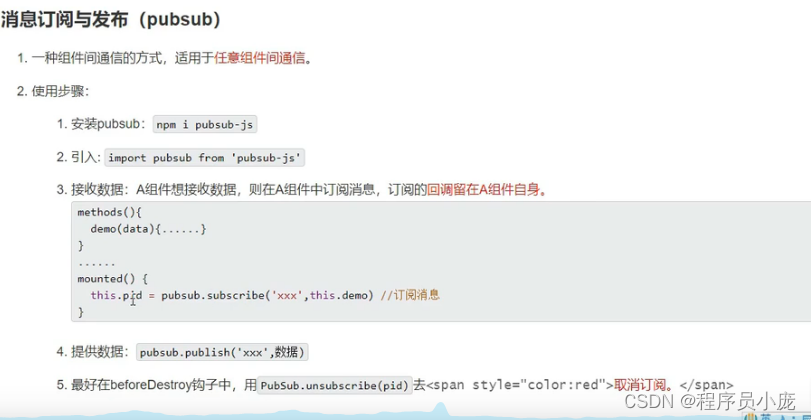
如:
Student.vue<template> <div class="test"> <h2>学生姓名:{{name}}</h2> <h2>学生性别:{{sex}}</h2> <button @click="sendStudentName">把学生名给School组件</button> </div> </template> <script> import pubsub from 'pubsub-js' export default { name:'Student', data() { return { name:'张三', sex:'男' } }, methods:{ sendStudentName(){ // //触发Student组件实例身上的cy事件 // this.$bus.$emit('hello',this.name) pubsub.publish('hello',666) } } } </script> <style scoped> .test{ background-color: bisque; } </style>- 1
- 2
- 3
- 4
- 5
- 6
- 7
- 8
- 9
- 10
- 11
- 12
- 13
- 14
- 15
- 16
- 17
- 18
- 19
- 20
- 21
- 22
- 23
- 24
- 25
- 26
- 27
- 28
- 29
- 30
- 31
- 32
- 33
School.vue
<template> <div class="demo"> <h2>学校名称:{{name | mySlice}}</h2> <h2>学校地址:{{address}}</h2> </div> </template> <script> // 引入 import pubsub from 'pubsub-js' export default { name:'School', data() { return { name:'尚硅谷atguigu', address:'北京', } }, mounted(){ // this.$bus.$on("hell",(data)=>{ // console.log("我是School组件,收到了数据",data) // }) this.pubId= pubsub.subscribe('hello',(msgName,data)=>{ console.log("有人发布了hello消息,hello消息的回调执行了",msgName,data) }) }, beforeDestroy(){ // this.$bus.$off('hello') pubsub.unsubscribe(this.pubId) } } </script> <style > .demo{ background-color: aqua; } </style>- 1
- 2
- 3
- 4
- 5
- 6
- 7
- 8
- 9
- 10
- 11
- 12
- 13
- 14
- 15
- 16
- 17
- 18
- 19
- 20
- 21
- 22
- 23
- 24
- 25
- 26
- 27
- 28
- 29
- 30
- 31
- 32
- 33
- 34
- 35
- 36
- 37
nextTick
1.语法: this.$nextTick(回调函数)
2.作用: 在下一次 DOM 更新结束后执行其指定的回调
3.什么时候用: 当改变数据后,要基于更新后的新DOM进行某些操作时,要在nextTick所指定的回调函数中执行.9 、Vue封装的过度与动画
1、作用:在插入、跟新或移除DOM元素时,在合适的时候给元素添加样式类名
2、图示

3、写法- 准备好样式:
元素进入的样式 1、v-enter:进入的起点 2、v-enter-axtive:进入过程中 3、v-enter-to:进入的终点 元素离开的样式 1、v-leave:离开的起点 2、v-leave-active:离开过程中 3、v-leave-to:离开的终点- 1
- 2
- 3
- 4
- 5
- 6
- 7
- 8
- 9
- 使用包裹要过渡的元素,并配置name属性:
<transition appear name='hello'> <h1 v-show="isShow">你好呀!</h1> </transition>- 1
- 2
- 3
- 备注:若有多个元素需要过度,则需要使用 transition-group,且每个元素都要指定key值
如:
<template> <div> <button @click="isShow =!isShow">显示/隐藏button> <transition appear name='hello'> <h1 v-show="isShow">你好呀!h1> transition> <transition-group appear name='hello '> <h1 v-show="isShow" key="1">你好呀!h1> <h1 v-show="isShow" key='2'>辰逸h1> transition-group> div> template> <script> export default ({ name:'Test2', data(){ return{ isShow:true } } }) script> <style scoped> h1{ background-color: orange; /* transition: 05s linear; */ } //封装的过度 /* 进入的起点、离开的终点*/ .hello-enter,.hello-leave-to{ transform: translateX(-100%); } /* 进入的终点 、离开的起点*/ .hello-enter-to,.hello-leave{ transform: translateX(0); } .hello-enter-active,.hello-leave-active{ transition: 05s linear; } //封装的动画,过度和动画使用一个就可以 .v-enter-active{ animation:cy 1s } .v-leave-active{ animation: cy 1s reverse; } @keyframes cy{ from{ transform: translateX(-100px); } to{ transform: translateX(-0px); } } style>- 1
- 2
- 3
- 4
- 5
- 6
- 7
- 8
- 9
- 10
- 11
- 12
- 13
- 14
- 15
- 16
- 17
- 18
- 19
- 20
- 21
- 22
- 23
- 24
- 25
- 26
- 27
- 28
- 29
- 30
- 31
- 32
- 33
- 34
- 35
- 36
- 37
- 38
- 39
- 40
- 41
- 42
- 43
- 44
- 45
- 46
- 47
- 48
- 49
- 50
- 51
- 52
- 53
- 54
- 55
- 56
- 57
- 58
- 59
- 60
- 61
- 62
- 第三方动画库
https://www.npmjs.com/网站上搜索animate.css
<template> <div> <button @click="isShow =!isShow">显示/隐藏button> <transition appear name='hello'> <h1 v-show="isShow">你好呀!h1> transition> <transition-group appear name='animate_animated animate_bounce' enter-active-class="animate_swing" leave-active-class="animate_backOutUp" > <h1 v-show="isShow" key="1">你好呀!h1> <h1 v-show="isShow" key='2'>辰逸h1> transition-group> div> template> <script> //引入animate import 'animate.css' export default ({ name:'Test2', data(){ return{ isShow:true } } }) script> <style scoped> h1{ background-color: orange; /* transition: 05s linear; */ } style>- 1
- 2
- 3
- 4
- 5
- 6
- 7
- 8
- 9
- 10
- 11
- 12
- 13
- 14
- 15
- 16
- 17
- 18
- 19
- 20
- 21
- 22
- 23
- 24
- 25
- 26
- 27
- 28
- 29
- 30
- 31
- 32
- 33
- 34
- 35
- 36
- 37
- 38
- 39
- 40
第 4 章:Vue 中的 ajax
1 解决开发环境 Ajax 跨域问题(代理服务器)

2、vue脚手架配置代理
方法一
在vue.config.s中添加如下配置:devServer:{ proxy:'http://localhost:5000' }- 1
- 2
- 3
说明:
- 优点:配置简单,请求资源时直接发给前端 (8080) 即可。
- 缺点:不能配置多个代理,不能灵活的控制请求是否走代理
- 工作方式:若按照上述配置代理,当请求了前端不存在的资源时,那么该请求会转发给服务器(优先匹配前端资源)
方法二:
编写vue.config.js配置具体代理规则devServer: { proxy: { '/cy': { //匹配所有以'/cy'开头的请求路径 target: 'http://localhost:5000',//代理目标的基础路径 pathRewrite:{'^/cy':''}, //去掉请求地址中的/cy ws: true, //用于支持websocket changeOrigin: true //用于控制请求头中的host值 }, '/demo': {//匹配所有以'/demo'开头的请求路径 target: 'http://localhost:5001',//代理目标的基础路径 pathRewrite:{'^/demo':''},//去掉请求地址中的/demo ws: true, //用于支持websocket changeOrigin: true //用于控制请求头中的host值 为true时请求头的host为:localhost:5000,为false时,localhost:8080 默认为true }, } }- 1
- 2
- 3
- 4
- 5
- 6
- 7
- 8
- 9
- 10
- 11
- 12
- 13
- 14
- 15
- 16
如:
vue.config.jsconst { defineConfig } = require('@vue/cli-service') module.exports = defineConfig({ transpileDependencies: true, lintOnSave:false , //关闭语法检查 //开启代理服务器(方式一) /* devServer:{ proxy:'http://localhost:5000' }, */ //开启代理服务器(方式二) devServer: { proxy: { '/cy': { target: 'http://localhost:5000', pathRewrite:{'^/cy':''}, //去掉请求地址中的/cy ws: true, //用于支持websocket changeOrigin: true //用于控制请求头中的host值 }, '/demo': { target: 'http://localhost:5001', pathRewrite:{'^/demo':''},//去掉请求地址中的/demo ws: true, //用于支持websocket changeOrigin: true //用于控制请求头中的host值 }, } } })- 1
- 2
- 3
- 4
- 5
- 6
- 7
- 8
- 9
- 10
- 11
- 12
- 13
- 14
- 15
- 16
- 17
- 18
- 19
- 20
- 21
- 22
- 23
- 24
- 25
- 26
- 27
- 28
App.vue
<template> <div> <button @click="getSutdents">获取学生信息button> <button @click="getCars">获取汽车信息button> div> template> <script> import axios from 'axios' export default { name:'App', methods:{ getSutdents(){ axios.get('http://localhost:8080/cy/students').then( response=>{ console.log("请求成功了",response.data) }, error=>{ console.log('请求失败了',error.message) } ) }, getCars(){ axios.get('http://localhost:8080/demo/cars').then( response=>{ console.log("请求成功了",response.data) }, error=>{ console.log('请求失败了',error.message) } ) } } } script>- 1
- 2
- 3
- 4
- 5
- 6
- 7
- 8
- 9
- 10
- 11
- 12
- 13
- 14
- 15
- 16
- 17
- 18
- 19
- 20
- 21
- 22
- 23
- 24
- 25
- 26
- 27
- 28
- 29
- 30
- 31
- 32
- 33
- 34
- 35
- 36
- 37
- 38
- 39
- 40
- 41
3、插槽
1.作用:
让父组件可以向子组件指定位置插入html结构,也是一种组件间通信的方式 适用于 父组件 ===>子组件
2.分类:
默认插槽、具名插槽、作用域插槽
3.使用方式:
1、默认插槽
父组件中: <Category> <div>html结构1div> Category> 子组件中: <template> <div> <slot>插槽默认内容...slot> div> template>- 1
- 2
- 3
- 4
- 5
- 6
- 7
- 8
- 9
- 10
- 11
2、具名插槽
父组件中 <Category> <template slot="center"》- 1
- 2
- 3
- 4
- 5
- 6
- 7
- 8
- 9
- 10
- 11
- 12
- 13
- 14
- 15
- 16
- 17
3.作用域插槽:
1.理解:
数据在组件的自身,但根据数据生成的结构需要组件的使用者来决定。 (games数据在Category组件中,但使用数据所遍历出来的结构由App组件决定)
2.具体编码
父组件中: <Category> <template scope="scopeData"> <ul> <li v-for="g in scopeData.games” :key="g">((g)} u1> template> Category> <Category> <template slot-scope="scopeData"> <h4 v-for="g in scopeData.games” :key="g">(g]]h4> template> Category> 子组件中, <template> <div> <slot :games="games">slot> div> template> <script> export default { name:'Category", props:['title'], //数据在子组件自身 data(){ return { games:['红色警戒”,穿越火线,劲舞团,超级玛丽] }, script>- 1
- 2
- 3
- 4
- 5
- 6
- 7
- 8
- 9
- 10
- 11
- 12
- 13
- 14
- 15
- 16
- 17
- 18
- 19
- 20
- 21
- 22
- 23
- 24
- 25
- 26
- 27
- 28
- 29
- 30
- 31
第 5 章:vuex
1、理解 vuex
1 vuex 是什么
- 概念:专门在 Vue 中实现集中式状态(数据)管理的一个Vue 插件,对vue应用中多个组件的共享状态进行集中式的管理(读/写),也是一种组件间通信的方式,且适用于任意组件间通信。
- Github 地址: https://github.com/vuejs/vuex
2、什么时候使用 Vuex
1.多个组件依赖于同一状态(数据)
2.来自不同组件的行为需要变更同一状态(数据)3、搭建环境
1、创建文件:src/store/index.js
//该文件用于创建vuex中最为核心的store // 引入vue核心库 import Vue from 'vue' //引入vuex import Vuex from 'vuex' // 应用Vuex插件 Vuex.usr(Vuex) //准备action-用于响应组件中的动作 const actions={} //准备mutations-用于操作数据(state) const mutations={} //准备state-用于存储数据 const state ={} // 创建并暴露store export default new Vuex.Store({ actions, mutations, state })- 1
- 2
- 3
- 4
- 5
- 6
- 7
- 8
- 9
- 10
- 11
- 12
- 13
- 14
- 15
- 16
- 17
- 18
- 19
- 20
- 21
- 22
2、在mian.js中创建vm时传入store配置项
//引入Vue import Vue from 'vue' //引入App import App from './App.vue' //关闭Vue的生产提示 Vue.config.productionTip = false //引入插件 import vueResource from 'vue-resource' // 引入store import store from './store/index' // 使用插件 Vue.use(vueResource) //创建vm new Vue({ el:'#app', render: h => h(App), store })- 1
- 2
- 3
- 4
- 5
- 6
- 7
- 8
- 9
- 10
- 11
- 12
- 13
- 14
- 15
- 16
- 17
- 18
- 19
- 20
- 21
4、基本使用
1、初始化数据、配置actions、配置mutations,操作文件store.js
//该文件用于创建vuex中最为核心的store // 引入vue核心库 import Vue from 'vue' //引入vuex import Vuex from 'vuex' // 应用Vuex插件 Vuex.usr(Vuex) //准备action-用于响应组件中的动作 const actions={ // jia(miniStore,value){ // miniStore.commit('JIA',value) // }, // jian(miniStore,value){ // miniStore.commit('JIAN',value) // }, jiaOdd(miniStore,value){ if(miniStore.state.sum % 2){ miniStore.commit('JIA',value) } }, jiaWait(miniStore,value){ setTimeout(() => { miniStore.commit('JIA',value) }, 500); }, } //准备mutations-用于操作数据(state) const mutations={ JIA(state,value){ state.sum+=value }, JIAN(state,value){ state.sum-=value } } //准备state-用于存储数据 const state ={ sum:0,//当前和 } // 创建并暴露store export default new Vuex.Store({ actions, mutations, state })- 1
- 2
- 3
- 4
- 5
- 6
- 7
- 8
- 9
- 10
- 11
- 12
- 13
- 14
- 15
- 16
- 17
- 18
- 19
- 20
- 21
- 22
- 23
- 24
- 25
- 26
- 27
- 28
- 29
- 30
- 31
- 32
- 33
- 34
- 35
- 36
- 37
- 38
- 39
- 40
- 41
- 42
- 43
- 44
- 45
- 46
- 47
- 48
- 49
2、组件中读取vuex中的数据
$store.state.sum- 1
3.组件中修改vuex中的数据:
$store.dispatch('action中的方法名,数据) 或 $store.commit('mutations中的方法名',数据)- 1
备注: 若没有网络请求或其他业务逻辑,组件中也可以越过actions,即不写dispath,直接编写commit
如:<template> <div> <h1>当前求和为:{{$store.state.sum}}h1> <select v-model='n'> <option :value="1">1option> <option :value="2">2option> <option :value="3">3option> select> <button @click='increment'>+button> <button @click='decrement'>-button> <button @click='incrementOdd'>当前求和为奇数时加button> <button @click='incrementWait'>等一等再加button> div> template> <script> export default { name:'Category', date(){ return{ // sum:0,//当前和 n:1,//用户选择的数字 } }, methods:{ increment(){ // this.sum+this.n //this.$store.dispatch('jia',this.n) //没有业务逻辑可以dispatch 直接写成 this.$store.commit('JIA',n) }, decrement(){ // this.sum-=this.n this.$store.dispatch('jian',this.n) }, incrementOdd(){ // if(this.sum % 2){ // this.sum+=this.n // } this.$store.dispatch('jiaOdd',this.n) }, incrementWait(){ // setTimeout(() => { // this.sum+this.n // }, 500); this.$store.dispatch('jiaWait',this.n) }, } } script> <style> style>- 1
- 2
- 3
- 4
- 5
- 6
- 7
- 8
- 9
- 10
- 11
- 12
- 13
- 14
- 15
- 16
- 17
- 18
- 19
- 20
- 21
- 22
- 23
- 24
- 25
- 26
- 27
- 28
- 29
- 30
- 31
- 32
- 33
- 34
- 35
- 36
- 37
- 38
- 39
- 40
- 41
- 42
- 43
- 44
- 45
- 46
- 47
- 48
- 49
- 50
- 51
- 52
- 53
5、getters的使用
1.概念:
当state中的数据需要经过加工后再使用时,可以使用getters加工。
2.在store.js 中追加getters 配置
...... const getters = { bigSum(state){ return state.sum * 10 } } //创建并暴露store export default new Vuex.Store({ ...... getters })- 1
- 2
- 3
- 4
- 5
- 6
- 7
- 8
- 9
- 10
- 11
3.组件中读取数据:
$store.getters.bigSum- 1
如:
<h3>当前求和放大十倍后为:{{$store.getters.bigSum}}h3>- 1
6、四个map方法的使用
1.mapstate方法:
用于帮助我们映射state 中的数据为计算属性
computed:{ //借助mapState生成计算属性: sum、schoo1、subject (对象写法) ...mapState((sum:'sum",school: 'school",subject:'subject"}), //借助mapstate生成计算属性: sum、schoo1、subject (数组写法) ...mapState(["sum',"school',"subject"]), }- 1
- 2
- 3
- 4
- 5
- 6
2.mapGetters方法:
用于帮助我们映射getters 中的数据为计算属性
computed:{ //借助mapGetters生成计算属性。bigSum (对象写法) ...mapGetters({bigSum;"bigSum"}). //借助mapGetters生成计算属性: bigSum (数组写法) ...mapGetters(['bigSum"]) }- 1
- 2
- 3
- 4
- 5
- 6
3.mapActions方法:
用于帮助我们生成与actions 对话的方法,即: 包含$store.dispatch(xxx)的函数
methods:{ //靠mapActions生成:incrementOdd、incrementWait (对象形式) ..mapActions(fincrementOdd:'jiaOdd',incrementWait:"jiaWait'}) //靠mapActions生成:incrementOdd、incrementWait (数组形式) ...mapActions(["jiaOdd","jiawait"]) }- 1
- 2
- 3
- 4
- 5
- 6
4.mapMutations方法:
用于帮助我们生成与mutations对话的方法,即:包含$store,commit(xxx)的函数
methods:( //靠mapActions生成: increment、decrement (对象形式) ...mapMutations({increment:'JIA',decrement:'JIAN'}), //靠mapMutations生成:JIA、JIAN (对象形式) ...mapMutations(['JIA',JIAN']), }- 1
- 2
- 3
- 4
- 5
- 6
备注: mapActions与mapMutations使用时,若需要传递参数需要: 在模板中绑定事件时传递好参数,否则参数是事件对象。
如:<template> <div> <h1>当前求和为:{{sum}}</h1> <h3>当前求和放大10倍为:{{bigSum}}</h3> <h3>我在{{school}},学习{{subject}}</h3> <select v-model.number="n"> <option value="1">1</option> <option value="2">2</option> <option value="3">3</option> </select> <button @click="increment(n)">+</button> <button @click="decrement(n)">-</button> <button @click="incrementOdd(n)">当前求和为奇数再加</button> <button @click="incrementWait(n)">等一等再加</button> </div> </template> <script> import {mapState,mapGetters,mapMutations,mapActions} from 'vuex' export default { name:'Count', data() { return { n:1, //用户选择的数字 } }, computed:{ //靠程序员自己亲自去写计算属性 /* sum(){ return this.$store.state.sum }, school(){ return this.$store.state.school }, subject(){ return this.$store.state.subject }, */ //借助mapState生成计算属性,从state中读取数据。(对象写法) // ...mapState({he:'sum',xuexiao:'school',xueke:'subject'}), //借助mapState生成计算属性,从state中读取数据。(数组写法) ...mapState(['sum','school','subject']), /* ******************************************************************** */ /* bigSum(){ return this.$store.getters.bigSum }, */ //借助mapGetters生成计算属性,从getters中读取数据。(对象写法) // ...mapGetters({bigSum:'bigSum'}) //借助mapGetters生成计算属性,从getters中读取数据。(数组写法) ...mapGetters(['bigSum']) }, methods: { //程序员亲自写方法 /* increment(){ this.$store.commit('JIA',this.n) }, decrement(){ this.$store.commit('JIAN',this.n) }, */ //借助mapMutations生成对应的方法,方法中会调用commit去联系mutations(对象写法) ...mapMutations({increment:'JIA',decrement:'JIAN'}), //借助mapMutations生成对应的方法,方法中会调用commit去联系mutations(数组写法) // ...mapMutations(['JIA','JIAN']), /* ************************************************* */ //程序员亲自写方法 /* incrementOdd(){ this.$store.dispatch('jiaOdd',this.n) }, incrementWait(){ this.$store.dispatch('jiaWait',this.n) }, */ //借助mapActions生成对应的方法,方法中会调用dispatch去联系actions(对象写法) ...mapActions({incrementOdd:'jiaOdd',incrementWait:'jiaWait'}) //借助mapActions生成对应的方法,方法中会调用dispatch去联系actions(数组写法) // ...mapActions(['jiaOdd','jiaWait']) }, mounted() { const x = mapState({he:'sum',xuexiao:'school',xueke:'subject'}) console.log(x) }, } </script> <style lang="css"> button{ margin-left: 5px; } </style>- 1
- 2
- 3
- 4
- 5
- 6
- 7
- 8
- 9
- 10
- 11
- 12
- 13
- 14
- 15
- 16
- 17
- 18
- 19
- 20
- 21
- 22
- 23
- 24
- 25
- 26
- 27
- 28
- 29
- 30
- 31
- 32
- 33
- 34
- 35
- 36
- 37
- 38
- 39
- 40
- 41
- 42
- 43
- 44
- 45
- 46
- 47
- 48
- 49
- 50
- 51
- 52
- 53
- 54
- 55
- 56
- 57
- 58
- 59
- 60
- 61
- 62
- 63
- 64
- 65
- 66
- 67
- 68
- 69
- 70
- 71
- 72
- 73
- 74
- 75
- 76
- 77
- 78
- 79
- 80
- 81
- 82
- 83
- 84
- 85
- 86
- 87
- 88
- 89
- 90
- 91
- 92
- 93
- 94
- 95
- 96
- 97
- 98
- 99
- 100
- 101
7.模块化+命名空间
1.目的:
让代码更好维护,让多种数据分类更加明确
2.修改store.js
const countAbout = { namespaced;true,//开启命名空间state:(x:1), mutations:(...} actions:[..}, getters: { bigSum(state){ return state.sum * 10 } } } const personAbout = { namespaced;true,//开启命名空间 state:{ ... }, mutations: { ...}, actions:{ ...} } const store = new Vuex.Store( modules:{ countAbout. personAbout } })- 1
- 2
- 3
- 4
- 5
- 6
- 7
- 8
- 9
- 10
- 11
- 12
- 13
- 14
- 15
- 16
- 17
- 18
- 19
- 20
- 21
- 22
- 23
- 24

如:第 6 章:vue-router路由
1 vue-router 的理解
vue 的一个插件库,专门用来实现 SPA 应用
2 对 SPA 应用的理解
- 单页 Web 应用(single page web application,SPA)。
- 整个应用只有一个完整的页面。
- 点击页面中的导航链接不会刷新页面,只会做页面的局部更新。
- 数据需要通过 ajax 请求获取。
3 路由的理解
1. 什么是路由?
- 一个路由就是一组映射关系(key - value)
- key 为路径, value 可能是 function 或 component
2. 路由分类
1. 后端路由:
- 理解:value 是 function, 用于处理客户端提交的请求。
- 工作过程:服务器接收到一个请求时, 根据请求路径找到匹配的函数来处理请求, 返回响应数据。
2. 前端路由:
- 理解:value 是 component,用于展示页面内容。
- 工作过程:当浏览器的路径改变时, 对应的组件就会显示。
4 路由的基本使用
1.安装vue-router,命令:
npm i vue-router@3- 1
2.应用插件:
Vue.use(VueRouter)- 1
如:
//引入Vue import Vue from 'vue' //引入App import App from './App.vue' //关闭Vue的生产提示 Vue.config.productionTip = false //引入vueRouter import VueRouter from 'vue-router' //引入路由器 import router from './router/index' //应用插件 Vue.use(VueRouter) //创建vm new Vue({ el:'#app', render: h => h(App), router:router })- 1
- 2
- 3
- 4
- 5
- 6
- 7
- 8
- 9
- 10
- 11
- 12
- 13
- 14
- 15
- 16
- 17
- 18
- 19
- 20
- 21
3.编写router配置项:
//该文件专门用于创建整个应用的路由器 import VueRouter from 'vue-router' //引入组件 import About from '@/components/About' import Home from '../components/Home' //创建并暴露路由器,去管理一组一组的路由规则 export default new VueRouter({ routes:[ { path:'/about', component:About }, { path:'/home', component:Home } ] })- 1
- 2
- 3
- 4
- 5
- 6
- 7
- 8
- 9
- 10
- 11
- 12
- 13
- 14
- 15
- 16
- 17
- 18
- 19
4.实现切换(active-class可配置高亮样式)
<router-link active-class="active" to="/about">About</router-link>- 1
5.指定展示位置
<router-view></router-view>- 1
如:
<template> <div> <div class="row"> <div class="col-xs-offset-2 col-xs-8"> <div class="page-header"><h2>Vue Router Demo</h2></div> </div> </div> <div class="row"> <div class="col-xs-2 col-xs-offset-2"> <div class="list-group"> <!-- 原始html中我们使用a标签实现页面的跳转 --> <!-- <a class="list-group-item active" href="./about.html">About</a> <a class="list-group-item" href="./home.html">Home</a> --> <!--Vue中借助router-lick标签实现路由的切换 --> <router-link class="list-group-item " active-class="active" to="/about">About</router-link> <router-link class="list-group-item" active-class="active" to="/home">Home</router-link> </div> </div> <div class="col-xs-6"> <div class="panel"> <div class="panel-body"> <!-- 指定组件的呈现位置 --> <router-view></router-view> </div> </div> </div> </div> </div> </template> <script> export default { name:'App' } </script> <style scoped> </style>- 1
- 2
- 3
- 4
- 5
- 6
- 7
- 8
- 9
- 10
- 11
- 12
- 13
- 14
- 15
- 16
- 17
- 18
- 19
- 20
- 21
- 22
- 23
- 24
- 25
- 26
- 27
- 28
- 29
- 30
- 31
- 32
- 33
- 34
- 35
- 36
- 37
- 38
- 39
6.几个注意点
1.路由组件通常存放在pages 文件夹,一般组件通常存放在components 文件夹
2.通过切换,“隐藏”了的路由组件,默认是被销毁掉的,需要的时候再去挂载。
3.每个组件都有自己的 $route 属性,里面存储着自己的路由信息
4.整个应用只有一个router,可以通过组件的 $router 属性获取到。5、嵌套(多级)路由
1.配置路由规则,使用children配置项:
routes:[ { path:'/about" component :About . }, { path : '/home", component :Home, children:{//通过children配置子级路由 { path:'news',//此处一定不要写: /news component:News }, { path:'message’,//此处一定不要写,/message component:Message } } } ]- 1
- 2
- 3
- 4
- 5
- 6
- 7
- 8
- 9
- 10
- 11
- 12
- 13
- 14
- 15
- 16
- 17
- 18
- 19
- 20
2.跳转 (要写完整路径) :
<router-link to="/home/news">News</router-link>- 1
6、路由的query传参
1、传递参数
<ul> <li v-for="m in messageList" :key="m.id"> <!-- 跳转路由并携带query参数,to的字符串写法 --> <!-- <router-link :to="`/home/message/detail?id=${m.id}&title=${m.title}`">{{m.title}}</router-link> --> <!-- 跳转路由并携带query参数,to的对象写法 --> <router-link :to="{ path:'/home/message/detail', query:{ id:m.id, title:m.title } }"> </router-link> </li> </ul>- 1
- 2
- 3
- 4
- 5
- 6
- 7
- 8
- 9
- 10
- 11
- 12
- 13
- 14
- 15
- 16
- 17
2、接收参数
{{$route.query.id}} {{$route.query.title}}- 1
- 2
7、命名路
1.作用:
可以简化路由的跳转
2.如何使用
1.给路由命名

2.简化跳转:
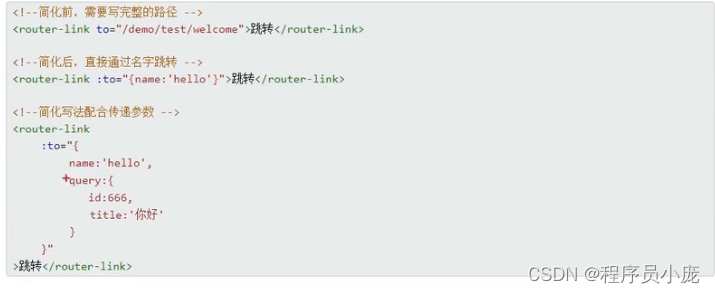
8、路由的params参数
1、配置路由,声明接收 params参数
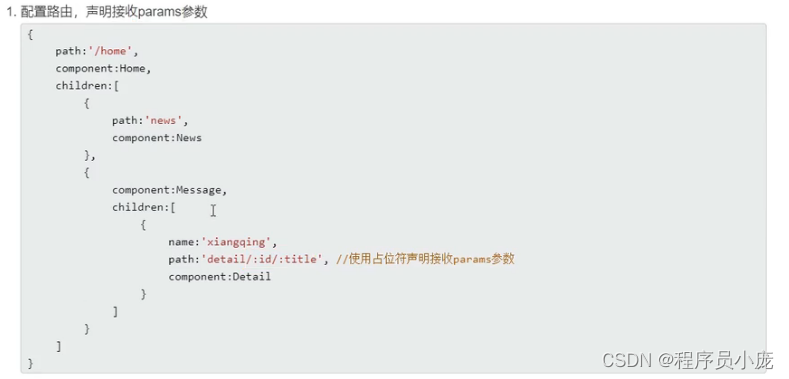
2、传递参数
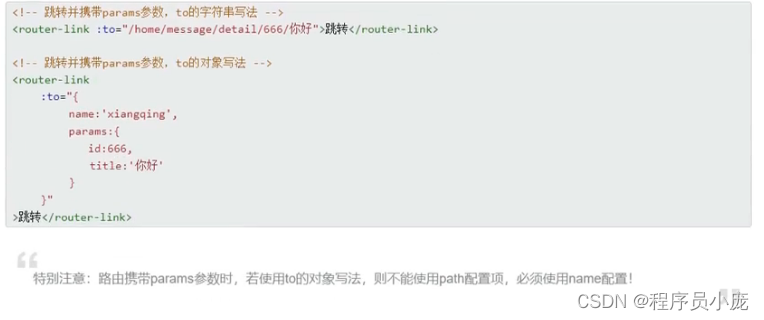
3、接收参数

9.路由的props配置
作用: 让路由组件更方便的收到参数
{ name:'xiangqing', path:'detail/:id', component:Detail, //第一种写法:props值为对象,该对象中所有的key-value的组合最终都会通过props传给Detail组件 // props:{a:900} //第二种写法:props值为布尔值,布尔值为true,则把路由收到的所有params参数通过props传给Detail组件 // props:true //第三种写法:props值为函数,该函数返回的对象中每一组key-value都会通过props传给Detail组件 props(route){ return { id:route.query.id, title:route.query.title } } }- 1
- 2
- 3
- 4
- 5
- 6
- 7
- 8
- 9
- 10
- 11
- 12
- 13
- 14
- 15
- 16
- 17
- 18
- 19
接收
<template> <ul> <li>消息编号:{{id}}</li> <li>消息标题:{{title}}</li> </ul> </template> <script> export default { name:'Detail', props:['id','title'], } </script>- 1
- 2
- 3
- 4
- 5
- 6
- 7
- 8
- 9
- 10
- 11
- 12
- 13
- 14
10.
- 作用:控制路由跳转时操作浏览器历史记录的模式
- 浏览器的历史记录有两种写入方式:分别为
push和replace,push是追加历史记录,replace是替换当前记录。路由跳转时候默认为push - 如何开启
replace模式:News
11.编程式路由导航
-
作用:不借助
-
具体编码:
//$router的两个API this.$router.push({ name:'xiangqing', params:{ id:xxx, title:xxx } }) this.$router.replace({ name:'xiangqing', params:{ id:xxx, title:xxx } }) this.$router.forward() //前进 this.$router.back() //后退 this.$router.go() //可前进也可后退- 1
- 2
- 3
- 4
- 5
- 6
- 7
- 8
- 9
- 10
- 11
- 12
- 13
- 14
- 15
- 16
- 17
- 18
- 19
如:
<template> <div> <ul> <li v-for="m in messageList" :key="m.id"> <!-- 跳转路由并携带params参数,to的字符串写法 --> <!-- <router-link :to="`/home/message/detail/${m.id}/${m.title}`">{{m.title}}</router-link> --> <!-- 跳转路由并携带params参数,to的对象写法 --> <router-link :to="{ name:'xiangqing', query:{ id:m.id, title:m.title } }"> {{m.title}} </router-link> <button @click="pushShow(m)">push查看</button> <button @click="replaceShow(m)">replace查看</button> </li> </ul> <hr> <router-view></router-view> </div> </template> <script> export default { name:'Message', data() { return { messageList:[ {id:'001',title:'消息001'}, {id:'002',title:'消息002'}, {id:'003',title:'消息003'} ] } }, methods: { pushShow(m){ this.$router.push({ name:'xiangqing', query:{ id:m.id, title:m.title } }) }, replaceShow(m){ this.$router.replace({ name:'xiangqing', query:{ id:m.id, title:m.title } }) } }, } </script>- 1
- 2
- 3
- 4
- 5
- 6
- 7
- 8
- 9
- 10
- 11
- 12
- 13
- 14
- 15
- 16
- 17
- 18
- 19
- 20
- 21
- 22
- 23
- 24
- 25
- 26
- 27
- 28
- 29
- 30
- 31
- 32
- 33
- 34
- 35
- 36
- 37
- 38
- 39
- 40
- 41
- 42
- 43
- 44
- 45
- 46
- 47
- 48
- 49
- 50
- 51
- 52
- 53
- 54
- 55
- 56
- 57
- 58
- 59
- 60
<template> <div class="col-xs-offset-2 col-xs-8"> <div class="page-header"> <h2>Vue Router Demo</h2> <button @click="back">后退</button> <button @click="forward">前进</button> <button @click="test">测试一下go</button> </div> </div> </template> <script> export default { name:'Banner', methods: { back(){ this.$router.back() // console.log(this.$router) }, forward(){ this.$router.forward() }, test(){ this.$router.go(3) } }, } </script>- 1
- 2
- 3
- 4
- 5
- 6
- 7
- 8
- 9
- 10
- 11
- 12
- 13
- 14
- 15
- 16
- 17
- 18
- 19
- 20
- 21
- 22
- 23
- 24
- 25
- 26
- 27
- 28
11、缓存路由组件
-
作用:让不展示的路由组件保持挂载,不被销毁。
-
具体编码:
- 1
- 2
- 3
- 4
- 5
- 6
- 7
- 8
- 9
- 10
12.两个新的生命周期钩子
- 作用:路由组件所独有的两个钩子,用于捕获路由组件的激活状态。
- 具体名字:
activated路由组件被激活时触发。deactivated路由组件失活时触发。
<template> <ul> <li :style="{opacity}">欢迎学习Vue</li> <li>news001 <input type="text"></li> <li>news002 <input type="text"></li> <li>news003 <input type="text"></li> </ul> </template> <script> export default { name:'News', data() { return { opacity:1 } }, //beforeDestroy和mounted对路由不起作用 /* beforeDestroy() { console.log('News组件即将被销毁了') clearInterval(this.timer) }, */ /* mounted(){ this.timer = setInterval(() => { console.log('@') this.opacity -= 0.01 if(this.opacity <= 0) this.opacity = 1 },16) }, */ activated() { console.log('News组件被激活了') this.timer = setInterval(() => { console.log('@') this.opacity -= 0.01 if(this.opacity <= 0) this.opacity = 1 },16) }, deactivated() { console.log('News组件失活了') clearInterval(this.timer) }, } </script>- 1
- 2
- 3
- 4
- 5
- 6
- 7
- 8
- 9
- 10
- 11
- 12
- 13
- 14
- 15
- 16
- 17
- 18
- 19
- 20
- 21
- 22
- 23
- 24
- 25
- 26
- 27
- 28
- 29
- 30
- 31
- 32
- 33
- 34
- 35
- 36
- 37
- 38
- 39
- 40
- 41
- 42
- 43
13、路由守卫
1. 作用:
对路由进行权限控制
2. 分类:
全局守卫、独享守卫、组件内守卫
3. 全局守卫:
//全局前置守卫:初始化时执行、每次路由切换前执行 router.beforeEach((to,from,next)=>{ console.log('beforeEach',to,from) if(to.meta.isAuth){ //判断当前路由是否需要进行权限控制 if(localStorage.getItem('school') === 'atguigu'){ //权限控制的具体规则 next() //放行 }else{ alert('暂无权限查看') // next({name:'guanyu'}) } }else{ next() //放行 } }) //全局后置守卫:初始化时执行、每次路由切换后执行 router.afterEach((to,from)=>{ console.log('afterEach',to,from) if(to.meta.title){ document.title = to.meta.title //修改网页的title }else{ document.title = 'vue_test' } })- 1
- 2
- 3
- 4
- 5
- 6
- 7
- 8
- 9
- 10
- 11
- 12
- 13
- 14
- 15
- 16
- 17
- 18
- 19
- 20
- 21
- 22
- 23
- 24
如:
// 该文件专门用于创建整个应用的路由器 import VueRouter from 'vue-router' //引入组件 import About from '../pages/About' import Home from '../pages/Home' import News from '../pages/News' import Message from '../pages/Message' import Detail from '../pages/Detail' //创建并暴露一个路由器 const router = new VueRouter({ routes:[ { name:'guanyu', path:'/about', component:About, meta:{title:'关于'} }, { name:'zhuye', path:'/home', component:Home, meta:{title:'主页'}, children:[ { name:'xinwen', path:'news', component:News, meta:{isAuth:true,title:'新闻'} }, { name:'xiaoxi', path:'message', component:Message, meta:{isAuth:true,title:'消息'}, children:[ { name:'xiangqing', path:'detail', component:Detail, meta:{isAuth:true,title:'详情'}, } ] } ] } ] }) //全局前置路由守卫————初始化的时候被调用、每次路由切换之前被调用 router.beforeEach((to,from,next)=>{ console.log('前置路由守卫',to,from) if(to.meta.isAuth){ //判断是否需要鉴权 if(localStorage.getItem('school')==='atguigu'){ next() }else{ alert('学校名不对,无权限查看!') } }else{ next() } }) //全局后置路由守卫————初始化的时候被调用、每次路由切换之后被调用 router.afterEach((to,from)=>{ console.log('后置路由守卫',to,from) document.title = to.meta.title || '硅谷系统' }) export default router- 1
- 2
- 3
- 4
- 5
- 6
- 7
- 8
- 9
- 10
- 11
- 12
- 13
- 14
- 15
- 16
- 17
- 18
- 19
- 20
- 21
- 22
- 23
- 24
- 25
- 26
- 27
- 28
- 29
- 30
- 31
- 32
- 33
- 34
- 35
- 36
- 37
- 38
- 39
- 40
- 41
- 42
- 43
- 44
- 45
- 46
- 47
- 48
- 49
- 50
- 51
- 52
- 53
- 54
- 55
- 56
- 57
- 58
- 59
- 60
- 61
- 62
- 63
- 64
- 65
- 66
- 67
- 68
- 69
- 70
- 71
4. 独享守卫:
beforeEnter(to,from,next){ console.log('beforeEnter',to,from) if(to.meta.isAuth){ //判断当前路由是否需要进行权限控制 if(localStorage.getItem('school') === 'atguigu'){ next() }else{ alert('暂无权限查看') // next({name:'guanyu'}) } }else{ next() } }- 1
- 2
- 3
- 4
- 5
- 6
- 7
- 8
- 9
- 10
- 11
- 12
- 13
如:
// 该文件专门用于创建整个应用的路由器 import VueRouter from 'vue-router' //引入组件 import About from '../pages/About' import Home from '../pages/Home' import News from '../pages/News' import Message from '../pages/Message' import Detail from '../pages/Detail' //创建并暴露一个路由器 const router = new VueRouter({ routes:[ { name:'guanyu', path:'/about', component:About, meta:{title:'关于'} }, { name:'zhuye', path:'/home', component:Home, meta:{title:'主页'}, children:[ { name:'xinwen', path:'news', component:News, meta:{isAuth:true,title:'新闻'}, beforeEnter: (to, from, next) => { console.log('独享路由守卫',to,from) if(to.meta.isAuth){ //判断是否需要鉴权 if(localStorage.getItem('school')==='atguigu'){ next() }else{ alert('学校名不对,无权限查看!') } }else{ next() } } }, { name:'xiaoxi', path:'message', component:Message, meta:{isAuth:true,title:'消息'}, children:[ { name:'xiangqing', path:'detail', component:Detail, meta:{isAuth:true,title:'详情'}, } ] } ] } ] }) export default router- 1
- 2
- 3
- 4
- 5
- 6
- 7
- 8
- 9
- 10
- 11
- 12
- 13
- 14
- 15
- 16
- 17
- 18
- 19
- 20
- 21
- 22
- 23
- 24
- 25
- 26
- 27
- 28
- 29
- 30
- 31
- 32
- 33
- 34
- 35
- 36
- 37
- 38
- 39
- 40
- 41
- 42
- 43
- 44
- 45
- 46
- 47
- 48
- 49
- 50
- 51
- 52
- 53
- 54
- 55
- 56
- 57
- 58
- 59
- 60
- 61
- 62
5. 组件内守卫:
//进入守卫:通过路由规则,进入该组件时被调用 beforeRouteEnter (to, from, next) { }, //离开守卫:通过路由规则,离开该组件时被调用 beforeRouteLeave (to, from, next) { }- 1
- 2
- 3
- 4
- 5
- 6
如:
<template> <h2>我是About的内容</h2> </template> <script> export default { name:'About', //通过路由规则,进入该组件时被调用 beforeRouteEnter (to, from, next) { console.log('About--beforeRouteEnter',to,from) if(to.meta.isAuth){ //判断是否需要鉴权 if(localStorage.getItem('school')==='atguigu'){ next() }else{ alert('学校名不对,无权限查看!') } }else{ next() } }, //通过路由规则,离开该组件时被调用 beforeRouteLeave (to, from, next) { console.log('About--beforeRouteLeave',to,from) next() } } </script>- 1
- 2
- 3
- 4
- 5
- 6
- 7
- 8
- 9
- 10
- 11
- 12
- 13
- 14
- 15
- 16
- 17
- 18
- 19
- 20
- 21
- 22
- 23
- 24
- 25
- 26
- 27
- 28
14、路由器的两种工作模式
- 对于一个url来说,什么是hash值?—— #及其后面的内容就是hash值。
- hash值不会包含在 HTTP 请求中,即:hash值不会带给服务器。
- hash模式:
- 地址中永远带着#号,不美观 。
- 若以后将地址通过第三方手机app分享,若app校验严格,则地址会被标记为不合法。
- 兼容性较好。
- history模式:
- 地址干净,美观 。
- 兼容性和hash模式相比略差。
- 应用部署上线时需要后端人员支持,解决刷新页面服务端404的问题。
如:
// 该文件专门用于创建整个应用的路由器 import VueRouter from 'vue-router' //引入组件 import About from '../pages/About' import Home from '../pages/Home' import News from '../pages/News' import Message from '../pages/Message' import Detail from '../pages/Detail' //创建并暴露一个路由器 const router = new VueRouter({ mode:'history',//选择路由模式 routes:[ ] }) export default router- 1
- 2
- 3
- 4
- 5
- 6
- 7
- 8
- 9
- 10
- 11
- 12
- 13
- 14
- 15
- 16
- 17
- 18
- 19
vue3快速上手
一、创建Vue3.0工程
1.使用 vue-cli 创建
官方文档:https://cli.vuejs.org/zh/guide/creating-a-project.html#vue-create
## 查看@vue/cli版本,确保@vue/cli版本在4.5.0以上 vue --version ## 安装或者升级你的@vue/cli npm install -g @vue/cli ## 创建 vue create vue_test ## 启动 cd vue_test npm run serve- 1
- 2
- 3
- 4
- 5
- 6
- 7
- 8
- 9
2.使用 vite 创建
官方文档:https://v3.cn.vuejs.org/guide/installation.html#vite
vite官网:https://vitejs.cn
- 什么是vite?—— 新一代前端构建工具。
- 优势如下:
- 开发环境中,无需打包操作,可快速的冷启动。
- 轻量快速的热重载(HMR)。
- 真正的按需编译,不再等待整个应用编译完成。
- 传统构建 与 vite构建对比图
## 创建工程 npm init vite-app <project-name> ## 进入工程目录 cd <project-name> ## 安装依赖 npm install ## 运行 npm run dev- 1
- 2
- 3
- 4
- 5
- 6
- 7
- 8
3.分析工程结构
main.js
//引入的不再是Vue构造函数了,引入的是一个名为createApp的工厂函数 import { createApp } from 'vue' import App from './App.vue' //创建应用实例对象——app(类似于之前Vue2中的vm,但app比vm更“轻”) const app = createApp(App) //挂载 app.mount('#app')- 1
- 2
- 3
- 4
- 5
- 6
- 7
- 8
- 9
- 10
二、常用 Composition API
官方文档: https://v3.cn.vuejs.org/guide/composition-api-introduction.html
1.拉开序幕的setup
- 理解:Vue3.0中一个新的配置项,值为一个函数。
- setup是所有Composition API(组合API)“ 表演的舞台 ”。
- 组件中所用到的:数据、方法等等,均要配置在setup中。
- setup函数的两种返回值:
- 若返回一个对象,则对象中的属性、方法, 在模板中均可以直接使用。(重点关注!)
- 若返回一个渲染函数:则可以自定义渲染内容。(了解)
- 注意点:
- 尽量不要与Vue2.x配置混用
- Vue2.x配置(data、methos、computed…)中可以访问到setup中的属性、方法。
- 但在setup中不能访问到Vue2.x配置(data、methos、computed…)。
- 如果有重名, setup优先。
- setup不能是一个async函数,因为返回值不再是return的对象, 而是promise, 模板看不到return对象中的属性。(后期也可以返回一个Promise实例,但需要Suspense和异步组件的配合)
- 尽量不要与Vue2.x配置混用
2.ref函数
- 作用: 定义一个响应式的数据
- 语法:
const xxx = ref(initValue)- 创建一个包含响应式数据的引用对象(reference对象,简称ref对象)。
- JS中操作数据:
xxx.value - 模板中读取数据: 不需要.value,直接:{{xxx}}
- 备注:
- 接收的数据可以是:基本类型、也可以是对象类型。
- 基本类型的数据:响应式依然是靠
Object.defineProperty()的get与set完成的。 - 对象类型的数据:内部 “ 求助 ” 了Vue3.0中的一个新函数——
reactive函数。
如:
<template> <h1>一个人的信息h1> <h2>姓名:{{name}}h2> <h2>年龄:{{age}}h2> <h3>工作种类:{{job.type}}h3> <h3>工作薪水:{{job.salary}}h3> <button @click="changeInfo">修改人的信息button> template> <script> import {ref} from 'vue' export default { name: 'App', setup(){ //数据 let name = ref('张三') let age = ref(18) let job = ref({ type:'前端工程师', salary:'30K' }) //修改方法 function changeInfo(){ name.value = '李四' age.value = 48 console.log(job.value) job.value.type = 'UI设计师' job.value.salary = '60K' console.log(name,age) } //返回一个对象(常用) return { name, age, job, changeInfo } } } script>- 1
- 2
- 3
- 4
- 5
- 6
- 7
- 8
- 9
- 10
- 11
- 12
- 13
- 14
- 15
- 16
- 17
- 18
- 19
- 20
- 21
- 22
- 23
- 24
- 25
- 26
- 27
- 28
- 29
- 30
- 31
- 32
- 33
- 34
- 35
- 36
- 37
- 38
- 39
- 40
- 41
- 42
3.reactive函数
- 作用: 定义一个对象类型的响应式数据(基本类型不要用它,要用
ref函数) - 语法:
const 代理对象= reactive(源对象)接收一个对象(或数组),返回一个代理对象(Proxy的实例对象,简称proxy对象) - reactive定义的响应式数据是“深层次的”。
- 内部基于 ES6 的 Proxy 实现,通过代理对象操作源对象内部数据进行操作。
如:
<template> <h1>一个人的信息h1> <h2>姓名:{{person.name}}h2> <h2>年龄:{{person.age}}h2> <h3>工作种类:{{person.job.type}}h3> <h3>工作薪水:{{person.job.salary}}h3> <h3>爱好:{{person.hobby}}h3> <h3>测试的数据c:{{person.job.a.b.c}}h3> <button @click="changeInfo">修改人的信息button> template> <script> import {reactive} from 'vue' export default { name: 'App', setup(){ //数据 let person = reactive({ name:'张三', age:18, job:{ type:'前端工程师', salary:'30K', a:{ b:{ c:666 } } }, hobby:['抽烟','喝酒','烫头'] }) //方法 function changeInfo(){ person.name = '李四' person.age = 48 person.job.type = 'UI设计师' person.job.salary = '60K' person.job.a.b.c = 999 person.hobby[0] = '学习' } //返回一个对象(常用) return { person, changeInfo } } } script>- 1
- 2
- 3
- 4
- 5
- 6
- 7
- 8
- 9
- 10
- 11
- 12
- 13
- 14
- 15
- 16
- 17
- 18
- 19
- 20
- 21
- 22
- 23
- 24
- 25
- 26
- 27
- 28
- 29
- 30
- 31
- 32
- 33
- 34
- 35
- 36
- 37
- 38
- 39
- 40
- 41
- 42
- 43
- 44
- 45
- 46
- 47
- 48
- 49
- 50
4.Vue3.0中的响应式原理
vue2.x的响应式
-
实现原理:
-
对象类型:通过
Object.defineProperty()对属性的读取、修改进行拦截(数据劫持)。 -
数组类型:通过重写更新数组的一系列方法来实现拦截。(对数组的变更方法进行了包裹)。
Object.defineProperty(data, 'count', { get () {}, set () {} })- 1
- 2
- 3
- 4
-
-
存在问题:
- 新增属性、删除属性, 界面不会更新。
- 直接通过下标修改数组, 界面不会自动更新。
Vue3.0的响应式
-
实现原理:
-
通过Proxy(代理): 拦截对象中任意属性的变化, 包括:属性值的读写、属性的添加、属性的删除等。
-
通过Reflect(反射): 对源对象的属性进行操作。
-
MDN文档中描述的Proxy与Reflect:
-
Proxy:https://developer.mozilla.org/zh-CN/docs/Web/JavaScript/Reference/Global_Objects/Proxy
-
Reflect:https://developer.mozilla.org/zh-CN/docs/Web/JavaScript/Reference/Global_Objects/Reflect
new Proxy(data, { // 拦截读取属性值 get (target, prop) { return Reflect.get(target, prop) }, // 拦截设置属性值或添加新属性 set (target, prop, value) { return Reflect.set(target, prop, value) }, // 拦截删除属性 deleteProperty (target, prop) { return Reflect.deleteProperty(target, prop) } }) proxy.name = 'tom'- 1
- 2
- 3
- 4
- 5
- 6
- 7
- 8
- 9
- 10
- 11
- 12
- 13
- 14
- 15
- 16
-
-
5.reactive对比ref
- 从定义数据角度对比:
- ref用来定义:基本类型数据。
- reactive用来定义:对象(或数组)类型数据。
- 备注:ref也可以用来定义对象(或数组)类型数据, 它内部会自动通过
reactive转为代理对象。
- 从原理角度对比:
- ref通过
Object.defineProperty()的get与set来实现响应式(数据劫持)。 - reactive通过使用Proxy来实现响应式(数据劫持), 并通过Reflect操作源对象内部的数据。
- ref通过
- 从使用角度对比:
- ref定义的数据:操作数据需要
.value,读取数据时模板中直接读取不需要.value。 - reactive定义的数据:操作数据与读取数据:均不需要
.value。
- ref定义的数据:操作数据需要
6.setup的两个注意点
-
setup执行的时机
- 在beforeCreate之前执行一次,this是undefined。
-
setup的参数
- props:值为对象,包含:组件外部传递过来,且组件内部声明接收了的属性。
- context:上下文对象
- attrs: 值为对象,包含:组件外部传递过来,但没有在props配置中声明的属性, 相当于
this.$attrs。 - slots: 收到的插槽内容, 相当于
this.$slots。 - emit: 分发自定义事件的函数, 相当于
this.$emit。
- attrs: 值为对象,包含:组件外部传递过来,但没有在props配置中声明的属性, 相当于
7.计算属性与监视
1.computed函数
-
与Vue2.x中computed配置功能一致
-
写法
import {computed} from 'vue' setup(){ //数据 let person = reactive({ firstName:'张', lastName:'三' }) //计算属性——简写(没有考虑计算属性被修改的情况) /* person.fullName = computed(()=>{ return person.firstName + '-' + person.lastName }) */ //计算属性——简写 let fullName = computed(()=>{ return person.firstName + '-' + person.lastName }) //计算属性——完整 let fullName = computed({ get(){ return person.firstName + '-' + person.lastName }, set(value){ const nameArr = value.split('-') person.firstName = nameArr[0] person.lastName = nameArr[1] } }) }- 1
- 2
- 3
- 4
- 5
- 6
- 7
- 8
- 9
- 10
- 11
- 12
- 13
- 14
- 15
- 16
- 17
- 18
- 19
- 20
- 21
- 22
- 23
- 24
- 25
- 26
- 27
- 28
如:
<template> <h1>一个人的信息h1> 姓:<input type="text" v-model="person.firstName"> <br> 名:<input type="text" v-model="person.lastName"> <br> <span>全名:{{person.fullName}}span> <br> 全名:<input type="text" v-model="person.fullName"> template> <script> import {reactive,computed} from 'vue' export default { name: 'Demo', setup(){ //数据 let person = reactive({ firstName:'张', lastName:'三' }) //计算属性——简写(没有考虑计算属性被修改的情况) /* person.fullName = computed(()=>{ return person.firstName + '-' + person.lastName }) */ //计算属性——完整写法(考虑读和写) person.fullName = computed({ get(){ return person.firstName + '-' + person.lastName }, set(value){ const nameArr = value.split('-') person.firstName = nameArr[0] person.lastName = nameArr[1] } }) //返回一个对象(常用) return { person } } } script>- 1
- 2
- 3
- 4
- 5
- 6
- 7
- 8
- 9
- 10
- 11
- 12
- 13
- 14
- 15
- 16
- 17
- 18
- 19
- 20
- 21
- 22
- 23
- 24
- 25
- 26
- 27
- 28
- 29
- 30
- 31
- 32
- 33
- 34
- 35
- 36
- 37
- 38
- 39
- 40
- 41
- 42
- 43
- 44
- 45
- 46
- 47
2.watch函数
-
与Vue2.x中watch配置功能一致
-
两个小“坑”:
- 监视reactive定义的响应式数据时:oldValue无法正确获取、强制开启了深度监视(deep配置失效)。
- 监视reactive定义的响应式数据中某个属性时:deep配置有效。
//情况一:监视ref定义的响应式数据 watch(sum,(newValue,oldValue)=>{ console.log('sum变化了',newValue,oldValue) },{immediate:true}) //情况二:监视多个ref定义的响应式数据 watch([sum,msg],(newValue,oldValue)=>{ console.log('sum或msg变化了',newValue,oldValue) }) /* 情况三:监视reactive定义的响应式数据 若watch监视的是reactive定义的响应式数据,则无法正确获得oldValue!! 若watch监视的是reactive定义的响应式数据,则强制开启了深度监视 */ watch(person,(newValue,oldValue)=>{ console.log('person变化了',newValue,oldValue) },{immediate:true,deep:false}) //此处的deep配置不再奏效 //情况四:监视reactive定义的响应式数据中的某个属性 watch(()=>person.job,(newValue,oldValue)=>{ console.log('person的job变化了',newValue,oldValue) },{immediate:true,deep:true}) //情况五:监视reactive定义的响应式数据中的某些属性 watch([()=>person.job,()=>person.name],(newValue,oldValue)=>{ console.log('person的job变化了',newValue,oldValue) },{immediate:true,deep:true}) //特殊情况 watch(()=>person.job,(newValue,oldValue)=>{ console.log('person的job变化了',newValue,oldValue) },{deep:true}) //此处由于监视的是reactive素定义的对象中的某个属性,所以deep配置有效- 1
- 2
- 3
- 4
- 5
- 6
- 7
- 8
- 9
- 10
- 11
- 12
- 13
- 14
- 15
- 16
- 17
- 18
- 19
- 20
- 21
- 22
- 23
- 24
- 25
- 26
- 27
- 28
- 29
- 30
- 31
- 32
如:
<template> <h2>当前求和为:{{sum}}h2> <button @click="sum++">点我+1button> <hr> <h2>当前的信息为:{{msg}}h2> <button @click="msg+='!'">修改信息button> <hr> <h2>姓名:{{person.name}}h2> <h2>年龄:{{person.age}}h2> <h2>薪资:{{person.job.j1.salary}}Kh2> <button @click="person.name+='~'">修改姓名button> <button @click="person.age++">增长年龄button> <button @click="person.job.j1.salary++">涨薪button> template> <script> import {ref,reactive,watch} from 'vue' export default { name: 'Demo', setup(){ //数据 let sum = ref(0) let msg = ref('你好啊') let person = reactive({ name:'张三', age:18, job:{ j1:{ salary:20 } } }) //情况一:监视ref所定义的一个响应式数据 /* watch(sum,(newValue,oldValue)=>{ console.log('sum变了',newValue,oldValue) },{immediate:true}) */ //情况二:监视ref所定义的多个响应式数据 /* watch([sum,msg],(newValue,oldValue)=>{ console.log('sum或msg变了',newValue,oldValue) },{immediate:true}) */ /* 情况三:监视reactive所定义的一个响应式数据的全部属性 1.注意:此处无法正确的获取oldValue 2.注意:强制开启了深度监视(deep配置无效) */ /* watch(person,(newValue,oldValue)=>{ console.log('person变化了',newValue,oldValue) },{deep:false}) //此处的deep配置无效 */ //情况四:监视reactive所定义的一个响应式数据中的某个属性 /* watch(()=>person.name,(newValue,oldValue)=>{ console.log('person的name变化了',newValue,oldValue) }) */ //情况五:监视reactive所定义的一个响应式数据中的某些属性 /* watch([()=>person.name,()=>person.age],(newValue,oldValue)=>{ console.log('person的name或age变化了',newValue,oldValue) }) */ //特殊情况 /* watch(()=>person.job,(newValue,oldValue)=>{ console.log('person的job变化了',newValue,oldValue) },{deep:true}) //此处由于监视的是reactive素定义的对象中的某个属性,所以deep配置有效 */ //返回一个对象(常用) return { sum, msg, person } } } script>- 1
- 2
- 3
- 4
- 5
- 6
- 7
- 8
- 9
- 10
- 11
- 12
- 13
- 14
- 15
- 16
- 17
- 18
- 19
- 20
- 21
- 22
- 23
- 24
- 25
- 26
- 27
- 28
- 29
- 30
- 31
- 32
- 33
- 34
- 35
- 36
- 37
- 38
- 39
- 40
- 41
- 42
- 43
- 44
- 45
- 46
- 47
- 48
- 49
- 50
- 51
- 52
- 53
- 54
- 55
- 56
- 57
- 58
- 59
- 60
- 61
- 62
- 63
- 64
- 65
- 66
- 67
- 68
- 69
- 70
- 71
- 72
- 73
- 74
- 75
- 76
- 77
- 78
- 79
3.watchEffect函数
-
watch的套路是:既要指明监视的属性,也要指明监视的回调。
-
watchEffect的套路是:不用指明监视哪个属性,监视的回调中用到哪个属性,那就监视哪个属性。
-
watchEffect有点像computed:
- 但computed注重的计算出来的值(回调函数的返回值),所以必须要写返回值。
- 而watchEffect更注重的是过程(回调函数的函数体),所以不用写返回值。
//watchEffect所指定的回调中用到的数据只要发生变化,则直接重新执行回调。 watchEffect(()=>{ const x1 = sum.value const x2 = person.age console.log('watchEffect配置的回调执行了') })- 1
- 2
- 3
- 4
- 5
- 6
如:
<template> <h2>当前求和为:{{sum}}h2> <button @click="sum++">点我+1button> <hr> <h2>当前的信息为:{{msg}}h2> <button @click="msg+='!'">修改信息button> <hr> <h2>姓名:{{person.name}}h2> <h2>年龄:{{person.age}}h2> <h2>薪资:{{person.job.j1.salary}}Kh2> <button @click="person.name+='~'">修改姓名button> <button @click="person.age++">增长年龄button> <button @click="person.job.j1.salary++">涨薪button> template> <script> import {ref,reactive,watch,watchEffect} from 'vue' export default { name: 'Demo', setup(){ //数据 let sum = ref(0) let msg = ref('你好啊') let person = reactive({ name:'张三', age:18, job:{ j1:{ salary:20 } } }) //监视 /* watch(sum,(newValue,oldValue)=>{ console.log('sum的值变化了',newValue,oldValue) },{immediate:true}) */ watchEffect(()=>{ const x1 = sum.value const x2 = person.job.j1.salary console.log('watchEffect所指定的回调执行了') }) //返回一个对象(常用) return { sum, msg, person } } } script>- 1
- 2
- 3
- 4
- 5
- 6
- 7
- 8
- 9
- 10
- 11
- 12
- 13
- 14
- 15
- 16
- 17
- 18
- 19
- 20
- 21
- 22
- 23
- 24
- 25
- 26
- 27
- 28
- 29
- 30
- 31
- 32
- 33
- 34
- 35
- 36
- 37
- 38
- 39
- 40
- 41
- 42
- 43
- 44
- 45
- 46
- 47
- 48
- 49
- 50
- 51
- 52
- 53
- 54
- 55
8.生命周期
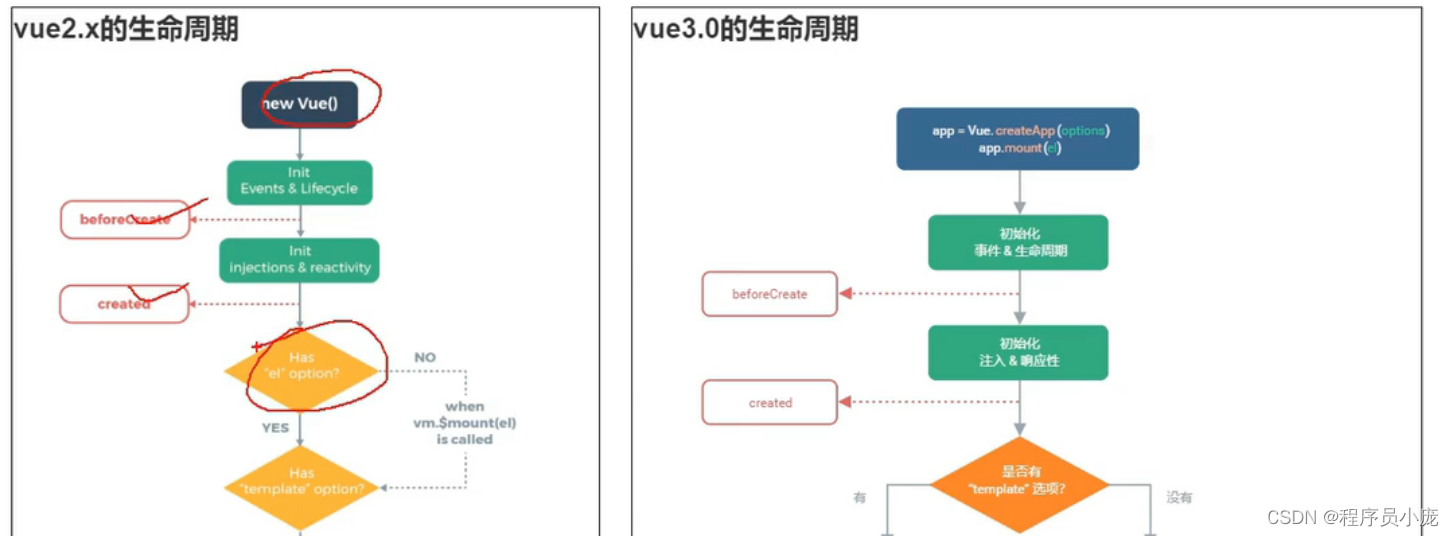

- Vue3.0中可以继续使用Vue2.x中的生命周期钩子,但有有两个被更名:
beforeDestroy改名为beforeUnmountdestroyed改名为unmounted
- Vue3.0也提供了 Composition API 形式的生命周期钩子,与Vue2.x中钩子对应关系如下:
beforeCreate===>setup()created=======>setup()beforeMount===>onBeforeMountmounted=======>onMountedbeforeUpdate===>onBeforeUpdateupdated=======>onUpdatedbeforeUnmount==>onBeforeUnmountunmounted=====>onUnmounted
注意:组合式API比配置项优先级高
如:<template> <h2>当前求和为:{{sum}}h2> <button @click="sum++">点我+1button> template> <script> import {ref,onBeforeMount,onMounted,onBeforeUpdate,onUpdated,onBeforeUnmount,onUnmounted} from 'vue' export default { name: 'Demo', setup(){ console.log('---setup---') //数据 let sum = ref(0) //通过组合式API的形式去使用生命周期钩子 onBeforeMount(()=>{ console.log('---onBeforeMount---') }) onMounted(()=>{ console.log('---onMounted---') }) onBeforeUpdate(()=>{ console.log('---onBeforeUpdate---') }) onUpdated(()=>{ console.log('---onUpdated---') }) onBeforeUnmount(()=>{ console.log('---onBeforeUnmount---') }) onUnmounted(()=>{ console.log('---onUnmounted---') }) //返回一个对象(常用) return {sum} }, //通过配置项的形式使用生命周期钩子 //#region beforeCreate() { console.log('---beforeCreate---') }, created() { console.log('---created---') }, beforeMount() { console.log('---beforeMount---') }, mounted() { console.log('---mounted---') }, beforeUpdate(){ console.log('---beforeUpdate---') }, updated() { console.log('---updated---') }, beforeUnmount() { console.log('---beforeUnmount---') }, unmounted() { console.log('---unmounted---') }, //#endregion } script>- 1
- 2
- 3
- 4
- 5
- 6
- 7
- 8
- 9
- 10
- 11
- 12
- 13
- 14
- 15
- 16
- 17
- 18
- 19
- 20
- 21
- 22
- 23
- 24
- 25
- 26
- 27
- 28
- 29
- 30
- 31
- 32
- 33
- 34
- 35
- 36
- 37
- 38
- 39
- 40
- 41
- 42
- 43
- 44
- 45
- 46
- 47
- 48
- 49
- 50
- 51
- 52
- 53
- 54
- 55
- 56
- 57
- 58
- 59
- 60
- 61
- 62
- 63
- 64
- 65
- 66
- 67
9.自定义hook函数
-
什么是hook?—— 本质是一个函数,把setup函数中使用的Composition API进行了封装。
-
类似于vue2.x中的mixin。
-
自定义hook的优势: 复用代码, 让setup中的逻辑更清楚易懂。
如:
1、创建usePoint.jsimport {reactive,onMounted,onBeforeUnmount} from 'vue' export default function (){ //实现鼠标“打点”相关的数据 let point = reactive({ x:0, y:0 }) //实现鼠标“打点”相关的方法 function savePoint(event){ point.x = event.pageX point.y = event.pageY console.log(event.pageX,event.pageY) } //实现鼠标“打点”相关的生命周期钩子 onMounted(()=>{ window.addEventListener('click',savePoint) }) onBeforeUnmount(()=>{ window.removeEventListener('click',savePoint) }) return point }- 1
- 2
- 3
- 4
- 5
- 6
- 7
- 8
- 9
- 10
- 11
- 12
- 13
- 14
- 15
- 16
- 17
- 18
- 19
- 20
- 21
- 22
- 23
- 24
- 25
- 26
- 27
2、在需要的地方引入调用即可
<template> <h2>我是Test组件</h2> <h2>当前点击时鼠标的坐标为:x:{{point.x}},y:{{point.y}}</h2> </template> <script> import usePoint from '../hooks/usePoint' export default { name:'Test', setup(){ const point = usePoint() return {point} } } </script>- 1
- 2
- 3
- 4
- 5
- 6
- 7
- 8
- 9
- 10
- 11
- 12
- 13
- 14
- 15
10.toRef
-
作用:创建一个 ref 对象,其value值指向另一个对象中的某个属性。
-
语法:
const name = toRef(person,'name') -
应用: 要将响应式对象中的某个属性单独提供给外部使用时。
-
扩展:
toRefs与toRef功能一致,但可以批量创建多个 ref 对象,语法:toRefs(person)
如:
<template> <h4>{{person}}</h4> <h2>姓名:{{name}}</h2> <h2>年龄:{{age}}</h2> <h2>薪资:{{job.j1.salary}}K</h2> <button @click="name+='~'">修改姓名</button> <button @click="age++">增长年龄</button> <button @click="job.j1.salary++">涨薪</button> </template> <script> import {ref,reactive,toRef,toRefs} from 'vue' export default { name: 'Demo', setup(){ //数据 let person = reactive({ name:'张三', age:18, job:{ j1:{ salary:20 } } }) // const name1 = person.name // console.log('%%%',name1) // const name2 = toRef(person,'name') // console.log('####',name2) const x = toRefs(person) console.log('******',x) //返回一个对象(常用) return { person, // name:toRef(person,'name'), // age:toRef(person,'age'), // salary:toRef(person.job.j1,'salary'), ...toRefs(person) } } } </script>- 1
- 2
- 3
- 4
- 5
- 6
- 7
- 8
- 9
- 10
- 11
- 12
- 13
- 14
- 15
- 16
- 17
- 18
- 19
- 20
- 21
- 22
- 23
- 24
- 25
- 26
- 27
- 28
- 29
- 30
- 31
- 32
- 33
- 34
- 35
- 36
- 37
- 38
- 39
- 40
- 41
- 42
- 43
- 44
- 45
- 46
- 47
- 48
三、其它 Composition API
1.shallowReactive 与 shallowRef
-
shallowReactive:只处理对象最外层属性的响应式(浅响应式)。
-
shallowRef:只处理基本数据类型的响应式, 不进行对象的响应式处理。
-
什么时候使用?
- 如果有一个对象数据,结构比较深, 但变化时只是外层属性变化 ===> shallowReactive。
- 如果有一个对象数据,后续功能不会修改该对象中的属性,而是生新的对象来替换 ===> shallowRef。
如:
<template> <h4>当前的x.y值是:{{x.y}}</h4> <button @click="x={y:888}">点我替换x</button> <button @click="x.y++">点我x.y++</button> <hr> <h4>{{person}}</h4> <h2>姓名:{{name}}</h2> <h2>年龄:{{age}}</h2> <h2>薪资:{{job.j1.salary}}K</h2> <button @click="name+='~'">修改姓名</button> <button @click="age++">增长年龄</button> <button @click="job.j1.salary++">涨薪</button> </template> <script> import {ref,reactive,toRef,toRefs,shallowReactive,shallowRef} from 'vue' export default { name: 'Demo', setup(){ //数据 // let person = shallowReactive({ //只考虑第一层数据的响应式 let person = reactive({ name:'张三', age:18, job:{ j1:{ salary:20 } } }) let x = shallowRef({ y:0 }) console.log('******',x) //返回一个对象(常用) return { x, person, ...toRefs(person) } } } </script>- 1
- 2
- 3
- 4
- 5
- 6
- 7
- 8
- 9
- 10
- 11
- 12
- 13
- 14
- 15
- 16
- 17
- 18
- 19
- 20
- 21
- 22
- 23
- 24
- 25
- 26
- 27
- 28
- 29
- 30
- 31
- 32
- 33
- 34
- 35
- 36
- 37
- 38
- 39
- 40
- 41
- 42
- 43
- 44
- 45
- 46
2.readonly 与 shallowReadonly
- readonly: 让一个响应式数据变为只读的(深只读)。
- shallowReadonly:让一个响应式数据变为只读的(浅只读)。
- 应用场景: 不希望数据被修改时。
如:
<template> <h4>当前求和为:{{sum}}</h4> <button @click="sum++">点我++</button> <hr> <h2>姓名:{{name}}</h2> <h2>年龄:{{age}}</h2> <h2>薪资:{{job.j1.salary}}K</h2> <button @click="name+='~'">修改姓名</button> <button @click="age++">增长年龄</button> <button @click="job.j1.salary++">涨薪</button> </template> <script> import {ref,reactive,toRefs,readonly,shallowReadonly} from 'vue' export default { name: 'Demo', setup(){ //数据 let sum = ref(0) let person = reactive({ name:'张三', age:18, job:{ j1:{ salary:20 } } }) person = readonly(person) // person = shallowReadonly(person) // sum = readonly(sum) // sum = shallowReadonly(sum) //返回一个对象(常用) return { sum, ...toRefs(person) } } } </script>- 1
- 2
- 3
- 4
- 5
- 6
- 7
- 8
- 9
- 10
- 11
- 12
- 13
- 14
- 15
- 16
- 17
- 18
- 19
- 20
- 21
- 22
- 23
- 24
- 25
- 26
- 27
- 28
- 29
- 30
- 31
- 32
- 33
- 34
- 35
- 36
- 37
- 38
- 39
- 40
- 41
- 42
3.toRaw 与 markRaw
- toRaw:
- 作用:将一个由
reactive生成的响应式对象转为普通对象。 - 使用场景:用于读取响应式对象对应的普通对象,对这个普通对象的所有操作,不会引起页面更新。
- 作用:将一个由
- markRaw:
- 作用:标记一个对象,使其永远不会再成为响应式对象。
- 应用场景:
- 有些值不应被设置为响应式的,例如复杂的第三方类库等。
- 当渲染具有不可变数据源的大列表时,跳过响应式转换可以提高性能。
<template> <h4>当前求和为:{{sum}}</h4> <button @click="sum++">点我++</button> <hr> <h2>姓名:{{name}}</h2> <h2>年龄:{{age}}</h2> <h2>薪资:{{job.j1.salary}}K</h2> <h3 v-show="person.car">座驾信息:{{person.car}}</h3> <button @click="name+='~'">修改姓名</button> <button @click="age++">增长年龄</button> <button @click="job.j1.salary++">涨薪</button> <button @click="showRawPerson">输出最原始的person</button> <button @click="addCar">给人添加一台车</button> <button @click="person.car.name+='!'">换车名</button> <button @click="changePrice">换价格</button> </template> <script> import {ref,reactive,toRefs,toRaw,markRaw} from 'vue' export default { name: 'Demo', setup(){ //数据 let sum = ref(0) let person = reactive({ name:'张三', age:18, job:{ j1:{ salary:20 } } }) function showRawPerson(){ const p = toRaw(person) p.age++ console.log(p) } function addCar(){ let car = {name:'奔驰',price:40} person.car = markRaw(car) } function changePrice(){ person.car.price++ console.log(person.car.price) } //返回一个对象(常用) return { sum, person, ...toRefs(person), showRawPerson, addCar, changePrice } } } </script>- 1
- 2
- 3
- 4
- 5
- 6
- 7
- 8
- 9
- 10
- 11
- 12
- 13
- 14
- 15
- 16
- 17
- 18
- 19
- 20
- 21
- 22
- 23
- 24
- 25
- 26
- 27
- 28
- 29
- 30
- 31
- 32
- 33
- 34
- 35
- 36
- 37
- 38
- 39
- 40
- 41
- 42
- 43
- 44
- 45
- 46
- 47
- 48
- 49
- 50
- 51
- 52
- 53
- 54
- 55
- 56
- 57
- 58
- 59
- 60
- 61
- 62
- 63
- 64
4.customRef
-
作用:创建一个自定义的 ref,并对其依赖项跟踪和更新触发进行显式控制。
-
实现防抖效果:
<template> <input type="text" v-model="keyword"> <h3>{{keyword}}h3> template> <script> import {ref,customRef} from 'vue' export default { name:'Demo', setup(){ // let keyword = ref('hello') //使用Vue准备好的内置ref //自定义一个myRef function myRef(value,delay){ let timer //通过customRef去实现自定义 return customRef((track,trigger)=>{ return{ get(){ track() //告诉Vue这个value值是需要被“追踪”的 return value }, set(newValue){ clearTimeout(timer) timer = setTimeout(()=>{ value = newValue trigger() //告诉Vue去更新界面 },delay) } } }) } let keyword = myRef('hello',500) //使用程序员自定义的ref return { keyword } } } script>- 1
- 2
- 3
- 4
- 5
- 6
- 7
- 8
- 9
- 10
- 11
- 12
- 13
- 14
- 15
- 16
- 17
- 18
- 19
- 20
- 21
- 22
- 23
- 24
- 25
- 26
- 27
- 28
- 29
- 30
- 31
- 32
- 33
- 34
- 35
- 36
- 37
- 38
5.provide 与 inject
-
作用:实现祖与后代组件间通信
-
套路:父组件有一个
provide选项来提供数据,后代组件有一个inject选项来开始使用这些数据 -
具体写法:
-
祖组件中:
setup(){ ...... let car = reactive({name:'奔驰',price:'40万'}) provide('car',car) ...... }- 1
- 2
- 3
- 4
- 5
- 6
-
后代组件中:
setup(props,context){ ...... const car = inject('car') return {car} ...... }- 1
- 2
- 3
- 4
- 5
- 6
-
如:
App.vue<template> <div class="app"> <h3>我是App组件(祖),{{name}}--{{price}}h3> <Child/> div> template> <script> import { reactive,toRefs,provide } from 'vue' import Child from './components/Child.vue' export default { name:'App', components:{Child}, setup(){ let car = reactive({name:'奔驰',price:'40W'}) provide('car',car) //给自己的后代组件传递数据 return {...toRefs(car)} } } script> <style> .app{ background-color: gray; padding: 10px; } style>- 1
- 2
- 3
- 4
- 5
- 6
- 7
- 8
- 9
- 10
- 11
- 12
- 13
- 14
- 15
- 16
- 17
- 18
- 19
- 20
- 21
- 22
- 23
- 24
- 25
- 26
- 27
Child.vue组件
<template> <div class="child"> <h3>我是Child组件(子)h3> <Son/> div> template> <script> import {inject} from 'vue' import Son from './Son.vue' export default { name:'Child', components:{Son}, /* setup(){ let x = inject('car') console.log(x,'Child-----') } */ } script> <style> .child{ background-color: skyblue; padding: 10px; } style>- 1
- 2
- 3
- 4
- 5
- 6
- 7
- 8
- 9
- 10
- 11
- 12
- 13
- 14
- 15
- 16
- 17
- 18
- 19
- 20
- 21
- 22
- 23
- 24
- 25
- 26
Son组件(孙)
<template> <div class="son"> <h3>我是Son组件(孙),{{car.name}}--{{car.price}}h3> div> template> <script> import {inject} from 'vue' export default { name:'Son', setup(){ let car = inject('car') return {car} } } script> <style> .son{ background-color: orange; padding: 10px; } style>- 1
- 2
- 3
- 4
- 5
- 6
- 7
- 8
- 9
- 10
- 11
- 12
- 13
- 14
- 15
- 16
- 17
- 18
- 19
- 20
- 21
- 22
- 23
6.响应式数据的判断
- isRef: 检查一个值是否为一个 ref 对象
- isReactive: 检查一个对象是否是由
reactive创建的响应式代理 - isReadonly: 检查一个对象是否是由
readonly创建的只读代理 - isProxy: 检查一个对象是否是由
reactive或者readonly方法创建的代理
<template> <h3>我是App组件h3> template> <script> import {ref, reactive,toRefs,readonly,isRef,isReactive,isReadonly,isProxy } from 'vue' export default { name:'App', setup(){ let car = reactive({name:'奔驰',price:'40W'}) let sum = ref(0) let car2 = readonly(car) console.log(isRef(sum)) console.log(isReactive(car)) console.log(isReadonly(car2)) console.log(isProxy(car)) console.log(isProxy(sum)) return {...toRefs(car)} } } script> <style> .app{ background-color: gray; padding: 10px; } style>- 1
- 2
- 3
- 4
- 5
- 6
- 7
- 8
- 9
- 10
- 11
- 12
- 13
- 14
- 15
- 16
- 17
- 18
- 19
- 20
- 21
- 22
- 23
- 24
- 25
- 26
- 27
- 28
- 29
- 30
- 31
四、Composition API 的优势
1.Options API 存在的问题
使用传统OptionsAPI中,新增或者修改一个需求,就需要分别在data,methods,computed里修改 。
.Composition API 的优势
我们可以更加优雅的组织我们的代码,函数。让相关功能的代码更加有序的组织在一起。(但要利用hook函数)
五、新的组件
1.Fragment
- 在Vue2中: 组件必须有一个根标签
- 在Vue3中: 组件可以没有根标签, 内部会将多个标签包含在一个Fragment虚拟元素中
- 好处: 减少标签层级, 减小内存占用
2.Teleport
-
什么是Teleport?——
Teleport是一种能够将我们的组件html结构移动到指定位置的技术。我是一个弹窗
- 1
- 2
- 3
- 4
- 5
- 6
- 7
- 8
如:
<template> <div> <button @click="isShow = true">点我弹个窗button> <teleport to="body"> <div v-if="isShow" class="mask"> <div class="dialog"> <h3>我是一个弹窗h3> <h4>一些内容h4> <h4>一些内容h4> <h4>一些内容h4> <button @click="isShow = false">关闭弹窗button> div> div> teleport> div> template> <script> import {ref} from 'vue' export default { name:'Dialog', setup(){ let isShow = ref(false) return {isShow} } } script> <style> .mask{ position: absolute; top: 0;bottom: 0;left: 0;right: 0; background-color: rgba(0, 0, 0, 0.5); } .dialog{ position: absolute; top: 50%; left: 50%; transform: translate(-50%,-50%); text-align: center; width: 300px; height: 300px; background-color: green; } style>- 1
- 2
- 3
- 4
- 5
- 6
- 7
- 8
- 9
- 10
- 11
- 12
- 13
- 14
- 15
- 16
- 17
- 18
- 19
- 20
- 21
- 22
- 23
- 24
- 25
- 26
- 27
- 28
- 29
- 30
- 31
- 32
- 33
- 34
- 35
- 36
- 37
- 38
- 39
- 40
- 41
- 42
- 43
- 44
- 45
3.Suspense
-
等待异步组件时渲染一些额外内容,让应用有更好的用户体验
-
使用步骤:
-
异步引入组件
import {defineAsyncComponent} from 'vue' const Child = defineAsyncComponent(()=>import('./components/Child.vue'))- 1
- 2
-
使用
Suspense包裹组件,并配置好default与fallback我是App组件
加载中.....
- 1
- 2
- 3
- 4
- 5
- 6
- 7
- 8
- 9
- 10
- 11
- 12
- 13
-
如:
App.vue<template> <div class="app"> <h3>我是App组件h3> <Suspense> <template v-slot:default> <Child/> template> <template v-slot:fallback> <h3>稍等,加载中...h3> template> Suspense> div> template> <script> // import Child from './components/Child'//静态引入 import {defineAsyncComponent} from 'vue' //定义一个异步组件 const Child = defineAsyncComponent(()=>import('./components/Child')) //异步引入 export default { name:'App', components:{Child}, } script> <style> .app{ background-color: gray; padding: 10px; } style>- 1
- 2
- 3
- 4
- 5
- 6
- 7
- 8
- 9
- 10
- 11
- 12
- 13
- 14
- 15
- 16
- 17
- 18
- 19
- 20
- 21
- 22
- 23
- 24
- 25
- 26
- 27
- 28
- 29
- 30
clild.vue
<template> <div class="child"> <h3>我是Child组件h3> {{sum}} div> template> <script> import {ref} from 'vue' export default { name:'Child', async setup(){ let sum = ref(0) let p = new Promise((resolve,reject)=>{ setTimeout(()=>{ resolve({sum}) },3000) }) return await p } } script> <style> .child{ background-color: skyblue; padding: 10px; } style>- 1
- 2
- 3
- 4
- 5
- 6
- 7
- 8
- 9
- 10
- 11
- 12
- 13
- 14
- 15
- 16
- 17
- 18
- 19
- 20
- 21
- 22
- 23
- 24
- 25
- 26
- 27
- 28
- 29
六、其他
1.全局API的转移
-
Vue 2.x 有许多全局 API 和配置。
-
例如:注册全局组件、注册全局指令等。
//注册全局组件 Vue.component('MyButton', { data: () => ({ count: 0 }), template: '' }) //注册全局指令 Vue.directive('focus', { inserted: el => el.focus() }- 1
- 2
- 3
- 4
- 5
- 6
- 7
- 8
- 9
- 10
- 11
- 12
-
-
Vue3.0中对这些API做出了调整:
-
将全局的API,即:
Vue.xxx调整到应用实例(app)上2.x 全局 API( Vue)3.x 实例 API ( app)Vue.config.xxxx app.config.xxxx Vue.config.productionTip 移除 Vue.component app.component Vue.directive app.directive Vue.mixin app.mixin Vue.use app.use Vue.prototype app.config.globalProperties
-
2.其他改变
-
data选项应始终被声明为一个函数。
-
过度类名的更改:
-
Vue2.x写法
.v-enter, .v-leave-to { opacity: 0; } .v-leave, .v-enter-to { opacity: 1; }- 1
- 2
- 3
- 4
- 5
- 6
- 7
- 8
-
Vue3.x写法
.v-enter-from, .v-leave-to { opacity: 0; } .v-leave-from, .v-enter-to { opacity: 1; }- 1
- 2
- 3
- 4
- 5
- 6
- 7
- 8
- 9
-
-
移除keyCode作为 v-on 的修饰符,同时也不再支持
config.keyCodes -
移除
v-on.native修饰符-
父组件中绑定事件
- 1
- 2
- 3
- 4
-
子组件中声明自定义事件
- 1
- 2
- 3
- 4
- 5
-
-
移除过滤器(filter)
过滤器虽然这看起来很方便,但它需要一个自定义语法,打破大括号内表达式是 “只是 JavaScript” 的假设,这不仅有学习成本,而且有实现成本!建议用方法调用或计算属性去替换过滤器。
-
…
第三方库
提供第三方库的网站:https://www.bootcdn.cn/
好用的第三方库:
dayjs是一个轻量的处理时间和日期的 JavaScript 库,和 Moment.js 的 API 设计保持完全一样浏览器本地存储
webStorage: SessionStorage和LocalStorage都称为webStorage
1.存储内容大小一般支持5MB左右 (不同浏览器可能还不一样)
2.浏览器端通过 Window.sessionStorage 和 Window.localStorage 属性来实现本地存储机制。
3.相关API:1. xxxxxStorage.setItem(' key", 'value'); 该方法接受一个键和值作为参数,会把键值对添加到存储中,如果键名存在,则更新其对应的值。 2. xxxxxStorage.getItem('person'); 该方法接受一个键名作为参数,返回键名对应的值。 3.xxxxxStorage.removeItem( " key"); 该方法接受一个键名作为参数,并把该键名从存储中删除。 4.xxxxxStorage.clear() 该方法会清空存储中的所有数据- 1
- 2
- 3
- 4
- 5
- 6
- 7
- 8
备注:
1.SessionStorage存储的内容会随着浏览器窗口关闭而消失
2.LocalStorage存储的内容,需要手动清除才会消失。
3.xxxxxStorage.getItem(xxx) 如果xxx对应的value获取不到,那么getltem的返回值是null。
4.JsoN.parse(nu11)的结果依然是null。 -
相关阅读:
数学建模-大模型的对比
GAN论文阅读笔记(9)—— Dual-path Image Inpainting with Auxiliary GAN Inversion
vite+vue3 + ts 项目搭建——vue-router
这几款好用的办公工具,你们还不知道吗?
MyBatis的各种查询功能
面试突击91:MD5 加密安全吗?
Ubuntu 24.04 屏蔽snap包
C++ 通过CreateProcess函数和ShellExecute函数打开另一个exe
第三章 C程序设计
GitHub 项目遭到“有毒”言论攻击,核心开源贡献者被迫出走!
- 原文地址:https://blog.csdn.net/qq_45429856/article/details/129684576
