-
深入Ansible
1.什么是ansible
ansible是新出现的自动化运维工具,基于Python开发,集合了众多运维工具(puppet、chef、func、fabric)的优点,实现了批量系统配置、批量程序部署、批量运行命令等功能。
ansible是基于 paramiko 开发的,并且基于模块化工作,本身没有批量部署的能力。真正具有批量部署的是ansible所运行的模块,ansible只是提供一种框架。ansible不需要在远程主机上安装client/agents,因为它们是基于ssh来和远程主机通讯的。ansible目前已经已经被红帽官方收购,是自动化运维工具中大家认可度最高的,并且上手容易,学习简单。是每位运维工程师必须掌握的技能之一。2.为什么使用ansible
1.ansible特性
- 模块化:调用特定的模块,完成特定的任务
- 有Paramiko,PyYAML,Jinja2(模板语言)三个关键模块
- 支持自定义模块,可以使用任何语言进行开发
- 基于Python语言实现
- 部署简单,基于python和SSH,agentless
- 安全,基于OpenSSH
- 支持playbook编排任务
- 幂等性:一个任务执行1遍和n遍效果一样,不因重复执行带来意外情况,Ansible通过任务模块的设计来实现幂等性
- 无需代理不依赖PKI(无需ssl)
- 可使用任何编程语言写模块
- YAML格式,编排任务,支持丰富的数据结构
- 较强大的多层解决方案
2.ansible架构

3.ansible工作

- CMDB:CMDB 存储和管理者企业IT架构中的各项配置信息,是构建 ITIL 项目的核心工具,运维人员可以组合 CMDB 和 Ansible,通过 CMDB 直接下发指令调用Ansible 工具集完成操作者所希望达到的目标;
- PUBLIC/PRIVATE 方式:Ansible 除了丰富的内置模块外,同时还提供丰富的 API语言接口,如PHP、Python、PERL 等多种流行语言,基于 PUBLIC/PRIVATE,Ansible 以 API 调用的方式运行;
- Ad-Hoc 命令集:Users直接通过Ad-Hoc命令集调用Ansible工具集来完成任务;
- playbook:任务剧本(任务集),编排定义ANSIBLE任务集的配置文件,由ANSIBLE顺序执行
- INVENTORY:ANSIBLE管理主机的清单,/etc/ansible/hosts
- MODULES:ansible执行命令的功能模块,多数为内置核心模块,也可定义
- PLUGIN:模块功能的补充,如连接类型插件、循环插件、变量插件、过滤插件等,不常用
- API:供第三方程序调用的应用程序编程接口
- ANSIBLE:组合以上全部功能,可以理解为是ANSIBLE命令根据,为核心执行工具


3.ansible使用
1.配置文件
# 基础配置项 [defaults] # some basic default values... inventory = /etc/ansible/hosts # 主机清单 library = /usr/share/my_modules/ # 模块库目录 module_utils = /usr/share/my_module_utils/ # 模块工具目录 remote_tmp = ~/.ansible/tmp # 远程脚本目录 local_tmp = ~/.ansible/tmp # 本地脚本目录 plugin_filters_cfg = /etc/ansible/plugin_filters.yml # 插件 forks = 5 # 并发数 poll_interval = 15 # 间隔 sudo_user = root # sudo用户 ask_sudo_pass = True # ask_pass = True transport = smart remote_port = 22 module_lang = C module_set_locale = False host_key_checking = False # 检查对应服务器的host_key,建议取消注释 log_path = /var/log/ansible.log # 日志文件,建议取消注释- 1
- 2
- 3
- 4
- 5
- 6
- 7
- 8
- 9
- 10
- 11
- 12
- 13
- 14
- 15
- 16
- 17
- 18
- 19
- 20
- 21
- 22
2.ansible系列命令
# 修改默认的编辑器为vim echo export EDITOR=vim >> /etc/profile.d/env.sh- 1
- 2
1.ansible-doc

2.ansible

-
-i PATH(—inventory=PATH):指定inventory信息,默认为/etc/ansible/hosts;
-
–private-key=PRIVATE_KEY_FILE:指定密钥文件;
-
-M DIRECTORY(—module-path=DIRECTORY) :指定模块存放路径,默认为/usr/share/ansible;
-
-l subset(—limit=SUBSET):限制运行主机;


3.ansible-galaxy

4.ansible-vault

5.ansible-console

6.ansible-pull、ansible-playbook

-
ansible-playbook [option] playbook [playbook …]
-
-i INVENTORY, --inventory=INVENTORY:指定清单文件或主机列表。 -
--list-hosts:列出运行任务的主机 -
list-tasks:列出playbook中的任务列表 -
-l SUBSET, --limit=SUBSET:进一步限制选定的主机/组。 -
-e EXTRA_VARS, --extra-vars=EXTRA_VARS:设置额外的变量,可以是键值对或 YAML/JSON 文件。 -
-t TAGS, --tags=TAGS:仅运行标记为这些值的任务。 -
--skip-tags=SKIP_TAGS:仅运行未标记为这些值的任务。 -
-C, --check:不进行任何更改,而是尝试预测可能发生的更改。 -
-D, --diff:显示可能更改的文件中的差异。 -
-v, --verbose:详细模式,可以使用多个 -v 选项以增加详细程度。
-
3.ansible命令执行过程

4.常用模块

-
command模块:
Ansible 的 command 模块用于在目标主机上执行命令。该模块接受命令名称,后跟一系列以空格分隔的参数。给定的命令将在所有选定的节点上执行。命令不会通过 shell 处理,因此像 $HOSTNAME 这样的变量和像 *、<、>、|、; 和 & 这样的操作将无法使用- 1
-
script模块:会把脚本自动发往各主机且自动赋予x权限
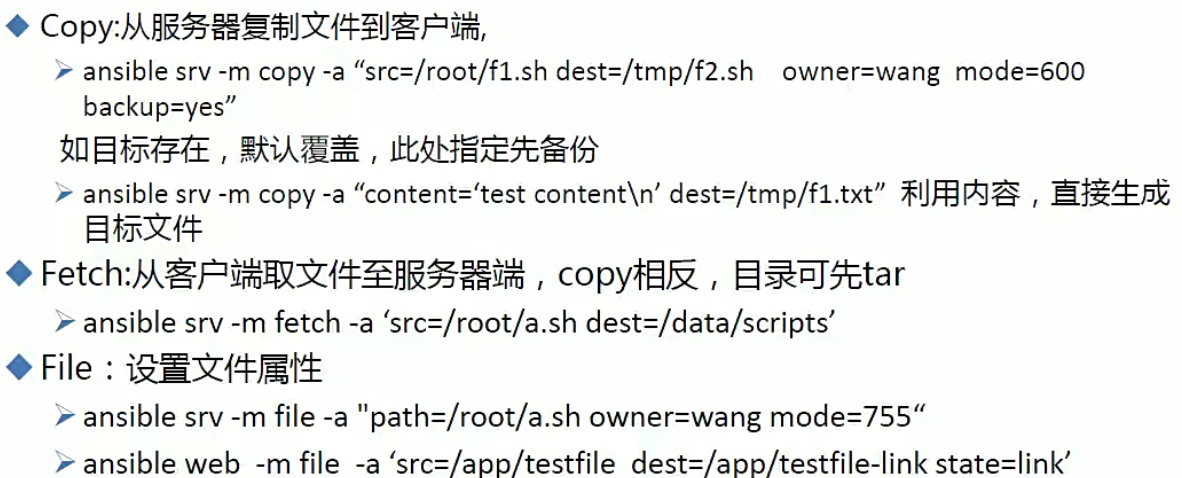
- copy模块:文件内容不一致也会进行操作
- fetch模块:自动创建目录,只能抓单个文件
if the `dest' directory is `/backup' a `src' file named `/etc/profile' on host `host.example.com', would be saved into `/backup/host.example.c om/etc/profile'. The host name is based on the inventory name.- 1
- 2
- 3
- 4
- 5
- 6

- yum:
# 如果想装多个包 name=nginx,mysql- 1
- 2

5.playbook
- playbook是由一个或多个play组成的列表
- play的主要功能在于将事先归并为一组的主机装扮成事先通过ansible中task定义好的角色。从根本上讲,所谓task无非是调用ansible的一个module。将多个play组织在一个playbook中,即可让它们连同起来按事先编排的机制同唱一台大戏
- playbook采用yaml语言编写


1.playbook组件

2.Hosts


3.task


一个name列表里面只能有不重名的模块,否则只会执行最后一个同名模块 如果在playbook中书写相对路径,则该路径是相对与playbook存在位置而言的- 1
- 2
4.handlers

--- - hosts: 192.168.19.128 remote_user: root tasks: - name: yum nginx yum: name=nginx - name: copy conf file copy: src=nginx/nginx.conf dest=/etc/nginx/ backup=yes notify: - restart service - stop seervice - name: start nginx service: name=nginx state=started handlers: - name: restart service service: name=nginx state=restarted - name: stop service service: name=nginx state=stopped- 1
- 2
- 3
- 4
- 5
- 6
- 7
- 8
- 9
- 10
- 11
- 12
- 13
- 14
- 15
- 16
- 17
- 18
- 19
5.tags
--- - hosts: 192.168.19.128 remote_user: root tasks: - name: yum nginx yum: name=nginx tags: install - name: copy conf file copy: src=nginx/nginx.conf dest=/etc/nginx/ backup=yes notify: - restart service - stop seervice - name: start nginx service: name=nginx state=started tags: startnginx handlers: - name: restart service service: name=nginx state=restarted - name: stop service service: name=nginx state=stopped # 使用tag ansible-playbook -t install,startnginx nginx.yml- 1
- 2
- 3
- 4
- 5
- 6
- 7
- 8
- 9
- 10
- 11
- 12
- 13
- 14
- 15
- 16
- 17
- 18
- 19
- 20
- 21
- 22
- 23
- 24
6.变量
- setup模块:查看本机信息,filter参数能过滤

# 变量优先级为:命令行 > playbook > 主机清单 # 可以在hosts文件中定义 [w] 192.168.19.120 port=10 node=20 [w:vars] node=178 node=20 --- - hosts: w remote_user: root vars: - pkname1: nginx - pkname2: httpd tasks: - name: install nginx yum: name={{ pkname1 }} - name: install httpd yum: name={{ pkname2 }} # vars_files: 可以使用变量文件 # - vars.yml # vars.yml - var1: httpd - var2: nginx- 1
- 2
- 3
- 4
- 5
- 6
- 7
- 8
- 9
- 10
- 11
- 12
- 13
- 14
- 15
- 16
- 17
- 18
- 19
- 20
- 21
- 22
- 23
- 24
- 25

7.模板

--- - hosts: web remote_user: root tasks: - name: install service yum: name=nginx - name: copy file template: src=nginx.conf.j2 dest=/etc/nginx/nginx.conf # nginx.conf.j2 worker_processes {{ ansible_processor_vcpus**2 }} {# example.j2 #} {% for user in users %} {% if user.authorized %} User {{ user.name }} is authorized. {% else %} User {{ user.name }} is not authorized. {% endif %} {% endfor %}- 1
- 2
- 3
- 4
- 5
- 6
- 7
- 8
- 9
- 10
- 11
- 12
- 13
- 14
- 15
- 16
- 17
- 18
- 19
8.when

9.迭代with_items
- 迭代:当有需要重复性执行的任务时,可以使用迭代机制
- 对迭代项的引用,固定变量名位"item"
- 要在task中使用with_items给定要迭代的元素列表
- 列表格式:
- 字符串
- 字典
--- - hosts: w remote_user: root tasks: - name: create file file: name={{ item }} state=touch when: item == "f2.txt" with_items: - f1.txt - f2.txt- 1
- 2
- 3
- 4
- 5
- 6
- 7
- 8
- 9
- 10
- 11

6.role


1.调用role


在这个文件能直接给role传递变量
{ role: nginx,username:nginx }
关于ansible role注意事项
- vars变量文件中只能使用字典,但是vars_files的变量文件只要带有字典就行
-
相关阅读:
Python系列-Django
WZOI-228一个数学问题
LeetCode-739-每日温度-单调栈
electron + vue3 + ts 打包后安装打开白屏解决
数据结构与算法-第六章 图的应用 拓扑排序
文件删除如何恢复?简单的方法
uvm中transaction的response和id的解读
【2】c++11新特性(稳定性和兼容性)—>超长整型 long long
gstreamer registry文件
安全信息化管理平台——数据分析与可视化
- 原文地址:https://blog.csdn.net/weixin_54279427/article/details/134503527
