-
jmeter接口自动化部署jenkins教程详解
首先,保证本地安装并部署了jenkins,jmeter,xslproc
我搭建的自动化测试框架是jmeter+jenkins+xslproc
注意:原理是,jmeter自生成的报告jtl文件,通过xslproc工具,再结合jmeter自带的模板修改,自带模板目录如下,最终将测试结果报告转化为html格式

在这我也准备了一份软件测试视频教程(含接口、自动化、性能等),需要的可以直接在下方观看,或者直接关注VX公众号:互联网杂货铺,免费领取
软件测试视频教程观看处:
京东内部员工自动化测试培训课程!盲目自学真的会毁终生,27天学完,能救一个是一个...
1.jenkins新建一个任务,选择“构建一个自由风格的软件项目”,点击OK


2.选择构建触发器,根据时间点,每天到点进行自动触发构建

3.输入构建命令

(1)D:/soft/apache-jmeter-3.2/bin/jmeter -n -t D:/soft/apache-jmeter-3.2/jmx/接口测试.jmx
这一句是通过cmd命令调用jmeter程序,执行jmeter的jmx自动化脚本;
(2)D:/soft/xsltproc/bin/xsltproc D:/soft/apache-jmeter-3.2/xsl/jmeter-results-detail-report_new.xsl %WORKSPACE%/test.jtl>%WORKSPACE%/test.html
这一句是调用xslproc程序,通过jmeter-results-detail-report_new.xsl模板,将jtl文件转换为html报告文件;
4.


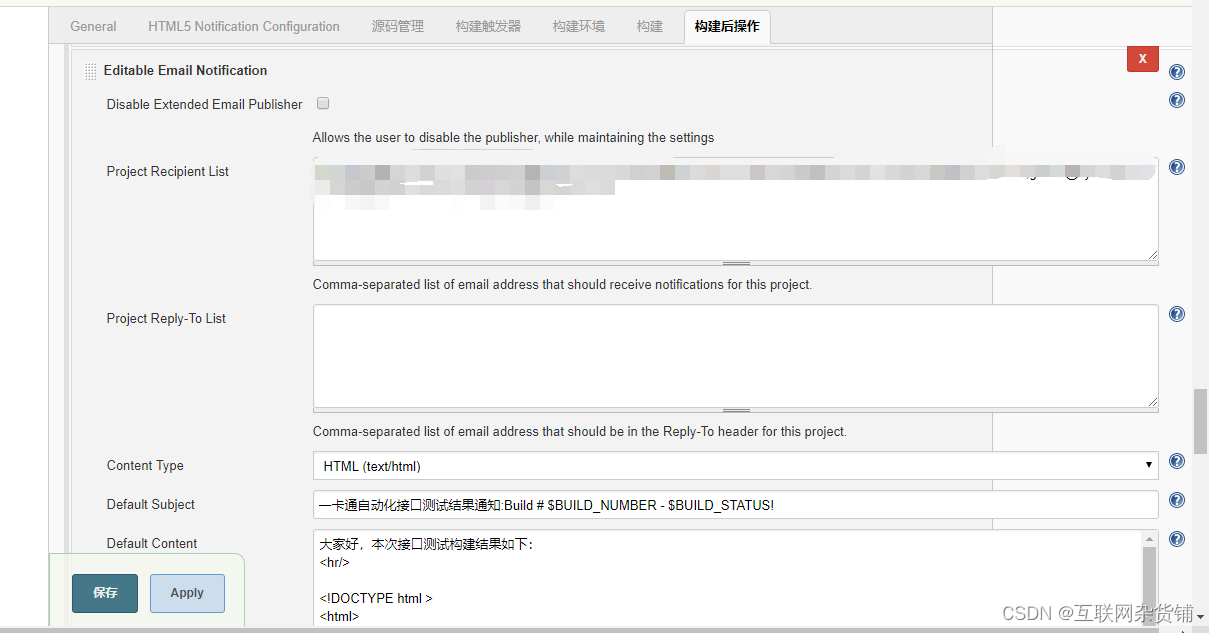

邮件的格式代码如下:
大家好,本次接口测试构建结果如下:
- <hr/>
- <!DOCTYPE html >
- <html>
- <head>
- <meta name="referrer" content="never">
- <title>${ENV, var="JOB_NAME"}-第${BUILD_NUMBER}次构建日志</title>
- </head>
- <body leftmargin="8" marginwidth="0" topmargin="8" marginheight="4" offset="0">
- <table width="95%" cellpadding="0" cellspacing="0"
- style="font-size: 11pt; font-family: Tahoma, Arial, Helvetica, sans-serif">
- <tr>
- <td>(本邮件是程序自动下发的,请勿回复!)</td>
- </tr>
- <tr>
- <td><h2>
- <font color="#0000FF">构建结果 - ${BUILD_STATUS}</font>
- </h2></td>
- </tr>
- <tr>
- <td><br />
- <b><font color="#0B610B">构建信息</font></b>
- <hr size="2" width="100%" align="center" /></td>
- </tr>
- <tr>
- <td>
- <ul>
- <li>项目名称 : ${PROJECT_NAME}</li>
- <li>构建编号 : 第${BUILD_NUMBER}次构建</li>
- <li>触发原因: ${CAUSE}</li>
- <li>构建日志: <a href="${BUILD_URL}console">${BUILD_URL}console</a></li>
- <li>构建 Url : <a href="${BUILD_URL}">${BUILD_URL}</a></li>
- <li>工作目录 : <a href="${PROJECT_URL}ws">${PROJECT_URL}ws</a></li>
- <li>项目 Url : <a href="${PROJECT_URL}">${PROJECT_URL}</a></li>
- </ul>
- </td>
- </tr>
- <tr>
- <td><b><font color="#0B610B">Changes Since Last
- Successful Build:</font></b>
- <hr size="2" width="100%" align="center" /></td>
- </tr>
- <tr>
- <td>
- <ul>
- <li>历史变更记录 : <a href="${PROJECT_URL}changes">${PROJECT_URL}changes</a></li>
- </ul> ${CHANGES_SINCE_LAST_SUCCESS,reverse=true, format="Changes for Build #%n:
%c
",showPaths=true,changesFormat="[%a]
",pathFormat=" %p"}
%m - </td>
- </tr>
- <tr>
- <td><b>Failed Test Results</b>
- <hr size="2" width="100%" align="center" /></td>
- </tr>
- <tr>
- <td><pre
- style="font-size: 11pt; font-family: Tahoma, Arial, Helvetica, sans-serif">$FAILED_TESTS</pre>
- <br /></td>
- </tr>
- </table>
- </body>
- </html>
- <b>${FILE,path="D:/jenkins/workspace/test/test.html"}</b>
以上是jenkins的所有设置
5.jenkins的版本太低的话,可能存在需要手动下载jenkins插件

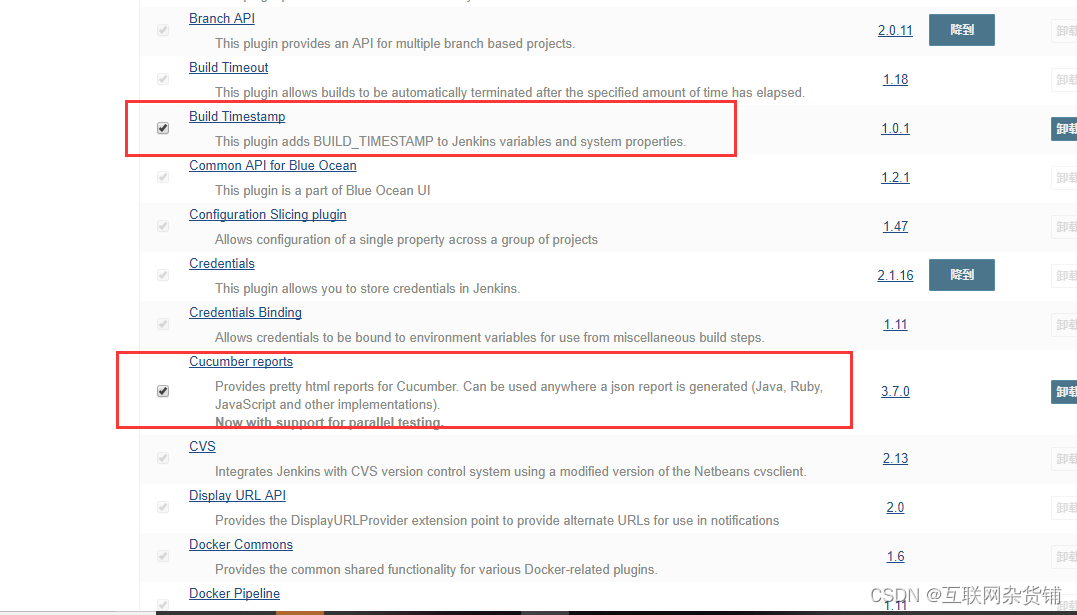
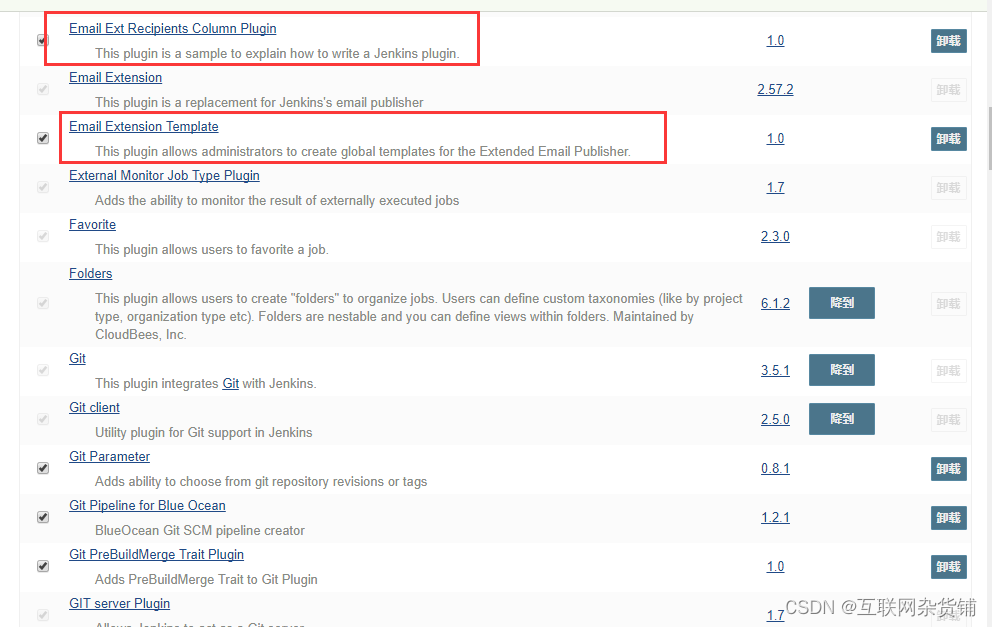

最后,附上模板代码给各位:
- <xsl:stylesheet xmlns:xsl="http://www.w3.org/1999/XSL/Transform" version="1.0">
- <!--
- Licensed to the Apache Software Foundation (ASF) under one or more
- contributor license agreements. See the NOTICE file distributed with
- this work for additional information regarding copyright ownership.
- The ASF licenses this file to You under the Apache License, Version 2.0
- (the "License"); you may not use this file except in compliance with
- the License. You may obtain a copy of the License at
- http://www.apache.org/licenses/LICENSE-2.0
- Unless required by applicable law or agreed to in writing, software
- distributed under the License is distributed on an "AS IS" BASIS,
- WITHOUT WARRANTIES OR CONDITIONS OF ANY KIND, either express or implied.
- See the License for the specific language governing permissions and
- limitations under the License.
- -->
- <!--
- Stylesheet for processing 2.1 output format test result files
- To uses this directly in a browser, add the following to the JTL file as line 2:
- <?xml-stylesheet type="text/xsl" href="../extras/jmeter-results-detail-report_21.xsl"?>
- and you can then view the JTL in a browser
- -->
- <xsl:output method="html" indent="yes" encoding="GB18030" doctype-public="-//W3C//DTD HTML 4.01 Transitional//EN" />
- <!-- Defined parameters (overrideable) <td bgcolor="#ff00ff"> -->
- <xsl:param name="showData" select="'y'"/>
- <xsl:param name="titleReport" select="'接口测试'"/>
- <xsl:template match="testResults">
- <html >
- <head>
- <title><xsl:value-of select="$titleReport" /></title>
- <style type="text/css">
- body {
- font:normal 95% verdana,arial,helvetica;
- color:#000000;
- }
- table tr td, table tr th {
- font-size: 95%;
- }
- table.details tr th{
- word-wrap:break-word;
- color: #ffffff;
- font-weight: bold;
- text-align:center;
- background:#2674a6;
- }
- table.details tr td{
- width: 400px;
- word-wrap:break-word;
- background:#eeeee0;
- }
- table{
- table-layout:fixed ;
- }
- h1 {
- margin: 0px 0px 5px; font: 165% verdana,arial,helvetica
- }
- h2 {
- margin-top: 1em; margin-bottom: 0.5em; font: bold 125% verdana,arial,helvetica
- }
- h3 {
- margin-bottom: 0.5em; font: bold 115% verdana,arial,helvetica
- }
- .Failure {
- font-weight:bold; color:red;
- }
- img
- {
- border-width: 0px;
- }
- .expand_link
- {
- position:absolute;
- right: 0px;
- width: 27px;
- top: 1px;
- height: 27px;
- }
- .page_details
- {
- display: none;
- }
- /* .page_details_expanded
- {
- display: block;
- displayhide this definition from IE5/6: table-row;
- } */
- </style>
- <script language="JavaScript"><![CDATA[
- function expand(details_id)
- {
- document.getElementById(details_id).className = "page_details_expanded";
- }
- function collapse(details_id)
- {
- document.getElementById(details_id).className = "page_details";
- }
- function change(details_id)
- {
- if(document.getElementById(details_id+"_image").src.match("expand"))
- {
- document.getElementById(details_id+"_image").src = "collapse.png";
- expand(details_id);
- }
- else
- {
- document.getElementById(details_id+"_image").src = "expand.png";
- collapse(details_id);
- }
- }
- ]]></script>
- </head>
- <body >
- <xsl:call-template name="pageHeader" />
- <xsl:call-template name="myresult" />
- <xsl:call-template name="summary" />
- <hr size="1" width="75%" align="center" />
- <xsl:call-template name="pagelist" />
- <hr size="1" width="75%" align="center" />
- <xsl:call-template name="detail" />
- </body>
- </html>
- </xsl:template>
- <xsl:template name="pageHeader">
- <h1><xsl:value-of select="$titleReport" /></h1>
- <table width="100%">
- <tr>
- <td align="left">Date report:</td>
- <td align="right">from 一卡通</td>
- </tr>
- </table>
- <hr size="1" />
- </xsl:template>
- <xsl:template name="myresult">
- <xsl:variable name="allFailCount" select="count(/testResults/*[attribute::s='false'])" />
- <xsl:if test="$allFailCount = '0'">
- <h2>测试结果:成功</h2>
- </xsl:if>
- <xsl:if test="$allFailCount > '0'">
- <h2 bgcolor="#ff00ff">测试结果:失败</h2>
- <h2 bgcolor="#ff00ff">失败个数:<xsl:value-of select="count(/testResults/*[attribute::s='false'])"/></h2>
- </xsl:if>
- </xsl:template>
- <xsl:template name="summary">
- <h2>报告概况</h2>
- <table align="center" class="details" border="0" cellpadding="5" cellspacing="2" width="95%">
- <tr valign="top">
- <th>用例总数</th>
- <th>失败数</th>
- <th>成功率</th>
- <th>平均响应时间</th>
- </tr>
- <tr valign="top">
- <xsl:variable name="allCount" select="count(/testResults/*)" />
- <xsl:variable name="allFailureCount" select="count(/testResults/*[attribute::s='false'])" />
- <xsl:variable name="allSuccessCount" select="count(/testResults/*[attribute::s='true'])" />
- <xsl:variable name="allSuccessPercent" select="$allSuccessCount div $allCount" />
- <xsl:variable name="allTotalTime" select="sum(/testResults/*/@t)" />
- <xsl:variable name="allAverageTime" select="$allTotalTime div $allCount" />
- <xsl:variable name="allMinTime">
- <xsl:call-template name="min">
- <xsl:with-param name="nodes" select="/testResults/*/@t" />
- </xsl:call-template>
- </xsl:variable>
- <xsl:variable name="allMaxTime">
- <xsl:call-template name="max">
- <xsl:with-param name="nodes" select="/testResults/*/@t" />
- </xsl:call-template>
- </xsl:variable>
- <xsl:attribute name="class">
- <xsl:choose>
- <xsl:when test="$allFailureCount > 0">Failure</xsl:when>
- </xsl:choose>
- </xsl:attribute>
- <td align="center">
- <xsl:value-of select="$allCount" />
- </td>
- <td align="center">
- <xsl:value-of select="$allFailureCount" />
- </td>
- <td align="center">
- <xsl:call-template name="display-percent">
- <xsl:with-param name="value" select="$allSuccessPercent" />
- </xsl:call-template>
- </td>
- <td align="center">
- <xsl:call-template name="display-time">
- <xsl:with-param name="value" select="$allAverageTime" />
- </xsl:call-template>
- </td>
- </tr>
- </table>
- </xsl:template>
- <xsl:template name="pagelist">
- <h2>详细情况</h2>
- <table align="center" class="details" border="0" cellpadding="5" cellspacing="2" width="95%">
- <tr valign="top">
- <th width="50%">功能模块</th>
- <th>检查次数</th>
- <th>失败数</th>
- <th>成功率</th>
- <th>平均响应时间</th>
- </tr>
- <xsl:for-each select="/testResults/*[not(@tn = preceding::*/@tn)]">
- <xsl:variable name="label" select="@tn" />
- <xsl:variable name="count" select="count(../*[@tn = current()/@tn])" />
- <xsl:variable name="failureCount" select="count(../*[@tn = current()/@tn][attribute::s='false'])" />
- <xsl:variable name="successCount" select="count(../*[@tn = current()/@tn][attribute::s='true'])" />
- <xsl:variable name="successPercent" select="$successCount div $count" />
- <xsl:variable name="totalTime" select="sum(../*[@tn = current()/@tn]/@t)" />
- <xsl:variable name="averageTime" select="$totalTime div $count" />
- <xsl:variable name="minTime">
- <xsl:call-template name="min">
- <xsl:with-param name="nodes" select="../*[@tn = current()/@tn]/@t" />
- </xsl:call-template>
- </xsl:variable>
- <xsl:variable name="maxTime">
- <xsl:call-template name="max">
- <xsl:with-param name="nodes" select="../*[@tn = current()/@tn]/@t" />
- </xsl:call-template>
- </xsl:variable>
- <tr valign="top">
- <xsl:attribute name="class">
- <xsl:choose>
- <xsl:when test="$failureCount > 0">Failure</xsl:when>
- </xsl:choose>
- </xsl:attribute>
- <td>
- <xsl:if test="$failureCount > 0">
- <a><xsl:attribute name="href">#<xsl:value-of select="$label" /></xsl:attribute>
- <xsl:value-of select="$label" />
- </a>
- </xsl:if>
- <xsl:if test="0 >= $failureCount">
- <xsl:value-of select="$label" />
- </xsl:if>
- </td>
- <td align="center">
- <xsl:value-of select="$count" />
- </td>
- <td align="center">
- <xsl:value-of select="$failureCount" />
- </td>
- <td align="center">
- <xsl:call-template name="display-percent">
- <xsl:with-param name="value" select="$successPercent" />
- </xsl:call-template>
- </td>
- <td align="center">
- <xsl:call-template name="display-time">
- <xsl:with-param name="value" select="$averageTime" />
- </xsl:call-template>
- </td>
- </tr>
- </xsl:for-each>
- </table>
- </xsl:template>
- <xsl:template name="detail">
- <xsl:variable name="allFailureCount" select="count(/testResults/*[attribute::s='false'])" />
- <xsl:if test="$allFailureCount > 0">
- <h2>Failure Detail</h2>
- <xsl:for-each select="/testResults/*[not(@lb = preceding::*/@lb)]">
- <xsl:variable name="failureCount" select="count(../*[@lb = current()/@lb][attribute::s='false'])" />
- <xsl:if test="$failureCount > 0">
- <xsl:for-each select="/testResults/*[@lb = current()/@lb][attribute::s='false']">
- <h3><xsl:value-of select="@tn" />---<xsl:value-of select="@lb" /><a><xsl:attribute name="name"><xsl:value-of select="@tn" /></xsl:attribute></a></h3>
- <table align="center" class="details" border="0" cellpadding="5" cellspacing="2" width="95%">
- <tr valign="top">
- <th>http请求</th>
- <th>失败详细信息</th>
- <xsl:if test="$showData = 'y'">
- <th>响应数据</th>
- </xsl:if>
- </tr>
- <tr>
- <td><xsl:value-of select="java.net.URL" /> </td>
- <td><xsl:value-of select="assertionResult/failureMessage" /></td>
- <xsl:if test="$showData = 'y'">
- <td><xsl:value-of select="responseData" /></td>
- </xsl:if>
- </tr>
- </table>
- </xsl:for-each>
- </xsl:if>
- </xsl:for-each>
- </xsl:if>
- </xsl:template>
- <xsl:template name="min">
- <xsl:param name="nodes" select="/.." />
- <xsl:choose>
- <xsl:when test="not($nodes)">NaN</xsl:when>
- <xsl:otherwise>
- <xsl:for-each select="$nodes">
- <xsl:sort data-type="number" />
- <xsl:if test="position() = 1">
- <xsl:value-of select="number(.)" />
- </xsl:if>
- </xsl:for-each>
- </xsl:otherwise>
- </xsl:choose>
- </xsl:template>
- <xsl:template name="max">
- <xsl:param name="nodes" select="/.." />
- <xsl:choose>
- <xsl:when test="not($nodes)">NaN</xsl:when>
- <xsl:otherwise>
- <xsl:for-each select="$nodes">
- <xsl:sort data-type="number" order="descending" />
- <xsl:if test="position() = 1">
- <xsl:value-of select="number(.)" />
- </xsl:if>
- </xsl:for-each>
- </xsl:otherwise>
- </xsl:choose>
- </xsl:template>
- <xsl:template name="display-percent">
- <xsl:param name="value" />
- <xsl:value-of select="format-number($value,'0.00%')" />
- </xsl:template>
- <xsl:template name="display-time">
- <xsl:param name="value" />
- <xsl:value-of select="format-number($value,'0 ms')" />
- </xsl:template>
- </xsl:stylesheet>
模板的截图如下:


写在最后
PS:这套软件测试的自学教程合集,对于在测试行业发展的小伙伴们来说应该会很有帮助。全套内容已经打包到网盘,内容总量接近500个G。如需要软件测试学习资料,关注公众号(互联网杂货铺),后台回复1,整理不易,给个关注点个赞吧,谢谢各位大佬!

这些资料,对于做【软件测试】的朋友来说应该是最全面最完整的备战仓库,这个仓库也陪伴我走过了最艰难的路程,希望也能帮助到你!凡事要趁早,特别是技术行业,一定要提升技术功底。
-
相关阅读:
深入了解网络流量清洗--使用免费的雷池社区版进行防护
能自动更新的万能周报模板,有手就会用!
蓝桥杯DP算法——背包问题(C++)
思腾云计算
C++中STL库
小红书KOC获得“官方认可”丨价值评估模型
图解LeetCode——1302. 层数最深叶子节点的和(难度:中等)
【算法与数据结构】106、LeetCode从中序与后序遍历序列构造二叉树
arduino 复习题
为什么在桌面右键word、excel和ppt会出现“在笔记本中编辑”的字样?
- 原文地址:https://blog.csdn.net/HUA6911/article/details/134532281
