-
轻量封装WebGPU渲染系统示例<36>- 广告板(Billboard)(WGSL源码)
原理不再赘述,请见wgsl shader实现。
当前示例源码github地址:
https://github.com/vilyLei/voxwebgpu/blob/feature/rendering/src/voxgpu/sample/BillboardEntityTest.ts
当前示例运行效果:
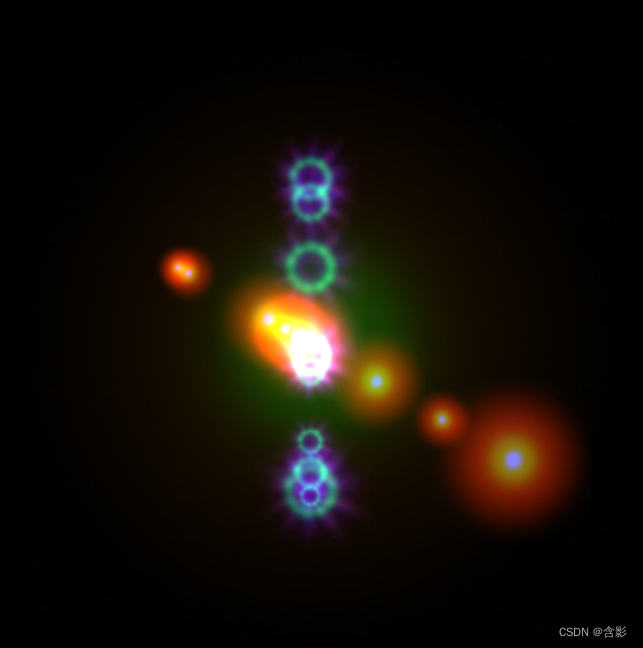

WGSL顶点shader:
- @group(0) @binding(0) var
objMat : mat4x4<f32>; - @group(0) @binding(1) var
viewMat : mat4x4<f32>; - @group(0) @binding(2) var
projMat : mat4x4<f32>; - @group(0) @binding(3) var
billParam: vec4<f32>; - struct VertexOutput {
- @builtin(position) Position : vec4<f32>,
- @location(0) uv : vec2<f32>
- }
- @vertex
- fn main(
- @location(0) position : vec3<f32>,
- @location(1) uv : vec2<f32>
- ) -> VertexOutput {
- let cosv = cos(billParam.z);
- let sinv = sin(billParam.z);
- let vtx = position.xy * billParam.xy;
- let vtx_pos = vec2<f32>(vtx.x * cosv - vtx.y * sinv, vtx.x * sinv + vtx.y * cosv);
- var viewV = viewMat * objMat * vec4f(0.0,0.0,0.0,1.0);
- viewV = vec4<f32>(viewV.xy + vtx_pos.xy, viewV.zw);
- var projV = projMat * viewV;
- projV.z = ((projV.z / projV.w) + billParam.w) * projV.w;
- var output : VertexOutput;
- output.Position = projV;
- output.uv = uv;
- return output;
- }
WGSL片段shader:
- @group(0) @binding(4) var
color: vec4f; - @group(0) @binding(5) var
uvScale: vec4f; - @group(0) @binding(6) var billSampler: sampler;
- @group(0) @binding(7) var billTexture: texture_2d<f32>;
- @fragment
- fn main(
- @location(0) uv: vec2f
- ) -> @location(0) vec4f {
- var c4 = textureSample(billTexture, billSampler, uv * uvScale.xy + uvScale.zw) * color;
- return c4;
- }
此示例基于此渲染系统实现,当前示例TypeScript源码如下:
- export class BillboardEntityTest {
- private mRscene = new RendererScene();
- initialize(): void {
- this.mRscene.initialize();
- this.initScene();
- this.initEvent();
- }
- private initScene(): void {
- this.initEntities();
- }
- private initEntities(): void {
- let rc = this.mRscene;
- let diffuseTex0 = { diffuse: { url: "static/assets/flare_core_02.jpg" } };
- let entity = new FixScreenPlaneEntity({ extent: [-0.8, -0.8, 1.6, 1.6], textures: [diffuseTex0] });
- entity.color = [0.1, 0.3, 0.5];
- rc.addEntity(entity);
- rc.addEntity(new AxisEntity());
- for (let i = 0; i < 10; ++i) {
- let billboard = new BillboardEntity({ textures: [diffuseTex0] });
- billboard.color = [0.5, 0.5, 2];
- billboard.scale = Math.random() * 2 + 1;
- billboard.transform.setPosition([Math.random() * 1000 - 500, 0, 0]);
- rc.addEntity(billboard);
- let diffuseTex1 = { diffuse: { url: "static/assets/testEFT4_01.jpg", flipY: true } };
- billboard = new BillboardEntity({ textures: [diffuseTex1] });
- billboard.color = [1.8, 1.5, 0.5];
- // billboard.color = [0.8, 0.5, 0.5];
- billboard.scale = Math.random() * 2 + 1;
- billboard.uvScale = [0.5, 0.5];
- billboard.uvOffset = [1, 1];
- // billboard.uvOffset = [0.5, 1];
- billboard.transform.setPosition([0, Math.random() * 1000 - 500, 0]);
- rc.addEntity(billboard);
- }
- }
- private initEvent(): void {
- const rc = this.mRscene;
- rc.addEventListener(MouseEvent.MOUSE_DOWN, this.mouseDown);
- new MouseInteraction().initialize(rc, 0, false).setAutoRunning(true);
- }
- private mouseDown = (evt: MouseEvent): void => {};
- run(): void {
- this.mRscene.run();
- }
- }
-
相关阅读:
BFS专题6 字符迷宫
2020最新Java面试题
微信小程序开发校园第二课堂+后台管理系统|前后分离VUE.js在线学习网
【前端面试】(四)JavaScript var let const的区别
python+nodejs+php+springboot+vue 学生选课程作业提交教学辅助管理系统
良品铺子:已成“良品”,但能成“优品”吗?
results=DBHelper.exeUpdate(conn,cur,exesql)是什么意思
AI-数学-高中-40法向量求法
Lvs +keepalivede : 高可用集群
网络爬虫——urllib(1)
- 原文地址:https://blog.csdn.net/vily_lei/article/details/134529358
